|
|
|
|
|
|
| |
| |
|
|
|
|
| |
| |
|
|
OK. I should know this, but somehow I am baffled now.

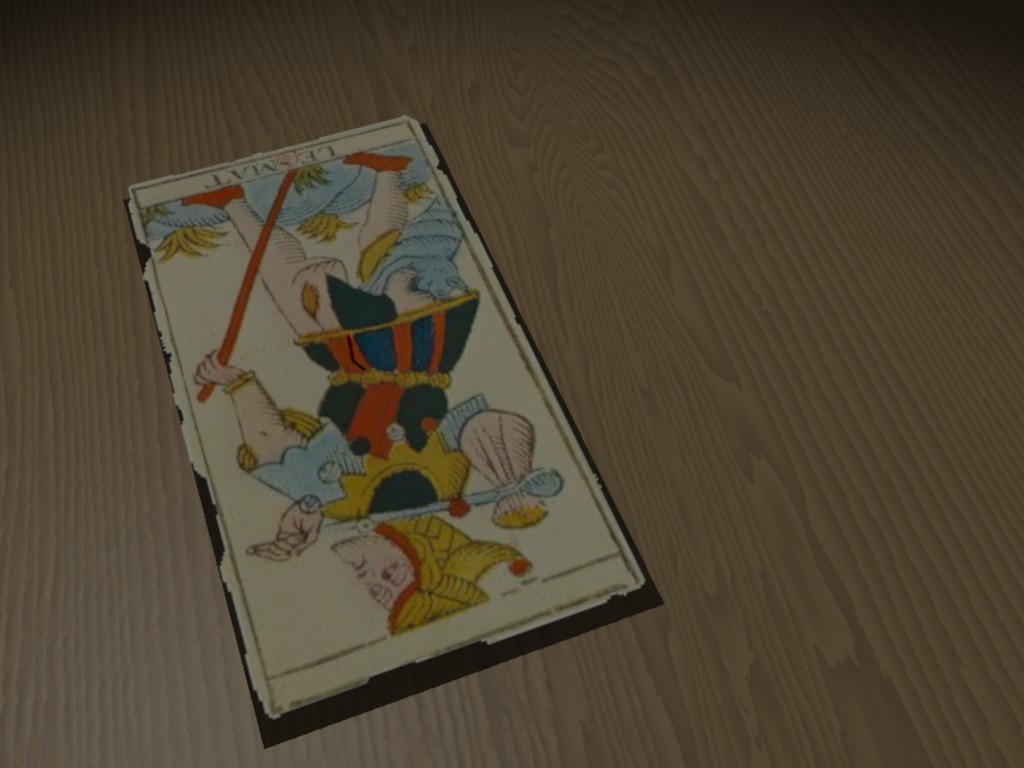
- png image_map (on a mesh2)
- uv_mapped
- with alpha channel (for serrated borders)
- floating above a table
---> casts *straight* shadows!

Rendered in 3.7 beta 34.

I forget something, but what?

Thanks for your help!!!


--
All the best,

Thomas
Post a reply to this message
Attachments:
Download 'TT.jpg' (95 KB)
Preview of image 'TT.jpg'
|
|
| |
| |
|
|
|
|
| |
| |
|
|
Thomas de Groot wrote:
> OK. I should know this, but somehow I am baffled now.
>
> - png image_map (on a mesh2)
> - uv_mapped
> - with alpha channel (for serrated borders)
> - floating above a table
> ---> casts *straight* shadows!
>
> Rendered in 3.7 beta 34.
>
> I forget something, but what?
>
> Thanks for your help!!!
>
>
>

How appropriate “The Fool reversed” LOL

If no one answers before tonight I’ll have a go.


--

Best Regards,
	Stephen
Post a reply to this message
|
|
| |
| |
|
|
|
|
| |
| |
|
|
Thomas de Groot schrieb:

> Rendered in 3.7 beta 34.
>
> I forget something, but what?

A bug I'd say.
Post a reply to this message
|
|
| |
| |
|
|
|
|
| |
| |
|
|
clipka schrieb:
> Thomas de Groot schrieb:
>
>> Rendered in 3.7 beta 34.
>>
>> I forget something, but what?
>
> A bug I'd say.

(That is, yes, I can confirm this behavior, and no, it's not how it
should work...)
Post a reply to this message
|
|
| |
| |
|
|
|
|
| |
| |
|
|
clipka schrieb:
> clipka schrieb:
>> Thomas de Groot schrieb:
>>
>>> Rendered in 3.7 beta 34.
>>>
>>> I forget something, but what?
>>
>> A bug I'd say.
>
> (That is, yes, I can confirm this behavior, and no, it's not how it
> should work...)

... and no, much to my surprise POV-Ray 3.6.2 ain't doin' it right either.

How come it has taken so long for this one to surface? You'd think it
was some trivial everyday case. And how the **** come I've done renders
with ample such partially-transparent objects casting /proper/ shadows?
Post a reply to this message
|
|
| |
| |
|
|
|
|
| |
| |
|
|
El 11/11/09 18:53, clipka escribió:
> clipka schrieb:
>
> ... and no, much to my surprise POV-Ray 3.6.2 ain't doin' it right
> either.
>
> How come it has taken so long for this one to surface? You'd think it was
> some trivial everyday case. And how the **** come I've done renders with
> ample such partially-transparent objects casting /proper/ shadows?


   I don't know... but this happened sometimes to me with certain PNG files,
and not with others. For example, all the trasnparent PNG files I export
from Chief Architect seem to behave this way, but the ones from TORCS I used
on my last post here and other scenes, work perfectly... except if I use
filtering media or fog, of course.

--
Jaime Vives Piqueres

http://www.ignorancia.org
Post a reply to this message
|
|
| |
| |
|
|
|
|
| |
| |
|
|
Jaime Vives Piqueres schrieb:
> El 11/11/09 18:53, clipka escribió:
>> clipka schrieb:
>>
>> ... and no, much to my surprise POV-Ray 3.6.2 ain't doin' it right
>> either.
>>
>> How come it has taken so long for this one to surface? You'd think it was
>> some trivial everyday case. And how the **** come I've done renders with
>> ample such partially-transparent objects casting /proper/ shadows?
>
>
>   I don't know... but this happened sometimes to me with certain PNG files,
> and not with others. For example, all the trasnparent PNG files I export
> from Chief Architect seem to behave this way, but the ones from TORCS I
> used
> on my last post here and other scenes, work perfectly... except if I use
> filtering media or fog, of course.


I guess I got it.

The following construct works properly:

     texture { uv_mapping pigment { image_map { ... } }

This one doesn't:

     texture { pigment { uv_mapping image_map { ... } }

Note the placement of the uv_mapping statement.

I'll file an error report if nobody has done yet.
Post a reply to this message
|
|
| |
| |
|
|
|
|
| |
| |
|
|
Stephen wrote:

>>
>
> How appropriate “The Fool reversed” LOL
>
> If no one answers before tonight I’ll have a go.
>

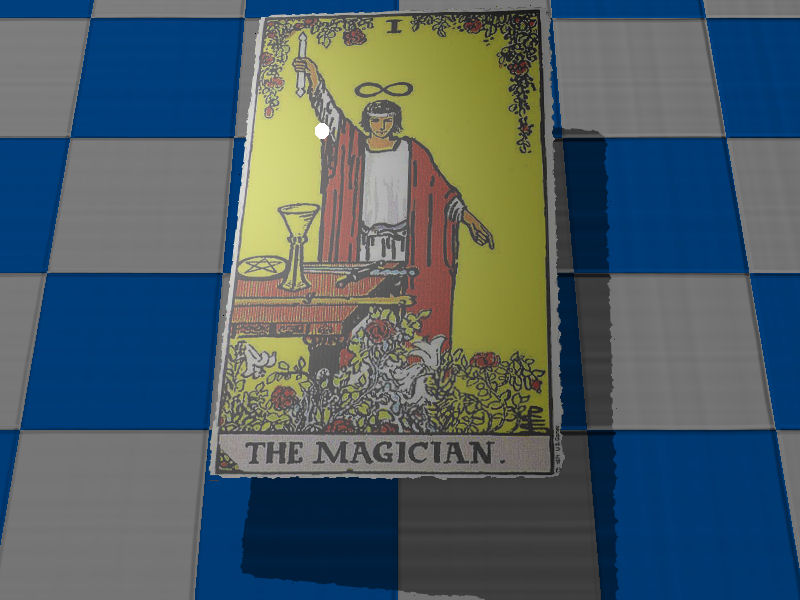
Since it is a bug why not use a transparency map in the meantime?

--

Best Regards,
	Stephen
Post a reply to this message
Attachments:
Download 'card01.jpg' (76 KB)
Preview of image 'card01.jpg'
|
|
| |
| |
|
|
|
|
| |
| |
|
|
El 11/11/09 19:40, clipka escribió:
> I guess I got it.
>
> The following construct works properly:
>
> texture { uv_mapping pigment { image_map { ... } }
>
> This one doesn't:
>
> texture { pigment { uv_mapping image_map { ... } }
>
> Note the placement of the uv_mapping statement.
>
> I'll file an error report if nobody has done yet.

   Didn't test it, but looking at my own scenes now, I can confirm this
finding: the ones I exported from Chief Architect where exported with
Poseray, which puts the uv_mapping inside the pigment, indeed... you're
fast, man!


--
Jaime Vives Piqueres

http://www.ignorancia.org
Post a reply to this message
|
|
| |
| |
|
|
|
|
| |
| |
|
|
Jaime Vives Piqueres schrieb:

>   Didn't test it, but looking at my own scenes now, I can confirm this
> finding: the ones I exported from Chief Architect where exported with
> Poseray, which puts the uv_mapping inside the pigment, indeed... you're
> fast, man!

Yeah, I guess I am - as a matter of fact, I even finished a fix some
minutes ago, ready to be submitted to the codebase.

Wasn't such a big deal actually. Throwing out the dozen lines of code
that handled the case that's working already, in favor of five lines of
code someplace else to handle both cases in one go did the job.
Post a reply to this message
|
|
| |
| |
|
|
|
|
| |
| |
|
|
clipka escreveu:
> Jaime Vives Piqueres schrieb:
>> El 11/11/09 18:53, clipka escribió:
>>> clipka schrieb:
>>>
>>> ... and no, much to my surprise POV-Ray 3.6.2 ain't doin' it right
>>> either.
>>>
>>> How come it has taken so long for this one to surface? You'd think it
>>> was
>>> some trivial everyday case. And how the **** come I've done renders with
>>> ample such partially-transparent objects casting /proper/ shadows?
>>
>>
>>   I don't know... but this happened sometimes to me with certain PNG
>> files,
>> and not with others. For example, all the trasnparent PNG files I export
>> from Chief Architect seem to behave this way, but the ones from TORCS
>> I used
>> on my last post here and other scenes, work perfectly... except if I use
>> filtering media or fog, of course.
>
>
> I guess I got it.
>
> The following construct works properly:
>
>     texture { uv_mapping pigment { image_map { ... } }
>
> This one doesn't:
>
>     texture { pigment { uv_mapping image_map { ... } }
>
> Note the placement of the uv_mapping statement.

That's not a bug, that's a feature! ;)

yes, I've met it before and yes, I thought it was a feature... :P

--
a game sig: http://tinyurl.com/d3rxz9
Post a reply to this message
|
|
| |
| |
|
|
|
|
| |
| |
|
|
nemesis schrieb:

> That's not a bug, that's a feature! ;)
>
> yes, I've met it before and yes, I thought it was a feature... :P

Not bloody likely.
Post a reply to this message
|
|
| |
| |
|
|
|
|
| |
| |
|
|
"Jaime Vives Piqueres" <jai### [at] ignorancia org> schreef in bericht
news:4afb0def@news.povray.org...
> Didn't test it, but looking at my own scenes now, I can confirm this
> finding: the ones I exported from Chief Architect where exported with
> Poseray, which puts the uv_mapping inside the pigment, indeed... you're
> fast, man!
>
Note that the latest version of Poseray puts the uv-mapping code *wrongly*.
Older versions did put it in the *right* place. I guess that is why I had
not noticed this really before.
Thomas org> schreef in bericht
news:4afb0def@news.povray.org...
> Didn't test it, but looking at my own scenes now, I can confirm this
> finding: the ones I exported from Chief Architect where exported with
> Poseray, which puts the uv_mapping inside the pigment, indeed... you're
> fast, man!
>
Note that the latest version of Poseray puts the uv-mapping code *wrongly*.
Older versions did put it in the *right* place. I guess that is why I had
not noticed this really before.
Thomas
Post a reply to this message
|
|
| |
| |
|
|
|
|
| |
| |
|
|
"clipka" <ano### [at] anonymousorg> schreef in bericht
news:4afb0536$1@news.povray.org...
> I guess I got it.
>
> The following construct works properly:
>
>     texture { uv_mapping pigment { image_map { ... } }
>
> This one doesn't:
>
>     texture { pigment { uv_mapping image_map { ... } }
>
> Note the placement of the uv_mapping statement.
>
> I'll file an error report if nobody has done yet.

Yes, this works correctly, Christoph. Thanks!

I shall post a also a comment in povray.tools.poser for the difference in
Poseray.

Thomas
Post a reply to this message
|
|
| |
| |
|
|
|
|
| |
| |
|
|
"Stephen" <mca### [at] aolDOTcom> schreef in bericht
news:4afb0b35@news.povray.org...
> Stephen wrote:
>
>>>
>>
>> How appropriate “The Fool reversed” LOL

LOL indeed!!

>>
>> If no one answers before tonight I’ll have a go.
>>
>
> Since it is a bug why not use a transparency map in the meantime?
>

It was because I did not use a transparency map that I discovered the
problem, but also that Poseray had changed the place of the uv_mapping code
in the latest version which led ultimately to the discovery.

Thomas
Post a reply to this message
|
|
| |
| |
|
|
|
|
| |
| |
|
|
Thomas de Groot wrote:
> "Stephen" <mca### [at] aolDOTcom> schreef in bericht
> news:4afb0b35@news.povray.org...
>> Stephen wrote:
>>
>>> How appropriate “The Fool reversed” LOL
>
> LOL indeed!!
>
>>> If no one answers before tonight I’ll have a go.
>>>
>> Since it is a bug why not use a transparency map in the meantime?
>>
>
> It was because I did not use a transparency map that I discovered the
> problem, but also that Poseray had changed the place of the uv_mapping code
> in the latest version which led ultimately to the discovery.
>

Well it gave me something to do last night :)

--

Best Regards,
	Stephen
Post a reply to this message
|
|
| |
| |
|
|
|
|
| |
| |
|
|
"Stephen" <mca### [at] aolDOTcom> schreef in bericht
news:4afc000d$1@news.povray.org...
>
> Well it gave me something to do last night :)

Excellent! As they say here "Ledigheid is des duivels oorkussen" which my
dictionary translates as "Idleness is the parent of vice" or "The devil
always finds work for idle hands", but somehow I prefer the literal
translation "idleness is the devil's pillow". :-)

Thomas
Post a reply to this message
|
|
| |
| |
|
|
|
|
| |
| |
|
|
Thomas de Groot wrote:
> Note that the latest version of Poseray puts the uv-mapping code *wrongly*.
> Older versions did put it in the *right* place. I guess that is why I had
> not noticed this really before.

Hijacking thread somewhat, and not sure if it's the latest version of
Poseray or not, but it exports Poser objects incorrectly (it might be a
setting I have ticked) and requires editing of the .inc file to
work...namely:

section
//This encapsulates the material into the mesh so that Moray can use the
original materials
#declare Victoria_4_hip_hip_2_hip__2_SkinHip_=...
(and so forth)

followed by:
//Model assembly from the meshes
#declare Victoria_4_hip_=
union {
object{Victoria_4_hip_hip_2_hip__2_SkinHip_uv_mapping}
object{Victoria_4_hip_rThigh_2_rThigh__2_SkinHip_uv_mapping}
object{Victoria_4_hip_rThigh_2_rThigh__3_SkinLeg_uv_mapping}
object{Victoria_4_hip_lThigh_2_lThigh__2_SkinHip_uv_mapping}
object{Victoria_4_hip_lThigh_2_lThigh__3_SkinLeg_uv_mapping}
split_union off
}

the problem is the fact that it does not declare any objects that end
with "_uv_mapping", making POV stall.  you have to manually remove the
"_uv_mapping" from each item in this part.  it doesn't take very long,
but it is a nuisance that shouldn't be necessary.

--
Tim Cook
http://empyrean.freesitespace.net
Post a reply to this message
|
|
| |
| |
|
|
|
|
| |
| |
|
|
Thomas de Groot wrote:
> "Stephen" <mca### [at] aolDOTcom> schreef in bericht
> news:4afc000d$1@news.povray.org...
>> Well it gave me something to do last night :)
>
> Excellent! As they say here "Ledigheid is des duivels oorkussen" which my
> dictionary translates as "Idleness is the parent of vice" or "The devil
> always finds work for idle hands", but somehow I prefer the literal
> translation "idleness is the devil's pillow". :-)
>
Great! I must learn how to pronounce that for when our Dutch colleagues
complain that I am working them too hard, :)

--

Best Regards,
	Stephen
Post a reply to this message
|
|
| |
| |
|
|
|
|
| |
| |
|
|
Tim Cook wrote:

>
> Hijacking thread somewhat, and not sure if it's the latest version of

[snip]

>  it doesn't take very long,
> but it is a nuisance that shouldn't be necessary.
>
> --
> Tim Cook
> http://empyrean.freesitespace.net

Not being funny Tim but FlyerX is good at responding to emails and this
is getting quite a long thread. He might miss what you wrote. Or you
could start a new thread.


--

Best Regards,
	Stephen
Post a reply to this message
|
|
| |
| |
|
|
|
|
| |
| |
|
|
"Tim Cook" <z99### [at] gmailcom> schreef in bericht
news:4afc0f9c$1@news.povray.org...
> Hijacking thread somewhat, and not sure if it's the latest version of
> Poseray or not, but it exports Poser objects incorrectly (it might be a
> setting I have ticked) and requires editing of the .inc file to
> work...namely:
>
> section
> //This encapsulates the material into the mesh so that Moray can use the
> original materials
> #declare Victoria_4_hip_hip_2_hip__2_SkinHip_=...
> (and so forth)
>
> followed by:
> //Model assembly from the meshes
> #declare Victoria_4_hip_=
> union {
> object{Victoria_4_hip_hip_2_hip__2_SkinHip_uv_mapping}
> object{Victoria_4_hip_rThigh_2_rThigh__2_SkinHip_uv_mapping}
> object{Victoria_4_hip_rThigh_2_rThigh__3_SkinLeg_uv_mapping}
> object{Victoria_4_hip_lThigh_2_lThigh__2_SkinHip_uv_mapping}
> object{Victoria_4_hip_lThigh_2_lThigh__3_SkinLeg_uv_mapping}
> split_union off
> }
>
> the problem is the fact that it does not declare any objects that end with
> "_uv_mapping", making POV stall.  you have to manually remove the
> "_uv_mapping" from each item in this part.  it doesn't take very long, but
> it is a nuisance that shouldn't be necessary.
>

This is indeed to go to the povray.tools.poser newsgroup.

What version of Poseray are you using? I do not get this output with pure
Poser figures, but Victoria is Daz|Studio, so maybe Poseray incorrectly
writes from there?

Thomas
Post a reply to this message
|
|
| |
| |
|
|
|
|
| |