|
|
|
|
|
|
| |
| |
|
|
|
|
| |
| |
|
|
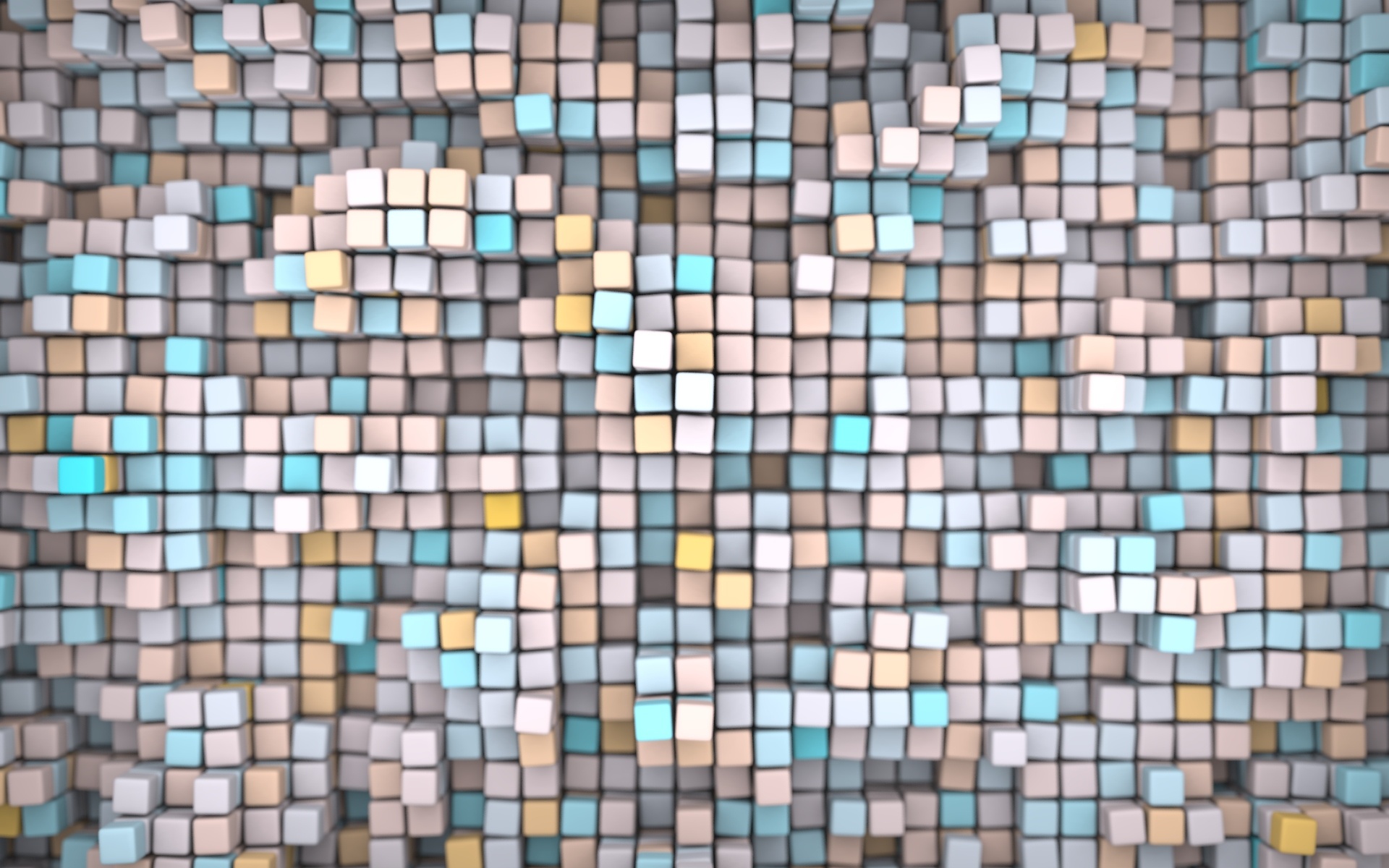
I have been using this snow leopard wallpaper image
http://uneasysilence.com/media/2009/07/Rocks.jpg on my desktop at work (on a
vista machine) for a few days, and it struck me that something about the
image makes it look really 3D, as if it's really some pebbles sat just
behind the glass of my monitor.

Anyway I wanted to devise a way of getting this effect in povray, so I did
the obvious things: objects arranged close to the plane of the image, lots
of focal blur, soft radiosity-lighting. But then I came up with an unusual
idea:

I've illuminated the scene using a rectangle placed at the "position" of the
screen. i.e. I've placed the camera where my eyes are in my usual seating
position, and created a glowing (invisible) rectangle exactly covering the
area where my monitor would be, with the objects just behind that. This
glowing rectangle is meant to simulate lighting coming in from the office,
as if the monitor is a window into another world. I could perhaps get a
better effect with a gradient or even an HDR photo of myself from the
monitor's point of view! But the simple light box has achieved a nice
result.

So basically, aside from the blur, this image is what you'd see if these
objects existed just behind the glass of your monitor, and were illuminated
by light coming through your screen! The blur helps the illusion of depth,
possibly just because it's a good depth cue, or maybe it's harder for your
stereoscopic vision to judge the depth of a blurry shape, or something...
not sure.

Anyway, I like the result and it seems to make quite nice wallpaper (though
TBH I still prefer the pebbles photo).

The image took almost exactly 24 hours to render, thanks to the rather high
quality radiosity & blur!

--
Tek
http://evilsuperbrain.com
Post a reply to this message
Attachments:
Download 'walldepth.jpg' (491 KB)
Preview of image 'walldepth.jpg'
|
|
| |
| |
|
|
|
|
| |
| |
|
|
I think it may be a bit too much blur. A subtle amount of blur would be
better if it were real, because your eyes don't have that much trouble
focusing on something only arms-length away.

--
   Darren New, San Diego CA, USA (PST)
   I ordered stamps from Zazzle that read "Place Stamp Here".
Post a reply to this message
|
|
| |
| |
|
|
|
|
| |
| |
|
|
On Thu, 24 Sep 2009 19:38:37 +0100, "Tek" <tek### [at] evilsuperbrain com> wrote:
>The image took almost exactly 24 hours to render, thanks to the rather high
>quality radiosity & blur!
That is nice
--
Regards
Stephen com> wrote:
>The image took almost exactly 24 hours to render, thanks to the rather high
>quality radiosity & blur!
That is nice
--
Regards
Stephen
Post a reply to this message
|
|
| |
| |
|
|
|
|
| |
| |
|
|
"Darren New" <dne### [at] sanrrcom> wrote in message
news:4abbcdce$1@news.povray.org...
>I think it may be a bit too much blur. A subtle amount of blur would be
>better if it were real, because your eyes don't have that much trouble
>focusing on something only arms-length away.

I'm just basing it on that photo of the pebbles, it's a very unnatural
amount of blur but something about that photo gave a really good sense of
depth for me personally, so I figure it was worth using a similar amount of
blur.

--
Tek
http://evilsuperbrain.com
Post a reply to this message
|
|
| |
| |
|
|
|
|
| |
| |
|
|
Tek wrote:
> I'm just basing it on that photo of the pebbles,

I thought the pebbles have less blur.

But now that I look at it, if you actually open a couple of windows on the
screen with some gaps in between, it looks like you're focusing on the
windows, leaving most of the blocks naturally blurry, giving a sense of
depth there.

I see what you did there.

--
   Darren New, San Diego CA, USA (PST)
   I ordered stamps from Zazzle that read "Place Stamp Here".
Post a reply to this message
|
|
| |
| |
|
|
|
|
| |
| |
|
|
I actually find it a little disorienting when only a small section of the
image is visible, I'd swear I can see through my monitor! :)

--
Tek
http://evilsuperbrain.com

"Darren New" <dne### [at] sanrrcom> wrote in message
news:4abbda06$1@news.povray.org...
> Tek wrote:
>> I'm just basing it on that photo of the pebbles,
>
> I thought the pebbles have less blur.
>
> But now that I look at it, if you actually open a couple of windows on the
> screen with some gaps in between, it looks like you're focusing on the
> windows, leaving most of the blocks naturally blurry, giving a sense of
> depth there.
>
> I see what you did there.
>
> --
>   Darren New, San Diego CA, USA (PST)
>   I ordered stamps from Zazzle that read "Place Stamp Here".
Post a reply to this message
|
|
| |
| |
|
|
|
|
| |
| |
|
|
"Tek" <tek### [at] evilsuperbraincom> wrote:
> So basically, aside from the blur, this image is what you'd see if these
> objects existed just behind the glass of your monitor, and were illuminated
> by light coming through your screen! The blur helps the illusion of depth,
> possibly just because it's a good depth cue, or maybe it's harder for your
> stereoscopic vision to judge the depth of a blurry shape, or something...
> not sure.

To me it does not appear to be existing behind the surface of my monitor. For
your image to appear as such, the margin of the image would have to be
partially shaded, as if the case of the monitor itself were casting a shadow
onto the objects below.

Your image by itself is very nice. I do like your abstract images.

But...

24 hours is a long time for a render to complete. By using Rune's illusion.inc,
you can save a *lot* of render time by projecting a pre-rendered image to the
existing geometry and re-rendering the scene with focal blur. The results are
not entirely accurate, but for an image such as this, the artifacts would not be
readily visible.

I wish POV-Ray could natively support projection images so this process would be
easier. As it is now, to avoid gamma issues, I have been using a patched version
of illusion.inc which supports .hdr images.

Anyway, nice image, and I don't think your excessive use of focal blur is bad at
all.

Sam
Post a reply to this message
|
|
| |
| |
|
|
|
|
| |
| |
|
|
"Tek" <tek### [at] evilsuperbraincom> wrote:
> I've illuminated the scene using a rectangle placed at the "position" of the
> screen. i.e. I've placed the camera where my eyes are in my usual seating
> position

What about something like what I've attempted to picture below?  Frame it with
the proper perspective for  a bit of a trompe l'oeil effect.  This might further
the illusion that it's really 'behind' the monitor, but of course it might not
be quite as elegant.  Of course I've really exaggerated this below, but you get
the idea anyway.

Oh, and it's really a very nice image.  Simple and elegant.  Good work, as
always.

 - Ricky


Monospace required:

+----------------------+
|\                    /|
| \                  / |
|  +----------------+  |
|  |                |  |
|  |                |  |
|  |                |  |
|  +----------------+  |
| /                  \ |
|/                    \|
+----------------------+
Post a reply to this message
|
|
| |
| |
|
|
|
|
| |
| |
|
|
"Tek" <tek### [at] evilsuperbraincom> wrote:
> ...
> Anyway, I like the result and it seems to make quite nice wallpaper (though
> TBH I still prefer the pebbles photo).
>
> The image took almost exactly 24 hours to render, thanks to the rather high
> quality radiosity & blur!
>
> --
> Tek
> http://evilsuperbrain.com

Cool!
At first glance, I thought that the colors of the cubes creating a text almost
hidden from view ...
.... might be an idea ...
Post a reply to this message
|
|
| |
| |
|
|
|
|
| |
| |
|
|
"Samuel Benge" <stb### [at] hotmailcom> wrote in message
news:web.4abbebd7c22ec3f4865621b80@news.povray.org...
>
> To me it does not appear to be existing behind the surface of my monitor.
> For
> your image to appear as such, the margin of the image would have to be
> partially shaded, as if the case of the monitor itself were casting a
> shadow
> onto the objects below.

That's an interesting idea...  Or the light shining on the cubes is all
coming from "outside" of the monitor.

Very cool image, though.  I get the feeling that I could reach out and touch
one of the cubes.
Post a reply to this message
|
|
| |
| |
|
|
|
|
| |
| |
|
|
"Samuel Benge" <stb### [at] hotmailcom> wrote in message
news:web.4abbebd7c22ec3f4865621b80@news.povray.org...
>
> To me it does not appear to be existing behind the surface of my monitor.
> For
> your image to appear as such, the margin of the image would have to be
> partially shaded, as if the case of the monitor itself were casting a
> shadow
> onto the objects below.

Well the light is coming from a rectangle precisely covering the area of the
image, but outside of that there's a background brightness of 0.5 to keep
the lighting nice and soft. If I wanted it to just look like a scene inside
your monitor I'd enclose it in a box, but I'm going more for a window into
another world type effect.

> 24 hours is a long time for a render to complete.

True but it's a completely un-optimised scene. I just left it running in the
background at work and didn't really notice how long it was taking!

--
Tek
http://evilsuperbrain.com
Post a reply to this message
|
|
| |
| |
|
|
|
|
| |
| |
|
|
Tek schrieb:

> Well the light is coming from a rectangle precisely covering the area of the
> image, but outside of that there's a background brightness of 0.5 to keep
> the lighting nice and soft. If I wanted it to just look like a scene inside
> your monitor I'd enclose it in a box, but I'm going more for a window into
> another world type effect.

Somehow I think that approach is flawed: If the monitor was really a
window to some other world, from the "other side" that window wouldn't
appear uniformly lit.

Maybe you should use a more elaborate setting to simulate the "outside"
illumination; a HDR light probe of some office would be ideal.
Post a reply to this message
|
|
| |
| |
|
|
|
|
| |
| |
|
|
Tek wrote:
>
> The image took almost exactly 24 hours to render, thanks to the rather high
> quality radiosity & blur!
>
>

That's proper poving there. Code for half an hour then wait for the
magic to happen. Nice wallpaper lighting idea.

  -Shay
Post a reply to this message
|
|
| |
| |
|
|
|
|
| |
| |
|
|
"Tek" <tek### [at] evilsuperbraincom> wrote in message
news:4abbbcc7@news.povray.org...
>I have been using this snow leopard wallpaper image
>http://uneasysilence.com/media/2009/07/Rocks.jpg on my desktop at work (on
>a vista machine) for a few days, and it struck me that something about the
>image makes it look really 3D, as if it's really some pebbles sat just
>behind the glass of my monitor.
>
> Anyway I wanted to devise a way of getting this effect in povray, so I did
> the obvious things: objects arranged close to the plane of the image, lots
> of focal blur, soft radiosity-lighting. But then I came up with an unusual
> idea:
>
> I've illuminated the scene using a rectangle placed at the "position" of
> the screen. i.e. I've placed the camera where my eyes are in my usual
> seating position, and created a glowing (invisible) rectangle exactly
> covering the area where my monitor would be, with the objects just behind
> that. This glowing rectangle is meant to simulate lighting coming in from
> the office, as if the monitor is a window into another world. I could
> perhaps get a better effect with a gradient or even an HDR photo of myself
> from the monitor's point of view! But the simple light box has achieved a
> nice result.
>
> So basically, aside from the blur, this image is what you'd see if these
> objects existed just behind the glass of your monitor, and were
> illuminated by light coming through your screen! The blur helps the
> illusion of depth, possibly just because it's a good depth cue, or maybe
> it's harder for your stereoscopic vision to judge the depth of a blurry
> shape, or something... not sure.
>
> Anyway, I like the result and it seems to make quite nice wallpaper
> (though TBH I still prefer the pebbles photo).
>
> The image took almost exactly 24 hours to render, thanks to the rather
> high quality radiosity & blur!
>
> --
> Tek
> http://evilsuperbrain.com
>
I'm having a real hard time getting a light box to work correctly, I dont
suppose you mind sharing that bit of code?

Cheers Dre
Post a reply to this message
|
|
| |
| |
|
|
|
|
| |
| |
|
|
"Dre" <and### [at] gmailcom> wrote in message
news:4ac1379d@news.povray.org...
>
> I'm having a real hard time getting a light box to work correctly, I dont
> suppose you mind sharing that bit of code?

I needed a light box I could see through from behind so it's a little wierd:

plane {
 z, 0
 clipped_by { box { -1,1 } }
 scale <image_width/image_height,1>*.5+z

 hollow

 texture { pigment { rgb 1 } finish { diffuse 0 ambient 2 } }
 interior_texture { pigment { rgbt 1 } }
}

camera {
    right x*image_width/image_height
    up y
    direction 2*z
    location -2*z
}


--
Tek
http://evilsuperbrain.com
Post a reply to this message
|
|
| |
| |
|
|
|
|
| |
| |
|
|
"Tek" <tek### [at] evilsuperbraincom> wrote in message
news:4ac25445@news.povray.org...
> "Dre" <and### [at] gmailcom> wrote in message
> news:4ac1379d@news.povray.org...
>>
>> I'm having a real hard time getting a light box to work correctly, I dont
>> suppose you mind sharing that bit of code?
>
> I needed a light box I could see through from behind so it's a little
> wierd:
>
> plane {
> z, 0
> clipped_by { box { -1,1 } }
> scale <image_width/image_height,1>*.5+z
>
> hollow
>
> texture { pigment { rgb 1 } finish { diffuse 0 ambient 2 } }
> interior_texture { pigment { rgbt 1 } }
> }
>
> camera {
>    right x*image_width/image_height
>    up y
>    direction 2*z
>    location -2*z
> }
>
>
> --
> Tek
> http://evilsuperbrain.com
>
>
>
Wonderful, thanks very much.  Thats completely different to how I was trying
so probably why mine failed miserably!

Cheers Dre
Post a reply to this message
|
|
| |
| |
|
|
|
|
| |