|
|
|
|
|
|
| |
| |
|
|
|
|
| |
| |
|
|
Hi all,

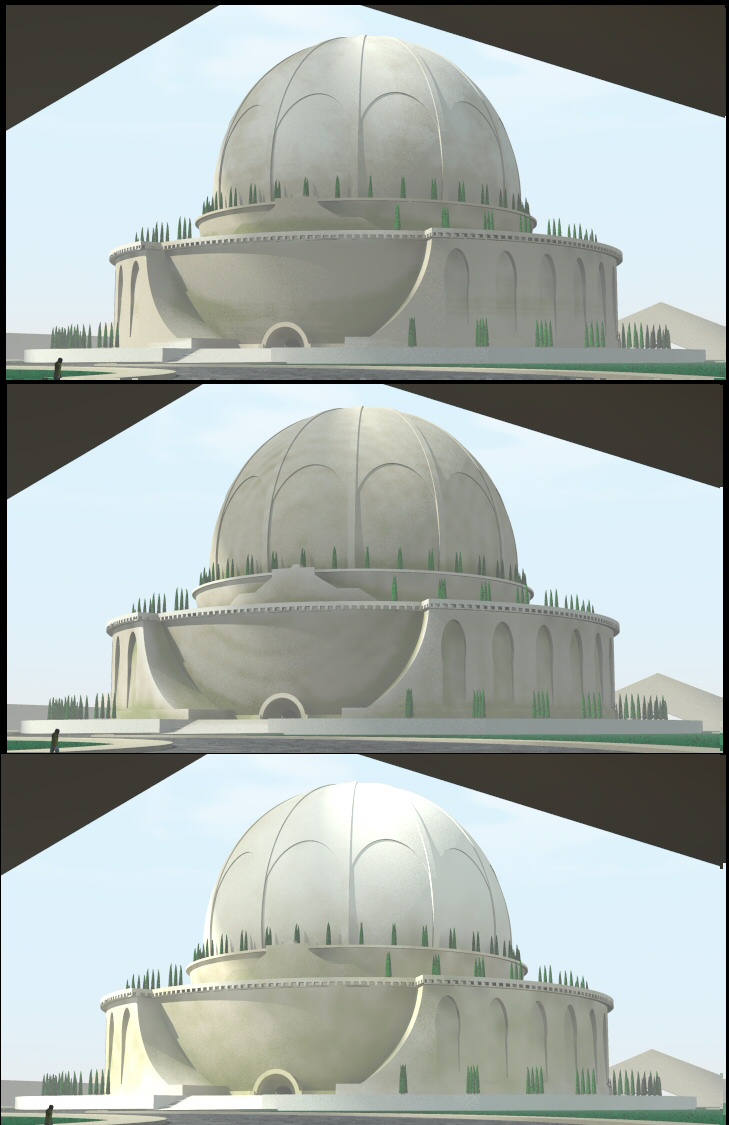
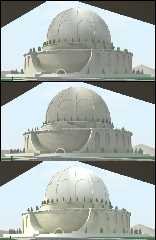
I promised to show some results of my experimentation with proximity
patterns, using my cenotaph building. The attached image shows three
results, from top to bottom:

- Patina2 macro (Rune Johansen/James Coons; 2003/2004). The pattern gives an
interesting result for the building but it renders veeeerrrryyy slowly. The
image took more than three hours to complete.

- df3prox macro (Edouard Poor; 2009). Something rather similar to Patina2.
Parsing the present df3 file took about half an hour but the render was very
fast. I believe that I have not yet got the parameters correctly as there
are still some artifacts showing.

- fastprox3 macro (Sam Benge; 2009). Very fast parsing/rendering. I added
here an adapted version of the wear pattern provided by Sam in his demo file
to get a more interesting result. The settings especially of the pigment in
the pigment_map block seems to be more tricky than with the other patterns.
I am not really sure why.

What do you think?

--
All the best,

Thomas
Post a reply to this message
Attachments:
Download 'boullee_cenotaphe_proxpat.jpg' (190 KB)
Preview of image 'boullee_cenotaphe_proxpat.jpg'
|
|
| |
| |
|
|
|
|
| |
| |
|
|
Hi
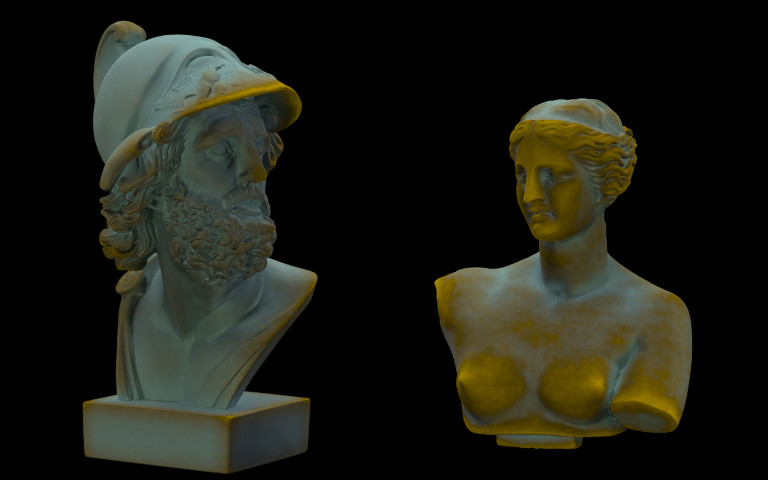
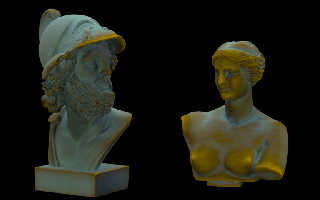
I tested Edouard's df3prox test scene with some meshes
I don't see such artifacts.
I use :
#declare resolution = <30,30,30>;
#declare num_samples = 100;
#declare sample_radius_fraction = 4;

I still have to test the others methods :-)

Marc


"Thomas de Groot" <tDOTdegroot@interDOTnlANOTHERDOTnet> a écrit dans le
message de news: 4aa0da0c@news.povray.org...
> Hi all,
>
> I promised to show some results of my experimentation with proximity
> patterns, using my cenotaph building. The attached image shows three
> results, from top to bottom:
>
> - Patina2 macro (Rune Johansen/James Coons; 2003/2004). The pattern gives
> an
> interesting result for the building but it renders veeeerrrryyy slowly.
> The
> image took more than three hours to complete.
>
> - df3prox macro (Edouard Poor; 2009). Something rather similar to Patina2.
> Parsing the present df3 file took about half an hour but the render was
> very
> fast. I believe that I have not yet got the parameters correctly as there
> are still some artifacts showing.
>
> - fastprox3 macro (Sam Benge; 2009). Very fast parsing/rendering. I added
> here an adapted version of the wear pattern provided by Sam in his demo
> file
> to get a more interesting result. The settings especially of the pigment
> in
> the pigment_map block seems to be more tricky than with the other
> patterns.
> I am not really sure why.
>
> What do you think?
>
> --
> All the best,
>
> Thomas
>
>
>
>
Post a reply to this message
Attachments:
Download 'DF3Prox_Ajax_Aphrodite.jpg' (47 KB)
Preview of image 'DF3Prox_Ajax_Aphrodite.jpg'
|
|
| |
| |
|
|
|
|
| |
| |
|
|
"Thomas de Groot" <tDOTdegroot@interDOTnlANOTHERDOTnet> wrote:
> Hi all,
>
> I promised to show some results of my experimentation with proximity
> patterns, using my cenotaph building. The attached image shows three
> results, from top to bottom:
>
> - Patina2 macro (Rune Johansen/James Coons; 2003/2004). The pattern gives an
> interesting result for the building but it renders veeeerrrryyy slowly. The
> image took more than three hours to complete.
>
> - df3prox macro (Edouard Poor; 2009). Something rather similar to Patina2.
> Parsing the present df3 file took about half an hour but the render was very
> fast. I believe that I have not yet got the parameters correctly as there
> are still some artifacts showing.
>
> - fastprox3 macro (Sam Benge; 2009). Very fast parsing/rendering. I added
> here an adapted version of the wear pattern provided by Sam in his demo file
> to get a more interesting result. The settings especially of the pigment in
> the pigment_map block seems to be more tricky than with the other patterns.
> I am not really sure why.
>
> What do you think?

"Oh dear, mine looks terrible"

What are the parameters you're using (for the macro and for the textures)? It
might be able to be improved a little.

I am interested in the rendering speed, as I was hoping that, at least, would be
faster than other methods. Can you give some more timings?

Cheers,
Edouard.
Post a reply to this message
|
|
| |
| |
|
|
|
|
| |
| |
|
|
"m_a_r_c" <jac### [at] wanadoo fr> wrote:
> Hi
> I tested Edouard's df3prox test scene with some meshes
> I don't see such artifacts.
> I use :
> #declare resolution = <30,30,30>;
> #declare num_samples = 100;
> #declare sample_radius_fraction = 4;
>
> I still have to test the others methods :-)
Oh wow - those look great! Cool!
Because the DF3 pattern runs over a regular spaced grid, I suspect it works much
better on more irregularly shaped objects like those meshes, rather than regular
objects like sphere's etc. Or at least with less tuning required...
Cheers,
Edouard. fr> wrote:
> Hi
> I tested Edouard's df3prox test scene with some meshes
> I don't see such artifacts.
> I use :
> #declare resolution = <30,30,30>;
> #declare num_samples = 100;
> #declare sample_radius_fraction = 4;
>
> I still have to test the others methods :-)
Oh wow - those look great! Cool!
Because the DF3 pattern runs over a regular spaced grid, I suspect it works much
better on more irregularly shaped objects like those meshes, rather than regular
objects like sphere's etc. Or at least with less tuning required...
Cheers,
Edouard.
Post a reply to this message
|
|
| |
| |
|
|
|
|
| |
| |
|
|
"Edouard" <pov### [at] edouardinfo> a écrit dans le message de news:
web.4aa0ec379d317c83c83e2c410@news.povray.org...
>
> Oh wow - those look great! Cool!
It's your work lol, I only dropped those meshs in your test scene, tuned the
bronze texture at my taste and modified your inc file.
the defaut values declared there (as mesh_mode=false) are not overridden by
those declared in the pov file.


> Because the DF3 pattern runs over a regular spaced grid, I suspect it
> works much
> better on more irregularly shaped objects like those meshes, rather than
> regular
> objects like sphere's etc. Or at least with less tuning required...

That's what I suspected too :-)

Marc
Post a reply to this message
|
|
| |
| |
|
|
|
|
| |
| |
|
|
"Thomas de Groot" <tDOTdegroot@interDOTnlANOTHERDOTnet> wrote:
> What do you think?

Thomas, to me Edouard's has the best overall coverage and look (aside from the
rather obvious radial pattern). I really like the dome arches you've added. The
original bald dome design was rather bland. Nice work!

-Rob
Post a reply to this message
|
|
| |
| |
|
|
|
|
| |
| |
|
|
"Edouard" <pov### [at] edouardinfo> schreef in bericht
news:web.4aa0e4149d317c83c83e2c410@news.povray.org...
>
> "Oh dear, mine looks terrible"

Probably the settings....

>
> What are the parameters you're using (for the macro and for the textures)?
> It
> might be able to be improved a little.

#declare interpolation_mode = 2;
#declare resolution = <80,80,80>;
#declare num_samples = 60;
#declare sample_radius_fraction = 4;
//Proximity_SetBailoutValue( 30 )
#declare add_noise = true;

I used your demo pigment_pattern code without changes;
as pigment_map I used:
        pigment_map {
            [0.30 color rgb <0.837064, 0.814426, 0.762936>]
            [0.50 color rgb <0.625, 0.5729, 0.454396>]
            [0.60 color rgb <0.3854, 0.395833, 0.1875>]
        }

Not being entirely sure about what I am doing, I am sure that you can
improve on this :-)  However, Marc might be right about the difficluty in
tuning a regular surface.

>
> I am interested in the rendering speed, as I was hoping that, at least,
> would be
> faster than other methods. Can you give some more timings?

I did not really note those down. What I remember is that apart from the
parsing of the df3 which took about 30 minutes, the render was finished in
no more than 4 minutes on a dual core machine.

Thomas
Post a reply to this message
|
|
| |
| |
|
|
|
|
| |
| |
|
|
"Robert McGregor" <rob### [at] mcgregorfineartcom> schreef in bericht
news:web.4aa0f5a69d317c834726e92b0@news.povray.org...
> Thomas, to me Edouard's has the best overall coverage and look (aside from
> the
> rather obvious radial pattern). I really like the dome arches you've
> added. The
> original bald dome design was rather bland. Nice work!
>

Thanks Robert. The original design indeed needed a bit of extra attention.
Possibly, I shall add or change some more things.

To me also Edouard's is approaching closest to what I want. Sam's seems to
be the most difficult to tune (perhaps due to my stupidity though) with or
without the extra wear given to the pigment_pattern.

Thomas
Post a reply to this message
|
|
| |
| |
|
|
|
|
| |
| |
|
|
"m_a_r_c" <jac### [at] wanadoofr> schreef in bericht
news:4aa0e453@news.povray.org...
> Hi
> I tested Edouard's df3prox test scene with some meshes
> I don't see such artifacts.
> I use :
> #declare resolution = <30,30,30>;
> #declare num_samples = 100;
> #declare sample_radius_fraction = 4;
>
> I still have to test the others methods :-)
>

I feel ashamed when I see this indeed :-)  Maybe, as you say below, a
regular surface is more difficult to tune right...

Thomas
Post a reply to this message
|
|
| |
| |
|
|
From: Thomas de Groot
Subject: Re: Using a couple of proximity patterns
Date: 5 Sep 2009 05:32:07
Message: <4aa23017@news.povray.org>
|
|
|
| |
| |
|
|
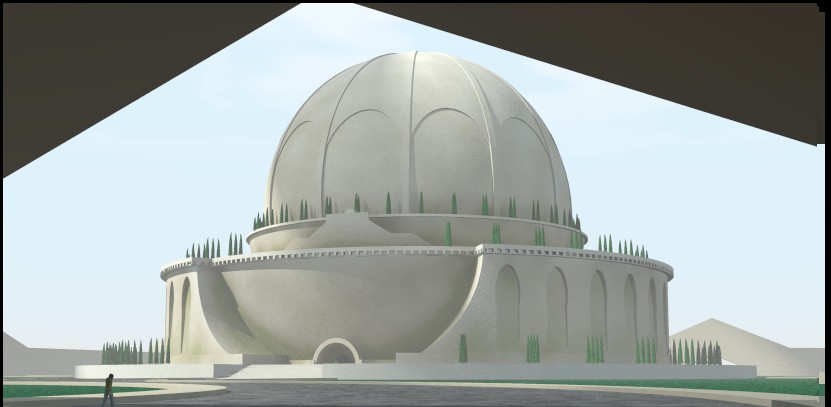
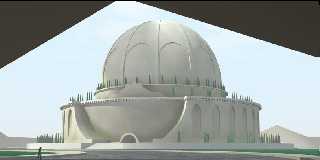
OK, Edouard, it seems that I exagerated my settings. Going back to basics, I
get a much better result as the image may testify.

Using these settings now:

  #declare interpolation_mode = 2;
 #declare resolution = <30,30,30>;
 #declare num_samples = 100;
 #declare sample_radius_fraction = 2;
//Proximity_SetBailoutValue( 30 )

All other things equal. Parsing of the df3 took a couple of minutes; render
in about 2.5 minutes.

Thomas
Post a reply to this message
Attachments:
Download 'boullee_cenotaphe_adapted_df3prox.jpg' (43 KB)
Preview of image 'boullee_cenotaphe_adapted_df3prox.jpg'
|
|
| |
| |
|
|
|
|
| |
| |
|
|
"Thomas de Groot" <tDOTdegroot@interDOTnlANOTHERDOTnet> wrote:
> OK, Edouard, it seems that I exagerated my settings. Going back to basics, I
> get a much better result as the image may testify.
>
> Using these settings now:
>
>   #declare interpolation_mode = 2;
>  #declare resolution = <30,30,30>;
>  #declare num_samples = 100;
>  #declare sample_radius_fraction = 2;
> //Proximity_SetBailoutValue( 30 )
>
> All other things equal. Parsing of the df3 took a couple of minutes; render
> in about 2.5 minutes.
>
> Thomas

Looks better!

And just when I'd come up with a great idea to improve the quality of the
pattern on regularly shaped objects. Hmmm...

Cheers,
Edouard.
Post a reply to this message
Attachments:
Download 'blur-df3-prox-hack.jpg' (69 KB)
Preview of image 'blur-df3-prox-hack.jpg'

|
|
| |
| |
|
|
|
|
| |
| |
|
|
Code Snippet:

#declare blur_proximity_pattern= true;

/* ... */

object {
        test_object

#if( use_df3_proximity_pattern )
 texture {
  pigment_pattern {
   average
   pigment_map {
#if( blur_proximity_pattern = false )
    [ 0.5 df3_pattern ]
#else
 #declare n = 0;
 #while ( n < 60 )
     [ 0.5 df3_pattern translate (halton3D( n )-<0.5,0.5,0.5>)*7.5 ]
  #declare n = n + 1;
 #end
#end

#if( add_noise = true )
    [ 0.1 slope { y altitude <0,1,0> } color_map { [0 rgb 1] [1 rgb 0] } scale
120 ]
    [ 0.4 bozo color_map { [0 rgb 0] [1 rgb 1] } scale 4 ]
    [ 0.3 bozo color_map { [0 rgb 0] [1 rgb 1] } scale 1 ]
    [ 0.2 bozo color_map { [0 rgb 0] [1 rgb 1] } scale 0.33 ]
    [ 0.1 bozo color_map { [0 rgb 0] [1 rgb 1] } scale 0.1 ]
#end
   }
  }
  texture_map {
#if( bronze = true )
   [ 0.46 shiny_brass ]
   [ 0.49 dull_brass ]
   [ 0.57 dull_brass ]
   [ 0.64 corroded_brass]
#else
            [ 0.3 pigment { color rgb <0.837064, 0.814426, 0.762936> } ]
            [ 0.5 pigment { color rgb <0.625, 0.5729, 0.454396> } ]
            [ 0.6 pigment { color rgb <0.3854, 0.395833, 0.1875> } ]
#end
  }
 }
#else
 pigment { rgb 1 }
#end
}


Cheers,
Edouard.
Post a reply to this message
|
|
| |
| |
|
|
|
|
| |
| |
|
|
"Some guy" <pov### [at] edouardinfo> wrote:

>  #declare n = 0;
>  #while ( n < 60 )
>      [ 0.5 df3_pattern translate (halton3D( n )-<0.5,0.5,0.5>)*7.5 ]
>   #declare n = n + 1;
>  #end

20 iterations of the loop looks fine to be honest. 60 looks a little bit better,
but not much. The render times don't actually change that much, but I'd try 20
first and see if it's smooth enough for you.

That "translate (halton3D( n )-<0.5,0.5,0.5>)*7.5" is the magic. It's applying a
box filter to the DF3 pattern to smooth it.

halton3D( n ) returns a (kind of) random point from 0..1 in three dimensions, so
the
"-<0.5,0.5,0.5>" just centres it around 0.

The "7.5" there is a magic number that is related to the voxel size in actual
pov units (i.e. once the DF3 scaled to the object's size during loading). Too
little or too big and it doesn't work. Sorry that that is a pain.

I'll figure out a way to hide the messy details in the loading code in 0.92, and
make it an option (Proximity_SetLoadBlurring( 60, 1.0 ) or something).

Cheers,
Edouard.
Post a reply to this message
|
|
| |
| |
|
|
|
|
| |
| |
|
|
"Edouard" <pov### [at] edouardinfo> schreef in bericht
news:web.4aa2399d9d317c83c83e2c410@news.povray.org...
>
> Looks better!
>
> And just when I'd come up with a great idea to improve the quality of the
> pattern on regularly shaped objects. Hmmm...
>

...which is really looking good :-)

I am going to work on this, Edouard,  Thanks a lot!!

Thomas
Post a reply to this message
|
|
| |
| |
|
|
From: Thomas de Groot
Subject: Re: Using a couple of proximity patterns
Date: 5 Sep 2009 10:47:51
Message: <4aa27a17@news.povray.org>
|
|
|
| |
| |
|
|
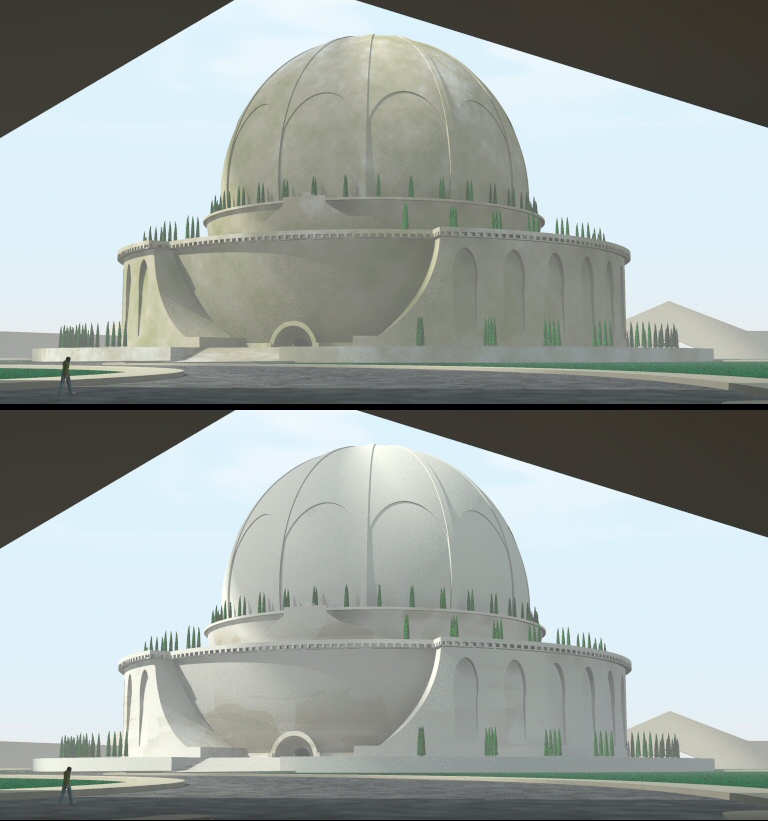
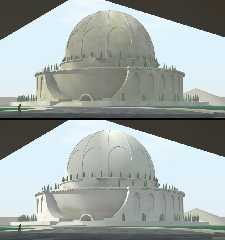
Next results. I used the following settings, at the top without blurring, at
the bottom with blurring. Everything else equal (note: z = up). Personally,
I prefer the non-blurred version as the spots are functional on the
building. Blurring gives ultimately too much accent to the lighter pigment
in the pigment_map (at least in my example).

//===start code
  #declare blur_proximity_pattern= false;

  object {FinalBuilding
    #if( use_df3_proximity_pattern )
     texture {
       pigment {
        pigment_pattern {
         average
         pigment_map {
              #if( blur_proximity_pattern = false )
                [ 0.5 df3_pattern ]
              #else
                #declare n = 0;
                #while ( n < 20 )
                  [ 0.5 df3_pattern translate (halton3D(
n )-<0.5,0.5,0.5>)*7.5 ]
                  #declare n = n + 1;
                #end
              #end
              #if( add_noise = true )
            [ 0.1 slope { <0,0,0.3> 0.5, 1.0 altitude <0,0,0.7> -4, 16.5 }
color_map { [0 rgb 1] [1 rgb 0] } scale 20 ]
            [ 0.4 bozo color_map { [0 rgb 0] [1 rgb 1] } scale 4 ]
            [ 0.3 bozo color_map { [0 rgb 0] [1 rgb 1] } scale 1 ]
            [ 0.2 bozo color_map { [0 rgb 0] [1 rgb 1] } scale 0.33 ]
            [ 0.1 bozo color_map { [0 rgb 0] [1 rgb 1] } scale 0.1 ]
              #end
          }
          }
        pigment_map {
            [0.30 color rgb <0.837064, 0.814426, 0.762936>]
            [0.40 color rgb <0.625, 0.5729, 0.454396>]
            [0.60 color rgb <0.3854, 0.395833, 0.1875>]
        }
      }
        normal {
          granite , 0.2
          scale  0.005
        }
        finish {
          ambient 0.0
          specular 0.1
          roughness 0.006139
        }
     }
    #else
      material {CenotaphStone}
    #end
  }
//===end code


Thomas
Post a reply to this message
Attachments:
Download 'boullee_cenotaphe_proxpat.jpg' (137 KB)
Preview of image 'boullee_cenotaphe_proxpat.jpg'
|
|
| |
| |
|
|
|
|
| |
| |
|
|
You know when you just can't help yourself tweaking then hitting the render
button again?

Some instancing of the same object and proximity pattern, but with random noise
settings (the levels at which the each texture appears, and the also the
position in space of the noise functions).

Cheers,
Edouard.
Post a reply to this message
Attachments:
Download 'df3-prox-instancing.jpg' (295 KB)
Preview of image 'df3-prox-instancing.jpg'

|
|
| |
| |
|
|
|
|
| |
| |
|
|
"Thomas de Groot" <tDOTdegroot@interDOTnlANOTHERDOTnet> wrote:
> Next results. I used the following settings, at the top without blurring, at
> the bottom with blurring. Everything else equal (note: z = up). Personally,
> I prefer the non-blurred version as the spots are functional on the
> building. Blurring gives ultimately too much accent to the lighter pigment
> in the pigment_map (at least in my example).
>
> ...
>
>                   [ 0.5 df3_pattern translate (halton3D(
> n )-<0.5,0.5,0.5>)*7.5 ]
>
> ...
>
>             [ 0.1 slope { <0,0,0.3> 0.5, 1.0 altitude <0,0,0.7> -4, 16.5 }
> color_map { [0 rgb 1] [1 rgb 0] } scale 20 ]
>             [ 0.4 bozo color_map { [0 rgb 0] [1 rgb 1] } scale 4 ]
>             [ 0.3 bozo color_map { [0 rgb 0] [1 rgb 1] } scale 1 ]
>             [ 0.2 bozo color_map { [0 rgb 0] [1 rgb 1] } scale 0.33 ]
>             [ 0.1 bozo color_map { [0 rgb 0] [1 rgb 1] } scale 0.1 ]

If I'm reading this right, I think that your building is about 20 units high. My
model is about 120 units high in comparison. If that's right, you should divide
the "7.5" in the df3_pattern line by 6 to get the blurring to about the right
level. It would also make sense to similarly adjust the "scale" statements in
the bozo noise functions as well.

Cheers,
Edouard.
Post a reply to this message
|
|
| |
| |
|
|
|
|
| |
| |
|
|
"Edouard" <pov### [at] edouardinfo> wrote:
> >             [ 0.1 slope { <0,0,0.3> 0.5, 1.0 altitude <0,0,0.7> -4, 16.5 }
> > color_map { [0 rgb 1] [1 rgb 0] } scale 20 ]
>
> If I'm reading this right, I think that your building is about 20 units high. My
> model is about 120 units high in comparison. If that's right, you should divide
> the "7.5" in the df3_pattern line by 6 to get the blurring to about the right
> level. It would also make sense to similarly adjust the "scale" statements in
> the bozo noise functions as well.

Or I could be reading it wrong and your model is 400 units high... Ahem.

Multiple the values by 3.33?

Like I said - that blurring value is especially magic right now. I'll try to
hide it in a later version.

Cheers,
Edouard.
Post a reply to this message
|
|
| |
| |
|
|
|
|
| |
| |
|
|
OK, enough of these now...

The same object and DF3 proximity pattern, just instanced and moved around. The
differences between each dome is due solely to the noise function (about 6
bozos, all at different scales).

Cheers,
Edouard.
Post a reply to this message
Attachments:
Download 'df3-prox-instancing-2.jpg' (267 KB)
Preview of image 'df3-prox-instancing-2.jpg'

|
|
| |
| |
|
|
|
|
| |
| |
|
|
"Edouard" <pov### [at] edouardinfo> schreef in bericht
news:web.4aa2dc579d317c83c83e2c410@news.povray.org...
>
> If I'm reading this right, I think that your building is about 20 units
> high. My
> model is about 120 units high in comparison. If that's right, you should
> divide
> the "7.5" in the df3_pattern line by 6 to get the blurring to about the
> right
> level. It would also make sense to similarly adjust the "scale" statements
> in
> the bozo noise functions as well.
>

Hmm Hmm, yes, that is correct. The building is about 20 units high. I had
compensated the slope pattern in the noise obviously as you have noticed. I
had not realized however how to compensate the other params. So there is a
close relationship there (obviously), but can you indicate approximately
what that would be for a unit sized object so that we can extrapolate from
there? That seems to me the best thing to do, doesn't it?

Your series of examples are what I ultimately would like to achieve with the
macro.

Thomas
Post a reply to this message
|
|
| |
| |
|
|
|
|
| |