|
|
|
|
|
|
| |
| |
|
|
|
|
| |
| |
|
|
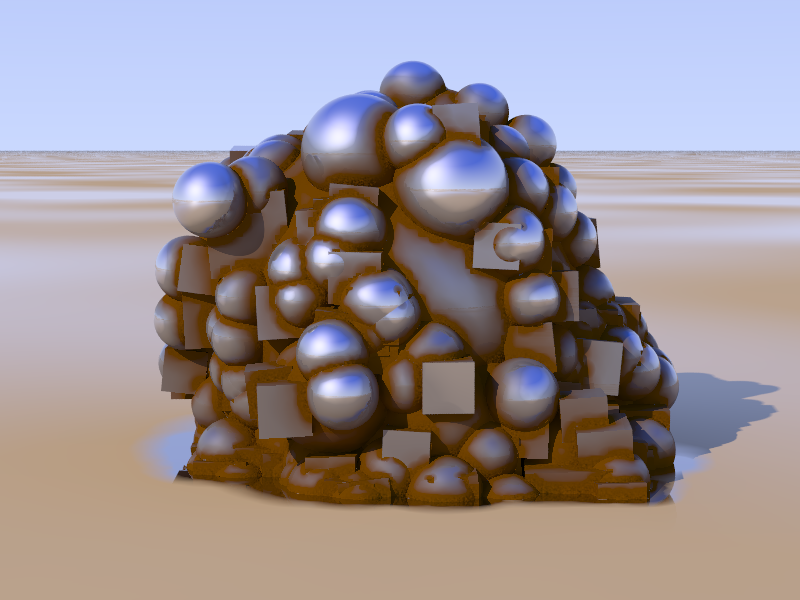
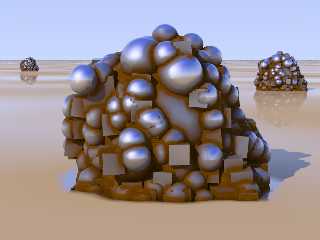
To accomplish its task efficiently, radiosity needs to keep track of how
far other objects are. Isn't it a shame to leave this information to
radiosity alone, when it would come in handy for a proximity pattern?

This shot is proof of that concept.
Post a reply to this message
Attachments:
Download 'proximity.png' (276 KB)
Preview of image 'proximity.png'
|
|
| |
| |
|
|
|
|
| |
| |
|
|
clipka escribió:
> To accomplish its task efficiently, radiosity needs to keep track of how
> far other objects are. Isn't it a shame to leave this information to
> radiosity alone, when it would come in handy for a proximity pattern?
>
> This shot is proof of that concept.
>

   Very promising... I'm already impatient to try it. Indeed, the wet-sand
beach surface is also very nice, and intriguing.

--
jaime
Post a reply to this message
|
|
| |
| |
|
|
|
|
| |
| |
|
|
Jaime Vives Piqueres schrieb:
>   Very promising... I'm already impatient to try it. Indeed, the wet-sand
> beach surface is also very nice, and intriguing.

I'm quite confident to finish it up in time for beta 35 ;-). ATM it only
works with texture maps - which of course is flexible enough, but I'd
prefer to make it work with pigment and normal maps, too. (No way of
making it work with pattern functions though. At least not as long as it
re-uses radiosity data.)

I came across the wet-beach idea by accident. It's basically just a bozo
texture map with a dry-beach (= diffuse only) and a wet-beach (= highly
reflective) texture. Except that I also did make use of that proximity
pattern to force the wet-beach texture in the proximity of "the Thing",
to give the illusion of a washed-out channel around it.
Post a reply to this message
|
|
| |
| |
|
|
|
|
| |
| |
|
|
clipka <ano### [at] anonymous org> wrote:
> To accomplish its task efficiently, radiosity needs to keep track of how
> far other objects are. Isn't it a shame to leave this information to
> radiosity alone, when it would come in handy for a proximity pattern?
>
> This shot is proof of that concept.
And a good proof it is! I do like proximity patterns :)
To be truly useful though, the effect must be a pattern or a function so you can
use it in any material block.
Will the effect remain the same even if you change the camera settings?
Sam org> wrote:
> To accomplish its task efficiently, radiosity needs to keep track of how
> far other objects are. Isn't it a shame to leave this information to
> radiosity alone, when it would come in handy for a proximity pattern?
>
> This shot is proof of that concept.
And a good proof it is! I do like proximity patterns :)
To be truly useful though, the effect must be a pattern or a function so you can
use it in any material block.
Will the effect remain the same even if you change the camera settings?
Sam
Post a reply to this message
|
|
| |
| |
|
|
|
|
| |
| |
|
|
Samuel Benge schrieb:
> clipka <ano### [at] anonymousorg> wrote:
>> To accomplish its task efficiently, radiosity needs to keep track of how
>> far other objects are. Isn't it a shame to leave this information to
>> radiosity alone, when it would come in handy for a proximity pattern?
>>
>> This shot is proof of that concept.
>
> And a good proof it is! I do like proximity patterns :)
>
> To be truly useful though, the effect must be a pattern or a function so you can
> use it in any material block.
>
> Will the effect remain the same even if you change the camera settings?

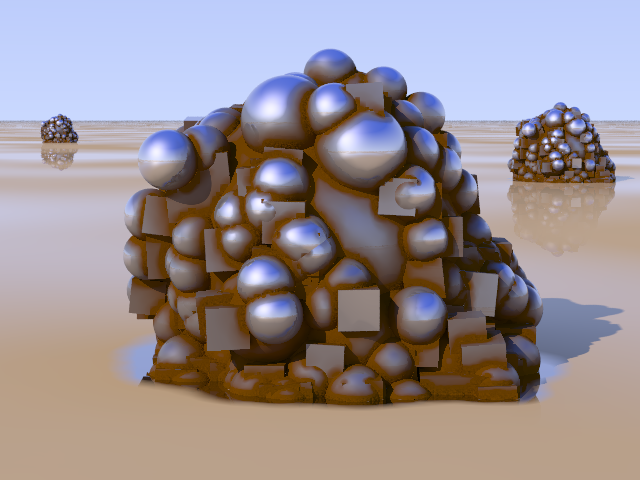
I guess details may suffer when too far away from the camera (due to
radiosity code maintaining some maximum sample density, which depends on
distance from camera), but they'll just get less precise, and don't seem
to "shift" (that was a problem initially).

See attached shot.

One thing that bothers me though is that the proximity pattern is highly
sensitive to final-render-sampling artifacts, so it requires a
higher-resolution pretrace.
Post a reply to this message
Attachments:
Download 'proximity.png' (215 KB)
Preview of image 'proximity.png'
|
|
| |
| |
|
|
|
|
| |
| |
|
|
"clipka" <ano### [at] anonymousorg> schreef in bericht
news:4a8fc8e7@news.povray.org...
> To accomplish its task efficiently, radiosity needs to keep track of how
> far other objects are. Isn't it a shame to leave this information to
> radiosity alone, when it would come in handy for a proximity pattern?
>
> This shot is proof of that concept.
>
>

Indeed it is.
Looks a lot like Sam's proximity pattern... :-)

Thomas
Post a reply to this message
|
|
| |
| |
|
|
|
|
| |
| |
|
|
clipka <ano### [at] anonymousorg> wrote:
> I guess details may suffer when too far away from the camera (due to
> radiosity code maintaining some maximum sample density, which depends on
> distance from camera), but they'll just get less precise, and don't seem
> to "shift" (that was a problem initially).

That's good to know, since a shifting pattern can lose all semblance of realism
during animation.

> See attached shot.

It seems to behave itself well enough.

> One thing that bothers me though is that the proximity pattern is highly
> sensitive to final-render-sampling artifacts, so it requires a
> higher-resolution pretrace.

There's always a trade off somewhere :(

Sam
Post a reply to this message
|
|
| |
| |
|
|
|
|
| |
| |
|
|
"Thomas de Groot" <tDOTdegroot@interDOTnlANOTHERDOTnet> wrote:
> "clipka" <ano### [at] anonymousorg> schreef in bericht
> > This shot is proof of that concept.
>
> Indeed it is.
> Looks a lot like Sam's proximity pattern... :-)

I think C. Lipka's pattern is more like ambient occlusion and less like an
averaged object pattern. With the latter you can apply colors and patterns to
outside edges as well as the inside ones. With the former you can only get
inside edge information and can't do nifty things like scratch up a box's edges
while leaving the sides untouched. I hope I'm wrong though :)

Sam
Post a reply to this message
|
|
| |
| |
|
|
|
|
| |
| |
|
|
Samuel Benge schrieb:
> I think C. Lipka's pattern is more like ambient occlusion and less like an
> averaged object pattern. With the latter you can apply colors and patterns to
> outside edges as well as the inside ones. With the former you can only get
> inside edge information and can't do nifty things like scratch up a box's edges
> while leaving the sides untouched. I hope I'm wrong though :)

You're not - you're actually perfectly right.

Radiosity doesn't collect edge proximity information (it doesn't need
it), only crevice proximity - which I think is the more important of the
two. (As you wrote, there's always a trade-off somewhere.)

For a full-fledged stand-alone proximity algorithm, I guess a voxel-tree
based approach would do fine. But that would mean a lot more of coding
effort - and somputational overhead for data that can't be shared with
any other features.


(BTW, someone's asking in povray.newusers for advice on your fastprox
macros... and speaking of them, do you have them for download anywhere?)
Post a reply to this message
|
|
| |
| |
|
|
|
|
| |
| |
|
|
clipka wrote:
> (BTW, someone's asking in povray.newusers for advice on your fastprox
> macros... and speaking of them, do you have them for download anywhere?)

Sure, a new one is in p.text.scene-files.

I had a lot more to say, but Thunderbird let me send it into the void
accidentally. Basically, I was getting into the possibility of reversing
inside/outside surface evaluation to obtain both inside/outside edge
data and displaying it as a pattern: where black is a crevice, gray is a
flat surface, and white is a peak. It might take twice as long to parse
though :(

Sam
Post a reply to this message
|
|
| |
| |
|
|
|
|
| |
| |
|
|
stbenge schrieb:
> I had a lot more to say, but Thunderbird let me send it into the void
> accidentally. Basically, I was getting into the possibility of reversing
> inside/outside surface evaluation to obtain both inside/outside edge
> data and displaying it as a pattern: where black is a crevice, gray is a
> flat surface, and white is a peak. It might take twice as long to parse
> though :(

You're making a point there. Strange that I didn't think of that myself:
After all, I did come up with that backside illumination thing, which
(among other) engages radiosity in just this manner. So yes, the
radiosity code /could/ just as well be used to detect outward edges as well.

If it's done smart enough, the radiosity code could be used in a
"lightweight" variant for surfaces that want edge proximity but not
backside radiosity illumination, so that could somewhat keep the
rendering time from exploding: After all, in those cases sample rays
need to be shot only to determine the distance to nearby objects in that
direction, without the need to do any texture computations there.
Post a reply to this message
|
|
| |
| |
|
|
|
|
| |
| |
|
|
clipka wrote:
> (BTW, someone's asking in povray.newusers for advice on your fastprox
> macros... and speaking of them, do you have them for download anywhere?)

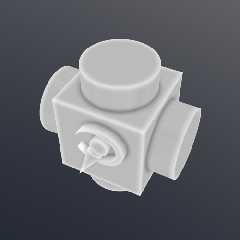
There is a pattern which is much easier to use than fastprox. I posted
it also to p.t.s-f. It's actually much more accurate than the "fast"
prox macros, as evidenced by the attached image. It also produces
outside edge data.

Sam
Post a reply to this message
Attachments:
Download 'edge_pigment.png' (48 KB)
Preview of image 'edge_pigment.png'
|
|
| |
| |
|
|
|
|
| |
| |
|
|
clipka wrote:
> You're making a point there. Strange that I didn't think of that myself:
> After all, I did come up with that backside illumination thing, which

Wait up! You haven't dismissed it as a curiosity, have you? I think even
if it makes a cameo appearance in a beta somewhere, I might like to see
  it :)

> (among other) engages radiosity in just this manner. So yes, the
> radiosity code /could/ just as well be used to detect outward edges as
> well.
>
> If it's done smart enough, the radiosity code could be used in a
> "lightweight" variant for surfaces that want edge proximity but not
> backside radiosity illumination, so that could somewhat keep the
> rendering time from exploding: After all, in those cases sample rays
> need to be shot only to determine the distance to nearby objects in that
> direction, without the need to do any texture computations there.

Now, is this a process that follows from screen-level evaluation? Or
does the sampling fill 3D space evenly? Both? I guess what I mean to
ask, is will there be a change in the pattern between animation frames?
Post a reply to this message
|
|
| |
| |
|
|
|
|
| |
| |
|
|
stbenge schrieb:
> clipka wrote:
>> (BTW, someone's asking in povray.newusers for advice on your fastprox
>> macros... and speaking of them, do you have them for download anywhere?)
>
> There is a pattern which is much easier to use than fastprox. I posted
> it also to p.t.s-f. It's actually much more accurate than the "fast"
> prox macros, as evidenced by the attached image. It also produces
> outside edge data.

It also seems to give much cleaner results than my reusing radiosity data.

A drawback I see is that it gives only a falloff to a certain distance
from edges and crevices, then stays level, right?

At the same time there are benefits of course:

- It can be used to model an object with dirty crevices and worn-out
edges that has recently been transported to someplace else; my approach
can only detect proximity to /any/ geometry, and cannot easily be
limited to a subset of the scene geometry (let alone some geometry that
isn't even in the scene).

- It is a true 3D pattern; my approach is only suitable for object
surfaces, and is therefore unsuited for use in media density, or in a
pattern function (which in turn could probably be used to generate a
smoothed version of the object using isosurfaces - what a powerful tool
for beveling that would be!).

Maybe it would really be a good thing to go for a voxel-based approach,
in hope to combine the quality of your approach with the speed gained
through caching data (you wouldn't want /all/ those N inside-tests to be
executed for /each/ iteration step of /every/ ray-object intersection
test to be performed on an isosurface... >_<)
Post a reply to this message
|
|
| |
| |
|
|
|
|
| |
| |
|
|
stbenge schrieb:
> Now, is this a process that follows from screen-level evaluation? Or
> does the sampling fill 3D space evenly? Both? I guess what I mean to
> ask, is will there be a change in the pattern between animation frames?

Being based on radiosity, it follows the same principles when to take
samples - that is, it is entirely screen-level driven - but using the
radiosity save/load mechanism will allow you to carry over samples from
one scene to the next.
Post a reply to this message
|
|
| |
| |
|
|
|
|
| |
| |
|
|
clipka wrote:
> stbenge schrieb:
>> clipka wrote:
>>> (BTW, someone's asking in povray.newusers for advice on your fastprox
>>> macros... and speaking of them, do you have them for download anywhere?)
>>
>> There is a pattern which is much easier to use than fastprox. I posted
>> it also to p.t.s-f. It's actually much more accurate than the "fast"
>> prox macros, as evidenced by the attached image. It also produces
>> outside edge data.
>
> It also seems to give much cleaner results than my reusing radiosity data.

In a way, this is true. But my methods wreak havoc upon memory and CPU
usage.

> A drawback I see is that it gives only a falloff to a certain distance
> from edges and crevices, then stays level, right?

Right. A disruption in space by an object continues only to a finite,
specified distance from the object by way of 3D averaging of point data.
Objects must be predeclared which is a big drawback.

> At the same time there are benefits of course:
>
> - It can be used to model an object with dirty crevices and worn-out
> edges that has recently been transported to someplace else; my approach
> can only detect proximity to /any/ geometry, and cannot easily be
> limited to a subset of the scene geometry (let alone some geometry that
> isn't even in the scene).

Is this good or bad for your method? It seems that having access to
~any~ scene geometry is good. My method is restrictive and costly for
high numbers of objects.

> - It is a true 3D pattern; my approach is only suitable for object
> surfaces, and is therefore unsuited for use in media density, or in a
> pattern function (which in turn could probably be used to generate a
> smoothed version of the object using isosurfaces - what a powerful tool
> for beveling that would be!).

That's the best part I suppose, it's 3D. But I've used it for
isosurfaces and media, and let me say, the results are a mixed bag. Good
surface exploration, sure, but bad, bad render times.

> Maybe it would really be a good thing to go for a voxel-based approach,
> in hope to combine the quality of your approach with the speed gained
> through caching data (you wouldn't want /all/ those N inside-tests to be
> executed for /each/ iteration step of /every/ ray-object intersection
> test to be performed on an isosurface... >_<)

You're very right, I wouldn't and I don't. What looks good as a pigment
becomes very ugly when used as an isosurface. Actually, it looks great
when you overload pigment_pattern lists with 256*256 pattern samples,
keep the accuracy low and the max grad high. Not that I've done it, not
that I want to, not that I need to learn patience some time ;)
Post a reply to this message
|
|
| |
| |
|
|
|
|
| |
| |
|
|
clipka wrote:
> stbenge schrieb:
>> Now, is this a process that follows from screen-level evaluation? Or
>> does the sampling fill 3D space evenly? Both? I guess what I mean to
>> ask, is will there be a change in the pattern between animation frames?
>
> Being based on radiosity, it follows the same principles when to take
> samples - that is, it is entirely screen-level driven - but using the
> radiosity save/load mechanism will allow you to carry over samples from
> one scene to the next.

Well, I'm all for this idea of yours. I think its a good, low-cost
method which will become very accessible to a lot of people. /every/
surface, eh? Good stuff indeed :)
Post a reply to this message
|
|
| |
| |
|
|
|
|
| |
| |
|
|
stbenge schrieb:
>> It also seems to give much cleaner results than my reusing radiosity
>> data.
>
> In a way, this is true. But my methods wreak havoc upon memory and CPU
> usage.

Sure they do - unless they're implemented in a compiled language and the
data cached.

>> - It can be used to model an object with dirty crevices and worn-out
>> edges that has recently been transported to someplace else; my
>> approach can only detect proximity to /any/ geometry, and cannot
>> easily be limited to a subset of the scene geometry (let alone some
>> geometry that isn't even in the scene).
>
> Is this good or bad for your method? It seems that having access to
> ~any~ scene geometry is good. My method is restrictive and costly for
> high numbers of objects.

I'd say it depends on what you want to do. At the moment, neither method
seems to be the silver bullet.
Post a reply to this message
|
|
| |
| |
|
|
|
|
| |
| |
|
|
stbenge wrote:
> clipka wrote:
>> You're making a point there. Strange that I didn't think of that
>> myself: After all, I did come up with that backside illumination
>> thing, which
>
> Wait up! You haven't dismissed it as a curiosity, have you? I think even
> if it makes a cameo appearance in a beta somewhere, I might like to see
>  it :)

This is what I get for not paying attention. It looks like I'll get to
play with this feature in about an hour :)
Post a reply to this message
|
|
| |
| |
|
|
|
|
| |
| |
|
|
stbenge schrieb:
>> Wait up! You haven't dismissed it as a curiosity, have you? I think
>> even if it makes a cameo appearance in a beta somewhere, I might like
>> to see  it :)
>
> This is what I get for not paying attention. It looks like I'll get to
> play with this feature in about an hour :)

The peculiar thing is that right until now, that former comment of yours
perfectly slipped me, even though I had replied to the post and it
really wasn't long... so much for not paying attention :-D
Post a reply to this message
|
|
| |
| |
|
|
|
|
| |