|
|
|
|
|
|
| |
| |
|
|
|
|
| |
| |
|
|
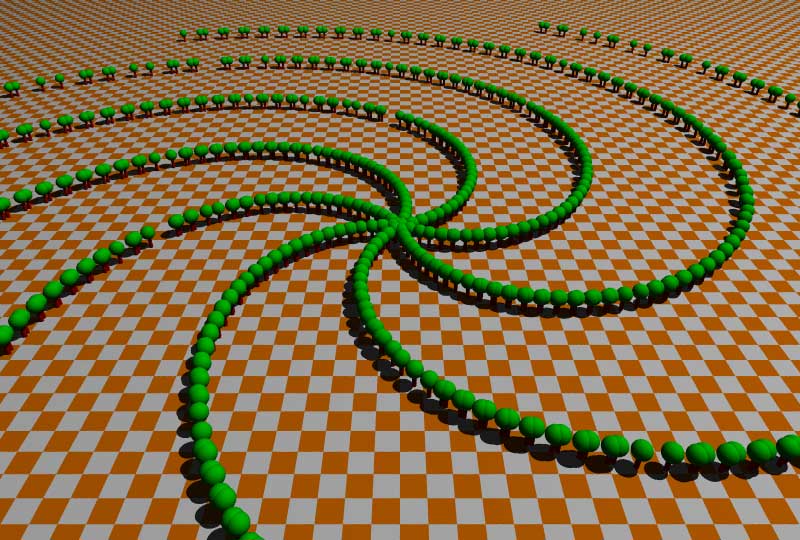
While experimenting with the function rand () to simulate a random
distribution of trees, (moving object at a random distance from origin and
then doing it orbit on the y-axis, when I found this.
I've noticed a pattern when attempting to distribute objects on a square
grid. But why this circular distribution?

Does anyone know why there are 7 arms and not 5 or 13 or something more
random?


#include "colors.inc"
#include "math.inc"
camera {location <0,20,-30>
        look_at <0,0,0>
       }
light_source {<50,100,-10> colour White}

plane {y,0
      texture {
             pigment {checker colour White colour Orange}
             }
      }


#declare Tree =
union {cylinder {<0,0,0>,<0,1,0>,.1 pigment {Red}}
           sphere {<0,1,0>.4 pigment {Green}}
          }

#local Num_Tree = 0 ;
#while (Num_Tree<1000)
  #local rnd_tree = seed (Num_Tree);
  #if (rand (rnd_tree)<.95 )
    object {Tree
            translate <50*rand(rnd_tree),0,0>
            rotate y*360*rand(rnd_tree)
            }
   #end
  #local Num_Tree = Num_Tree +1 ;
#end


pd. I found it while editing the code to upload the image. The key is in the
use of the same rand value to control the density of generating objects. But
interesting anyway.
pd2 google searchs results: "the seven arms of Shiva", "the seven arms of
the Menorah", "an Octopus with only seven arms"...
B. Gimeno
Post a reply to this message
Attachments:
Download 'random_trees.jpg' (98 KB)
Preview of image 'random_trees.jpg'
|
|
| |
| |
|
|
|
|
| |
| |
|
|
"bgimeno" <bgimeno[at]persistencia[dot]org> wrote in message
news:4a865de4@news.povray.org...
> While experimenting with the function rand () to simulate a random
> distribution of trees, (moving object at a random distance from origin and
> then doing it orbit on the y-axis, when I found this.
> I've noticed a pattern when attempting to distribute objects on a square
> grid. But why this circular distribution?
>
> ... snip ...
>
> #local Num_Tree = 0 ;
> #while (Num_Tree<1000)
>  #local rnd_tree = seed (Num_Tree);
>  #if (rand (rnd_tree)<.95 )
>    object {Tree
>            translate <50*rand(rnd_tree),0,0>
>            rotate y*360*rand(rnd_tree)
>            }
>   #end
>  #local Num_Tree = Num_Tree +1 ;
> #end
>
>
> pd. I found it while editing the code to upload the image. The key is in
> the use of the same rand value to control the density of generating
> objects. But interesting anyway.
> pd2 google searchs results: "the seven arms of Shiva", "the seven arms of
> the Menorah", "an Octopus with only seven arms"...
>

Take your pick:
Answer A: Yes it's controlled by ancient deities.
Answer B: You're using the seed function wrong.

Answer B continued:
Because the seed function is being called from within the #while loop you
are simply stepping sequentially through the seeds rather than taking
successive numbers from a random number stream. If you move the seed
definition outside the loop and use a single number as the seed you should
avoid this problem ie use:
#local rnd_tree = seed (0);
and move it so that it's set before starting the #while loop.

This characteristic of the seed/rand functions was discussed in some detail
in a long thread quite a while ago:
http://news.povray.org/povray.binaries.images/thread/%3Cweb.4a0d5729a7098c1c34d207310@news.povray.org%3E/
I don't remember seeing anything there that explains what it is that will
give you 7 arms rather than a different number of arms, so this is maybe
where Answer A and Answer B mysteriously come together.

The other thing to note is that even when you fix this, your algorithm still
gives a cluster at the centre of the circle, but the reason for this is
categorically mathematical :o)

Regards,
Chris B.
Post a reply to this message
|
|
| |
| |
|
|
|
|
| |
| |
|
|
"Chris B" <nom### [at] nomail com> wrote:
> The other thing to note is that even when you fix this, your algorithm still
> gives a cluster at the centre of the circle, but the reason for this is
> categorically mathematical :o)
This document has a couple solutions, right around pages 12-13 (not to mention a
lot of other useful stuff!):
http://www.cs.kuleuven.be/~phil/GI/
In short, to get around the problem use a random angle and a random radius, but
take the square root of the radius before you use it, i.e.:
translate <50*sqrt(rand(rnd_tree)),0,0>
- Ricky com> wrote:
> The other thing to note is that even when you fix this, your algorithm still
> gives a cluster at the centre of the circle, but the reason for this is
> categorically mathematical :o)
This document has a couple solutions, right around pages 12-13 (not to mention a
lot of other useful stuff!):
http://www.cs.kuleuven.be/~phil/GI/
In short, to get around the problem use a random angle and a random radius, but
take the square root of the radius before you use it, i.e.:
translate <50*sqrt(rand(rnd_tree)),0,0>
- Ricky
Post a reply to this message
|
|
| |
| |
|
|
|
|
| |
| |
|
|
triple_r wrote:
> In short, to get around the problem use a random angle and a random radius, but
> take the square root of the radius before you use it, i.e.:
>
> translate <50*sqrt(rand(rnd_tree)),0,0>

  To some it might sound that the square root "trick" is completely
arbitrary and that it just happens to give "close enough" results to be
acceptably believable.

  However, the fact is that the square root is the mathematically exact
solution to the problem. The reason is simple: The density of the
elements does indeed change by (exactly) the square of the distance from
the center, and thus to counter that you take the square root, in which
case you get an even distribution along the whole surface.
Post a reply to this message
|
|
| |
| |
|
|
|
|
| |
| |
|
|
"bgimeno" <bgimeno[at]persistencia[dot]org> wrote:
> While experimenting with the function rand () to simulate a random
> distribution of trees...

> #local Num_Tree = 0 ;
> #while (Num_Tree<1000)
>   #local rnd_tree = seed (Num_Tree);
>   #if (rand (rnd_tree)<.95 )
>     object {Tree
>             translate <50*rand(rnd_tree),0,0>
>             rotate y*360*rand(rnd_tree)
>             }
>    #end
>   #local Num_Tree = Num_Tree +1 ;
> #end
>


I don't understand the reason for this line, as it doesn't really do anything:
>   #if (rand (rnd_tree)<.95 )

The only effect is throw the count of trees off, since it pulls a number from
the stream, compares it, either places a tree or doesn't, but updates the
counter regardless.

-Reactor
Post a reply to this message
|
|
| |
| |
|
|
|
|
| |
| |
|
|
"Reactor" <rea### [at] hotmailcom> pifufó en el mensaje
news:web.4a870387fa341737fb6da2e10@news.povray.org...
> I don't understand the reason for this line, as it doesn't really do
> anything:
>>   #if (rand (rnd_tree)<.95 )
>
> The only effect is throw the count of trees off, since it pulls a number
> from
> the stream, compares it, either places a tree or doesn't, but updates the
> counter regardless.
>
> -Reactor

Certainly not, at least in this image. But I usually use this trick (with
other values) in scenes where I use a condition for the random generation of
objects

B. Gimeno
Post a reply to this message
|
|
| |
| |
|
|
|
|
| |
| |
|
|
Reactor wrote:
> I don't understand the reason for this line, as it doesn't really do anything:
>>   #if (rand (rnd_tree)<.95 )
>
> The only effect is throw the count of trees off, since it pulls a number from
> the stream, compares it, either places a tree or doesn't, but updates the
> counter regardless.

  Rather than placing exactly 1000 trees, it places a bit less.

  Of course you are right in that if what he wants is to place less than
1000 trees, then why not use a number which is less than 1000 to begin
with? The number of trees will always be the same from render to render
regardless of whether it's done with that #if or with a direct value
less than 1000.
Post a reply to this message
|
|
| |
| |
|
|
|
|
| |
| |
|
|
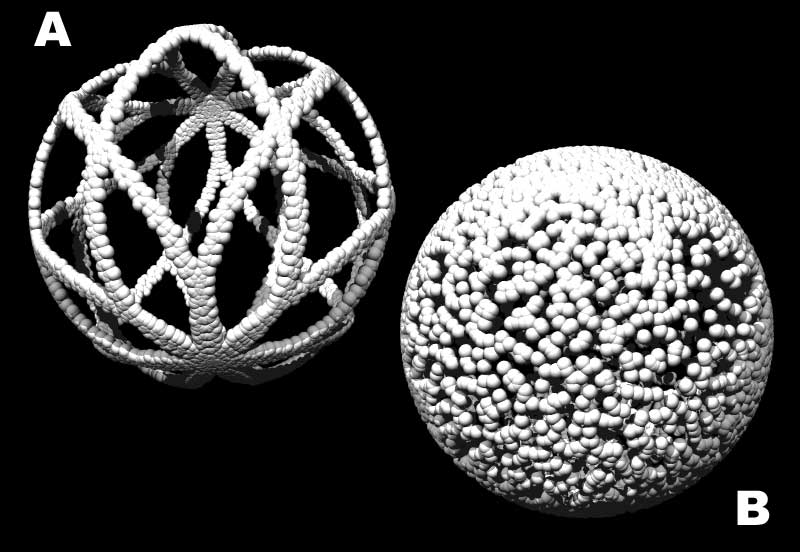
This is not a thread about the disadvantages of the function rand () of
pov-ray, but a comment on one of its peculiarities.
In my first post the objects are arranged in a spiral of seven arms through
(or despite) the pseudorandom function. Now I used the same loop to
distribute objects around a sphere.
Code A generates the image with pattern that would correspond to the spiral
of the first post (Note seven leaves).

Interestingly, code B randomly distributed spheres of the whole area.

B. Gimeno

#include "colors.inc"
#include "math.inc"

camera {location <0,150,-150>
        look_at <0,0,0>
       }
light_source {<50,300,-100> colour White}
light_source {<-150,300,-100> colour White}

#declare Tree =  sphere {<0,0,0>2 pigment {White}} ;

#local Num_Tree = 0 ;
// ------------------------------------------------------
#while (Num_Tree<5000)
  #local rnd_tree = seed (Num_Tree);
  object {Tree
          translate x*60       // code A
          rotate <rand(rnd_tree),rand(rnd_tree),rand(rnd_tree)>*360
          }
  #local Num_Tree = Num_Tree +1 ;
#end
// ------------------------------------------------------
#while (Num_Tree<5000)
  #local rnd_tree = seed (Num_Tree);
  object {Tree
          translate y*60       // code B
          rotate <rand(rnd_tree),rand(rnd_tree),rand(rnd_tree)>*360
          }
  #local Num_Tree = Num_Tree +1 ;
#end
// ------------------------------------------------------
Post a reply to this message
Attachments:
Download 'random_test.jpg' (57 KB)
Preview of image 'random_test.jpg'
|
|
| |
| |
|
|
|
|
| |
| |
|
|
That's curious! I had not expected that. Any idea why?

Thomas
Post a reply to this message
|
|
| |
| |
|
|
|
|
| |
| |
|
|
On Wed, 19 Aug 2009 10:00:52 +0200, "Thomas de Groot"
<tDOTdegroot@interDOTnlANOTHERDOTnet> wrote:

>That's curious! I had not expected that. Any idea why?
>

Not an answer but it could be a hint.
If you split the rotate *360 into separate rotate x, rotate y, rotate z and
order them separately then adding the translation to the first rotate gives a
similar result.


#include "colors.inc"

camera {location <0,150,-150>
        look_at <0,0,0>
       }
light_source {<50,300,-100> colour White}
light_source {<-150,300,-100> colour White}

#declare Tree =  sphere {<0,0,0>2 pigment {White}} ;


#local Num_Tree = 0 ;

// ------------------------------------------------------
#while (Num_Tree<5000)
  #local rnd_tree = seed (Num_Tree);
  object {Tree
          translate y*60       // code C


          rotate rand(rnd_tree) *y*360

          rotate rand(rnd_tree) *z*360

          rotate rand(rnd_tree) *x*360

          }
  #local Num_Tree = Num_Tree +1 ;
#end


--

Regards
     Stephen
Post a reply to this message
|
|
| |
| |
|
|
|
|
| |
| |
|
|
"bgimeno" <bgimeno[at]persistencia[dot]org> wrote:
> // ------------------------------------------------------
> #while (Num_Tree<5000)
>   #local rnd_tree = seed (Num_Tree);
>   object {Tree
>           translate x*60       // code A
>           rotate <rand(rnd_tree),rand(rnd_tree),rand(rnd_tree)>*360
>           }
>   #local Num_Tree = Num_Tree +1 ;
> #end
> // ------------------------------------------------------
> #while (Num_Tree<5000)
>   #local rnd_tree = seed (Num_Tree);
>   object {Tree
>           translate y*60       // code B
>           rotate <rand(rnd_tree),rand(rnd_tree),rand(rnd_tree)>*360
>           }
>   #local Num_Tree = Num_Tree +1 ;
> #end
> // ------------------------------------------------------

That isn't really surprising.  Keep in mind that rotating by <rand,rand,rand>
doesn't necessarily do what you think it does.  It rotates by all three axes in
sequence, x, then y, then z, so if you start with a point ON the x-axis, at
least one rotation won't do anything.  And there's certainly no guarantee
they'll be uniformly distributed.  In other words, it doesn't mean the code
rotates around a random axis by a random angle, in fact it rotates around three
well-defined axes by random angles.

If you want random points on a sphere, I suggest one of two methods.

1) Use a random point in a box, call it p, and if vlength(p<1) it's inside a
sphere so you can use vnormalize(p) as your random point on the surface.  This
is inefficient, but looks something like:

#declare p = <rand(),rand(),rand()>*2-1;
#while( vlength(p)>1 )
     #declare p = <rand(),rand(),rand()>*2-1;
#end
#declare p = vnormalize(p);

2) The document I posted a link to has a better answer on p. 19:

r1 = rand()
r2 = rand()
x = 2 cos (2*pi*r1) * sqrt( r2*(1-r2) )
y = 2 sin (2*pi*r1) * sqrt( r2*(1-r2) )
z =  1-2*r2

This is just spherical coordinates, so I think you can rephrase it (according to
the document) as

vrotate( vrotate( y, 180/pi * acos( rand() ) * x ), 360*rand() * y )

I haven't tested this, but I think it would work.

 - Ricky
Post a reply to this message
|
|
| |
| |
|
|
|
|
| |
| |
|
|
bgimeno a écrit :
> This is not a thread about the disadvantages of the function rand () of
> pov-ray, but a comment on one of its peculiarities.
> In my first post the objects are arranged in a spiral of seven arms through
> (or despite) the pseudorandom function. Now I used the same loop to
> distribute objects around a sphere.
> Code A generates the image with pattern that would correspond to the spiral
> of the first post (Note seven leaves).
>
> Interestingly, code B randomly distributed spheres of the whole area.
>
> B. Gimeno
>
> #include "colors.inc"
> #include "math.inc"
>
> camera {location <0,150,-150>
>         look_at <0,0,0>
>        }
> light_source {<50,300,-100> colour White}
> light_source {<-150,300,-100> colour White}
>
> #declare Tree =  sphere {<0,0,0>2 pigment {White}} ;
>
> #local Num_Tree = 0 ;
> // ------------------------------------------------------
> #while (Num_Tree<5000)
>   #local rnd_tree = seed (Num_Tree);
>   object {Tree
>           translate x*60       // code A
>           rotate <rand(rnd_tree),rand(rnd_tree),rand(rnd_tree)>*360
>           }
>   #local Num_Tree = Num_Tree +1 ;
> #end
> // ------------------------------------------------------
> #while (Num_Tree<5000)
>   #local rnd_tree = seed (Num_Tree);
>   object {Tree
>           translate y*60       // code B
>           rotate <rand(rnd_tree),rand(rnd_tree),rand(rnd_tree)>*360
>           }
>   #local Num_Tree = Num_Tree +1 ;
> #end
> // ------------------------------------------------------
>
>
>
In the case "A", you start ON the X axis and your first rotation been
around that axis does nothing. Well, it rotate a sphere on itself and
don't have a visible result. Just redefine Tree as:
cone{-y,2,y,0}//a cone with the same bounding box,
And you'll see the effect of the first rotation. All the trees will lay
flat on the sphere, ther axis tangent to it's "surface".

So, the first rotate is effectively a "throw away"
Net result: ONLY 2 effective rotations.

In the case "B", You start on the Y axis. Now, the first rotation DOES
move the object, then, unless you rotated by exactly 0 or 180, the
second rotation moves the object further. Then, you rotate around the Z
axis.
Net result: 3 successive rotations.
The redefined trees will all point outside.

The same would appens if you started at z*60. All 3 rotations would
affect your final position.


Alain
Post a reply to this message
|
|
| |
| |
|
|
|
|
| |
| |
|
|
Thank you! That is just the detail I missing, although not explain the
pattern of code A nor the spiral of the first image. Thank you

B. Gimeno
Post a reply to this message
|
|
| |
| |
|
|
|
|
| |
| |
|
|
bgimeno schrieb:
> // ------------------------------------------------------
> #while (Num_Tree<5000)
>   #local rnd_tree = seed (Num_Tree);
>   object {Tree
>           translate x*60       // code A
>           rotate <rand(rnd_tree),rand(rnd_tree),rand(rnd_tree)>*360

With the Tree object being translated to <60,0,0>, the first rotation
about the X axis effectively just rotates the object in place, without
changing its position.

Thus, you only have two random numbers affecting the placement of the
object.


>           }
>   #local Num_Tree = Num_Tree +1 ;
> #end
> // ------------------------------------------------------
> #while (Num_Tree<5000)
>   #local rnd_tree = seed (Num_Tree);
>   object {Tree
>           translate y*60       // code B
>           rotate <rand(rnd_tree),rand(rnd_tree),rand(rnd_tree)>*360

Here, the object starts at <0,60,0>, so first rotation about the X axis
already "messes up" the object's position.

Thus, in this case you have three random numbers affecting placement.


>           }
>   #local Num_Tree = Num_Tree +1 ;
> #end
> // ------------------------------------------------------
>
>
>
Post a reply to this message
|
|
| |
| |
|
|
|
|
| |
| |
|
|
triple_r schrieb:
> If you want random points on a sphere, I suggest one of two methods.

3) use the VRand_On_Sphere macro from rand.inc

(Make sure to copy the macro definition to your code if you use it
frequently - POV-Ray isn't very speedy at executing macros stored in
include files.)
Post a reply to this message
|
|
| |
| |
|
|
|
|
| |
| |
|
|
I would also add this detail. Although:

 sphere {<0,0,0>3
          translate x*60
          rotate x*rand(rnd_tree)*360
          rotate y*rand(rnd_tree)*360
          rotate z*rand(rnd_tree)*360
          pigment {White}
         }

should produce the same result as:

 sphere {<0,0,0>3
         translate x*60
       // rotate x*rand(rnd_tree)*360
          rotate y*rand(rnd_tree)*360
          rotate z*rand(rnd_tree)*360
          pigment {White}
         }
 the use of this first superfluous rand()  affects the values extracted by
the 2nd and 3rd rand(). In this case therefore we obtain values that don't
seem to follow any pattern.
Be recorded as comment on the peculiarities of the rand () function and
nothing else.

B. Gimeno
Post a reply to this message
|
|
| |
| |
|
|
|
|
| |
| |
|
|
On Thu, 20 Aug 2009 14:08:55 +0200, "bgimeno" <bgimeno[at]persistencia[dot]org>
wrote:

> the use of this first superfluous rand()  affects the values extracted by
>the 2nd and 3rd rand(). In this case therefore we obtain values that don't
>seem to follow any pattern.
>Be recorded as comment on the peculiarities of the rand () function and
>nothing else.

/*
Try this extract of your scene. By commenting out some #declare RotNo2's you
will get different results :)
/*

#include "colors.inc"

camera {location <0,150,-150>
        look_at <0,0,0>
       }
light_source {<50,300,-100> colour White}
light_source {<-150,300,-100> colour White}

#declare Tree =  sphere {<0,0,0>2 pigment {White} } ;

#declare Num_Tree = 0 ;

// ------------------------------------------------------
#while (Num_Tree<5000)
  #declare rnd_tree = seed (Num_Tree);
  object {Tree
#declare rnd_tree = seed (Num_Tree);

          translate x*60       // code C

// Comment out the lines below to get different effects
#declare RotNo2 = rand(rnd_tree);
#declare RotNo2 = rand(rnd_tree);
#declare RotNo2 = rand(rnd_tree);
#declare RotNo2 = rand(rnd_tree);
#declare RotNo2 = rand(rnd_tree);


          rotate <0,rand(rnd_tree),rand(rnd_tree)>*360

          }
  #declare Num_Tree = Num_Tree +1 ;
#end

--

Regards
     Stephen
Post a reply to this message
|
|
| |
| |
|
|
|
|
| |
| |
|
|
bgimeno a écrit :
> I would also add this detail. Although:
>
>  sphere {<0,0,0>3
>           translate x*60
>           rotate x*rand(rnd_tree)*360
>           rotate y*rand(rnd_tree)*360
>           rotate z*rand(rnd_tree)*360
>           pigment {White}
>          }
>
> should produce the same result as:
>
>  sphere {<0,0,0>3
>          translate x*60
>        // rotate x*rand(rnd_tree)*360
>           rotate y*rand(rnd_tree)*360
>           rotate z*rand(rnd_tree)*360
>           pigment {White}
>          }
>  the use of this first superfluous rand()  affects the values extracted by
> the 2nd and 3rd rand(). In this case therefore we obtain values that don't
> seem to follow any pattern.
> Be recorded as comment on the peculiarities of the rand () function and
> nothing else.
>
> B. Gimeno
>
>
This should NOT produce the same result.

Although the first random rotate is effectively a "do nothing", it DOES
fetch a number from the random stream.
If you remove the first rotate, the value it would have used will be
used by the second, now first, rotate.

In the first case, you featch 3 random numbers from the stream for each
iteration.
In the second case, you only featch 2.
Any change in the number of values accessed WILL change the end result.
Just adding one #declare Dummy=rand(rnd_tree); will totaly change the
result.


Alain
Post a reply to this message
|
|
| |
| |
|
|
|
|
| |
| |
|
|
As a final message of this thread let me show you why this caught my
attention so trivial:

http://www.youtube.com/watch?v=G-2HIMGssfU

This was created in 2005-2006 with an AMD K-6 400Mhz with 128 Mb RAM and
does not seem that I will have time for a substantial improvement

I know, I know, I know. Improve the lighting, background and approach of the
camera. Any suggestions more?

B. Gimeno
Post a reply to this message
|
|
| |
| |
|
|
|
|
| |
| |
|
|
On Thu, 20 Aug 2009 23:06:51 +0200, "bgimeno" <bgimeno[at]persistencia[dot]org>
wrote:

>As a final message of this thread let me show you why this caught my
>attention so trivial:
>

That's neat and it's Alexander's ragtime Band :)
--

Regards
     Stephen
Post a reply to this message
|
|
| |
| |
|
|
|
|
| |
|
|