|
|
|
|
|
|
| |
| |
|
|
From: Thomas de Groot
Subject: What is there I do not understand about HDRI map_type 7 in MegaPOV?
Date: 5 May 2009 05:24:26
Message: <4a0005ca@news.povray.org>
|
|
|
| |
| |
|
|
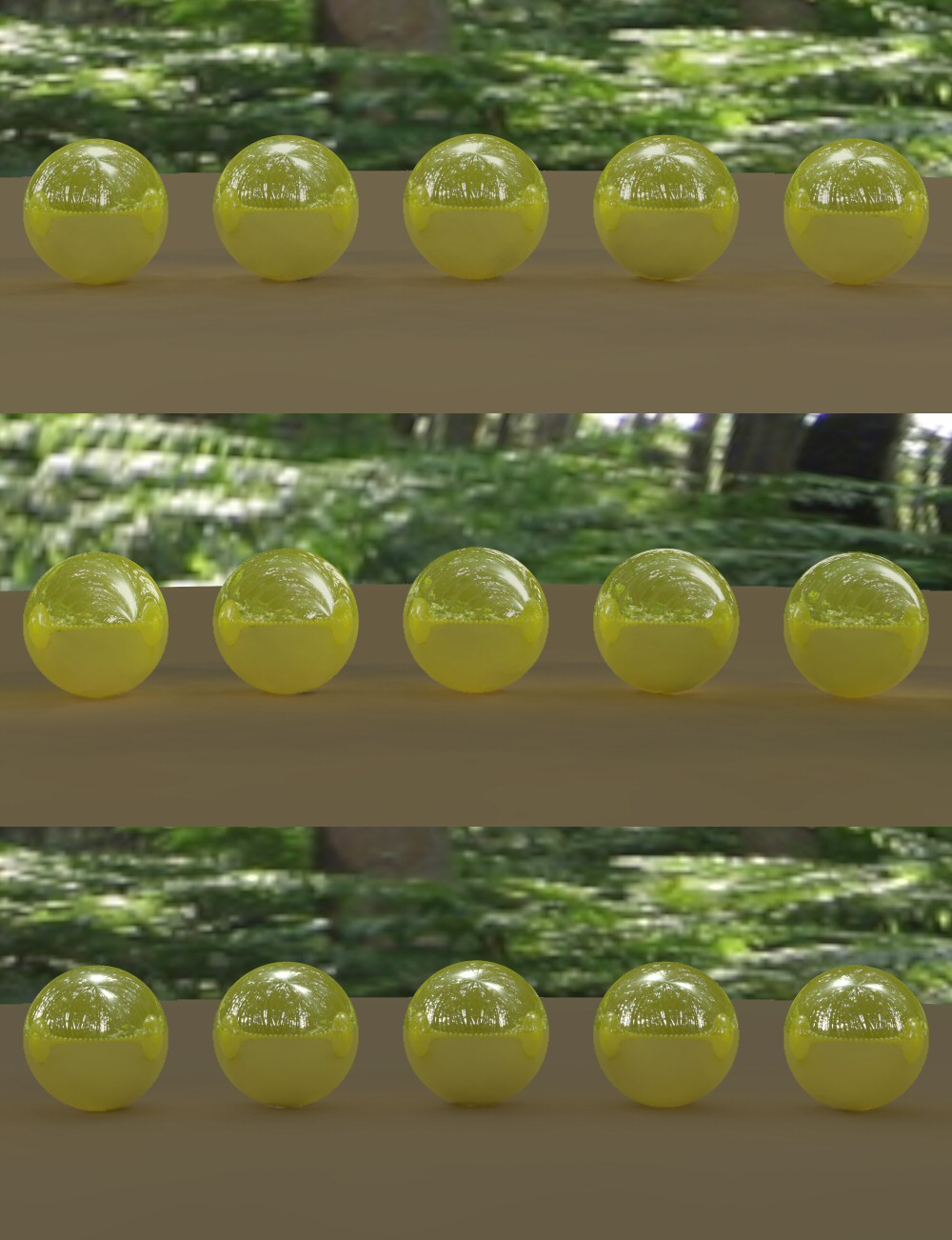
HDRI_test1 uses a map generated with MegaPOV 1.2.1. From top to bottom, this
was rendered with MegaPOV map_type 1; MegaPOV map_type 7; and finally with
version 3.7 beta 32.

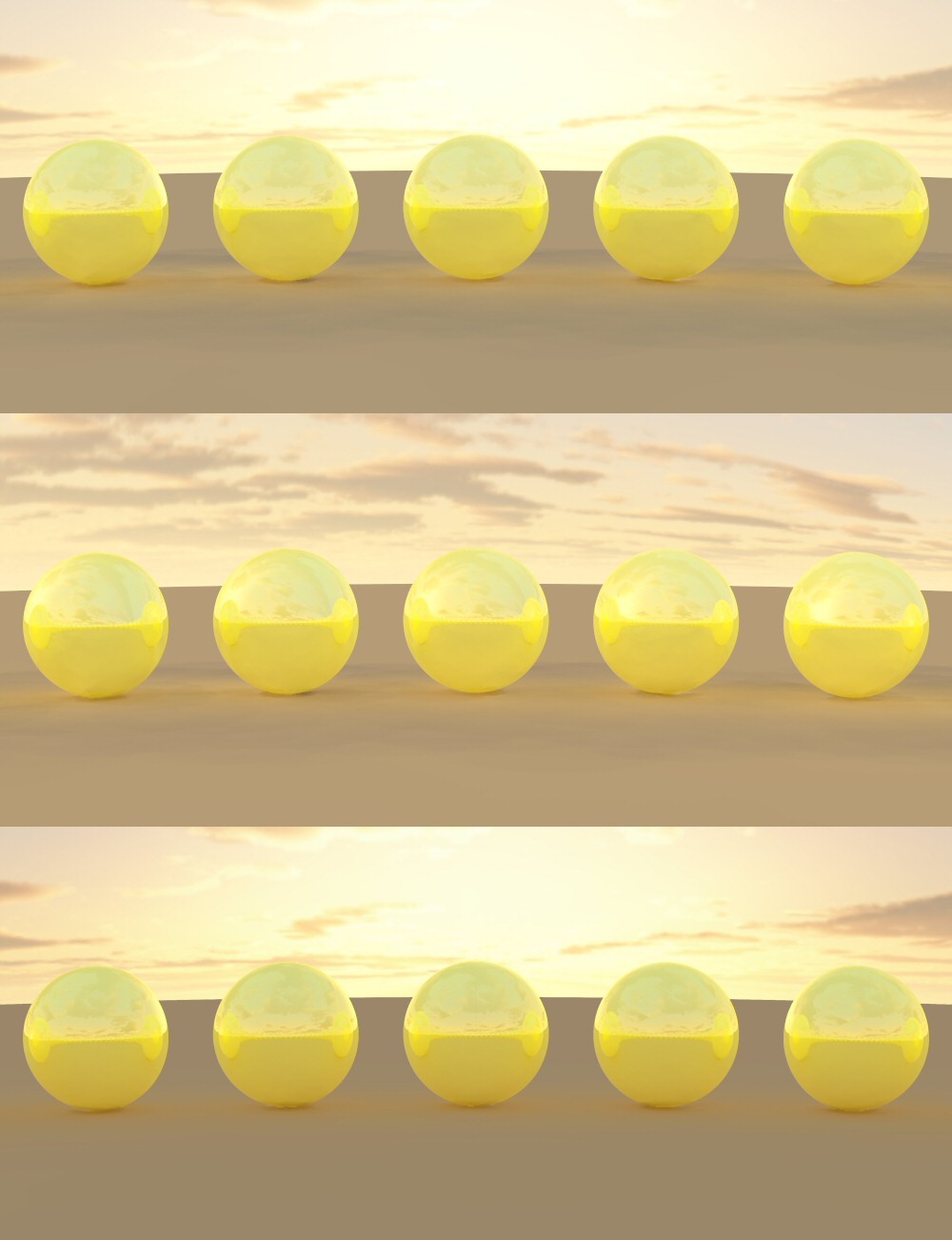
HDRI_test2 uses a map from a hdri collection, and was rendered identically
with megapov and 3.7.

The scenes rendered with map_type 7 are clearly different. So, in what
situations is this particular parameter used? The documentation is unclear
about this.

Thanks for any info.

Thomas
Post a reply to this message
Attachments:
Download 'HDRI_test2.jpg' (186 KB)
Download 'HDRI_test1.jpg' (114 KB)
Preview of image 'HDRI_test2.jpg'
Preview of image 'HDRI_test1.jpg'
|
|
| |
| |
|
|
|
|
| |
| |
|
|
"Thomas de Groot" <tDOTdegroot@interDOTnlANOTHERDOTnet> wrote:
> The scenes rendered with map_type 7 are clearly different. So, in what
> situations is this particular parameter used? The documentation is unclear
> about this.

It depends on the shape of the light probe. If you have a lat-long projection,
like this:

http://www.trinity3d.com/media/dosch_design/dosch_hdri/City_At_Night/example2.jpg

....you use map_type 1, in which the top and bottom rows of the image correspond
to the north and south poles of the sphere.

If, however, you use spherical projections (i.e., as photographed from mirror
balls), such as this:

http://gl.ict.usc.edu/HDRShop/tutorial/images/uffizi_probe.jpg

....you need the map_type 7, which the standard pov 3.6 doesn't support.

I think (but have never tried) you can set up the povray camera to produce
either projection if you're generating your own probe.

Bill
Post a reply to this message
|
|
| |
| |
|
|
From: Jaime Vives Piqueres
Subject: Re: What is there I do not understand about HDRI map_type 7 in MegaPOV?
Date: 5 May 2009 05:43:06
Message: <4a000a2a@news.povray.org>
|
|
|
| |
| |
|
|
Thomas de Groot escribió:
> HDRI_test1 uses a map generated with MegaPOV 1.2.1. From top to bottom, this
> was rendered with MegaPOV map_type 1; MegaPOV map_type 7; and finally with
> version 3.7 beta 32.
>
> HDRI_test2 uses a map from a hdri collection, and was rendered identically
> with megapov and 3.7.
>
> The scenes rendered with map_type 7 are clearly different. So, in what
> situations is this particular parameter used? The documentation is unclear
> about this.
>

   It all depends on the map you're using... in both of your tests, the HDRI
used seems to be equirectangular, so this is why map_type 1 works, and
map_type 7 doesn't because it was designed for another type of projection. I
don't recall how it's named, but there was a recent post by clipka
explaining just this and other interesting facts about the different
projection types used for HDRI.

--
Jaime
Post a reply to this message
|
|
| |
| |
|
|
From: Ive
Subject: Re: What is there I do not understand about HDRI map_type 7 in MegaPOV?
Date: 5 May 2009 07:12:26
Message: <4a001f1a@news.povray.org>
|
|
|
| |
| |
|
|
Bill Pragnell wrote:
> "Thomas de Groot" <tDOTdegroot@interDOTnlANOTHERDOTnet> wrote:
>> The scenes rendered with map_type 7 are clearly different. So, in what
>> situations is this particular parameter used? The documentation is unclear
>> about this.
>
> It depends on the shape of the light probe. If you have a lat-long projection,
> like this:
>
> http://www.trinity3d.com/media/dosch_design/dosch_hdri/City_At_Night/example2.jpg
>
> ....you use map_type 1, in which the top and bottom rows of the image correspond
> to the north and south poles of the sphere.
>

thats's right

> If, however, you use spherical projections (i.e., as photographed from mirror
> balls), such as this:
>
> http://gl.ict.usc.edu/HDRShop/tutorial/images/uffizi_probe.jpg
>
> ....you need the map_type 7, which the standard pov 3.6 doesn't support.
>

I think you are confusing things here a little. What you call spherical
projection is named angular projection (as used for so called light
probes) and those 'probes' are different to mirror ball photographs
because they are already post processed and corrected for the outer
distortion of mirror ball photos. So the 'Uffizi' - and the well known
'Kitchen' - probe are directly usable with MegaPov's map_type 7.
Mirror ball photos have to be processed with some external tool.

-Ive
Post a reply to this message
|
|
| |
| |
|
|
|
|
| |
| |
|
|
Ive <"ive### [at] lilysoft org"> wrote:
> I think you are confusing things here a little. What you call spherical
> projection is named angular projection (as used for so called light
> probes) and those 'probes' are different to mirror ball photographs
> because they are already post processed and corrected for the outer
> distortion of mirror ball photos. So the 'Uffizi' - and the well known
> 'Kitchen' - probe are directly usable with MegaPov's map_type 7.
> Mirror ball photos have to be processed with some external tool.
I didn't know the precise terminology for it, so my 'spherical' was just a
description! I realise there is more to it than just a photograph of a ball,
but I was trying to keep it simple to distinguish between the two projections.
(Actually you can use a ball photograph without processing, as long as you can
work around the 'pinched' area - to say nothing of the photographer!).
:-) org"> wrote:
> I think you are confusing things here a little. What you call spherical
> projection is named angular projection (as used for so called light
> probes) and those 'probes' are different to mirror ball photographs
> because they are already post processed and corrected for the outer
> distortion of mirror ball photos. So the 'Uffizi' - and the well known
> 'Kitchen' - probe are directly usable with MegaPov's map_type 7.
> Mirror ball photos have to be processed with some external tool.
I didn't know the precise terminology for it, so my 'spherical' was just a
description! I realise there is more to it than just a photograph of a ball,
but I was trying to keep it simple to distinguish between the two projections.
(Actually you can use a ball photograph without processing, as long as you can
work around the 'pinched' area - to say nothing of the photographer!).
:-)
Post a reply to this message
|
|
| |
| |
|
|
From: Ive
Subject: Re: What is there I do not understand about HDRI map_type 7 in MegaPOV?
Date: 5 May 2009 08:10:53
Message: <4a002ccd$1@news.povray.org>
|
|
|
| |
| |
|
|
Bill Pragnell wrote:
> (Actually you can use a ball photograph without processing, as long as you can
> work around the 'pinched' area - to say nothing of the photographer!).
>
 > :-)

err, I really hate it to sound so picky but actually you can't use a
mirror ball photograph without processing - at least if the image is
used as a reflection map - because it will look distorted.

The generation of a photographic 'probe' works usually like this: take a
two photos of a chrome ball from opposite directions.
Remap both images from the 'mirror ball' projection (sorry this time I
do not know the exact therm - but maybe there is none) to
latitude/longitude projection and compose them. Then map from
latitude/longitude to angular projection to get the so called probe.

It is just a nice side effect that this way the reflection of the
'photographer' can be removed, the importand thing is: The 'mirror ball'
*projection* is different to the 'angular' *projection*. But I admit
they can very easily be confused.

-Ive
Post a reply to this message
|
|
| |
| |
|
|
|
|
| |
| |
|
|
Ive <"ive### [at] lilysoftorg"> wrote:
> Bill Pragnell wrote:
> > (Actually you can use a ball photograph without processing, as long as you can
> > work around the 'pinched' area - to say nothing of the photographer!).
> >
>  > :-)
>
> err, I really hate it to sound so picky but actually you can't use a
> mirror ball photograph without processing - at least if the image is
> used as a reflection map - because it will look distorted.
>
> The generation of a photographic 'probe' works usually like this: take a
> two photos of a chrome ball from opposite directions.
> Remap both images from the 'mirror ball' projection (sorry this time I
> do not know the exact therm - but maybe there is none) to
> latitude/longitude projection and compose them. Then map from
> latitude/longitude to angular projection to get the so called probe.
>
> It is just a nice side effect that this way the reflection of the
> 'photographer' can be removed, the importand thing is: The 'mirror ball'
> *projection* is different to the 'angular' *projection*. But I admit
> they can very easily be confused.
>
> -Ive

Well you *could* use a mirror-ball without processing, but neither POV nor
megaPOV have a map-type that corresponds to it (as has been noted, map type 7
is not equivalent to mirror-ball and using it as such will present quite a bit
of distortion, I see this mistake made quite often on DeviantArt for example).
You could write a custom function that would unwrap and properly map the
mirror-ball, but this would involve lots of math and trig to figure out
correctly.

A HDRI map can be produced from a single mirror ball, however there are some
limitations:
-because of perspective/parallax, you don't quite get the full 360deg
-you tend to get a pinching and low resolution issues from the edges of the ball
(which reflects the rear of the scene)
-the photographer will be visible
There are situations where this may be acceptable (eg, the reflections are such
that the pinching effect or photographer wouldn't be obvious)
The *preferred* method for creating is as is described above, with two
perpendicular shots of the mirror ball (this allows both the distorion/low
resolution and photographer issues to be removed).  However, for the creator,
this requires meticulous processing in matching and masking/blending the two
together.

I find that the best way to handle HDRI maps is to convert them all to lat/long
format (I use HDRShop) whether from angular or mirrorball (just make sure you
use the correct corresponding map types for conversion or you will also get
major distortion, at least with lat/long, any severe distortion from incorrect
map types should be quite obvious also, this map-type is supported by both POV
3.7 and megaPOV as it is just your basic spherical panorama mapping.

-tgq
Post a reply to this message
|
|
| |
| |
|
|
|
|
| |
| |
|
|
Ive <"ive### [at] lilysoftorg"> wrote:
>  the importand thing is: The 'mirror ball'
> *projection* is different to the 'angular' *projection*. But I admit
> they can very easily be confused.

I am well aware of the difference, and that using a 'mirror ball' projection
with map_type 7 will produce a distorted reflection. All I meant was that in my
experience (I have used both types of projection in hdri-lit renders), it can be
good enough (scene geometry and view permitting). Comparing the techniques will
make the distortion obvious, and an expert may spot it immediately, but it's
not the end of the world! :-)
Post a reply to this message
|
|
| |
| |
|
|
|
|
| |
| |
|
|
"Thomas de Groot" <tDOTdegroot@interDOTnlANOTHERDOTnet> wrote:
> HDRI_test1 uses a map generated with MegaPOV 1.2.1. From top to bottom, this
> was rendered with MegaPOV map_type 1; MegaPOV map_type 7; and finally with
> version 3.7 beta 32.
>
> HDRI_test2 uses a map from a hdri collection, and was rendered identically
> with megapov and 3.7.
>
> The scenes rendered with map_type 7 are clearly different. So, in what
> situations is this particular parameter used? The documentation is unclear
> about this.
>
> Thanks for any info.
>
> Thomas

To further clarify the differences for you:

lat/long (spherical panorama): Each x coordinate represents the angle around the
sphere from 0 to 360deg, each y coordinate represents the vertical angle from
-90deg to +90deg.  This results in the poles being quite stretched in the
unmapped image, but this is not an issue.

mirror ball: A direct image (or could be generated using software) of a mirrored
ball.  Each point of the visible side of the ball reflects the scene based on
the angle of incidence.  The centre reflects straight back, progressing to a
reflection from behind the ball at the edges (or as close as the camera
parallax/perspective will allow).  The progression from the front to rear
reflection is non-linear as it is related to the angle of incidence with the
surface of the sphere.  This results in a pinching effect from the edges of the
ball due to poor resolution at this area.  These are not usually used for direct
mapping, but are usually converted to lat/long or angular map types.

Angular (also called probe sometimes):  Appears similar to mirror-ball as it is
circular and represents the scene from front to back as it progresses from the
center to the edges.  However, the progression here is linear (i.e.,
centre=0deg, 1/2way out=90deg, edges=180deg).  The linear progression helps to
preserve an adequate resolution for the entire map area and is also very simple
to unwrap and map.

-tgq
Post a reply to this message
|
|
| |
| |
|
|
From: Ive
Subject: Re: What is there I do not understand about HDRI map_type 7 in MegaPOV?
Date: 5 May 2009 09:02:27
Message: <4a0038e3$1@news.povray.org>
|
|
|
| |
| |
|
|
Bill Pragnell wrote:
> I am well aware of the difference, and that using a 'mirror ball' projection
> with map_type 7 will produce a distorted reflection. All I meant was that in my
> experience (I have used both types of projection in hdri-lit renders), it can be
> good enough (scene geometry and view permitting). Comparing the techniques will
> make the distortion obvious, and an expert may spot it immediately, but it's
> not the end of the world! :-)
>

;) definitely not!

I just wanted to make it clear for everybody that there is a difference
and (as Trevor also mentioned) I've seen quite some images where this
resulting distortion *was* visible and it was obviously not the
intention of the artists but lack of knowledge about those projection types.

-Ive
Post a reply to this message
|
|
| |
| |
|
|
|
|
| |
| |
|
|
"Bill Pragnell" <bil### [at] hotmailcom> wrote:
> Ive <"ive### [at] lilysoftorg"> wrote:
> >  the importand thing is: The 'mirror ball'
> > *projection* is different to the 'angular' *projection*. But I admit
> > they can very easily be confused.
>
> I am well aware of the difference, and that using a 'mirror ball' projection
> with map_type 7 will produce a distorted reflection. All I meant was that in my
> experience (I have used both types of projection in hdri-lit renders), it can be
> good enough (scene geometry and view permitting). Comparing the techniques will
> make the distortion obvious, and an expert may spot it immediately, but it's
> not the end of the world! :-)

Yes, you are right that you can get away with it in certain circumstances
(no-one will know the difference) and it can do in a pinch so long as
significant portions are not visible either directly or via reflection.  The
distortion is not minor and is fairly obvious if enough of the map is visible.

-tgq
Post a reply to this message
|
|
| |
| |
|
|
|
|
| |
| |
|
|
Ive <"ive### [at] lilysoftorg"> wrote:
> Bill Pragnell wrote:
> > I am well aware of the difference, and that using a 'mirror ball' projection
> > with map_type 7 will produce a distorted reflection. All I meant was that in my
> > experience (I have used both types of projection in hdri-lit renders), it can be
> > good enough (scene geometry and view permitting). Comparing the techniques will
> > make the distortion obvious, and an expert may spot it immediately, but it's
> > not the end of the world! :-)
> >
>
> ;) definitely not!
>
> I just wanted to make it clear for everybody that there is a difference
> and (as Trevor also mentioned) I've seen quite some images where this
> resulting distortion *was* visible and it was obviously not the
> intention of the artists but lack of knowledge about those projection types.

Good point, well made :-)

As an aside, I have recently ordered some mirrored spheres from a garden centre
(of all places!) to do exactly what you described, or at least attempt it. I
suspect the actual photography will be the difficult part. My camera's not an
SLR, so I hope it's up to the task... oh well, good excuse to buy me a new toy
if it's not!
Post a reply to this message
|
|
| |
| |
|
|
From: Thomas de Groot
Subject: Re: What is there I do not understand about HDRI map_type 7 in MegaPOV? Thanks to All!!
Date: 5 May 2009 09:40:40
Message: <4a0041d8$1@news.povray.org>
|
|
|
| |
| |
|
|
You are great, my friends!! :-)

Thanks a lot to all, as you have cleared up my mind by answering my
question. I see now when to use map_type 7. In fact, all my hdr maps are of
the lat/long type, but it is good to know about the other possibilities. The
megapov docs are rather vague about all this.

Again, thank you very much indeed.

Thomas
Post a reply to this message
|
|
| |
| |
|
|
|
|
| |
| |
|
|
"Bill Pragnell" <bil### [at] hotmailcom> wrote:
> As an aside, I have recently ordered some mirrored spheres from a garden centre
> (of all places!) to do exactly what you described, or at least attempt it. I
> suspect the actual photography will be the difficult part. My camera's not an
> SLR, so I hope it's up to the task... oh well, good excuse to buy me a new toy
> if it's not!

Good luck and have fun!
I have made a few in the past
(http://barberofcivil.deviantart.com/gallery/#HDR-Light-Probes) using a regular
digital camera (Canon S2, with 12X optical zoom though) and steel balls (those
chinese stress balls ~2" diameter).  I used HDRSop and followed the tutorials
to assemble them (http://gl.ict.usc.edu/HDRShop/tutorial/tutorial5.html).

A few pointers for you:

- Make sure you use a good dynamic range.  Check your scene beforehand with your
camera, decrease stops until the scene is mostly dark and light sources are as
dim as possible, then increase until the scene is mostly saturated

- You can make a usuable HDR with as little as 3 exposures, two as noted above,
plus one in between at a balanced exposure.  However, more exposure can be
helpful in ensuring a good dynamic recreation and minimize errors from noise.

- Try to make sure the perpendicular shots are taken from the same distance if
possible to minimize the parallax/perspective difference.  Also try to get
camera as far away from the ball as possible to minimize overall perspective
effects (this is where large zoom can help), however this is not critical so
long as you have sufficient distance.  It also makes a much smaller
camera/photographer reflection to be removed.

- adjust the shutter speed only for exposures.  Aperture and ISO have other
photographic effects that will impact the HDR assembly.

- keep the camera still and stationary.  This makes assembling the HDRs easier,
however, jitter can be adjusted for if necessary, it can just be tedious

- make sure there is minimal movement of background objects (ie, cars driving,
people walking, even fast moving clouds) as this can be quite evident and cause
visual errors in assembling the HDR.

Most of all, have fun!  Try to pick scenes which will produce interesting
reflection or lighting effects.  And by all means post them where I can get
them, I'm always looking to expand my collection.

One further item of interest.  If you have a Canon camera, you may want to check
out CHDK (http://chdk.wikia.com/wiki/Main_Page). I have it installed on my
cameras and it installs easily and doesn't harm the camera at all.  It can give
you a few advantages such as the scripting ability so you can setup your camera
push a button once and wait, minimizing jitter (look in the user-made scripts
section, I actually have a couple in there myself that are for HDR usage).
Also it makes shutter speeds available beyond those avaiable in the standard
camera (available shutter speeds from 64s to as fast as 1/32000 or possibly
even faster, yes that is three zeros) it can make a point and shoot Canon
camera far more powerful than any DSLR money can buy!

-tgq
Post a reply to this message
|
|
| |
| |
|
|
|
|
| |
| |
|
|
"Trevor G Quayle" <Tin### [at] hotmailcom> wrote:
> Good luck and have fun!

I'm looking forward to it - Brasso at the ready in case these spheres aren't
quite what I expect... :-)

> Most of all, have fun!  Try to pick scenes which will produce interesting
> reflection or lighting effects.  And by all means post them where I can get
> them, I'm always looking to expand my collection.

Thanks for the tips, and don't worry, if my exploits are successful I'll
definitely be showing off- er, I mean sharing them!

> One further item of interest.  If you have a Canon camera, you may want to check
> out CHDK (http://chdk.wikia.com/wiki/Main_Page).

Thanks for this link, this looks awesome ! :-D I do have a Canon, it's a
PowerShot A710... need to check my firmware version but this looks good!

Bill
Post a reply to this message
|
|
| |
| |
|
|
|
|
| |
| |
|
|
"Trevor G Quayle" <Tin### [at] hotmailcom> wrote:
> "Bill Pragnell" <bil### [at] hotmailcom> wrote:
> > As an aside, I have recently ordered some mirrored spheres from a garden centre
> > (of all places!) to do exactly what you described, or at least attempt it. I
> > suspect the actual photography will be the difficult part. My camera's not an
> > SLR, so I hope it's up to the task... oh well, good excuse to buy me a new toy
> > if it's not!
>
> Good luck and have fun!
> I have made a few in the past
> (http://barberofcivil.deviantart.com/gallery/#HDR-Light-Probes) using a regular
> digital camera (Canon S2, with 12X optical zoom though) and steel balls (those
> chinese stress balls ~2" diameter).  I used HDRSop and followed the tutorials
> to assemble them (http://gl.ict.usc.edu/HDRShop/tutorial/tutorial5.html).

Ahh! Shooting lightprobes - I've managed to spend some time on that too!

My setup is a chrome-plated pinball, a Canon IXUS 860 (aka the SD 870 in the
US), and a couple of super cheap table-top tripods (one for the camera, one for
the ball).

The pinball by itself was good, but even though it looked very well polished,
when you took close-ups of it, you could see all the almost microscopic
scratches on the surface. They were especially bad with bright lights (the sun,
light bulbs, etc). The first one started to rust after a while too.

Chrome-plating it got rid of the scratches, and finally gave it a true mirror
finish. It should also make it more or less rust-proof as well.

It's interesting to consider that while the perfectly reflective, perfectly
spherical ball is the stereotypical ray-traced object, getting one in real life
is much, much harder than you would think...

I also use CHDK firmware on my Canon, as it lets me automate taking 10 shots,
each one f-stop apart, as well as several other useful tricks, like locking the
focus to the minimum distance the camera will allow, and loading overlays on the
screen so I can exactly place the pinball at the correct distance from the
camera to match that focal distance. I only wish I had a camera that had a
better macro ratio at full zoom.

I use Photoshop to convert the 10 images into an HDR, then HDRShop to convert
that into a lat-long image. I shoot from two positions approx 90 degrees apart,
and combine the two lat-long HDRs into a single one in Photoshop again.

Lately I've started using LightMapGen to give me light dome data from the
images, and also shooting HDR backplates (normal shots of the environment) that
you can use to place in the background of a render. The light probes are almost
always to low res to look good behind objects in your scene, unless they are
very out of focus.

> A few pointers for you:
>
> - Make sure you use a good dynamic range.  Check your scene beforehand with your
> camera, decrease stops until the scene is mostly dark and light sources are as
> dim as possible, then increase until the scene is mostly saturated

I find that two stops over-exposed to seven stops under exposed (which is 10
exposures) captures most environments very well, even those with the sun in
them. I'd suggest at least three shots (2 fstops over, normal, two fstops
under), or four (+2, 0 -2, -4) as a minimum. The underexposed shots capture
lights more accurately, and make reflections look much more realistic.

> - make sure there is minimal movement of background objects (ie, cars driving,
> people walking, even fast moving clouds) as this can be quite evident and cause
> visual errors in assembling the HDR.

Clouds in particular move ore than you think they do...

> Most of all, have fun!  Try to pick scenes which will produce interesting
> reflection or lighting effects.  And by all means post them where I can get
> them, I'm always looking to expand my collection.

Also try to take images with different types of light in the same scene - a
otherwise boring office shot of mine turned out to be a favourite light probe
because it had florescent lighting from the office, and overcast daylight
coming through the windows.

> One further item of interest.  If you have a Canon camera, you may want to check
> out CHDK (http://chdk.wikia.com/wiki/Main_Page). I have it installed on my
> cameras and it installs easily and doesn't harm the camera at all.  It can give
> you a few advantages such as the scripting ability so you can setup your camera
> push a button once and wait, minimizing jitter (look in the user-made scripts
> section, I actually have a couple in there myself that are for HDR usage).
> Also it makes shutter speeds available beyond those avaiable in the standard
> camera (available shutter speeds from 64s to as fast as 1/32000 or possibly
> even faster, yes that is three zeros) it can make a point and shoot Canon
> camera far more powerful than any DSLR money can buy!

I agree - CHDK is an absolute marvel. Definitely check it out if you have a
Canon camera.

> -tgq

Cheers,
Edouard.
Post a reply to this message
|
|
| |
| |
|
|
|
|
| |
| |
|
|
"Edouard" <pov### [at] edouardinfo> wrote:
> My setup is a chrome-plated pinball, a Canon IXUS 860 (aka the SD 870 in the
> US), and a couple of super cheap table-top tripods (one for the camera, one
> for the ball).

When you say pinball, is that as in pinball machine? Basically a large ball
bearing? I thought about trying to find something like that, but I figured
imperfections would be more obvious on a small ball (as you say).

> It's interesting to consider that while the perfectly reflective, perfectly
> spherical ball is the stereotypical ray-traced object, getting one in real
> life is much, much harder than you would think...

I was in a church the other day with a lovely checkered tile floor. Oh for a
mirror ball and a camera... ;-)

> > - make sure there is minimal movement of background objects (ie, cars
> > driving, people walking, even fast moving clouds) as this can be quite
> > evident and cause visual errors in assembling the HDR.
>
> Clouds in particular move ore than you think they do...

I am well versed in this regard, I've been stitching regular rectilinear
panoramics centred on the horizon for some years now. Clouds are not as bad as
foreground parallax errors - I don't have a suitable tripod, so I try to
minimise parallax by rotating myself around the camera lens!

People moving can also be a problem, but as long as they stay out of overlap
regions it can work out (at least for regular panoramas). I took one where my
friend in the foreground appears twice - she skiied on while I was taking the
shots.

Thanks for the tips, both.

Bill
Post a reply to this message
|
|
| |
| |
|
|
|
|
| |
| |
|
|
"Bill Pragnell" <bil### [at] hotmailcom> wrote:
> "Edouard" <pov### [at] edouardinfo> wrote:
> > > - make sure there is minimal movement of background objects (ie, cars
> > > driving, people walking, even fast moving clouds) as this can be quite
> > > evident and cause visual errors in assembling the HDR.
> >
> > Clouds in particular move ore than you think they do...
>
> I am well versed in this regard, I've been stitching regular rectilinear
> panoramics centred on the horizon for some years now. Clouds are not as bad as
> foreground parallax errors - I don't have a suitable tripod, so I try to
> minimise parallax by rotating myself around the camera lens!
>
> People moving can also be a problem, but as long as they stay out of overlap
> regions it can work out (at least for regular panoramas). I took one where my
> friend in the foreground appears twice - she skiied on while I was taking the
> shots.
>
> Thanks for the tips, both.
>
> Bill

With HDRI this is even more pronounced as you are not just dealing with overlap
parallax, but also assembly of several exposures.  While moving objects for
panorama stitching can be hidden or minimized and don't really cause huge
problems other than little ghosting, they can cause ugly noticeable errors in
the calculation and assembly of HDRIs from multiple exposures.  The HDRI
assembler is basically taking the pixel value from the same area for each
exposure and creating a true dynamic value, as sudden change in one exposure
due to a moving object can cause chaos for it.

-tgq
Post a reply to this message
|
|
| |
| |
|
|
From: Sven Littkowski
Subject: Re: What is there I do not understand about HDRI map_type 7 in MegaPOV?
Date: 11 May 2009 14:39:39
Message: <4a0870eb$1@news.povray.org>
|
|
|
| |
| |
|
|
Whatever they are - they look beautiful! Are these some sort of seeds?

3D Artists Wanted!
http://Evolutions.Jamaica-Focus.com
Evolutions!  - The Game
Post a reply to this message
|
|
| |
| |
|
|
From: Thomas de Groot
Subject: Re: What is there I do not understand about HDRI map_type 7 in MegaPOV?
Date: 12 May 2009 03:09:42
Message: <4a0920b6$1@news.povray.org>
|
|
|
| |
| |
|
|
"Sven Littkowski" <Sve### [at] Jamaica-Focuscom> schreef in bericht
news:4a0870eb$1@news.povray.org...
> Whatever they are - they look beautiful! Are these some sort of seeds?

he he... no. They are narcissic mirror balls for vain beholders :-)  Only
the beholder is not present here...  hmmm makes me remember I 'did' a scene
like that a long time ago....

Thomas
Post a reply to this message
|
|
| |
| |
|
|
|
|
| |
|
|