|
|
|
|
|
|
| |
| |
|
|
|
|
| |
| |
|
|
Hi all:

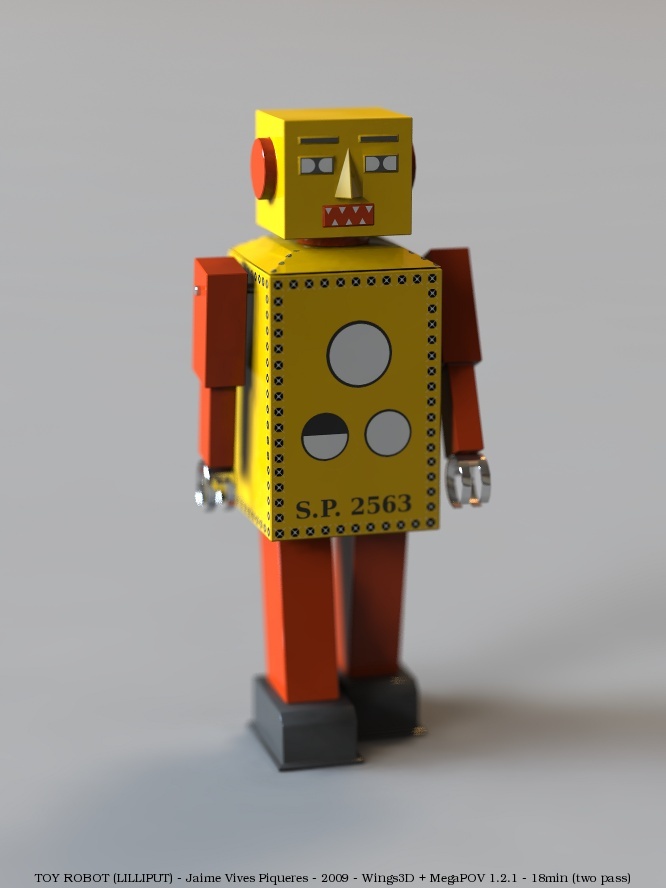
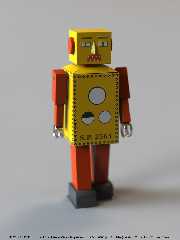
    Just another "cannot resist to model it"...

    I always wanted to do a toy robot, but never found the inspiration to
start. Casually, some days ago I found a picture of this Lilliput robot
while doing an image search, and I loved its simplicity and elegance, so I
did a virtual replica with Wings3D in some hours.

   It's still a WIP: the paint job is unfinished, and I want to make it to
look more ancient, but that is going to require some learning about UV
unwrapping.

    Regards,

--
Jaime
Post a reply to this message
Attachments:
Download 'toy-robot-01.jpg' (73 KB)
Preview of image 'toy-robot-01.jpg'
|
|
| |
| |
|
|
|
|
| |
| |
|
|
Jaime Vives Piqueres <jai### [at] ignorancia org> wrote:
> Hi all:
>
> Just another "cannot resist to model it"...
>
> I always wanted to do a toy robot, but never found the inspiration to
> start. Casually, some days ago I found a picture of this Lilliput robot
> while doing an image search, and I loved its simplicity and elegance, so I
> did a virtual replica with Wings3D in some hours.
>
> It's still a WIP: the paint job is unfinished, and I want to make it to
> look more ancient, but that is going to require some learning about UV
> unwrapping.
>
> Regards,
>
> --
> Jaime
For me it is already beautiful.
(But we file the teeth :-) )
--
Carlo org> wrote:
> Hi all:
>
> Just another "cannot resist to model it"...
>
> I always wanted to do a toy robot, but never found the inspiration to
> start. Casually, some days ago I found a picture of this Lilliput robot
> while doing an image search, and I loved its simplicity and elegance, so I
> did a virtual replica with Wings3D in some hours.
>
> It's still a WIP: the paint job is unfinished, and I want to make it to
> look more ancient, but that is going to require some learning about UV
> unwrapping.
>
> Regards,
>
> --
> Jaime
For me it is already beautiful.
(But we file the teeth :-) )
--
Carlo
Post a reply to this message
|
|
| |
| |
|
|
|
|
| |
| |
|
|
Jaime Vives Piqueres <jai### [at] ignoranciaorg> wrote:
> Hi all:
>
>     Just another "cannot resist to model it"...
>
>     I always wanted to do a toy robot...

Wow, this is a beauty.

Right now, his body looks a bit like cardboard (instead of metal?)

KW
Post a reply to this message
|
|
| |
| |
|
|
|
|
| |
| |
|
|
Jaime Vives Piqueres wrote:

Pretty 'fearsome' ;0

Are those mesh artifacts on the far side of the nose?
Post a reply to this message
|
|
| |
| |
|
|
|
|
| |
| |
|
|
Jaime Vives Piqueres nous illumina en ce 2009-04-23 07:21 -->
> Hi all:
>
>    Just another "cannot resist to model it"...
>
>    I always wanted to do a toy robot, but never found the inspiration to
> start. Casually, some days ago I found a picture of this Lilliput robot
> while doing an image search, and I loved its simplicity and elegance, so I
> did a virtual replica with Wings3D in some hours.
>
>   It's still a WIP: the paint job is unfinished, and I want to make it to
> look more ancient, but that is going to require some learning about UV
> unwrapping.
>
>    Regards,
>
> --
> Jaime
>
>
> ------------------------------------------------------------------------
>
Nice work. Some dirt, scratch and rust and it will look old enough. Also, some
bit of blured reflection on the outside of the "hands".

--
Alain
-------------------------------------------------
  Maybe God wants us to meet a few wrong people before meeting the right one, so
that when we finally meet the person, we will know how to be grateful.
Post a reply to this message
|
|
| |
| |
|
|
From: Jaime Vives Piqueres
Subject: Re: TOY ROBOT (Lilliput) (96KB)
Date: 24 Apr 2009 03:11:20
Message: <49f16618@news.povray.org>
|
|
|
| |
| |
|
|
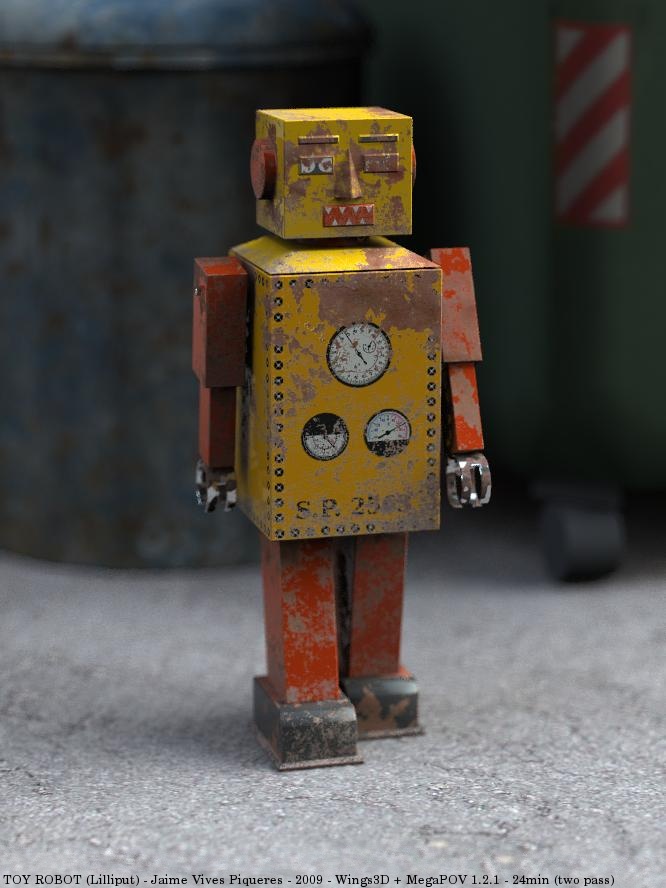
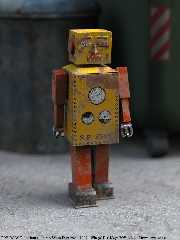
Now with finished paint job and perhaps too much rust...

--
Jaime
Post a reply to this message
Attachments:
Download 'toy-robot-06.jpg' (96 KB)
Preview of image 'toy-robot-06.jpg'
|
|
| |
| |
|
|
|
|
| |
| |
|
|
Kenneth escribió:
> Right now, his body looks a bit like cardboard (instead of metal?)

   Yes, my impression too... I added a bit more of reflection, but it still
looks like reflective cardboard. :)

--
Jaime
Post a reply to this message
|
|
| |
| |
|
|
|
|
| |
| |
|
|
Jim Charter escribió:
> Are those mesh artifacts on the far side of the nose?

   No, just radiosity artifacts due to low quality settings: they disappear
with higher quality.

--
Jaime
Post a reply to this message
|
|
| |
| |
|
|
From: Jaime Vives Piqueres
Subject: Re: TOY ROBOT (Lilliput) (72KB)
Date: 24 Apr 2009 03:28:15
Message: <49f16a0f@news.povray.org>
|
|
|
| |
| |
|
|
Alain escribió:
> Nice work. Some dirt, scratch and rust and it will look old enough.

   Done. Finally I didn't bother to learn how to unwrap the mesh properly for
UV painting, so I just did a material_map to add the rust. It then has
abrupt changes on non-contiguous uv maps, but it's hardly noticeable.

> Also, some bit of blured reflection on the outside of the "hands".

   Now that you mention it, blurred reflections would be a nice addition, as
the scene is really fast to render and is asking for some extra features.

--
Jaime
Post a reply to this message
|
|
| |
| |
|
|
|
|
| |
| |
|
|
Jaime Vives Piqueres <jai### [at] ignoranciaorg> wrote:
> Now with finished paint job and perhaps too much rust...
>

Beautiful image and good rust. Lighting is also great.
Waiting to see the next version.
Un abrazo.

> --
> Jaime

Txemi Jendrix
http://www.txemijendrix.com
http://www.losmiercoles.net
Post a reply to this message
|
|
| |
| |
|
|
|
|
| |
| |
|
|
Jaime Vives Piqueres wrote:

> Now with finished paint job and perhaps too much rust...
>
> --
> Jaime


Poor lil fella

Simple, nice, beautiful.

The only thing missing now is some dents because the fella hasn't been
treated too nicely
--
Ger
Post a reply to this message
|
|
| |
| |
|
|
|
|
| |
| |
|
|
"Jaime Vives Piqueres" <jai### [at] ignoranciaorg> schreef in bericht
news:49f16618@news.povray.org...
> Now with finished paint job and perhaps too much rust...
>

He is a worthy companion to Rusty. :-)

Thomas
Post a reply to this message
|
|
| |
| |
|
|
|
|
| |
| |
|
|
Another fascinating work!
;-)
Paolo

 >Jaime Vives Piqueres  on date 24/04/2009 09:12 wrote:
> Now with finished paint job and perhaps too much rust...
>
> --
> Jaime
>
>
> ------------------------------------------------------------------------
>
Post a reply to this message
|
|
| |
| |
|
|
|
|
| |
| |
|
|
> Now with finished paint job and perhaps too much rust...
>

I do not think so, maybe some 'real' dents would be nice -
as it seems the little guy might have had some exiting adventures during
his lifetime.

-Ive
Post a reply to this message
|
|
| |
| |
|
|
|
|
| |
| |
|
|
Jaime Vives Piqueres nous illumina en ce 2009-04-24 03:12 -->
> Now with finished paint job and perhaps too much rust...
>
> --
> Jaime
>
>
> ------------------------------------------------------------------------
>
Ouch! It's been a rough decade at work!

--
Alain
-------------------------------------------------
Seventh Day Adventism: No shit shall happen on Saturday.
Post a reply to this message
|
|
| |
| |
|
|
|
|
| |
| |
|
|
Jaime Vives Piqueres <jai### [at] ignoranciaorg> wrote:
> Hi all:
>
>     Just another "cannot resist to model it"...
>
>     I always wanted to do a toy robot, but never found the inspiration to
> start. Casually, some days ago I found a picture of this Lilliput robot
> while doing an image search, and I loved its simplicity and elegance, so I
> did a virtual replica with Wings3D in some hours.
>
>    It's still a WIP: the paint job is unfinished, and I want to make it to
> look more ancient, but that is going to require some learning about UV
> unwrapping.
>
>     Regards,
>
> --
> Jaime


You know, I've been trying to do some uv unwrapping on a complex model also, and
after finally figuring out what causes the "failed to export" plugin issue (not
placing every face in the model on the UV chart), I shot myself in the foot by
upgrading to 0.99.04 from 0.98.28 while halfway through the model.  So... a
word of warning:  finish the modeling process before upgrading!

Anyway, I've since realized that uv mapping in wings still has some issues when
it comes to Pov exporting, and I will probably try to partially avoid it, since
the model can be correctly textured using some of the image_map features
directly in POV-ray, if the textures for the object are selected correctly
(that is, marking which areas in wings that will receive which image_map in
povray).

Good luck!


-Reactor


P.S. Seeing the rusty version was actually kind of sad.  However, I noticed that
the arms are still positioned as though the robot were walking.  Are they part
of the model that way, or are they cut for animation?  I keep meaning to write
a wiki article on using marker lights in wings so you can animate your models,
but I never get around to it...
Post a reply to this message
|
|
| |
| |
|
|
|
|
| |
| |
|
|
Jaime Vives Piqueres <jai### [at] ignoranciaorg> wrote:
> Now with finished paint job and perhaps too much rust...
>
> --
> Jaime

Wow, now I understand why the first was a WIP!
Great textures.
:-)

--
Carlo
Post a reply to this message
|
|
| |
| |
|
|
From: Jaime Vives Piqueres
Subject: Now with dents [Re: TOY ROBOT (Lilliput)]
Date: 27 Apr 2009 09:21:53
Message: <49f5b171@news.povray.org>
|
|
|
| |
| |
|
|
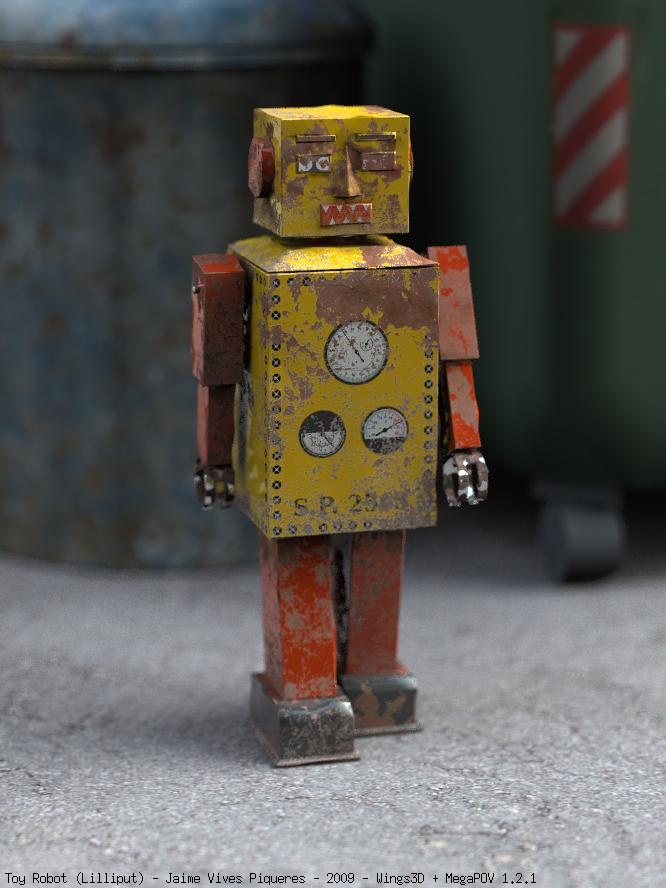
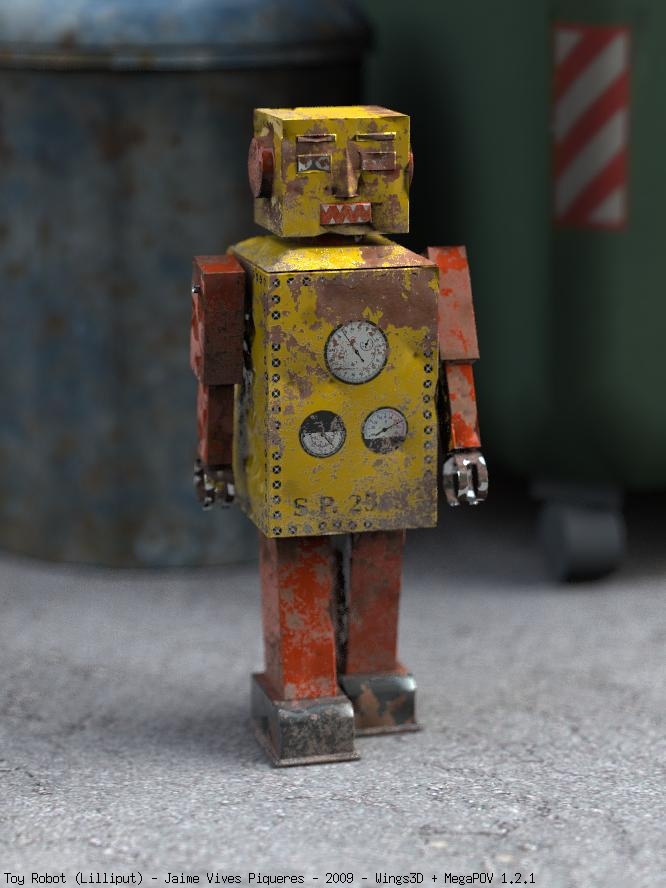
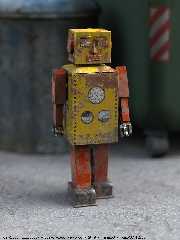
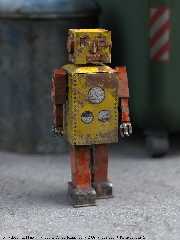
Last update for the moment... until I find some interesting situation for a
real scene with it.

The dents where done in Wings3d, using the random point selection to select
10% of the points, then moving them along the normal: one time to the inside
and another to the outside. Both pics use the same technique, but 9c has
more depth on the dents.

Regards,

--
Jaime
Post a reply to this message
Attachments:
Download 'toy-robot-09b.jpg' (93 KB)
Download 'toy-robot-09c.jpg' (93 KB)
Preview of image 'toy-robot-09b.jpg'
Preview of image 'toy-robot-09c.jpg'
|
|
| |
| |
|
|
|
|
| |
| |
|
|
Reactor escribió:
> You know, I've been trying to do some uv unwrapping on a complex model
> also, and after finally figuring out what causes the "failed to export"
> plugin issue (not placing every face in the model on the UV chart), I
> shot myself in the foot by upgrading to 0.99.04 from 0.98.28 while
> halfway through the model.  So... a word of warning:  finish the modeling
>  process before upgrading!

   I'm already on 0.99.04, but thanks for the tips...

> Anyway, I've since realized that uv mapping in wings still has some
> issues when it comes to Pov exporting, and I will probably try to
> partially avoid it, since the model can be correctly textured using some
> of the image_map features directly in POV-ray, if the textures for the
> object are selected correctly (that is, marking which areas in wings that
>  will receive which image_map in povray).

   You can also use Poseray... it does a better job, specially on how it
handles the textures, but in general you have much more control on the
exported code.

> P.S. Seeing the rusty version was actually kind of sad.

   Then better don't look at the new version... :)


> However, I noticed that the arms are still positioned as though the robot
>  were walking.  Are they part of the model that way, or are they cut for
> animation?

   No, I didn't think at all about animating it, but in this case it will be
very easy to animate it in POV-Ray, just exporting the arms as a separate
mesh and using some simple transformations.

> I keep meaning to write a wiki article on using marker lights in wings so
>  you can animate your models, but I never get around to it...

   Now I don't know what you're talking about... marker lights? You mean
placing lights to use the points later, or something like that?

--
Jaime
Post a reply to this message
|
|
| |
| |
|
|
|
|
| |
| |
|
|
Jaime Vives Piqueres <jai### [at] ignoranciaorg> wrote:
> The dents where done in Wings3d, using the random point selection to select
> 10% of the points, then moving them along the normal: one time to the inside
> and another to the outside. Both pics use the same technique, but 9c has
> more depth on the dents.

Very nice job, as usual, Jaime! I really like the dents, chipped paint, and
heavy rust, as well as the great (I'm assuming) proceduralized textures.

I'd maybe add a big dent in one or more corner(s) of the head box where some
careless child has dropped him many times (as they tend to do, especially when
battling Jedi knights or clone troopers or Klingons or...)

Cheers,
Rob :)
Post a reply to this message
|
|
| |
| |
|
|
|
|
| |
| |
|
|
Jaime Vives Piqueres <jai### [at] ignoranciaorg> wrote:
> Last update for the moment... until I find some interesting situation for a
> real scene with it.

It looks like an honest-to-goodness photo.  Just perfect.

IMO, the family dog just dug it up in the backyard; it was lost in the bushes
decades ago by mistake, and sadly forgotten by its young owner. Now, as an
older adult, the owner cherishes it for the wonderful memories it evokes. (And
he gave his dog a nice meaty bone as a reward for finding it!)

KW
Post a reply to this message
|
|
| |
| |
|
|
|
|
| |
| |
|
|
Jaime Vives Piqueres <jai### [at] ignoranciaorg> wrote:
>
>    Now I don't know what you're talking about... marker lights? You mean
> placing lights to use the points later, or something like that?
>
> --
> Jaime


Sorry, yes, using lights and the 'position highlight' command to mark points of
rotation.  For a very simple model, one can often align the axis of rotation
with one of the cardinal axes and export that way, but for a very complex
object or an object that will incorporate POV-ray primitives, it can be very
helpful to know where a given point or shape is.

As Wings doesn't have a way to export a point or line primitive, I tend to use
light sources.

-Reactor
Post a reply to this message
|
|
| |
| |
|
|
|
|
| |
| |
|
|
Reactor escribió:
> Jaime Vives Piqueres <jai### [at] ignoranciaorg> wrote:
>> Now I don't know what you're talking about... marker lights? You mean
>> placing lights to use the points later, or something like that?
>>
>> -- Jaime
>
>
>
> Sorry, yes, using lights and the 'position highlight' command to mark
> points of rotation.  For a very simple model, one can often align the
> axis of rotation with one of the cardinal axes and export that way, but
> for a very complex object or an object that will incorporate POV-ray
> primitives, it can be very helpful to know where a given point or shape
> is.
>
> As Wings doesn't have a way to export a point or line primitive, I tend
> to use light sources.

   Ah... clever! I also wanted sometimes to export points (not for animation,
but to place other objects on the surface), but never figured out this
one... thanks!

--
Jaime
Post a reply to this message
|
|
| |
| |
|
|
From: Jaime Vives Piqueres
Subject: Re: Now with dents [Re: TOY ROBOT (Lilliput)]
Date: 28 Apr 2009 18:07:46
Message: <49f77e32@news.povray.org>
|
|
|
| |
| |
|
|
Robert McGregor escribió:
> Very nice job, as usual, Jaime! I really like the dents, chipped paint,
> and heavy rust, as well as the great (I'm assuming) proceduralized
> textures.

   Thanks, but in this case I didn't use any procedural pattern, so I don't
know if that counts as proceduralizing... ;) ...I just used the material map
feature to mix the uv maps with a photo of rusted metal, something like:

   texture{
    uv_mapping
    material_map{
     png "rust_map" // b&w (2 indexes) image generated from the one below
     texture{pigment{image_map{jpeg "any_rust_photo.jpg"}}}
     texture{pigment{image_map{png "uv_map.png"}}}
    }
   }

> I'd maybe add a big dent in one or more corner(s) of the head box where
> some careless child has dropped him many times (as they tend to do,
> especially when battling Jedi knights or clone troopers or Klingons
> or...)

   I think I prefer Kenneth story on the post bellow: it doesn't involves any
further damage to the poor little robot... :)

--
Jaime
Post a reply to this message
|
|
| |
| |
|
|
From: Jaime Vives Piqueres
Subject: Re: Now with dents [Re: TOY ROBOT (Lilliput)]
Date: 28 Apr 2009 18:09:34
Message: <49f77e9e$1@news.povray.org>
|
|
|
| |
| |
|
|
Kenneth escribió:
> IMO, the family dog just dug it up in the backyard; it was lost in the
> bushes decades ago by mistake, and sadly forgotten by its young owner.
> Now, as an older adult, the owner cherishes it for the wonderful memories
> it evokes. (And he gave his dog a nice meaty bone as a reward for finding
> it!)

   Beautiful story... thanks for coming up with such nice explanation for the
excess of rust and lack of real damage. :)

--
Jaime
Post a reply to this message
|
|
| |
| |
|
|
|
|
| |
| |
|
|
Jaime Vives Piqueres wrote:
> Last update for the moment... until I find some interesting situation for a
> real scene with it.


Jaime, this is beautiful. One of my favourite rendered images ever.

zutroi
Post a reply to this message
|
|
| |
| |
|
|
|
|
| |