|
|
|
|
|
|
| |
| |
|
|
|
|
| |
| |
|
|
High!

While playing around with procedurally generated countries' flags, I
tried to use them in patterns... and to make it simple in the beginning,
I started with a checker pattern containing the flags of Palau and
Trinidad and Tobago:

The include file containing the texture definitions (I plan to program
all sovereign countries' flags of the world later on):

// beginning of procflags.inc

#declare F_NoLights =
finish
{
   ambient 1
   diffuse 0
}

#declare P_Flag_Palau =
pigment
{
   spherical
   color_map
   {
     [0 rgb <0, 0.75, 1>]
     [0.0001 rgb <0, 0.75, 1>]
     [0.0001 rgb <1, 1, 0>]
   }
   // translate <-0.1, 0, 0.03>
}

#declare T_Flag_Palau =
texture
{
   pigment { P_Flag_Palau }
   finish { F_NoLights }
}

#declare P_Flag_TrinidadAndTobago =
pigment
{
   gradient x
   triangle_wave
   color_map
   {
     [0.87 rgb <1, 0, 0>]
     [0.87 rgb 1]
     [0.92 rgb 1]
     [0.92 rgb 0]
   }
   rotate y*45
}

#declare T_Flag_TrinidadAndTobago =
texture
{
   pigment { P_Flag_TrinidadAndTobago }
   finish { F_NoLights }
}

// end of procflags.inc

And the actual test scene:

// beginning of procflagstest.pov

#include "procflags.inc"

plane
{
   y, 0
   texture
   {
     pigment
     {
       checker
       pigment { P_Flag_Palau }
       pigment { P_Flag_TrinidadAndTobago }
     }
     finish { ambient 1 diffuse 0 }
   }
}

camera
{
   location <0, 10, 0>
   look_at 0
   angle 40
}

// end of procflagstest.pov

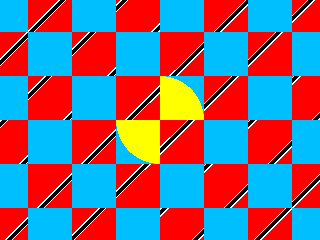
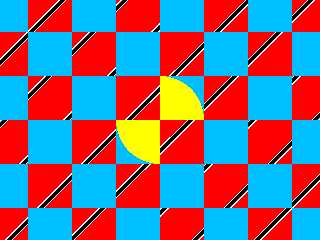
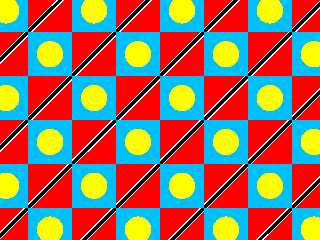
...but the textures continue through the checker pattern rather than
being "copied" into each checker cell (see attached picture) - is this a
general shortcoming of the checker pattern, or are there ways to avoid this?

See you on www.khyberspace.de!

Yadgar
Post a reply to this message
Attachments:
Download 'procflagstest.png' (4 KB)
Preview of image 'procflagstest.png'
|
|
| |
| |
|
|
|
|
| |
| |
|
|
=?ISO-8859-1?Q?J=F6rg_=27Yadgar=27_Bleimann?= <yaz### [at] gmx de> wrote:
> ...but the textures continue through the checker pattern rather than
> being "copied" into each checker cell (see attached picture) - is this a
> general shortcoming of the checker pattern, or are there ways to avoid this?
All the checker pattern does is "weave" two textures (or pigments or whatever)
together in an alternating fashion. It does no transformations whatsoever on
the textures themselves.
This is not a "shortcoming" - it's just the way the checker pattern works.
Having the pattern repeat for each tile is not always desired, so that requires
an additional operation, a so-called warp (more precisely, a repeat warp in this
case; you probably need two of them). See "3.5.12.6.2 Repeat Warp" in the POV
3.6 documentation. de> wrote:
> ...but the textures continue through the checker pattern rather than
> being "copied" into each checker cell (see attached picture) - is this a
> general shortcoming of the checker pattern, or are there ways to avoid this?
All the checker pattern does is "weave" two textures (or pigments or whatever)
together in an alternating fashion. It does no transformations whatsoever on
the textures themselves.
This is not a "shortcoming" - it's just the way the checker pattern works.
Having the pattern repeat for each tile is not always desired, so that requires
an additional operation, a so-called warp (more precisely, a repeat warp in this
case; you probably need two of them). See "3.5.12.6.2 Repeat Warp" in the POV
3.6 documentation.
Post a reply to this message
|
|
| |
| |
|
|
From: Jörg 'Yadgar' Bleimann
Subject: Re: Textured block pattern problem
Date: 24 Mar 2009 22:16:19
Message: <49c993f3@news.povray.org>
|
|
|
| |
| |
|
|
High! (so spät noch auf p.b.i. unterwegs?)

clipka wrote:

> This is not a "shortcoming" - it's just the way the checker pattern works.
> Having the pattern repeat for each tile is not always desired, so that requires
> an additional operation, a so-called warp (more precisely, a repeat warp in this
> case; you probably need two of them). See "3.5.12.6.2  Repeat Warp" in the POV
> 3.6 documentation.

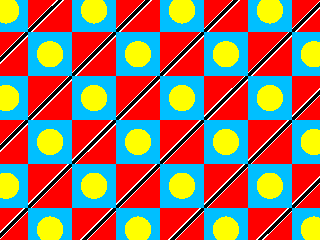
Oh, it's legal to use more than one warp in each pattern? Then here we
go! But there's still one problem: almost all countries' flags are
rectangles (usually at a 3:2 ratio) rather than squares, so I need to
scale the checker cells *before* I insert the defined textures...

See you in Khyberspace!

Yadgar
Post a reply to this message
Attachments:
Download 'procflagstest.png' (5 KB)
Preview of image 'procflagstest.png'
|
|
| |
| |
|
|
From: Jörg 'Yadgar' Bleimann
Subject: Re: Textured block pattern problem
Date: 24 Mar 2009 22:30:33
Message: <49c99749@news.povray.org>
|
|
|
| |
| |
|
|
High!

Jörg 'Yadgar' Bleimann wrote:
>But there's still one problem: almost all countries' flags are
> rectangles (usually at a 3:2 ratio) rather than squares, so I need to
> scale the checker cells *before* I insert the defined textures...

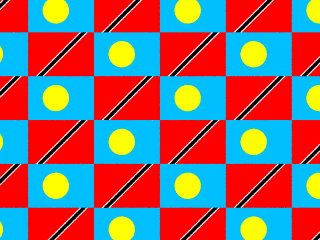
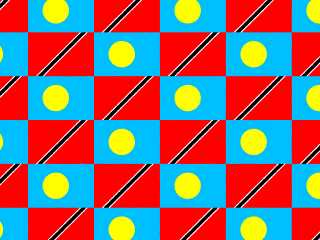
I got it... scaling the checker pattern and then reciprocally rescaling
the textures does the trick!

plane
{
   y, 0
   texture
   {
     scale x*1.5
     pigment
     {
       checker
       pigment { P_Flag_Palau scale 0.3 scale <2/3, 0, 0> translate
<0.42, 0, 0.5> warp { repeat x } warp { repeat z } }
       pigment { P_Flag_TrinidadAndTobago scale <2/3, 0, 0> translate
x*0.65 warp { repeat x } warp { repeat z } }
     }
     finish { ambient 1 diffuse 0 }
   }
}

See you in Khyberspace!

Yadgar
Post a reply to this message
Attachments:
Download 'procflagstest.png' (15 KB)
Preview of image 'procflagstest.png'
|
|
| |
| |
|
|
|
|
| |
| |
|
|
"clipka" <nomail@nomail> wrote:
> an additional operation, a so-called warp (more precisely, a repeat warp in this
> case; you probably need two of them). See "3.5.12.6.2  Repeat Warp" in the POV
> 3.6 documentation.

Dang, I completely forgot about repeat warps. Looks like I reinvented the wheel
again... ;-)
Post a reply to this message
|
|
| |
| |
|
|
From: Jaime Vives Piqueres
Subject: Re: Textured block pattern problem
Date: 25 Mar 2009 09:17:28
Message: <49ca2ee8@news.povray.org>
|
|
|
| |
| |
|
|
Bill Pragnell escribió:
> Dang, I completely forgot about repeat warps. Looks like I reinvented the
> wheel again... ;-)

  I always thought that POV-Ray was specially crafted for people who like to
reinvent the 3D wheel... :)

--
Jaime
Post a reply to this message
|
|
| |
| |
|
|
|
|
| |
| |
|
|
Jaime Vives Piqueres <jai### [at] ignoranciaorg> wrote:
> Bill Pragnell escribió:
> > Dang, I completely forgot about repeat warps. Looks like I reinvented the
> > wheel again... ;-)
>
>   I always thought that POV-Ray was specially crafted for people who like to
> reinvent the 3D wheel... :)

It's often quicker to do so than go hunting through docs and resources...!

I was making some textures the other day by drawing pictures with spherical and
boxed pigments, then tessellating them. Because I was using pigment functions
to combine the various shapes, it seemed obvious to call them as

fn(x-floor(x), 0, z-floor(z)).x

to get the repetition...
Post a reply to this message
|
|
| |
| |
|
|
|
|
| |
| |
|
|
"Bill Pragnell" <bil### [at] hotmailcom> wrote:
> >   I always thought that POV-Ray was specially crafted for people who like to
> > reinvent the 3D wheel... :)
>
> It's often quicker to do so than go hunting through docs and resources...!
>
> I was making some textures the other day by drawing pictures with spherical and
> boxed pigments, then tessellating them. Because I was using pigment functions
> to combine the various shapes, it seemed obvious to call them as
>
> fn(x-floor(x), 0, z-floor(z)).x
>
> to get the repetition...

Yeah. It seems that most things are actually quite trivial in POV - at least in
the original latin sense, literally meaning "having three ways" ;)

In this case, another one would be to use the pattern as a function image (see
3.5.11.16) without the "once" keyword ;) (didn't test it, but I guess it should
tile like any proper image would)


You know you've been raytracing too long when...
    ... you know every little trick the POV SDL has to offer ;)
Post a reply to this message
|
|
| |
| |
|
|
|
|
| |
| |
|
|
Jaime Vives Piqueres wrote:
>  I always thought that POV-Ray was specially crafted for people who like to
> reinvent the 3D wheel... :)

Or at least the sphere.

--
   Darren New, San Diego CA, USA (PST)
   My fortune cookie said, "You will soon be
   unable to read this, even at arm's length."
Post a reply to this message
|
|
| |
| |
|
|
|
|
| |
| |
|
|
Darren New <dne### [at] sanrrcom> wrote:
> Jaime Vives Piqueres wrote:
> >  I always thought that POV-Ray was specially crafted for people who like to
> > reinvent the 3D wheel... :)
>
> Or at least the sphere.

Yeah, those are "tri-vial" as well: You can use POV's standard sphere{}, but
occasionally you are better off with a sperical blob element. And occasionally
you may have reason to model it as an isosurface - or a mesh, for that
matter...

Using bicubic patches to approximate a sphere seems to be a bit difficult
though...

;)
Post a reply to this message
|
|
| |
| |
|
|
|
|
| |
| |
|
|
On Tue, 24 Mar 2009 20:51:33 -0400, Jörg 'Yadgar' Bleimann
<yaz### [at] gmxde> wrote:

> While playing around with procedurally generated countries' flags, I
> tried to use them in patterns... and to make it simple in the beginning,
> I started with a checker pattern containing the flags of Palau and
> Trinidad and Tobago:

Here are some procedurally-generated flags I was experimenting with a year
and a half ago.  The first 3 are:
   - U.S. Virgins Islands, where I live;
   - United States of America, my country of citizenship;
   - Maryland, USA, where I was staying when I made these flags.

I didn't make a Trinidad and Tobago; not enough of a challenge, I guess.
Instead I submit nearby countries Barbados and St. Vincent and the
Grenadines.  (I have flags languishing of even closer countries, Venezuela
(which is a good swim from Trinidad) and Grenada, as well as T&T itself.
However, they are from my pre-POV-Ray days.)

The colors may seem a bit coolish; the monitor I was using at the time was
damaged and didn't illuminate properly.

--
<Insert witty .sig here>
Post a reply to this message
Attachments:
Download 'usvi-flag.png' (22 KB)
Download 'usa-flag.png' (11 KB)
Download 'maryland-flag.png' (4 KB)
Download 'barbados-flag.png' (2 KB)
Download 'st_vincent-flag.png' (3 KB)
Preview of image 'usvi-flag.png'

Preview of image 'usa-flag.png'

Preview of image 'maryland-flag.png'

Preview of image 'barbados-flag.png'

Preview of image 'st_vincent-flag.png'

|
|
| |
| |
|
|
|
|
| |
| |
|
|
"clipka" <nomail@nomail> wrote:

> In this case, another one would be to use the pattern as a function image (see
> 3.5.11.16) without the "once" keyword ;) (didn't test it, but I guess it should
> tile like any proper image would)

Yes indeed; I use that technique quite a bit.

The only problem with a function image is the really odd 'upside-down mirror
image' behavior of the resulting pattern 'slice' (at least when it's used to
make a HF, anyway.) Try making a function image from an image_map to see what I
mean.  This behavior seems to be intrinsic to using a function with *any*
pattern (although, since POV patterns like bozo and such are
random-looking anyway, it's difficult to see this effect.) Awhile ago, I posted
something about all this, with a fix (and I've since found a slightly simpler
fix, but the posted one will do it)...

http://news.povray.org/povray.advanced-users/thread/%3Cweb.47f304325a8bc21378dcad930%40news.povray.org%3E/

KW
Post a reply to this message
|
|
| |
| |
|
|
|
|
| |
| |
|
|
"Jörg 'Yadgar' Bleimann" <yaz### [at] gmxde> wrote in message
news:49c98018$1@news.povray.org...
> High!
>
> I started with a checker pattern containing the flags of Palau and
> Trinidad and Tobago:
>

Hi Yadgar and CR,

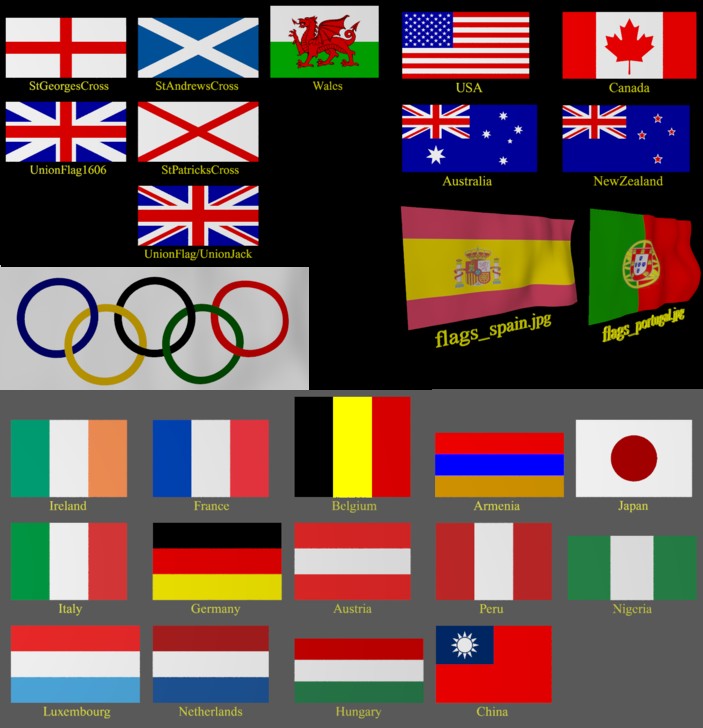
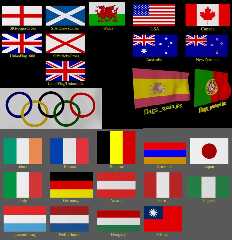
If you code these in a way that's compatible with the 23 already in the
Object Collection at
http://lib.povray.org/searchcollection/index2.php?objectName=Flags&contributorTag=chrisb
then we could build a pretty comprehensive set (each is simply defined in
it's own macro which sets the Flags_Texture identifier using a texture
scaled to fit a unit square.

It currently contains procedural textures for "Olympic", "UnionJack",
"UnionFlag1606", "StGeorgesCross", "StAndrewsCross",
"StPatricksCross","Wales", "Canada", "USA", "Australia", "New Zealand",
"Ireland", "France", "Belgium", "Italy", "Germany", "Austria", "Luxembourg",
"Netherlands", "Hungary", "Armenia", "Peru", "Nigeria".

I'd be happy to help put that together if that's something you'd like to do.

Regards,
then Chris B.
Post a reply to this message
|
|
| |
| |
|
|
|
|
| |
| |
|
|
Since we're on pbi:

Chris B.
Post a reply to this message
Attachments:
Download 'flags.jpg' (100 KB)
Preview of image 'flags.jpg'
|
|
| |
| |
|
|
|
|
| |
| |
|
|
"Kenneth" <kdw### [at] earthlinknet> wrote:
> The only problem with a function image is the really odd 'upside-down mirror
> image' behavior of the resulting pattern 'slice' (at least when it's used to
> make a HF, anyway.) Try making a function image from an image_map to see what I
> mean.

Ah, so *that's* why I found myself in need of a scale <1,1,-1> when I migrated a
particular scene from an auto-generated mesh to an auto-generated-df3-based
height field these days...

I actually have an Idea how this came to be so:

Where's <0,0> in an image?

In a POV context, for some reason I'd be quite quick to claim that it must be
the bottom left corner.

In an image editing context, however, (0;0) classically designates the top left
corner.

So height field code, normally dealing with images, might have to swap around
the image's y co-ordinate for proper operation. And it might do just the same
for function images - but the function images may fail to do a similar
re-normalization for the input pattern.

So the issue may actually be in function images in general, not patterns in
height fields (after all, if I'm not mistaken, function images are the only way
to create a height field from a pattern in the first place).
Post a reply to this message
|
|
| |
| |
|
|
|
|
| |
| |
|
|
"clipka" <nomail@nomail> wrote:
> "Kenneth" <kdw### [at] earthlinknet> wrote:
> > The only problem with a function image is the really odd 'upside-down mirror
> > image' behavior of the resulting pattern 'slice' (at least when it's used to
> > make a HF, anyway.) Try making a function image from an image_map to see
> > what I mean.
>
> Ah, so *that's* why I found myself in need of a scale <1,1,-1> when I
> migrated a particular scene from an auto-generated mesh to an
> auto-generated-df3-based height field these days...
>
> I actually have an Idea how this came to be so:
>
> Where's <0,0> in an image?
>
> In a POV context, for some reason I'd be quite quick to claim that it must be
> the bottom left corner.
>
> In an image editing context, however, (0,0) classically designates the top
> left corner.

YES, you've hit the nail squarely on the head. The x/z 'origin' of an image_map
function in POV_Ray is, strangely enough, at <0,1>, not <0,0>. That took me a
bit of experimenting to find. And your explanation of how it possibly came to
be is the final piece of info that solves the puzzle. Yet *at the moment* I'm
not so sure now that the same thing applies to POV pigments or patterns (see
below.)
>
> So height field code, normally dealing with images, might have to swap around
> the image's y co-ordinate for proper operation. And it might do just the same
> for function images - but the function images may fail to do a similar
> re-normalization for the input pattern.

> So the issue may actually be in function images in general, not patterns in
> height fields...

Since posting my reply, I've gone back for yet *another* round of experimenting
with function images and HFs (this time using the HF_Square macro in
shapes.inc), and I've seen some odd behavior.  Part of that is due to a problem
in that macro itself (which I just found a fix for); but my 'fix'--to reorient
how the macro 'sees' an image_map function--does not seem to operate the same
way on functions made from POV-Ray pigments or patterns. I'm getting
conflicting results, in several different ways, so--whether dealing with this
HF macro or a regular HF-- I'm not so sure now that pigments/patterns and
image_maps are even operating the 'same' way when 'functionalized.' Using the
HEXAGON and RADIAL patterns--which have a definite 'direction' or
orientation--they come out looking *exactly* the way they should when used in
the HF_Square macro--no 'mirror image' stuff to contend with, no altered x/z
origin point. Yet an image_map function there DOES need my fix (as a
similar-but-different 'mirror-image' fix was required in a regular HF.) I need
to go back to a 'regular' HF and see if those two specific patterns show up
correctly there as well.

It's all quite weird, and I continue to experiment. I think I *can* say this: A
regular HF and the HF_Square macro seem to operate differently when presented
with functions. (Not so weird in itself; they probably have different code
paradigms.) But nailing down that difference--and the image_map vs.
pigment/pattern discrepancies--is taking some time and thought.
>
> ...(after all, if I'm not mistaken, function images are the only
> way to create a height field from a pattern in the first place).

Yes, that's the only way I know of too.

KW
Post a reply to this message
|
|
| |
| |
|
|
|
|
| |
| |
|
|
"Kenneth" <kdw### [at] earthlinknet> wrote:

> Since posting my reply, I've gone back for yet *another* round of
> experimenting with function images and HFs (this time using the HF_Square
> macro in shapes.inc), and I've seen some odd behavior.  Part of that is due
> to a problem in that macro itself (which I just found a fix for); but my
> 'fix'--to reorient how the macro 'sees' an image_map function--does not seem
> to operate the same way on functions made from POV-Ray pigments or patterns.

After more work, I decided against using that macro fix, as it really wasn't
needed (the problem was better solved outside the macro.) Instead, there seems
to be *something* basically weird, having to do with how functions 'see'
image_maps (as opposed to how they deal with pigments/patterns); I even have
questions now about functions supposedly "evaluating the pattern on the X/Y
plane". Trying to sort it all out is rather complex and mind-numbing--but I'm
getting *closer* to an answer!

KW
Post a reply to this message
|
|
| |
| |
|
|
|
|
| |
| |
|
|
"Kenneth" <kdw### [at] earthlinknet> wrote:
>...but my 'fix'--to reorient
> how the macro 'sees' an image_map function--does not seem to operate the same
> way on functions made from POV-Ray pigments or patterns. I'm getting
> conflicting results, in several different ways...

I know I'm getting further and further off-topic with this little discussion,
but I just found out something interesting (and definitely weird):

When a function is used in the HF_Square macro in shapes.inc--supposedly the
'equivalent' of POV's regular HF--the function (whether of a pigment/pattern OR
an image_map) actually evaluates the pattern 'slice' on the X/Z plane(!) rather
than the X/Y plane as it is supposed to. That explains lots of things!


OK, enough. :-) I'll continue with this in its own post.

KW
Post a reply to this message
|
|
| |
| |
|
|
|
|
| |
| |
|
|
"Kenneth" <kdw### [at] earthlinknet> wrote:
> "clipka" <nomail@nomail> wrote:
> > ...(after all, if I'm not mistaken, function images are the only
> > way to create a height field from a pattern in the first place).
>
> Yes, that's the only way I know of too.

Just an aside to your discussion, obviously, but...

What about using a regular pigment function in the height field? Or a pigment
function called at <x,0,z> in an isosurface? (Not strictly a heightfield but
you get the same effect.) Or, of course, you could always write your own
heightfield macro...

As always, plenty of ways to skin a cat... :)
Post a reply to this message
|
|
| |
| |
|
|
|
|
| |
| |
|
|
"Kenneth" <kdw### [at] earthlinknet> wrote:
> After more work, I decided against using that macro fix, as it really wasn't
> needed (the problem was better solved outside the macro.) Instead, there seems
> to be *something* basically weird, having to do with how functions 'see'
> image_maps (as opposed to how they deal with pigments/patterns); I even have
> questions now about functions supposedly "evaluating the pattern on the X/Y
> plane". Trying to sort it all out is rather complex and mind-numbing--but I'm
> getting *closer* to an answer!

Make sure you're not messing up these two in your experiments:

    function { pattern { MyPattern } }
    function 20, 20 { pattern { MyPattern } }

They do totally different things. The former lets you use patterns where POV
would expect a function, by merely providing a wrapper; the latter lets you use
patterns where POV would expect an image, by actually sampling a slice of the
pattern in advance.

The former is officially called a "pattern function"; the latter is called a
"function image" or "internal bitmap"
Post a reply to this message
|
|
| |
| |
|
|
|
|
| |
| |
|
|
"Kenneth" <kdw### [at] earthlinknet> wrote:
> When a function is used in the HF_Square macro in shapes.inc--supposedly the
> 'equivalent' of POV's regular HF--the function (whether of a pigment/pattern OR
> an image_map) actually evaluates the pattern 'slice' on the X/Z plane(!) rather
> than the X/Y plane as it is supposed to. That explains lots of things!

No, that's actually documented:

"The function values used for the heights will be taken from the square that
goes from <0,0,0> to <1,1,0> if UV height mapping is on. Otherwise the function
values will be taken from the points where the surface is (before the
deformation)."

As the HF_Square macro will build a height field over the X/Z plane, you'd need
to set the UseUVheight parameter to true to get the samples from the X/Y plane.

The regular height_field is always in "UseUVheight" mode, so to speak.
Post a reply to this message
|
|
| |
| |
|
|
|
|
| |
| |
|
|
"Bill Pragnell" <bil### [at] hotmailcom> wrote:
> > > ...(after all, if I'm not mistaken, function images are the only
> > > way to create a height field from a pattern in the first place).
> >
> Just an aside to your discussion, obviously, but...
>
> What about using a regular pigment function in the height field?

You always need an image (= image file or "internal image" aka "function image")
to generate the height field from... or do you know some other way?

> Or a pigment
> function called at <x,0,z> in an isosurface? (Not strictly a heightfield but
> you get the same effect.) Or, of course, you could always write your own
> heightfield macro...
>
> As always, plenty of ways to skin a cat... :)

At other occasions I'd fully agree with you (after all, POV is mostly
"tri-vial", you know ;)), but we're talking specifically about height_field
objects here.

(Well, the isosurface solution won't work as you described anyway, because it
needs some gradient mixed in to act as a height field substitute :P)
Post a reply to this message
|
|
| |
| |
|
|
|
|
| |
| |
|
|
"clipka" <nomail@nomail> wrote:
> "Bill Pragnell" <bil### [at] hotmailcom> wrote:
> > > > ...(after all, if I'm not mistaken, function images are the only
> > > > way to create a height field from a pattern in the first place).
> > >
> > Just an aside to your discussion, obviously, but...
> >
> > What about using a regular pigment function in the height field?
>
> You always need an image (= image file or "internal image" aka "function image")
> to generate the height field from... or do you know some other way?

Apologies, I think we're talking about the same thing. You don't need any
"image" related SDL keywords, that's what confused me (without having looked it
up till now)!

> At other occasions I'd fully agree with you (after all, POV is mostly
> "tri-vial", you know ;)), but we're talking specifically about height_field
> objects here.

The 'tri-vial' was indeed my angle :) Yes, fair enough, the underscore seemed to
get lost somewhere, I was thinking of general solutions.

> (Well, the isosurface solution won't work as you described anyway, because it
> needs some gradient mixed in to act as a height field substitute :P)

Yes. Well, I didn't really describe it at all :)
Post a reply to this message
|
|
| |
| |
|
|
|
|
| |
| |
|
|
High!

Cousin Ricky wrote:

> I didn't make a Trinidad and Tobago; not enough of a challenge, I
> guess.  Instead I submit nearby countries Barbados and St. Vincent and
> the Grenadines.  (I have flags languishing of even closer countries,
> Venezuela (which is a good swim from Trinidad) and Grenada, as well as
> T&T itself. However, they are from my pre-POV-Ray days.)

Impressive... how did you the coats-of-arms of the Virgin Islands? Did
you use that famous Python script to convert GIMP bezier paths into POV
splines?

I plan to do two versions for each country, a simple one and a more
intricated one containing also the coat-of-arms (if given), depending on
the use of the texture.

Here is what I put together up to now:
1. Afghanistan (of course ;-))
2. Poland
3. Spain
4. Switzerland

...more to come!

See you in Khyberspace! (yes, there will be also flags of POVghanistan
and Khyberspace!)

Yadgar
Post a reply to this message
Attachments:
Download 'flag_afghanistan.png' (2 KB)
Download 'flag_poland.png' (2 KB)
Download 'flag_spain.png' (2 KB)
Download 'flag_switzerland.png' (2 KB)
Preview of image 'flag_afghanistan.png'

Preview of image 'flag_poland.png'

Preview of image 'flag_spain.png'
Preview of image 'flag_switzerland.png'

|
|
| |
| |
|
|
|
|
| |
| |
|
|
"clipka" <nomail@nomail> wrote:
> "Kenneth" <kdw### [at] earthlinknet> wrote:
> > When a function is used in the HF_Square macro in shapes.inc--supposedly the
> > 'equivalent' of POV's regular HF--the function (whether of a
> > pigment/pattern OR an image_map) actually evaluates the pattern 'slice'
> > on the X/Z plane(!) rather than the X/Y plane as it is supposed to. That
> > explains lots of things!
>
> No, that's actually documented:
>
> "The function values used for the heights will be taken from the square that
> goes from <0,0,0> to <1,1,0> if UV height mapping is on. Otherwise the
> function values will be taken from the points where the surface is
> (before the deformation)."

So *that's* what is meant by that paragraph. I've been trying to pin down its
meaning for quite awhile... the 'surface' thing.  Now that you bring it to my
attention (and explain it so succinctly), it does make complete sense.

Hmm. I've been taking my cues from two different places--"3.5.11.16  Function
Image" (which I understand to be the way to create a 'regular' procedural HF,
and where the image 'slice' is definitely evaluated on the X/Y plane) and
"3.7.12.1.1  The HF Macros" in shapes.inc. It's possible that I've been
combining/confusing their explanations; I need to step back and re-gather my
thoughts.
>
> As the HF_Square macro will build a height field over the X/Z plane, you'd
> need to set the UseUVheight parameter to true to get the samples from
> the X/Y plane.
>
> The regular height_field is always in "UseUVheight" mode, so to speak.

I think this is why it never occurred to me, re: the HF_Square macro--I was
expecting it to automatically be in that mode as well. Hmm, what a strange and
semi-confusing difference. I can't truly understand why the macro wasn't set up
'out of the box' to duplicate regular HF behavior. (Probably having to do with
the added feature of UV-mapping, I suppose.) Thanks for pointing this out; much
appreciated.
Post a reply to this message
|
|
| |
| |
|
|
|
|
| |
| |
|
|
"clipka" <nomail@nomail> wrote:

> Make sure you're not messing up these two in your experiments:
>
>     function { pattern { MyPattern } }
>     function 20, 20 { pattern { MyPattern } }
>

I'm not even sure anymore!! :-|  I've lately been *exclusively* thinking about
how they relate to HFs. Time to re-read the docs. (Sometimes, when I get onto a
problem and start dealing with minutia, I 'can't see the forest for the trees.')

BTW (and finally on-topic), I'm really liking the flag images I'm seeing!

KW
Post a reply to this message
|
|
| |
| |
|
|
|
|
| |
| |
|
|
"Kenneth" <kdw### [at] earthlinknet> wrote:
> I think this is why it never occurred to me, re: the HF_Square macro--I was
> expecting it to automatically be in that mode as well. Hmm, what a strange and
> semi-confusing difference. I can't truly understand why the macro wasn't set up
> 'out of the box' to duplicate regular HF behavior. (Probably having to do with
> the added feature of UV-mapping, I suppose.)

I guess it has more to do with the way the other macros work. HF_Square is
probably there mainly for completeness. With a sphere for instance, the
standard mode makes much more sense than the UV-mapped, IMO. So for the macro
suite to be consistent, it had to be made inconsistent with the regular
height_field.
Post a reply to this message
|
|
| |
| |
|
|
From: Jörg 'Yadgar' Bleimann
Subject: @Chris B.: new flags for flags.inc!
Date: 27 Mar 2009 00:30:14
Message: <49cc5656@news.povray.org>
|
|
|
| |
| |
|
|
High!

Chris B wrote:

> If you code these in a way that's compatible with the 23 already in the
> Object Collection at
>
http://lib.povray.org/searchcollection/index2.php?objectName=Flags&contributorTag=chrisb

>
> then we could build a pretty comprehensive set (each is simply defined
> in it's own macro which sets the Flags_Texture identifier using a
> texture scaled to fit a unit square.
>
> It currently contains procedural textures for "Olympic", "UnionJack",
> "UnionFlag1606", "StGeorgesCross", "StAndrewsCross",
> "StPatricksCross","Wales", "Canada", "USA", "Australia", "New Zealand",
> "Ireland", "France", "Belgium", "Italy", "Germany", "Austria",
> "Luxembourg", "Netherlands", "Hungary", "Armenia", "Peru", "Nigeria".

That's a good idea... I just spent this night (CET) working myself into
the logic of your files - and, so, contributing 18 additional flags your
collection (I think it's more creative than just daddling away my
lifetime with Freeciv...)!

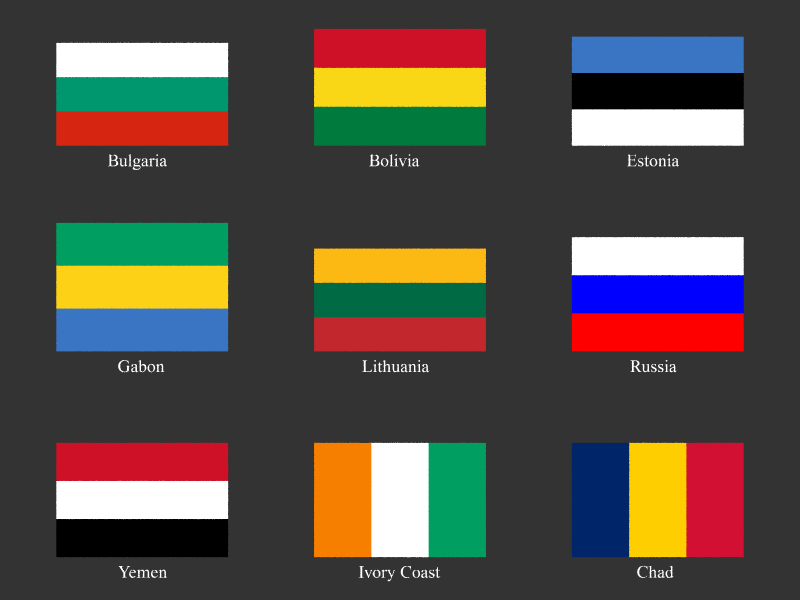
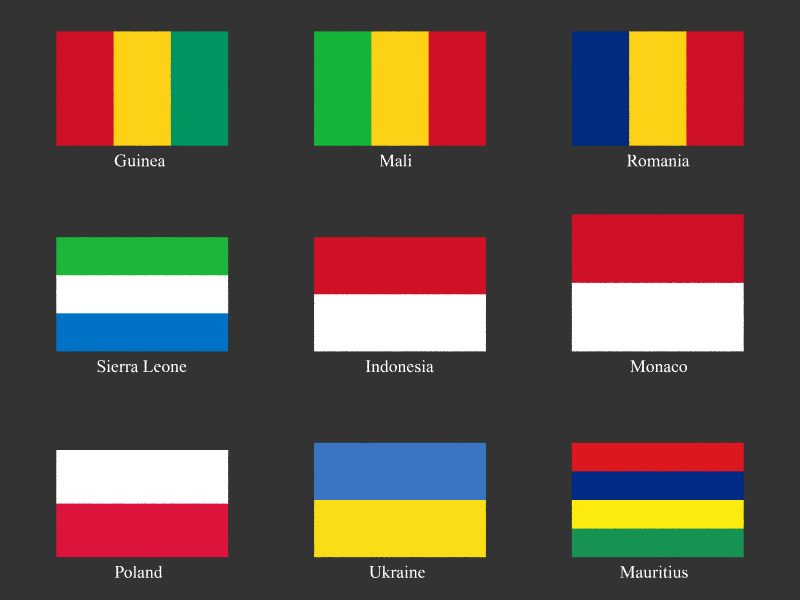
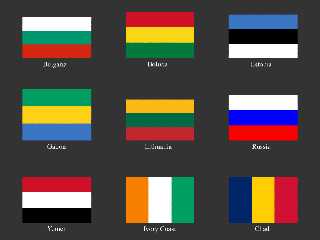
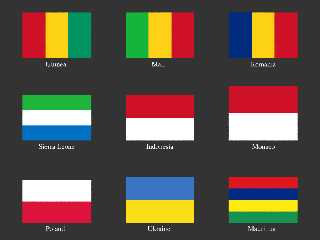
I added flags of the following countries:
Bulgaria, Bolivia, Estonia, Gabon, Lithuania, Russia, Yemen, Ivory
Coast, Chad, Guinea, Mali, Romania, Sierra Leone, Indonesia, Monaco,
Poland, Ukraine and Mauritius

They are all still pretty simple, straight gradient patterns without any
coats of arms; to do Indonesia, Monaco, Poland and Ukraine, I added a
TwoStripeFlag() macro, also FourStripeFlag() for Mauritius (which is
currently the only country flying a simple 4-stripe flag, but who knows
that this may not change in the future?).

Another addition is a third parameter "light" for the Flags() macro: if
"light" is set to 0, the texture gets ambient 1 and diffuse 0 in its
finish, making it usable without light sources.

Oh, and I've got a suggestion for the more sophisticated flags: as
bi-/tri-/tetracolors, circles, crescents, stars, crosses and diagonal
stripes are quite common elements of flags throughout the world, it
would be more elegant to define them via global macros and then build
layered textures using them for any specific flag!

See you in Khyberspace!

Now playing: Clouds (Rosenstein & Wagener)
Post a reply to this message
Attachments:
Download 'newflags1.png' (21 KB)
Download 'newflags2.png' (20 KB)
Preview of image 'newflags1.png'
Preview of image 'newflags2.png'
|
|
| |
| |
|
|
|
|
| |
| |
|
|
Good work.
I look forward to seeing it up on the site.
Just replace the existing submission with a new 'Flags' submission with a
higher version number.
If you need any help with that just shout.

Regards,
Chris B.
Post a reply to this message
|
|
| |
| |
|
|
|
|
| |
| |
|
|
High!

Although I just registered and logged in, I can't proceed to the members
area... I just always get the login tab!

Can you help me?

See you in Khyberspace!

Yadgar

Now playing: Six Days In Berlin, Part 6 (Mike Batt)
Post a reply to this message
|
|
| |
| |
|
|
|
|
| |
| |
|
|
High!

Meanwhile I managed to get into the submitting dialog - but the server
won't accept any ZIP files! What should I do?

See you in Khyberspace!

Yadgar
Post a reply to this message
|
|
| |
| |
|
|
|
|
| |
| |
|
|
"Jörg 'Yadgar' Bleimann" <yaz### [at] gmxde> wrote in message
news:49cde50d$1@news.povray.org...
> High!
>
> Although I just registered and logged in, I can't proceed to the members
> area... I just always get the login tab!
>
> Yadgar

That's odd!

Once you're logged in it should change the menu along the top, so you get a
'Contribute' and a 'Members' option. It should also take you straight into
the Members Page (although it says 'Contributors Page' in the title at the
moment). This lists 4 options ('Submit a contribution','Update your
profile','Log Off','Unregister').

The login process uses Cookies, so it won't work if you have Cookies
disabled. The Contribution screen also uses JavaScript, so that won't work
if you have JavaScript disabled in your browser.  The other thing I noticed
one time was that my first login attempt didn't seem to 'take', but I
repeated the same login and it worked the second time.

I've just checked the site in both Firefox 3.0.7 and IE 7.0 on Windows Vista
and they both seems to be working ok. What are you using?

Regards
Chris B.
Post a reply to this message
|
|
| |
| |
|
|
|
|
| |
| |
|
|
"Jörg 'Yadgar' Bleimann" <yaz### [at] gmxde> wrote in message
news:49cdede8@news.povray.org...
> High!
>
> Meanwhile I managed to get into the submitting dialog - but the server
> won't accept any ZIP files! What should I do?
>

True. You'll need to upload the individual files. On the contributions
screen you hit the browse button under the files tab on the left and select
a file, repeating that for each file (I guess there'll be about 10 files).
You should see the list of files you've added build up on the screen.

Regards,
Chris B.
Post a reply to this message
|
|
| |
| |
|
|
|
|
| |
| |
|
|
Post a reply to this message
|
|
| |
| |
|
|
|
|
| |
| |
|
|
"Jörg 'Yadgar' Bleimann" <yaz### [at] gmxde> wrote in message
news:49ce2cd1$1@news.povray.org...
>

Now I'm confused :-)
I don't see a new version on the site and I don't see any text in your last
post ??

Regards,
Chris B.
Post a reply to this message
|
|
| |
| |
|
|
From: Jörg 'Yadgar' Bleimann
Subject: Re: My contribution is online now! (n/t)
Date: 28 Mar 2009 12:52:31
Message: <49ce55cf@news.povray.org>
|
|
|
| |
| |
|
|
High!

Chris B wrote:
>
> "Jörg 'Yadgar' Bleimann" <yaz### [at] gmxde> wrote in message
> news:49ce2cd1$1@news.povray.org...
>>
>
> Now I'm confused :-)
> I don't see a new version on the site and I don't see any text in your
> last post ??

Yes, (n/t) means "no text" - the headline was meant to say it all!

As I'm an absolute newbie to the Object Collection, I probably uploaded
the version under a wrong name, so that you can't find it - I simply
entered "Flags" in the "Name" line, if that may help you...

See you in Khyberspace!

Yadgar
Post a reply to this message
|
|
| |
| |
|
|
|
|
| |
| |
|
|
>> Now I'm confused :-)
>> I don't see a new version on the site and I don't see any text in your
>> last post ??
>
> Yes, (n/t) means "no text" - the headline was meant to say it all!
>
> As I'm an absolute newbie to the Object Collection, I probably uploaded
> the version under a wrong name, so that you can't find it - I simply
> entered "Flags" in the "Name" line, if that may help you...
>

The name "Flags" should be right and it should have asked for a new version
number.
However, I don't see it under that or any other name. The last submission I
see was a new one from a couple of days ago.
Did you get something like the screen shot attached, confirming that the
upload had worked?

Regards,
Chris B.
Post a reply to this message
Attachments:
Download 'screenshot.jpg' (32 KB)
Preview of image 'screenshot.jpg'

|
|
| |
| |
|
|
From: Jörg 'Yadgar' Bleimann
Subject: Re: My contribution is online now! (n/t)
Date: 28 Mar 2009 14:08:47
Message: <49ce67af$1@news.povray.org>
|
|
|
| |
| |
|
|
Chris B wrote:

> However, I don't see it under that or any other name. The last
> submission I see was a new one from a couple of days ago.
> Did you get something like the screen shot attached, confirming that the
> upload had worked?

I tried it once more, and now I got the confirming screen!

See you in Khyberspace!

Yadgar
Post a reply to this message
|
|
| |
| |
|
|
From: Jörg 'Yadgar' Bleimann
Subject: Re: My contribution is online now! (n/t)
Date: 28 Mar 2009 14:18:42
Message: <49ce6a02$1@news.povray.org>
|
|
|
| |
| |
|
|
High!

But now another problem occurs: as I tried to compose the texture of the
Afghan flag as a layered texture consisting of a simple three-column
pattern (lower layer) and an object pattern generated from a vectorized
bitmap made with Inkscape, I got the message:

Illegal texture or patch in clip, bound or object pattern.

Here is the definition of the "AfghanFlag" macro:

#macro Flags_AfghanFlag()
    Flags_ThreeColumnFlag(0, <191, 0, 0>/255, <0, 0.6, 0>)
// Layered texture, coat of arms object-patterned texture yet to be
// added!
    texture
    {
      pigment
      {
         object
         {
           object { Afghanistan_Coat_of_Arms }
           scale 0.01
           color rgbft 1
           color rgbft <1, 1, 1, 0, 0>
         }
       }
     }
#end

What went wrong? I also submitted the file Afghanistan_Coat_of_Arms.inc
containing the definition of Afghanistan_Coat_of_Arms to the Object
Collection, so you can look it up...

See you in Khyberspace!

Yadgar
Post a reply to this message
|
|
| |
| |
|
|
|
|
| |
| |
|
|
=?ISO-8859-1?Q?J=F6rg_=27Yadgar=27_Bleimann?= <yaz### [at] gmxde> wrote:
> Illegal texture or patch in clip, bound or object pattern.

POV-Ray does not allow for a textured object to be used itself in an
object-pattern. It must be "naked", so to speak.

I guess this is intended to avoid people having wrong expectations about what
the object pattern does.


BTW, instead of

>          object
>          {
>            object { Afghanistan_Coat_of_Arms }
>            scale 0.01
>            color rgbft 1
>            color rgbft <1, 1, 1, 0, 0>
>          }

you can just as well write

         object { Afghanistan_Coat_of_Arms
           scale 0.01
           color rgbft 1
           color rgbft <1, 1, 1, 0, 0>
         }
Post a reply to this message
|
|
| |
| |
|
|
From: Jörg 'Yadgar' Bleimann
Subject: Re: My contribution is online now! (n/t)
Date: 28 Mar 2009 15:56:37
Message: <49ce80f5$1@news.povray.org>
|
|
|
| |
| |
|
|
High!

clipka wrote:

> POV-Ray does not allow for a textured object to be used itself in an
> object-pattern. It must be "naked", so to speak.

I removed the textures from the inc file, now the render runs... but
although I defined a white pigment for the object pattern, it does not
show up at all! The only way I can tell from is the slowing down of the
render...

See you in Khyberspace!

Yadgar
Post a reply to this message
|
|
| |
| |
|
|
|
|
| |
| |
|
|
"Jörg 'Yadgar' Bleimann" <yaz### [at] gmxde> wrote in message
news:49ce67af$1@news.povray.org...
> I tried it once more, and now I got the confirming screen!

Congratulations :o)

Now that it's there I can see a few reasons it might have given you problems
with the upload:

When you download from the object collection it generates some files that
you don't need to upload (a readme, a little script and a copyright logo).
Basically anything that isn't prefixed with the object name you don't need
to upload.

To make it 'standards compliant' you mostly just need to prefix everything
with the object name. So I've prefixed the new include file and all the
variables contained within it. With files generated from Inkscape this only
needs two simple global changes, AllShapes to Flags_AllShapes and path to
Flags_path.

I've also added the same 'Flags_' prefix to the new image files and changed
all references to file names to lowercase. The server changes the file names
to lowercase automatically, so any references to files from within other
files need to be in lowercase.

I've made those minor changes and marked it as fully compliant (3).

I hope these trials and tribulations didn't put you off. The flags you've
done are excellent.

Best Regards,
Chris B.
Post a reply to this message
|
|
| |
| |
|
|
|
|
| |
| |
|
|
Among other things, Jörg 'Yadgar' Bleimann saw fit to write:

> 3. Spain
> 4. Switzerland

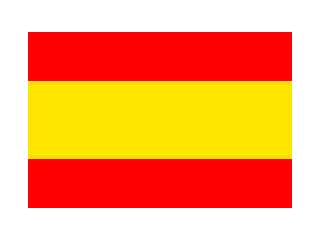
The Spanish flag doesn't look quite right. The middle yellow stripe should
be twice as wide as the red stripes. The image looks like 1.5 times only.

The proportions of the Swiss flag's cross don't look exactly right either.
According to Wikipedia ("Flag of Switzerland") the cross's arms should be
"a sixth longer than their width", and "a relation of 2:3 or 7:10 to the
span of the flag is usual".

--
light_source{9+9*x,1}camera{orthographic look_at(1-y)/4angle 30location
9/4-z*4}light_source{-9*z,1}union{box{.9-z.1+x clipped_by{plane{2+y-4*x
0}}}box{z-y-.1.1+z}box{-.1.1+x}box{.1z-.1}pigment{rgb<.8.2,1>}}//Jellby
Post a reply to this message
|
|
| |
| |
|
|
From: Jörg 'Yadgar' Bleimann
Subject: Re: Textured block pattern problem
Date: 4 Apr 2009 10:56:01
Message: <49d77501@news.povray.org>
|
|
|
| |
| |
|
|
High!

Jellby wrote:

> The Spanish flag doesn't look quite right. The middle yellow stripe should
> be twice as wide as the red stripes. The image looks like 1.5 times only.
>
> The proportions of the Swiss flag's cross don't look exactly right either.
> According to Wikipedia ("Flag of Switzerland") the cross's arms should be
> "a sixth longer than their width", and "a relation of 2:3 or 7:10 to the
> span of the flag is usual".

They were just meant als provisional... currently I'm working on Chris
Bartlett's Flags.inc, thoroughly revising these preliminary drafts!

See you in Khyberspace!

Yadgar

Now playing: If It Wasn't For Love (Jon Anderson)
Post a reply to this message
|
|
| |
| |
|
|
|
|
| |
|
|