 |
|
|
|
|
|
| |
| |
|
|
|
|
| |
| |
|
|
Excellent Sam, just excellent. Please do finish something one day though? :)

    ~Steve~
Post a reply to this message
|
|
| |
| |
|
|
|
|
| |
| |
|
|
The AO makes the whole scene look chrome, despite no reflections.

It's all CSG, master?  How did you do the side-front of the tractor,
just above the wheels?  It looks curved in a way I can't figure out how
to do with just primitives?  :)

This image should be posted in some CG webforums, beyond just
newsgroups... it would bring much awareness for Povray.  Well, that and
an indication for povray's Hall of Fame as well. :)
Post a reply to this message
|
|
| |
| |
|
|
|
|
| |
| |
|
|
Bridgeofstraws wrote:
> That tractor is awesome!  As it has already been said, I can almost touch it.
> Thank you for sharing your awesome model.

Thanks

> I just have one question:  Where might I find the M.O.P.S' belt macros?  I
> googled for them but had no luck.  Any and all help is appreciated.

I had a little trouble finding this. Here you go:

http://pagesperso-orange.fr/mops/atelier05.html

It's all in French, but it's not much of a problem. I just took an
example file and cut out the unnecessary parts to make it work for my scene.

Sam
Post a reply to this message
|
|
| |
| |
|
|
|
|
| |
| |
|
|
St. wrote:
> Excellent Sam, just excellent. Please do finish something one day though? :)

Sure, one of these days :)

Sam
Post a reply to this message
|
|
| |
| |
|
|
|
|
| |
| |
|
|
nemesis wrote:
> The AO makes the whole scene look chrome, despite no reflections.
>
> It's all CSG, master?  How did you do the side-front of the tractor,
> just above the wheels?  It looks curved in a way I can't figure out how
> to do with just primitives?  :)

Ah, good eye. What I had to do was intersect a cylinder with a prism
using a custom curve, and then follow that up with a bunch of spheres
following the same curve. Sounds easy, but it wasn't `:/

> This image should be posted in some CG webforums, beyond just
> newsgroups... it would bring much awareness for Povray.  Well, that and
> an indication for povray's Hall of Fame as well. :)

Maybe we POVvers should start entering contests or something. There's a
steampunk contest going on right now, and POV is really good for making
mechanical things :)

Sam
Post a reply to this message
|
|
| |
| |
|
|
|
|
| |
| |
|
|
Meothuru wrote:
> Cool work...
> remembers me a litte bit for a monstertruck
> just like this:
>
>
http://www-c.inria.fr/gamma/download/affichage.php?dir=MISC_VEH&name=Monstertruck&last_page=13

That model is begging to be raytraced :)

Sam
Post a reply to this message
|
|
| |
| |
|
|
|
|
| |
| |
|
|
Thomas de Groot wrote:
> Excellent modelling indeed. Bravo!
>
> One question though: the caterpillars do not seem very functional with only
> one pair of wheels touching the ground...

Thanks. Like I said, it's an imaginary design, made from a sketch. Of
course I had some doubts about the design, but I thought I would try it
out anyway. The idea was to have a machine made for going up small
slopes. The design is probably unnecessary :)

Sam
Post a reply to this message
|
|
| |
| |
|
|
|
|
| |
| |
|
|
Kirk Andrews wrote:
>> It's so real I can almost touch it. Beautiful. Great detail. (I really like the
>> monochrome look too; lends itself *very* well to such an image.)
>>
>> The only nitpick I might offer is that the lighting/shadows look a bit *too*
>> smooth or perhaps omnidirectional, although that's not really the proper term
>> for it. In the belt treads, for example.
>>
>
> Well, I think this is what is often called a "mud render" -- textures are still
> to come and lighting is just ambient occlusion.  Sam is just being gracious,
> lest he blow us all away.
>
> Thanks, Sam.  Amazing as usual.

Yeah, I rendered this with basic textures to simply display the model. I
don't know if I'll go forward and finish the scene or not. Maybe I'll
try out some textures, but the code is a little hard to navigate (it's
over 1000 lines long).

Sam
Post a reply to this message
|
|
| |
| |
|
|
|
|
| |
| |
|
|
Kenneth wrote:
> stbenge <THI### [at] hotmail com> wrote:
>> This is an imaginary tractor, modeled from
>> a sketch. It took me several days to model. Most of that time was spent
>> adding details, though the model could still use more of them.
>
> It's so real I can almost touch it. Beautiful. Great detail. (I really like the
> monochrome look too; lends itself *very* well to such an image.)
>
> The only nitpick I might offer is that the lighting/shadows look a bit *too*
> smooth or perhaps omnidirectional, although that's not really the proper term
> for it. In the belt treads, for example.
>
> Otherwise, WOW! You really have a magic touch with your images.
Thank you for your comments. The lighting is like that on purpose,
though I did not intend for the shadows to be quite so soft. It almost
looks like the front tracks are treading on air.
Sam com> wrote:
>> This is an imaginary tractor, modeled from
>> a sketch. It took me several days to model. Most of that time was spent
>> adding details, though the model could still use more of them.
>
> It's so real I can almost touch it. Beautiful. Great detail. (I really like the
> monochrome look too; lends itself *very* well to such an image.)
>
> The only nitpick I might offer is that the lighting/shadows look a bit *too*
> smooth or perhaps omnidirectional, although that's not really the proper term
> for it. In the belt treads, for example.
>
> Otherwise, WOW! You really have a magic touch with your images.
Thank you for your comments. The lighting is like that on purpose,
though I did not intend for the shadows to be quite so soft. It almost
looks like the front tracks are treading on air.
Sam
Post a reply to this message
|
|
| |
| |
|
|
|
|
| |
| |
|
|
stbenge wrote:
> nemesis wrote:
>> This image should be posted in some CG webforums, beyond just
>> newsgroups... it would bring much awareness for Povray.  Well, that
>> and an indication for povray's Hall of Fame as well. :)
>
> Maybe we POVvers should start entering contests or something. There's a
> steampunk contest going on right now, and POV is really good for making
> mechanical things :)

Yes:
http://features.cgsociety.org/challenge/steampunk/

Would you be courageous enough to challenge all those polygon-pros with
a little CSG wonder?  It's a very hard task.

I also heard this contest is offering US$220,000 in prizes!  Plus, it
can be made in teams rather than individually.  Overall, an amazing
oportunity in all accounts. :)
Post a reply to this message
|
|
| |
| |
|
|
|
|
| |
| |
|
|
"stbenge" <THI### [at] hotmailcom> wrote in message
news:49347d54@news.povray.org...
> Kirk Andrews wrote:
>>> It's so real I can almost touch it. Beautiful. Great detail. (I really
>>> like the
>>> monochrome look too; lends itself *very* well to such an image.)
>>>
>>> The only nitpick I might offer is that the lighting/shadows look a bit
>>> *too*
>>> smooth or perhaps omnidirectional, although that's not really the proper
>>> term
>>> for it. In the belt treads, for example.
>>>
>>
>> Well, I think this is what is often called a "mud render" -- textures are
>> still
>> to come and lighting is just ambient occlusion.  Sam is just being
>> gracious,
>> lest he blow us all away.
>>
>> Thanks, Sam.  Amazing as usual.
>
> Yeah, I rendered this with basic textures to simply display the model. I
> don't know if I'll go forward and finish the scene or not. Maybe I'll try
> out some textures, but the code is a little hard to navigate (it's over
> 1000 lines long).
>
> Sam

Thats the problem I seem to have when my scenes start to get somewhere, they
become so huge i have trouble following them...

One question I have, how do you get those nice round edges instead of the
sharp square edges you normally get when you difference stuff??  Do you do
anything special here or do you manually round them off everywhere?

Cheers Dre
Post a reply to this message
|
|
| |
| |
|
|
|
|
| |
| |
|
|
stbenge <THI### [at] hotmailcom> wrote:
> Meothuru wrote:
> > Cool work...
> > remembers me a litte bit for a monstertruck
> > just like this:
> >
> >
http://www-c.inria.fr/gamma/download/affichage.php?dir=MISC_VEH&name=Monstertruck&last_page=13
>
> That model is begging to be raytraced :)
>
> Sam

Should be no Problem ...

- Download the model
- Download the tool "Poseray"

Let "Poseray" convert the model into a POV-Mesh2 scene
and render the model with POV-Ray.
Post a reply to this message
|
|
| |
| |
|
|
|
|
| |
| |
|
|
Dre wrote:
> Thats the problem I seem to have when my scenes start to get somewhere, they
> become so huge i have trouble following them...
>
> One question I have, how do you get those nice round edges instead of the
> sharp square edges you normally get when you difference stuff??  Do you do
> anything special here or do you manually round them off everywhere?

They are manually rounded off using cylinders, torii and spheres.
There's an object pattern trick for making edges look rounded using
surface normals, but it doesn't work too well with most objects.

Sam
Post a reply to this message
|
|
| |
| |
|
|
From: stbenge
Subject: Re: CGSociety Steampunk contest (was tractor 2008)
Date: 1 Dec 2008 23:26:45
Message: <4934b905@news.povray.org>
|
|
|
| |
| |
|
|
nemesis wrote:
> stbenge wrote:
>> Maybe we POVvers should start entering contests or something. There's
>> a steampunk contest going on right now, and POV is really good for
>> making mechanical things :)
>
> Yes:
> http://features.cgsociety.org/challenge/steampunk/
>
> Would you be courageous enough to challenge all those polygon-pros with
> a little CSG wonder?  It's a very hard task.

Maybe if I get a good idea. I had an idea for a steampunk version of the
grasshopper/ants tale, but it isn't quite right.

> I also heard this contest is offering US$220,000 in prizes!  Plus, it
> can be made in teams rather than individually.  Overall, an amazing
> oportunity in all accounts. :)

I don't know how well I would operate in a team. Not that I'm opposed to
it. I would rather not get all excited about it and then lose "steam",
thus annoying my teammates. If I did join a team, I would only want one
of the software prizes (zBrush). The computers or whatever could go to
somebody else :)

Sam
Post a reply to this message
|
|
| |
| |
|
|
|
|
| |
| |
|
|
stbenge <THI### [at] hotmailcom> wrote:
>... but the code is a little hard to navigate (it's
> over 1000 lines long).

Your's is 1000, mine would be 10,000--1000 for the code, 9000 for the comments,
so I could understand what I did!  ;-)

KW
Post a reply to this message
|
|
| |
| |
|
|
From: St
Subject: Re: CGSociety Steampunk contest (was tractor 2008)
Date: 2 Dec 2008 03:59:38
Message: <4934f8fa@news.povray.org>
|
|
|
| |
| |
|
|
Hmm, why are the entries incomplete?
http://features.cgsociety.org/challenge/steampunk/view_entries.php

  They just update them until finished?

     ~Steve~
Post a reply to this message
|
|
| |
| |
|
|
From: Gail
Subject: Re: CGSociety Steampunk contest (was tractor 2008)
Date: 2 Dec 2008 04:15:43
Message: <4934fcbf@news.povray.org>
|
|
|
| |
| |
|
|
"St." <dot### [at] dotcom> wrote in message news:4934f8fa@news.povray.org...
> Hmm, why are the entries incomplete?
> http://features.cgsociety.org/challenge/steampunk/view_entries.php
>
>  They just update them until finished?
>

Yes. The contest rules require that people post frequent WIP versions.
Post a reply to this message
|
|
| |
| |
|
|
From: nemesis
Subject: Re: CGSociety Steampunk contest (was tractor 2008)
Date: 2 Dec 2008 04:28:16
Message: <4934ffb0@news.povray.org>
|
|
|
| |
| |
|
|
Gail escreveu:
>
> "St." <dot### [at] dotcom> wrote in message news:4934f8fa@news.povray.org...
>> Hmm, why are the entries incomplete?
>> http://features.cgsociety.org/challenge/steampunk/view_entries.php
>>
>>  They just update them until finished?
>
> Yes. The contest rules require that people post frequent WIP versions.

That "real-time" feedback is to prevent people with images ready from
2001 reposting them as if anew.  Of course, nothing prevents someone
with a lot of wip files repost them. :P
Post a reply to this message
|
|
| |
| |
|
|
|
|
| |
| |
|
|
stbenge escreveu:
> I don't know how well I would operate in a team. Not that I'm opposed to
> it. I would rather not get all excited about it and then lose "steam",
> thus annoying my teammates. If I did join a team, I would only want one
> of the software prizes (zBrush). The computers or whatever could go to
> somebody else :)

I'm also an individualist.  Come on, it's much more fun doing everything
by yourself! :)

zBrush has made a name for itself, but most modelling packages are
coming with sculpting tools already...
Post a reply to this message
|
|
| |
| |
|
|
|
|
| |
| |
|
|
BTW, there are contests, you don't have to model for... ;-)
AFAIR you can't win prizes, but they seem to be supposed of doing them
with PovRay.
http://forums.cgsociety.org/showthread.php?f=185&t=450471

bluetree
Post a reply to this message
|
|
| |
| |
|
|
|
|
| |
| |
|
|
bluetree <sea### [at] yahoode> wrote:
> BTW, there are contests, you don't have to model for... ;-)
> AFAIR you can't win prizes, but they seem to be supposed of doing them
> with PovRay.
> http://forums.cgsociety.org/showthread.php?f=185&t=450471
>
> bluetree

I have entered the lighting challenge a few times in the past with POVRay:

Bottle Collection
Under the Boardwalk
Candlelight
An Eye for an Eye

look for barberofcivil


-tgq
Post a reply to this message
|
|
| |
| |
|
|
|
|
| |
| |
|
|
"Gail" <gail (at) sql in the wild (dot) co [dot] za> wrote in message
news:4934fcbf@news.povray.org...
>
> "St." <dot### [at] dotcom> wrote in message news:4934f8fa@news.povray.org...
>> Hmm, why are the entries incomplete?
>> http://features.cgsociety.org/challenge/steampunk/view_entries.php
>>
>>  They just update them until finished?
>>
>
> Yes. The contest rules require that people post frequent WIP versions.

     Hmm, this is very interesting. Wouldn't it be great if a Pover won
something.

       ~Steve~
Post a reply to this message
|
|
| |
| |
|
|
From: Francois Labreque
Subject: Re: CGSociety Steampunk contest (was tractor 2008)
Date: 2 Dec 2008 09:16:05
Message: <49354325$1@news.povray.org>
|
|
|
| |
| |
|
|
Gail a écrit :
>
> "St." <dot### [at] dotcom> wrote in message news:4934f8fa@news.povray.org...
>> Hmm, why are the entries incomplete?
>> http://features.cgsociety.org/challenge/steampunk/view_entries.php
>>
>>  They just update them until finished?
>>
>
> Yes. The contest rules require that people post frequent WIP versions.

I guess it also prevents having twelve nearly identical Minotaur entries.
Post a reply to this message
|
|
| |
| |
|
|
|
|
| |
| |
|
|
stbenge wrote:
> Thomas de Groot wrote:
>
>> Excellent modelling indeed. Bravo!
>>
>> One question though: the caterpillars do not seem very functional with
>> only one pair of wheels touching the ground...
>
>
> Thanks. Like I said, it's an imaginary design, made from a sketch. Of
> course I had some doubts about the design, but I thought I would try it
> out anyway. The idea was to have a machine made for going up small
> slopes. The design is probably unnecessary :)
>
> Sam
i spent some time pondering which whould be the drive wheel, the model
looks as if the higher one has a drive chain or something
Post a reply to this message
|
|
| |
| |
|
|
|
|
| |
| |
|
|
stbenge <THI### [at] hotmailcom> wrote:
> Meothuru wrote:
> > Cool work...
> > remembers me a litte bit for a monstertruck
> > just like this:
> >
> >
http://www-c.inria.fr/gamma/download/affichage.php?dir=MISC_VEH&name=Monstertruck&last_page=13
>
> That model is begging to be raytraced :)
>
> Sam

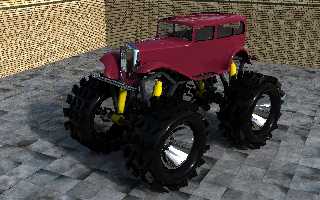
A *quick* render.  I have made it very shiny!

-tgq
Post a reply to this message
Attachments:
Download 'truck.jpg' (292 KB)
Preview of image 'truck.jpg'
|
|
| |
| |
|
|
|
|
| |
| |
|
|
"stbenge" <THI### [at] hotmailcom> wrote in message
news:4934b72f@news.povray.org...
> Dre wrote:
>> Thats the problem I seem to have when my scenes start to get somewhere,
>> they become so huge i have trouble following them...
>>
>> One question I have, how do you get those nice round edges instead of the
>> sharp square edges you normally get when you difference stuff??  Do you
>> do anything special here or do you manually round them off everywhere?
>
> They are manually rounded off using cylinders, torii and spheres. There's
> an object pattern trick for making edges look rounded using surface
> normals, but it doesn't work too well with most objects.
>
> Sam

Ahhh so it is manual, I thought I was heading down the wrong track doing it
manually becuase it is so much work!

Thanks for the info, much appreciated!

Cheers Dre
Post a reply to this message
|
|
| |
| |
|
|
|
|
| |
| |
|
|
"Dre" <and### [at] gmailcom> wrote:
> "stbenge" <THI### [at] hotmailcom> wrote in message
> news:4934b72f@news.povray.org...
> > They are manually rounded off using cylinders, torii and spheres. There's
> > an object pattern trick for making edges look rounded using surface
> > normals, but it doesn't work too well with most objects.
>
> Ahhh so it is manual, I thought I was heading down the wrong track doing it
> manually becuase it is so much work!

It is much work and is not really the "right path".  But is also as much ego
boosting as assembly programming. ;)

These things are called beveled edges in the polygonal world and come out as
fluidly and painlessly as pouring milk in a glass... I wish there was some
automatic way of doing them in regular CSG, but that is really a very old
wish...
Post a reply to this message
|
|
| |
| |
|
|
|
|
| |
| |
|
|
"nemesis" <nam### [at] gmailcom> wrote in message
news:web.4935ce1462d2e221245753e10@news.povray.org...
> "Dre" <and### [at] gmailcom> wrote:
>> "stbenge" <THI### [at] hotmailcom> wrote in message
>> news:4934b72f@news.povray.org...
>> > They are manually rounded off using cylinders, torii and spheres.
>> > There's
>> > an object pattern trick for making edges look rounded using surface
>> > normals, but it doesn't work too well with most objects.
>>
>> Ahhh so it is manual, I thought I was heading down the wrong track doing
>> it
>> manually becuase it is so much work!
>
> It is much work and is not really the "right path".  But is also as much
> ego
> boosting as assembly programming. ;)
>
> These things are called beveled edges in the polygonal world and come out
> as
> fluidly and painlessly as pouring milk in a glass... I wish there was some
> automatic way of doing them in regular CSG, but that is really a very old
> wish...
>
Hehehe, so looks like its the "only" path then :)  Oh well, better keep at
it, the more I do, the more I find little tricks here and there that make
things easier.  Pity it makes my code such a monster to read, I might have
to start using include files more often...

Actually while we are on the topic, how do people generally build objects.
Do you make your complete object first and then bevel the edges?  or do you
do it piece by piece, making each piece right with edges before moving onto
the next finally finishing up with a completely assembled object?

I soft of start making the whole thing up first, then get sidetracked and
start bevelling and then shortly after I cant follow my code anymore :)
(even with stacks of comments)

Cheers Dre
Post a reply to this message
|
|
| |
| |
|
|
|
|
| |
| |
|
|
nemesis wrote:
>
> These things are called beveled edges in the polygonal world and come out as
> fluidly and painlessly as pouring milk in a glass... I wish there was some
> automatic way of doing them in regular CSG, but that is really a very old
> wish...

The biggest reason I didn't model this as a mesh is because it's
currently impossible to use any proximity patterns with meshes. That's
right, impossible! Actually, if somebody can figure out how to get a
proximity pattern working with meshes, I would really appreciate it :)

Sam
Post a reply to this message
|
|
| |
| |
|
|
|
|
| |
| |
|
|
Dre wrote:
> Actually while we are on the topic, how do people generally build objects.
> Do you make your complete object first and then bevel the edges?  or do you
> do it piece by piece, making each piece right with edges before moving onto
> the next finally finishing up with a completely assembled object?

A little of both for me, but maybe more of the latter. It's helpful to
declare edge radii in advance, so you can make a global change if you
decide you don't like the current look. I don't always do this, but it
really makes changing the code easier later on.

Sam
Post a reply to this message
|
|
| |
| |
|
|
|
|
| |
| |
|
|
"stbenge" <THI### [at] hotmailcom> wrote in message
news:49361034@news.povray.org...
> Dre wrote:
>> Actually while we are on the topic, how do people generally build
>> objects. Do you make your complete object first and then bevel the edges?
>> or do you do it piece by piece, making each piece right with edges before
>> moving onto the next finally finishing up with a completely assembled
>> object?
>
> A little of both for me, but maybe more of the latter. It's helpful to
> declare edge radii in advance, so you can make a global change if you
> decide you don't like the current look. I don't always do this, but it
> really makes changing the code easier later on.
>
> Sam

Thanks!

I fully agree with the global edge radii, the last few scenes I've been
doing have had a hell of a lot of definitions at the top of the scene for
things like this.  Previously I've only been testing stuff/code/ideas so I
haven't bothered.  Now that I've started some more serious scenes I've
wanted to make them as clever as possible so using *lots* of variables...

Cheers Dre
Post a reply to this message
|
|
| |
| |
|
|
|
|
| |
| |
|
|
stbenge <THI### [at] hotmailcom> wrote:
> currently impossible to use any proximity patterns with meshes. That's
> right, impossible!

What are proximity patterns?  Is it like AO or radiosity?
Post a reply to this message
|
|
| |
| |
|
|
|
|
| |
| |
|
|
"Trevor G Quayle" <Tin### [at] hotmailcom> schreef in bericht
news:web.493594d862d2e22181c811d20@news.povray.org...
>
> A *quick* render.  I have made it very shiny!
>
LOL

Now let that baby ROAR....

(and black smoke, please....)   :-)

Thomas
Post a reply to this message
|
|
| |
| |
|
|
|
|
| |
| |
|
|
nemesis wrote:
> stbenge <THI### [at] hotmailcom> wrote:
>> currently impossible to use any proximity patterns with meshes. That's
>> right, impossible!
>
> What are proximity patterns?  Is it like AO or radiosity?

I'm not sure if the term "proximity pattern" ever existed before
MegaPOV. I remember seeing it a long time ago as a new feature, but
never got to play with it.

Basically a proximity pattern is like a gradient indicating the distance
from a surface in 3D space. Imagine making an object pattern from some
object and applying a 3D blur to it. What you get is a fuzzy
representation of your object, but in pattern form. As a special bonus,
the inside edges and vacations end up black, the outside edges and
protrusions end up white, and all the flat parts in between end up a
gray color.

I have created two versions which I use for different things. I have
released one of them bundled with the fastSSS macros, but I think I will
release another include with just the proximity macros.

Sam
Post a reply to this message
|
|
| |
| |
|
|
|
|
| |
| |
|
|
stbenge wrote:

> The biggest reason I didn't model this as a mesh is because it's
> currently impossible to use any proximity patterns with meshes.

you never know when a wax tractor might come in handy ;)
Post a reply to this message
|
|
| |
| |
|
|
|
|
| |
| |
|
|
stbenge wrote:
> Basically a proximity pattern is like a gradient indicating the distance
> from a surface in 3D space. Imagine making an object pattern from some
> object and applying a 3D blur to it. What you get is a fuzzy
> representation of your object, but in pattern form. As a special bonus,
> the inside edges and vacations end up black, the outside edges and
> protrusions end up white, and all the flat parts in between end up a
> gray color.

Sounds like AO.  The occlusion effect is likewise achieved by taking
into account surrounding geometry, not angle of incidence or position of
light sources.  Your image looks very AO like.
Post a reply to this message
|
|
| |
| |
|
|
|
|
| |
| |
|
|
stbenge <THI### [at] hotmailcom> wrote:

> They are manually rounded off using cylinders, torii and spheres.
> There's an object pattern trick for making edges look rounded using
> surface normals, but it doesn't work too well with most objects.

Gosh.  I did that with a piano a few years back.  It was a *lot* of work and it
wasn't nearly this complex.  That's very impressive.

 - Ricky
Post a reply to this message
|
|
| |
| |
|
|
|
|
| |
| |
|
|
nemesis wrote:
> stbenge wrote:
>> Basically a proximity pattern is like a gradient indicating the
>> distance from a surface in 3D space. Imagine making an object pattern
>> from some object and applying a 3D blur to it. What you get is a fuzzy
>> representation of your object, but in pattern form. As a special
>> bonus, the inside edges and vacations end up black, the outside edges
>> and protrusions end up white, and all the flat parts in between end up
>> a gray color.
>
> Sounds like AO.  The occlusion effect is likewise achieved by taking
> into account surrounding geometry, not angle of incidence or position of
> light sources.  Your image looks very AO like.

AO and proximity patterns give different results. Proximity patterns can
give you access to *outside* edge data as well as inside edge data. AO
just makes inside edges dark. Proximity patterns also make thin objects
lighter in color, and thicker ones slightly darker. When I combine my
proximity macros, I'll post examples to this group so you can see for
yourself how it looks.

Sam
Post a reply to this message
|
|
| |
| |
|
|
|
|
| |
| |
|
|
triple_r wrote:
> Gosh.  I did that with a piano a few years back.  It was a *lot* of work and it
> wasn't nearly this complex.  That's very impressive.

It's time consuming, that's for sure :/

Sam
Post a reply to this message
|
|
| |
| |
|
|
|
|
| |
| |
|
|
stbenge <THI### [at] hotmailcom> wrote:
>
> The biggest reason I didn't model this as a mesh is because it's
> currently impossible to use any proximity patterns with meshes. That's
> right, impossible! Actually, if somebody can figure out how to get a
> proximity pattern working with meshes, I would really appreciate it :)

Just write your own inside() function. I gave it a go with the following, and it
seems to work pretty well. It should really be improved with the equivalent of
an inside_vector, so you can usefully use it with open meshes, but it's OK for
a quick attempt.

#macro inside_m( obj, pos )
 #local current = pos;
 #local dir = x;
 #local done = 0;
 #local num = 0;
 #while ( done != 1 )
  #local norm = <0,0,0>;
  #local inter = trace( obj, current, dir, norm );
  #if ( vlength( norm ) != 0 )
   #local num = num + 1;
   #local current = inter + <0.0001,0,0>;
  #else
   #local done = 1;
  #end
 #end
 (mod( num, 2 ) = 1)
#end

Cheers,
Edouard.
Post a reply to this message
Attachments:
Download 'fastprox_bunny.jpg' (19 KB)
Preview of image 'fastprox_bunny.jpg'

|
|
| |
| |
|
|
|
|
| |
| |
|
|
"Edouard Poor" <pov### [at] edouardinfo> wrote:
> stbenge <THI### [at] hotmailcom> wrote:
> >
> > The biggest reason I didn't model this as a mesh is because it's
> > currently impossible to use any proximity patterns with meshes. That's
> > right, impossible! Actually, if somebody can figure out how to get a
> > proximity pattern working with meshes, I would really appreciate it :)
>
> Just write your own inside() function. I gave it a go with the following, and it
> seems to work pretty well. It should really be improved with the equivalent of
> an inside_vector, so you can usefully use it with open meshes, but it's OK for
> a quick attempt.
>
> #macro inside_m( obj, pos )
>  #local current = pos;
>  #local dir = x;
>  #local done = 0;
>  #local num = 0;
>  #while ( done != 1 )
>   #local norm = <0,0,0>;
>   #local inter = trace( obj, current, dir, norm );
>   #if ( vlength( norm ) != 0 )
>    #local num = num + 1;
>    #local current = inter + <0.0001,0,0>;
>   #else
>    #local done = 1;
>   #end
>  #end
>  (mod( num, 2 ) = 1)
> #end
>
> Cheers,
> Edouard.

Forgive me for being slow as usual, but could you could help me understand your
macro?

I suppose you could used the inside test to fill up the inside of a mesh with
cubes to make CSG approximation of a mesh shape--but that doesn't appear to be
what you did.
Post a reply to this message
|
|
| |
| |
|
|
|
|
| |
| |
|
|
> > > The biggest reason I didn't model this as a mesh is because it's
> > > currently impossible to use any proximity patterns with meshes. That's
> > > right, impossible! Actually, if somebody can figure out how to get a
> > > proximity pattern working with meshes, I would really appreciate it :)
> >
> > Just write your own inside() function. I gave it a go with the following, and it
> > seems to work pretty well. It should really be improved with the equivalent of
> > an inside_vector, so you can usefully use it with open meshes, but it's OK for
> > a quick attempt.
> >
>>[...]
>
> Forgive me for being slow as usual, but could you could help me understand your
> macro?
>
> I suppose you could used the inside test to fill up the inside of a mesh with
> cubes to make CSG approximation of a mesh shape--but that doesn't appear to be
> what you did.

Just replace the "inside()" call in Sam's fastprox macros with my "inside_m()"
(or your own more complete macro) and his code then works perfectly on meshes
(but still should work with everything else too).

Cheers,
Edouard.
Post a reply to this message
|
|
| |
| |
|
|
|
|
| |
| |
|
|
Edouard Poor wrote:
> stbenge <THI### [at] hotmailcom> wrote:
>> The biggest reason I didn't model this as a mesh is because it's
>> currently impossible to use any proximity patterns with meshes. That's
>> right, impossible! Actually, if somebody can figure out how to get a
>> proximity pattern working with meshes, I would really appreciate it :)
>
> Just write your own inside() function. I gave it a go with the following, and it
> seems to work pretty well. It should really be improved with the equivalent of
> an inside_vector, so you can usefully use it with open meshes, but it's OK for
> a quick attempt.
>
> #macro inside_m( obj, pos )

Hi Edouard,

I thought using the "i" word might get somebody to think of a solution
:) I tried the macro, and it seems to work very well. It's not as slow
as I thought it would be! I'm not sure if I understand the code
completely. It traces lines through the mesh, and if the number of
intersections is odd, it considers the point of reference inside, right?
I don't have any formal schooling in higher math, so I do not understand
this line:

(mod( num, 2 ) = 1)

The POV docs say mod(A,B) returns the remainder of the integer division
of A/B. I can understand that. But how does this work when you say it
equals 1? Is this like a conditional statement?

And I don't comprehend what you mean when you say I can improve your
macro with the equivalent of an inside_vector. Would I simply add
another parameter which would pass a vector to #local dir ?

May I use your code in my next distribution of my proximity macros? I'll
give you credit, of course :)

Sam
Post a reply to this message
|
|
| |
| |
|
|
|
|
| |
| |
|
|
Edouard Poor wrote:
> Just replace the "inside()" call in Sam's fastprox macros with my "inside_m()"
> (or your own more complete macro)

Would you care to elaborate on what a "more complete macro" might
entail? If there are improvements I can make before my next release, I
will consider them as long as they don't make the macro too complex for
the end user (of course, it might already be too late...).

Sam
Post a reply to this message
|
|
| |
| |
|
|
|
|
| |
| |
|
|
stbenge <THI### [at] hotmailcom> wrote:

> Hi Edouard,
>
> I thought using the "i" word might get somebody to think of a solution
> :) I tried the macro, and it seems to work very well. It's not as slow
> as I thought it would be! I'm not sure if I understand the code
> completely. It traces lines through the mesh, and if the number of
> intersections is odd, it considers the point of reference inside, right?

Exactly - odd means the point was inside.

I, too, was surprised how fast it was - I didn't really notice being slower on
the test scenes you bundled with your macro.

> I don't have any formal schooling in higher math, so I do not understand
> this line:
>
> (mod( num, 2 ) = 1)
>
> The POV docs say mod(A,B) returns the remainder of the integer division
> of A/B. I can understand that. But how does this work when you say it
> equals 1? Is this like a conditional statement?

The statement gets evaluated to true or false (which is one or zero in POV SDL).
Once the "mod(num,2)" has been evaluated, the statement then becomes "0=1" or
"1=1" which in turn evaulates to 0 or 1 (i.e. false or true).

It's being used like a shorthand for an if() statement. I'm a C++ programmer,
and it's a very common idiom in that language, so I guess it's second nature to
me, and I didn't think that it wouldn't be as clear to an SDL programmer. Sorry!

> May I use your code in my next distribution of my proximity macros? I'll
> give you credit, of course :)

Most certainly! Your macros are a wonder, and amazingly useful.

> Sam

Cheers,
Edouard.
Post a reply to this message
|
|
| |
| |
|
|
|
|
| |
| |
|
|
stbenge <THI### [at] hotmailcom> wrote:
> Edouard Poor wrote:
> > Just replace the "inside()" call in Sam's fastprox macros with my "inside_m()"
> > (or your own more complete macro)
>
> Would you care to elaborate on what a "more complete macro" might
> entail? If there are improvements I can make before my next release, I
> will consider them as long as they don't make the macro too complex for
> the end user (of course, it might already be too late...).

Just the inside_vector improvement I think.

Imagine if you had a mesh height field - if you chose an inside_vector that
pointed "up", then your fastprox macros would work on it, even though it's an
open object. My inside_m() macro just uses x as the test direction.

> Sam

Cheers,
Edouard.
Post a reply to this message
|
|
| |
| |
|
|
|
|
| |
| |
|
|
"Edouard Poor" <pov### [at] edouardinfo> wrote:
> stbenge <THI### [at] hotmailcom> wrote:
> > Edouard Poor wrote:
> > > Just replace the "inside()" call in Sam's fastprox macros with my "inside_m()"
> > > (or your own more complete macro)
> >
> > Would you care to elaborate on what a "more complete macro" might
> > entail? If there are improvements I can make before my next release, I
> > will consider them as long as they don't make the macro too complex for
> > the end user (of course, it might already be too late...).
>
> Just the inside_vector improvement I think.
>
> Imagine if you had a mesh height field - if you chose an inside_vector that
> pointed "up", then your fastprox macros would work on it, even though it's an
> open object. My inside_m() macro just uses x as the test direction.

You guys are friggin' amazin'! XD
Post a reply to this message
|
|
| |
| |
|
|
|
|
| |
| |
|
|
Edouard Poor wrote:
> stbenge <THI### [at] hotmailcom> wrote:

> The statement gets evaluated to true or false (which is one or zero
> in POV SDL). Once the "mod(num,2)" has been evaluated, the statement
> then becomes "0=1" or "1=1" which in turn evaulates to 0 or 1 (i.e.
> false or true).

Excuse me, but isn't the statement in this case totally obsolet?
It evaluates to 0 when mod(num,2) is 0 and it evaluates to 1 if mod(num,2)
is 1.

Or did i miss something?

Greetings,
Marc-Hendrik
Post a reply to this message
|
|
| |
| |
|
|
|
|
| |
| |
|
|
"Marc-Hendrik Bremer" <Mar### [at] t-onlinede> wrote:
>
> > The statement gets evaluated to true or false (which is one or zero
> > in POV SDL). Once the "mod(num,2)" has been evaluated, the statement
> > then becomes "0=1" or "1=1" which in turn evaulates to 0 or 1 (i.e.
> > false or true).
>
> Excuse me, but isn't the statement in this case totally obsolet?
> It evaluates to 0 when mod(num,2) is 0 and it evaluates to 1 if mod(num,2)
> is 1.
>
> Or did i miss something?

No - you're exactly right. It makes it explicit what the check is for, but is
unnecessary.
Post a reply to this message
|
|
| |
| |
|
|
|
|
| |
| |
|
|
"nemesis" <nam### [at] gmailcom> schreef in bericht
news:web.493c772562d2e2211cb718750@news.povray.org...
>
> You guys are friggin' amazin'! XD
>

I agree totally!!

(...and I almost missed this code development)

Thomas
Post a reply to this message
|
|
| |
| |
|
|
|
|
| |







