|
|
|
|
|
|
| |
| |
|
|
|
|
| |
| |
|
|
Hello everybody,

Once again, I'm trying my hand at generating a better subsurface
scattering technique. "Better" in this case means faster render times
and smoother results.

The attached image parsed in 5 seconds and rendered in 11 seconds, for a
total of 16 seconds render time! It was rendered with four cores, but
the parsing used only one. (it would be nice if POV used more than one
core for parsing)

For this image the effect was applied to the pigment, and an ambient
value was applied to the finish.

The object is a mesh created in LightWave. I used "povlogo.ttf" as a base.

The SSS can use any object type you can trace() a ray at. Parse times
can get pretty high, and odd artifacts sometimes occur. Flat-sided
objects look better than rounded ones. Higher samples mean less "light"
penetration, and longer parse/render times. (this is opposite from other
SSS techs I've tried in the past)

This technique is based on a proximity (edge-finding) pattern I've been
developing. If you really want, I can go into the gory details about how
it works, but I might have a hard time explaining it...

Questions and/or comments are always welcome~

Sam
Post a reply to this message
Attachments:
Download 'ssstest0_16.jpg' (27 KB)
Preview of image 'ssstest0_16.jpg'

|
|
| |
| |
|
|
|
|
| |
| |
|
|
Neat effect!
It is an extension of your SSS technique or a new one?
;-)
Paolo

 >stbenge  on date 08/08/2008 05:39 wrote:
> Hello everybody,
>
> Once again, I'm trying my hand at generating a better subsurface
> scattering technique. "Better" in this case means faster render times
> and smoother results.
>
> The attached image parsed in 5 seconds and rendered in 11 seconds, for a
> total of 16 seconds render time! It was rendered with four cores, but
> the parsing used only one. (it would be nice if POV used more than one
> core for parsing)
>
> For this image the effect was applied to the pigment, and an ambient
> value was applied to the finish.
>
> The object is a mesh created in LightWave. I used "povlogo.ttf" as a base.
>
> The SSS can use any object type you can trace() a ray at. Parse times
> can get pretty high, and odd artifacts sometimes occur. Flat-sided
> objects look better than rounded ones. Higher samples mean less "light"
> penetration, and longer parse/render times. (this is opposite from other
> SSS techs I've tried in the past)
>
> This technique is based on a proximity (edge-finding) pattern I've been
> developing. If you really want, I can go into the gory details about how
> it works, but I might have a hard time explaining it...
>
> Questions and/or comments are always welcome~
>
> Sam
>
> ------------------------------------------------------------------------
>
Post a reply to this message
|
|
| |
| |
|
|
|
|
| |
| |
|
|
stbenge <THI### [at] hotmail com> wrote:
> This technique is based on a proximity (edge-finding) pattern I've been
> developing. If you really want, I can go into the gory details about how
> it works, but I might have a hard time explaining it...
Looks good! How does it do with large variations in scale? Self-shadowing? I
guess the usual transparency/refraction effects are not a problem since it's
just a texture. Reminds me of Blender's SSS--not as accurate, but it looks
very good!
- Ricky com> wrote:
> This technique is based on a proximity (edge-finding) pattern I've been
> developing. If you really want, I can go into the gory details about how
> it works, but I might have a hard time explaining it...
Looks good! How does it do with large variations in scale? Self-shadowing? I
guess the usual transparency/refraction effects are not a problem since it's
just a texture. Reminds me of Blender's SSS--not as accurate, but it looks
very good!
- Ricky
Post a reply to this message
|
|
| |
| |
|
|
|
|
| |
| |
|
|
stbenge wrote:
> Hello everybody,
>
> Once again, I'm trying my hand at generating a better subsurface
> scattering technique. "Better" in this case means faster render times
> and smoother results.
>
> The attached image parsed in 5 seconds and rendered in 11 seconds, for a
> total of 16 seconds render time! It was rendered with four cores, but
> the parsing used only one. (it would be nice if POV used more than one
> core for parsing)
>
> For this image the effect was applied to the pigment, and an ambient
> value was applied to the finish.
>
> The object is a mesh created in LightWave. I used "povlogo.ttf" as a base.
>
> The SSS can use any object type you can trace() a ray at. Parse times
> can get pretty high, and odd artifacts sometimes occur. Flat-sided
> objects look better than rounded ones. Higher samples mean less "light"
> penetration, and longer parse/render times. (this is opposite from other
> SSS techs I've tried in the past)
>
> This technique is based on a proximity (edge-finding) pattern I've been
> developing. If you really want, I can go into the gory details about how
> it works, but I might have a hard time explaining it...
>
> Questions and/or comments are always welcome~

Really neat!  I've been banging my head on this a lot lately and
achieved only mediocre results with high render times to boot.  It would
great to hear how you did it, or see some code, if you feel like giving
an explanation a shot.

--
-The Mildly Infamous Blue Herring
Post a reply to this message
|
|
| |
| |
|
|
|
|
| |
| |
|
|
triple_r wrote:
>
> Looks good!

Thank you! It's till resembles wax, but most SSS techniques do.

> How does it do with large variations in scale?  Self-shadowing?  I
> guess the usual transparency/refraction effects are not a problem since it's
> just a texture.  Reminds me of Blender's SSS--not as accurate, but it looks
> very good!

The objects can be scaled to whatever size, although if the desired
result is to have only minimal light penetration over a large area, the
parsing can take quite a while. An object can shadow itself, since a
traced ray stops where it hits.

Sam
Post a reply to this message
|
|
| |
| |
|
|
|
|
| |
| |
|
|
Blue Herring wrote:
> Really neat!  I've been banging my head on this a lot lately and
> achieved only mediocre results with high render times to boot.  It would
> great to hear how you did it, or see some code, if you feel like giving
> an explanation a shot.

Okay, here goes.

Imagine a virtual df3 setup where a 3d grid pattern exists around a
specified object. For this setup I used three planar patterns, each
oriented along the x, y and z axes. I placed loops within the
pigment_maps for each planar pattern so that I could test each "cell"
within the virtual density map.

For each cell a ray is shot from a specified point in space where the
light_source resides. If a ray lands on the object within the cell, that
part of the density pattern is given a white value. If the ray doesn't
hit the object in that cell, the entry is left black.

The result is an approximation of where the light lands on the surface
of the object. Imagine how this would look like as a density pattern. It
doesn't look too great, as there is major stair-stepping present.

To reduce the stair-stepping effect, I go through the above steps at
different sample rates. For instance, I could start off with a density
map with <3,3,3> elements. I could then sample at <4,4,4>, <5,5,5>, and
so on, and average the results to produce a smoother end result. This is
all done automatically, otherwise the setup would be painfully tedious
to use. All these tests are averaged together into one pigment pattern.

The long parse times come when I test an object many times. For the
image I attached in the original post, I tested the object 30 times
starting with <3,2,3> samples and ending with <24,16,24> samples.
Remember, for each cell a call to trace() is performed. That's a lot of
tests! Not only that, but with 30 averaged pigments comes a hit on
render time. For simple pigments this is no problem, but for textures
with texture_maps, the rendering itself can take a long time.

I may try to make this code available. I'll need to write up some
documentation. It would be bundled with the proximity pattern macros, as
the SSS code stems from them.

Sam
Post a reply to this message
|
|
| |
| |
|
|
|
|
| |
| |
|
|
Paolo Gibellini wrote:
> Neat effect!

Thanks!

> It is an extension of your SSS technique or a new one?
> ;-)
> Paolo

I've had a few different techniques over the years. This one works on
the principle that light hitting an object is spread out in all
directions from the point of contact. See my reply to Blue Herring if
you want an in-depth explanation.

Sam
Post a reply to this message
|
|
| |
| |
|
|
|
|
| |
| |
|
|
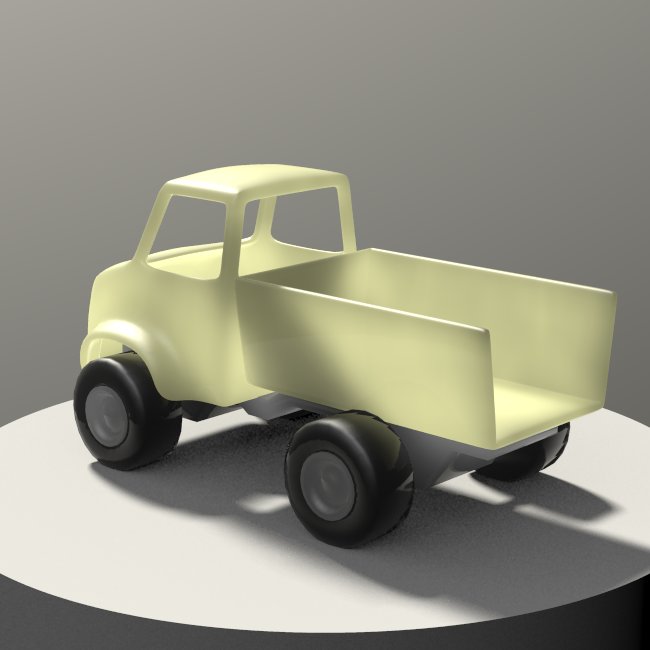
Another test. It's a toy truck I slapped together in LightWave. Parsing
took 12 seconds, rendering took 336 seconds for a total of about 1
minute, 37 seconds. There are two area_lights and two instances of the
SSS pattern which were averaged together.

The effect is only efficient where the object is very translucent, such
as found in cheap plastic like this model.

Sam
Post a reply to this message
Attachments:
Download 'ssstest2.jpg' (31 KB)
Preview of image 'ssstest2.jpg'
|
|
| |
| |
|
|
|
|
| |
| |
|
|
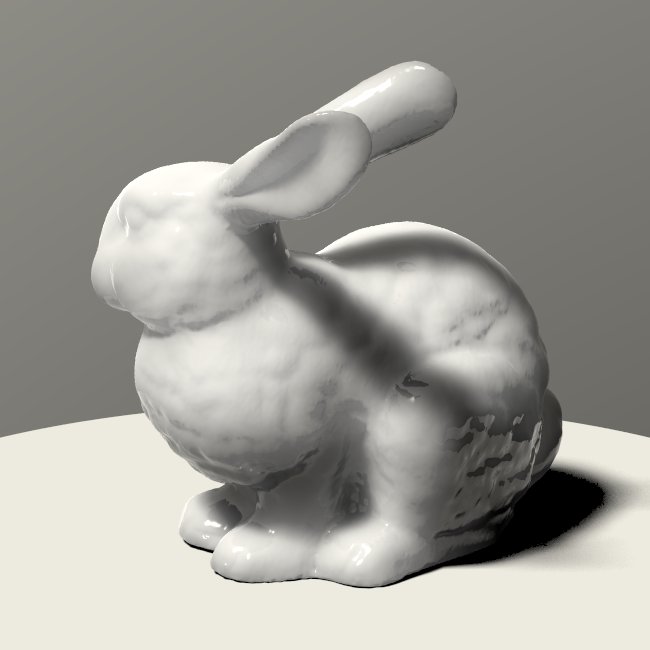
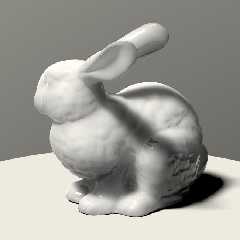
It's the Stanford bunny :) I opened and enhanced it with Blender, and
converted it with PoseRay. It took 28 seconds to parse, with 7-8 used
for parsing the mesh itself.

Sam
Post a reply to this message
Attachments:
Download 'ssstest3.jpg' (27 KB)
Preview of image 'ssstest3.jpg'
|
|
| |
| |
|
|
|
|
| |
| |
|
|
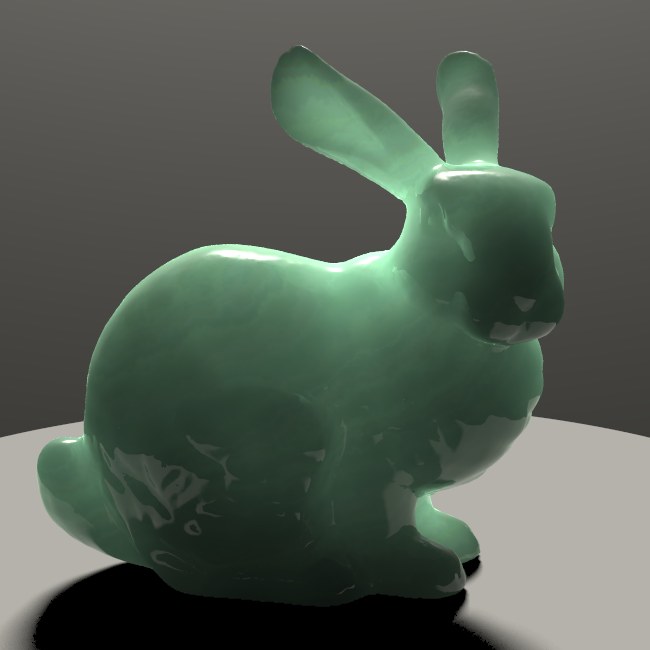
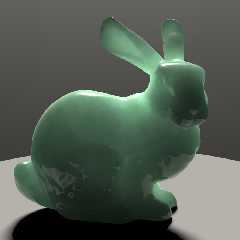
Okay, this is the last one for now.

Parse time:
  1 second.... bunny
  5 seconds... SSS

Render time:
  125 seconds

Total:
  2 minutes, 5 seconds

This effect is too general to be useful for much. It's nothing more than
a curiosity at this point, and I think I'll let it sit for a while.

Sam
Post a reply to this message
Attachments:
Download 'ssstest4.jpg' (28 KB)
Preview of image 'ssstest4.jpg'
|
|
| |
| |
|
|
|
|
| |
| |
|
|
stbenge <THI### [at] hotmailcom> wrote:
> Okay, this is the last one for now.
>

Looks almost like jade. A fascinating (and beautiful) technique you've come up
with, Sam.

Ken W.
Post a reply to this message
|
|
| |
| |
|
|
|
|
| |
| |
|
|
Kenneth wrote:
> Looks almost like jade. A fascinating (and beautiful) technique you've come up
> with, Sam.

It has some problems. It's probably useful for something, I just know
know what for...

Sam
Post a reply to this message
|
|
| |
| |
|
|
|
|
| |
| |
|
|
stbenge <THI### [at] hotmailcom> wrote:
> Okay, this is the last one for now.
>
> Parse time:
>   1 second.... bunny
>   5 seconds... SSS
>
> Render time:
>   125 seconds
>
> Total:
>   2 minutes, 5 seconds
>
> This effect is too general to be useful for much. It's nothing more than
> a curiosity at this point, and I think I'll let it sit for a while.
>
> Sam

Ok, I hereby declare you a Povray God (TM) in the same league as the greats
Gilles and Jaime, perhaps not so much in sheer artistry output but certainly in
devilish technique.  Please, bring the knowledge fire to your faithful servants.

Goodbye, media.
Post a reply to this message
|
|
| |
| |
|
|
|
|
| |
| |
|
|
> Ok, I hereby declare you a Povray God (TM) in the same league as the greats
> Gilles and Jaime, perhaps not so much in sheer artistry output but certainly in
> devilish technique.  Please, bring the knowledge fire to your faithful servants.

Oh no, don't apply the G-word to me! I'm just a bored guy, exploiting
POV's SDL :)

It's funny, I got into 3d graphics because of my interest in art, but I
find myself screwing around with only the technical aspects. Maybe I'd
be less depressed if I returned to the roots of my preoccupation...

> Goodbye, media.

Huh?

Sam
Post a reply to this message
|
|
| |
| |
|
|
|
|
| |
| |
|
|
"stbenge" <THI### [at] hotmailcom> schreef in bericht
news:489e7180@news.povray.org...
> Oh no, don't apply the G-word to me! I'm just a bored guy, exploiting
> POV's SDL :)

Well, like it or not, you are a Master at these things while most of us are
mere Journeypersons or Apprentices. Again, excellent work.

>
> It's funny, I got into 3d graphics because of my interest in art, but I
> find myself screwing around with only the technical aspects. Maybe I'd be
> less depressed if I returned to the roots of my preoccupation...

And yet, as has been said already earlier, your work goes farther than mere
technical aspects. Each of your images illustrating a new technique is
carefully composed and textured into a little piece of art. Don't scorn your
achievements. The end product is more than the sum of its components, so to
speak.

Thomas
Post a reply to this message
|
|
| |
| |
|
|
|
|
| |
| |
|
|
stbenge wrote:
> This effect is too general to be useful for much. It's nothing more than
> a curiosity at this point, and I think I'll let it sit for a while.

  Sharing it would still be nice. Maybe others could improve on the
technique.
Post a reply to this message
|
|
| |
| |
|
|
|
|
| |
| |
|
|
>> Goodbye, media.
>
> Huh?

Someone doesn't want to use media for SSS anymore ;)

Great technique, BTW!
Post a reply to this message
|
|
| |
| |
|
|
|
|
| |
| |
|
|
Thomas de Groot wrote:
> "stbenge" <THI### [at] hotmailcom> schreef in bericht
> news:489e7180@news.povray.org...
>> Oh no, don't apply the G-word to me! I'm just a bored guy, exploiting
>> POV's SDL :)
>
> Well, like it or not, you are a Master at these things while most of us are
> mere Journeypersons or Apprentices. Again, excellent work.
>
>> It's funny, I got into 3d graphics because of my interest in art, but I
>> find myself screwing around with only the technical aspects. Maybe I'd be
>> less depressed if I returned to the roots of my preoccupation...
>
> And yet, as has been said already earlier, your work goes farther than mere
> technical aspects. Each of your images illustrating a new technique is
> carefully composed and textured into a little piece of art. Don't scorn your
> achievements.

Thanks for the encouragement. I'll be screwing around in POV until I
have something better to do ;)

> The end product is more than the sum of its components, so to
> speak.

Is that what is called a "gestalt?"

Sam
Post a reply to this message
|
|
| |
| |
|
|
|
|
| |
| |
|
|
Christian Froeschlin wrote:
>>> Goodbye, media.
>>
>> Huh?
>
> Someone doesn't want to use media for SSS anymore ;)

Oh, of course (palm slap to the forehead). I though he was talking about
mass-media and identifying with it for some reason.

> Great technique, BTW!

Thanks!

Sam
Post a reply to this message
|
|
| |
| |
|
|
|
|
| |
| |
|
|
Warp wrote:
> stbenge wrote:
>> This effect is too general to be useful for much. It's nothing more than
>> a curiosity at this point, and I think I'll let it sit for a while.
>
>   Sharing it would still be nice. Maybe others could improve on the
> technique.

Okay, I'll post it along with the proximity macros. Hopefully it will be
ready sometime today.

Sam
Post a reply to this message
|
|
| |
| |
|
|
|
|
| |
| |
|
|
stbenge <THI### [at] hotmailcom> wrote:
> Oh no, don't apply the G-word to me! I'm just a bored guy, exploiting
> POV's SDL :)

Yeah, God said something like that about the laws of physics. ;)

> It's funny, I got into 3d graphics because of my interest in art, but I
> find myself screwing around with only the technical aspects. Maybe I'd
> be less depressed if I returned to the roots of my preoccupation...

Don't worry, You Highness.  Ingenious technique is a work of art in itself.  And
as others pointed out, many of your "example" images look and feel far better
than most art-geared stuff.

> > Goodbye, media.
>
> Huh?

No need for slow media SSS anymore! :D
Post a reply to this message
|
|
| |
| |
|
|
|
|
| |
| |
|
|
nemesis wrote:
> stbenge <THI### [at] hotmailcom> wrote:
>> Oh no, don't apply the G-word to me! I'm just a bored guy, exploiting
>> POV's SDL :)
>
> Yeah, God said something like that about the laws of physics. ;)

Lol. I guess it's better to play God with art than it is with other
people's lives. Everybody plays the role in one way or another. I'd
rather do it in a harmless fashion :)

>> It's funny, I got into 3d graphics because of my interest in art, but I
>> find myself screwing around with only the technical aspects. Maybe I'd
>> be less depressed if I returned to the roots of my preoccupation...
>
> Don't worry, You Highness.

Okay, where's my crown. I didn't get a crown :(

> Ingenious technique is a work of art in itself.  And
> as others pointed out, many of your "example" images look and feel far better
> than most art-geared stuff.

If that's the case, maybe I *can* make money at this someday.

>>> Goodbye, media.
>> Huh?
>
> No need for slow media SSS anymore! :D

Don't abandon media! It's still a better option for glass objects and
clouds. I did, however, manage to use my SSS pattern with a transparent
object by making the black parts clear, and filling the object with
absorbing media. It was faster than using scattering media, and didn't
look altogether bad.

Sam
Post a reply to this message
|
|
| |
| |
|
|
|
|
| |
| |
|
|
stbenge wrote:
> Okay, here goes.
>
> Imagine a virtual df3 setup where a 3d grid pattern exists around a
> specified object. For this setup I used three planar patterns, each
> oriented along the x, y and z axes. I placed loops within the
> pigment_maps for each planar pattern so that I could test each "cell"
> within the virtual density map.
>
> For each cell a ray is shot from a specified point in space where the
> light_source resides. If a ray lands on the object within the cell, that
> part of the density pattern is given a white value. If the ray doesn't
> hit the object in that cell, the entry is left black.
>
> The result is an approximation of where the light lands on the surface
> of the object. Imagine how this would look like as a density pattern. It
> doesn't look too great, as there is major stair-stepping present.
>
> To reduce the stair-stepping effect, I go through the above steps at
> different sample rates. For instance, I could start off with a density
> map with <3,3,3> elements. I could then sample at <4,4,4>, <5,5,5>, and
> so on, and average the results to produce a smoother end result. This is
> all done automatically, otherwise the setup would be painfully tedious
> to use. All these tests are averaged together into one pigment pattern.
>
> The long parse times come when I test an object many times. For the
> image I attached in the original post, I tested the object 30 times
> starting with <3,2,3> samples and ending with <24,16,24> samples.
> Remember, for each cell a call to trace() is performed. That's a lot of
> tests! Not only that, but with 30 averaged pigments comes a hit on
> render time. For simple pigments this is no problem, but for textures
> with texture_maps, the rendering itself can take a long time.
>
> I may try to make this code available. I'll need to write up some
> documentation. It would be bundled with the proximity pattern macros, as
> the SSS code stems from them.

Thanks for the explanation, I'm not sure what you were worried about,
this is very clear and understandable :).  Very clever, this is already
making the gears turn in my head.  I'm quite curious about the nuts and
bolts of how you actually construct the 3d density pigment.  Any details
you are able to share would be most welcome.

--
-The Mildly Infamous Blue Herring
Post a reply to this message
|
|
| |
| |
|
|
|
|
| |
| |
|
|
stbenge wrote:
> Okay, this is the last one for now.
>
> Parse time:
>  1 second.... bunny
>  5 seconds... SSS
>
> Render time:
>  125 seconds
>
> Total:
>  2 minutes, 5 seconds
>
> This effect is too general to be useful for much. It's nothing more than
> a curiosity at this point, and I think I'll let it sit for a while.

Really really great!  I was killing myself recently trying to come up
with almost exactly this texture using scattering media, and this is so
so much better!

--
-The Mildly Infamous Blue Herring
Post a reply to this message
|
|
| |
| |
|
|
|
|
| |
| |
|
|
Blue Herring wrote:
> stbenge wrote:
>> Okay, here goes.
>
> Thanks for the explanation, I'm not sure what you were worried about,
> this is very clear and understandable :).  Very clever, this is already
> making the gears turn in my head.  I'm quite curious about the nuts and
> bolts of how you actually construct the 3d density pigment.  Any details
> you are able to share would be most welcome.

You could view the source I posted in p.b.scene-files to see exactly how
it was done, or you could look at the code below as an example. It uses
the gradient pattern, and is clipped by a boxed pattern.

/* Begin Code */

// Renders colored static inside a cubic region 2x2x2 units large.
// There are 10x10x10=1000 'cells'

// a good test object
#declare obj=
union{
  plane{y,-.5}
  sphere{0,.5}
}

// number of cells
#declare incre=1/9;

// cleaner code is reusable code :)
// I should have done it this was for fast_prox.inc...
#macro grad(gDir)
  pigment_pattern{
   gradient gDir
   scale 2
   translate gDir
  }
#end

object{obj
  pigment{
   // wrapping them inside 'boxed' is a good way
   // to contain the infinitely-repeating gradients
   boxed
   pigment_map{
    [0 rgb 1]
    [1/256
     grad(z)
     pigment_map{
      #declare Z=0;
      #while(Z<=1)
       [Z
        grad(y)
        pigment_map{
         #declare Y=0;
         #while(Y<=1)
          [Y
           grad(x)
           pigment_map{
            #declare X=0;
            #while(X<=1)
             [X
              rgb<rand(R),rand(R),rand(R)>
             ]
             #declare X=X+incre;
            #end
           }
          ]
          #declare Y=Y+incre;
         #end
        }
       ]
       #declare Z=Z+incre;
      #end
     }
    ]
   }
  }
}

/* End Code */

Sam
Post a reply to this message
|
|
| |
| |
|
|
|
|
| |
| |
|
|
stbenge wrote:
> You could view the source I posted in p.b.scene-files to see exactly how
> it was done, or you could look at the code below as an example. It uses
> the gradient pattern, and is clipped by a boxed pattern.

Of course, forgot you posted code, I'll definitely look at it.  I must
say, this is brilliant though.  We definitely need to see about getting
you that crown :)

--
-The Mildly Infamous Blue Herring
Post a reply to this message
|
|
| |
| |
|
|
|
|
| |
| |
|
|
Blue Herring wrote:
> stbenge wrote:
>> You could view the source I posted in p.b.scene-files to see exactly
>> how it was done, or you could look at the code below as an example. It
>> uses the gradient pattern, and is clipped by a boxed pattern.
>
> Of course, forgot you posted code, I'll definitely look at it.  I must
> say, this is brilliant though.  We definitely need to see about getting
> you that crown :)
>

Forgot to mention, I think this may well solve an aggravating problem
I've been having with media later...

--
-The Mildly Infamous Blue Herring
Post a reply to this message
|
|
| |
| |
|
|
|
|
| |
| |
|
|
Blue Herring wrote:
> stbenge wrote:
>> You could view the source I posted in p.b.scene-files to see exactly
>> how it was done, or you could look at the code below as an example. It
>> uses the gradient pattern, and is clipped by a boxed pattern.
>
> Of course, forgot you posted code, I'll definitely look at it.  I must
> say, this is brilliant though.  We definitely need to see about getting
> you that crown :)
>

I've got some aluminum foil...

Sam
Post a reply to this message
|
|
| |
| |
|
|
|
|
| |
| |
|
|
Blue Herring wrote:
>
> Forgot to mention, I think this may well solve an aggravating problem
> I've been having with media later...

What is the problem you are having?

Sam
Post a reply to this message
|
|
| |
| |
|
|
From: Christian Froeschlin
Subject: Re: Another SSS technique (28k jpg)
Date: 19 Aug 2008 07:57:19
Message: <48aab51f@news.povray.org>
|
|
|
| |
| |
|
|
> We definitely need to see about getting you that crown :)

How about a rendered one ;)
Post a reply to this message
|
|
| |
| |
|
|
|
|
| |
| |
|
|
stbenge wrote:
> What is the problem you are having?

The problem I've been having is creating a shaped density pattern for
media.  I wanted a non-constant density that conformed to a bezier sweep
shape.    I figured out a function using a "max" of a few hundred
functions, but needless to say render time was tortuous.  However, using
your method I was able to resample that function into a pigment with
much better render time.  The attached image is the simple scene I was
working on.  It took about 3 1/2 minutes to render using the resampled
pigment turned function as the density function.  The original function
took over an hour to render.   Parse time of course was much higher, but
once the pigment was written to a file re-rendering was quite quick.
(Incidentally the file for this pigment is 179Mb).

--
-The Mildly Infamous Blue Herring
Post a reply to this message
Attachments:
Download 'nixie_2.png' (27 KB)
Preview of image 'nixie_2.png'

|
|
| |
| |
|
|
|
|
| |