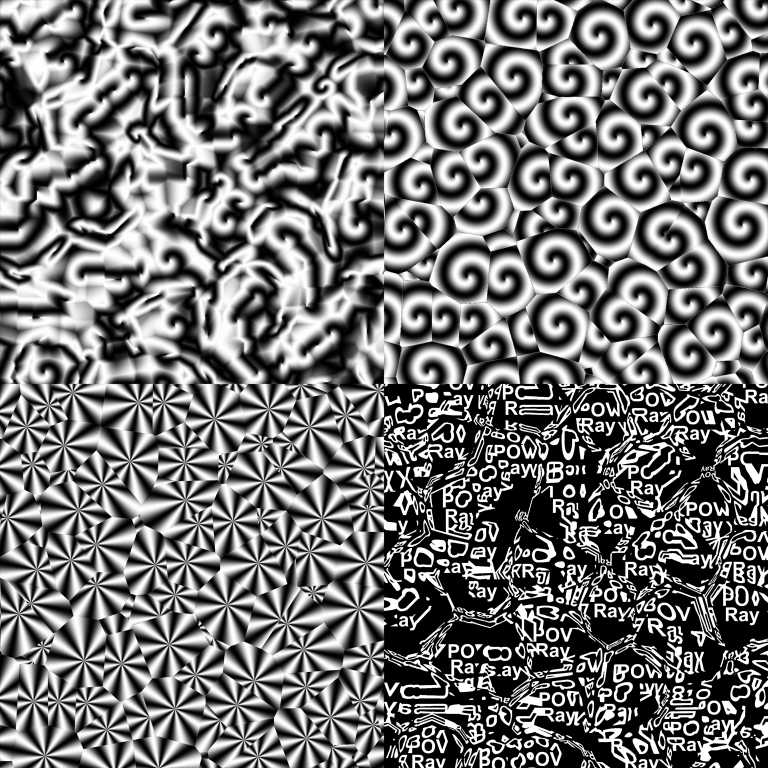
|
|
|
|
|
|
| |
| |
|
|
|
|
| |
| |
|
|
Hi everyone,

Years ago, somebody posted a swirly pigment. It resembled the swirls you
see in clouds sometimes. I have tried looking for the code many times,
but to no avail. The code has been lost.

Every once in a while I try to recreate that code using pigment
functions. Every time I've tried, I've failed. Until today.

I based my work on the premise that the target pattern must be
translated according to another pattern, in this case crackle form x.
What I have arrived at must be different from the aforementioned
poster's code, since his tended to have small gray boxes right at the
center of each crackle cell. There is no such artifact in my code, and I
can't be sure just how close my effect comes to his.

Here is some code:

#macro pcc(pgmt, Mod)
  #local pgmt2=function{pigment{pgmt}}
  #local pg1=
  function{
   pigment{
    crackle form x
    scale .25
   }
  }
  pigment_pattern{
   function{
    pgmt2(
     (pow(pg1(x+Mod,y,z).grey,2)-pow(pg1(x-Mod,y,z).grey,2))/(Mod*64),
     (pow(pg1(x,y+Mod,z).grey,2)-pow(pg1(x,y-Mod,z).grey,2))/(Mod*64),
     z
    ).grey
   }
  }
#end

#declare my_pigment=
pigment{
  pcc(
   pigment{
    spiral1 1
    sine_wave frequency 1
    scale .125
   }
   ,.085
  )
}

The macro takes two arguments. The first is the pigment you wish to have
copied into each crackle cell. The second indicates how sharp you want
the edges to be. Smaller values = sharper edges. The macro returns a
pigment_pattern, so it can be used in any pattern block (pigment,
normal, texture, etc.)

I hope some of you find a use for this. I had hoped to use it for making
height fields. I'll post any interesting results I might get.

Sam
Post a reply to this message
Attachments:
Download 'pcc1.jpg' (123 KB)
Preview of image 'pcc1.jpg'
|
|
| |
| |
|
|
From: Paolo Gibellini
Subject: Re: Copying pigments with crackle (124k jpg)
Date: 29 Jul 2008 04:20:43
Message: <488ed2db$1@news.povray.org>
|
|
|
| |
| |
|
|
Mmmm...
Interesting pigment: to be evaluated...
;-)
Paolo

 >stbenge  on date 29/07/2008 01:14 wrote:
> Hi everyone,
>
> Years ago, somebody posted a swirly pigment. It resembled the swirls you
> see in clouds sometimes. I have tried looking for the code many times,
> but to no avail. The code has been lost.
>
> Every once in a while I try to recreate that code using pigment
> functions. Every time I've tried, I've failed. Until today.
>
> I based my work on the premise that the target pattern must be
> translated according to another pattern, in this case crackle form x.
> What I have arrived at must be different from the aforementioned
> poster's code, since his tended to have small gray boxes right at the
> center of each crackle cell. There is no such artifact in my code, and I
> can't be sure just how close my effect comes to his.
>
> Here is some code:
>
> #macro pcc(pgmt, Mod)
>  #local pgmt2=function{pigment{pgmt}}
>  #local pg1=
>  function{
>   pigment{
>    crackle form x
>    scale .25
>   }
>  }
>  pigment_pattern{
>   function{
>    pgmt2(
>     (pow(pg1(x+Mod,y,z).grey,2)-pow(pg1(x-Mod,y,z).grey,2))/(Mod*64),
>     (pow(pg1(x,y+Mod,z).grey,2)-pow(pg1(x,y-Mod,z).grey,2))/(Mod*64),
>     z
>    ).grey
>   }
>  }
> #end
>
> #declare my_pigment=
> pigment{
>  pcc(
>   pigment{
>    spiral1 1
>    sine_wave frequency 1
>    scale .125
>   }
>   ,.085
>  )
> }
>
> The macro takes two arguments. The first is the pigment you wish to have
> copied into each crackle cell. The second indicates how sharp you want
> the edges to be. Smaller values = sharper edges. The macro returns a
> pigment_pattern, so it can be used in any pattern block (pigment,
> normal, texture, etc.)
>
> I hope some of you find a use for this. I had hoped to use it for making
> height fields. I'll post any interesting results I might get.
>
> Sam
>
> ------------------------------------------------------------------------
>
Post a reply to this message
|
|
| |
| |
|
|
|
|
| |
| |
|
|
This is really nifty, I'm trying to bend my brain around how it works :)

This reminds me of something I ran into a while back that Rune Johansen
did with pigments, though I think the methods are different:
http://runevision.com/3d/povgoodies/#216

I haven't tried it, but it might be slightly faster if you eliminate
some interim pigments and some of the grayscale conversions, and return
the function:

#macro pcc(pgmt, Mod)
   #local pgmt2 =
     function{
       pattern {
         pigment_pattern {pgmt}
       }
     }

   #local pg1=
     function{
       pattern {
         crackle form x
         scale .25
       }
     }

   function{
     pgmt2(
      (pow(pg1(x+Mod,y,z),2)-pow(pg1(x-Mod,y,z),2))/(Mod*64),
      (pow(pg1(x,y+Mod,z),2)-pow(pg1(x,y-Mod,z),2))/(Mod*64),
      z
     )
   }

#end

Just a possibility.

--
-The Mildly Infamous Blue Herring
Post a reply to this message
|
|
| |
| |
|
|
From: stbenge
Subject: Re: Copying pigments with crackle (124k jpg)
Date: 29 Jul 2008 16:34:06
Message: <488f7ebe@news.povray.org>
|
|
|
| |
| |
|
|
Blue Herring wrote:
> This is really nifty, I'm trying to bend my brain around how it works :)

To be honest, I only have a vague idea myself, though I still managed to
get what I was after... Perhaps my subconscious mind knows all the
details...

> This reminds me of something I ran into a while back that Rune Johansen
> did with pigments, though I think the methods are different:
> http://runevision.com/3d/povgoodies/#216

Yeah, that's not the same at all. I think those patterns may use
functions as well, or possibly pattern warps or looped pigment_maps.

> I haven't tried it, but it might be slightly faster if you eliminate
> some interim pigments and some of the grayscale conversions, and return
> the function:

Thanks for pointing that out! Here's an updated version of the macro:

#macro pcc(pgmt, Mod)
  #local pgmt2 =
   function{
    pattern{
     pigment_pattern {pgmt}
    }
   }
  #local pg1=
   function{
    pattern{
     crackle form x*.75
    }
   }
  function{
   pgmt2(
    (pow(pg1(x+Mod,y,z),2)-pow(pg1(x-Mod,y,z),2))/(Mod*1.2),
    (pow(pg1(x,y+Mod,z),2)-pow(pg1(x,y-Mod,z),2))/(Mod*1.2),
    (pow(pg1(x,y,z+Mod),2)-pow(pg1(x,y,z-Mod),2))/(Mod*1.2)
   )
  }
#end

It now works in all three dimensions, and the underlying crackle pattern
is scaled 100%, allowing you to do stuff like this more easily:

plane{z,0
  pigment{
   crackle
   pigment_map{
    [0 rgb 0]
    [.5
     pcc(
      pigment{
       spiral1 1 sine_wave scale 0.75
      }
      ,.00001
     )
     color_map{[0 rgb<0,.3,.4>][1 rgb<.5,1,.75>]}
    ]
   }
  }
}

Sam
Post a reply to this message
|
|
| |
| |
|
|
|
|
| |
| |
|
|
Awesome! I wanted something like that ages ago when I did my procedural
crackle based city. I couldn't figure out how to do it. Now I'm just trying
to understand your code!
Is there any way to make it work with metric 1?
--
Tek
http://evilsuperbrain.com
"stbenge" <THI### [at] hotmail com> wrote in message
news:488e5300@news.povray.org...
> Hi everyone,
>
> Years ago, somebody posted a swirly pigment. It resembled the swirls you
> see in clouds sometimes. I have tried looking for the code many times,
> but to no avail. The code has been lost.
>
> Every once in a while I try to recreate that code using pigment
> functions. Every time I've tried, I've failed. Until today.
>
> I based my work on the premise that the target pattern must be
> translated according to another pattern, in this case crackle form x.
> What I have arrived at must be different from the aforementioned
> poster's code, since his tended to have small gray boxes right at the
> center of each crackle cell. There is no such artifact in my code, and I
> can't be sure just how close my effect comes to his.
>
> Here is some code:
>
> #macro pcc(pgmt, Mod)
> #local pgmt2=function{pigment{pgmt}}
> #local pg1=
> function{
> pigment{
> crackle form x
> scale .25
> }
> }
> pigment_pattern{
> function{
> pgmt2(
> (pow(pg1(x+Mod,y,z).grey,2)-pow(pg1(x-Mod,y,z).grey,2))/(Mod*64),
> (pow(pg1(x,y+Mod,z).grey,2)-pow(pg1(x,y-Mod,z).grey,2))/(Mod*64),
> z
> ).grey
> }
> }
> #end
>
> #declare my_pigment=
> pigment{
> pcc(
> pigment{
> spiral1 1
> sine_wave frequency 1
> scale .125
> }
> ,.085
> )
> }
>
> The macro takes two arguments. The first is the pigment you wish to have
> copied into each crackle cell. The second indicates how sharp you want
> the edges to be. Smaller values = sharper edges. The macro returns a
> pigment_pattern, so it can be used in any pattern block (pigment,
> normal, texture, etc.)
>
> I hope some of you find a use for this. I had hoped to use it for making
> height fields. I'll post any interesting results I might get.
>
> Sam
> com> wrote in message
news:488e5300@news.povray.org...
> Hi everyone,
>
> Years ago, somebody posted a swirly pigment. It resembled the swirls you
> see in clouds sometimes. I have tried looking for the code many times,
> but to no avail. The code has been lost.
>
> Every once in a while I try to recreate that code using pigment
> functions. Every time I've tried, I've failed. Until today.
>
> I based my work on the premise that the target pattern must be
> translated according to another pattern, in this case crackle form x.
> What I have arrived at must be different from the aforementioned
> poster's code, since his tended to have small gray boxes right at the
> center of each crackle cell. There is no such artifact in my code, and I
> can't be sure just how close my effect comes to his.
>
> Here is some code:
>
> #macro pcc(pgmt, Mod)
> #local pgmt2=function{pigment{pgmt}}
> #local pg1=
> function{
> pigment{
> crackle form x
> scale .25
> }
> }
> pigment_pattern{
> function{
> pgmt2(
> (pow(pg1(x+Mod,y,z).grey,2)-pow(pg1(x-Mod,y,z).grey,2))/(Mod*64),
> (pow(pg1(x,y+Mod,z).grey,2)-pow(pg1(x,y-Mod,z).grey,2))/(Mod*64),
> z
> ).grey
> }
> }
> #end
>
> #declare my_pigment=
> pigment{
> pcc(
> pigment{
> spiral1 1
> sine_wave frequency 1
> scale .125
> }
> ,.085
> )
> }
>
> The macro takes two arguments. The first is the pigment you wish to have
> copied into each crackle cell. The second indicates how sharp you want
> the edges to be. Smaller values = sharper edges. The macro returns a
> pigment_pattern, so it can be used in any pattern block (pigment,
> normal, texture, etc.)
>
> I hope some of you find a use for this. I had hoped to use it for making
> height fields. I'll post any interesting results I might get.
>
> Sam
>
Post a reply to this message
|
|
| |
| |
|
|
|
|
| |
| |
|
|
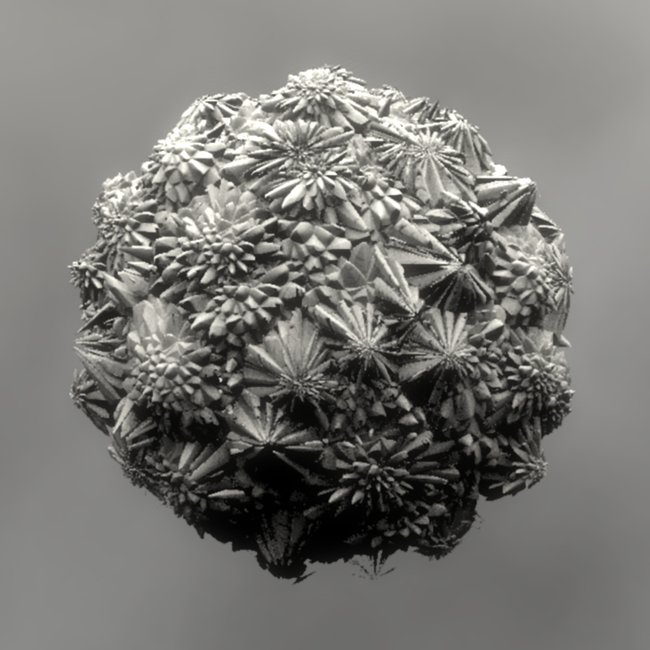
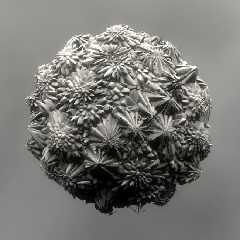
Using the code modified to work in three dimensions, I applied a
radiating crackle pattern to each cell. The resulting isosurface
resembles aragonite.

Don't mind the really low-quality aa settings. Isosurfaces render very
slowly...

Sam
Post a reply to this message
Attachments:
Download 'crystal_mass.jpg' (63 KB)
Preview of image 'crystal_mass.jpg'
|
|
| |
| |
|
|
From: stbenge
Subject: Re: Copying pigments with crackle (124k jpg)
Date: 29 Jul 2008 18:36:13
Message: <488f9b5d@news.povray.org>
|
|
|
| |
| |
|
|
Tek wrote:
> Awesome! I wanted something like that ages ago when I did my procedural
> crackle based city. I couldn't figure out how to do it. Now I'm just trying
> to understand your code!

It pays off to keep trying. I can't tell you how many times I've tried
to get this to work.

> Is there any way to make it work with metric 1?

Yes, you can get some interesting effects. Here, try this out:

#macro pcc(pgmt, Mod)
  #local pgmt2 =
   function{
    pattern{
     pigment_pattern {pgmt}
    }
   }
  #local pg1=
   function{
    pattern{
     crackle form x*.75
     metric 1
    }
   }
  function{
   pgmt2(
    (pow(pg1(x+Mod,y,z),2)-pow(pg1(x-Mod,y,z),2))/(Mod*1.2),
    (pow(pg1(x,y+Mod,z),2)-pow(pg1(x,y-Mod,z),2))/(Mod*1.2),
    (pow(pg1(x,y,z+Mod),2)-pow(pg1(x,y,z-Mod),2))/(Mod*1.2)
   )
  }
#end

plane{z,0
  pigment{
   pcc(
    pigment{
     radial rotate x*90+z*45
     triangle_wave frequency 2
     color_map{[0 rgb 0][1 rgb 1]}
    }
    ,.05
   )
  }
}

It makes rectangular masses all over the place. Nest a few of those with
different translation values, and a cityscape might be possible.

Sam
Post a reply to this message
|
|
| |
| |
|
|
|
|
| |
| |
|
|
"stbenge" <THI### [at] hotmailcom> wrote in message
news:488f9b5d@news.povray.org...
> Tek wrote:
>> Awesome! I wanted something like that ages ago when I did my procedural
>> crackle based city. I couldn't figure out how to do it. Now I'm just
>> trying to understand your code!
>
> It pays off to keep trying. I can't tell you how many times I've tried to
> get this to work.
>
>> Is there any way to make it work with metric 1?
>
> Yes, you can get some interesting effects. Here, try this out:

Yeah but it distorts the pattern, one of the things that's great about your
first post is that it duplicates my pattern into every cell, but with metric
one it breaks it.

> It makes rectangular masses all over the place. Nest a few of those with
> different translation values, and a cityscape might be possible.

I've already got the city:
http://news.povray.org/povray.binaries.images/thread/%3C47e997a1%40news.povray.org%3E/?ttop=280683&toff=150
But I really need a perpendicular pattern to the crackle, something like the
radial example in your original post, but perpendicular to metric 1.
I don't think it's possible though :(

--
Tek
http://evilsuperbrain.com
Post a reply to this message
|
|
| |
| |
|
|
|
|
| |
| |
|
|
stbenge napsal(a):
> Using the code modified to work in three dimensions, I applied a
> radiating crackle pattern to each cell. The resulting isosurface
> resembles aragonite.
>
> Don't mind the really low-quality aa settings. Isosurfaces render very
> slowly...
>
> Sam
>
> ------------------------------------------------------------------------
>
beautiful. There are a few disconnected speckles but these may be
difficult to remove.

--
the ultimate time-killer:
+a0.0 +am2 +r9

Johnny D
Post a reply to this message
|
|
| |
| |
|
|
|
|
| |
| |
|
|
Jan Dvorak wrote:
> beautiful. There are a few disconnected speckles but these may be
> difficult to remove.

Thanks. Yeah, those disconnected parts are always hard to remove.

Sam
Post a reply to this message
|
|
| |
| |
|
|
|
|
| |
| |
|
|
"stbenge" <THI### [at] hotmailcom> schreef in bericht
news:488f9aa2@news.povray.org...
> Using the code modified to work in three dimensions, I applied a
> radiating crackle pattern to each cell. The resulting isosurface
> resembles aragonite.
>

I am speachless, Sam...
I just now realize the potentiality of your code!

Thomas
Post a reply to this message
|
|
| |
| |
|
|
|
|
| |
| |
|
|
Ah, Sam!
This is fascinating! It seems carved wood too.
;-)
Paolo

 >stbenge  on date 30/07/2008 00:32 wrote:
> Using the code modified to work in three dimensions, I applied a
> radiating crackle pattern to each cell. The resulting isosurface
> resembles aragonite.
>
> Don't mind the really low-quality aa settings. Isosurfaces render very
> slowly...
>
> Sam
>
> ------------------------------------------------------------------------
>
Post a reply to this message
|
|
| |
| |
|
|
|
|
| |
| |
|
|
Fantastic!!

--
-The Mildly Infamous Blue Herring
Post a reply to this message
|
|
| |
| |
|
|
|
|
| |
| |
|
|
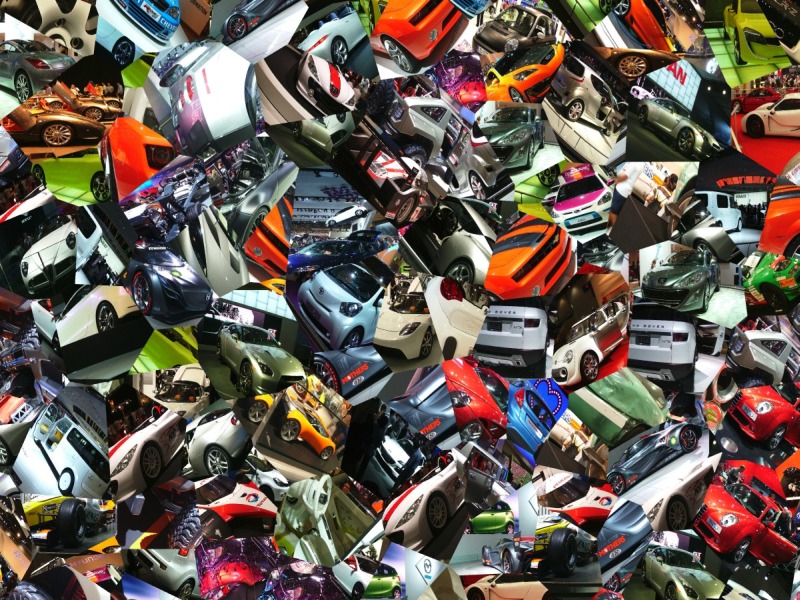
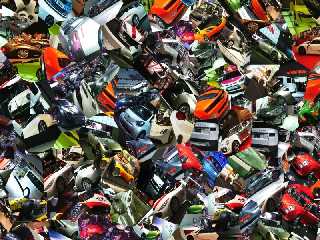
Here's something I made using Sam's techinique, slightly adapted to allow
coloured pigments, and some photos I took of the london motorshow.

My version of the  code is *really* inefficient, it took 48 minutes to
render at 1600x1200!

--
Tek
http://evilsuperbrain.com


"stbenge" <THI### [at] hotmailcom> wrote in message
news:488e5300@news.povray.org...
> Hi everyone,
>
> Years ago, somebody posted a swirly pigment. It resembled the swirls you
> see in clouds sometimes. I have tried looking for the code many times,
> but to no avail. The code has been lost.
>
> Every once in a while I try to recreate that code using pigment
> functions. Every time I've tried, I've failed. Until today.
>
> I based my work on the premise that the target pattern must be
> translated according to another pattern, in this case crackle form x.
> What I have arrived at must be different from the aforementioned
> poster's code, since his tended to have small gray boxes right at the
> center of each crackle cell. There is no such artifact in my code, and I
> can't be sure just how close my effect comes to his.
>
> Here is some code:
>
> #macro pcc(pgmt, Mod)
>  #local pgmt2=function{pigment{pgmt}}
>  #local pg1=
>  function{
>   pigment{
>    crackle form x
>    scale .25
>   }
>  }
>  pigment_pattern{
>   function{
>    pgmt2(
>     (pow(pg1(x+Mod,y,z).grey,2)-pow(pg1(x-Mod,y,z).grey,2))/(Mod*64),
>     (pow(pg1(x,y+Mod,z).grey,2)-pow(pg1(x,y-Mod,z).grey,2))/(Mod*64),
>     z
>    ).grey
>   }
>  }
> #end
>
> #declare my_pigment=
> pigment{
>  pcc(
>   pigment{
>    spiral1 1
>    sine_wave frequency 1
>    scale .125
>   }
>   ,.085
>  )
> }
>
> The macro takes two arguments. The first is the pigment you wish to have
> copied into each crackle cell. The second indicates how sharp you want
> the edges to be. Smaller values = sharper edges. The macro returns a
> pigment_pattern, so it can be used in any pattern block (pigment,
> normal, texture, etc.)
>
> I hope some of you find a use for this. I had hoped to use it for making
> height fields. I'll post any interesting results I might get.
>
> Sam
>
Post a reply to this message
Attachments:
Download 'crackle_paternizedphoto.jpg' (242 KB)
Preview of image 'crackle_paternizedphoto.jpg'
|
|
| |
| |
|
|
|
|
| |
| |
|
|
Thomas de Groot wrote:
>
> I am speachless, Sam...
> I just now realize the potentiality of your code!
>

Thanks, I hope you find it useful!

My original idea for this code was to fake erosion by placing a radial
pigment at each hill/cell. In my mind it worked brilliantly, but in
reality, well, I don't have to show you :)

Sam
Post a reply to this message
|
|
| |
| |
|
|
|
|
| |
| |
|
|
Paolo Gibellini wrote:
> Ah, Sam!
> This is fascinating! It seems carved wood too.
> ;-)
> Paolo

Thanks!

Sam
Post a reply to this message
|
|
| |
| |
|
|
|
|
| |
| |
|
|
Blue Herring wrote:
> Fantastic!!
>
I was actually inspired by some real aragonite we found not far from
here. I'll post a photo if I can find a specimen in time...

Sam
Post a reply to this message
|
|
| |
| |
|
|
|
|
| |
| |
|
|
"Tek" <tek### [at] evilsuperbraincom> wrote:
> "stbenge" <THI### [at] hotmailcom> wrote in message
> > Yes, you can get some interesting effects. Here, try this out:
>
> Yeah but it distorts the pattern, one of the things that's great about your
> first post is that it duplicates my pattern into every cell, but with metric
> one it breaks it.

Hmm, I don't know if what you want is possible... "You can't change the laws of
physics," as my mom would say, or in this case, the laws of mathematics ;)

> > It makes rectangular masses all over the place. Nest a few of those with
> > different translation values, and a cityscape might be possible.
>
> I've already got the city:
>
Ah yes, now I remember.

> But I really need a perpendicular pattern to the crackle, something like the
> radial example in your original post, but perpendicular to metric 1.
> I don't think it's possible though :(

What are you after? Are you planning to make vertical ridges going up along the
sides of each building? Can my code (without metric 1) be applied into each
metric 1 cell to achieve your goal? It wouldn't wrap perfectly around the
metric 1 cells, but would still be central to each cell. Buried in a
pigment_map, you could hide the discontinuities between the metric 1 and metric
2 cell edges.

Sam
Post a reply to this message
|
|
| |
| |
|
|
|
|
| |
| |
|
|
"Tek" <tek### [at] evilsuperbraincom> wrote:
> Here's something I made using Sam's techinique, slightly adapted to allow
> coloured pigments, and some photos I took of the london motorshow.
>
> My version of the  code is *really* inefficient, it took 48 minutes to
> render at 1600x1200!

Actually, my code is rather slow, too. It doesn't seem slow until you try to
make a height_field with it. Most height fields don't take that long to parse!
Isosurfaces don't seem to be affected in the same way.

Sam
Post a reply to this message
|
|
| |
| |
|
|
|
|
| |
| |
|
|
Crackle seems to be pov's slowest pattern, and this technique accesses it
multiple times.

--
Tek
http://evilsuperbrain.com

"Samuel Benge" <stb### [at] hotmailcom> wrote in message
news:web.4890bfd54f928167ff8a991c0@news.povray.org...
> "Tek" <tek### [at] evilsuperbraincom> wrote:
>> Here's something I made using Sam's techinique, slightly adapted to allow
>> coloured pigments, and some photos I took of the london motorshow.
>>
>> My version of the  code is *really* inefficient, it took 48 minutes to
>> render at 1600x1200!
>
> Actually, my code is rather slow, too. It doesn't seem slow until you try
> to
> make a height_field with it. Most height fields don't take that long to
> parse!
> Isosurfaces don't seem to be affected in the same way.
>
> Sam
>
Post a reply to this message
|
|
| |
| |
|
|
|
|
| |
| |
|
|
Actually I want dotted white lines on the road, i.e. I need a pattern that's
a perpendicular gradient to crackle. I'm almost completely certain it's
impossible!

For my city I got windows on the buildings using a slope_mapped pattern on
the isosurface, with window patterns arranged for the 8 possible wall angles
that occur on that metric 1 isosurface. But of course that slope_map
wouldn't work on the flat road.

Though... that gives me an idea. maybe I can borrow your technique to sample
the gradient, then use that to index a pattern according to the gradient...
i.e. I could have a pattern for north-south lines, and map it onto east-west
gradients. There'd be discontinuities round the edge, and it wouldn't work
on the flat bits of metric 1, but it should be fine for my dotted white
lines...

Still, this all sounds like a lot more trouble than it's worth!

--
Tek
http://evilsuperbrain.com

"Samuel Benge" <stb### [at] hotmailcom> wrote in message
news:web.4890be074f928167ff8a991c0@news.povray.org...
> "Tek" <tek### [at] evilsuperbraincom> wrote:
>> "stbenge" <THI### [at] hotmailcom> wrote in message
>> > Yes, you can get some interesting effects. Here, try this out:
>>
>> Yeah but it distorts the pattern, one of the things that's great about
>> your
>> first post is that it duplicates my pattern into every cell, but with
>> metric
>> one it breaks it.
>
> Hmm, I don't know if what you want is possible... "You can't change the
> laws of
> physics," as my mom would say, or in this case, the laws of mathematics ;)
>
>> > It makes rectangular masses all over the place. Nest a few of those
>> > with
>> > different translation values, and a cityscape might be possible.
>>
>> I've already got the city:
>>
> Ah yes, now I remember.
>
>> But I really need a perpendicular pattern to the crackle, something like
>> the
>> radial example in your original post, but perpendicular to metric 1.
>> I don't think it's possible though :(
>
> What are you after? Are you planning to make vertical ridges going up
> along the
> sides of each building? Can my code (without metric 1) be applied into
> each
> metric 1 cell to achieve your goal? It wouldn't wrap perfectly around the
> metric 1 cells, but would still be central to each cell. Buried in a
> pigment_map, you could hide the discontinuities between the metric 1 and
> metric
> 2 cell edges.
>
> Sam
>
Post a reply to this message
|
|
| |
| |
|
|
From: stbenge
Subject: Re: Copying pigments with crackle (124k jpg)
Date: 30 Jul 2008 17:15:47
Message: <4890da03@news.povray.org>
|
|
|
| |
| |
|
|
Tek wrote:
> Actually I want dotted white lines on the road, i.e. I need a pattern that's
> a perpendicular gradient to crackle. I'm almost completely certain it's
> impossible!

Even if you could get that to work (nothing is impossible, only
improbable...), wouldn't some of the dotted lines be wedge-shaped?

> Still, this all sounds like a lot more trouble than it's worth!

It probably is. Sometimes it's better to just sit down and make macros
to be called randomly.

If you really have your heart set on making the buildings conform to a
crackle-like geometry, perhaps you should try your hand at learning how
voronoi diagrams work. You would have more control over all your objects
and textures that way.

I've been thinking about learning how voronoi geometry works. I'm sure
that knowledge will lead to something interesting!

Sam
Post a reply to this message
|
|
| |
| |
|
|
|
|
| |
| |
|
|
Tek wrote:
> Crackle seems to be pov's slowest pattern, and this technique accesses it
> multiple times.
>
So, are you saying that for faster renders, don't be a crackle ho?
Post a reply to this message
|
|
| |
| |
|
|
|
|
| |
| |
|
|
"Tek" <tek### [at] evilsuperbraincom> wrote:
> Actually I want dotted white lines on the road, i.e. I need a pattern that's
> a perpendicular gradient to crackle. I'm almost completely certain it's
> impossible!

A sort of pattern version of the Delaunay triangulation?

Tom
Post a reply to this message
|
|
| |
| |
|
|
|
|
| |
|
|