|
|
|
|
|
|
| |
| |
|
|
|
|
| |
| |
|
|
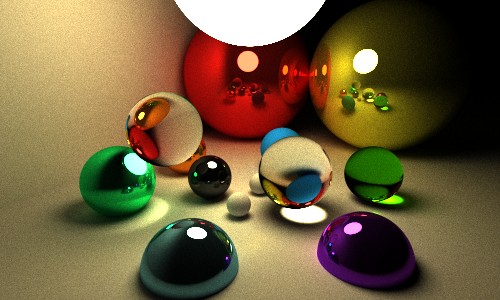
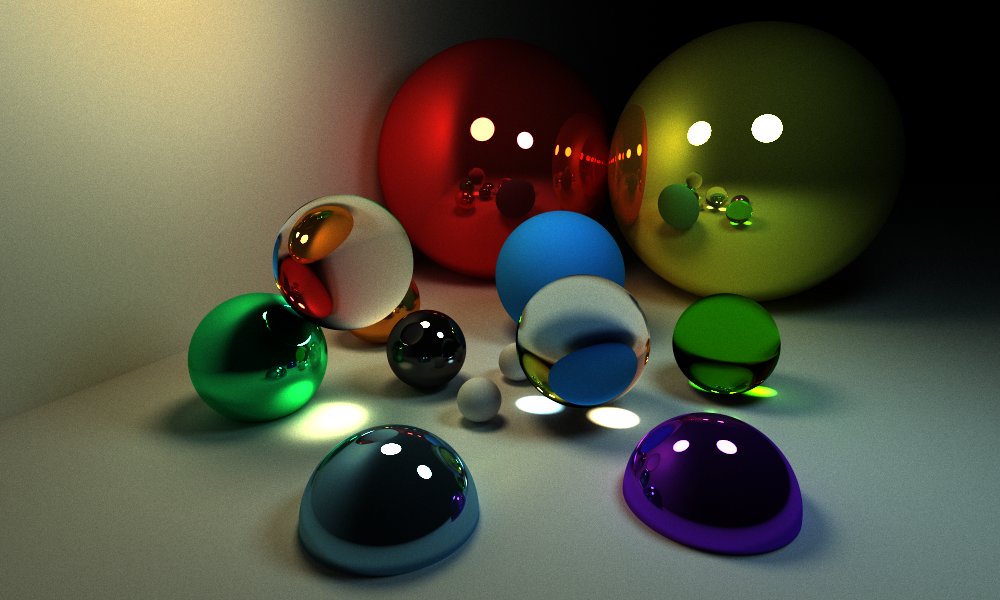
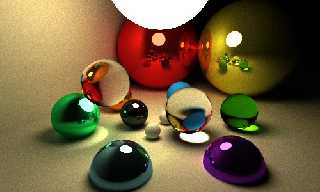
Just say when you get tired of my images :) But here is a new one. And
the results just keep on impressing me more and more!

Now you finally see refractions. I had some nasty artifacts before I
realized I really have to use epsilon value. (Because of floating point
errors, you rarely get 0.0 as a result, but values like 0.000000002332
which still should be considered 0.0. Epsilon is the highest value still
considered to be zero. So we don't compare to zero, but to epsilon)
After fixing that I finally got these beautiful refractions.

And guess what. I also got real caustics, for free :) No need to
implement them separately. See the left-most sphere: the green
reflecting one. You can see normal caustics at its base coming from the
clear sphere floating near it. But you can also see some green hue
around the white caustics. The green hue is most likely the white
caustics reflected from the green sphere hitting the ground. As before:
there is no recursion limit in the image. Rays keep on bouncing with 10%
probability to "die".

This image also has the "perfect anti-aliasing".

I'd like to know how easy/hard it is to achieve same results with
POV-Ray. This is a really simple scene with just spheres and planes and
reflection and refraction. And one spherical light source with warm
light 10*Vector(1, 0.9, 0.6).

For my eyes this one looks very realistic in many ways. Not sure how
much the graininess accounts for.
Post a reply to this message
Attachments:
Download 'kuva8.jpg' (45 KB)
Preview of image 'kuva8.jpg'
|
|
| |
| |
|
|
|
|
| |
| |
|
|
> I'd like to know how easy/hard it is to achieve same results with
> POV-Ray. This is a really simple scene with just spheres and planes and
> reflection and refraction. And one spherical light source with warm
> light 10*Vector(1, 0.9, 0.6).


please don't make me envious


--
You know you've been raytracing too long when...
you ever saw a beautiful scenerey and regretted not to take your 6"
reflective ball and a digital camera, thinking "this would have been a
perfect light probe"
-Johnny D
Post a reply to this message
|
|
| |
| |
|
|
|
|
| |
| |
|
|
> I'd like to know how easy/hard it is to achieve same results with
> POV-Ray. This is a really simple scene with just spheres and planes and
> reflection and refraction. And one spherical light source with warm
> light 10*Vector(1, 0.9, 0.6).

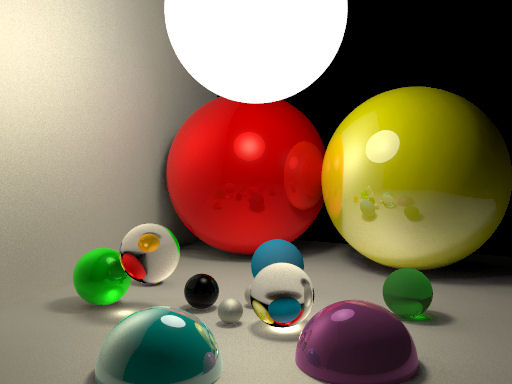
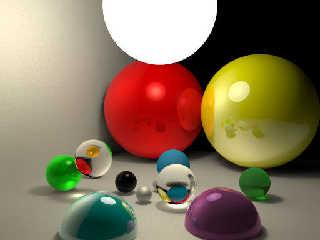
Not all that hard, it's just a matter of what settings are used. (24m)

> For my eyes this one looks very realistic in many ways. Not sure how
> much the graininess accounts for.

IMHO the graininess directly impacts the quality of a scene in
ways that make some surfaces appear to be textured (as in plaster)
and that it plays a trick on the mind, since the eye sees grain, but
interprets it as a textured surface instead of an artifact.
Post a reply to this message
Attachments:
Download 'sphere_vs_unbiased.jpg' (34 KB)
Preview of image 'sphere_vs_unbiased.jpg'
|
|
| |
| |
|
|
|
|
| |
| |
|
|
Glass (or any transparent material for that matter) that doesn't
reflect, only refracts, doesn't exist in reality. Glass always reflects
some light (and the amount of reflection actually depends on the
incidence angle).

  To get realistic and physically accurate results brute-force rendering
is not enough. You also need physically accurate BRDFs.
Post a reply to this message
|
|
| |
| |
|
|
|
|
| |
| |
|
|
Warp wrote:
>   Glass (or any transparent material for that matter) that doesn't
> reflect, only refracts, doesn't exist in reality. Glass always reflects
> some light (and the amount of reflection actually depends on the
> incidence angle).

Yeah, I just read about Fresnel equations in Wikipedia. Do you know if
"normal" reflections happen (about) equally when going from less dense
medium to denser medium when compared to opposite situation?

Glass has about 4% reflection coefficient when angle of incidence is 0.
I guess this 4% holds true both when entering glass and exiting it?

>   To get realistic and physically accurate results brute-force rendering
> is not enough. You also need physically accurate BRDFs.

Very true. I omitted reflections totally from the refractive spheres.
But brute force let's you simulate many multiple-bounce lighting
situations easily. Of course it just means that: the the light bounce as
much as it wants. The rest is up to the programmer. And my renderer
still misses many important features that make the image look realistic.
Post a reply to this message
|
|
| |
| |
|
|
|
|
| |
| |
|
|
Tim Attwood wrote:
>> I'd like to know how easy/hard it is to achieve same results with
>> POV-Ray. This is a really simple scene with just spheres and planes and
>> reflection and refraction. And one spherical light source with warm
>> light 10*Vector(1, 0.9, 0.6).
>
> Not all that hard, it's just a matter of what settings are used. (24m)

Could you try also with radiosity? Now your test image lacks global
illumination which contributes a lot to realism. Also the shadows seem
to be way too sharp considering the size of the emitting ball.

I also noticed caustics that can be seen below the green refractive
sphere. They came from reflections from the big yellow sphere. I guess
in POV you have to tell POV where to shoot photons? So you might also
miss these kind of effects?

To my eye, my image looks more realistic but I'm a bit subjective to say
it :-)
Post a reply to this message
|
|
| |
| |
|
|
|
|
| |
| |
|
|
> Could you try also with radiosity? Now your test image lacks global
> illumination which contributes a lot to realism. Also the shadows seem
> to be way too sharp considering the size of the emitting ball.

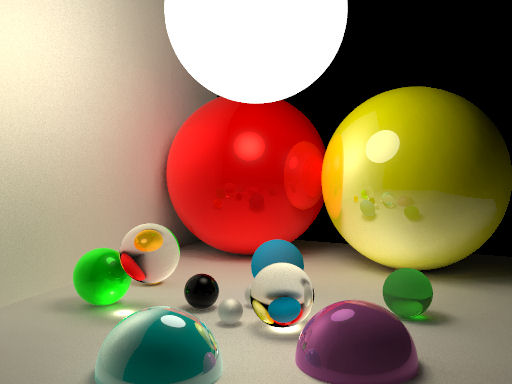
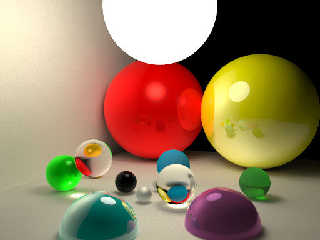
Here's one with a little bit better radiosity... high quality settings
take a lot of time, these are medium settings. (26m)

> I also noticed caustics that can be seen below the green refractive
> sphere. They came from reflections from the big yellow sphere. I guess
> in POV you have to tell POV where to shoot photons? So you might also
> miss these kind of effects?

Depends on what you mean by miss... you have control in POV to
omit them if you want to. It's a different way of doing it.

> To my eye, my image looks more realistic but I'm a bit subjective to say
> it :-)

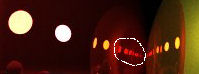
It's easy to miss the artifacts in any good image... for example where
your red and yellow spheres have a bit of hall-of-mirrors the color
fading into the distance is uneven, which is caused by the unbiased
methods, but would eventually resolve. Or the sharp edges on the
highlights seems a bit harsh, sort of like unintentional lens flares...
another artifact that your mind subconsciously ignores.
Post a reply to this message
Attachments:
Download 'sphere_vs_unbiased2.jpg' (35 KB)
Preview of image 'sphere_vs_unbiased2.jpg'
|
|
| |
| |
|
|
|
|
| |
| |
|
|
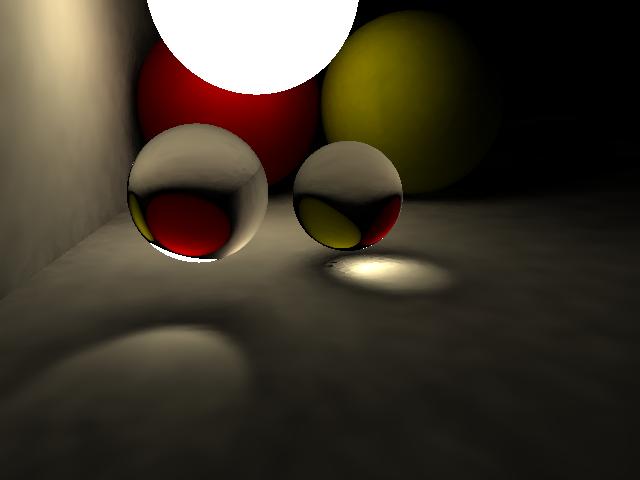
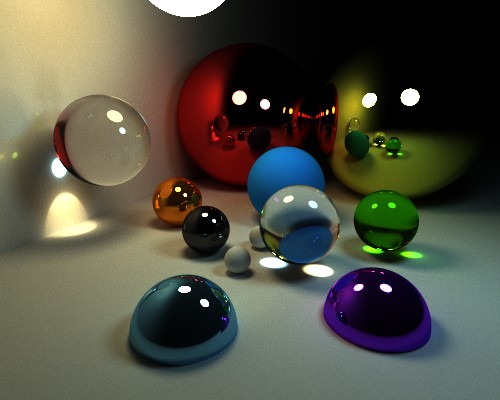
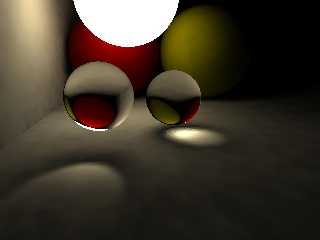
you're using photon mapping for the caustics, right?  Ever since these
guys have been posting these bruteforce renders, I've been noticing an
interesting pattern about photon mapping:  the caustics don't match the
shape of the source of light, you look at your render and to that of
Severi and you notice your caustics are focused in one point while his
are large and in the shape of the light sphere.  And that is to be
expected, since photon mapping reacts to the (point)light source, not to
a physical object emitting light, like in the bruteforce methods.

But radiosity works ok for that purpose.  Like here, just first
radiosity pass as I don't have the time right now for a complete
render... there are a few radiosity artifacts left, you could raise the
count a bit...


#local GIgather = 1;

#default { pigment { rgb 1 } finish { ambient 0 diffuse .5 } }

global_settings {
	adc_bailout .02
	radiosity {
		brightness 1.8
		gray_threshold .3
		error_bound .1
		low_error_factor .5
		#if (GIgather)
		save_file "pde.rad"
		count 80*4
		recursion_limit 3
		always_sample no
		nearest_count 16
		pretrace_end .006
		#else
		load_file "pde.rad"
		count 1
		recursion_limit 1
		always_sample no
		nearest_count 1
		pretrace_end 1
		pretrace_start 1
		#end
	}
}

#macro refl()
#if (!GIgather)
	reflection 1
#end
#end

union {
	plane { y, 0 }
	plane { x, -2 }
	// light ball
	sphere { y*2-x/2, .8 pigment { rgb <1,.9,.6> } finish { ambient 3
diffuse 1 }}
	// back balls
	sphere { <-1,1,2>, 1 pigment { rgb x } finish { diffuse 1/3 refl()
metallic .5 }}
	sphere { <1,1,2>, 1 pigment { rgb x+y } finish { diffuse 1/3 refl() }}
	// glass ball
	sphere { <.2,.5,-.6>, .4 pigment { rgbt 1 } finish { diffuse 0 } hollow
interior {ior 1.33}}
	sphere { <-.7,.7,-1.5>, .4 pigment { rgbt 1 } finish { diffuse 0 }
hollow interior {ior 1.33}}
}

camera {
	location <0,1.4,-5>
	look_at 0
	angle 55
	#if (!GIgather)
	aperture .01 blur_samples 40*6 variance .0000001 confidence .99
	#end
}
Post a reply to this message
Attachments:
Download 'pretty_damn_easy.jpg' (16 KB)
Preview of image 'pretty_damn_easy.jpg'
|
|
| |
| |
|
|
|
|
| |
| |
|
|
Tim Attwood wrote:
>> Could you try also with radiosity? Now your test image lacks global
>> illumination which contributes a lot to realism. Also the shadows seem
>> to be way too sharp considering the size of the emitting ball.
>
> Here's one with a little bit better radiosity... high quality settings
> take a lot of time, these are medium settings. (26m)

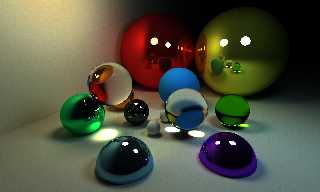
Better but still there is something that is missing. I don't know. Maybe
it is the small color bleeding/caustics that make images either look
realistic or not. I attached a higher quality render of similar scene.
Noise is better and when scaled down it looks very smooth.

Of course my scene has spheres with more reflection and less diffuse
light overall. My scene has darker shadows. Your blue and white balls
have very different diffuse characteristics. Etc. Not really comparing
just apples. If I have time, I try to install POV to my Linux side and
try myself to replicate this scene.

Actually the whole thing of what constitutes a realistic looking image
is quite fascinating. There are definitely many things that are hard to
pin-point but which still makes use realize we are looking at GC image.
For my eyes it looks like brute force renderers (or any renderer that
shoots MANY rays and let them bounce) cover many of those things.

>> I also noticed caustics that can be seen below the green refractive
>> sphere. They came from reflections from the big yellow sphere. I guess
>> in POV you have to tell POV where to shoot photons? So you might also
>> miss these kind of effects?
>
> Depends on what you mean by miss... you have control in POV to
> omit them if you want to. It's a different way of doing it.

Sadly it is more often the opposite, IMO. Images lack many features that
really should be there. We see images with no global illumination, no
caustics, no realistic shadows based on light source shape etc. So many
times I have seen an image which looks kinda "POVish". And then I see
something stunning which more than often meant that it was made with
another renderer. Again, I'm not necessarily saying that it can't be
done with POV, but it seems to be very difficult because you have to
enable and tweak all imaginable effects separately and use many "hacks".

> It's easy to miss the artifacts in any good image... for example where
> your red and yellow spheres have a bit of hall-of-mirrors the color
> fading into the distance is uneven, which is caused by the unbiased
> methods, but would eventually resolve. Or the sharp edges on the
> highlights seems a bit harsh, sort of like unintentional lens flares...
> another artifact that your mind subconsciously ignores.

I don't know what you mean by uneven fading. Is it still present in this
higher quality render attached? The sharp highlights are result of the
way the image is generated. I consider anything above 1.0 pure white. So
if I have a VERY bright lightsource, then the "perfectly antialiased"
value is still way above 1.0 and we see rough edges. As you can see,
some spheres have smooth highlight and some rough. At this point this is
intentional but might change.
Post a reply to this message
Attachments:
Download 'kuva9.jpg' (76 KB)
Preview of image 'kuva9.jpg'
|
|
| |
| |
|
|
|
|
| |
| |
|
|
nemesis wrote:
> you're using photon mapping for the caustics, right?  Ever since these
> guys have been posting these bruteforce renders, I've been noticing an
> interesting pattern about photon mapping:  the caustics don't match the
> shape of the source of light, you look at your render and to that of
> Severi and you notice your caustics are focused in one point while his
> are large and in the shape of the light sphere.  And that is to be
> expected, since photon mapping reacts to the (point)light source, not to
> a physical object emitting light, like in the bruteforce methods.
>
> But radiosity works ok for that purpose.

But radiosity doesn't work very well for shadows. AFAIK it is not that
easy to get sharp shadows with radiosity, where needed. As we saw in the
thread "Motecarlo path tracing with MegaPov 1.2.1". So you still have to
combine the usage of conventional light sources and emitting
shapes+radiosity.

So basically the user has to constantly make decisions like: "Do I want
semi-accurate shadows (only from certain light-source shapes, though),
or do I want semi-accurate caustics with radiosity artifacts? Or should
I try to use both to get decent results?"
Post a reply to this message
|
|
| |
| |
|
|
|
|
| |
| |
|
|
Severi Salminen wrote:
> Do you know if
> "normal" reflections happen (about) equally when going from less dense
> medium to denser medium when compared to opposite situation?

  Sorry, I'm not too acquainted with the specifics of the physics
involved...

> And my renderer
> still misses many important features that make the image look realistic.

  Speaking of which, does it handle total internal reflection properly?

  (OTOH, that would also be something which should be specified with a
physically accurate BRDF instead of being hard-coded into the renderer...)
Post a reply to this message
|
|
| |
| |
|
|
|
|
| |
| |
|
|
> Do you know if
> "normal" reflections happen (about) equally when going from less dense
> medium to denser medium when compared to opposite situation?

Yes, the inside of a RL glass surface reflects about the same as
the outside, sometimes a bit more reflective, since grime can
build up on the outside, but not on the inside.
Post a reply to this message
|
|
| |
| |
|
|
|
|
| |
| |
|
|
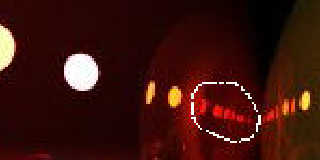
> I don't know what you mean by uneven fading. Is it still present in this
> higher quality render attached?

Yes, the first couple reflective bounces are colored darker,
(which is correct) but as the reflections continue on they
are close to the same color instead of darker, probably a
saturation issue?
Post a reply to this message
Attachments:
Download 'kuva9a.jpg' (15 KB)
Preview of image 'kuva9a.jpg'
|
|
| |
| |
|
|
|
|
| |
| |
|
|
"Tim Attwood" <tim### [at] comcast net> wrote in message
news:47c34a7b$1@news.povray.org...
>> Do you know if
>> "normal" reflections happen (about) equally when going from less dense
>> medium to denser medium when compared to opposite situation?
>
> Yes, the inside of a RL glass surface reflects about the same as
> the outside, sometimes a bit more reflective, since grime can
> build up on the outside, but not on the inside.
Are you sure? A watersurface seems a lot more reflective from underneath
the water than from above the water. Could be an optical illusion though.
cu!
--
#macro G(b,e)b+(e-b)*C/50#end#macro _(b,e,k,l)#local C=0;#while(C<50)
sphere{G(b,e)+3*z.1pigment{rgb G(k,l)}finish{ambient 1}}#local C=C+1;
#end#end _(y-x,y,x,x+y)_(y,-x-y,x+y,y)_(-x-y,-y,y,y+z)_(-y,y,y+z,x+y)
_(0x+y.5+y/2x)_(0x-y.5+y/2x) // ZK http://www.povplace.com net> wrote in message
news:47c34a7b$1@news.povray.org...
>> Do you know if
>> "normal" reflections happen (about) equally when going from less dense
>> medium to denser medium when compared to opposite situation?
>
> Yes, the inside of a RL glass surface reflects about the same as
> the outside, sometimes a bit more reflective, since grime can
> build up on the outside, but not on the inside.
Are you sure? A watersurface seems a lot more reflective from underneath
the water than from above the water. Could be an optical illusion though.
cu!
--
#macro G(b,e)b+(e-b)*C/50#end#macro _(b,e,k,l)#local C=0;#while(C<50)
sphere{G(b,e)+3*z.1pigment{rgb G(k,l)}finish{ambient 1}}#local C=C+1;
#end#end _(y-x,y,x,x+y)_(y,-x-y,x+y,y)_(-x-y,-y,y,y+z)_(-y,y,y+z,x+y)
_(0x+y.5+y/2x)_(0x-y.5+y/2x) // ZK http://www.povplace.com
Post a reply to this message
|
|
| |
| |
|
|
|
|
| |
| |
|
|
> Are you sure?  A watersurface seems a lot more reflective from underneath
> the water than from above the water. Could be an optical illusion though.

Look up some lake reflections... it's just that sometimes the
surface of water doesn't have much to reflect, just empty sky.
Post a reply to this message
|
|
| |
| |
|
|
|
|
| |
| |
|
|
Tim Attwood wrote:
>> I don't know what you mean by uneven fading. Is it still present in this
>> higher quality render attached?
>
> Yes, the first couple reflective bounces are colored darker,
> (which is correct) but as the reflections continue on they
> are close to the same color instead of darker, probably a
> saturation issue?

Yeah, it is simply because the spheres are very reflective and the light
source is very intensive. So the red components remains strong even
after many bounces. It takes many reflections to get the value go down.
I tested with dimmer lights and a bit less reflective surface and it
works as it should: it gets darker every time it reflects.
Post a reply to this message
|
|
| |
| |
|
|
|
|
| |
| |
|
|
Warp wrote:

>   Speaking of which, does it handle total internal reflection properly?

Yeah, I think it does. But I don't have proper objects to test it
properly so I'm not 100% sure yet. I tried to place camera inside a
glass sphere and I did saw internal reflection (basically you see a
circular "window" and the outside is dark).

>   (OTOH, that would also be something which should be specified with a
> physically accurate BRDF instead of being hard-coded into the renderer...)

I have no idea how to represent an arbitary BRDF or BSDF. But you get
quite far even with traditional refraction/specular/diffuse models.
Post a reply to this message
|
|
| |
| |
|
|
|
|
| |
| |
|
|
"Zeger Knaepen" <zeg### [at] povplacecom> wrote:
> > Yes, the inside of a RL glass surface reflects about the same as
> > the outside, sometimes a bit more reflective, since grime can
> > build up on the outside, but not on the inside.
>
> Are you sure?  A watersurface seems a lot more reflective from underneath
> the water than from above the water. Could be an optical illusion though.
>
> <snip>

http://en.wikipedia.org/wiki/Total_internal_reflection
Post a reply to this message
|
|
| |
| |
|
|
|
|
| |
| |
|
|
> > Are you sure?  A watersurface seems a lot more reflective from underneath
> > the water than from above the water. Could be an optical illusion though.
> >
> > <snip>
>
> http://en.wikipedia.org/wiki/Total_internal_reflection

We were not talking about total internal reflections, but normal specular
reflections. I have the impression that they happen about equally to both
directions.
Post a reply to this message
|
|
| |
| |
|
|
|
|
| |
| |
|
|
Severi Salminen wrote:
> Warp wrote:
>
>>   Speaking of which, does it handle total internal reflection properly?
>
> Yeah, I think it does. But I don't have proper objects to test it
> properly so I'm not 100% sure yet.

  Try with the example at wikipedia:
http://en.wikipedia.org/wiki/Image:Total_internal_reflection.jpg

>>   (OTOH, that would also be something which should be specified with a
>> physically accurate BRDF instead of being hard-coded into the renderer...)
>
> I have no idea how to represent an arbitary BRDF or BSDF. But you get
> quite far even with traditional refraction/specular/diffuse models.

  The problem with the "traditional" lighting models is that they are
not physically accurate and thus do not produce completely realistic
results.

  The whole reason why the "traditional" lighting models were developed
was precisely to avoid having to send millions of rays from each
intersection point. They try to approximate (often poorly) what would
happen if you would send the millions of rays and have a physically
accurate BRDF, but they are only approximations.

  If you are bruteforce-rendering anyways, using these limited lighting
models kind of becomes moot. They were created precisely for
non-bruteforce rendering because bruteforce rendering was unfeasible.
Now that you are bruteforce-rendering, there's no need to use them. You
can use realistic BRDFs.

  In principle a BRDF is quite simple: It's a function which takes an
incoming direction vector and an outcoming direction vector as (const)
parameters, and returns a factor for each color component between 0.0
and 1.0. That's it. Its usage is equally simple: When you have
calculated a ray which intersects a surface and want to reflect that ray
to some direction, you shoot that reflected ray and then multiply the
color returned by that ray with the factor returned by the BRDF of that
surface. This will be the color returned by the original incoming ray.

  Of course implementing the BRDF to be physically accurate is not that
simple.
Post a reply to this message
|
|
| |
| |
|
|
|
|
| |
| |
|
|
"Severi Salminen" <not### [at] hereinvalid> wrote:
> > > Are you sure?  A watersurface seems a lot more reflective from underneath
> > > the water than from above the water. Could be an optical illusion though.
> > >
> > > <snip>
> >
> > http://en.wikipedia.org/wiki/Total_internal_reflection
>
> We were not talking about total internal reflections, but normal specular
> reflections. I have the impression that they happen about equally to both
> directions.

I know that the discussion was about 'normal' reflection. I was only referring
to the post by Zeger Knaepen since total internal reflection is what's making
up the phenomenon he's describing in his post.

Regards Roman
Post a reply to this message
|
|
| |
| |
|
|
|
|
| |
| |
|
|
>   Try with the example at wikipedia:
> http://en.wikipedia.org/wiki/Image:Total_internal_reflection.jpg

I really have now only spheres and planes. Boxes next.

>   If you are bruteforce-rendering anyways, using these limited lighting
> models kind of becomes moot. They were created precisely for
> non-bruteforce rendering because bruteforce rendering was unfeasible.
> Now that you are bruteforce-rendering, there's no need to use them. You
> can use realistic BRDFs.

I don't know. I think these are different things. Brute force helps to create
every lighting effect which depends on light bouncing multiple times. BRDF, on
the other hand, just represents the way light reflects. So they address
different problems. But it is true that both should be handled and taken into
account in a good renderer.

>   In principle a BRDF is quite simple: It's a function which takes an
> incoming direction vector and an outcoming direction vector as (const)
> parameters, and returns a factor for each color component between 0.0
> and 1.0. That's it. Its usage is equally simple: When you have
> calculated a ray which intersects a surface and want to reflect that ray
> to some direction, you shoot that reflected ray and then multiply the
> color returned by that ray with the factor returned by the BRDF of that
> surface. This will be the color returned by the original incoming ray.

I think that is not the best way to implement it. Better way is to use a ray
distribution function that generates rays distributed according to BSDF. Now I
use cosine weighted function to create random rays at diffuse surface. This
minimizes useless rays and gives faster results - but is unbiased. And I create
pure specular rays at specular surface - no need to create other rays and give
them weight 0. The result is identical but faster. There are good functions for
different glossy surfaces also.

So basically I'm using certain ideal BSDF's but "ideal" is not necessarily
"physically possible"...
Post a reply to this message
|
|
| |
| |
|
|
|
|
| |
| |
|
|
Severi Salminen wrote:
> I don't know. I think these are different things.

  Of course you *can* perform brute-force rendering without using BRDFs.
The point is that it doesn't make too much sense because BRDFs are the
most accurate texture definition functions, while everything used in
non-brute-force rendering is only an inaccurate approximation.
Brute-force rendering allows using BRDFs, so why not use them?

>>   In principle a BRDF is quite simple: It's a function which takes an
>> incoming direction vector and an outcoming direction vector as (const)
>> parameters, and returns a factor for each color component between 0.0
>> and 1.0. That's it. Its usage is equally simple: When you have
>> calculated a ray which intersects a surface and want to reflect that ray
>> to some direction, you shoot that reflected ray and then multiply the
>> color returned by that ray with the factor returned by the BRDF of that
>> surface. This will be the color returned by the original incoming ray.
>
> I think that is not the best way to implement it.

  I didn't say anything about which direction the reflected ray should
go. The BRDF doesn't care.

  You can, of course, send more rays towards directions for which the
BRDF gives larger factors.
Post a reply to this message
|
|
| |
| |
|
|
|
|
| |
| |
|
|
nemesis nous apporta ses lumieres en ce 2008/02/25 11:32:
> you're using photon mapping for the caustics, right?  Ever since these
> guys have been posting these bruteforce renders, I've been noticing an
> interesting pattern about photon mapping:  the caustics don't match the
> shape of the source of light, you look at your render and to that of
> Severi and you notice your caustics are focused in one point while his
> are large and in the shape of the light sphere.  And that is to be
> expected, since photon mapping reacts to the (point)light source, not to
> a physical object emitting light, like in the bruteforce methods.
>
> But radiosity works ok for that purpose.  Like here, just first
> radiosity pass as I don't have the time right now for a complete
> render... there are a few radiosity artifacts left, you could raise the
> count a bit...
>
>
With photons, you can have broad caustics. You need to add "area_light" in the
photons block of the area_light.
Here's an area_light that will emit photons from a "spherical" area:

light_source{Location, rgb 1 area_light 3*x,3*y 17,17 autostop 0 circular orient
photons{area_light}// the key of having soft caustics
}

--
Alain
-------------------------------------------------
EVERYTHING HAS A GENDER

You may not know this but many nonliving things have a gender...

A Subway is Male, because it uses the same old lines to pick people up.
Post a reply to this message
|
|
| |
| |
|
|
|
|
| |
| |
|
|
Severi Salminen wrote:
> Glass has about 4% reflection coefficient when angle of incidence is 0.
> I guess this 4% holds true both when entering glass and exiting it?

It's more complicated than that in reality. Light doesn't reflect from
the surface of the glass. It reflects inside the glass. It only seems
like it reflects from the surface because different paths that reflect
at different depths in the glass cancel out. A piece of glass the proper
thickness has no "surface reflection" at all, and a half wavelength
thicker and it has 16% reflection. So, technically speaking, there's no
"reflection off the back" at all - it's just that the math works out to
make it look like there is. (And I have no idea where I left the book I
have that explains the math well enough to indicate whether the math
works out to make it look like a 4% reflection off the back, too. ;-)

(Similarly, a mirror reflects all over its surface, but only the paths
where incidence = reflection don't tend to cancel out. Diffraction
gratings and holograms take advantage of this, for example.)

I mean, if you're talking about "physically-accurate" tracing. :-)

--
   Darren New / San Diego, CA, USA (PST)
     "That's pretty. Where's that?"
          "It's the Age of Channelwood."
     "We should go there on vacation some time."
Post a reply to this message
|
|
| |
| |
|
|
|
|
| |
| |
|
|
Darren New wrote:
> Severi Salminen wrote:
>> Glass has about 4% reflection coefficient when angle of incidence is 0.
>> I guess this 4% holds true both when entering glass and exiting it?
>
> It's more complicated than that in reality. Light doesn't reflect from
> the surface of the glass. It reflects inside the glass. It only seems
> like it reflects from the surface because different paths that reflect
> at different depths in the glass cancel out.

Thanks for the clarification. The important part is the actual net
effect that affects the image. If the 4% (or whatever n1 and n2 gives)
holds true in most cases and is accurate within some margin - that is
suitable for now.

> I mean, if you're talking about "physically-accurate" tracing. :-)

Definitely :=)

But at this point I'm mostly interested in reproducing the effects that
make bigger difference in final image. For example:

having no shadows is worse than having inaccurate sharp shadows
inaccurate sharp shadows < inaccurate area_light approximation

Lack of accurate GI < lack of dispersion

lack of dispersion < slightly inaccurate refraction model (light bends a
bit too far etc.)

etc.

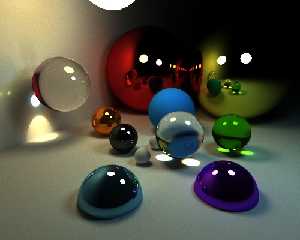
So things must be fixed in priority order. Here is the same scene with
5% reflection in the spheres - including the light that tries to exit
the sphere :) 46000 passes. Quite smooth rendering.

I'm now experimenting with Halton sequence that replaces totally random
rays. It is deterministic but should give more uniform distribution. So
less samples are needed for certain noise level. Not working properly yet...
Post a reply to this message
Attachments:
Download 'kuva10.jpg' (38 KB)
Preview of image 'kuva10.jpg'
|
|
| |
| |
|
|
|
|
| |
| |
|
|
Warp wrote:

>   Of course you *can* perform brute-force rendering without using BRDFs.
> The point is that it doesn't make too much sense because BRDFs are the
> most accurate texture definition functions, while everything used in
> non-brute-force rendering is only an inaccurate approximation.
> Brute-force rendering allows using BRDFs, so why not use them?

Depending on definition, even POV-Ray is using BRDFs. Maybe I just don't
know what is your definition of "BRDF" when considering ray tracers.
(see below)

>   You can, of course, send more rays towards directions for which the
> BRDF gives larger factors.

And that is the best way to do it. Like I said, sending rays to all
direction when the material is 100% mirror, is not so clever.

The problem here is I have no idea, how the user would assign an
_arbitary_ BRDF to a object. What does it look like and how would the
program generate a distribution function out of it. Should it be just a
bunch of weight/angle pairs and the renderer interpolates and renders
accordingly? Or something else?

And of course, I use BRDFs even now if end result is considered. They
just look a bit different and are "special cases", like 100% diffuse
material, 100% specular surface etc, transmissive surface following
Snell's law etc. Luxrenderer also "uses BRDFs" the way I do. So maybe
I'm using BRDFs after all :)

http://www.luxrender.net/index.php?option=com_content&view=article&id=49&Itemid=59
Post a reply to this message
|
|
| |
| |
|
|
|
|
| |
| |
|
|
Severi Salminen wrote:
> Thanks for the clarification. The important part is the actual net
> effect that affects the image. If the 4% (or whatever n1 and n2 gives)
> holds true in most cases and is accurate within some margin - that is
> suitable for now.

I think it's more like 4% is going to be the average surface
reflectivity, and you really have to manufacture the glass smooth and
with a constant thickness within a fraction of a wavelength to see any
difference.

The "not always 4%" effect can be seen in things like oil floating on
water, where the layer of oil is less than a few wavelengths thick, so
you see the different colors reflecting with different percentages.

For a "normal" block of glass, yah, it's going to be about 4%, because
you're going to average a whole bunch of thicknesses of glass and a
number of different angles (as your pupil has a size much larger than a
wavelength of light too).

--
   Darren New / San Diego, CA, USA (PST)
     "That's pretty. Where's that?"
          "It's the Age of Channelwood."
     "We should go there on vacation some time."
Post a reply to this message
|
|
| |
| |
|
|
|
|
| |
| |
|
|
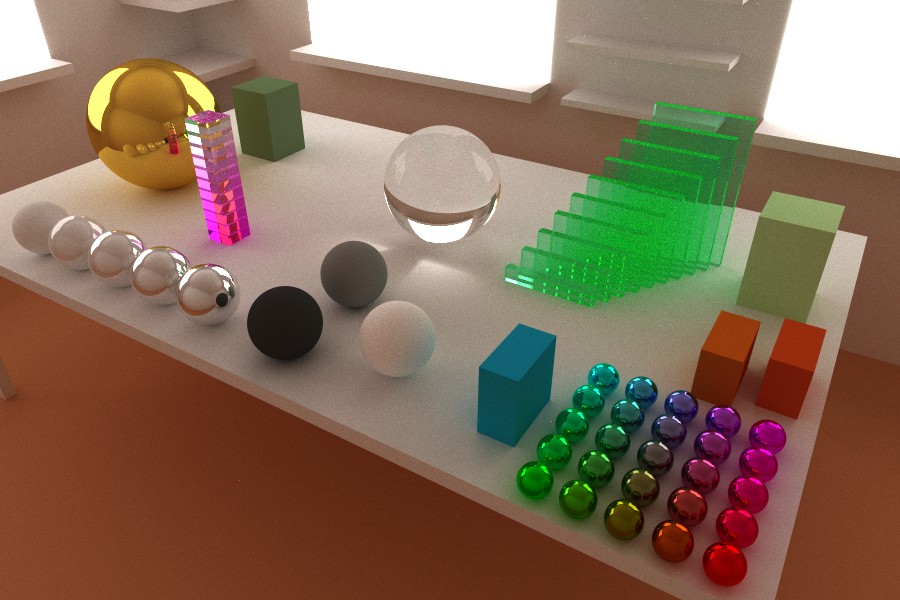
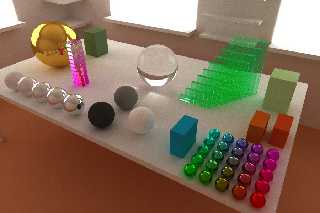
Here is a new render. Now with boxes and properly working total internal
reflection (you can see the windows through green glass, for example).
Everything looks pretty good to me: shadows, highlights, caustics etc.
The "windows" are actually only light emitting boxes. I also stopped
using the infamous C rand() and implemented Mersenne Twister RNG. It is
a lot faster (some 20-30% faster rendering) - and there is even faster
variation available.

Next:

1. Wait till "the Bible" arrives in mail. "Physically based rendering",
by Matt Pharr and Greg Humphreys.
2. Implement basic transformations.
3. Improve box intersections stuff.
4. Some kind of bounding box hierarchy acceleration system is needed.
5.- 1000004. Million other things.
Post a reply to this message
Attachments:
Download 'kuva11.jpg' (111 KB)
Preview of image 'kuva11.jpg'
|
|
| |
| |
|
|
|
|
| |
| |
|
|
Oh, cool.

Are you going to make the program available (e.g., Sourceforge) at some
point?

--
William Tracy
afi### [at] gmailcom -- wtr### [at] calpolyedu

For example, using PHP to access a MySQL database is a common subject
for print and on-line articles. Perhaps combining those two technologies
on an Esperanto-speaking giant robot that shoots laser beams out of its
eyes?
     -- From the _Linux Journal_ article submission guidelines
Post a reply to this message
|
|
| |
| |
|
|
|
|
| |
| |
|
|
William Tracy wrote:

> Oh, cool.

Thanks, I think it's cool too!

> Are you going to make the program available (e.g., Sourceforge) at some
> point?
>

I don't know. At this point, no. It is still too immature and lacks some
important features for any kind of release. And there are a lot better
open source brute force renderers available, like Luxrender, or PBRT.

My goal is to learn (good) C++ programming, to learn how (brute force)
ray tracing works and to implement it from scratch. If I have a fully
working program at some point I might even release it under GPL.
Post a reply to this message
|
|
| |
| |
|
|
|
|
| |
| |
|
|
Severi Salminen escribió:
> Here is a new render. Now with boxes and properly working total internal
> reflection (you can see the windows through green glass, for example).
> Everything looks pretty good to me: shadows, highlights, caustics etc.
> The "windows" are actually only light emitting boxes. I also stopped
> using the infamous C rand() and implemented Mersenne Twister RNG. It is
> a lot faster (some 20-30% faster rendering) - and there is even faster
> variation available.

Oh my gawd.

I'd have a new wallpaper if it wasn't because the image is too small for
my screen.

...bad excuse.

Scratch that. I have a new wallpaper.
Post a reply to this message
|
|
| |
| |
|
|
|
|
| |
| |
|
|
Severi Salminen wrote:
> 4. Some kind of bounding box hierarchy acceleration system is needed.

  Yeah, that's one of the biggest problems in raytracing, and rendering
in general.
  Making a simple raytracer is a piece of cake. Making one which is fast
even with hundreds of thousands of objects is a lot more laborious.

  POV-Ray is a prime example of a raytracer which has bounding box
hierarchy optimizations: Render a simple scene with 10 spheres in a
home-made raytracer and with POV-Ray, and the render times may be
comparable. Render a scene with 100000 spheres with the home-made
raytracer and POV-Ray and the Sun will probably die before the former
gets the job done, while POV-Ray doesn't take significantly longer.

  Btw, for a very good-quality and very fast RNG, you could also try
this: http://burtleburtle.net/bob/rand/isaacafa.html

  It's horribly ugly C code. I have made a clean C++ implementation if
you are interested.

  I measured the algorithm (compiled with g++ 4.1.2), and with my
computer (Pentium4 3.4GHz) it generated 150 million random numbers per
second. According to the author the randomness should be of very high
quality (cryptographically strong).
Post a reply to this message
|
|
| |
| |
|
|
|
|
| |
| |
|
|
Warp escribió:
>   It's horribly ugly C code. I have made a clean C++ implementation if
> you are interested.
>
>   I measured the algorithm (compiled with g++ 4.1.2), and with my
> computer (Pentium4 3.4GHz) it generated 150 million random numbers per
> second. According to the author the randomness should be of very high
> quality (cryptographically strong).

How do the ugly C code and your clean implementation compare in terms of
performance? Pure curiosity.
Post a reply to this message
|
|
| |
| |
|
|
|
|
| |
| |
|
|
Severi Salminen <sev### [at] NOTTHISsaunalahtifiinvalid> wrote:
> Here is a new render. Now with boxes and properly working total internal
> reflection (you can see the windows through green glass, for example).
> Everything looks pretty good to me: shadows, highlights, caustics etc.
> The "windows" are actually only light emitting boxes. I also stopped
> using the infamous C rand() and implemented Mersenne Twister RNG. It is
> a lot faster (some 20-30% faster rendering) - and there is even faster
> variation available.

What does POV-Ray use for random number generation?  When I finally opened up
the source code, it looked like there were just arrays of tabulated numbers,
but then I plotted them and they certainly weren't random.  Something like a
fractal.  Still, would it be possible to precompute some random numbers, or is
the dependence on 'good' random numbers too strong?  Oh, and GSL, the GNU
Scientific Library has a plethora of random number generators, but I haven't a
clue how fast they are.  Perhaps possible to 'try before you buy' and test them
out before implementing them though.

Oh, and that's a beautiful render.  I love the square caustics on the sphere.
No tweaking necessary.  Wow.  You should try triangles.  That would open up a
world of possibilities, but then you'd certainly need some acceleration.  I
guess that's already been accounted for in 5-1000004.  Sorry.  Keep it up.

 - Ricky
Post a reply to this message
|
|
| |
| |
|
|
|
|
| |
| |
|
|
Amazing to see your progress, man.  How about implementing polygons already and
test it against known models like the Standford Bunny? :)
Post a reply to this message
|
|
| |
| |
|
|
|
|
| |
| |
|
|
Severi Salminen wrote:
> My goal is to learn (good) C++ programming, to learn how (brute force)
> ray tracing works and to implement it from scratch. If I have a fully
> working program at some point I might even release it under GPL.

<digression>

I'll need to do a senior project next year for school. One of the things
I have been thinking about is building my own raytracer.

Since my raytracer would probably never see use in the Real World, it
would be interesting to push in some different directions that don't
make sense in the Real World.

One idea I've had is using arbitrary-precision numbers for geometry
(java.lang.BigDecimal comes to mind--I haven't yet looked into
equivalent C/C++ libraries). The performance hit would make this stupid
for Povray, but it opens up interesting ideas for massive scenes (Bill
Pragnell's renderings of Ringworld gave me the original idea).

Actually, if I broke down and wrote the darn thing in Java, I might have
enough time to implement animation and clustering support before the
project ends. Then I could try to bribe the lab monitor to let me turn
all the computers in the labs into cluster nodes. ;-)

</digression>

--
William Tracy
afi### [at] gmailcom -- wtr### [at] calpolyedu

These may involve hunting down whoever added whichever thing it is and
torturing information out of them.
     -- from the GCC Documentation Project's web page
Post a reply to this message
|
|
| |
| |
|
|
|
|
| |
| |
|
|
"Warp" <war### [at] tagpovrayorg> wrote in message
news:47cc7714@news.povray.org...

>  I measured the algorithm (compiled with g++ 4.1.2), and with my
> computer (Pentium4 3.4GHz) it generated 150 million random numbers per
> second. According to the author the randomness should be of very high
> quality (cryptographically strong).

Maybe this is a stupid question, but here it is: Is this implemented in
Pov-Ray's "rand" function? If not, can it be implemented in future versions?


--
-Nekar Xenos-
Post a reply to this message
|
|
| |
| |
|
|
|
|
| |
| |
|
|
Nekar Xenos wrote:
> Maybe this is a stupid question, but here it is: Is this implemented in
> Pov-Ray's "rand" function?

  Nope. POV-Ray's rand() uses a very simple linear congruential
generator (with period 2^32).

> If not, can it be implemented in future versions?

  The idea has crossed my mind, and I have been intending to ask the
team about it, but I have not yet got to actually do it.
Post a reply to this message
|
|
| |
| |
|
|
|
|
| |
| |
|
|
Nicolas Alvarez wrote:
> How do the ugly C code and your clean implementation compare in terms of
> performance? Pure curiosity.

  The C++ version generates approximately 151M numbers/s, while the
original C version generates, in the same conditions, approximately 167M
numbers/s.

  Maybe I could try profiling the program to see what is causing the
slight delay in the C++ version.
Post a reply to this message
|
|
| |
| |
|
|
|
|
| |
| |
|
|
Warp wrote:
> Nicolas Alvarez wrote:
>> How do the ugly C code and your clean implementation compare in terms of
>> performance? Pure curiosity.
>
>   The C++ version generates approximately 151M numbers/s, while the
> original C version generates, in the same conditions, approximately 167M
> numbers/s.

  Oops, scratch that. The conditions were not the same, after all (I had
configured the two versions to use differently sized arrays).

  Configuring both to use the exact same settings resulted in both being
equally fast (that is, approximately 151M numbers/s), so there's no
difference in speed. (I didn't expect there to be.)

  (Curiously, though, this showed me that increasing the array used by
the algorithm, while it requires more memory, makes the algorithm
slightly faster. More precisely increasing the array size from 16 ints
to 256 ints makes the algorithm about 10% faster.)
Post a reply to this message
|
|
| |
| |
|
|
|
|
| |
| |
|
|
Hi Severi,

Your renderer is truly great! How long did you let it run on that image, and how
many passes/iterations did it do in that time?

I have lately been playing around with Blender and rendering with Kerkythea
2008, which supports several brute force rendering methods: Path tracing,
bi-directional path tracing (BiPT) and Metropolis Light Transport (MLT) (two
methods built on top of each of the two path-tracing methods).

I didn't have your scene data so I just improvised by eye.. attached is a render
using MLT on PT, that I let run for 1h 20m, in which time it did about 65
iterations. It isn't an exact match, obviously, since I got the spacing a bit
wrong, but I can see that our renderers agree on all the right light in all the
right places!

(btw I was using 2 threads on a Core2 Duo 2.5GHz (2 cores), running WinAmp and
browsing news.povray.org at the same time ;)


Also in the future if you would like me to run any other comparisons I would be
happy to oblige. It would be nice if I could use the same geometry as you -
sphere coordinates and radii, etc. How do you define your scenes?

Cheers
sooperFoX


Severi Salminen wrote:
> Here is a new render. Now with boxes and properly working total internal
> reflection (you can see the windows through green glass, for example).
> Everything looks pretty good to me: shadows, highlights, caustics etc.
> The "windows" are actually only light emitting boxes. I also stopped
> using the infamous C rand() and implemented Mersenne Twister RNG. It is
> a lot faster (some 20-30% faster rendering) - and there is even faster
> variation available.
>
> Next:
>
> 1. Wait till "the Bible" arrives in mail. "Physically based rendering",
> by Matt Pharr and Greg Humphreys.
> 2. Implement basic transformations.
> 3. Improve box intersections stuff.
> 4. Some kind of bounding box hierarchy acceleration system is needed.
> 5.- 1000004. Million other things.
Post a reply to this message
Attachments:
Download 'kuva11_mlt_pt_1h_20m.jpg' (116 KB)
Preview of image 'kuva11_mlt_pt_1h_20m.jpg'

|
|
| |
| |
|
|
|
|
| |
| |
|
|
Warp escribió:
> Nekar Xenos wrote:
>> Maybe this is a stupid question, but here it is: Is this implemented in
>> Pov-Ray's "rand" function?
>> If not, can it be implemented in future versions?
>
>   The idea has crossed my mind, and I have been intending to ask the
> team about it, but I have not yet got to actually do it.

Well, it would have problems with backwards compatibility: changing the
random number generator would make existing scenes look different, as if
they had changed the seed. So we probably need something like
global_settings { random_generator 2 }
Post a reply to this message
|
|
| |
| |
|
|
|
|
| |
| |
|
|
sooperFoX escribió:
> Also in the future if you would like me to run any other comparisons I would be
> happy to oblige. It would be nice if I could use the same geometry as you -
> sphere coordinates and radii, etc. How do you define your scenes?

Somebody should make that scene in a format we all know (like POV SDL
with no #directives).

Also, could you please test this one? :)
http://www.winosi.onlinehome.de/Gallery_t14_01.htm
Post a reply to this message
|
|
| |
| |
|
|
|
|
| |
| |
|
|
"Nicolas Alvarez" <nic### [at] gmailisthebestcom> wrote in message
news:47cd674d$1@news.povray.org...
> Well, it would have problems with backwards compatibility: changing the
> random number generator would make existing scenes look different, as if
> they had changed the seed. So we probably need something like
> global_settings { random_generator 2 }

..or just let people use the #version-directive

cu!
--
#macro G(b,e)b+(e-b)*C/50#end#macro _(b,e,k,l)#local C=0;#while(C<50)
sphere{G(b,e)+3*z.1pigment{rgb G(k,l)}finish{ambient 1}}#local C=C+1;
#end#end _(y-x,y,x,x+y)_(y,-x-y,x+y,y)_(-x-y,-y,y,y+z)_(-y,y,y+z,x+y)
_(0x+y.5+y/2x)_(0x-y.5+y/2x)            // ZK http://www.povplace.com
Post a reply to this message
|
|
| |
| |
|
|
|
|
| |
| |
|
|
Zeger Knaepen escribió:
> "Nicolas Alvarez" <nic### [at] gmailisthebestcom> wrote in message
> news:47cd674d$1@news.povray.org...
>> Well, it would have problems with backwards compatibility: changing the
>> random number generator would make existing scenes look different, as if
>> they had changed the seed. So we probably need something like
>> global_settings { random_generator 2 }
>
> ..or just let people use the #version-directive

People might still want the old generator for some strange reason :)
Post a reply to this message
|
|
| |
| |
|
|
|
|
| |
| |
|
|
"Nicolas Alvarez" <nic### [at] gmailisthebestcom> wrote in message
news:47cd8bee@news.povray.org...
> Zeger Knaepen escribió:
>> "Nicolas Alvarez" <nic### [at] gmailisthebestcom> wrote in
>> message news:47cd674d$1@news.povray.org...
>>> Well, it would have problems with backwards compatibility: changing the
>>> random number generator would make existing scenes look different, as if
>>> they had changed the seed. So we probably need something like
>>> global_settings { random_generator 2 }
>>
>> ..or just let people use the #version-directive
>
> People might still want the old generator for some strange reason :)

yes, and those people can use the #version-directive, I don't see the
problem?

cu!
--
#macro G(b,e)b+(e-b)*C/50#end#macro _(b,e,k,l)#local C=0;#while(C<50)
sphere{G(b,e)+3*z.1pigment{rgb G(k,l)}finish{ambient 1}}#local C=C+1;
#end#end _(y-x,y,x,x+y)_(y,-x-y,x+y,y)_(-x-y,-y,y,y+z)_(-y,y,y+z,x+y)
_(0x+y.5+y/2x)_(0x-y.5+y/2x)            // ZK http://www.povplace.com
Post a reply to this message
|
|
| |
| |
|
|
|
|
| |
| |
|
|
William Tracy wrote:

> One idea I've had is using arbitrary-precision numbers for geometry
> (java.lang.BigDecimal comes to mind--I haven't yet looked into
> equivalent C/C++ libraries). The performance hit would make this stupid
> for Povray, but it opens up interesting ideas for massive scenes (Bill
> Pragnell's renderings of Ringworld gave me the original idea).

Hmm. What kind of "interesting ideas" you mean? Do you have any links to
sample images?

But anyway, go for it! You can't beat the feeling (ok, at least with
pants on...) you get from seeing your first rendering. It is so cool to
create worlds.
Post a reply to this message
|
|
| |
| |
|
|
|
|
| |
| |
|
|
Warp wrote:

>   POV-Ray is a prime example of a raytracer which has bounding box
> hierarchy optimizations: Render a simple scene with 10 spheres in a
> home-made raytracer and with POV-Ray, and the render times may be
> comparable. Render a scene with 100000 spheres with the home-made
> raytracer and POV-Ray and the Sun will probably die before the former
> gets the job done, while POV-Ray doesn't take significantly longer.

Very true. Now I have to check every single object with every single
ray. That is O(N) and that is way too much. I have to study BSP trees at
some point. And whatever other similar methods there are.

>   Btw, for a very good-quality and very fast RNG, you could also try
> this: http://burtleburtle.net/bob/rand/isaacafa.html
>
>   It's horribly ugly C code. I have made a clean C++ implementation if
> you are interested.

Actually I'm interested. I remember reading about Isaac a few years ago
but missed it now. Do you know how it compares to Mersenne Twister
speed-wise? I don't need 100% cryptographic robustness but fast
generation and decent randomness for (say) 1280x1024x10x10000 numbers.
(resolution * rays/pixel * passes). So the cycle must be a lot larger
than that :)

Most likely I'll implement my own class but if you care to show me
yours, that would be appreciated!
Post a reply to this message
|
|
| |
| |
|
|
|
|
| |
| |
|
|
> Your renderer is truly great! How long did you let it run on that image, and how
> many passes/iterations did it do in that time?

I don't remember exact figures but it was about a 8h render with some
2500 passes on one core (C2D@3GHz). Pure Monte Carlo path tracing with
no accelerations or fancy techniques. Just brute force :) (And pure
stupidity :)

You don't have to post the image but it would be interesting to know how
quickly Kerkythea renders the same image with pure path tracing to about
the same noise levels as my image.

> I didn't have your scene data so I just improvised by eye.. attached is a render
> using MLT on PT, that I let run for 1h 20m, in which time it did about 65
> iterations. It isn't an exact match, obviously, since I got the spacing a bit
> wrong, but I can see that our renderers agree on all the right light in all the
> right places!

Actually that is a very good replica of the scene! I'm impressed. And
impressed even more with the similarity of the render! Really, they look
very similar in all respects: the caustics, color bleeding, shadows,
everything. Of course your image has a bit more light but still, very
close. On the other hand, that is to be expected with unbiased
renderers. There should be no room for inaccuracies or interpretation.
MLT and Bi-directional are better (ie. faster) techniques and I'll also
try to implement at least the latter at some point.

> Also in the future if you would like me to run any other comparisons I would be
> happy to oblige. It would be nice if I could use the same geometry as you -
> sphere coordinates and radii, etc. How do you define your scenes?

Thanks. I'll sure ask if I need more similar renders!

At this point I describe the scene purely in the source code. I compile
a new program every time I change the scene. But since my renderer has
2k lines of code it takes a fraction of a second to compile it :) Yes, a
parser would be cool but:

1. I don't know what kind of SDL I want to support/implement.
2. I have never done a parser - besides a simple command line parameter
parse. So this is a bigger learning process :)
Post a reply to this message
|
|
| |
| |
|
|
|
|
| |