|
|
|
|
|
|
| |
| |
|
|
|
|
| |
| |
|
|
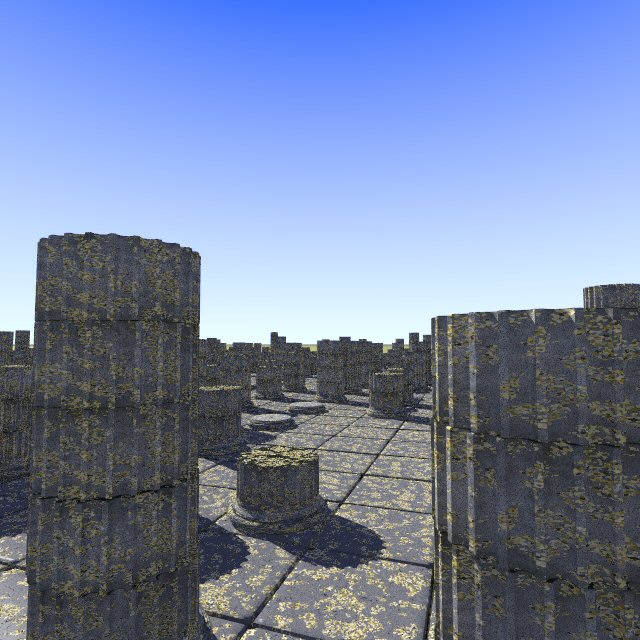
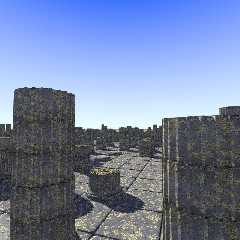
I worked hard on the textures, tweaking Jim Charter's StainedStones macro
until it fitted better to the column segments, and hammering out a
believable lichen growth (or so I hope). I took the lichen colors from a
photograph and tried to reproduce their shape with a crackle solid pattern.

On the floor tiles this is just not yet good enough I am afraid. I am
certainly going to randomize the amount of lichen growth on individual
stones in the first place, but I wonder if the growth should not be
restricted more to shadowy areas. This is more difficult to obtain. Maybe
with a X or Z gradient for the columns? But for the tiles, I don't know.

Also, I think the diffuse parameter (now at 0.8) should be lowered as the
lichen seems too bright overall.

Rubble is coming later.

I am sure you have comments to make on this :-)

Thomas
Post a reply to this message
Attachments:
Download 'IonianTempleRuins_2_04.jpg' (90 KB)
Preview of image 'IonianTempleRuins_2_04.jpg'
|
|
| |
| |
|
|
|
|
| |
| |
|
|
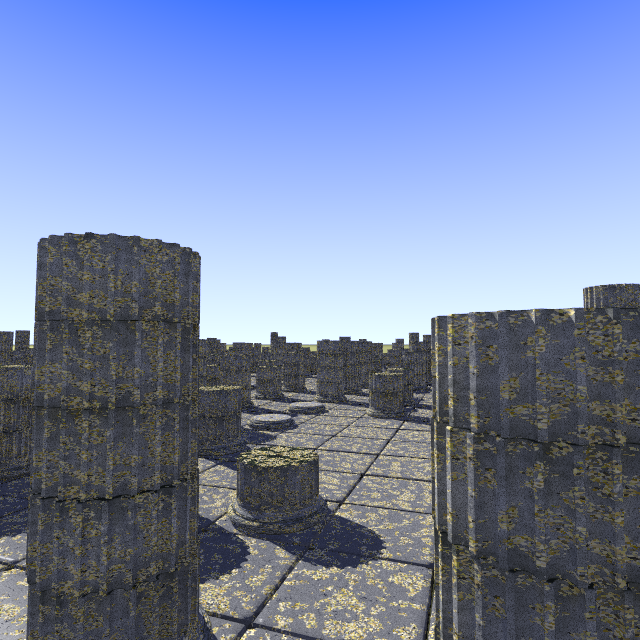
It has some ugly artifacts, as if you had compressed it with JPEG
multiple times. Could you upload the original PNG, if it's not too big?
Post a reply to this message
|
|
| |
| |
|
|
|
|
| |
| |
|
|
Thomas de Groot nous apporta ses lumieres en ce 2008/02/14 10:41:
> I worked hard on the textures, tweaking Jim Charter's StainedStones macro
> until it fitted better to the column segments, and hammering out a
> believable lichen growth (or so I hope). I took the lichen colors from a
> photograph and tried to reproduce their shape with a crackle solid pattern.
>
> On the floor tiles this is just not yet good enough I am afraid. I am
> certainly going to randomize the amount of lichen growth on individual
> stones in the first place, but I wonder if the growth should not be
> restricted more to shadowy areas. This is more difficult to obtain. Maybe
> with a X or Z gradient for the columns? But for the tiles, I don't know.
>
> Also, I think the diffuse parameter (now at 0.8) should be lowered as the
> lichen seems too bright overall.
>
> Rubble is coming later.
>
> I am sure you have comments to make on this :-)
>
> Thomas
>
>
>
In my experiance, lichen do grow well on sunlit areas. I've seen large patches
on bare rock patches on hill tops, with no trees near enough to give any shadows.

--
Alain
-------------------------------------------------
When we get piled upon one another in large cities, as in Europe, we shall
become as corrupt as Europe.
Thomas Jefferson
Post a reply to this message
|
|
| |
| |
|
|
|
|
| |
| |
|
|
Looks a bit too grainy.  What about dropping the granite in the pigment for some
granite in the normal?  And what about some slight, reasonably fast radiosity?
Post a reply to this message
|
|
| |
| |
|
|
|
|
| |
| |
|
|
"nemesis" <nam### [at] gmail com> wrote in message
news:web.47b49e054fa69d8166f20de80@news.povray.org...
> Looks a bit too grainy. What about dropping the granite in the pigment
> for some
> granite in the normal? And what about some slight, reasonably fast
> radiosity?
That's the second time someone suggests radiosity for this WIP. I think
it's very clear radiosity is already being used though.
strange
cu!
--
#macro G(b,e)b+(e-b)*C/50#end#macro _(b,e,k,l)#local C=0;#while(C<50)
sphere{G(b,e)+3*z.1pigment{rgb G(k,l)}finish{ambient 1}}#local C=C+1;
#end#end _(y-x,y,x,x+y)_(y,-x-y,x+y,y)_(-x-y,-y,y,y+z)_(-y,y,y+z,x+y)
_(0x+y.5+y/2x)_(0x-y.5+y/2x) // ZK http://www.povplace.com com> wrote in message
news:web.47b49e054fa69d8166f20de80@news.povray.org...
> Looks a bit too grainy. What about dropping the granite in the pigment
> for some
> granite in the normal? And what about some slight, reasonably fast
> radiosity?
That's the second time someone suggests radiosity for this WIP. I think
it's very clear radiosity is already being used though.
strange
cu!
--
#macro G(b,e)b+(e-b)*C/50#end#macro _(b,e,k,l)#local C=0;#while(C<50)
sphere{G(b,e)+3*z.1pigment{rgb G(k,l)}finish{ambient 1}}#local C=C+1;
#end#end _(y-x,y,x,x+y)_(y,-x-y,x+y,y)_(-x-y,-y,y,y+z)_(-y,y,y+z,x+y)
_(0x+y.5+y/2x)_(0x-y.5+y/2x) // ZK http://www.povplace.com
Post a reply to this message
|
|
| |
| |
|
|
|
|
| |
| |
|
|
Thomas de Groot wrote:
> I worked hard on the textures, tweaking Jim Charter's StainedStones macro
> until it fitted better to the column segments, and hammering out a
> believable lichen growth (or so I hope). I took the lichen colors from a
> photograph and tried to reproduce their shape with a crackle solid pattern.
>
> On the floor tiles this is just not yet good enough I am afraid. I am
> certainly going to randomize the amount of lichen growth on individual
> stones in the first place, but I wonder if the growth should not be
> restricted more to shadowy areas. This is more difficult to obtain. Maybe
> with a X or Z gradient for the columns? But for the tiles, I don't know.
>
> Also, I think the diffuse parameter (now at 0.8) should be lowered as the
> lichen seems too bright overall.
>


Looking better and better.  I think it mostly needs more variation
between stones and areas.

Not sure what you mean by 'crackle solid' pattern.  Are you using a none
standard form?  What this

actually reminds me of is the 'cells' pattern which might be something
worth trying too.

Now you've gotten me googling antique ruins.  They really are powerful
images.
Post a reply to this message
|
|
| |
| |
|
|
|
|
| |
| |
|
|
"Nicolas Alvarez" <nic### [at] gmailisthebestcom> schreef in bericht
news:47b470e2@news.povray.org...
> It has some ugly artifacts, as if you had compressed it with JPEG
> multiple times. Could you upload the original PNG, if it's not too big?

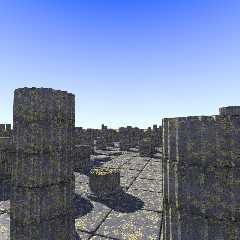
Strange... I see no differences... Here is the png.

Thomas
Post a reply to this message
Attachments:
Download 'IonianTempleRuins_2_04.png' (512 KB)
Preview of image 'IonianTempleRuins_2_04.png'
|
|
| |
| |
|
|
|
|
| |
| |
|
|
"nemesis" <nam### [at] gmailcom> schreef in bericht
news:web.47b49e054fa69d8166f20de80@news.povray.org...
> Looks a bit too grainy.  What about dropping the granite in the pigment
> for some
> granite in the normal?  And what about some slight, reasonably fast
> radiosity?
>
>

Radiosity is there already!

Granite: depends. Jim's set of macros is highly complex. At this moment I
cannot refer you back to his postings (July 2006) as the POV-Ray ng's appear
to be unstable.

Thomas
Post a reply to this message
|
|
| |
| |
|
|
|
|
| |
| |
|
|
"Alain" <ele### [at] netscapenet> schreef in bericht
news:47b48b8e$1@news.povray.org...
>>
> In my experiance, lichen do grow well on sunlit areas. I've seen large
> patches on bare rock patches on hill tops, with no trees near enough to
> give any shadows.
>

Ah! That is good to know. I may be confused with some mosses on tree boles
that have preferential growth on the shade sides. I suddenly was not sure
about lichens. Thanks!

Thomas
Post a reply to this message
|
|
| |
| |
|
|
|
|
| |
| |
|
|
"Zeger Knaepen" <zeg### [at] povplacecom> schreef in bericht
news:47b4ad29@news.povray.org...
>
> That's the second time someone suggests radiosity for this WIP.  I think
> it's very clear radiosity is already being used though.
> strange
>
well, the radiosity used is mainly default and it may enhance artifacts
here. Maybe that is the reason.

Thomas
Post a reply to this message
|
|
| |
| |
|
|
|
|
| |
| |
|
|
"Jim Charter" <jrc### [at] msncom> schreef in bericht
news:47b5144d$1@news.povray.org...
>
> Looking better and better.  I think it mostly needs more variation between
> stones and areas.

Thanks Jim. I am still not really happy with this although there is
improvement. Yes, variation is needed and easy to do (implemented now to
some extend; see below).

>
> Not sure what you mean by 'crackle solid' pattern.  Are you using a none
> standard form?  What this actually reminds me of is the 'cells' pattern
> which might be something worth trying too.

To simulate the lichen I used a color_map with crackle solid. Here is the
macro code (state of the art) I used for the tiles. You only need to define
a parameter T (here: 0.4), a seed value for the parameter RR, and include
rand.inc. Note that I lowered the diffuse value of the lichen to 0.5. A
quick render shows this to be much better. The lichen now blends better with
the surrounding stone.

//-- Start Code --
#macro StoneTex()
#declare PLichen =
pigment {
  crackle solid
  color_map {
    [0.45 rgbf <1.0, 1.0, 1.0, 1.0> ]
    [0.50 rgb <249, 224, 142>/255 ]
    [0.55 rgb <163, 149,  26>/255 ]
     [0.555 rgbf <1.0, 1.0, 1.0, 1.0> ]
    [0.60 rgb <215, 172,  67>/255 ]
    [0.65 rgb <124,  82,   0>/255 ]
     [0.655 rgbf <1.0, 1.0, 1.0, 1.0> ]
    [0.70 rgb <255, 217, 126>/255 ]
    [0.75 rgb <155, 111,  50>/255 ]
     [0.755 rgbf <1.0, 1.0, 1.0, 1.0> ]
    [0.80 rgb <176, 155,  98>/255 ]
    [0.85 rgb <126, 106,  53>/255 ]
     [0.855 rgbf <1.0, 1.0, 1.0, 1.0> ]
    [0.90 rgb <249, 224, 142>/255 ]
    [0.95 rgb <163, 149,  26>/255 ]
  }
  scale  <1.0, 1.0, 1.0>*0.02
  warp {turbulence 0.1}
}

#local Amount = RRand(T-0.1, T+0.1, RR);

#declare TLichen =
texture {
  pigment {
    granite
    pigment_map {
      [Amount color rgbf <1.0, 1.0, 1.0, 1.0> ]
      [Amount PLichen]
    }
    //scale  <1.0, 1.0, 2.0>*0.1
    //warp {turbulence <1.0, 1.0, 1.0>}
  }
  normal {
    crackle 10.0 solid
    bump_size 2.0
    scale 0.01
    //warp {turbulence <1.0, 1.0, 1.0>}
  }
  finish {
    ambient 0.0
    diffuse 0.5
  }
}

#declare LichenLimestone =
material {
   // Limestone:
   texture {
      pigment {
         agate
         agate_turb 1.0
         pigment_map {
            [0.0   color rgb <1.0, 1.0, 1.0>*0.3]
            [0.4   color rgb <0.6, 0.6, 0.6>*0.3]
            [0.8   color rgb <0.9, 0.9, 0.9>*0.3]
            [1.0   color rgb <0.7, 0.7, 0.7>*0.3]
         }
         scale  <3.0, 0.3, 1.0>*0.05
         rotate    <-10.0, 0.0, 15.0>
      }
      normal {
         crackle 10 solid
         warp {turbulence 0.5}
         scale 0.2
      }
      finish {
         ambient 0.0
         brilliance 0.5
         specular 0.3525
         roughness 0.005
      }
   }
   // Lichen:
   texture {TLichen}
}

#end

//-- End Code --

>
> Now you've gotten me googling antique ruins.  They really are powerful
> images.

Fascinating indeed. High potential for interesting scenes but also fairly
difficult to do correctly is my own feeling.

Thomas
Post a reply to this message
|
|
| |
| |
|
|
|
|
| |
| |
|
|
Hmm, I'm not completely convinced by this. Actual ruins look more
like: http://www.risawn.com/blog2/greece/gr3_29.jpg
Post a reply to this message
|
|
| |
| |
|
|
|
|
| |
| |
|
|
"Warp" <war### [at] tagpovrayorg> schreef in bericht
news:47b566c7@news.povray.org...
>  Hmm, I'm not completely convinced by this. Actual ruins look more
> like: http://www.risawn.com/blog2/greece/gr3_29.jpg

Oh yes indeed! or this:
http://jfbradu.free.fr/GRECEANTIQUE/turquie/didymes/didymes1.htm for
instance.

However, I am not really trying to reproduce something photo realistic, but
to make an evocation of some ancient place. Tings should be properly
balanced one way or another and that needs some further tweaking.

Thomas
Post a reply to this message
|
|
| |
| |
|
|
|
|
| |
| |
|
|
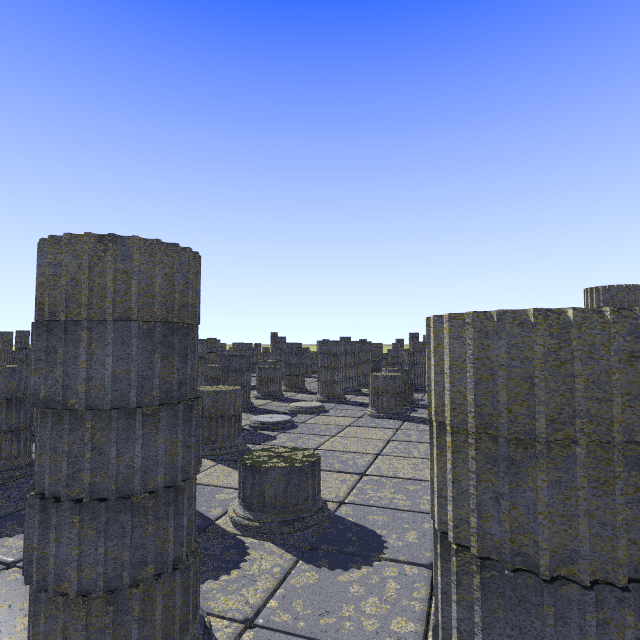
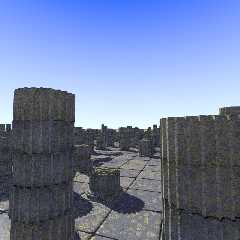
A further balancing of texture parameters. Coarser stones, more random
lichen. Stone textures could be lighter though, although this depends on the
source material and even black pillars could be envisioned here.

Thomas
Post a reply to this message
Attachments:
Download 'IonianTempleRuins_2_05.png' (475 KB)
Preview of image 'IonianTempleRuins_2_05.png'
|
|
| |
| |
|
|
|
|
| |
| |
|
|
Thomas de Groot wrote:
> well, the radiosity used is mainly default and it may enhance artifacts
> here. Maybe that is the reason.

hmm, I didn't notice it was used.  If it's the default, then it is
already very smooth and very slight, I don't think it's causing
artifacts.  Is ambient 0 for all objects other than sky?  The shadow
areas are too flat, there should be some occlusion effect along edges
and groves...

I really think the texture makes it all look too grainy.  Perhaps some
slight camera blur in the distance would make some of it go away?
Post a reply to this message
|
|
| |
| |
|
|
|
|
| |
| |
|
|
you know, from those photos, I think the problem is partially that
povray doesn't support mip-mapping of textures and anisotropic
filtering.  I don't know how these could support procedural textures,
but they'd certainly help in making the graininess go away.

Only geometry near the camera would show the little pointy granite
grain.  Those far away would only permit the larger crackle pattern to
be visible.  Besides, the ground would show a smooth transition from
detail up close and be slightly blurred and less grainy in the distance.

I still think, though, that camera blur would be of some help here.
Post a reply to this message
|
|
| |
| |
|
|
|
|
| |
| |
|
|
"nemesis" <nam### [at] nospamgmailcom> schreef in bericht
news:47b58d65$1@news.povray.org...
>
> hmm, I didn't notice it was used.  If it's the default, then it is already
> very smooth and very slight, I don't think it's causing artifacts.  Is
> ambient 0 for all objects other than sky?  The shadow areas are too flat,
> there should be some occlusion effect along edges and groves...

Ambient 0 for objects is standard in all my scenes.

>
> I really think the texture makes it all look too grainy.  Perhaps some
> slight camera blur in the distance would make some of it go away?

Interestingly, what makes the graininess go away is to put the sun behind
the camera :-)  The more dramatic lighting effect is thereby lost somewhat
of course, but the stone shows off better. I shall upload an example as soon
as the render is done.

Thomas
Post a reply to this message
|
|
| |
| |
|
|
|
|
| |
| |
|
|
"nemesis" <nam### [at] nospamgmailcom> schreef in bericht
news:47b59216$1@news.povray.org...
> you know, from those photos, I think the problem is partially that povray
> doesn't support mip-mapping of textures and anisotropic filtering.  I
> don't know how these could support procedural textures, but they'd
> certainly help in making the graininess go away.
>
> Only geometry near the camera would show the little pointy granite grain.
> Those far away would only permit the larger crackle pattern to be visible.
> Besides, the ground would show a smooth transition from detail up close
> and be slightly blurred and less grainy in the distance.
>
> I still think, though, that camera blur would be of some help here.

One thing about the photographs is also that those classic ruins we visit
may often have been "cleaned" of all offensive lichens and growths that
threaten their survival.

You might well be right about mip-mapping here... My knowledge about that is
slight however.

Thomas
Post a reply to this message
|
|
| |
| |
|
|
|
|
| |
| |
|
|
Thomas de Groot wrote:
> You might well be right about mip-mapping here... My knowledge about that is
> slight however.

it's just a technique for substituting less detailed textures for richer
textures the closer something is to the camera.  First time I saw it in
full glory was in the N64 game Goldeneye.  From the distance, walls
looked detailed enough, but once you came near them, *real* detail began
to smoothly blend in to the larger granite texture, like tiny crackles
and ridges... that was amazing for the time...
Post a reply to this message
|
|
| |
| |
|
|
|
|
| |
| |
|
|
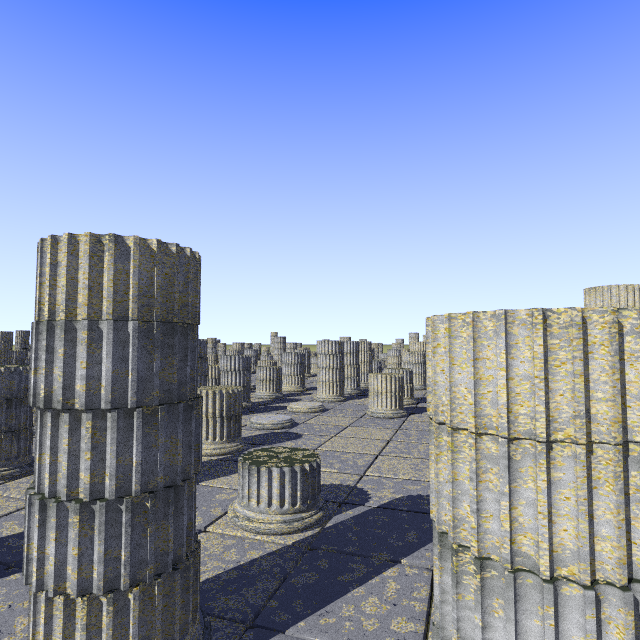
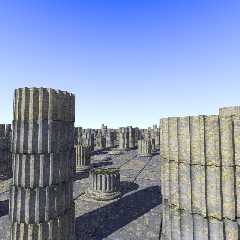
Allright. Last example for the time being, showing the place under a
different lighting. Note that the graininess is much less.

Thomas
Post a reply to this message
Attachments:
Download 'IonianTempleRuins_2.png' (510 KB)
Preview of image 'IonianTempleRuins_2.png'
|
|
| |
| |
|
|
|
|
| |
| |
|
|
nemesis wrote:
> you know, from those photos, I think the problem is partially that
> povray doesn't support mip-mapping of textures and anisotropic
> filtering.

  By definition procedural textures and mip-mapping do not mix.
Mip-mapping is exclusively related to bitmap textures.

  In theory the same effect (although much slower) can be achieved with
procedural textures by using a very heavy antialiasing. OTOH, that
doesn't always remove all moire-patterns, though.
Post a reply to this message
|
|
| |
| |
|
|
|
|
| |
| |
|
|
nemesis escribió:
> you know, from those photos, I think the problem is partially that
> povray doesn't support mip-mapping of textures and anisotropic
> filtering.

Mip-mapping is a mere optimization to do scaling in realtime. POV-Ray
antialiasing should do the same.

I never understood what anisotropic filtering *is*...
Post a reply to this message
|
|
| |
| |
|
|
|
|
| |
| |
|
|
Thomas de Groot escribió:
> Allright. Last example for the time being, showing the place under a
> different lighting. Note that the graininess is much less.
>

Now you just need a camera fly-through animation.
Post a reply to this message
|
|
| |
| |
|
|
|
|
| |
| |
|
|
Nicolas Alvarez wrote:
> I never understood what anisotropic filtering *is*...

correct antialiasing of mipmapped textures accounting for the fact that
pixels are square shapes.  The page on wikipedia compares two pictures,
with and without anisotropic filtering.
Post a reply to this message
|
|
| |
| |
|
|
|
|
| |
| |
|
|
Thomas de Groot nous apporta ses lumieres en ce 2008/02/15 04:05:
> "Alain" <ele### [at] netscapenet> schreef in bericht
> news:47b48b8e$1@news.povray.org...
>> In my experiance, lichen do grow well on sunlit areas. I've seen large
>> patches on bare rock patches on hill tops, with no trees near enough to
>> give any shadows.
>>
>
> Ah! That is good to know. I may be confused with some mosses on tree boles
> that have preferential growth on the shade sides. I suddenly was not sure
> about lichens. Thanks!
>
> Thomas
>
>
Moss need humidity, often lot of humidity, and some shade help preserve it. It
usualy grow on trees, or in the water. Moss is usualy green.
Lichen usualy grow on rocks, often in cool/cold and dry places. It need more
light. Lichens are often a greenish shade of gray, and some can be almost white.

--
Alain
-------------------------------------------------
Islam: If shit happens, blame Israel.
Post a reply to this message
|
|
| |
| |
|
|
|
|
| |
| |
|
|
"Nicolas Alvarez" <nic### [at] gmailisthebestcom> schreef in bericht
news:47b5db74@news.povray.org...
>
> Now you just need a camera fly-through animation.

<grin> would be nice, but is not my intention  :-)

Thomas
Post a reply to this message
|
|
| |
| |
|
|
|
|
| |
| |
|
|
"Alain" <ele### [at] netscapenet> a écrit dans le message de news:
47b60b7c$1@news.povray.org...
>>
>>
> Moss need humidity, often lot of humidity, and some shade help preserve
> it. It usualy grow on trees, or in the water. Moss is usualy green.
> Lichen usualy grow on rocks, often in cool/cold and dry places. It need
> more light. Lichens are often a greenish shade of gray, and some can be
> almost white.

Here (Brittany) we have greenish grey, whitish,    and deep gold  lichens
http://www.atlanticbio.com/images/LICHEN%20encroutant%20jaune.jpg
Marc
Post a reply to this message
|
|
| |
| |
|
|
|
|
| |
| |
|
|
Nicolas Alvarez wrote:
> I never understood what anisotropic filtering *is*...

  It's related to texturing with bitmaps.

  Regular trilinear filtering (ie. bilinear filtering + mipmapping +
interpolating between mipmaps) works perfectly when the surface being
rendered is parallel to the viewing plane, that is, the texture pixels
are square when projected on screen.

  A problem happens when the surface being rendered is at a high angle
with respect to the viewing plane: In this case the texture pixels, when
projected onto the screen, are very elongated, far from square. This
presents a problem: Which mipmap level to choose? In one direction a
more detailed mipmap would be required, but in the other direction a
much coarser one. If you choose a mipmap which is too detailed, it will
introduce ugly moire patterns. If you choose a mipmap which is too
coarse, the texture will be unnecessarily blurred.
  Most implementations go for the unnecessarily-coarse solution, which
means that textures at steep angles will usually look quite blurred.
(I suppose the rationale is that blurring doesn't look as bad as
flickering moire patterns.)

  Anisotropic filtering is a technique which solves this problem, at the
cost of extra calculation time required.
Post a reply to this message
|
|
| |
| |
|
|
|
|
| |
| |
|
|
Warp wrote:

> nemesis wrote:
>
>>you know, from those photos, I think the problem is partially that
>>povray doesn't support mip-mapping of textures and anisotropic
>>filtering.
>
>   By definition procedural textures and mip-mapping do not mix.
> Mip-mapping is exclusively related to bitmap textures.

But for rendering still images, you could manually
define multiple textures with different levels of detail
and apply simpler ones to objects far from the camera.
Post a reply to this message
|
|
| |
| |
|
|
|
|
| |
| |
|
|
"Christian Froeschlin" <chr### [at] chrfrde> schreef in bericht
news:47b83f9c$1@news.povray.org...
>
> But for rendering still images, you could manually
> define multiple textures with different levels of detail
> and apply simpler ones to objects far from the camera.

Yes indeed!
This has been done by several people here, using the spherical pattern.

Thomas
Post a reply to this message
|
|
| |
| |
|
|
|
|
| |