|
|
|
|
|
|
| |
| |
|
|
|
|
| |
| |
|
|
I'm wondering why, short of historical reason, does the
interpolation of weighted textures(pigment) is performed in the rgb
space.

Wouldn't it be possible to perform it in HSV or HSL space, even for
out of rgb <0,0,0> / rgb <1,1,1> block ?
And wouldn't the result be different and maybe more natural (or not ?)

Linear for SL/SV should be easy, but I'm still wondering about
interpolation of opposite hue: what would be the right solution ?

Could it be chosen per interpolation ?

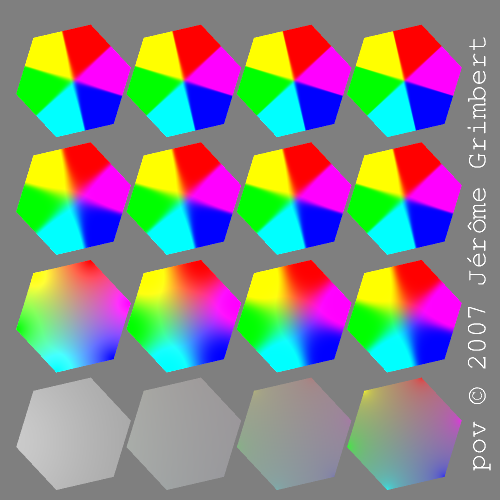
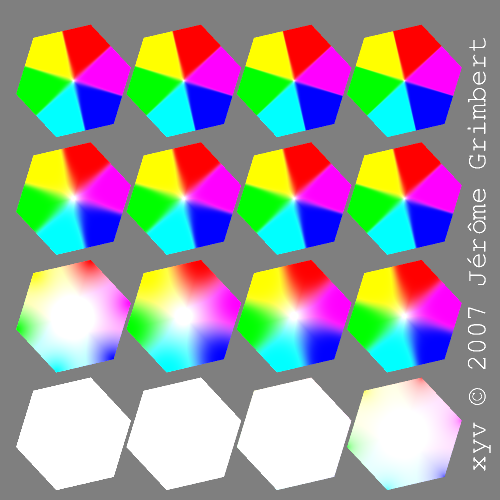
Attached is a rgb interpolation of the polygon, with various
strength of mix.
--
The superior man understands what is right;
the inferior man understands what will sell.
-- Confucius
Post a reply to this message
Attachments:
Download 'demoexpl.png' (221 KB)
Preview of image 'demoexpl.png'
|
|
| |
| |
|
|
|
|
| |
| |
|
|
Le Forgeron nous apporta ses lumieres en ce 2007/11/27 15:38:
> I'm wondering why, short of historical reason, does the
> interpolation of weighted textures(pigment) is performed in the rgb
> space.
>
> Wouldn't it be possible to perform it in HSV or HSL space, even for
> out of rgb <0,0,0> / rgb <1,1,1> block ?
> And wouldn't the result be different and maybe more natural (or not ?)
>
> Linear for SL/SV should be easy, but I'm still wondering about
> interpolation of opposite hue: what would be the right solution ?
>
> Could it be chosen per interpolation ?
>
> Attached is a rgb interpolation of the polygon, with various
> strength of mix.
>
>
> ------------------------------------------------------------------------
>
Your computer, and most image formats, use the RGB space. So, it's much simpler
to work in RGB space.
You can work in another colour space, but it's more complex, as you need to
translate from one to the other. There are some macros to do just that in
colors.inc.
They are:
CH2RGB()
CRGB2H()
CHSL2RGB()
CRGB2HSL()
CHSV2RGB()
CRGB2HSV()

--
Alain
-------------------------------------------------
The strongest reason for the people to retain the right to keep and bear
arms is, as a last resort, to protect themselves against tyranny in
government.
Thomas Jefferson
Post a reply to this message
|
|
| |
| |
|
|
|
|
| |
| |
|
|
> I'm wondering why, short of historical reason, does the
> interpolation of weighted textures(pigment) is performed in the rgb
> space.

Because it's easiest?

> Wouldn't it be possible to perform it in HSV or HSL space, even for
> out of rgb <0,0,0> / rgb <1,1,1> block ?
> And wouldn't the result be different and maybe more natural (or not ?)

Yes, IIRC some paint/drawing program has the option to do this, but I forget
which one.

> Linear for SL/SV should be easy, but I'm still wondering about
> interpolation of opposite hue: what would be the right solution ?

Use something like Yuv space would be best, Y is the brightness and (u,v) is
the colour.  But they key point is that equal distances between points in
the uv plane are perceived as equal "differences" in colour by the human
eye.  If you interpolate linearly in uv space you should get the most
"natural" looking gradient without any sharp bits.  You can then just
interpolate Y separately (maybe linearly or not, gamma is involved).
Post a reply to this message
|
|
| |
| |
|
|
|
|
| |
| |
|
|
Le Forgeron wrote:
> I'm wondering why, short of historical reason, does the
> interpolation of weighted textures(pigment) is performed in the rgb
> space.
>
> Wouldn't it be possible to perform it in HSV or HSL space

  Is HSV interpolation unambiguous?

  Suppose that the two colors you are interpolating between have the
same saturation and brightness, and only differ in hue. How would you
interpolate between them?

  A naive approach would be to interpolate between the separate
components. Since the saturation and brightness are equal in both
colors, their interpolation doesn't produce any change. Thus all that is
 left is interpolating the hue value. This means that if one of the
colors has eg. a red hue and the other a cyan hue, the interpolation
would go through yellow and green (or magenta and blue) producing a
rainbow of colors, which is hardly  what the user wanted.

  Another approach would be to interpolate linearly along the surface of
the hue disc, ie. the ring of colors which have the different hue values
at its border and gray at its center: Place both colors on this disc and
interpolate linearly between the two. The brightness can be interpolated
separately. (I think this effectively makes it an interpolation inside
the hue cone.)
  While this could work, I'm not exactly sure how it's different from a
direct RGB interpolation. I haven't tested it.
Post a reply to this message
|
|
| |
| |
|
|
|
|
| |
| |
|
|
Le 28.11.2007 15:19, Warp nous fit lire :
> Le Forgeron wrote:
>> I'm wondering why, short of historical reason, does the
>> interpolation of weighted textures(pigment) is performed in the rgb
>> space.
>>
>> Wouldn't it be possible to perform it in HSV or HSL space
>   While this could work, I'm not exactly sure how it's different from a
> direct RGB interpolation. I haven't tested it.

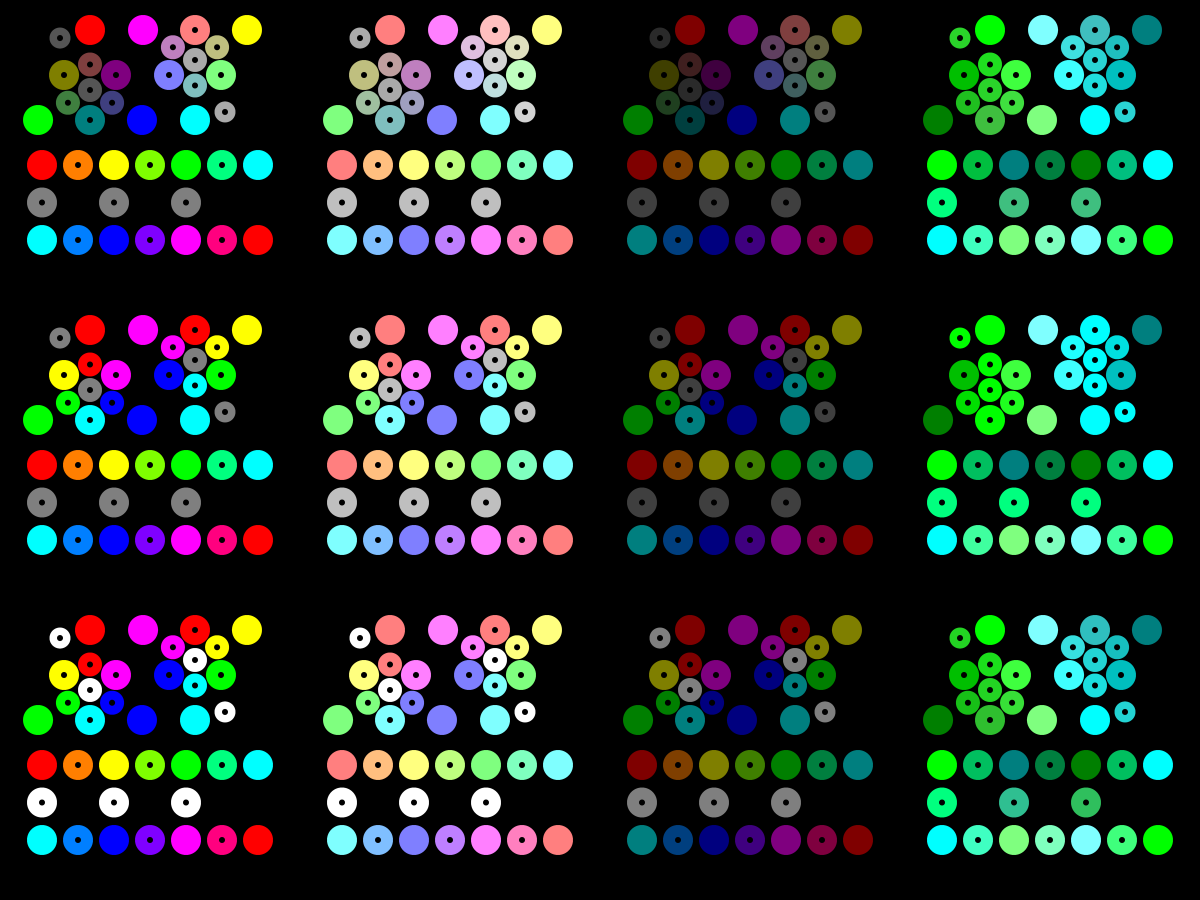
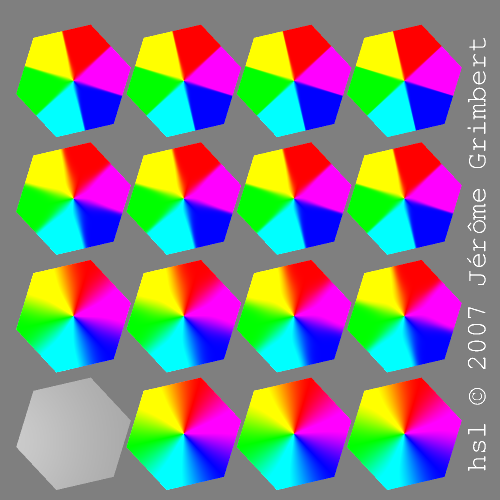
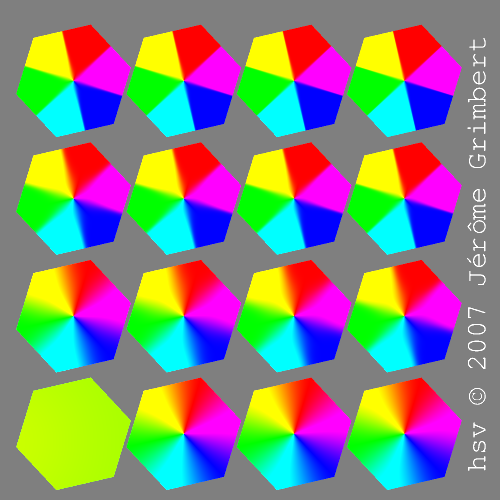
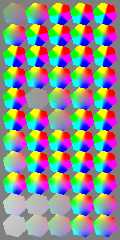
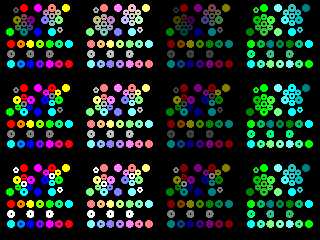
I had a try with RGB (the pov current way), HSL & HSV. (see attached
picture)

First row is RGB interpolation
Second HSL
Third HSV.

There is no point in trying YUV/YIQ/Secam/Pal/NTSC... colorspace as
they are matrix transformation of RGB, and as such keep the same result.

First column is Pure colours (<1,0,0>),
Second column is Light colours (<1,0.5,0.5>)
Third column is dark colours (0.5,0,0),
Fourth column is Green & Cyan, with dark & light.

The original colours are in full-disc.
The interpolated colours are in opened-disc, at mid-way between the
used colours. The center open-disc is the interpolation of the three
original colours. The opened-disc on the side is the interpolation
of the three first-level interpolation.

There is differences!
For the management of Shades, I prefer HSL: mixing dark & light
gives normal, which does not happen for HSV nor RGB!

--
The superior man understands what is right;
the inferior man understands what will sell.
-- Confucius
Post a reply to this message
Attachments:
Download 'melange.png' (199 KB)
Preview of image 'melange.png'
|
|
| |
| |
|
|
|
|
| |
| |
|
|
> There is no point in trying YUV/YIQ/Secam/Pal/NTSC... colorspace as
> they are matrix transformation of RGB, and as such keep the same result.

Yuv certainly isn't a simple matrix transform, which is why I mentioned it
earlier.

FYI to convert from RGB to Yuv do the following (via XYZ):

XYZ = [some_matrix] * RGB
(the matrix depends on which colour space your RGB is in, choose sRGB, PAL,
NTSC whatever)

x = X/(X+Y+Z)
y = Y/(Y+Y+Z)

u = 2*x/(6*y-1.5*x)
v = 4.5*y/(6*y-1.5*x)

Y will give you the "brightness" and uv will give you the colour.
Interpolating uv linearly will give the smoothest change in colour, as each
distance in your "picture" will correspond to an equal change in "colour" as
the eye sees it.
Post a reply to this message
|
|
| |
| |
|
|
|
|
| |
| |
|
|
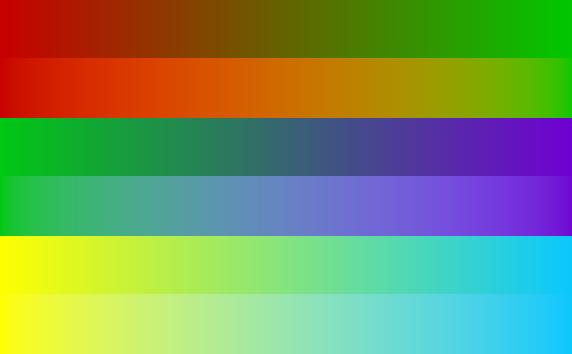
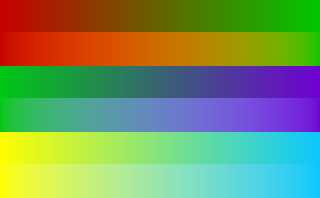
Oh I knocked up a quick program to interpolate between two colours in RGB
space and Yuv space.  In each pair, the top version is RGB, the lower
version is Yuv.

Actually, I just realised, you were probably thinking of the YUV signals
used in TV, that are just linear combinations of RGB.  I'm talking about the
CIE Yuv color space, revised in 1976 so that colours are spread equally in
the uv plane.  See:

http://hyperphysics.phy-astr.gsu.edu/hbase/vision/cie1976.html
Post a reply to this message
Attachments:
Download 'interpolation comparison.png' (3 KB)
Preview of image 'interpolation comparison.png'
|
|
| |
| |
|
|
|
|
| |
| |
|
|
Le 29.11.2007 17:14, scott nous fit lire :

> Actually, I just realised, you were probably thinking of the YUV signals
> used in TV, that are just linear combinations of RGB.
Yes, right.

> I'm talking about
> the CIE Yuv color space, revised in 1976 so that colours are spread
> equally in the uv plane.  See:

I give up on the evaluation of the spectrum... as for all CIELab,
L*a*b* and such... it's far too much complex and removed from my
skill with computer.
Converting formulaes which request the performance of integration is
a bit too much.


--
The superior man understands what is right;
the inferior man understands what will sell.
-- Confucius
Post a reply to this message
|
|
| |
| |
|
|
|
|
| |
| |
|
|
Le Forgeron <jgr### [at] free fr> wrote:
> I had a try with RGB (the pov current way), HSL & HSV. (see attached
> picture)
>
I've been having a look at this. One problem in your graphic is the
interpolation of opposite colours in HSV and HSL.
You are basically interpolating linearly between individual H,S and V/L values.
The interpolation of H is done in the shortest direction around the
circumference. This poses a problem because there is no logical way to choose
the direction to interpolate H around the circumference, as both directions are
equal in length, so you have chosen to interpolate directly across the colour
space, which creates a discontinuity (eg: check the interpolation of
<1,0,0><0,1,1> compared to <1,0,0><0.001,1,1>, they should be virtually
indistinguishable, but the slight value added to the R value tips the shortest
route from being undefined to defined). It would be far better to interploate
all colours directly across the colour space to remove this discontinuity.
A second problem I see is that this really only shows the halfway colour, and
not the full transition from one to the other.
The attached image shows interpolation between pure red and the other 5 pure
colours using interpolation across the colour space as described above.
top band: HSV
middle band: RGB
bottom band: HSL
Looking at this, RGB interpolation seems to give the most pleasing transition to
the eye (my eye at least).
-tgq fr> wrote:
> I had a try with RGB (the pov current way), HSL & HSV. (see attached
> picture)
>
I've been having a look at this. One problem in your graphic is the
interpolation of opposite colours in HSV and HSL.
You are basically interpolating linearly between individual H,S and V/L values.
The interpolation of H is done in the shortest direction around the
circumference. This poses a problem because there is no logical way to choose
the direction to interpolate H around the circumference, as both directions are
equal in length, so you have chosen to interpolate directly across the colour
space, which creates a discontinuity (eg: check the interpolation of
<1,0,0><0,1,1> compared to <1,0,0><0.001,1,1>, they should be virtually
indistinguishable, but the slight value added to the R value tips the shortest
route from being undefined to defined). It would be far better to interploate
all colours directly across the colour space to remove this discontinuity.
A second problem I see is that this really only shows the halfway colour, and
not the full transition from one to the other.
The attached image shows interpolation between pure red and the other 5 pure
colours using interpolation across the colour space as described above.
top band: HSV
middle band: RGB
bottom band: HSL
Looking at this, RGB interpolation seems to give the most pleasing transition to
the eye (my eye at least).
-tgq
Post a reply to this message
Attachments:
Download 'interp.jpg' (72 KB)
Preview of image 'interp.jpg'

|
|
| |
| |
|
|
|
|
| |
| |
|
|
Le 29.11.2007 21:29, Trevor G Quayle nous fit lire :
> Le Forgeron <jgr### [at] freefr> wrote:
>> I had a try with RGB (the pov current way), HSL & HSV. (see attached
>> picture)
>>
>
> I've been having a look at this.  One problem in your graphic is the
> interpolation of opposite colours in HSV and HSL.
> You are basically interpolating linearly between individual H,S and V/L values.
> The interpolation of H is done in the shortest direction around the
> circumference. This poses a problem because there is no logical way to choose
> the direction to interpolate H around the circumference, as both directions are
> equal in length, so you have chosen to interpolate directly across the colour
> space, which creates a discontinuity (eg: check the interpolation of
> <1,0,0><0,1,1> compared to <1,0,0><0.001,1,1>, they should be virtually
> indistinguishable, but the slight value added to the R value tips the shortest
> route from being undefined to defined).  It would be far better to interploate
> all colours directly across the colour space to remove this discontinuity.

Did you look at my code in p.b.sf ?
H was not linearly interpolated. There is a bit of vectors involved.
RGB or HSV/L: red & cyan mix as a shade of grey. (null saturation)
If one is shorter than, it is defined...
Now, should the path be alike is another problem: at any moment you
will have to choose between the upper path and the lower path...
There is two ways for opposites on a circle. And no good choice.


>
> A second problem I see is that this really only shows the halfway colour, and
> not the full transition from one to the other.

I did as I could in SDL. Patching lighting.cpp around line 5251 is
an idea I'm not yet ready to perform for a continuous gradation. Not
tonight anyway.
May be next week... but I want more control than changing it from
RGB to HSL/HSV hardcoded.
So reflexion is needed before trying that.

A problem with your picture: it only uses saturated colors. What
about lighter, darker, white & black ?
Mixing a lighter blue & darker blue ? Not a saturated blue in RGB model.

--
The superior man understands what is right;
the inferior man understands what will sell.
-- Confucius
Post a reply to this message
|
|
| |
| |
|
|
|
|
| |
| |
|
|
Le Forgeron <jgr### [at] freefr> wrote:
> Did you look at my code in p.b.sf ?
> H was not linearly interpolated. There is a bit of vectors involved.
> RGB or HSV/L: red & cyan mix as a shade of grey. (null saturation)
> If one is shorter than, it is defined...
> Now, should the path be alike is another problem: at any moment you
> will have to choose between the upper path and the lower path...
> There is two ways for opposites on a circle. And no good choice.

Actually I didn't look at the actual code, I was commenting more on the
appearance of the graphic.  The main problem that stood out to me was that 2
pure colours interpolated as a pure colour (red to blue = magenta) which
indicated to me that the path was interpolating between the H values, following
the perimeter of the colour space, rather than cutting directly across which
gives a different shade, whereas the opposite colours are interpolated directly
across.

>
>
>
> >
> > A second problem I see is that this really only shows the halfway colour, and
> > not the full transition from one to the other.
>
> I did as I could in SDL. Patching lighting.cpp around line 5251 is
> an idea I'm not yet ready to perform for a continuous gradation. Not
> tonight anyway.
> May be next week... but I want more control than changing it from
> RGB to HSL/HSV hardcoded.
> So reflexion is needed before trying that.
>

I can understand the problem in getting this to work.  It took me a while to
write the SDL code to get smooth transitions.


> A problem with your picture: it only uses saturated colors. What
> about lighter, darker, white & black ?
> Mixing a lighter blue & darker blue ? Not a saturated blue in RGB model.

Here's some new mixes using different shades of red:

Top to bottom:
1. red to dark red
2. red to light red
3. dark red to light red
4. red to black
5. red to white

If there's any particular mix you want I can make an image for you, or I could
post the code.  The difficult trick in the interpolation is that you have to
convert the RGB to HSV/HSL(polar) to XYZ(cartesian) coordinates, interpolate
then convert back XYZ -> HSV/HSL -> RGB.

-tgq
Post a reply to this message
Attachments:
Download 'interp2.jpg' (58 KB)
Preview of image 'interp2.jpg'

|
|
| |
| |
|
|
|
|
| |
| |
|
|
Here's a better version of the original one without gamma f***ing it up.  (I
have to stop using PNG, it causes nothing but gamma problems for me).  You can
still see the big differences, particularly between red and green or blue.

The HSL doesn't look to bad here, but I still prefer the RGB (HSV is completely
out...)

-tgq
Post a reply to this message
Attachments:
Download 'interp3.jpg' (68 KB)
Preview of image 'interp3.jpg'

|
|
| |
| |
|
|
|
|
| |
| |
|
|
"Trevor G Quayle" <Tin### [at] hotmailcom> wrote:
> Here's a better version of the original one without gamma f***ing it up.  (I
> have to stop using PNG, it causes nothing but gamma problems for me).  You can
> still see the big differences, particularly between red and green or blue.
>
> The HSL doesn't look to bad here, but I still prefer the RGB (HSV is completely
> out...)
>
> -tgq

Here's an intersting take on this one.  The transitions are converted to
equal-weighting grayscale (r=g=b=0.333).

Of particular note is the transition from red to blue or green, where the gray
value increases then decreases for both the HSV and HSL, however not as
drastically for the HSL.

-tgq
Post a reply to this message
Attachments:
Download 'interp4.jpg' (52 KB)
Preview of image 'interp4.jpg'

|
|
| |
| |
|
|
|
|
| |
| |
|
|
One more interesting little experiment before I pack it in for the day.

Here I interpolated between pure Blue and Red, Green, and Gray with an
equivilant intesity (0.11).  The top shows it in colour and the bottom shows it
converted to grayscale via an external converter.

Here it can be clearly seen that the RGB interpolation retains constant
intensity, whereas the other two do not.

-tgq
Post a reply to this message
Attachments:
Download 'interp5.jpg' (58 KB)
Preview of image 'interp5.jpg'

|
|
| |
| |
|
|
|
|
| |
| |
|
|
scott wrote:
> Oh I knocked up a quick program to interpolate between two colours in
> RGB space and Yuv space.  In each pair, the top version is RGB, the
> lower version is Yuv.

  The yuv interpolation doesn't look half-bad.
Post a reply to this message
|
|
| |
| |
|
|
|
|
| |
| |
|
|
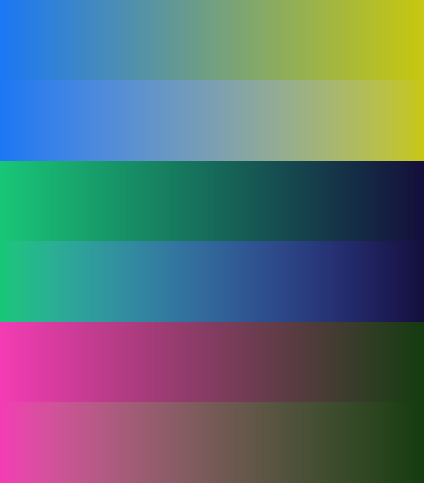
>> Oh I knocked up a quick program to interpolate between two colours in
>> RGB space and Yuv space.  In each pair, the top version is RGB, the
>> lower version is Yuv.
>
>  The yuv interpolation doesn't look half-bad.

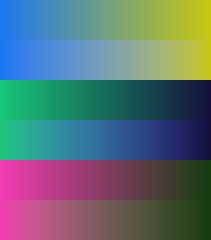
I realised an improvement though.

Although the "colour" part (u and v) is supposed to be interpolated evenly,
the Y part will not be.  Y is linear luminance, ie not gamma corrected, so
interpolating it directly will not give a very "even" looking result (there
will be too much "white").

So I modified the code to do this (now a black-white gradient looks
identical in both RGB and Yuv interpolation) and it looks a bit better,
especially when going from dark to light colours.  Again, top bar is RGB and
lower bar is Yuv.

Also, the problem with converting from RGB to Yuv and back is that it
assumes your display device is exactly calibrated to a standard (I used sRGB
in the calculations).  If it's not then the results won't look as good as
they could.
Post a reply to this message
Attachments:
Download 'interpolation comparison 2.png' (3 KB)
Preview of image 'interpolation comparison 2.png'
|
|
| |
| |
|
|
|
|
| |
| |
|
|
"scott" <sco### [at] laptopcom> wrote:
> >> Oh I knocked up a quick program to interpolate between two colours in
> >> RGB space and Yuv space.  In each pair, the top version is RGB, the
> >> lower version is Yuv.
> >
> >  The yuv interpolation doesn't look half-bad.
>
> I realised an improvement though.
>
> Although the "colour" part (u and v) is supposed to be interpolated evenly,
> the Y part will not be.  Y is linear luminance, ie not gamma corrected, so
> interpolating it directly will not give a very "even" looking result (there
> will be too much "white").
>
> So I modified the code to do this (now a black-white gradient looks
> identical in both RGB and Yuv interpolation) and it looks a bit better,
> especially when going from dark to light colours.  Again, top bar is RGB and
> lower bar is Yuv.
>
> Also, the problem with converting from RGB to Yuv and back is that it
> assumes your display device is exactly calibrated to a standard (I used sRGB
> in the calculations).  If it's not then the results won't look as good as
> they could.

I think this does present an interesting result.  Similar to the RGB gradient,
the colour luminance is constantly increasing or decreasing (unlike in HSV or
HSL where it tends to arc up or down past the final luminance and back again),
however following a different path of colour mix.

-tgq
Post a reply to this message
|
|
| |
| |
|
|
|
|
| |
| |
|
|
Having seen the differences between the different colour spaces, I think rather
than trying to figure out which is right or wrong (as opinion on this can vary
drastically)  I think it could be of use to be able to implement this in future
POV versions (likely POV4) provided efficient conversion algorithms can be made
(my HSL/HSV algorithm is SDL function based and renders quite slow compared to
the regular RGB gradient).  Anywhere a pattern gradient can be applied, be able
to specify the colour space to use (RGB being default) and have whatever colour
spaces can be properly set up (HSV,HSL,YUV, etc.)

-tgq
Post a reply to this message
|
|
| |
| |
|
|
|
|
| |
| |
|
|
Yes, the "brightness" will ramp up or down linearly in gamma-corrected
space.

The colour will linearly interpolate between two points in the uv plane.

You can see a picture of the uv plane here:

http://content.answers.com/main/content/img/CDE/_CIE1976.JPG

The outer edge are single-wavelength colours, with the wavelengths marked
on.  If you mix two or more wavelengths you can simply take a weighted
average of the uv coordinates and that will give you the resulting colour.
That is essentially what I am doing in my code, varying the % of each colour
linearly from 0-100%.

The problem occurs when you interpolate from blue to yellow (or any other
pair either side of white).  In real life, if you mix 50% blue and 50%
yellow you do get white (it's how most white LEDs work).

To me though it doesn't seem right that if you want a nice colour gradient
between a strong blue and yellow, you end up with a muddy grey in the
middle, but then I don't know what else you could do without introducing
other colours...
Post a reply to this message
|
|
| |
| |
|
|
|
|
| |
| |
|
|
>> I'm talking about
>> the CIE Yuv color space, revised in 1976 so that colours are spread
>> equally in the uv plane.  See:
>
> I give up on the evaluation of the spectrum... as for all CIELab,
> L*a*b* and such... it's far too much complex and removed from my
> skill with computer.
> Converting formulaes which request the performance of integration is
> a bit too much.

You actually don't need to do anything with the spectrum.  You just need to
choose a physical colour-space to work in (sRGB or AdobeRGB are common), and
then a 3x3 matrix is available to convert from linear RGB values to XYZ.
Once you have the XYZ colour then it's just a simple formula to convert to
Yuv.

Of course you can derive the 3x3 matrix from first principles using the
primary colours' spectrums and viewer functions, but that usually isn't
necessary.
Post a reply to this message
|
|
| |
| |
|
|
|
|
| |
| |
|
|
Le 30.11.2007 14:59, Trevor G Quayle nous fit lire :
> Having seen the differences between the different colour spaces, I think rather
> than trying to figure out which is right or wrong (as opinion on this can vary
> drastically)  I think it could be of use to be able to implement this in future
> POV versions (likely POV4) provided efficient conversion algorithms can be made
> (my HSL/HSV algorithm is SDL function based and renders quite slow compared to
> the regular RGB gradient).  Anywhere a pattern gradient can be applied, be able
> to specify the colour space to use (RGB being default) and have whatever colour
> spaces can be properly set up (HSV,HSL,YUV, etc.)

I would agree... would you mind sharing your SDL interpolation code ?
--
The superior man understands what is right;
the inferior man understands what will sell.
-- Confucius
Post a reply to this message
|
|
| |
| |
|
|
|
|
| |
| |
|
|
Le Forgeron <jgr### [at] freefr> wrote:
> I would agree... would you mind sharing your SDL interpolation code ?

I don't mind.  It can be likely far better optimized.  It is quite easy to do as
a macro using #if, #range, etc., but was quite cumbersome to make a continuous
function through creative use of select(), especially since functions don't
handle vectors, so each component has to be split out separately and
recombined.

I have also influded the function for converting HSV/HSL to XYZ and back

The formulae for these are based on the ones from wikipedia
http://en.wikipedia.org/wiki/HSV_color_space

Let me know if you see any errors or have questions.

//RGB to HSV
#declare HHSV=function(R,G,B)
{
  60*
  select(
    min(R,G,B)-max(R,G,B)
  ,//min<max
    select(
      R-max(R,G,B)
    ,//R<max
      select(
        B-max(R,G,B)
      ,//G=max
        (B-R)/(max(R,G,B)-min(R,G,B))+2
      ,//B=max
        (R-G)/(max(R,G,B)-min(R,G,B))+4
      )
    ,//R=max
      (G-B)/(max(R,G,B)-min(R,G,B))+
      select(
        G-B
      ,//G>B
        6
      ,//B>G
        0
      )
    )
  ,//min=max
    0
  )
}
#declare SHSV=function(R,G,B) {select(-max(R,G,B),1-min(R,G,B)/max(R,G,B),0)}
#declare VHSV=function(R,G,B) {max(R,G,B)}
//END RGB to HSV

//RGB to HSL
#declare HHSL=function(R,G,B) {HHSV(R,G,B)}   //same as HSV
#declare SHSL=function(R,G,B)
{
  select(
    min(R,G,B)-max(R,G,B)
  ,//max>min
    (max(R,G,B)-min(R,G,B))/
    select(
      1-(max(R,G,B)+min(R,G,B))
    ,//l>1/2
      2-(max(R,G,B)+min(R,G,B))
    ,//1/2=>l
      max(R,G,B)+min(R,G,B)
    )
  ,//max=min
    0
  )
}
#declare LHSL=function(R,G,B){(max(R,G,B)+min(R,G,B))/2}
//END RGB to HSL

//HSL to RGB
#declare tHSL=function(H,C){(H/360+C/3)-floor(H/360+C/3)}
#declare qHSL=function(H,S,L){select(L-1/2,L*(1+S),L+S-L*S)}
#declare pHSL=function(H,S,L){2*L-qHSL(H,S,L)}
#declare CHSL=function(H,S,L,C)
{
  select(
    -S
  ,//S>0
    select(
      tHSL(H,C)-1/6
    ,//tc<1/6
      pHSL(H,S,L)+2*(qHSL(H,S,L)-L)*6*tHSL(H,C)
    ,
      select(
        tHSL(H,C)-1/2
      ,//tc<1/2
        qHSL(H,S,L)
      ,
        select(
          tHSL(H,C)-2/3
        ,//tc<2/3
          pHSL(H,S,L)+2*(qHSL(H,S,L)-L)*6*(2/3-tHSL(H,C))
        ,//esle
          pHSL(H,S,L)
        )
      )
    )
  ,//S=0
    L
  )
}
#declare RHSL=function (H,S,L){CHSL(H,S,L,+1)}
#declare GHSL=function (H,S,L){CHSL(H,S,L, 0)}
#declare BHSL=function (H,S,L){CHSL(H,S,L,-1)}
//END HSL to RGB


//HSV to RGB
#declare hHSV=function (H){floor(mod(H/60,6))}
#declare fHSV=function (H){H/60-hHSV(H)}
#declare pHSV=function (H,S,V){V*(1-S)}
#declare qHSV=function (H,S,V){V*(1-fHSV(H)*S)}
#declare tHSV=function (H,S,V){V*(1-(1-fHSV(H))*S)}
#declare RHSV=function (H,S,V)
{
  select(hHSV(H)-0.5
  ,//0
    V
  ,
    select(hHSV(H)-1.5
    ,//1
      qHSV(H,S,V)
    ,
      select(hHSV(H)-2.5
      ,//2
        pHSV(H,S,V)
      ,
        select(hHSV(H)-3.5
        ,//3
          pHSV(H,S,V)
        ,
          select(hHSV(H)-4.5
          ,//4
            tHSV(H,S,V)
          ,//5
            V
          )
        )
      )
    )
  )
}

#declare GHSV=function (H,S,V)
{
  select(hHSV(H)-0.5
  ,//0
    tHSV(H,S,V)
  ,
    select(hHSV(H)-1.5
    ,//1
      V
    ,
      select(hHSV(H)-2.5
      ,//2
        V
      ,
        select(hHSV(H)-3.5
        ,//3
          qHSV(H,S,V)
        ,//4,5
          pHSV(H,S,V)
        )
      )
    )
  )
}

#declare BHSV=function (H,S,V)
{
  select(hHSV(H)-0.5
  ,//0
    pHSV(H,S,V)
  ,
    select(hHSV(H)-1.5
    ,//1
      pHSV(H,S,V)
    ,
      select(hHSV(H)-2.5
      ,//2
        tHSV(H,S,V)
      ,
        select(hHSV(H)-3.5
        ,//3
          V
        ,
          select(hHSV(H)-4.5
          ,//4
            V
          ,//5
            qHSV(H,S,V)
          )
        )
      )
    )
  )
}
//END HSV to RGB


//CONVERT HSV to XYZ (polar to caresian) for interpolation and back
#declare HSVX=function(H,S,V){sin(radians(H))*S}
#declare HSVY=function(H,S,V){cos(radians(H))*S}
#declare HSVZ=function(H,S,V){V}
#declare
XYZH=function(X,Y,Z){select(-sqrt(X*X+Y*Y),abs(degrees(acos(Y/sqrt(X*X+Y*Y)))-select(X,360,0)),0)}
#declare XYZS=function(X,Y,Z){sqrt(X*X+Y*Y)}
#declare XYZV=function(X,Y,Z){Z}

#declare HSLX=function(H,S,L){sin(radians(H))*S}
#declare HSLY=function(H,S,L){cos(radians(H))*S}
#declare HSLZ=function(H,S,L){L}
//H & S same as above
#declare XYZL=function(X,Y,Z){Z}
//END CONVERT HSV to XYZ

#declare INTRGB=function (PTA,PTB,K){PTA+(PTB-PTA)*K}
Post a reply to this message
|
|
| |
| |
|
|
|
|
| |
| |
|
|
Le 30.11.2007 18:44, Trevor G Quayle nous fit lire :

> I have also influded the function for converting HSV/HSL to XYZ and back

Thanks, that's interesting.
I trusted the povray macro for CRGB2HSV/CRGB2HSL and opposite for
HSV/L <->RGB.
XYZ opens an interesting path.

--
The superior man understands what is right;
the inferior man understands what will sell.
-- Confucius
Post a reply to this message
|
|
| |
| |
|
|
|
|
| |
| |
|
|
Le Forgeron <jgr### [at] freefr> wrote:
> Le 30.11.2007 18:44, Trevor G Quayle nous fit lire :
>
> > I have also influded the function for converting HSV/HSL to XYZ and back
>
> Thanks, that's interesting.
> I trusted the povray macro for CRGB2HSV/CRGB2HSL and opposite for
> HSV/L <->RGB.
> XYZ opens an interesting path.
>
> --
> The superior man understands what is right;
> the inferior man understands what will sell.
> -- Confucius

The problem with the macro is that it can't be used in a function, which is what
I wanted.

Here is the pigment declaration for an HSV gradient:


#macro PIG2(RGB1,RGB2)//HSV gradient
  #declare RA=RGB1.x;#declare GA=RGB1.y;#declare BA=RGB1.z;
  #declare RB=RGB2.x;#declare GB=RGB2.y;#declare BB=RGB2.z;
  average
  pigment_map{
    [function{
      RHSV(
        XYZH(

INTRGB(HSVX(HHSV(RA,GA,BA),SHSV(RA,GA,BA),VHSV(RA,GA,BA)),HSVX(HHSV(RB,GB,BB),SHSV(RB,GB,BB),VHSV(RB,GB,BB)),x)
        ,

INTRGB(HSVY(HHSV(RA,GA,BA),SHSV(RA,GA,BA),VHSV(RA,GA,BA)),HSVY(HHSV(RB,GB,BB),SHSV(RB,GB,BB),VHSV(RB,GB,BB)),x)
        ,

INTRGB(HSVZ(HHSV(RA,GA,BA),SHSV(RA,GA,BA),VHSV(RA,GA,BA)),HSVZ(HHSV(RB,GB,BB),SHSV(RB,GB,BB),VHSV(RB,GB,BB)),x)
        )
      ,
        XYZS(

INTRGB(HSVX(HHSV(RA,GA,BA),SHSV(RA,GA,BA),VHSV(RA,GA,BA)),HSVX(HHSV(RB,GB,BB),SHSV(RB,GB,BB),VHSV(RB,GB,BB)),x)
        ,

INTRGB(HSVY(HHSV(RA,GA,BA),SHSV(RA,GA,BA),VHSV(RA,GA,BA)),HSVY(HHSV(RB,GB,BB),SHSV(RB,GB,BB),VHSV(RB,GB,BB)),x)
        ,

INTRGB(HSVZ(HHSV(RA,GA,BA),SHSV(RA,GA,BA),VHSV(RA,GA,BA)),HSVZ(HHSV(RB,GB,BB),SHSV(RB,GB,BB),VHSV(RB,GB,BB)),x)
        )
      ,
        XYZV(

INTRGB(HSVX(HHSV(RA,GA,BA),SHSV(RA,GA,BA),VHSV(RA,GA,BA)),HSVX(HHSV(RB,GB,BB),SHSV(RB,GB,BB),VHSV(RB,GB,BB)),x)
        ,

INTRGB(HSVY(HHSV(RA,GA,BA),SHSV(RA,GA,BA),VHSV(RA,GA,BA)),HSVY(HHSV(RB,GB,BB),SHSV(RB,GB,BB),VHSV(RB,GB,BB)),x)
        ,

INTRGB(HSVZ(HHSV(RA,GA,BA),SHSV(RA,GA,BA),VHSV(RA,GA,BA)),HSVZ(HHSV(RB,GB,BB),SHSV(RB,GB,BB),VHSV(RB,GB,BB)),x)
        )
      )
    } color_map{[0 rgb 0][1 rgb <1,0,0>]}]
    [function{
      GHSV(
        XYZH(

INTRGB(HSVX(HHSV(RA,GA,BA),SHSV(RA,GA,BA),VHSV(RA,GA,BA)),HSVX(HHSV(RB,GB,BB),SHSV(RB,GB,BB),VHSV(RB,GB,BB)),x)
        ,

INTRGB(HSVY(HHSV(RA,GA,BA),SHSV(RA,GA,BA),VHSV(RA,GA,BA)),HSVY(HHSV(RB,GB,BB),SHSV(RB,GB,BB),VHSV(RB,GB,BB)),x)
        ,

INTRGB(HSVZ(HHSV(RA,GA,BA),SHSV(RA,GA,BA),VHSV(RA,GA,BA)),HSVZ(HHSV(RB,GB,BB),SHSV(RB,GB,BB),VHSV(RB,GB,BB)),x)
        )
      ,
        XYZS(

INTRGB(HSVX(HHSV(RA,GA,BA),SHSV(RA,GA,BA),VHSV(RA,GA,BA)),HSVX(HHSV(RB,GB,BB),SHSV(RB,GB,BB),VHSV(RB,GB,BB)),x)
        ,

INTRGB(HSVY(HHSV(RA,GA,BA),SHSV(RA,GA,BA),VHSV(RA,GA,BA)),HSVY(HHSV(RB,GB,BB),SHSV(RB,GB,BB),VHSV(RB,GB,BB)),x)
        ,

INTRGB(HSVZ(HHSV(RA,GA,BA),SHSV(RA,GA,BA),VHSV(RA,GA,BA)),HSVZ(HHSV(RB,GB,BB),SHSV(RB,GB,BB),VHSV(RB,GB,BB)),x)
        )
      ,
        XYZV(

INTRGB(HSVX(HHSV(RA,GA,BA),SHSV(RA,GA,BA),VHSV(RA,GA,BA)),HSVX(HHSV(RB,GB,BB),SHSV(RB,GB,BB),VHSV(RB,GB,BB)),x)
        ,

INTRGB(HSVY(HHSV(RA,GA,BA),SHSV(RA,GA,BA),VHSV(RA,GA,BA)),HSVY(HHSV(RB,GB,BB),SHSV(RB,GB,BB),VHSV(RB,GB,BB)),x)
        ,

INTRGB(HSVZ(HHSV(RA,GA,BA),SHSV(RA,GA,BA),VHSV(RA,GA,BA)),HSVZ(HHSV(RB,GB,BB),SHSV(RB,GB,BB),VHSV(RB,GB,BB)),x)
        )
      )
    } color_map{[0 rgb 0][1 rgb <0,1,0>]}]
    [function{
      BHSV(
        XYZH(

INTRGB(HSVX(HHSV(RA,GA,BA),SHSV(RA,GA,BA),VHSV(RA,GA,BA)),HSVX(HHSV(RB,GB,BB),SHSV(RB,GB,BB),VHSV(RB,GB,BB)),x)
        ,

INTRGB(HSVY(HHSV(RA,GA,BA),SHSV(RA,GA,BA),VHSV(RA,GA,BA)),HSVY(HHSV(RB,GB,BB),SHSV(RB,GB,BB),VHSV(RB,GB,BB)),x)
        ,

INTRGB(HSVZ(HHSV(RA,GA,BA),SHSV(RA,GA,BA),VHSV(RA,GA,BA)),HSVZ(HHSV(RB,GB,BB),SHSV(RB,GB,BB),VHSV(RB,GB,BB)),x)
        )
      ,
        XYZS(

INTRGB(HSVX(HHSV(RA,GA,BA),SHSV(RA,GA,BA),VHSV(RA,GA,BA)),HSVX(HHSV(RB,GB,BB),SHSV(RB,GB,BB),VHSV(RB,GB,BB)),x)
        ,

INTRGB(HSVY(HHSV(RA,GA,BA),SHSV(RA,GA,BA),VHSV(RA,GA,BA)),HSVY(HHSV(RB,GB,BB),SHSV(RB,GB,BB),VHSV(RB,GB,BB)),x)
        ,

INTRGB(HSVZ(HHSV(RA,GA,BA),SHSV(RA,GA,BA),VHSV(RA,GA,BA)),HSVZ(HHSV(RB,GB,BB),SHSV(RB,GB,BB),VHSV(RB,GB,BB)),x)
        )
      ,
        XYZV(

INTRGB(HSVX(HHSV(RA,GA,BA),SHSV(RA,GA,BA),VHSV(RA,GA,BA)),HSVX(HHSV(RB,GB,BB),SHSV(RB,GB,BB),VHSV(RB,GB,BB)),x)
        ,

INTRGB(HSVY(HHSV(RA,GA,BA),SHSV(RA,GA,BA),VHSV(RA,GA,BA)),HSVY(HHSV(RB,GB,BB),SHSV(RB,GB,BB),VHSV(RB,GB,BB)),x)
        ,

INTRGB(HSVZ(HHSV(RA,GA,BA),SHSV(RA,GA,BA),VHSV(RA,GA,BA)),HSVZ(HHSV(RB,GB,BB),SHSV(RB,GB,BB),VHSV(RB,GB,BB)),x)
        )
      )
    } color_map{[0 rgb 0][1 rgb <0,0,1>]}]
  }
#end

    box{<0,0,0>,<1,0,1>
      pigment{PIG2(COLA,COLB)}
      finish{ambient 3 diffuse 0}
      translate <-1/2,0,-1/2>
      scale <LEN,1,WID/3*2>
      translate z*WID/3*2
    }
Post a reply to this message
|
|
| |
| |
|
|
|
|
| |
| |
|
|
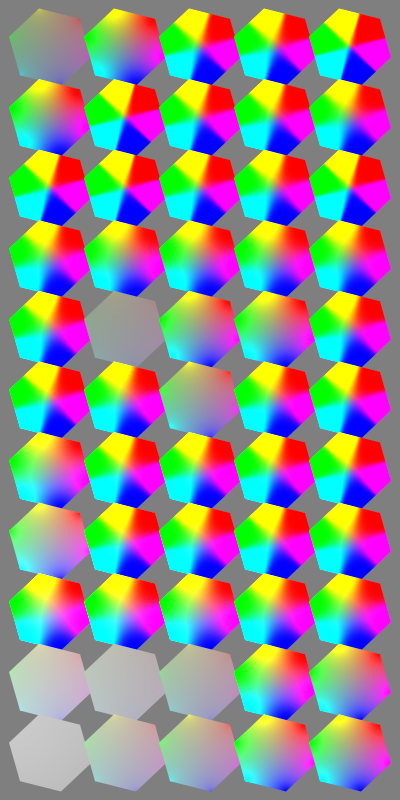
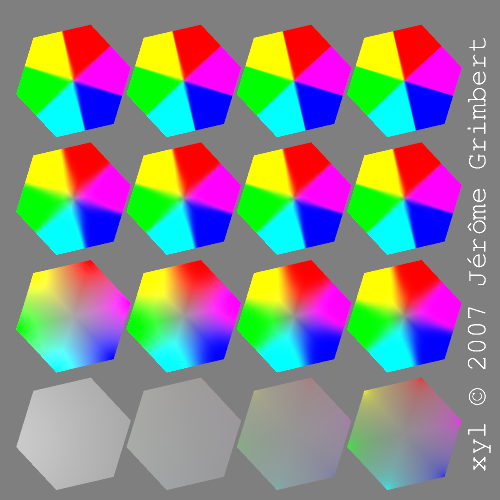
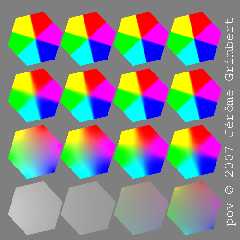
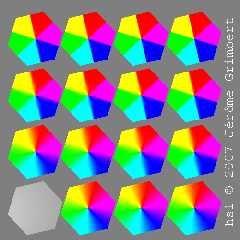
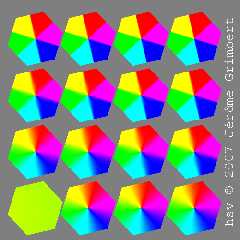
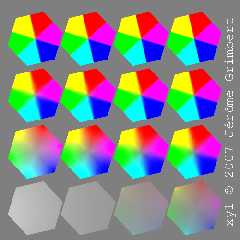
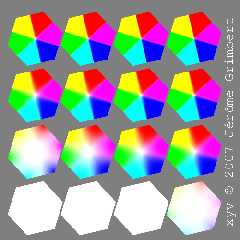
here is a small experiment (real patched code), currently only for
polygon interpolation.

Still a little problem of green for degenerate hsv...

Next step, the blob 3D object...

Playing with ADC_bailout might be fun, if only it was per object and
not a global.
--
The superior man understands what is right;
the inferior man understands what will sell.
-- Confucius
Post a reply to this message
Attachments:
Download 'demo1.png' (87 KB)
Download 'demo2.png' (72 KB)
Download 'demo3.png' (72 KB)
Download 'demo4.png' (98 KB)
Download 'demo5.png' (86 KB)
Preview of image 'demo1.png'
Preview of image 'demo2.png'
Preview of image 'demo3.png'
Preview of image 'demo4.png'
Preview of image 'demo5.png'
|
|
| |
| |
|
|
|
|
| |
|
|