|
|
|
|
|
|
| |
| |
|
|
|
|
| |
| |
|
|
-----BEGIN PGP SIGNED MESSAGE-----
Hash: SHA1
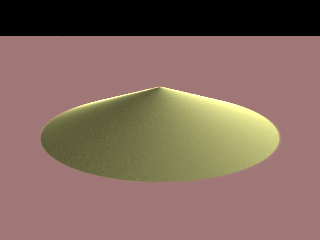
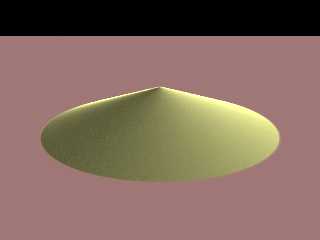
I thought I'd take another shot at a decent sand texture; this is the
result of my first pass. It has all sorts of things wrong with it, but
it's not a bad start. :-) I'm not so much aiming for photorealistic sand
as I'm shooting for something that people instantly recognize as sand.
Whenever anyone posts sand images up, people complain about not seeing
sand grains, even if the sand in question is so far away that you
wouldn't be able to see the sand grains. The general solution to this
seems to be to have some sort of patterning going on at just about the
pixel level, where you can just see that there is something going on,
but you can't really see what.
The problem that I've had with this is that you have to tune your
patterning to the resolution you're rendering at. If you render at a
lower resolution, the patterning disappears; if you render at a higher
resolution, the larger-than-realistic "sand grains" become glaringly
obvious.
This also marks the first time I've tried to do subsurface scattering. I
didn't realize just how easy it is to set up, actually.
BTW, does anybody know if it's possible to make subsurface scattering
and normal perturbations play well together?
- --
William Tracy
afi### [at] gmail com -- wtr### [at] calpolyedu
You know you've been raytracing too long when you stop using a
protractor to measure angles because you can do it just by looking.
-- Taps a.k.a. Tapio Vocadlo
-----BEGIN PGP SIGNATURE-----
Version: GnuPG v1.4.6 (GNU/Linux)
Comment: Using GnuPG with Mozilla - http://enigmail.mozdev.org
iD8DBQFHRdL1KrVIcTMekC8RAmvtAJ0f17NnYlOzv0WcgRKbh4nELUr2lQCgstsd
XZ8XeEaCZXx8KfAZ9pcINnY=
=deV9
-----END PGP SIGNATURE----- com -- wtr### [at] calpolyedu
You know you've been raytracing too long when you stop using a
protractor to measure angles because you can do it just by looking.
-- Taps a.k.a. Tapio Vocadlo
-----BEGIN PGP SIGNATURE-----
Version: GnuPG v1.4.6 (GNU/Linux)
Comment: Using GnuPG with Mozilla - http://enigmail.mozdev.org
iD8DBQFHRdL1KrVIcTMekC8RAmvtAJ0f17NnYlOzv0WcgRKbh4nELUr2lQCgstsd
XZ8XeEaCZXx8KfAZ9pcINnY=
=deV9
-----END PGP SIGNATURE-----
Post a reply to this message
Attachments:
Download 'test.png' (22 KB)
Download 'test.png.sig.dat' (1 KB)
Preview of image 'test.png'
|
|
| |
| |
|
|
|
|
| |
| |
|
|
-----BEGIN PGP SIGNED MESSAGE-----
Hash: SHA1

I'm starting to come up with some stuff that I want to build sand
castles in. :-)

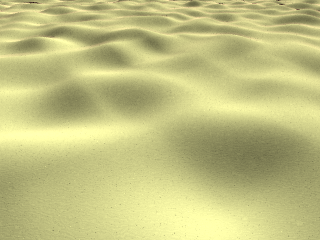
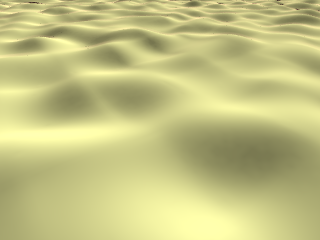
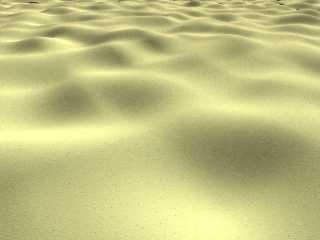
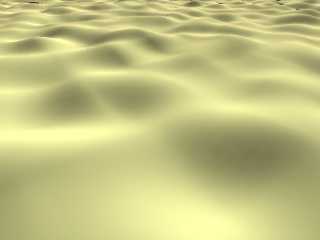
I'm starting to wonder if all my "details" are really helping or
hurting. Here's two renders, one with lots of yummy little patterns, and
one that's completely flat except for the subsurface scattering.

Speaking of subsurface scattering, just a little goes a long way. I
probably overdid the scattering media in these images, because
everything looks like its underwater. Which is still cool. ;-)

- --
William Tracy
afi### [at] gmailcom -- wtr### [at] calpolyedu

You know you've been raytracing too long when you thought the infamous
Book of Questions would have deeper stuff in it, like "If you could only
use one renderer, which would it be?', etc.
    -- Taps a.k.a. Tapio Vocadlo
-----BEGIN PGP SIGNATURE-----
Version: GnuPG v1.4.6 (GNU/Linux)
Comment: Using GnuPG with Mozilla - http://enigmail.mozdev.org

iD8DBQFHRhB/KrVIcTMekC8RAqvXAJ4+FXU8nlNx2lyCyYyjDH86cwZIqQCbBOjr
+t6Y83uXFGZkmG/sZhmuTSU=
=URSM
-----END PGP SIGNATURE-----
Post a reply to this message
Attachments:
Download 'sand-grainy.png' (99 KB)
Download 'sand-smooth.png' (51 KB)
Download 'sand-grainy.png.sig.dat' (1 KB)
Download 'sand-smooth.png.sig.dat' (1 KB)
Preview of image 'sand-grainy.png'
Preview of image 'sand-smooth.png'
|
|
| |
| |
|
|
|
|
| |
| |
|
|
It's useless in animations, but have you tried the 'crand' option?
Post a reply to this message
|
|
| |
| |
|
|
|
|
| |
| |
|
|
-----BEGIN PGP SIGNED MESSAGE-----
Hash: SHA1

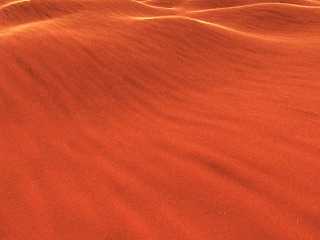
Mark Birch wrote:
> It's useless in animations, but have you tried the 'crand' option?

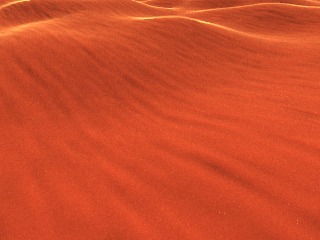
It works better than I expected, actually.

(...and sorry for not remembering to convert those other pictures to jpg
before uploading them.)

- --
William Tracy
afi### [at] gmailcom -- wtr### [at] calpolyedu

You know you've been raytracing too long when you can remember back to a
time when you thought raytracing was a guy named Ray sitting at a desk
tracing.
    -- Ken Tyler
-----BEGIN PGP SIGNATURE-----
Version: GnuPG v1.4.6 (GNU/Linux)
Comment: Using GnuPG with Mozilla - http://enigmail.mozdev.org

iD8DBQFHRl2RKrVIcTMekC8RAkt0AJ9VNXoHxqhKLT5pnAvOcpMv0XEfMwCcCswk
Ry0s2tmcDJBIyuFExT3DFbk=
=0Bfu
-----END PGP SIGNATURE-----
Post a reply to this message
Attachments:
Download 'sand-crand.jpg' (19 KB)
Download 'sand-crand.jpg.sig.dat' (1 KB)
Preview of image 'sand-crand.jpg'
|
|
| |
| |
|
|
|
|
| |
| |
|
|
"William Tracy" <wtr### [at] calpolyedu> schreef in bericht
news:47461080@news.povray.org...
> -----BEGIN PGP SIGNED MESSAGE-----
> Hash: SHA1
>
> I'm starting to come up with some stuff that I want to build sand
> castles in. :-)
>
> I'm starting to wonder if all my "details" are really helping or
> hurting. Here's two renders, one with lots of yummy little patterns, and
> one that's completely flat except for the subsurface scattering.
>

Sand is - at the same time - easy and complicated to do. Imo, your renders
look well. I suppose that the technique used depends on the type of scene
one wants to build and the effect one wants to convey. This means that there
is no definitive solution, or so I experienced myself. Using crand, like
Mark says, can help, although I do not particularly like it. Perhaps using
more contrast between the "grain" colors gives even better results. That, of
course, depends on the type of sand one wants to render.

Thomas
Post a reply to this message
|
|
| |
| |
|
|
|
|
| |
| |
|
|
"Thomas de Groot" <t.d### [at] internlDOTnet> wrote:
> "William Tracy" <wtr### [at] calpolyedu> schreef in bericht
> news:47461080@news.povray.org...
> > -----BEGIN PGP SIGNED MESSAGE-----
> > Hash: SHA1
> >
> > I'm starting to come up with some stuff that I want to build sand
> > castles in. :-)
> >
> > I'm starting to wonder if all my "details" are really helping or
> > hurting. Here's two renders, one with lots of yummy little patterns, and
> > one that's completely flat except for the subsurface scattering.
> >
>
> Sand is - at the same time - easy and complicated to do. Imo, your renders
> look well. I suppose that the technique used depends on the type of scene
> one wants to build and the effect one wants to convey. This means that there
> is no definitive solution, or so I experienced myself. Using crand, like
> Mark says, can help, although I do not particularly like it. Perhaps using
> more contrast between the "grain" colors gives even better results. That, of
> course, depends on the type of sand one wants to render.
>
> Thomas

Hi

I was busy in RL those two last weeks and could not read much here. William,
your work seems very interesting. Would you mind, when achieved or partial,
sharing things so that I can integrate this nice stuff in TerraPOV?

    Regards

      Bruno
Post a reply to this message
|
|
| |
| |
|
|
|
|
| |
| |
|
|
William Tracy <wtr### [at] calpolyedu> wrote:
> -----BEGIN PGP SIGNED MESSAGE-----
> Hash: SHA1
>
> I'm starting to come up with some stuff that I want to build sand
> castles in. :-)
>
> I'm starting to wonder if all my "details" are really helping or
> hurting. Here's two renders, one with lots of yummy little patterns, and
> one that's completely flat except for the subsurface scattering.
>
> Speaking of subsurface scattering, just a little goes a long way. I
> probably overdid the scattering media in these images, because
> everything looks like its underwater. Which is still cool. ;-)
>
> - --
> William Tracy


I like these two images, individually. Is there a way that you could merge the
materials, with the grainy one in the foreground fading to the smooth one in the
midground?

Stephen
Post a reply to this message
|
|
| |
| |
|
|
|
|
| |
| |
|
|
"Stephen" <mcavoys_AT_aolDOT.com> wrote:
> William Tracy <wtr### [at] calpolyedu> wrote:
> > -----BEGIN PGP SIGNED MESSAGE-----
> > Hash: SHA1
> >
> > I'm starting to come up with some stuff that I want to build sand
> > castles in. :-)
> >
> > I'm starting to wonder if all my "details" are really helping or
> > hurting. Here's two renders, one with lots of yummy little patterns, and
> > one that's completely flat except for the subsurface scattering.
> >
> > Speaking of subsurface scattering, just a little goes a long way. I
> > probably overdid the scattering media in these images, because
> > everything looks like its underwater. Which is still cool. ;-)
> >
> > - --
> > William Tracy
>
>
> I like these two images, individually. Is there a way that you could merge the
> materials, with the grainy one in the foreground fading to the smooth one in the
> midground?
>
> Stephen

I used a kind of 'fadeaway' technique for my snow texture for TerraPOV, and I
posted recently and test render here. It is based on the distance wrt camera
(use of spherical pattern): when near it is one texture, when far it tends to
be a plain color (or whatever else). I intend to integrate fadeaway texturing
macros like this in TerraPOV, because terrain pigments become plain colors with
distance. Something like this can be applied to sand (same problem). It can also
be used for other purposes, of course.

Currently, it is coded as:
// --------------------------------------------------------------
// Parameters:
//    _color
//        Color of the snow. Can be C_SNOW_COLOR_BLUEISH.
//    _distance
//        Distance where the texture becomes a plain color
//    _scale
//        Scale for the near aspect of the texture
//
#macro TP_SnowFadeaway (_color, _distance, _scale)
    #local _t = texture
    {
        pigment_pattern {spherical scale _distance}
        texture_map
        {
            [0 TP_FarSnow(_color)]
            [.8 TP_SparkleSnow(_color, _scale)]
            [1 TP_SparkleSnow(_color, _scale/3)]
        }
    };
    _t
#end
// --------------------------------------------------------------

with TP_FarSnow() and TP_SparkleSnow() as other texture macros. This snow
texture is quite complex, but I think the result is OK.

I'll probablly define a general convenience macro with the following interface

#macro _tp_make_fadeway (_texture1, _texture2, _distance, _campos)
   // use of a more generic macro with thresholds and scales
#end

If this can help...


    Bruno
Post a reply to this message
|
|
| |
| |
|
|
|
|
| |
| |
|
|
Wow, this is nice!

Time ago I used this sand texture:

#declare t_sand=texture {
     pigment {
        granite
        color_map {
           [ 0.0     rgbft <0.670588, 0.505882, 0.321569, 0.0, 0.0> ]
           [ 1.0     rgbft <0.941176, 0.878431, 0.792157, 0.0, 0.0> ]
        }
        turbulence 0.75
        ramp_wave
        scale  0.01
     }
    //finish { crand 0.1 }
}

But the one you realized is more impressive.
;-)
Paolo

>"William Tracy" <wtr### [at] calpolyedu> ha scritto nel messaggio
news:47465d91$1@news.povray.org...
> -----BEGIN PGP SIGNED MESSAGE-----
> Hash: SHA1
>
> Mark Birch wrote:
> > It's useless in animations, but have you tried the 'crand' option?
>
> It works better than I expected, actually.
>
> (...and sorry for not remembering to convert those other pictures to jpg
> before uploading them.)
>
> - --
> William Tracy
> afi### [at] gmailcom -- wtr### [at] calpolyedu
>
> You know you've been raytracing too long when you can remember back to a
> time when you thought raytracing was a guy named Ray sitting at a desk
> tracing.
>     -- Ken Tyler
> -----BEGIN PGP SIGNATURE-----
> Version: GnuPG v1.4.6 (GNU/Linux)
> Comment: Using GnuPG with Mozilla - http://enigmail.mozdev.org
>
> iD8DBQFHRl2RKrVIcTMekC8RAkt0AJ9VNXoHxqhKLT5pnAvOcpMv0XEfMwCcCswk
> Ry0s2tmcDJBIyuFExT3DFbk=
> =0Bfu
> -----END PGP SIGNATURE-----
>


----------------------------------------------------------------------------
----
Post a reply to this message
|
|
| |
| |
|
|
|
|
| |
| |
|
|
"Bruno Cabasson" <bru### [at] alcatelaleniaspacefr> schreef in bericht
news:web.4746b46aee83a16ce8ba46670@news.povray.org...

> I used a kind of 'fadeaway' technique for my snow texture for TerraPOV,
> and I
> posted recently and test render here. It is based on the distance wrt
> camera
> (use of spherical pattern): when near it is one texture, when far it tends
> to
> be a plain color (or whatever else). I intend to integrate fadeaway
> texturing
> macros like this in TerraPOV, because terrain pigments become plain colors
> with
> distance. Something like this can be applied to sand (same problem). It
> can also
> be used for other purposes, of course.
>

Another possibility, I guess, would be to use the boxed or the cylindrical
patterns. Maybe cylindrical would be better than spherical in a landscape?
What do you think?

Thomas
Post a reply to this message
|
|
| |
| |
|
|
|
|
| |
| |
|
|
Looking pretty good.  Sand can be a difficult thing to simulate.  God idea
trying some SSS with it.

A few things you can try too.
-as stated before, maybe don't use a uniform colour, but have a patterned
varition as real sand tends to be
-maybe try different normal types: instead of granite or bumps, you may get
better result using either a solid crackle, or cells pattern.  This will give
you flat surfaces with varying normals, and sharp transitions betwen rather
than the continuous transitions of other types.  You can also colour (or
texture) map in cordination with the pattern used.  You may need good AA though
to get nice results.

keep up the good work.

-tgq
Post a reply to this message
|
|
| |
| |
|
|
|
|
| |
| |
|
|
-----BEGIN PGP SIGNED MESSAGE-----
Hash: SHA1

I've been looking at this scene:
http://www.irtc.org/ftp/pub/stills/2004-08-31/em_giza.jpg

My sand texture is already better than that ;-) but I need to look into
how the sloping sand shapes at the base of the pyramids was done. My
geometry is still pretty hacked-together.

Bruno Cabasson wrote:
> I was busy in RL those two last weeks and could not read much here. William,
> your work seems very interesting. Would you mind, when achieved or partial,
> sharing things so that I can integrate this nice stuff in TerraPOV?

Cool, is it that good? :-)

Anyway, for anyone who wants to play around, here's I have so far, minus
the heightfield. As others have pointed out, there's a bunch of ways to
improve this. :-)

You'll probably want to tweak the colors and the media (right now I have
it set up for red sand), and you'll probably have to play with scaling
the bozo map (the extra special sand grains) to fit your scene.

Finally, a heads-up that terrain with SSS can take a while to render.
:-) On a ~2GHz processor, the little bitty images I've been rendering
take about 30 seconds.

#declare sand_shape = height_field {
	...
};

object {
	sand_shape
        texture {
                pigment {color rgb <0.75, 0.25, 0.25>}
        }
}
object {
        sand_shape
        hollow
        translate y * 0.1
        texture {
                pigment {
                        bozo
                        color_map {
                                [0 color rgb <0.3, 0.3, 0.2>]
                                [0.25 color rgbt <0.9, 0.9, 0.6, 1.0>]
                                [0.75 color rgbt <0.9, 0.9, 0.6, 1.0>]
                                [1 color rgb <1.8, 1.8, 1.2>]
                        }
                        scale 0.005
                }
                finish {crand 0.03}
        }
        interior {
                media {scattering {1 color rgb <0.15, 0.15, 0.05>}
samples 10, 10}
        }
}


- --
William Tracy
afi### [at] gmailcom -- wtr### [at] calpolyedu

You know you've been raytracing too long when you can remember the 4
digit decimal equivelents to measurements down to 1 sixtyfourth of an inch.
    -- David Kraics
-----BEGIN PGP SIGNATURE-----
Version: GnuPG v1.4.6 (GNU/Linux)
Comment: Using GnuPG with Mozilla - http://enigmail.mozdev.org

iD8DBQFHRxhWKrVIcTMekC8RAl2BAKDI/VhfpNpv2DOi3Zp5LX2R69ntSgCfSYDJ
1xJg21JBoGTZ2DyhxxEXcus=
=gAL4
-----END PGP SIGNATURE-----
Post a reply to this message
|
|
| |
| |
|
|
|
|
| |
| |
|
|
-----BEGIN PGP SIGNED MESSAGE-----
Hash: SHA1

Thomas de Groot wrote:
> Another possibility, I guess, would be to use the boxed or the cylindrical
> patterns. Maybe cylindrical would be better than spherical in a landscape?
> What do you think?

The last time I was working on my "Alien Desert" image (which will
eventually use my improved sand...), I used a boxed pattern as
described. I had a bozo pattern for sand grains in the foreground, and
solid in the background.

The transition between the two was far enough away where you couldn't
even tell the difference between the two textures, so I don't know how
useful it would be for creating smooth transitions.

But it did make a big improvement in my render times. :-) Having bozo
all over a virtually limitless heightfield is slow. (I can't wait to see
how much slower SSS is!)

- --
William Tracy
afi### [at] gmailcom -- wtr### [at] calpolyedu

You know you've been raytracing too long when you downloaded and printed
the Renderman Interface documentation, so you'd have a little light
reading to take on holiday.
    -- Alex McLeod a.k.a. Giant Robot Messiah

[Come to think of it, yours truly has done that before with the Java
documentation...]
-----BEGIN PGP SIGNATURE-----
Version: GnuPG v1.4.6 (GNU/Linux)
Comment: Using GnuPG with Mozilla - http://enigmail.mozdev.org

iD8DBQFHRxpNKrVIcTMekC8RAtRMAKCU3txMhEy6i88BABydEekxzxAUCQCg0KAJ
rTLvkiK8BORgDqyJ3FkunXI=
=k0XJ
-----END PGP SIGNATURE-----
Post a reply to this message
|
|
| |
| |
|
|
|
|
| |
| |
|
|
-----BEGIN PGP SIGNED MESSAGE-----
Hash: SHA1

Trevor G Quayle wrote:
> Looking pretty good.  Sand can be a difficult thing to simulate.  God idea
> trying some SSS with it.
>
> A few things you can try too.
> -as stated before, maybe don't use a uniform colour, but have a patterned
> varition as real sand tends to be

Very good idea.

> -maybe try different normal types: instead of granite or bumps,

Take a peek at the code I posted farther up in the thread. Normals
aren't really helpful here, because the surface is transparent. :-(
Early on I tried normals on the solid surface *below* the SSS, but that
made the patterns only visible on the dark side of the sand dunes, which
is why my first screenshots were all backlit. :-)

Oddly enough, crand *does* work on a transparent surface. I'm still on
the fence whether that's a good long-term solution.

> You may need good AA though
> to get nice results.

Heh, you have no idea how I abuse AA. :-) I've posted images here before
with textures that look gorgeous under 0.1 AA, but which look like vomit
on the screen without AA. ;-)

- --
William Tracy
afi### [at] gmailcom -- wtr### [at] calpolyedu

You know you've been raytracing too long when you have to buy a new
computer to do your homework on because the other 5 are still rendering
that cool finale of "Godzilla meets the Julia monster ... with
volumetric lights".
    00 AmaltheaJ5
-----BEGIN PGP SIGNATURE-----
Version: GnuPG v1.4.6 (GNU/Linux)
Comment: Using GnuPG with Mozilla - http://enigmail.mozdev.org

iD8DBQFHRxudKrVIcTMekC8RAmVCAKCVImDS7nH90y0d53KUKyGgtUWkPACgg7lu
tvCMXYGghMN+ALKKI6O1KzQ=
=lEgj
-----END PGP SIGNATURE-----
Post a reply to this message
|
|
| |
| |
|
|
|
|
| |
| |
|
|
-----BEGIN PGP SIGNED MESSAGE-----
Hash: SHA1

Incidentally, I bet snow would look fantastic with heavy SSS.

Hmm, something else to try. ;-)

- --
William Tracy
afi### [at] gmailcom -- wtr### [at] calpolyedu

You know you've been raytracing too long when you've ever thought or
said out-loud, "I'll bet I can raytrace that!"
    -- Neil Clark
-----BEGIN PGP SIGNATURE-----
Version: GnuPG v1.4.6 (GNU/Linux)
Comment: Using GnuPG with Mozilla - http://enigmail.mozdev.org

iD8DBQFHRxwhKrVIcTMekC8RAllAAJ99JI6cDtK0fBTwKR/opQa1B+i5KACfcMJs
Q++218oF9kVmNHpZ3LYDVdU=
=m/AX
-----END PGP SIGNATURE-----
Post a reply to this message
|
|
| |
| |
|
|
|
|
| |
| |
|
|
William Tracy <wtr### [at] calpolyedu> wrote:
> Trevor G Quayle wrote:
> > -maybe try different normal types: instead of granite or bumps,
>
> Take a peek at the code I posted farther up in the thread. Normals
> aren't really helpful here, because the surface is transparent. :-(
> Early on I tried normals on the solid surface *below* the SSS, but that
> made the patterns only visible on the dark side of the sand dunes, which
> is why my first screenshots were all backlit. :-)
>

Ah right, I see what you mean.  Forgot about the SSS.  Still, maybe try to use
the crackle or cell pattern for your density instead.

-tgq
Post a reply to this message
|
|
| |
| |
|
|
|
|
| |
| |
|
|
Some further thoughts on this.
Maybe you can still use normals, but try adding fresnel (or variable)
reflection.

Have a look at this photo: http://www.benzor.com/misc/desert.jpg

Part of the colouring and look of the sand appears to come from actual specular
reflection.

-tgq
Post a reply to this message
|
|
| |
| |
|
|
|
|
| |
| |
|
|
"Trevor G Quayle" <Tin### [at] hotmailcom> schreef in bericht
news:web.47470378ee83a16cc150d4c10@news.povray.org...
> Looking pretty good.  Sand can be a difficult thing to simulate.  God idea
> trying some SSS with it.
>
> A few things you can try too.
> -as stated before, maybe don't use a uniform colour, but have a patterned
> varition as real sand tends to be
> -maybe try different normal types: instead of granite or bumps, you may
> get
> better result using either a solid crackle, or cells pattern.  This will
> give
> you flat surfaces with varying normals, and sharp transitions betwen
> rather
> than the continuous transitions of other types.  You can also colour (or
> texture) map in cordination with the pattern used.  You may need good AA
> though
> to get nice results.
>
> keep up the good work.
>


With the example William provided above, the cells pattern gives an
excellent result!

Thomas
Post a reply to this message
|
|
| |
| |
|
|
|
|
| |
| |
|
|
"Thomas de Groot" <t.d### [at] internlDOTnet> schreef in bericht
news:4747ebe9$1@news.povray.org...
>
> With the example William provided above, the cells pattern gives an
> excellent result!

I forgot to say that I changed the scale to 0.0005 too, but that may vary
with the scene involved.
Good work William!

Thomas
Post a reply to this message
|
|
| |
| |
|
|
|
|
| |
| |
|
|
-----BEGIN PGP SIGNED MESSAGE-----
Hash: SHA1

Thomas de Groot wrote:
> Another possibility, I guess, would be to use the boxed or the cylindrical
> patterns. Maybe cylindrical would be better than spherical in a landscape?
> What do you think?

I just finished picking apart the code for "Picnic at Giza":
http://www.irtc.org/ftp/pub/stills/2004-08-31/em_giza.jpg

emkaah uses the following heightfield for the sand:
#declare PF0 = pigment{
  bumps
  turbulence 0.1
  color_map { [0 rgb .12] [1 rgb .1] } scale <1,.9,1>*0.1 translate x*-5
}
#declare PF1 = pigment{
  crackle
  form<.86,0,0>
  turbulence 0.4
  color_map { [0 rgb .105] [1 rgb .08] }
  scale <1,.8,10>*0.1
  translate <-2,-1,0>
}
#declare PF2 = pigment{
  bumps
  color_map { [0 rgb .11] [1 rgb .072] }
  scale .2
  translate x*-1
}
#declare PF=function {
  pigment{
    gradient z
    pigment_map{
      [0 PF0]
      [.40 PF0]
      [.50 PF1]
      [.60 PF2]
      [1 PF2]
    }
    turbulence .3
  }
}
#declare sandh1 = height_field{function 600,600 {PF(x,0,y).grey} /* lots
of extraneous parameters removed */ }

So, there's a gradient used as a pattern map, with PF0 being the pattern
in the foreground, PF1 in the midground, and PF2 in the distance.
There's some turbulence to keep the transitions from being too sharp.

PF2 is the pattern for the slope up just before the base of the
pyramids. It's a crackle pattern; that's how he got those neat little
valleys running down the slope.

I also want to fiddle with the source for "Mirage", from the same IRTC
round:
http://www.irtc.org/ftp/pub/stills/2004-08-31/mirage.jpg

What struck me about that image is that there's no doubt that the sand
in the image is *sand*. That's more than you can say for a lot of the
entries in that round. :-P

It's very stylized, but still instantly recognizable as sand.

- --
William Tracy
afi### [at] gmailcom -- wtr### [at] calpolyedu

"Jérôme M. Berger" <jeb### [at] freefr> wrote:
> >  - Type 0 are tesselated dynamically during render time and the
> > tesselation results are discarded immediately once the intersections
> > are found. In particular, I noticed that POV accessed the u_order
> > and v_order variables and repetitively called the DeCasteljau
> > subdivision functions during intersection computations...

I see.

    -- Warp
-----BEGIN PGP SIGNATURE-----
Version: GnuPG v1.4.6 (GNU/Linux)
Comment: Using GnuPG with Mozilla - http://enigmail.mozdev.org

iD8DBQFHSMnpKrVIcTMekC8RAmNKAJ4y7D43pY6etFSEndPRYTS9MrEo2ACgmukT
pmx/BoFOt404ZlgNF7qw8tI=
=N5xF
-----END PGP SIGNATURE-----
Post a reply to this message
|
|
| |
| |
|
|
|
|
| |
| |
|
|
-----BEGIN PGP SIGNED MESSAGE-----
Hash: SHA1

Thomas de Groot wrote:
> I forgot to say that I changed the scale to 0.0005 too, but that may vary
> with the scene involved.
> Good work William!

Well thank-you. :-)

I've started playing with phong highlighting on the upper surface
coupled with noisy normals, though I don't really have anything to show yet.

It seems to me that phong or specular highlights are going to be much
more helpful than reflections.

- --
William Tracy
afi### [at] gmailcom -- wtr### [at] calpolyedu

You know you've been raytracing too long when you have archived more
than thousand rendered frames of an animation onto a CD to avoid ever
having to re-render.
    -- Aaron Gage a.k.a Slartibartfast
-----BEGIN PGP SIGNATURE-----
Version: GnuPG v1.4.6 (GNU/Linux)
Comment: Using GnuPG with Mozilla - http://enigmail.mozdev.org

iD8DBQFHSMtZKrVIcTMekC8RAvQHAJ9/UERSKvZAoGIR+Iifvkb9I+TxMwCgre85
wqrWlaOhCmJD4d8XhOKELDY=
=nVtM
-----END PGP SIGNATURE-----
Post a reply to this message
|
|
| |
| |
|
|
|
|
| |
| |
|
|
"Thomas de Groot" <t.d### [at] internlDOTnet> wrote:
> "Bruno Cabasson" <bru### [at] alcatelaleniaspacefr> schreef in bericht
> news:web.4746b46aee83a16ce8ba46670@news.povray.org...
>
> > I used a kind of 'fadeaway' technique for my snow texture for TerraPOV,
> > and I
> > posted recently and test render here. It is based on the distance wrt
> > camera
> > (use of spherical pattern): when near it is one texture, when far it tends
> > to
> > be a plain color (or whatever else). I intend to integrate fadeaway
> > texturing
> > macros like this in TerraPOV, because terrain pigments become plain colors
> > with
> > distance. Something like this can be applied to sand (same problem). It
> > can also
> > be used for other purposes, of course.
> >
>
> Another possibility, I guess, would be to use the boxed or the cylindrical
> patterns. Maybe cylindrical would be better than spherical in a landscape?
> What do you think?
>
> Thomas

Spherical and cylindrical patterns are equivalent when the camera is near the
ground. But if the camera is positionned high, only spherical is correct to
make things depend on distance.

    Bruno
Post a reply to this message
|
|
| |
| |
|
|
|
|
| |
| |
|
|
"Bruno Cabasson" <bru### [at] alcatelaleniaspacefr> schreef in bericht
news:web.474a77e7ee83a16ce8ba46670@news.povray.org...
> "Thomas de Groot" <t.d### [at] internlDOTnet> wrote:
>> Another possibility, I guess, would be to use the boxed or the
>> cylindrical
>> patterns. Maybe cylindrical would be better than spherical in a
>> landscape?
>> What do you think?
>>
>> Thomas
>
> Spherical and cylindrical patterns are equivalent when the camera is near
> the
> ground. But if the camera is positionned high, only spherical is correct
> to
> make things depend on distance.
>
>    Bruno
>

Yes, that makes sense indeed. Thanks Bruno.

Thomas
Post a reply to this message
|
|
| |
| |
|
|
|
|
| |
| |
|
|
that looks pretty darn good.
Post a reply to this message
|
|
| |
| |
|
|
|
|
| |
|
|