|
|
|
|
|
|
| |
| |
|
|
From: Thomas de Groot
Subject: Poser's dynamic hair in POV-Ray (WIP 1)
Date: 21 Oct 2007 05:21:10
Message: <471b1a06@news.povray.org>
|
|
|
| |
| |
|
|
Hi all,

I have started experimenting with dynamic hair in Poser (version 7) and the
possibilities to get acceptable results in POV-Ray. As I am in need of an
old man with a bald pat and a beard, I included beard building into the
experiment. I shall not detail here the work needed in Poser, that will be
treated in due time in the povray.tools.poser newsgroup. What I want now is
some unbiased opinion about the *looks* of the figure under different
conditions.

Poseray has the (experimental) possibility to convert lines (and that is how
Poser converts dynamic hair) into ribbons. The width of the ribbons
determines how the hair or the beard is going to look like, so my first
series of experiments concerns their variation. One of the reasons for these
experiments is to explore what additional settings would be needed in
Poseray for a realistic render of hair and beard. So, FlyerX, pay attention
:-)

A following series of experiments will concern texturing. Tipically, Poser
does not uv map its dynamic hair it seems. However, using ribbons, this
would be an interesting possibility in Poseray/POV-Ray. In the present set
of images, I used a simple color_map of greys.

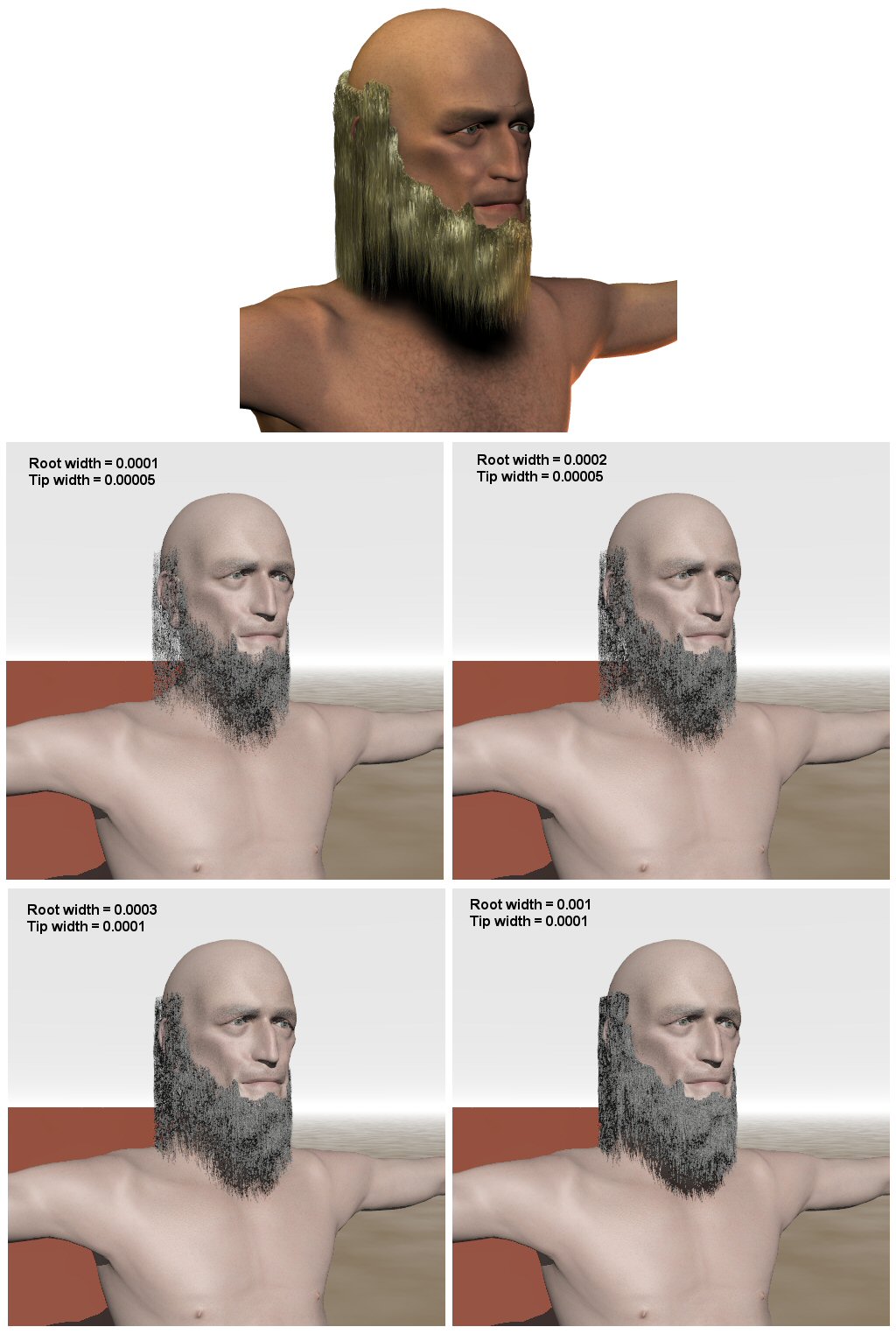
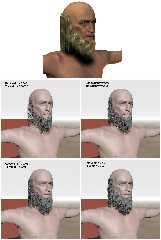
About the images: The top one is a render in Poser of the figure with the
standard texture generated. No changes were made. The figure is based on the
Apollo Maximus figure. The next set of four images shows the conversion of
the hair and beard, and the width settings of the ribbons used each time.
One amelioration I could suggest offhand already is to use a second set of
hairs at the transition between beard (or hair) and skin, the outer one
being more sparsely populated. Just to smooth the transition more
realistically.

Regards,

Thomas
Post a reply to this message
Attachments:
Download 'HairAndBeard_test.jpg' (168 KB)
Preview of image 'HairAndBeard_test.jpg'
|
|
| |
| |
|
|
From: Jörg 'Yadgar' Bleimann
Subject: Re: Poser's dynamic hair in POV-Ray (WIP 1)
Date: 21 Oct 2007 09:37:02
Message: <471b55fe$1@news.povray.org>
|
|
|
| |
| |
|
|
High!

Thomas de Groot schrieb:

> About the images: The top one is a render in Poser of the figure with the
> standard texture generated. No changes were made. The figure is based on the
> Apollo Maximus figure. The next set of four images shows the conversion of
> the hair and beard, and the width settings of the ribbons used each time.
> One amelioration I could suggest offhand already is to use a second set of
> hairs at the transition between beard (or hair) and skin, the outer one
> being more sparsely populated. Just to smooth the transition more
> realistically.
>
> Regards,
>
> Thomas

Very few men have beard hair of the same structure like scalp hair - in
most cases it is thicker and coarser, more like pubic hair!

See you in Khyberspace!

Yadgar

Now playing: Light Of The World (The Alan Parsons Project)
Post a reply to this message
|
|
| |
| |
|
|
|
|
| |
| |
|
|
"Jörg 'Yadgar' Bleimann" <yaz### [at] gmx de> schreef in bericht
news:471b55fe$1@news.povray.org...
>
> Very few men have beard hair of the same structure like scalp hair - in
> most cases it is thicker and coarser, more like pubic hair!
>
Yes, sure, I know. I have a beard myself :-)
However, that is something that cannot be achieved (at the same time
presently) in Poseray... nor, really satisfactorily in Poser!!
Be aware that the *ribbons* do not really simulate hair structure. They are,
IMO, mainly intended to be used as support for an image_map of hair. FlyerX
could tell us for sure.
[==> on ToDo list for Poseray; possible question for Poser Forum]
Thomas de> schreef in bericht
news:471b55fe$1@news.povray.org...
>
> Very few men have beard hair of the same structure like scalp hair - in
> most cases it is thicker and coarser, more like pubic hair!
>
Yes, sure, I know. I have a beard myself :-)
However, that is something that cannot be achieved (at the same time
presently) in Poseray... nor, really satisfactorily in Poser!!
Be aware that the *ribbons* do not really simulate hair structure. They are,
IMO, mainly intended to be used as support for an image_map of hair. FlyerX
could tell us for sure.
[==> on ToDo list for Poseray; possible question for Poser Forum]
Thomas
Post a reply to this message
|
|
| |
| |
|
|
|
|
| |
| |
|
|
"Thomas de Groot" <t.d### [at] internlDOTnet> wrote:
>.... What I want now is
> some unbiased opinion about the *looks* of the figure under different
> conditions.
The first one is better than the rest. You might need to work on the
materials a bit. ;) You can add some wave to the hair in Poser using the
kink settings, I think that would help a lot. Will PoseRay translate the
kink? The reason I ask is becasue maybe it doesn't ... the head hair
doesn't appear to meet the scalp correctly (which would appear to happen in
the conversion).  Another thing that might work is if you had 2 hair props.
A sparser one along the edges where beard meets clean shaven, and a thicker
one for the rest of the beard area. I also think it falls straight down too
fast.

Janet
Post a reply to this message
|
|
| |
| |
|
|
|
|
| |
| |
|
|
That's pretty neat. I haven't monkeyed in the Hair Room much, but that could
be the coming week's experiment.
Post a reply to this message
|
|
| |
| |
|
|
|
|
| |
| |
|
|
Thomas de Groot wrote:
> "Jörg 'Yadgar' Bleimann" <yaz### [at] gmxde> schreef in bericht
> news:471b55fe$1@news.povray.org...
>> Very few men have beard hair of the same structure like scalp hair - in
>> most cases it is thicker and coarser, more like pubic hair!
>>
>
> Yes, sure, I know. I have a beard myself  :-)
>
>  However, that is something that cannot be achieved (at the same time
> presently) in Poseray... nor, really satisfactorily in Poser!!
>
> Be aware that the *ribbons* do not really simulate hair structure. They are,
> IMO, mainly intended to be used as support for an image_map of hair. FlyerX
> could tell us for sure.
>
> [==> on ToDo list for Poseray; possible question for Poser Forum]
>
> Thomas
>
>
>
Nice test.

The ribbons are the closest thing I could use to lines in POV-Ray unless
there is a line primitive that I am unaware of. I hardly use the ribbons
myself because Poser dynamic hair is rather useless. In fact I am
working on modifying this feature to create tubes (with 3 sides and up)
for each line. I think less hair lines with larger texture areas may
look better than a very dense set of thin ribbons. The ribbons just do
not look good when they are too wide. They tend to twist too much.

FlyerX
Post a reply to this message
|
|
| |
| |
|
|
|
|
| |
| |
|
|
"FlyerX" <fly### [at] yahoocom> schreef in bericht
news:471bd1fb$1@news.povray.org...
> Nice test.
Thank you :-)

>
> The ribbons are the closest thing I could use to lines in POV-Ray unless
> there is a line primitive that I am unaware of. I hardly use the ribbons
> myself because Poser dynamic hair is rather useless. In fact I am working
> on modifying this feature to create tubes (with 3 sides and up) for each
> line. I think less hair lines with larger texture areas may look better
> than a very dense set of thin ribbons. The ribbons just do not look good
> when they are too wide. They tend to twist too much.
>
I agree. The idea to use tubes might indeed be a much better solution than
the ribbons. Looking forward to that!
Yes, less hair and larger texture areas are what I am favoring too. The
problem then is how to texture that correctly. I think uv mapping would be
necessary in Poseray, but I have not yet found out what type of mapping
would work best. Using the ribbons, I shall experiment further along that
line.

Thomas
Post a reply to this message
|
|
| |
| |
|
|
From: Thomas de Groot
Subject: Re: Poser's dynamic hair in POV-Ray (WIP 1)
Date: 22 Oct 2007 03:16:11
Message: <471c4e3b@news.povray.org>
|
|
|
| |
| |
|
|
"Janet" <par### [at] attnet> schreef in bericht
news:web.471b831fbb33e2ddf2a6e2870@news.povray.org...
> The first one is better than the rest. You might need to work on the
> materials a bit. ;) You can add some wave to the hair in Poser using the
> kink settings, I think that would help a lot. Will PoseRay translate the
> kink? The reason I ask is becasue maybe it doesn't ... the head hair
> doesn't appear to meet the scalp correctly (which would appear to happen
> in
> the conversion).  Another thing that might work is if you had 2 hair
> props.
> A sparser one along the edges where beard meets clean shaven, and a
> thicker
> one for the rest of the beard area. I also think it falls straight down
> too
> fast.
>

Thank you Janet for your comments! Yes, the kinks are translated to Poseray
as far as I am aware of that. If you compare carefully the Poser "original"
and the different conversions, you will see that the kinks correspond to the
shadowed areas.

The hair/beard consist - in the Poseray conversion - of a root mesh (against
the scalp) and a hair mesh. My impression is that they do not meet correctly
thus giving the impression of the hair floating some distance from the
scalp. By the way, only using the root mesh gives the impression of a badly
shaven figure :-)  That could be a line to explore!

Yes, two hair props. I mentioned that also in my original message, towards
the end, in a more cryptic way I admit as I did not want to go to deep into
prop building and so forth. However, that would be the best solution. I
shall certainly explore that avenue too.

I have to experiment further with the dynamic settings of the hair,
especially the falling down. I used a pretty extreme setting  here.

Janet, would you think that the resolution of the skullcap/beardcap (i.e.
finer or coarser mesh) influences the number of guide hairs and hence the
total number of hairs in Poser? I am not sure and I have not tried this out
yet, but that seems to be the case.


Oh, one thing in general: using radiosity with these hair/beard meshes is
terrible. Render time rockets upwards tremendously. Something to keep in
mind.

Thomas
Post a reply to this message
|
|
| |
| |
|
|
|
|
| |
| |
|
|
"fls13" <fls### [at] netzeronet> schreef in bericht
news:web.471ba20ebb33e2dd49bb394f0@news.povray.org...
> That's pretty neat. I haven't monkeyed in the Hair Room much, but that
> could
> be the coming week's experiment.
>

Thanks!! Excellent idea!

Thomas
Post a reply to this message
|
|
| |
| |
|
|
|
|
| |
| |
|
|
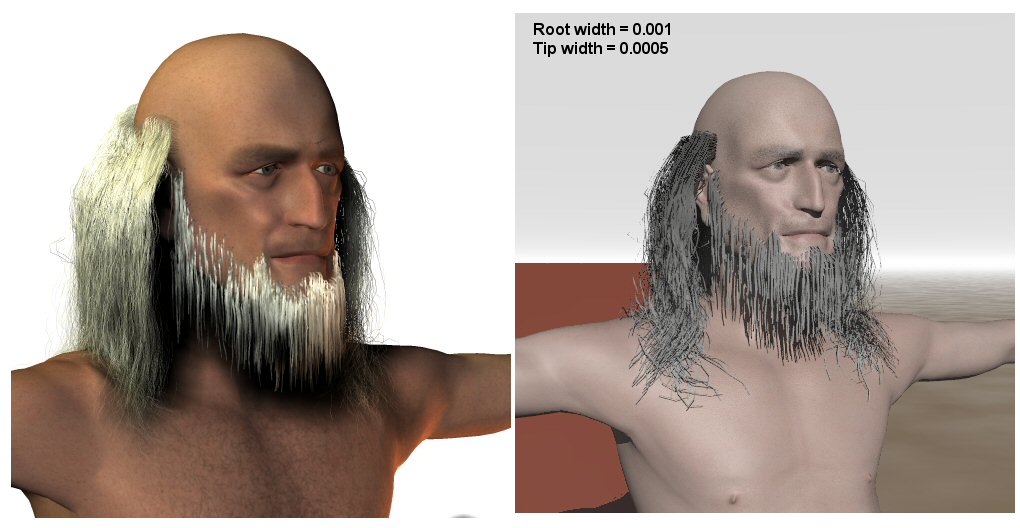
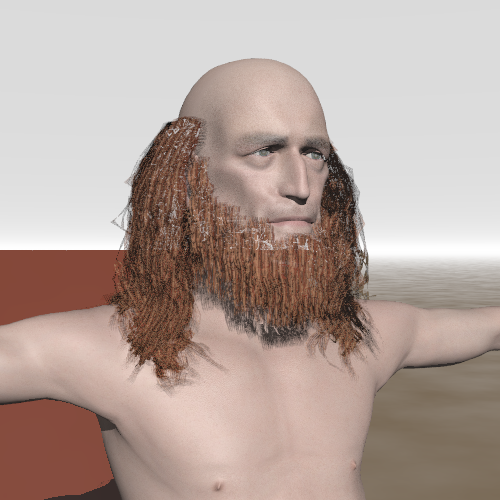
Here is an update.

Following the suggestions of Yadgar and Janet, I changed the dynamic
settings in Poser. I made hair longer and it falls more naturally now,
especially as I checked on the collision detection. I used a coarser mesh
for the beardcap and, indeed as I suspected, the beard is sparser (with the
same hair settings). I made it stiffer than the hair too. For both, I used a
simple gradient y texture, uv mapped cylindrically along y in Poseray.

Comment 1: there is an issue with the root to hair transition. I probably
have to play with the pull down and the root stiffness settings...

Comment 2: I deliberately used a fairly wide ribbon setting. I would like to
see if I can get an image_map uv mapped on them...


Thomas
Post a reply to this message
|
|
| |
| |
|
|
From: Thomas de Groot
Subject: Re: Poser's dynamic hair in POV-Ray (WIP 2)
Date: 22 Oct 2007 05:06:09
Message: <471c6801@news.povray.org>
|
|
|
| |
| |
|
|
Sorry. Should have included the image of course.....

Thomas
Post a reply to this message
Attachments:
Download 'HairAndBeard_test_02.jpg' (80 KB)
Preview of image 'HairAndBeard_test_02.jpg'
|
|
| |
| |
|
|
From: Thomas de Groot
Subject: Re: Poser's dynamic hair in POV-Ray (WIP 3)
Date: 22 Oct 2007 08:27:58
Message: <471c974e@news.povray.org>
|
|
|
| |
| |
|
|
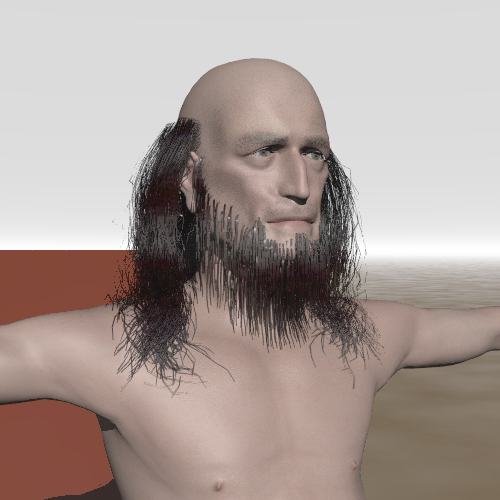
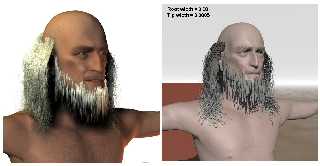
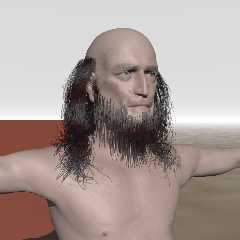
And this is a version with an image_map and corresponding transparency map.

I edited a couple of hair maps from Kozaburo (in Poser 6) and applied them
to the figure in Poseray. Cylindrical uv_mapping around y.

I believe this looks already pretty convincing, xcept for the beard, but
that needs a higher number of hairs to obtain the same effect.


Thomas
Post a reply to this message
Attachments:
Download 'PoserFiguretest.png' (222 KB)
Preview of image 'PoserFiguretest.png'
|
|
| |
| |
|
|
|
|
| |
| |
|
|
"Thomas de Groot" <t.d### [at] internlDOTnet> wrote:
> And this is a version with an image_map and corresponding transparency map.
>
> I edited a couple of hair maps from Kozaburo (in Poser 6) and applied them
> to the figure in Poseray. Cylindrical uv_mapping around y.
>
> I believe this looks already pretty convincing, xcept for the beard, but
> that needs a higher number of hairs to obtain the same effect.
>
>
> Thomas

It makes me want to go and play with ribbons now. :) I bet you could get it
even better by transitioning the ends to transparent. Do all the ribbons
use the same UV mapping?
Post a reply to this message
|
|
| |
| |
|
|
|
|
| |
| |
|
|
Janet wrote:
> "Thomas de Groot" <t.d### [at] internlDOTnet> wrote:
>> And this is a version with an image_map and corresponding transparency map.
>>
>> I edited a couple of hair maps from Kozaburo (in Poser 6) and applied them
>> to the figure in Poseray. Cylindrical uv_mapping around y.
>>
>> I believe this looks already pretty convincing, xcept for the beard, but
>> that needs a higher number of hairs to obtain the same effect.
>>
>>
>> Thomas
>
> It makes me want to go and play with ribbons now. :) I bet you could get it
> even better by transitioning the ends to transparent. Do all the ribbons
> use the same UV mapping?
>
>
>
The UV mapping is the same for all. U is along the ribbon and V is across.

FlyerX
Post a reply to this message
|
|
| |
| |
|
|
|
|
| |
| |
|
|
"FlyerX" <fly### [at] yahoocom> schreef in bericht
news:471d67cc$1@news.povray.org...
> Janet wrote:
>>
>> It makes me want to go and play with ribbons now. :) I bet you could get
>> it
>> even better by transitioning the ends to transparent. Do all the ribbons
>> use the same UV mapping?
>>
>>
>>
> The UV mapping is the same for all. U is along the ribbon and V is across.
>
> FlyerX'


I did use also a transparent map, specially for the ends, but I think I have
to scale down the uv mapping a bit as it does not seem to appear in the
image.

Thomas
Post a reply to this message
|
|
| |
| |
|
|
|
|
| |
| |
|
|
"Thomas de Groot" <t.d### [at] internlDOTnet> wrote:
> "FlyerX" <fly### [at] yahoocom> schreef in bericht
> news:471d67cc$1@news.povray.org...
> > Janet wrote:
> >>
> >> It makes me want to go and play with ribbons now. :) I bet you could get
> >> it
> >> even better by transitioning the ends to transparent. Do all the ribbons
> >> use the same UV mapping?
> >>
> >>
> >>
> > The UV mapping is the same for all. U is along the ribbon and V is across.
> >
> > FlyerX'
>
>
> I did use also a transparent map, specially for the ends, but I think I have
> to scale down the uv mapping a bit as it does not seem to appear in the
> image.
>
> Thomas

Maybe something like this? I was trying it out. Renders slow, needs higher
max_trace_level, wouldn't even wanna try radiosity with it. lol

Janet
Post a reply to this message
Attachments:
Download 'trans.jpg' (28 KB)
Preview of image 'trans.jpg'

|
|
| |
| |
|
|
|
|
| |
| |
|
|
And a hair texture to go with the trans map.
Post a reply to this message
Attachments:
Download 'hair.jpg' (32 KB)
Preview of image 'hair.jpg'

|
|
| |
| |
|
|
|
|
| |
| |
|
|
"Janet" <par### [at] attnet> schreef in bericht
news:web.471ed76d8905805f9ac6d8a40@news.povray.org...
> And a hair texture to go with the trans map.
>

Thank you Janet! I am going to experiment with those maps. I think that the
main problem is going to be to find convenient hair maps. We shall have to
make them ourselves (other challenge).

As you said earlier, radiosity is a real issue. Imagine you have a scene
with a dozen figures with nice hairdoes. It will take weeks to render!

Thomas
Post a reply to this message
|
|
| |
| |
|
|
From: Jaime Vives Piqueres
Subject: Re: Poser's dynamic hair in POV-Ray (WIP 3)
Date: 24 Oct 2007 07:12:04
Message: <471f2884$1@news.povray.org>
|
|
|
| |
| |
|
|
Thomas de Groot wrote:
> As you said earlier, radiosity is a real issue. Imagine you have a scene
> with a dozen figures with nice hairdoes. It will take weeks to render!

   Well, perhaps saving rad without the hair and then loading it with hair
will work...

--
Jaime
Post a reply to this message
|
|
| |
| |
|
|
|
|
| |
| |
|
|
"Thomas de Groot" <t.d### [at] internlDOTnet> wrote:
> "Janet" <par### [at] attnet> schreef in bericht
> news:web.471ed76d8905805f9ac6d8a40@news.povray.org...
> > And a hair texture to go with the trans map.
> >
>
> Thank you Janet! I am going to experiment with those maps. I think that the
> main problem is going to be to find convenient hair maps. We shall have to
> make them ourselves (other challenge).

I made the one I posted in Photoshop.

> As you said earlier, radiosity is a real issue. Imagine you have a scene
> with a dozen figures with nice hairdoes. It will take weeks to render!

Yes, weeks! ...faint...
Here's an image that uses the maps I posted. It took a while to render with
just one light source, no radiosity, max_trace_level 40.
Average was 90 pps, and took about an hour.

Janet
Post a reply to this message
Attachments:
Download 'dynhairtest_pov_scene.jpg' (44 KB)
Preview of image 'dynhairtest_pov_scene.jpg'

|
|
| |
| |
|
|
From: Thomas de Groot
Subject: Re: Poser's dynamic hair in POV-Ray (WIP 3)
Date: 24 Oct 2007 09:45:55
Message: <471f4c93@news.povray.org>
|
|
|
| |
| |
|
|
"Janet" <par### [at] attnet> schreef in bericht
news:web.471f3fb88905805f330285230@news.povray.org...

> Yes, weeks! ...faint...
> Here's an image that uses the maps I posted. It took a while to render
> with
> just one light source, no radiosity, max_trace_level 40.
> Average was 90 pps, and took about an hour.
>

Yes that looks already good! We still have some work to do to get the
transition with the scalp right and maybe the hair tips. To the left, they
look strange.
As an approximate indication: Without radiosity, my model renders fairly
fast, about 20-25 minutes. Faster even with version 3.7 of course. With
radiosity, I cancelled the render after about 3 hours and half the
hair/beard done.

Thomas
Post a reply to this message
|
|
| |
| |
|
|
|
|
| |
| |
|
|
"Jaime Vives Piqueres" <jai### [at] ignoranciaorg> schreef in bericht
news:471f2884$1@news.povray.org...
> Thomas de Groot wrote:
>> As you said earlier, radiosity is a real issue. Imagine you have a scene
>> with a dozen figures with nice hairdoes. It will take weeks to render!
>
>   Well, perhaps saving rad without the hair and then loading it with hair
> will work...
>

Yes, I suppose that would be the way to do it. It is something that I shall
test.

Thomas
Post a reply to this message
|
|
| |
| |
|
|
|
|
| |
| |
|
|
Jaime Vives Piqueres nous apporta ses lumieres en ce 2007/10/24 07:12:
> Thomas de Groot wrote:
>> As you said earlier, radiosity is a real issue. Imagine you have a
>> scene with a dozen figures with nice hairdoes. It will take weeks to
>> render!
>
>   Well, perhaps saving rad without the hair and then loading it with
> hair will work...
>
> --
> Jaime
It's a possibility.
Another one, more realist, would be to use some simplified mockup hairs without
transparancy, but with the same overall colouration. Something like some whide
ribons or tubes.
Do the setup without the hairs. Then add the mockup hairs and collect the
radiosity data. Lastly, do the final render with loaded radiosity data and
quality hairs.

--
Alain
-------------------------------------------------
   A girl phoned me and said, "Come on over. There's nobody home." I Went over.
Nobody was home!
	Rodney Dangerfield
Post a reply to this message
|
|
| |
| |
|
|
|
|
| |
| |
|
|
"Thomas de Groot" <t.d### [at] internlDOTnet> wrote:
> Yes that looks already good! We still have some work to do to get the
> transition with the scalp right and maybe the hair tips. To the left, they
> look strange.

Yes, its definitely not right. :) I got curious and started examining it all
in Blender. I think there are just limitations in the way Poser exports the
hair. And part of the problem might be my settings for the hair in Poser
too.

So anyway, I imported the hair into Blender twice. Once right after the
Poser export and then again after making the ribbons with root material in
PoseRay.
In the image, the root material is dark brown, the hair ribbons are light
brown.
The Poser exported lines are the yellow lines with verts. By the way, there
is one hair line per vertex on the model it's grown from, but maybe you
already knew that.

So, in the image you can see the lines that Poser makes aren't always nice.
I circled one that loops around, and there are several that have those
loops. The loops make the ribbons not so nice looking too.

And then there is a gap, that's the red arrow. So you can see why the
ribbons don't always meet the scalp. Maybe if PoseRay had an option to add
an extra face at each end, and thus imbed the ribbon into the model a bit,
that would help.

Also, the ribbons twist around sometimes. I don't know enough about it but I
think there's vertex normal data in the OBJ that could cause the twisting -
I'll blame Poser, or my Poser hair settings again. :)

Janet
Post a reply to this message
Attachments:
Download 'blendercapture.jpg' (37 KB)
Preview of image 'blendercapture.jpg'

|
|
| |
| |
|
|
From: Thomas de Groot
Subject: Re: Poser's dynamic hair in POV-Ray (WIP 3)
Date: 25 Oct 2007 03:29:14
Message: <472045ca@news.povray.org>
|
|
|
| |
| |
|
|
That is good work you have done there, Janet!

I had not (yet) noticed those strange loops Poser is generating. That might
be a bug if they consistently, although randomly,  appear with straight hair
(like in your model). I cannot imagine that they have to do with the kinks
setting.

The gap at the base of the ribbon can be filled I think,  if you scale down
the skullcap a bit before growing the hair. Typically, I scaled it at 99%
intuitively, without being aware of the gap.

The twists are something FlyerX mentioned in his answer above. He is
experimenting with tubes now and that might be an excellent alternative.

Thomas


"Janet" <par### [at] attnet> schreef in bericht
news:web.472017018905805f1557f29d0@news.povray.org...
> "Thomas de Groot" <t.d### [at] internlDOTnet> wrote:
>> Yes that looks already good! We still have some work to do to get the
>> transition with the scalp right and maybe the hair tips. To the left,
>> they
>> look strange.
>
> Yes, its definitely not right. :) I got curious and started examining it
> all
> in Blender. I think there are just limitations in the way Poser exports
> the
> hair. And part of the problem might be my settings for the hair in Poser
> too.
>
> So anyway, I imported the hair into Blender twice. Once right after the
> Poser export and then again after making the ribbons with root material in
> PoseRay.
> In the image, the root material is dark brown, the hair ribbons are light
> brown.
> The Poser exported lines are the yellow lines with verts. By the way,
> there
> is one hair line per vertex on the model it's grown from, but maybe you
> already knew that.
>
> So, in the image you can see the lines that Poser makes aren't always
> nice.
> I circled one that loops around, and there are several that have those
> loops. The loops make the ribbons not so nice looking too.
>
> And then there is a gap, that's the red arrow. So you can see why the
> ribbons don't always meet the scalp. Maybe if PoseRay had an option to add
> an extra face at each end, and thus imbed the ribbon into the model a bit,
> that would help.
>
> Also, the ribbons twist around sometimes. I don't know enough about it but
> I
> think there's vertex normal data in the OBJ that could cause the
> twisting -
> I'll blame Poser, or my Poser hair settings again. :)
>
> Janet
>
>
>
Post a reply to this message
|
|
| |
| |
|
|
From: Thomas de Groot
Subject: Re: Poser's dynamic hair in POV-Ray (WIP 4)
Date: 25 Oct 2007 05:00:27
Message: <47205b2b@news.povray.org>
|
|
|
| |
| |
|
|
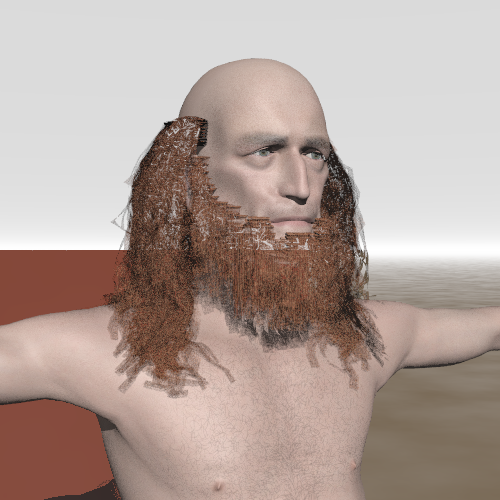
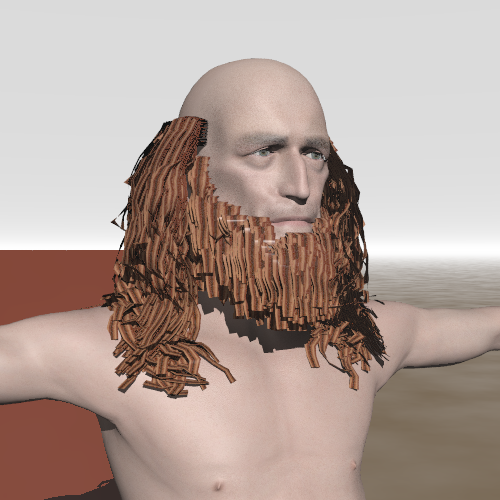
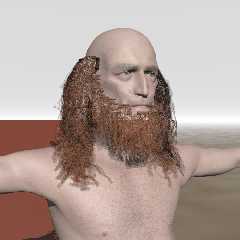
This is an ugly image. Never mind. There are a couple of puzzling features.

I used here Janet's hair maps, uv-scaled x500 along u, and on fairly wide
ribbons (default Poseray values). Other values might give better results of
course.

Puzzling feature 1: The background shines through the figure! Not only the
hair but also the underlying skin. I had noticed this in a much earlier
experiment but forgot about it.

Puzzling feature 2: the transparency at the hair tips casts shadows on the
underlying skin.

Additional comment: I am still not sure about the usefulness of the ribbon
roots. They are detached from the hair proper. Why not grow the hair
directly from the line origin?

Rendered with POV-Ray 3.7 on dual core machine. Render took about 25
minutes. No radiosity.


Thomas
Post a reply to this message
Attachments:
Download 'PoserFiguretest.png' (253 KB)
Preview of image 'PoserFiguretest.png'
|
|
| |
| |
|
|
|
|
| |
| |
|
|
"Thomas de Groot" <t.d### [at] internlDOTnet> wrote:
> The gap at the base of the ribbon can be filled I think,  if you scale down
> the skullcap a bit before growing the hair. Typically, I scaled it at 99%
> intuitively, without being aware of the gap.

That's a good idea.

> The twists are something FlyerX mentioned in his answer above. He is
> experimenting with tubes now and that might be an excellent alternative.
>
> Thomas

Oops, I guess I missed that part about the twists.
Post a reply to this message
|
|
| |
| |
|
|
|
|
| |
| |
|
|
"Thomas de Groot" <t.d### [at] internlDOTnet> wrote:
> This is an ugly image. Never mind. There are a couple of puzzling features.
>
> I used here Janet's hair maps, uv-scaled x500 along u, and on fairly wide
> ribbons (default Poseray values). Other values might give better results of
> course.
>
> Puzzling feature 1: The background shines through the figure! Not only the
> hair but also the underlying skin. I had noticed this in a much earlier
> experiment but forgot about it.
>
> Puzzling feature 2: the transparency at the hair tips casts shadows on the
> underlying skin.

I'd be curious to see this rendered without any uv scaling.

> Additional comment: I am still not sure about the usefulness of the ribbon
> roots. They are detached from the hair proper. Why not grow the hair
> directly from the line origin?

I don't understand the point of the root material either. It just assigns
the first face a new material. The ribbons still start at the same spot
with or without it.

Janet
Post a reply to this message
|
|
| |
| |
|
|
From: Thomas de Groot
Subject: Re: Poser's dynamic hair in POV-Ray (WIP 4)
Date: 26 Oct 2007 03:49:02
Message: <47219bee@news.povray.org>
|
|
|
| |
| |
|
|
"Janet" <par### [at] attnet> schreef in bericht
news:web.472092d6c64416986697168f0@news.povray.org...
>
> I'd be curious to see this rendered without any uv scaling.

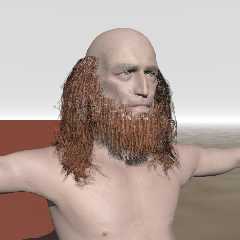
I had been carried away by my enthousiasm to manipulate the uv's :-)
Here is the same, without scaling and without ribbon roots. The textures
looks indeed much better. However, the puzzling features remain.... :-(

>
> I don't understand the point of the root material either. It just assigns
> the first face a new material. The ribbons still start at the same spot
> with or without it.

Indeed. That is what I was also wondering about...

Thomas
Post a reply to this message
Attachments:
Download 'PoserFiguretest.png' (235 KB)
Preview of image 'PoserFiguretest.png'
|
|
| |
| |
|
|
From: Thomas de Groot
Subject: Re: Poser's dynamic hair in POV-Ray (WIP 4 without transparency)
Date: 26 Oct 2007 04:24:12
Message: <4721a42c@news.povray.org>
|
|
|
| |
| |
|
|
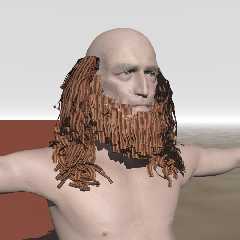
The figure without hair transparency map renders correctly as far as the
backgropund is concerned. So what goes wrong with the transparency map?

This is the material code as generated by Poseray (comments added by me):

#declare p_map10=pigment {image_map{jpeg "C:\....\Janet_hair.jpg"
interpolate 2 transmit all 0 filter all 0} }
#declare p_map11=pigment {image_map{jpeg "C:\....\Janet_trans.jpg"
interpolate 2 }}

#declare Hair__opaque=
texture{ pigment{ p_map10} //this is the hair map
        finish{specular 0.5019608 roughness 0.00286312 ambient rgb <0,0,0>
diffuse 0.8  reflection{0 metallic} conserve_energy}}

#declare Hair_=
material{
texture{  pigment_pattern{ p_map11} //this is the transparency map
texture_map{[0 pigment{Clear}]
            [1 Hair__opaque]
           }}
}


Somebody with a smart idea??? :-)

Thomas
Post a reply to this message
Attachments:
Download 'PoserFiguretest.png' (237 KB)
Preview of image 'PoserFiguretest.png'
|
|
| |
| |
|
|
|
|
| |
| |
|
|
Thomas de Groot nous apporta ses lumieres en ce 2007/10/26 03:48:
> "Janet" <par### [at] attnet> schreef in bericht
> news:web.472092d6c64416986697168f0@news.povray.org...
>> I'd be curious to see this rendered without any uv scaling.
>
> I had been carried away by my enthousiasm to manipulate the uv's :-)
> Here is the same, without scaling and without ribbon roots. The textures
> looks indeed much better. However, the puzzling features remain.... :-(
>
>> I don't understand the point of the root material either. It just assigns
>> the first face a new material. The ribbons still start at the same spot
>> with or without it.
>
> Indeed. That is what I was also wondering about...
>
> Thomas
>
>
>
You still see trough his head. Is that what puzzles you?

--
Alain
-------------------------------------------------
You know you've been raytracing too long when you see the movie credits going by
and instead of seeing Lenses by Panaflex it always seems to say Lens Effects by
Chris Colefax.
Ken Tyler
Post a reply to this message
|
|
| |
| |
|
|
|
|
| |
| |
|
|
"Alain" <ele### [at] netscapenet> schreef in bericht
news:4721e90e$1@news.povray.org...
>>
> You still see trough his head. Is that what puzzles you?
>

Yes indeed!

Thomas
Post a reply to this message
|
|
| |
| |
|
|
|
|
| |
| |
|
|
comment reserved until we know if this is a self portrait.

alphaQuad wants to upload new mesh for experimentation.

sorry had to be sed.
Post a reply to this message
|
|
| |
| |
|
|
From: William Tracy
Subject: Re: Poser's dynamic hair in POV-Ray (WIP 4 without transparency)
Date: 26 Oct 2007 22:38:09
Message: <4722a491@news.povray.org>
|
|
|
| |
| |
|
|
-----BEGIN PGP SIGNED MESSAGE-----
Hash: SHA1

Mmm, bacon for hair. (Sorry, couldn't resist.)

- --
William Tracy
afi### [at] gmailcom -- wtr### [at] calpolyedu

You know you've been raytracing too long when other people's Images
directories contain N00D G1F$ downloaded from the Net. Your Images
directory contains raytraces that you upload *to* the Net.
    -- Jeff Lee
-----BEGIN PGP SIGNATURE-----
Version: GnuPG v1.4.6 (GNU/Linux)
Comment: Using GnuPG with Mozilla - http://enigmail.mozdev.org

iD8DBQFHIqSRKrVIcTMekC8RAkDeAJ0daeSgCRVjssU5+X7D2xlXk/OhzwCfZOGl
rhYD5fOF6IRPXyrCdWGIm3c=
=w1Rz
-----END PGP SIGNATURE-----
Post a reply to this message
|
|
| |
| |
|
|
|
|
| |
| |
|
|
"alphaQuad" <alp### [at] earthlinknet> schreef in bericht
news:web.472246b5c644169862b5d7be0@news.povray.org...
> comment reserved until we know if this is a self portrait.
>
> alphaQuad wants to upload new mesh for experimentation.
>
> sorry had to be sed.
>

Of course it is a self portrait! All my figures are self portraits one way
or another :-)

Thomas
Post a reply to this message
|
|
| |
| |
|
|
From: Thomas de Groot
Subject: Re: Poser's dynamic hair in POV-Ray (WIP 4 without transparency)
Date: 27 Oct 2007 03:21:56
Message: <4722e714$1@news.povray.org>
|
|
|
| |
| |
|
|
"William Tracy" <wtr### [at] calpolyedu> schreef in bericht
news:4722a491@news.povray.org...
> -----BEGIN PGP SIGNED MESSAGE-----
> Hash: SHA1
>
> Mmm, bacon for hair. (Sorry, couldn't resist.)
>

That makes chewing the ends of your hair or beard so enjoyable (although
somewhat nauseating...)   :-)

Thomas
Post a reply to this message
|
|
| |
| |
|
|
|
|
| |