|
|
|
|
|
|
| |
| |
|
|
|
|
| |
| |
|
|
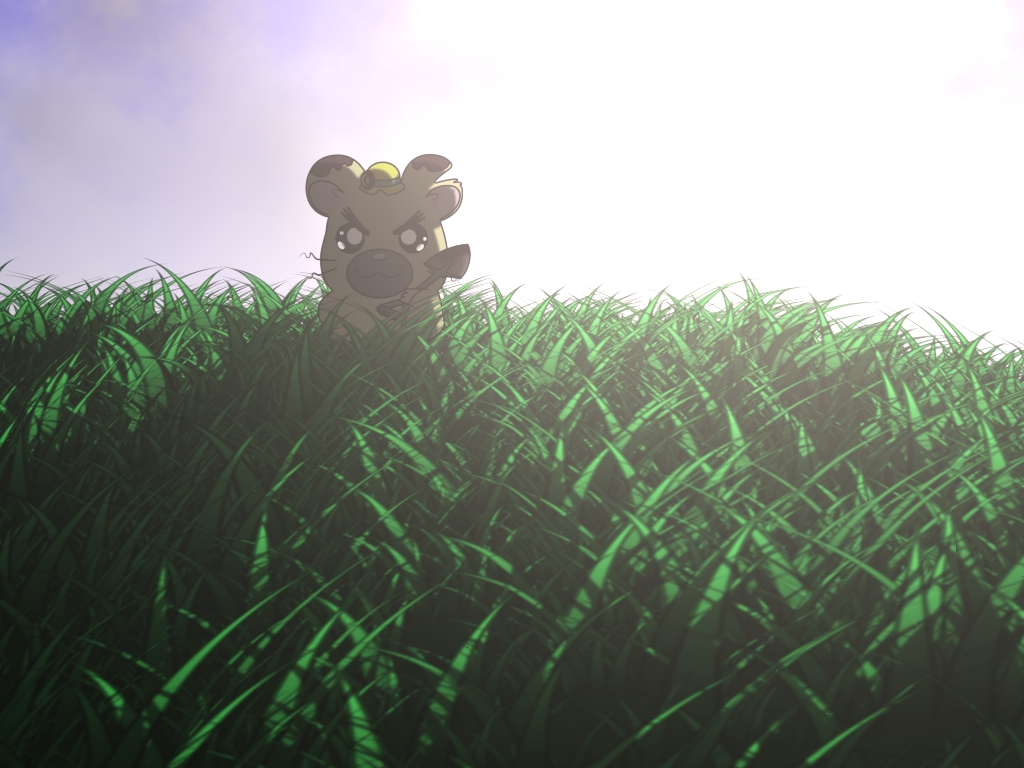
Rendered in a single pass with one point light. No aa or focal blur.

Render time: 7m:22s.

Questions and comments, welcome as always!

Sam
Post a reply to this message
Attachments:
Download 'boss7_22.jpg' (373 KB)
Preview of image 'boss7_22.jpg'
|
|
| |
| |
|
|
|
|
| |
| |
|
|
The image have a good desing, good theme, but too background light, lack of
deep in background.
I question, how to render in a "cartoonist" style?
Samuel Benge <stb### [at] THIShotmail com> wrote:
> Rendered in a single pass with one point light. No aa or focal blur.
>
> Render time: 7m:22s.
>
> Questions and comments, welcome as always!
>
> Sam com> wrote:
> Rendered in a single pass with one point light. No aa or focal blur.
>
> Render time: 7m:22s.
>
> Questions and comments, welcome as always!
>
> Sam
Post a reply to this message
|
|
| |
| |
|
|
|
|
| |
| |
|
|
Samuel Benge <stb### [at] THIShotmailcom> wrote:
> Rendered in a single pass with one point light. No aa or focal blur.
>
> Render time: 7m:22s.
>
> Questions and comments, welcome as always!
>
> Sam

Wow, I really like this! Love the stylized look, and I'm amazed that you
were able to get this out of a raytracer. I presume you're doing some sort
of cell shading, and that the grass is 2D while the bear is a 3D model?
Post a reply to this message
|
|
| |
| |
|
|
|
|
| |
| |
|
|
Samuel Benge a écrit :
> Rendered in a single pass with one point light. No aa or focal blur.
>
> Render time: 7m:22s.
>
> Questions and comments, welcome as always!
>
> Sam
>
> ------------------------------------------------------------------------
>


wow, nice !

How did you get the blurry effect int he foreground without focal blur ?
And what methode did you use for drawing the edges of the "boss" ?

Thibaut
Post a reply to this message
|
|
| |
| |
|
|
|
|
| |
| |
|
|
Agustin Britait Molina wrote:
> The image have a good desing, good theme,

Thanks

> but too background light, lack of
> deep in background.

The background is just a sky_sphere, with a transparent, specular-finish
  cylinder connecting the light_source to the camera location for the
glare effect.

> I question, how to render in a "cartoonist" style?

I used a png bitmap for the cartoon character. I created it with Adobe
Illustrator and the Gimp.

Sam
Post a reply to this message
|
|
| |
| |
|
|
|
|
| |
| |
|
|
Thibaut Jonckheere wrote:
> wow, nice !

Thank you :)

> How did you get the blurry effect int he foreground without focal blur ?

I blurred a png file of grass (originally made with POV) in the Gimp.
The focal blur effect is simply a by-product of seeing the blurred image
of the grass (uv-mapped onto a triangle mesh) closer to the camera.

> And what methode did you use for drawing the edges of the "boss" ?

Adobe Illustrator was used for that. It's an image projected onto a 2d box.

Sam
Post a reply to this message
|
|
| |
| |
|
|
|
|
| |
| |
|
|
scam wrote:
> Wow, I really like this! Love the stylized look, and I'm amazed that you
> were able to get this out of a raytracer.

Thank you!

> I presume you're doing some sort
> of cell shading

No, the character is just a bitmapped box.

>, and that the grass is 2D while the bear is a 3D model?

The grass is a png I created with POV, mapped to 64 layers of a triangle
mesh, which is conformed to an underlying triangle mesh hill. Semi
transparent PNGs are useful for this kind of thing.

The character is not actually a bear, but a hamster from the TV series
"Hamtaro".

Sam
Post a reply to this message
|
|
| |
| |
|
|
|
|
| |
| |
|
|
>> I presume you're doing some sort
>> of cell shading
>
> No, the character is just a bitmapped box.
>
>> , and that the grass is 2D while the bear is a 3D model?
>
> The grass is a png I created with POV, mapped to 64 layers of a triangle
> mesh, which is conformed to an underlying triangle mesh hill. Semi
> transparent PNGs are useful for this kind of thing.

So, are you saying that you're basically just using POV to composite
images? What in the image actually was done with POV?

--
William Tracy
afi### [at] gmailcom wtr### [at] calpolyedu

You know you've been raytracing too long when you have spent a full week
improving quality in an animation; your friends did not see the difference.
Post a reply to this message
|
|
| |
| |
|
|
|
|
| |
| |
|
|
William Tracy wrote:
> So, are you saying that you're basically just using POV to composite
> images?

For this image, for the most part, yes. What's wrong with that?

> What in the image actually was done with POV?

Let's see, with POV I was able to render this with perspective, glare
from a light source, and diffuse shading (with double_illuminate) for
the grass. The sky is a sky_sphere, and fog was used.

I like that fact that POV-Ray can be used in so many different ways.

Sam
Post a reply to this message
|
|
| |
| |
|
|
|
|
| |
| |
|
|
"Samuel Benge" <stb### [at] THIShotmailcom> schreef in bericht
news:46dcf4ab@news.povray.org...
>
> I like that fact that POV-Ray can be used in so many different ways.
>
>

Yes, I think I like that too. It is not heresy to use POV-Ray in novel and
inovative ways, in order to obtain a gorgeous image. I like it btw!!

Thomas
Post a reply to this message
|
|
| |
| |
|
|
|
|
| |
| |
|
|
>
> I blurred a png file of grass (originally made with POV) in the Gimp.
> The focal blur effect is simply a by-product of seeing the blurred image
> of the grass (uv-mapped onto a triangle mesh) closer to the camera.
>
>> And what methode did you use for drawing the edges of the "boss" ?
>
> Adobe Illustrator was used for that. It's an image projected onto a 2d box.
>


Nice way of combining Povray with other apps.

tuabiht
Post a reply to this message
|
|
| |
| |
|
|
|
|
| |
| |
|
|
Thomas de Groot wrote:
> "Samuel Benge" <stb### [at] THIShotmailcom> schreef in bericht
>> I like that fact that POV-Ray can be used in so many different ways.
>
> Yes, I think I like that too. It is not heresy to use POV-Ray in novel and
> inovative ways, in order to obtain a gorgeous image. I like it btw!!

Thank you for saying that, Thomas!

Sam
Post a reply to this message
|
|
| |
| |
|
|
|
|
| |
| |
|
|
"Samuel Benge" <stb### [at] THIShotmailcom> wrote in message
news:46dcae54@news.povray.org...
> The background is just a sky_sphere, with a transparent, specular-finish
> cylinder connecting the light_source to the camera location for the glare
> effect.

interesting idea that's yielded a cool effect!!! gonna have to give that a
try!

Jim
Post a reply to this message
|
|
| |
| |
|
|
|
|
| |
| |
|
|
Jim Holsenback wrote:
> "Samuel Benge" <stb### [at] THIShotmailcom> wrote in message
>> The background is just a sky_sphere, with a transparent, specular-finish
>> cylinder connecting the light_source to the camera location for the glare
>> effect.
>
> interesting idea that's yielded a cool effect!!! gonna have to give that a
> try!

It's especially good for partly-clouded skies :)

Sam
Post a reply to this message
|
|
| |
| |
|
|
|
|
| |
| |
|
|
Is that a character from Hamtaro?

Good compositing of 2D clip art, it turned out very well.  I sometimes
use Pov-ray like this as well, and it always feels like swatting a fly
with a Buick, but somehow often ends up being the easiest way I know to
get it done.
Post a reply to this message
|
|
| |
| |
|
|
|
|
| |
| |
|
|
Sorry if that sounded accusatory; I was just trying to understand what
was going on in the image.

It's cool. :-)

--
William Tracy
afi### [at] gmailcom wtr### [at] calpolyedu

You know you've been raytracing too long when you're watching Bay Watch
on the telly, see Pamela A. walking by and shout out "Great bump mapping!"
Post a reply to this message
|
|
| |
| |
|
|
|
|
| |
| |
|
|
William Tracy wrote:
> Sorry if that sounded accusatory; I was just trying to understand what
> was going on in the image.
>
> It's cool. :-)

It's okay. No flames were thrown :)

Sam
Post a reply to this message
|
|
| |
| |
|
|
|
|
| |
| |
|
|
Kevin Wampler wrote:
> Is that a character from Hamtaro?

Indeed it is.

> Good compositing of 2D clip art, it turned out very well.

Thank you!

> I sometimes
> use Pov-ray like this as well, and it always feels like swatting a fly
> with a Buick, but somehow often ends up being the easiest way I know to
> get it done.

Lol, it does seem like overkill sometimes. When you consider the
options, it always turns out that POV is much more configurable. You're
not stuck with bad choices. Things can always be changed and
experimented with. Plus, you don't have horrible refresh rates. If I had
done this completely with Illustrator, I would have dealt with horrible
redraw rates which would have slowed everything down. With POV I can
just render a tiny section of the screen, or the whole screen (but
smaller), to get an idea of what the final outcome will be. Gotta love it :)

Sam
Post a reply to this message
|
|
| |
| |
|
|
|
|
| |
| |
|
|
Samuel Benge wrote:
> It's okay. No flames were thrown :)
>
> Sam

If I came across as annoyed, it's because I've been interested in how
people do 'toon rendering in POV, and was slightly disappointed to find
that wasn't what this was. :-P

I get too lazy to draw cartoons by hand. ;-)

--
William Tracy
afi### [at] gmailcom wtr### [at] calpolyedu

You know you've been raytracing too long when you boot your computer
with multiple OSs to see which loads the new version of POV-Ray faster.
Post a reply to this message
|
|
| |
| |
|
|
|
|
| |
| |
|
|
"William Tracy" <wtr### [at] calpolyedu> schreef in bericht
news:46de3035$1@news.povray.org...
>
> If I came across as annoyed, it's because I've been interested in how
> people do 'toon rendering in POV, and was slightly disappointed to find
> that wasn't what this was. :-P

No, no! I didn't feel you were annoyed. Samuel's image reminded me how
universally in a sense, POV-Ray can be made to work.

>
> I get too lazy to draw cartoons by hand. ;-)

Shame on you!!  :-)


Thomas
Post a reply to this message
|
|
| |
| |
|
|
|
|
| |
| |
|
|
William Tracy wrote:
> Samuel Benge wrote:
>> It's okay. No flames were thrown :)
 >
> If I came across as annoyed, it's because I've been interested in how
> people do 'toon rendering in POV, and was slightly disappointed to find
> that wasn't what this was. :-P
>

I do plan on making such a render in the future... if I do, you can be
sure I'll share the source ;)

> I get too lazy to draw cartoons by hand. ;-)

What operating system are you running? Depending on the system, you
could get a nice vector manipulation program for free. It would make
things easier in that department. I used Adobe Illustrator (not free,
obviously) for Boss, but would have used InkScape if it worked under
Windows 98. InkScape is supposed to be really nice... possibly rivaling
Illustrator.

Sam
Post a reply to this message
|
|
| |
| |
|
|
|
|
| |
| |
|
|
Samuel Benge wrote:
> What operating system are you running? Depending on the system, you
> could get a nice vector manipulation program for free. It would make
> things easier in that department. I used Adobe Illustrator (not free,
> obviously) for Boss, but would have used InkScape if it worked under
> Windows 98. InkScape is supposed to be really nice... possibly rivaling
> Illustrator.

I'm on Linux, and have doodled with InkScape before, though not enough
to really learn it. (I'm still lost when it comes to anything more
complicated than geometric shapes...)

I keep daydreaming about starting some kind of webcomic "one of these
days." (I have too many programming projects going on, as it is.) I
really like the idea of being able to build a 3D model and render it
from different angles, as opposed to re-drawing it again for each scene,
hence the lazy bit. :-)

So, I keep watching the different macros that people come up with for
toon-shading in POV.

--
William Tracy
afi### [at] gmailcom wtr### [at] calpolyedu

You know you've been raytracing too long when you spend more time
"tweaking" a texture than modelling the rest of the scene.
Twyst
Post a reply to this message
|
|
| |
| |
|
|
|
|
| |
| |
|
|
William Tracy wrote:
> I'm on Linux, and have doodled with InkScape before, though not enough
> to really learn it. (I'm still lost when it comes to anything more
> complicated than geometric shapes...)

Splines are easy to use, once you get used to them. I used Macromedia
Freehand (which is like Illustrator or InkScape) almost exclusively for
three years with one company. It didn't take me nearly that long to
master it. After awhile, it became like a third hand to me :)

> I keep daydreaming about starting some kind of webcomic "one of these
> days."

Lol. I still need to write a tutorial "one of these days" !

> (I have too many programming projects going on, as it is.) I
> really like the idea of being able to build a 3D model and render it
> from different angles, as opposed to re-drawing it again for each scene,
> hence the lazy bit. :-)
>
> So, I keep watching the different macros that people come up with for
> toon-shading in POV.

Do you know about "smooth-shifting"? I don't know what it's called in
programs other than LightWave Modeler, but basically it shifts the
outside of the mesh in or out by a given value. For example a torus
could be made into either a thin ring or a very fat donut. The reason I
mention this is because an extra copy of a smooth-shifted mesh could be
used effectively for a cartoon outline of the actual thing. I hope to
eventually post an image showing that.

Sam
Post a reply to this message
|
|
| |
| |
|
|
|
|
| |
| |
|
|
My son has found it lovely ...and now it's waiting for Hamtaro!
;-)
Paolo

>"Samuel Benge" <stb### [at] THIShotmailcom> wrote:
> Rendered in a single pass with one point light. No aa or focal blur.
>
> Render time: 7m:22s.
>
> Questions and comments, welcome as always!
>
> Sam
>
Post a reply to this message
|
|
| |
| |
|
|
|
|
| |