|
|
|
|
|
|
| |
| |
|
|
|
|
| |
| |
|
|
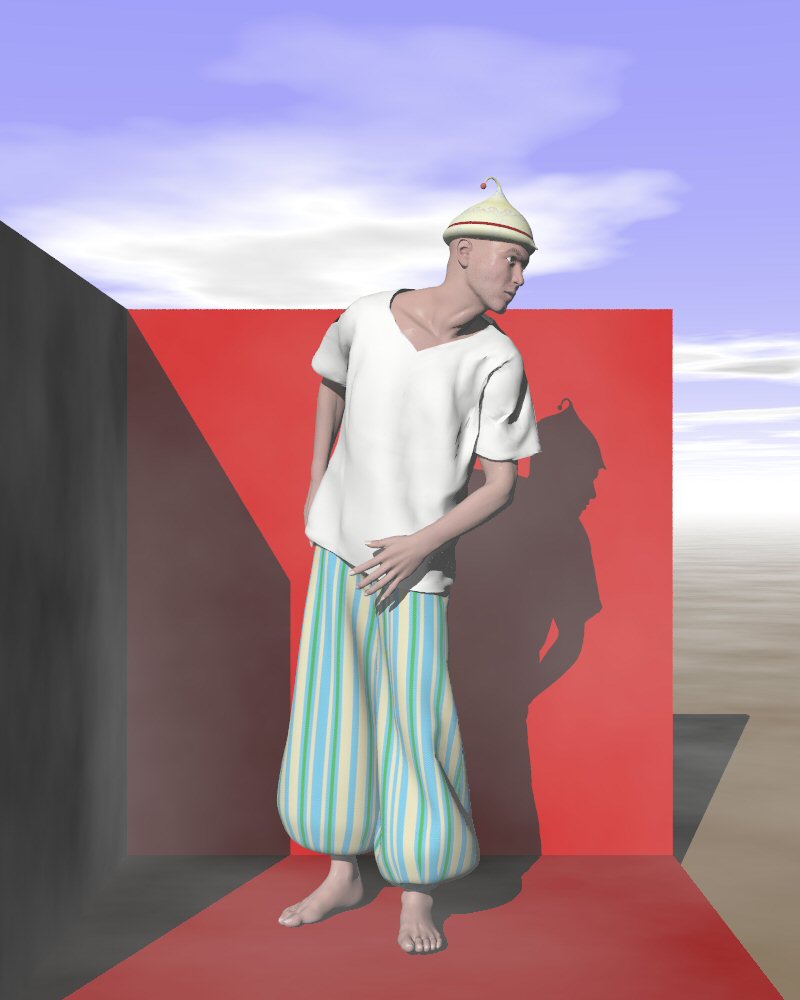
Now, my friends, compare this image with the preceding one in Take 5. Very
similar? Not so! (forget about the red walls. They here for fun only)

From top to bottom:
- The hat has been uv mapped and seamed properly.
- The t-shirt: I exported the conforming t-shirt to Silo (had to do it
through Poseray for some reason), combined all the meshes, merged the
ovelapping vertices, corrected some wrong geometry, exported again to a
.obj, and imported it in Poser where I made it a dynamic cloth in the Cloth
Room. Look how the cloth falls much more naturally about the figure!!
- The pantaloon: I added seams at the base of the trousers, thus correcting
greatly the stretching of the map.

Note: Stephen mentioned end-caps when exporting the conforming clothes. I
think this is due to problems with the Wings3D import (I experienced that
also on other mesh imports). End-caps do not happen in Silo, nor will they
happen I believe in Blender. Note however, that the exported object may have
numerous wrong faces (invisible in fact) so do not subdivide the mesh
further or you will have to correct them.

Thomas
Post a reply to this message
Attachments:
Download 'Poser_figuretest_08c.jpg' (64 KB)
Preview of image 'Poser_figuretest_08c.jpg'
|
|
| |
| |
|
|
|
|
| |
| |
|
|
On Sun, 27 May 2007 11:42:34 +0200, "Thomas de Groot" <t.d### [at] inter nlDOTnet>
wrote:
>Now, my friends, compare this image with the preceding one in Take 5. Very
>similar? Not so! (forget about the red walls. They here for fun only)
>
>From top to bottom:
>- The hat has been uv mapped and seamed properly.
It fits better as well.
>- The t-shirt: I exported the conforming t-shirt to Silo (had to do it
>through Poseray for some reason), combined all the meshes, merged the
>ovelapping vertices, corrected some wrong geometry, exported again to a
>.obj, and imported it in Poser where I made it a dynamic cloth in the Cloth
>Room. Look how the cloth falls much more naturally about the figure!!
Much better
>- The pantaloon: I added seams at the base of the trousers, thus correcting
>greatly the stretching of the map.
Good but there is a bit of a pinch at the turn. Sorry :-)
>Note: Stephen mentioned end-caps when exporting the conforming clothes. I
>think this is due to problems with the Wings3D import (I experienced that
>also on other mesh imports).
I thought that it was the Poser export, I'm sure I saw them in PoseRay.
> End-caps do not happen in Silo, nor will they
>happen I believe in Blender.
Interesting, I used an old copy of Max.
>Note however, that the exported object may have
>numerous wrong faces (invisible in fact) so do not subdivide the mesh
>further or you will have to correct them.
Which export, from Poser or the modeller?
Regards
Stephen nlDOTnet>
wrote:
>Now, my friends, compare this image with the preceding one in Take 5. Very
>similar? Not so! (forget about the red walls. They here for fun only)
>
>From top to bottom:
>- The hat has been uv mapped and seamed properly.
It fits better as well.
>- The t-shirt: I exported the conforming t-shirt to Silo (had to do it
>through Poseray for some reason), combined all the meshes, merged the
>ovelapping vertices, corrected some wrong geometry, exported again to a
>.obj, and imported it in Poser where I made it a dynamic cloth in the Cloth
>Room. Look how the cloth falls much more naturally about the figure!!
Much better
>- The pantaloon: I added seams at the base of the trousers, thus correcting
>greatly the stretching of the map.
Good but there is a bit of a pinch at the turn. Sorry :-)
>Note: Stephen mentioned end-caps when exporting the conforming clothes. I
>think this is due to problems with the Wings3D import (I experienced that
>also on other mesh imports).
I thought that it was the Poser export, I'm sure I saw them in PoseRay.
> End-caps do not happen in Silo, nor will they
>happen I believe in Blender.
Interesting, I used an old copy of Max.
>Note however, that the exported object may have
>numerous wrong faces (invisible in fact) so do not subdivide the mesh
>further or you will have to correct them.
Which export, from Poser or the modeller?
Regards
Stephen
Post a reply to this message
|
|
| |
| |
|
|
|
|
| |
| |
|
|
"Stephen" <mcavoysATaolDOTcom@> schreef in bericht
news:0aui53drmj8gbed77karjfo195joeug01m@4ax.com...
> On Sun, 27 May 2007 11:42:34 +0200, "Thomas de Groot"
> <t.d### [at] internlDOTnet>
> wrote:
>
>>Now, my friends, compare this image with the preceding one in Take 5. Very
>>similar? Not so! (forget about the red walls. They here for fun only)
>>
>>From top to bottom:
>>- The hat has been uv mapped and seamed properly.
>
> It fits better as well.

Ah! That's because Iskander moved it on his head :-)

>
>>- The t-shirt: I exported the conforming t-shirt to Silo (had to do it
>>through Poseray for some reason), combined all the meshes, merged the
>>ovelapping vertices, corrected some wrong geometry, exported again to a
>>.obj, and imported it in Poser where I made it a dynamic cloth in the
>>Cloth
>>Room. Look how the cloth falls much more naturally about the figure!!
>
> Much better

Yes, this is really an interesting development. I have never been very
enthousiastic about conforming clothes as they often appear to be too
artificial. If this transformation remains easy for all of them, then there
is great potential to generate more natural looking clothing.

>
>>- The pantaloon: I added seams at the base of the trousers, thus
>>correcting
>>greatly the stretching of the map.
>
> Good but there is a bit of a pinch at the turn. Sorry :-)

Of course! Where the seams are, a pinch automatically appears. That is to be
expected... also in RL when using a striped tissue. It doesn't really
matter.

>
>>Note: Stephen mentioned end-caps when exporting the conforming clothes. I
>>think this is due to problems with the Wings3D import (I experienced that
>>also on other mesh imports).
>
> I thought that it was the Poser export, I'm sure I saw them in PoseRay.

Interesting. Maybe we have two different issues here...

>
>> End-caps do not happen in Silo, nor will they
>>happen I believe in Blender.
>
> Interesting, I used an old copy of Max.

Well... We are not yet done with experimenting these cases then!

>
>>Note however, that the exported object may have
>>numerous wrong faces (invisible in fact) so do not subdivide the mesh
>>further or you will have to correct them.
>
> Which export, from Poser or the modeller?

Yes, good question. I mean the object exported from Poser. My experience (so
far) after combining the different meshes into one, and merging the
vertices, is that there remain a number of redundant faces, i.e. edges with
more than two faces. If you need to subdivide the mesh further, you have to
get rid of them to avoid ugly spiky artefacts.

Thanks for your comments Stephen!

Thomas
Post a reply to this message
|
|
| |
| |
|
|
|
|
| |
| |
|
|
On Sun, 27 May 2007 16:16:06 +0200, "Thomas de Groot" <t.d### [at] internlDOTnet>
wrote:

>
>"Stephen" <mcavoysATaolDOTcom@> schreef in bericht

>> It fits better as well.
>
>Ah! That's because Iskander moved it on his head :-)
>

OK, where did his name come from?


>>>Room. Look how the cloth falls much more naturally about the figure!!
>>
>> Much better
>
>Yes, this is really an interesting development. I have never been very
>enthousiastic about conforming clothes as they often appear to be too
>artificial. If this transformation remains easy for all of them, then there
>is great potential to generate more natural looking clothing.

Much more natural but I can see us spending more time in Poser than in Pov-Ray
:-(
>>>- The pantaloon: I added seams at the base of the trousers, thus
>>>correcting
>>>greatly the stretching of the map.
>>
>> Good but there is a bit of a pinch at the turn. Sorry :-)
>
>Of course! Where the seams are, a pinch automatically appears. That is to be
>expected... also in RL when using a striped tissue. It doesn't really
>matter.

I actually thought that might be the case. Hmm! Even more impressed.
>>
>>>Note: Stephen mentioned end-caps when exporting the conforming clothes. I
>>>think this is due to problems with the Wings3D import (I experienced that
>>>also on other mesh imports).
>>
>> I thought that it was the Poser export, I'm sure I saw them in PoseRay.
>
>Interesting. Maybe we have two different issues here...

It could be. I just remembered I exported as 3DS, so I could work in Max.
Actually I generally use 3DS because you get fewer groups in the figure meshes.

>>
>>> End-caps do not happen in Silo, nor will they
>>>happen I believe in Blender.
>>
>> Interesting, I used an old copy of Max.
>
>Well... We are not yet done with experimenting these cases then!
>
>>
>>>Note however, that the exported object may have
>>>numerous wrong faces (invisible in fact) so do not subdivide the mesh
>>>further or you will have to correct them.
>>
>> Which export, from Poser or the modeller?
>
>Yes, good question. I mean the object exported from Poser. My experience (so
>far) after combining the different meshes into one, and merging the
>vertices, is that there remain a number of redundant faces, i.e. edges with
>more than two faces. If you need to subdivide the mesh further, you have to
>get rid of them to avoid ugly spiky artefacts.

Sorry, you're going too fast for me. What different meshes are combined into
one? I normally export the Poser objects separately and combine them in the
scene. Or do you mean the separate parts of the cloth? But that aside I've found
lots of redundant faces too.

Regards
	Stephen
Post a reply to this message
|
|
| |
| |
|
|
|
|
| |
| |
|
|
Nice job Thomas. The shirt looks much better dynamic vs. conforming. The
pants look great. And I like his hat!
Post a reply to this message
|
|
| |
| |
|
|
|
|
| |
| |
|
|
"Stephen" <mcavoysATaolDOTcom@> wrote in message
news:pq7j53l87epg9g65mn71dqh2s4o490808o@4ax.com...

> Sorry, you're going too fast for me. What different meshes are combined
> into
> one? I normally export the Poser objects separately and combine them in
> the
> scene. Or do you mean the separate parts of the cloth? But that aside I've
> found
> lots of redundant faces too.

     But isn't the 'Cleanup' command supposed to get rid of this? I thought
it did. (Even PoseRay clears unwanted verts iirc).

       ~Steve~ <puzzled>


>
> Regards
> Stephen
Post a reply to this message
|
|
| |
| |
|
|
|
|
| |
| |
|
|
"Thomas de Groot" <t.d### [at] internlDOTnet> wrote in message
news:4659528f@news.povray.org...

   That is MUCH better! Well done, looks good to me!

      ~Steve~
Post a reply to this message
|
|
| |
| |
|
|
|
|
| |
| |
|
|
On Sun, 27 May 2007 17:12:57 +0100, "St." <dot### [at] dotcom> wrote:

>
>     But isn't the 'Cleanup' command supposed to get rid of this? I thought
>it did. (Even PoseRay clears unwanted verts iirc).

Yes but ... :-)

Regards
	Stephen
Post a reply to this message
|
|
| |
| |
|
|
|
|
| |
| |
|
|
Now THAT is nice!

--
William Tracy
+-+-+-+-+-+-+-+-+-+-+-+-+-+-+-+-+-+-+-+-+-+
|a|f|i|s|h|i|o|n|a|d|o|@|g|m|a|i|l|.|c|o|m|
+-+-+-+-+-+-+-+-+-+-+-+-+-+-+-+-+-+-+-+-+-+
+-+-+-+-+-+-+-+-+-+-+-+-+-+-+-+-+-+-+
|w|t|r|a|c|y|@|c|a|l|p|o|l|y|.|e|d|u|
+-+-+-+-+-+-+-+-+-+-+-+-+-+-+-+-+-+-+
You know you've been raytracing too long when you see the movie credits
going by and instead of seeing Lenses by Panaflex it always seems to say
Lens Effects by Chris Colefax.
Ken Tyler
Post a reply to this message
|
|
| |
| |
|
|
|
|
| |
| |
|
|
"Stephen" <mcavoysATaolDOTcom@> schreef in bericht
news:pq7j53l87epg9g65mn71dqh2s4o490808o@4ax.com...
>>
>>Ah! That's because Iskander moved it on his head :-)
>
> OK, where did his name come from?

It is a name that has been turning inside my head for some time. Iskander is
the name for Alexander in the Middle East, especially in reference to
Alexander the Great. As the series I have in mind is set in a mythic Middle
East, the name seemed appropriate.

>
>>>>Room. Look how the cloth falls much more naturally about the figure!!
>>>
>>> Much better
>>
>>Yes, this is really an interesting development. I have never been very
>>enthousiastic about conforming clothes as they often appear to be too
>>artificial. If this transformation remains easy for all of them, then
>>there
>>is great potential to generate more natural looking clothing.
>
> Much more natural but I can see us spending more time in Poser than in
> Pov-Ray :-(

Not really, I believe. All this work on the t-shirt took only a couple of
hours or less, and that for a first experiment. The simulation in Poser
takes some time of course, but if all goes well you end up with a posed
image you are at liberty to use in POV-Ray as you want. In the end, I guess
that we shall spend much more time in POV-Ray for scene building. Time spent
in Poser is certainly worth it.


>>>>Note: Stephen mentioned end-caps when exporting the conforming clothes.
>>>>I
>>>>think this is due to problems with the Wings3D import (I experienced
>>>>that
>>>>also on other mesh imports).
>>>
>>> I thought that it was the Poser export, I'm sure I saw them in PoseRay.
>>
>>Interesting. Maybe we have two different issues here...
>
> It could be. I just remembered I exported as 3DS, so I could work in Max.
> Actually I generally use 3DS because you get fewer groups in the figure
> meshes.

So, maybe those endcaps are created in a 3DS version? I never experimented
much with that format as .obj seems to be more universal.


>>>>Note however, that the exported object may have
>>>>numerous wrong faces (invisible in fact) so do not subdivide the mesh
>>>>further or you will have to correct them.
>>>
>>> Which export, from Poser or the modeller?
>>
>>Yes, good question. I mean the object exported from Poser. My experience
>>(so
>>far) after combining the different meshes into one, and merging the
>>vertices, is that there remain a number of redundant faces, i.e. edges
>>with
>>more than two faces. If you need to subdivide the mesh further, you have
>>to
>>get rid of them to avoid ugly spiky artefacts.
>
> Sorry, you're going too fast for me. What different meshes are combined
> into
> one? I normally export the Poser objects separately and combine them in
> the
> scene. Or do you mean the separate parts of the cloth? But that aside I've
> found
> lots of redundant faces too.

I'm sorry. I should learn to explain better. The export of a conforming
cloth (or a figure, for that matter) from Poser, shows the different meshes
it is built from (pectorals, shoulders, neck... etc). So, the first action
is to group/combine all those separate meshes into a single one, and
join/merge the overlapping vertices of the original meshes. To answer Steve
here: This cannot be done in Poseray I believe, as you have to group first
the different constituent meshes. In the same action, the loose triangles
that may also be present in the mesh are nicely joined to the whole.
After this stage, as you say Stephen, you are left with a number of
redundant faces which you can try to get rid of, or (if you do not intend to
subdivide) just leave alone as they will not be visible in the end: they are
located on the inside of the mesh.

Thomas
Post a reply to this message
|
|
| |
| |
|
|
From: Thomas de Groot
Subject: Re: Making clothes in Poser - Take 5b
Date: 28 May 2007 03:44:03
Message: <465a8843@news.povray.org>
|
|
|
| |
| |
|
|
"St." <dot### [at] dotcom> schreef in bericht news:4659ae36$1@news.povray.org...
>
> "Stephen" <mcavoysATaolDOTcom@> wrote in message
> news:pq7j53l87epg9g65mn71dqh2s4o490808o@4ax.com...
>
>> Sorry, you're going too fast for me. What different meshes are combined
>> into
>> one? I normally export the Poser objects separately and combine them in
>> the
>> scene. Or do you mean the separate parts of the cloth? But that aside
>> I've found
>> lots of redundant faces too.
>
>     But isn't the 'Cleanup' command supposed to get rid of this? I thought
> it did. (Even PoseRay clears unwanted verts iirc).
>

Most are redundant faces, which means edges with more than two faces.You
cannot clean that up so easily I believe.

Thomas
Post a reply to this message
|
|
| |
| |
|
|
|
|
| |
| |
|
|
"Janet" <par### [at] attnet> schreef in bericht
news:web.4659a7a0206256a8f19d8b3c0@news.povray.org...
> Nice job Thomas. The shirt looks much better dynamic vs. conforming. The
> pants look great. And I like his hat!
>
Thanks Janet! I think I got the incentive to transmogrify a lot of
conforming clothes into dynamic ones (at least those that would really get
better from the operation).
Have you noted how the shirt also nicely collides with the underlying pants?
I was a bit worried about that but it went well. The trick is revealed in
the tutorial manual. You just have to simulate the different clothes in
succession, from inside to outside. Each simulation will take the earlier
results into account it seems. The manual tells this a little bit more
confusedly though, so I was in doubt.
The pants are very nice now. I could certainly work a bit more on them, but
I shall leave that for another occasion. There is now a next step in
complexity that I want to explore: breeches with bindings along the calves.
I think I know how to do this (again, the tutorial manual give a number of
useful hints in that direction) but I have to try this out on a figure.
<grin> yes the hat! Such a simple object, originally built from a torus. I
wanted something outlandish anyway  :-)

Thomas
Post a reply to this message
|
|
| |
| |
|
|
From: Thomas de Groot
Subject: Re: Making clothes in Poser - Take 5b
Date: 28 May 2007 04:00:33
Message: <465a8c21@news.povray.org>
|
|
|
| |
| |
|
|
"St." <dot### [at] dotcom> schreef in bericht news:4659aee9$1@news.povray.org...
>
> "Thomas de Groot" <t.d### [at] internlDOTnet> wrote in message
> news:4659528f@news.povray.org...
>
>   That is MUCH better! Well done, looks good to me!
>

Thank you Steve! I am rather satisfied about the whole process up to now.

Thomas
Post a reply to this message
|
|
| |
| |
|
|
|
|
| |
| |
|
|
"William Tracy" <wtr### [at] calpolyedu> schreef in bericht
news:465a0704$1@news.povray.org...
> Now THAT is nice!
>

<grin> Isn't it??  :-)

Thomas
Post a reply to this message
|
|
| |
| |
|
|
From: Thomas de Groot
Subject: Re: Making clothes in Poser - Take 5b
Date: 28 May 2007 04:11:07
Message: <465a8e9b@news.povray.org>
|
|
|
| |
| |
|
|
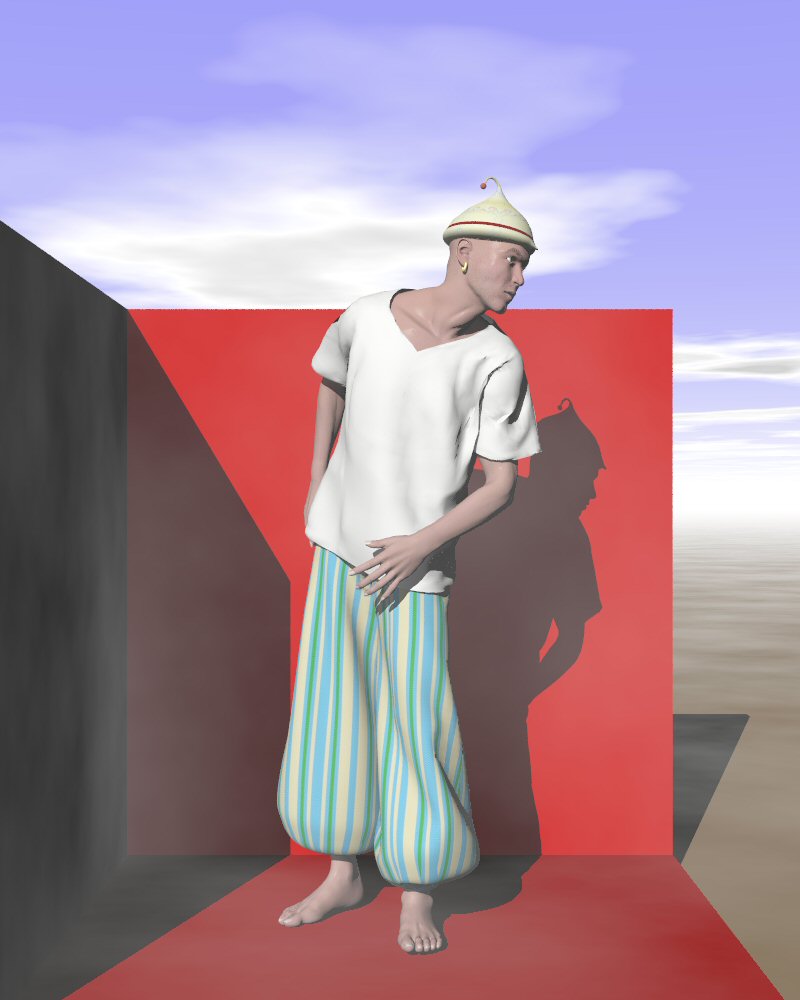
Iskander missed a small thing: a golden earring :-)

Thomas
Post a reply to this message
Attachments:
Download 'Poser_figuretest_08c.jpg' (64 KB)
Preview of image 'Poser_figuretest_08c.jpg'
|
|
| |
| |
|
|
|
|
| |
| |
|
|
"Thomas de Groot" <t.d### [at] internlDOTnet> wrote:
> "Janet" <par### [at] attnet> schreef in bericht
> news:web.4659a7a0206256a8f19d8b3c0@news.povray.org...
> > Nice job Thomas. The shirt looks much better dynamic vs. conforming. The
> > pants look great. And I like his hat!
> >
> Thanks Janet! I think I got the incentive to transmogrify a lot of
> conforming clothes into dynamic ones (at least those that would really get
> better from the operation).
> Have you noted how the shirt also nicely collides with the underlying pants?
> I was a bit worried about that but it went well. The trick is revealed in
> the tutorial manual. You just have to simulate the different clothes in
> succession, from inside to outside. Each simulation will take the earlier
> results into account it seems. The manual tells this a little bit more
> confusedly though, so I was in doubt.

Thanks, that's good to know. It makes sense also, now that you have me
thinking about it.

> The pants are very nice now. I could certainly work a bit more on them, but
> I shall leave that for another occasion. There is now a next step in
> complexity that I want to explore: breeches with bindings along the calves.
> I think I know how to do this (again, the tutorial manual give a number of
> useful hints in that direction) but I have to try this out on a figure.

Wouldn't these be shorter pantaloons? I'm no sailor tailor, just curious. :)

> <grin> yes the hat! Such a simple object, originally built from a torus. I
> wanted something outlandish anyway  :-)

It is definitely unique and outlandish. :)

Janet
Post a reply to this message
|
|
| |
| |
|
|
|
|
| |
| |
|
|
"Thomas de Groot" <t.d### [at] internlDOTnet> wrote:
>
> It is a name that has been turning inside my head for some time. Iskander is
> the name for Alexander in the Middle East, especially in reference to
> Alexander the Great. As the series I have in mind is set in a mythic Middle
> East, the name seemed appropriate.

Thank you, I look forward to the series.


> Not really, I believe. All this work on the t-shirt took only a couple of
> hours or less, and that for a first experiment. The simulation in Poser
> takes some time of course, but if all goes well you end up with a posed
> image you are at liberty to use in POV-Ray as you want. In the end, I guess
> that we shall spend much more time in POV-Ray for scene building. Time spent
> in Poser is certainly worth it.

Time spent in Poser is certainly worth it. I guess since I do mostly
animations I spend more time there than you (at the moment)


> So, maybe those endcaps are created in a 3DS version? I never experimented
> much with that format as .obj seems to be more universal.

Yes that might be the case. When next I’ve got some free time and playing
with Poser I’ll experiment.


>
> I'm sorry. I should learn to explain better. The export of a conforming
> cloth (or a figure, for that matter) from Poser, shows the different meshes
> it is built from (pectorals, shoulders, neck... etc). So, the first action
> is to group/combine all those separate meshes into a single one, and
> join/merge the overlapping vertices of the original meshes. To answer Steve
> here: This cannot be done in Poseray I believe, as you have to group first
> the different constituent meshes. In the same action, the loose triangles
> that may also be present in the mesh are nicely joined to the whole.
> After this stage, as you say Stephen, you are left with a number of
> redundant faces which you can try to get rid of, or (if you do not intend to
> subdivide) just leave alone as they will not be visible in the end: they are
> located on the inside of the mesh.

When I used 3DS format the meshes are grouped and named (Head, neck etc.)
but in my old 3d Max they are joined. As for leaving alone, I don’t know
about that. When making SpinKick the animation would sometimes just stop or
leave the skirt behind. I felt, but could not prove, that some of the
redundant faces and polygons were intersecting the model.
Post a reply to this message
|
|
| |
| |
|
|
|
|
| |
| |
|
|
"Stephen" <mcavoys_AT_aolDOT.com> schreef in bericht
news:web.465c1130206256a8c4e49fa40@news.povray.org...
>
>> Not really, I believe. All this work on the t-shirt took only a couple of
>> hours or less, and that for a first experiment. The simulation in Poser
>> takes some time of course, but if all goes well you end up with a posed
>> image you are at liberty to use in POV-Ray as you want. In the end, I
>> guess
>> that we shall spend much more time in POV-Ray for scene building. Time
>> spent
>> in Poser is certainly worth it.
>
> Time spent in Poser is certainly worth it. I guess since I do mostly
> animations I spend more time there than you (at the moment)

Yes, I believe that is certainly true for animation. Stills are a lot more
easier.

>
>> So, maybe those endcaps are created in a 3DS version? I never
>> experimented
>> much with that format as .obj seems to be more universal.
>
> Yes that might be the case. When next I've got some free time and playing
> with Poser I'll experiment.

One thing I did yesterday, was exporting a conforming cloth in 3DS, import
it in Wings3D, and lo! the endcaps were there!!!

>
> When I used 3DS format the meshes are grouped and named (Head, neck etc.)
> but in my old 3d Max they are joined. As for leaving alone, I don't know
> about that. When making SpinKick the animation would sometimes just stop
> or
> leave the skirt behind. I felt, but could not prove, that some of the
> redundant faces and polygons were intersecting the model.

Hmm... No, in Silo I have first to merge the different meshes into one.
Those redundant faces and polygons might indeed intersect... However, if
you make the animation in Poser, there shouldn't be any redundant faces,
should there? Or am I making a false assumption here?

Thomas
Post a reply to this message
|
|
| |
| |
|
|
|
|
| |
| |
|
|
"Thomas de Groot" <t.d### [at] internlDOTnet> wrote:

> > Time spent in Poser is certainly worth it. I guess since I do mostly
> > animations I spend more time there than you (at the moment)
>
> Yes, I believe that is certainly true for animation. Stills are a lot more
> easier.

I don’t know about “a lot easier” but animations are certainly time
consuming.


> One thing I did yesterday, was exporting a conforming cloth in 3DS, import
> it in Wings3D, and lo! the endcaps were there!!!

Ha! OBJ’s are the way to go then, I better get a modeler that can handle
them. Wings, Silo Blender? Steve (St) has done some sterling work with
Wings. Oh! Joy more to learn :-)


> Hmm... No, in Silo I have first to merge the different meshes into one.
> Those redundant faces and polygons might indeed intersect... However, if
> you make the animation in Poser, there shouldn't be any redundant faces,
> should there? Or am I making a false assumption here?

No you aren’t making a false assumption. I exported some cloth from poser to
tailor it to the figure I was using. That’s when the redundant faces and
polygons appeared.

Stephen
Post a reply to this message
|
|
| |
| |
|
|
|
|
| |
| |
|
|
"Stephen" <mcavoys_AT_aolDOT.com> schreef in bericht
news:web.465c358a206256a8c4e49fa40@news.povray.org...
>
>> One thing I did yesterday, was exporting a conforming cloth in 3DS,
>> import
>> it in Wings3D, and lo! the endcaps were there!!!
>
> Ha! OBJ's are the way to go then, I better get a modeler that can handle
> them. Wings, Silo Blender? Steve (St) has done some sterling work with
> Wings. Oh! Joy more to learn :-)

I didn't do the test of Poser-generated obj loaded into Wings. I remember
though some identical problems coming from Moray. :-(
However, maybe Steve (St) can light up our darkness  :-)

Blender would certainly be worthwhile the try (steep learning curve,
though).
Silo works fine, but it is not a free program.

Thomas
Post a reply to this message
|
|
| |
| |
|
|
From: Thomas de Groot
Subject: Re: Making clothes in Poser - Take 5b
Date: 29 May 2007 11:00:52
Message: <465c4024@news.povray.org>
|
|
|
| |
| |
|
|
"Janet" <par### [at] attnet> schreef in bericht
news:web.465ba07b206256a83bbb6b9d0@news.povray.org...
>
>> The pants are very nice now. I could certainly work a bit more on them,
>> but
>> I shall leave that for another occasion. There is now a next step in
>> complexity that I want to explore: breeches with bindings along the
>> calves.
>> I think I know how to do this (again, the tutorial manual give a number
>> of
>> useful hints in that direction) but I have to try this out on a figure.
>
> Wouldn't these be shorter pantaloons? I'm no sailor tailor, just curious.
> :)

There are a lot of different type of breeches, depending on historical epoch
mainly, and use. I googled some images and there are even a number of sewing
'patterns' for making them in RL. Not so useful in the mesh universe, but it
might give some ideas. What I want to try is the Celtic or the Viking type
of breeches, and bind them at the calves, perhaps with some additional
leggings (for winter) if I feel confident enough.
17:00 hours: the breeches are finished and ready for simulation. Next step
are the bindings...

>
>> <grin> yes the hat! Such a simple object, originally built from a torus.
>> I
>> wanted something outlandish anyway  :-)
>
> It is definitely unique and outlandish. :)

Yes indeed.

Thomas
Post a reply to this message
|
|
| |
| |
|
|
|
|
| |
| |
|
|
"Thomas de Groot" <t.d### [at] internlDOTnet> wrote:
> There are a lot of different type of breeches, depending on historical epoch
> mainly, and use. I googled some images and there are even a number of sewing
> 'patterns' for making them in RL. Not so useful in the mesh universe, but it
> might give some ideas. What I want to try is the Celtic or the Viking type
> of breeches, and bind them at the calves, perhaps with some additional
> leggings (for winter) if I feel confident enough.
> 17:00 hours: the breeches are finished and ready for simulation. Next step
> are the bindings...
Thanks Thomas, maybe the breeches will be in "Take 6" ?  :)
Janet
Post a reply to this message
|
|
| |
| |
|
|
|
|
| |
| |
|
|
"Janet" <par### [at] attnet> schreef in bericht
news:web.465f2034206256a83c1e96f10@news.povray.org...
> Thanks Thomas, maybe the breeches will be in "Take 6" ?  :)

Yes indeed. However, the simulation is a bit more complicated than I had
expected and expecially the workflow is very critical. It will work for
stills, but I doubt if it can be used for animations. So, take patience. I
shall come up with a fully dressed Kelt!

To get some idea about the problem and solution, have a look at the CP
Poser7 Forum:
http://www.contentparadise.com/forums/showthread.php?t=5387
That is basically what I am struggling with.

Thomas
Post a reply to this message
|
|
| |
| |
|
|
|
|
| |
| |
|
|
"Thomas de Groot" <t.d### [at] internlDOTnet> wrote:
> Yes indeed. However, the simulation is a bit more complicated than I had
> expected and expecially the workflow is very critical. It will work for
> stills, but I doubt if it can be used for animations. So, take patience. I
> shall come up with a fully dressed Kelt!
>
> To get some idea about the problem and solution, have a look at the CP
> Poser7 Forum:
> http://www.contentparadise.com/forums/showthread.php?t=5387
> That is basically what I am struggling with.
>
> Thomas

Oh, man, you are getting fancy! That's a great idea with the torus. And it
makes UV mapping easier, I would think. I see what you mean about
animating. :) I am very glad you started these Poser cloth threads, and I
will keep watching!

Janet
Post a reply to this message
|
|
| |
| |
|
|
|
|
| |
| |
|
|
"Janet" <par### [at] attnet> schreef in bericht
news:web.46604e3e206256a8a517c74b0@news.povray.org...
>
> Oh, man, you are getting fancy! That's a great idea with the torus. And it
> makes UV mapping easier, I would think. I see what you mean about
> animating. :) I am very glad you started these Poser cloth threads, and I
> will keep watching!
>

<grin>
Stay tuned. More is coming. :-)

I am now writing a short HowTo for this particular procedure. I have also a
request for e-frontiers about an upgrade for Poser 8 (oh well, let's say
7.2), concerning this, because I think it could be integrated into the Cloth
Room as a modelling similar and parallel to Draping. The potential for that
would be that you could pose and animate the whole thing without any
problems.

About animation, maybe it can be done. Otherwise, there are other techniques
I have thought about, to reach a similar (although less natural) effect, but
which would work much better when animating.

UV mapping easier? Hmm... yes, for some cases that would be so. Thinking
about my pantaloons, no, because there the design is already baggy from the
start. It is a different approach towards a fairly similar result (a case of
convergent evolution so to speak).

Not being entirely satisfied with the clothing Poser provides, nor with the
clothing on sale by and large, and having very specific needs for a number
of scenes I want to do, the only logical step was to go systematically
through the Cloth Room and discover how far I could go. Only natural to make
that available to the community. You and Stephen are actively
involved/interested in this matter, but I am sure there are lots of silent
watchers waiting impatiently for the next release :-)

Thomas
Post a reply to this message
|
|
| |
| |
|
|
|
|
| |
| |
|
|
On Sat, 2 Jun 2007 09:51:40 +0200, "Thomas de Groot" <t.d### [at] internlDOTnet>
wrote:

>
>Not being entirely satisfied with the clothing Poser provides, nor with the
>clothing on sale by and large, and having very specific needs for a number
>of scenes I want to do, the only logical step was to go systematically
>through the Cloth Room and discover how far I could go. Only natural to make
>that available to the community. You and Stephen are actively
>involved/interested in this matter, but I am sure there are lots of silent
>watchers waiting impatiently for the next release :-)

This is appreciated by me. I would love to devote the time to Poser's cloth room
as I have similar requirements for non-bedroom oriented clothes. Alas, I am
spending most of my time in Bishop3D, which is becoming quite workable now.
(Alas! - Alack, I'll have to stop drinking your Dutch coffee or at least going
to your coffee shops :-)

Regards
	Stephen
Post a reply to this message
|
|
| |
| |
|
|
|
|
| |
| |
|
|
> About animation, maybe it can be done. Otherwise, there are other techniques
> I have thought about, to reach a similar (although less natural) effect, but
> which would work much better when animating.

If the torus is made into a conforming clothing item, that might work. Or
make a leg binding into a conforming item and use that instead of the
torus. Just a thought.
Post a reply to this message
|
|
| |
| |
|
|
|
|
| |
| |
|
|
"Janet" <par### [at] attnet> schreef in bericht
news:web.46618266206256a8875c8bc90@news.povray.org...
>> About animation, maybe it can be done. Otherwise, there are other
>> techniques
>> I have thought about, to reach a similar (although less natural) effect,
>> but
>> which would work much better when animating.
>
> If the torus is made into a conforming clothing item, that might work. Or
> make a leg binding into a conforming item and use that instead of the
> torus. Just a thought.
>
 Hmm... interesting. I had not thought about that. Might also solve another
problem, the fact that a prop parented to a figure cannot be scaled during a
simulation. But maybe a conforming item can? I shall have to experiment a
bit with this...
Thanks Janet! Good suggestion.

Thomas
Post a reply to this message
|
|
| |
| |
|
|
|
|
| |
|
|