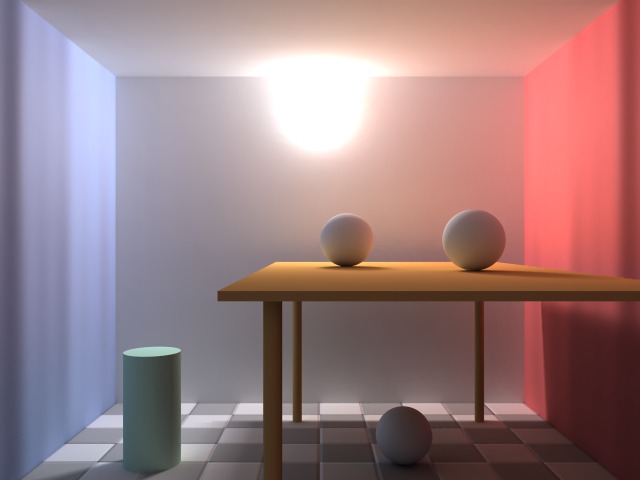
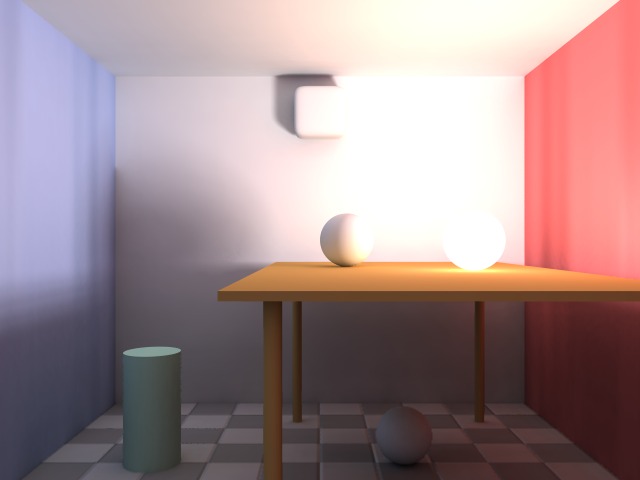
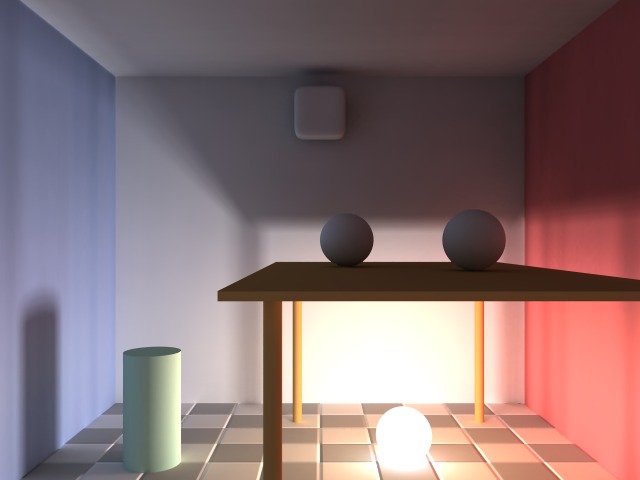
|
|
|
|
|
|
| |
| |
|
|
|
|
| |
| |
|
|
Post a reply to this message
Attachments:
Download 'rad1.jpg' (31 KB)
Download 'rad2.jpg' (27 KB)
Download 'rad3.jpg' (32 KB)
Preview of image 'rad1.jpg'
Preview of image 'rad2.jpg'
Preview of image 'rad3.jpg'
|
|
| |
| |
|
|
|
|
| |
| |
|
|
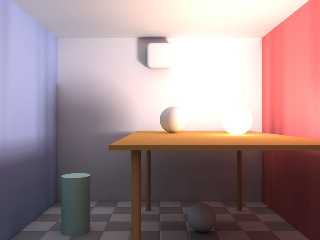
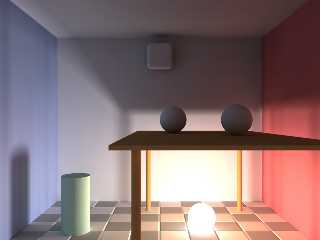
This is the first time I see those incredibly soft shadows some commercial
renderers produce (they don't look always realistic, though) done in
POV-Ray. Did you use pure radiosity lighting or in a combination with area
lights? How long did it take to render these pictures? And the most
important question: Which color has that light? I am always trying to get
the right shade of yellow/orange for my lights ;)
Post a reply to this message
|
|
| |
| |
|
|
|
|
| |
| |
|
|
Lukas Winter wrote:
> Did you use pure radiosity lighting or in a combination with area
> lights?

  I used area lights, of course.

> How long did it take to render these pictures?

  Between 30 minutes and 1 hour.

> And the most
> important question: Which color has that light?

  White.
Post a reply to this message
|
|
| |
| |
|
|
|
|
| |
| |
|
|
Nice images.

I wrote a little program to combine the three images dynamically
depending upon the mouse position on the screen.  It uses a very simple
and not quite correct method but the results are interesting.

Sort of simulates varying the intensity of any of the three lights.

Unzip to a directory and run the exe.
Post a reply to this message
Attachments:
Download 'imagemerge.zip' (701 KB)
|
|
| |
| |
|
|
|
|
| |
| |
|
|
Lukas Winter <web### [at] removeit geloeschtnet> wrote:
> This is the first time I see those incredibly soft shadows some commercial
> renderers produce... done in POV-Ray.
I see you're new to povray. :)
Povray has got area light soft shadows for even longer than radiosity... geloeschtnet> wrote:
> This is the first time I see those incredibly soft shadows some commercial
> renderers produce... done in POV-Ray.
I see you're new to povray. :)
Povray has got area light soft shadows for even longer than radiosity...
Post a reply to this message
|
|
| |
| |
|
|
|
|
| |
| |
|
|
Paul Fuller <pgf### [at] optusnetcomau> wrote:
> Nice images.
>
> I wrote a little program to combine the three images dynamically
> depending upon the mouse position on the screen.  It uses a very simple
> and not quite correct method but the results are interesting.
>
> Sort of simulates varying the intensity of any of the three lights.
>
> Unzip to a directory and run the exe.

That is interesting, I wonder how far you could push this trick?

I'm thinking out loud here, but bear with me. Lets say each image was 50KB,
and you loaded the images into the fast RAM on a video card. With 100MBs of
RAM you could have 2000 total images in memory, or alternatively your scene
rendered with the lightsource placed at each point of a 45 by 45 grid. You
would only need to sample the three or four images with the closest
lightsource to simulate light positions between grid points, so it seems
like computationally it would be feasible. With the use of an adaptive grid
you could simulate real-time radiosity with all the bells and whistles in
extrememly complex scenes.

So... any chance you could share your code?
Post a reply to this message
|
|
| |
| |
|
|
|
|
| |
| |
|
|
scam wrote:
> Paul Fuller <pgf### [at] optusnetcomau> wrote:
>> Nice images.
>>
>> I wrote a little program to combine the three images dynamically
>> depending upon the mouse position on the screen.  It uses a very simple
>> and not quite correct method but the results are interesting.
>>
>> Sort of simulates varying the intensity of any of the three lights.
>>
>> Unzip to a directory and run the exe.
>
> That is interesting, I wonder how far you could push this trick?
>
> I'm thinking out loud here, but bear with me. Lets say each image was 50KB,
> and you loaded the images into the fast RAM on a video card. With 100MBs of
> RAM you could have 2000 total images in memory, or alternatively your scene
> rendered with the lightsource placed at each point of a 45 by 45 grid. You
> would only need to sample the three or four images with the closest
> lightsource to simulate light positions between grid points, so it seems
> like computationally it would be feasible. With the use of an adaptive grid
> you could simulate real-time radiosity with all the bells and whistles in
> extrememly complex scenes.
>
> So... any chance you could share your code?
>
>
>

There are definitely some possibilities for giving games a ray-traced
like appearance without actually calculating everything dynamically.
You are limited though by the combinatoric explosion that happens if you
want to support too much with this method.

Probably better applied to local effects rather than the illumination of
the whole scene as it is here.

Another trick / trade-off not done here is to render the basic scene
then calculate each effect independently.  Calculate the difference
between the original and new scene.  You don' necessarily need to store
every different pixel.  Perhaps only store the significant changes or
those within some subregion that is most significant.

By the way, there is a fault in the method as shown below.  The first
image is displayed with Alpha=1.0.  Then the second image is drawn over
it with an Alpha that depends upon how strong it should be.  The third
image is again drawn over that and I think has too strong an influence
on the result.  There needs to be some adjustment of the Alpha from the
simple method used here.  Perhaps it could all be made additive...

I wrote the program in BlitzMax which is great for quick graphics stuff.
  the graphics routines support hardware accelerated alpha and rotation
which is nice.  You may not have or know of BlitzMax but the code is
pretty straightforward.

Also it is just knocked together after seeing Warp's post.  Probably too
many globals and other frowned upon practices for the purists.

Anyway, publish and be damned:

SuperStrict

Global G_ScreenWidth:Int = 800
Global G_ScreenHeight:Int = 600
Global G_MaxDistance:Float = G_ScreenHeight * 2 / Sqr(3)

Graphics G_ScreenWidth, G_ScreenHeight,1

SetBlend(ALPHABLEND)

' H:\Resources\Images\System\QiD Logo 1920x1200.png
' H:\Resources\Images\System\QiD Logo 1920x1200 - Gold.png

Global G_Image1:TImage = GetImage("Warp - Rad1.jpg")
Global G_Image2:TImage = GetImage("Warp - Rad2.jpg")
Global G_Image3:TImage = GetImage("Warp - Rad3.jpg")

Global G_P3:TPoint = TPoint.CreatePoint(G_ScreenWidth / 2, 0)
Global G_P1:TPoint = TPoint.CreatePoint(G_P3.X - G_MaxDistance / 2,
G_ScreenHeight - 1)
Global G_P2:TPoint = TPoint.CreatePoint(G_P3.X + G_MaxDistance / 2,
G_ScreenHeight - 1)

Global G_Mouse:TPoint = Tpoint.CreatePoint(0.0, 0.0)

Global G_Offset:TPoint = TPoint.CreatePoint((G_ScreenWidth -
ImageWidth(G_Image1)) / 2.0, (G_ScreenHeight - ImageHeight(G_Image1)) / 2.0)

While Not KeyHit(KEY_ESCAPE)

	Cls

	G_Mouse.SetXY(MouseX(), MouseY())

	Local S1:Float = CalcStrength(G_Mouse, G_P1)
	Local S2:Float = CalcStrength(G_Mouse, G_P2)
	Local S3:Float = CalcStrength(G_Mouse, G_P3)

	DrawImageFade(S1, G_Image1)
	DrawImageFade(S2, G_Image2)

	If (G_Image3 <> Null)
		DrawImageFade(S3, G_Image3)
	EndIf

	DrawMarkers()

	Flip

Wend

Function GetImage:TImage(filename:String)

	Return LoadImage(filename, FILTEREDIMAGE | MASKEDIMAGE)

End Function

Function CalcStrength:Float(p1:TPoint, p2:TPoint)

	Local dx:Float = p1.X - p2.X
	Local dy:Float = p1.Y - p2.Y

	Local distance:Float = Sqr(dx * dx + dy * dy)

	If (distance > G_MaxDistance)
		Return 0.0
	Else
		Return 1.0 - distance / G_MaxDistance
	EndIf

End Function

Function DrawImageFade(s:Float, image:TImage)

	SetAlpha(s)
	DrawImage(image, G_Offset.X, G_Offset.Y)

End Function

Function DrawMarkers()

	SetAlpha(1.0)
	SetColor(255, 255, 255)

	DrawMarker(G_P1)
	DrawMarker(G_P2)
	DrawMarker(G_P3)

End Function

Function DrawMarker(p:TPoint)

	DrawOval(p.X - 1, p.Y - 1, 3, 3)

End Function

Type TPoint
	Field	X:Float
	Field	Y:Float

	Function CreatePoint:TPoint(x:Float, y:Float)

		Local T:TPoint = New TPoint
		T.X = x
		T.Y = y

		Return T

	End Function

	Method SetXY(x:Float, y:Float)

		self.X = x
		self.Y = y

	End Method

End Type
Post a reply to this message
|
|
| |
| |
|
|
|
|
| |
| |
|
|
Paul Fuller <pgf### [at] optusnetcomau> wrote:
>
> There are definitely some possibilities for giving games a ray-traced
> like appearance without actually calculating everything dynamically.
> You are limited though by the combinatoric explosion that happens if you
> want to support too much with this method.

Thanks for posting the code Paul, I hadn't heard of BlitzMax before but it
looks like it will be fun to play with. They even offer a trial of the
software, so I've been able to compile your code myself.

Even with the various limits I think you could still use your approach to
make a cool little platformer or something. Each level could be a single
window, and the protagonist could be exploring a dark world with an area
light source (like a lantern or a burning torch). With some focal blur,
area lights and radiosity I think you could create a really cool, unique
visual style.
Post a reply to this message
|
|
| |
| |
|
|
|
|
| |
| |
|
|
Am Thu, 03 May 2007 00:01:07 -0400 schrieb nemesis:

> Lukas Winter <web### [at] removeitgeloeschtnet> wrote:
>> This is the first time I see those incredibly soft shadows some
>> commercial renderers produce... done in POV-Ray.
>
> I see you're new to povray. :)
>
> Povray has got area light soft shadows for even longer than radiosity...

I have been using POV-Ray for about two years now, although not very
often. I know there are area lights but they don't have the effect I
thought of. Perhaps I should have said soft shading. I have the impression
most POV-Ray images have very "sharp" global illumination, everything
looks a bit too exact to be believable. Maybe it's the lack
of a light bleeding filter on the final image. As someone noticed, area
lights also only have an effect on shadows, not on highlights or diffuse
reflection.
Post a reply to this message
|
|
| |
| |
|
|
|
|
| |
| |
|
|
Am Thu, 03 May 2007 00:28:18 +0300 schrieb Warp:

> Lukas Winter wrote:
>> Did you use pure radiosity lighting or in a combination with area
>> lights?
>
>   I used area lights, of course.
>
>> How long did it take to render these pictures?
>
>   Between 30 minutes and 1 hour.
>
>> And the most
>> important question: Which color has that light?
>
>   White.

Really? It looks a bit yellow.
Post a reply to this message
|
|
| |
| |
|
|
|
|
| |
| |
|
|
Lukas Winter <web### [at] removeitgeloeschtnet> wrote:
> Am Thu, 03 May 2007 00:28:18 +0300 schrieb Warp:
>
> > Lukas Winter wrote:
> >> Did you use pure radiosity lighting or in a combination with area
> >> lights?
> >
> >   I used area lights, of course.
> >
> >> How long did it take to render these pictures?
> >
> >   Between 30 minutes and 1 hour.
> >
> >> And the most
> >> important question: Which color has that light?
> >
> >   White.
>
> Really? It looks a bit yellow.

Two of the three lights are nearer the yellow table and red wall than the
blue; the reflected light is therefore warm; and even the top one, because
of the relative perceived 'brightness' of red compared to blue, appears to
have a warm tint --- but this is all because of the reflected light. The
shadows, you'll notice, don't look particularly cool in comparison;
comparing light to shadow id  a good way of getting a more absolute idea of
the color of a light.

-Sam Bleckley
http://www.meetsoup.com
Post a reply to this message
|
|
| |
| |
|
|
|
|
| |
| |
|
|
Lukas Winter nous apporta ses lumieres en ce 03-05-2007 10:15:
> Am Thu, 03 May 2007 00:01:07 -0400 schrieb nemesis:
>
>> Lukas Winter <web### [at] removeitgeloeschtnet> wrote:
>>> This is the first time I see those incredibly soft shadows some
>>> commercial renderers produce... done in POV-Ray.
>> I see you're new to povray. :)
>>
>> Povray has got area light soft shadows for even longer than radiosity...
>
> I have been using POV-Ray for about two years now, although not very
> often. I know there are area lights but they don't have the effect I
> thought of. Perhaps I should have said soft shading. I have the impression
> most POV-Ray images have very "sharp" global illumination, everything
> looks a bit too exact to be believable. Maybe it's the lack
> of a light bleeding filter on the final image. As someone noticed, area
> lights also only have an effect on shadows, not on highlights or diffuse
> reflection.
If your shadows from area_light looks banded or grainy, the cause is a to sparce
aray of components. Try with larger values, then add adaptive N (start with 0
and increase as needed if you get artefacts) to use adaptive sampling that will
greatly accelerate the rendering.
I commonly use aray of 17*17 or 33*33, even 65*65 without to much slowing.
If the area_light is surrounded by several objects, it's effect will vary
accordingly to the relative positions. Use circular orient to emulate a
spherical light.

--
Alain
-------------------------------------------------
It doesn’t matter what you do. It only matters what you say you’ve done and what
you’re going to do.
Post a reply to this message
|
|
| |
| |
|
|
|
|
| |
| |
|
|
scam wrote:
> Paul Fuller <pgf### [at] optusnetcomau> wrote:
>> There are definitely some possibilities for giving games a ray-traced
>> like appearance without actually calculating everything dynamically.
>> You are limited though by the combinatoric explosion that happens if you
>> want to support too much with this method.
>
> Thanks for posting the code Paul, I hadn't heard of BlitzMax before but it
> looks like it will be fun to play with. They even offer a trial of the
> software, so I've been able to compile your code myself.
>
> Even with the various limits I think you could still use your approach to
> make a cool little platformer or something. Each level could be a single
> window, and the protagonist could be exploring a dark world with an area
> light source (like a lantern or a burning torch). With some focal blur,
> area lights and radiosity I think you could create a really cool, unique
> visual style.
>
>
>
That is a great idea.  Just mention me in the credits when you make it
big :)
Post a reply to this message
|
|
| |
| |
|
|
|
|
| |
| |
|
|
Warp <war### [at] tagpovrayorg> wrote:
> Lukas Winter wrote:
> > Did you use pure radiosity lighting or in a combination with area
> > lights?
>
>   I used area lights, of course.
>
> > How long did it take to render these pictures?
>
>   Between 30 minutes and 1 hour.
>
> > And the most
> > important question: Which color has that light?
>
>   White.


Those are some great soft shadows. Please post your area light sttings.
Post a reply to this message
|
|
| |
| |
|
|
|
|
| |
| |
|
|
Lukas Winter wrote:
> This is the first time I see those incredibly soft shadows some commercial
> renderers produce

  Perhaps you mean that the image has soft *shading* (which is a bit
different from *shadows*), uncommon in average povray images?

  The soft shading is purely produced by the color bleeding produced
by the global illumination.
Post a reply to this message
|
|
| |
| |
|
|
|
|
| |
| |
|
|
fls13 wrote:
> Those are some great soft shadows. Please post your area light sttings.

  They are just regular, quite dense (20x20) circular orient jitter
adaptive 2 lights.
Post a reply to this message
|
|
| |
| |
|
|
|
|
| |
| |
|
|
Nice image,
I'm very interested in soft shadows and radiosity parameters.
Can you post the source code of the scene?

Thanks,

Joel.
Post a reply to this message
|
|
| |
| |
|
|
|
|
| |
| |
|
|
Am Fri, 04 May 2007 03:53:15 +0300 schrieb Warp:

> Lukas Winter wrote:
>> This is the first time I see those incredibly soft shadows some
>> commercial renderers produce
>
>   Perhaps you mean that the image has soft *shading* (which is a bit
> different from *shadows*), uncommon in average povray images?
>
>   The soft shading is purely produced by the color bleeding produced
> by the global illumination.

You're right, that is exactly what I meant. Seems I have some difficulties
expressing myself in english ;)
Post a reply to this message
|
|
| |
| |
|
|
|
|
| |
| |
|
|
> If your shadows from area_light looks banded or grainy, the cause is a to
> sparce aray of components. Try with larger values, then add adaptive N
> (start with 0 and increase as needed if you get artefacts) to use adaptive
> sampling that will greatly accelerate the rendering.
> I commonly use aray of 17*17 or 33*33, even 65*65 without to much slowing.
> If the area_light is surrounded by several objects, it's effect will vary
> accordingly to the relative positions. Use circular orient to emulate a
> spherical light.

I wasn't saying anything about banded area light shadows.
Unfortunately, increasing the resolution of the grid won't change how
POV-Ray calculates highlights. Some people have tried using a grid of area
lights instead.
Post a reply to this message
|
|
| |
| |
|
|
|
|
| |
| |
|
|
Warp <war### [at] tagpovrayorg> wrote:
> fls13 wrote:
> > Those are some great soft shadows. Please post your area light sttings.
>
>   They are just regular, quite dense (20x20) circular orient jitter
> adaptive 2 lights.

Appreciate the info. :O)
Post a reply to this message
|
|
| |
| |
|
|
|
|
| |
| |
|
|
Warp <war### [at] tagpovrayorg> wrote:

>
>   I used area lights, of course.
>

Hello. And what happened if we don't use any light sources? only radiosity
with more ambient emmiting objects? i think that time of render could be
very long but result could be very realistic....
Thats pity that i have no time to play whith povray no more....:(:(
Woland
Post a reply to this message
|
|
| |
| |
|
|
|
|
| |
| |
|
|
> Hello. And what happened if we don't use any light sources? only radiosity
> with more ambient emmiting objects? i think that time of render could be
> very long but result could be very realistic....
> Thats pity that i have no time to play whith povray no more....:(:(
> Woland

http://povray.org/documentation/view/3.6.1/105/

--
William Tracy
+-+-+-+-+-+-+-+-+-+-+-+-+-+-+-+-+-+-+-+-+-+
|a|f|i|s|h|i|o|n|a|d|o|@|g|m|a|i|l|.|c|o|m|
+-+-+-+-+-+-+-+-+-+-+-+-+-+-+-+-+-+-+-+-+-+
+-+-+-+-+-+-+-+-+-+-+-+-+-+-+-+-+-+-+
|w|t|r|a|c|y|@|c|a|l|p|o|l|y|.|e|d|u|
+-+-+-+-+-+-+-+-+-+-+-+-+-+-+-+-+-+-+
You know you've been raytracing too long when you can remember back to a
time when you thought raytracing was a guy named Ray sitting at a desk
tracing.
Ken Tyler
Post a reply to this message
|
|
| |
| |
|
|
|
|
| |
| |
|
|
Woland wrote:
> Hello. And what happened if we don't use any light sources? only radiosity
> with more ambient emmiting objects?

  Rendering will probably take like 50 hours and still look like
crap. :P
Post a reply to this message
|
|
| |
| |
|
|
|
|
| |
| |
|
|
Am Fri, 04 May 2007 12:55:55 -0400 schrieb Woland:

> Warp <war### [at] tagpovrayorg> wrote:
>
>
>>   I used area lights, of course.
>>
>>
> Hello. And what happened if we don't use any light sources? only radiosity
> with more ambient emmiting objects? i think that time of render could be
> very long but result could be very realistic.... Thats pity that i have no
> time to play whith povray no more....:(:( Woland

You'd have to use very (very) high quality blurred reflection to get
highlights back. Photon tracing would be impossible. There are renderers,
where all light sources are objects at the same time, but POV-Ray will
lose a lot of its features if we don't use light_source.
Post a reply to this message
|
|
| |
| |
|
|
|
|
| |
| |
|
|
Lukas Winter nous apporta ses lumieres en ce 04-05-2007 09:11:
>> If your shadows from area_light looks banded or grainy, the cause is a to
>> sparce aray of components. Try with larger values, then add adaptive N
>> (start with 0 and increase as needed if you get artefacts) to use adaptive
>> sampling that will greatly accelerate the rendering.
>> I commonly use aray of 17*17 or 33*33, even 65*65 without to much slowing.
>> If the area_light is surrounded by several objects, it's effect will vary
>> accordingly to the relative positions. Use circular orient to emulate a
>> spherical light.
>
> I wasn't saying anything about banded area light shadows.
> Unfortunately, increasing the resolution of the grid won't change how
> POV-Ray calculates highlights. Some people have tried using a grid of area
> lights instead.
It works, but that aray must be somewhat spherical if you want to replace
circular orient.

--
Alain
-------------------------------------------------
A day without sunshine is like, night
Post a reply to this message
|
|
| |
| |
|
|
|
|
| |