|
|
|
|
|
|
| |
| |
|
|
|
|
| |
| |
|
|
Hi all,

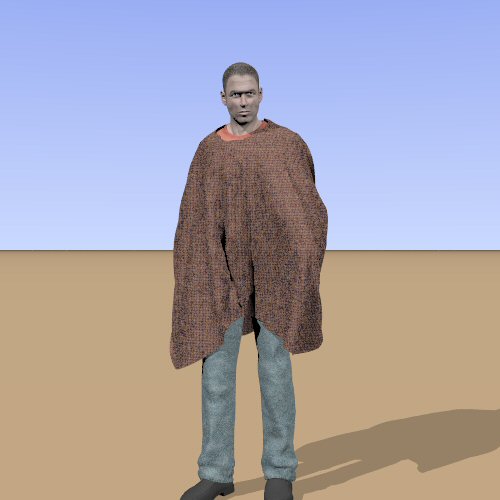
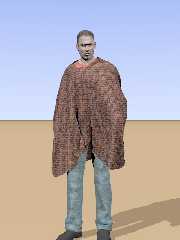
I started with my major challenge, to make clothes in/for Poser. I start
really from basics, so, the simplest piece of garment is.... a poncho!
Fo those who have put a tablecloth on a table, this is basically the same
thing.

OK. Back to the drawing board...

Thomas
Post a reply to this message
Attachments:
Download 'PoserFiguretest.jpg' (27 KB)
Preview of image 'PoserFiguretest.jpg'
|
|
| |
| |
|
|
|
|
| |
| |
|
|
Great work! Now he needs a cheroot, a six-gun, and a mule.

   Oh yes, and a wrinkled squint look...    ;)

      ~Steve~
Post a reply to this message
|
|
| |
| |
|
|
|
|
| |
| |
|
|
On Mon, 30 Apr 2007 16:19:52 +0200, "Thomas de Groot" <t.d### [at] inter nlDOTnet>
wrote:
>Hi all,
>
>I started with my major challenge, to make clothes in/for Poser. I start
>really from basics, so, the simplest piece of garment is.... a poncho!
>Fo those who have put a tablecloth on a table, this is basically the same
>thing.
>
>OK. Back to the drawing board...
That's not bad try increasing the offset depth and steps per frame. For a static
pose you can drop the air dampening to zero, as well.
I finished my clothes for my animation. Well I've done as much as I can be
bothered with and will post the results tomorrow, warts and all :-)
Regards
Stephen nlDOTnet>
wrote:
>Hi all,
>
>I started with my major challenge, to make clothes in/for Poser. I start
>really from basics, so, the simplest piece of garment is.... a poncho!
>Fo those who have put a tablecloth on a table, this is basically the same
>thing.
>
>OK. Back to the drawing board...
That's not bad try increasing the offset depth and steps per frame. For a static
pose you can drop the air dampening to zero, as well.
I finished my clothes for my animation. Well I've done as much as I can be
bothered with and will post the results tomorrow, warts and all :-)
Regards
Stephen
Post a reply to this message
|
|
| |
| |
|
|
|
|
| |
| |
|
|
I like it very much. I'm trying to do an uniform but I dont use Poser. In my
first try I will use wings and mapping, let's see if its as good as your
result.
Post a reply to this message
|
|
| |
| |
|
|
|
|
| |
| |
|
|
On Mon, 30 Apr 2007 16:45:47 +0100, "St." <dot### [at] dotcom> wrote:

>
>   Great work! Now he needs a cheroot, a six-gun, and a mule.
>
>   Oh yes, and a wrinkled squint look...    ;)
>
>      ~Steve~
>

Heh, that was my thought, exactly!


Kyle
Post a reply to this message
|
|
| |
| |
|
|
|
|
| |
| |
|
|
On Mon, 30 Apr 2007 14:58:32 EDT, "kike" <dry### [at] hotmailcom> wrote:

>I like it very much. I'm trying to do an uniform but I dont use Poser. In my
>first try I will use wings and mapping, let's see if its as good as your
>result.
>
>
If you don't want to start from scratch, you could download some Poser cloths
and import them into Wings.

Regards
	Stephen
Post a reply to this message
|
|
| |
| |
|
|
|
|
| |
| |
|
|
"kike" <dry### [at] hotmailcom> wrote in message
news:web.46363c585d4af28be7bfb550@news.povray.org...
>I like it very much. I'm trying to do an uniform but I dont use Poser. In
>my
> first try I will use wings and mapping, let's see if its as good as your
> result.

    Hey Kike, if you're using Wings, then your attempt should hopefully be
as good as Thomas'. :o)

  If you try a shirt for example, don't forget to use 'intrude'. Also, in
Wings, there is a command when selecting faces; 'extract region'. Try using
this wisely with any decent human figure you can find, (or make), for your
clothing.   ;)

      ~Steve~


>
>
Post a reply to this message
|
|
| |
| |
|
|
|
|
| |
| |
|
|
I hate realism.

But this is, uh, actual photorealism with cool sense of design. Makes me
want to shell out cash for the Windoze version of Poser.
Post a reply to this message
|
|
| |
| |
|
|
|
|
| |
| |
|
|
Wasn't it Thomas de Groot who wrote:
>Hi all,
>
>I started with my major challenge, to make clothes in/for Poser. I start
>really from basics, so, the simplest piece of garment is.... a poncho!
>Fo those who have put a tablecloth on a table, this is basically the same
>thing.

It's more complicated than my first poser dynamic clothes attempt, back
in 2002 (well, at least the first where the material actually stayed on
the body).

http://www.econym.demon.co.uk/pictures/laceface.jpg

--
Mike Williams
Gentleman of Leisure
Post a reply to this message
|
|
| |
| |
|
|
|
|
| |
| |
|
|
"St." <dot### [at] dotcom> schreef in bericht news:46360f32@news.povray.org...
>
>   Great work! Now he needs a cheroot, a six-gun, and a mule.
>
>   Oh yes, and a wrinkled squint look...    ;)
>

Yeah, pardner... For a fistfull of dollars I might just be inclined to
follow your advice... Now get out of my way, Angelface!

Thomas
Post a reply to this message
|
|
| |
| |
|
|
|
|
| |
| |
|
|
"Stephen" <mcavoysATaolDOTcom@> schreef in bericht
news:g04c33t0643jhsufebl574g6u8uu6n4hkq@4ax.com...
>
> That's not bad try increasing the offset depth and steps per frame. For a
> static
> pose you can drop the air dampening to zero, as well.
> I finished my clothes for my animation. Well I've done as much as I can be
> bothered with and will post the results tomorrow, warts and all :-)
>

Thanks Stephen!
Yes, I slightly increased the offset here, and there are 5 steps per frame.
I also increased the cloth self-friction. Still, I thought that with a
slight air damping the results were better. I want to try a bit of a breeze
too here...

Looking forward to your work, indeed!!

Thomas
Post a reply to this message
|
|
| |
| |
|
|
|
|
| |
| |
|
|
"Greg M. Johnson" <pte### [at] thecommononethatstartswithYcom> schreef in
bericht news:463683f1@news.povray.org...
>I hate realism.
>
> But this is, uh, actual photorealism with cool sense of design. Makes me
> want to shell out cash for the Windoze version of Poser.

Thanks indeed. However, just a simple first trial dropping a (Silo-made)
poncho over a figure. The following steps are going to be much harder...
Poser is worth its money I believe. Since I decided to buy, I have never
regretted it one moment, and I virtually dumped Daz|Studio.

Thomas
Post a reply to this message
|
|
| |
| |
|
|
|
|
| |
| |
|
|
"Mike Williams" <nos### [at] econymdemoncouk> schreef in bericht
news:vKM### [at] econymdemoncouk...
>
> It's more complicated than my first poser dynamic clothes attempt, back
> in 2002 (well, at least the first where the material actually stayed on
> the body).
>
> http://www.econym.demon.co.uk/pictures/laceface.jpg
>

Well that looks very good, Mike!
I suppose that Poser has become better since 2002, I don't know. I am fairly
new to it. This was relatively easy to do after a couple of trial and
errors, and reading the manual of course :-)  This particular example is
working in a similar way to the tablecloth utility in Megapov.

Thomas
Post a reply to this message
|
|
| |
| |
|
|
|
|
| |
| |
|
|
On Tue, 1 May 2007 07:18:34 +0100, Mike Williams <nos### [at] econymdemoncouk>
wrote:

>(well, at least the first where the material actually stayed on
>the body).

LOL

Regards
	Stephen
Post a reply to this message
|
|
| |
| |
|
|
|
|
| |
| |
|
|
"St." <dot### [at] dotcom> schreef in bericht news:46360f32@news.povray.org...
>
>   Great work! Now he needs a cheroot, a six-gun, and a mule.
>
>   Oh yes, and a wrinkled squint look...    ;)
>
>      ~Steve~
>
>

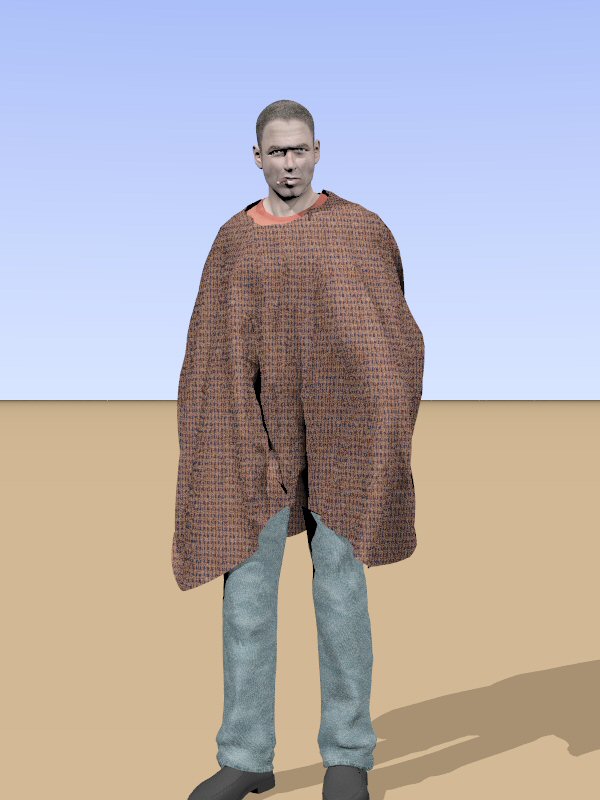
Here you are!!

Thomas
Post a reply to this message
Attachments:
Download 'PoserFiguretest.jpg' (56 KB)
Preview of image 'PoserFiguretest.jpg'
|
|
| |
| |
|
|
|
|
| |
| |
|
|
On Tue, 1 May 2007 10:54:35 +0200, "Thomas de Groot" <t.d### [at] internlDOTnet> wrote:

>Here you are!!

But, where's his cowboy hat?!?  :-p
Post a reply to this message
|
|
| |
| |
|
|
|
|
| |
| |
|
|
"Kyle" <hob### [at] gatenet> schreef in bericht
news:o8fe3395id1la5v997tpvgifdhhacnom8v@4ax.com...
> On Tue, 1 May 2007 10:54:35 +0200, "Thomas de Groot"
> <t.d### [at] internlDOTnet> wrote:
>
>>Here you are!!
>
> But, where's his cowboy hat?!?  :-p
>

Yeah... I know! He lost it! It was shot from his head probably.

Thomas
Post a reply to this message
|
|
| |
| |
|
|
|
|
| |
| |
|
|
"Thomas de Groot" <t.d### [at] internlDOTnet> wrote in message
news:4637004e@news.povray.org...

> Here you are!!


 LOL! Thank you Thomas!   :o)

   ~Steve~


>
> Thomas
>
>
>
Post a reply to this message
|
|
| |
| |
|
|
|
|
| |
| |
|
|
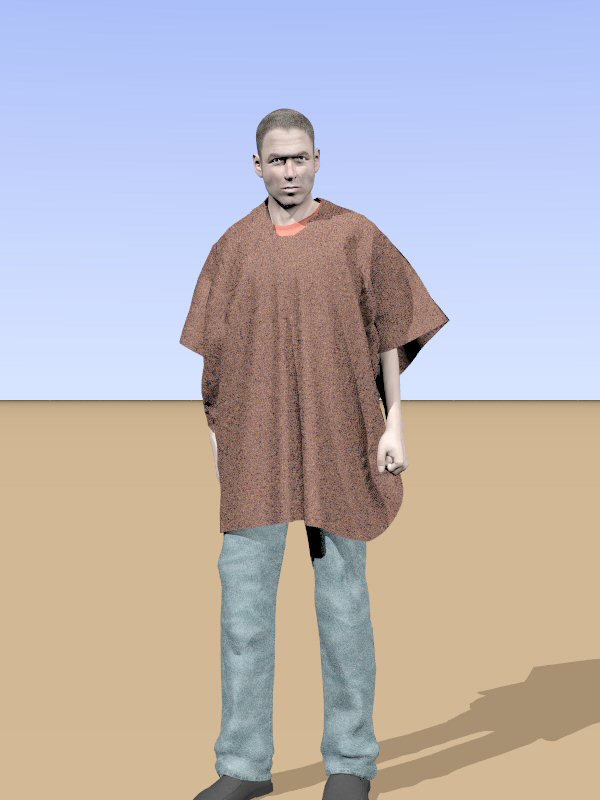
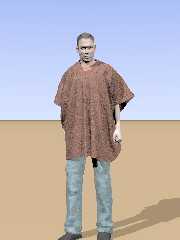
Even with a simple poncho, there is much to learn!!

This is a much better version.
I edited the poncho itself first of all, making it narrower (Argentinan vs.
Chilean, from my own experience).
The trials are now about better draping and binding the cloth to the figure
while changing the pose. So far so good.
What I am still puzzled about is saving as dynamic cloth. That works - I
think - but loading it again doesn't show anything...

Back to the drawing board....


Thomas
Post a reply to this message
Attachments:
Download 'PoserFiguretest.jpg' (48 KB)
Preview of image 'PoserFiguretest.jpg'
|
|
| |
| |
|
|
|
|
| |
| |
|
|
On Wed, 2 May 2007 11:32:02 +0200, "Thomas de Groot" <t.d### [at] internlDOTnet>
wrote:

>What I am still puzzled about is saving as dynamic cloth. That works - I
>think - but loading it again doesn't show anything...

What do you mean? "loading it again doesn't show anything."
Show what?
I have been saving (exporting) the objects as OBJ's. Remember that you have to
export as multi-frame with the range 30 to 30. Where 30 is the number of frames
in the animation. You loose the dynamic groups but I generally used materials
for grouping.
When the cloth folds in on itself don't be afraid to use a high number of steps
per frame. For some of the dresses I tried I went as high as 80 and often used
60 steps per frame with an offset of 0.1

Regards
	Stephen
Post a reply to this message
|
|
| |
| |
|
|
|
|
| |
| |
|
|
"Stephen" <mcavoysATaolDOTcom@> schreef in bericht
news:3vog33pkg90aiilummgoeigiaff1e82po8@4ax.com...
> On Wed, 2 May 2007 11:32:02 +0200, "Thomas de Groot"
> <t.d### [at] internlDOTnet>
> wrote:
>
>>What I am still puzzled about is saving as dynamic cloth. That works - I
>>think - but loading it again doesn't show anything...
>
> What do you mean? "loading it again doesn't show anything."
> Show what?
Well, I thought that saving in Poser as a dynamic cloth, you could load it
again another time with all its characteristics, but what really happens
then is that a green cross appears, but no object, nor does the recalculate
dynamics work then. Oh well, I think I have to read the manual more
carefully...

> I have been saving (exporting) the objects as OBJ's. Remember that you
> have to
> export as multi-frame with the range 30 to 30. Where 30 is the number of
> frames
> in the animation. You loose the dynamic groups but I generally used
> materials
> for grouping.
Yes, usually I do that (although not multi-frame as yet). Still part of my
future experimentations.

> When the cloth folds in on itself don't be afraid to use a high number of
> steps
> per frame. For some of the dresses I tried I went as high as 80 and often
> used
> 60 steps per frame with an offset of 0.1
Yes, that is certainly true! I went as high as 10 till now, but just for
experimental purposes. I also noticed that the number of draping frames is
very important for the quality of the folding. I am going to increase that
too.

Thomas
Post a reply to this message
|
|
| |
| |
|
|
|
|
| |
| |
|
|
On Thu, 3 May 2007 14:05:41 +0200, "Thomas de Groot" <t.d### [at] internlDOTnet>
wrote:


>Well, I thought that saving in Poser as a dynamic cloth, you could load it
>again another time with all its characteristics, but what really happens
>then is that a green cross appears, but no object, nor does the recalculate
>dynamics work then. Oh well, I think I have to read the manual more
>carefully...

Green Cross?
I tried it out and I can save my dress as a Prop. It is saved with an image but
in the "Zero" position. It does keep the clothing groups. I did it by selecting
the skirt opening the props menu and pressing the + sign. In the Set Name pop
up, change the text, press Select subset, then select the prop and OK. Click OK
and it was saved with the preview image.


>> I have been saving (exporting) the objects as OBJ's. Remember that you
>> have to
>> export as multi-frame with the range 30 to 30. Where 30 is the number of
>> frames
>> in the animation. You loose the dynamic groups but I generally used
>> materials
>> for grouping.
>Yes, usually I do that (although not multi-frame as yet). Still part of my
>future experimentations.

I've tried to cut out the start from zero pose.

>> When the cloth folds in on itself don't be afraid to use a high number of
>> steps
>> per frame. For some of the dresses I tried I went as high as 80 and often
>> used
>> 60 steps per frame with an offset of 0.1
>Yes, that is certainly true! I went as high as 10 till now, but just for
>experimental purposes. I also noticed that the number of draping frames is
>very important for the quality of the folding. I am going to increase that
>too.

Minimum draping frames 20, I've found. You have a super duper machine I'm sure
it's fast :-)

Regards
	Stephen
Post a reply to this message
|
|
| |
| |
|
|
|
|
| |