|
|
|
|
|
|
| |
| |
|
|
|
|
| |
| |
|
|
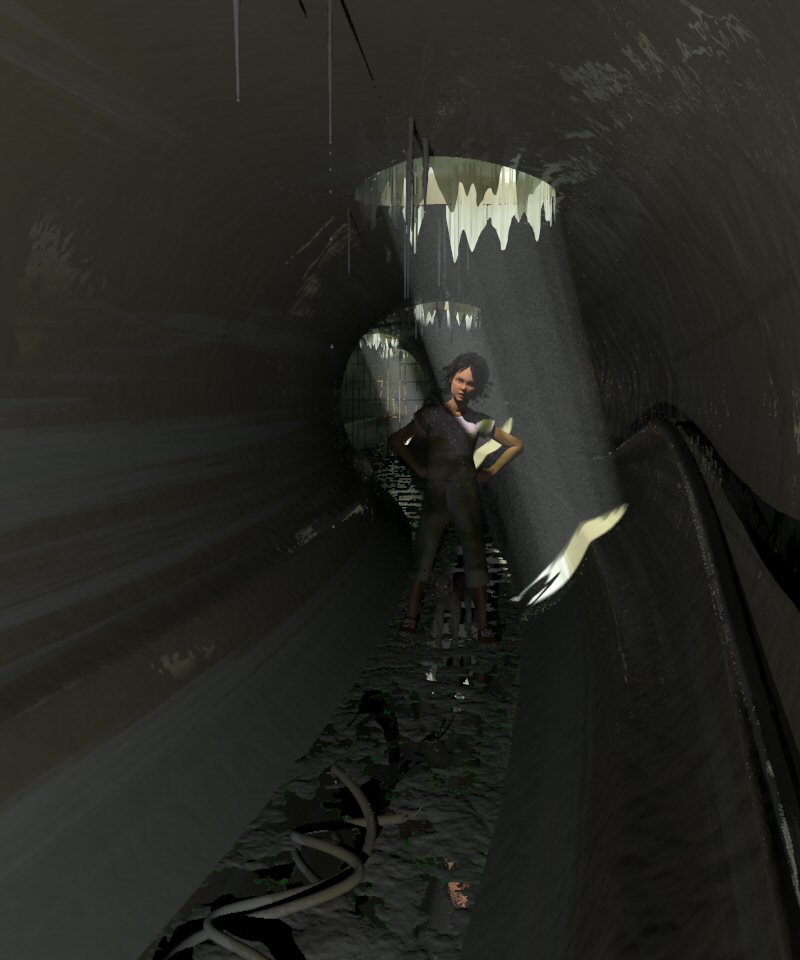
After a cumulative render of about 49 hours, here is finally 'Age of
Curiosity', the second part of my series Cathy's World.

The long render is not so much due to the media, but to the use of Rune's
Patina macro which covers most of the scene. The tunnel has been inspired by
a sequence from the film Stalker, by Andrei Tarkovski.

Thomas
Post a reply to this message
Attachments:
Download 'AgeOfCuriosity_final.jpg' (69 KB)
Preview of image 'AgeOfCuriosity_final.jpg'
|
|
| |
| |
|
|
|
|
| |
| |
|
|
"Thomas de Groot" <t.d### [at] inter nlDOTnet> wrote in message
news:462209fe@news.povray.org...
> After a cumulative render of about 49 hours, here is finally 'Age of
> Curiosity', the second part of my series Cathy's World.
>
> The long render is not so much due to the media, but to the use of Rune's
> Patina macro which covers most of the scene. The tunnel has been inspired
> by a sequence from the film Stalker, by Andrei Tarkovski.
I like this Thomas! The scene has an eeriness about it - I mean, is she
looking at YOU? Or, is she trying to spot something she 'may' have seen
whilst you are crouching down trying to keep as still as possible? <spooky!>
~Steve~
> Thomas
>
>
> nlDOTnet> wrote in message
news:462209fe@news.povray.org...
> After a cumulative render of about 49 hours, here is finally 'Age of
> Curiosity', the second part of my series Cathy's World.
>
> The long render is not so much due to the media, but to the use of Rune's
> Patina macro which covers most of the scene. The tunnel has been inspired
> by a sequence from the film Stalker, by Andrei Tarkovski.
I like this Thomas! The scene has an eeriness about it - I mean, is she
looking at YOU? Or, is she trying to spot something she 'may' have seen
whilst you are crouching down trying to keep as still as possible? <spooky!>
~Steve~
> Thomas
>
>
>
Post a reply to this message
|
|
| |
| |
|
|
|
|
| |
| |
|
|
Thomas de Groot wrote:
> After a cumulative render of about 49 hours, here is finally 'Age of
> Curiosity', the second part of my series Cathy's World.
>
> The long render is not so much due to the media, but to the use of Rune's
> Patina macro which covers most of the scene. The tunnel has been inspired by
> a sequence from the film Stalker, by Andrei Tarkovski.

You did a very good job then, because I was instantly reminded of that
scene  when i saw the picture.  I think the one complaint I have is that
it doesn't feel very wet somehow -- sort of like a drainage pipe
somewhere where it hasn't rained for a month.  I can't put my finger on
what it is that makes me think this.  I still like the image though and
you capture a mood well with it.
Post a reply to this message
|
|
| |
| |
|
|
|
|
| |
| |
|
|
"St." <dot### [at] dotcom> schreef in bericht news:462288bd$1@news.povray.org...
>
>
>    I like this Thomas! The scene has an eeriness about it - I mean, is she
> looking at YOU? Or, is she trying to spot something she 'may' have seen
> whilst you are crouching down trying to keep as still as possible?
> <spooky!>
>
>

Thank you Steve!
Well, I don't know what/or who Cathy is looking at. Maybe the drops of water
falling from the stalactite? But most probably at something behind the
camera, where the light comes from... I have no idea, and I would like to
turn around, but I cannot.

Thomas
Post a reply to this message
|
|
| |
| |
|
|
|
|
| |
| |
|
|
"Kevin Wampler" <wampler+pov### [at] uwashingtonedu> schreef in bericht
news:46228c3b$1@news.povray.org...
>
> You did a very good job then, because I was instantly reminded of that
> scene  when i saw the picture.  I think the one complaint I have is that
> it doesn't feel very wet somehow -- sort of like a drainage pipe somewhere
> where it hasn't rained for a month.  I can't put my finger on what it is
> that makes me think this.  I still like the image though and you capture a
> mood well with it.

Thank you indeed Kevin! Glad you recognized the scene, although this image
is not intended of course as a Tarkovski reminder. I just borrowed the key
element for my own purposes. There are still some other locations in Stalker
which I would like to "borrow".

Yes, the wet feel is difficult. I tried to get that by making part of the
wall and objects texture reflective in Rune's Patina macro, but it is rather
difficult to control correctly. Water should be running also down the walls,
dropping from the cable or the ceiling (only from the stalactites now). So
this particular scene here is from a fairly dry season, which explains why
Cathy is able to explore :-)

Thomas
Post a reply to this message
|
|
| |
| |
|
|
|
|
| |
| |
|
|
Too dark.
Post a reply to this message
|
|
| |
| |
|
|
|
|
| |
| |
|
|
On Sun, 15 Apr 2007 13:18:20 +0200, "Thomas de Groot" <t.d### [at] internlDOTnet>
wrote:

>After a cumulative render of about 49 hours, here is finally 'Age of
>Curiosity', the second part of my series Cathy's World.

Too light, until I adjusted the gamma.
Evocative as usual.

Regards
	Stephen
Post a reply to this message
|
|
| |
| |
|
|
|
|
| |
| |
|
|
Too dark (Warp)
Too light (Stephen)

Now, isn't that interesting?
The scene uses the default gamma procedure for v.3.7. The only thing I did
was resave the png image before exporting to jpg.
The scene anyhow is rather dark because it is intended to be that. However,
I can see the details well enough on my screen.
Post a reply to this message
|
|
| |
| |
|
|
|
|
| |
| |
|
|
"Thomas de Groot" <t.d### [at] internlDOTnet> schreef in bericht
news:46235b01$1@news.povray.org...
> Too dark (Warp)
> Too light (Stephen)
>
> Now, isn't that interesting?
> The scene uses the default gamma procedure for v.3.7. The only thing I did
> was resave the png image before exporting to jpg.
> The scene anyhow is rather dark because it is intended to be that.
> However, I can see the details well enough on my screen.

< I pressed send before I was finished...>
We have had this discussion before concerning the gamma in 3.7 I believe. As
far as I can tell, if I do nothing to my scene, it renders exactly identical
on 3.6 or 3.7, with the exception that WinIE shows the image far too light,
which is solved by just saving the image in PaintShopPro, without doing
anything. But otherwise, I see no difference.
Just the same, thanks Warp and Stephen to mention this :-)

Thomas
Post a reply to this message
|
|
| |
| |
|
|
|
|
| |
| |
|
|
"Stephen" <mcavoysATaolDOTcom@> schreef in bericht
news:s9c62351dm0fm556e4fkd7l8tgfns5skms@4ax.com...
> Evocative as usual.
>

Thank you indeed Stephen!  I do my best :-)

Thomas
Post a reply to this message
|
|
| |
| |
|
|
|
|
| |
| |
|
|
Great seeing Poser figures in Povray! Keep em coming.
Post a reply to this message
|
|
| |
| |
|
|
|
|
| |
| |
|
|
She's too curious. :) I see what you mean by "in the shadows" now. I like
the way the lights are streaming in. I am glad too, whenever I see people
using Poser and POV-Ray together. Poser is not as easy as it looks (I
find), to create an image that looks good from an artistic standpoint. So,
great job Thomas!
Post a reply to this message
|
|
| |
| |
|
|
|
|
| |
| |
|
|
"Janet" <par### [at] attnet> schreef in bericht
news:web.4624432e1a29668e136e395e0@news.povray.org...
> She's too curious. :) I see what you mean by "in the shadows" now. I like
> the way the lights are streaming in. I am glad too, whenever I see people
> using Poser and POV-Ray together. Poser is not as easy as it looks (I
> find), to create an image that looks good from an artistic standpoint. So,
> great job Thomas!
>

Thank you indeed, Janet!

My question in povray.tools.poser concerned another image in fact where
radiosity should play an important role. Here, I didn't use radiosity at
all, as the render was already so terribly slow, so that I preferred using
v.3.7 on my dual core machine (and still 49 hours!).

Poser is very complex and I found (for now) that the best way to tackle
facial expressions and body language is to start from very simple basics as
found in the provided poses, and change those gradually until a harmonious
balance is found. It is very easy to overdue the effect, so one has to be
very careful. Especially the facial expressions need changes sometimes that
are hardly visible, but which convey a huge impact. And looking often into
the mirror helps a lot!  :-)  I think one has to be a bit of a (mental)
performer...

I like Poser very much and my "before and after" entry will show several
Poser figures. But I feel also that one has to restrain oneselves from using
Poser everywhere. It has to add a significant value to the scene, otherwise
it may look artificial. Oh well...

One of my next projects will involve tayloring clothes...

Thomas
Post a reply to this message
|
|
| |
| |
|
|
|
|
| |
| |
|
|
"fls13" <fls### [at] netzeronet> schreef in bericht
news:web.462424a61a29668e5d33d38c0@news.povray.org...
> Great seeing Poser figures in Povray! Keep em coming.
>
Wait for my "before and after" entry.

Thomas
Post a reply to this message
|
|
| |
| |
|
|
|
|
| |
| |
|
|
"Thomas de Groot" <t.d### [at] internlDOTnet> wrote:
> "fls13" <fls### [at] netzeronet> schreef in bericht
> news:web.462424a61a29668e5d33d38c0@news.povray.org...
> > Great seeing Poser figures in Povray! Keep em coming.
> >
> Wait for my "before and after" entry.

....and mine (well, Daz|Studio anyway).

Great image, Thomas. I like the detail in this, and your posed figures
always have personality. The brightness is an interesting issue actually,
it's too dark on my CRT but looks fine on my laptop. I have the same
problem with my images. I don't think this is something that can be easily
solved; I think one has to just make sure details are not lost in darkness
(or brightness) and leave it up to the audience to brighten/darken their
display or gamma-correct the image.

Keep it up!

Bill
Post a reply to this message
|
|
| |
| |
|
|
|
|
| |
| |
|
|
"Thomas de Groot" <t.d### [at] internlDOTnet> wrote:
>
> ...Here, I didn't use radiosity at
> all, as the render was already so terribly slow, so that I preferred using
> v.3.7 on my dual core machine (and still 49 hours!).

Oh no!! I couldn't wait that long. Well, maybe...

> Poser is very complex and I found (for now) that the best way to tackle
> facial expressions and body language is to start from very simple basics as
> found in the provided poses, and change those gradually until a harmonious
> balance is found. It is very easy to overdue the effect, so one has to be
> very careful. Especially the facial expressions need changes sometimes that
> are hardly visible, but which convey a huge impact. And looking often into
> the mirror helps a lot!  :-)  I think one has to be a bit of a (mental)
> performer...

Yes, subtle expressions can be hard to get right.

> I like Poser very much and my "before and after" entry will show several
> Poser figures. But I feel also that one has to restrain oneselves from using
> Poser everywhere. It has to add a significant value to the scene, otherwise
> it may look artificial. Oh well...

I think it depends on what you want the image to be. If its a portrait then,
that's a lot of Poser. And, yeah, it can easily look unrealistic. But,
that's part of the challenge. I will look for the "Before and After" pic.
:)

> One of my next projects will involve tayloring clothes...
Do you mean making your own clothes, or modifying existing ones?
Post a reply to this message
|
|
| |
| |
|
|
|
|
| |
| |
|
|
"Janet" <par### [at] attnet> schreef in bericht
news:web.4625a8ec1a29668e7da18c860@news.povray.org...
>
>> I like Poser very much and my "before and after" entry will show several
>> Poser figures. But I feel also that one has to restrain oneselves from
>> using
>> Poser everywhere. It has to add a significant value to the scene,
>> otherwise
>> it may look artificial. Oh well...
>
> I think it depends on what you want the image to be. If its a portrait
> then,
> that's a lot of Poser. And, yeah, it can easily look unrealistic. But,
> that's part of the challenge. I will look for the "Before and After" pic.
> :)

Part of the challenge indeed. That has a great attraction. Find the right
balance between the initial vision and the created scene...
Yeah, it's coming along nicely, I guess. I won't be ready with radiosity
renders, though, so it will be the best for the moment  :-)

>
>> One of my next projects will involve tayloring clothes...
> Do you mean making your own clothes, or modifying existing ones?

Well, both, probably. In the near future I shall need a whole new set of
clothes not to be found elsewhere, so that will be a good opportunity to
explore those areas. There is that tutorial that Stephen found
(povray.tools.poser) and I still have to get familiar with Clothing Designer
which looks promising. So, we'll see.

Thomas
Post a reply to this message
|
|
| |
| |
|
|
|
|
| |
| |
|
|
"Bill Pragnell" <bil### [at] hotmailcom> schreef in bericht
news:web.46249d731a29668e731f01d10@news.povray.org...
>
> ....and mine (well, Daz|Studio anyway).

Ok. Daz|Studio works quite well too :-)

>
> Great image, Thomas. I like the detail in this, and your posed figures
> always have personality. The brightness is an interesting issue actually,
> it's too dark on my CRT but looks fine on my laptop. I have the same
> problem with my images. I don't think this is something that can be easily
> solved; I think one has to just make sure details are not lost in darkness
> (or brightness) and leave it up to the audience to brighten/darken their
> display or gamma-correct the image.

Thank you indeed, Bill! Much appreciated.
I am currently and exclusively working on LCD flat screen, so I cannot
compare, but there is (was also) a certain difference. I suppose that with
the gradual extinction of CRT the problem will "solve" itself.... :-)
>
> Keep it up!

I will!!

Thomas
Post a reply to this message
|
|
| |
| |
|
|
|
|
| |
| |
|
|
"Thomas de Groot" <t.d### [at] internlDOTnet> wrote:
> Too dark (Warp)
> Too light (Stephen)
>
> Now, isn't that interesting?

That's too funny!  :-)  Looks quite good on my (older) Mac and (older)
Viewsonic CRT monitor. Monitor gamma of 1.8, AFAIK.

Nice work.  Not sure just what the *material* is supposed to be that's
sagging down through the holes, though. Looks kind of like old peeling
paint. I would suggest a curved look to that material--like metal that has
been blasted through by a bomb. Or perhaps a rougher edge to the material;
looks a bit too "rounded off."

Ken W.
Post a reply to this message
|
|
| |
| |
|
|
|
|
| |
| |
|
|
"Kenneth" <kdw### [at] earthlinknet> schreef in bericht
news:web.46270e0a1a29668e7ed3e70e0@news.povray.org...
>
> Nice work.  Not sure just what the *material* is supposed to be that's
> sagging down through the holes, though. Looks kind of like old peeling
> paint. I would suggest a curved look to that material--like metal that has
> been blasted through by a bomb. Or perhaps a rougher edge to the material;
> looks a bit too "rounded off."
>

Thank you, Kenneth!
Don't know either what the *material* is :-)  looks organic to me. I
experimented with rougher edges (those are meshes) but the results were not
convincing at all, so I stayed with this, after several aborted
re-modellings of them. They were, by far, the most difficult things to model
in this scene, and even now I am not entirely satisfied...

Thomas
Post a reply to this message
|
|
| |
| |
|
|
|
|
| |
| |
|
|
"Thomas de Groot" <t.d### [at] internlDOTnet> wrote:
> >> One of my next projects will involve tayloring clothes...
> > Do you mean making your own clothes, or modifying existing ones?
>
> Well, both, probably. In the near future I shall need a whole new set of
> clothes not to be found elsewhere, so that will be a good opportunity to
> explore those areas. There is that tutorial that Stephen found
> (povray.tools.poser) and I still have to get familiar with Clothing Designer
> which looks promising. So, we'll see.
>
> Thomas

Good luck Thomas, You are brave to attempt it. I have done "clothing" that
doesn't have to bend, like a hat, earrings, stuff like that. Those are
pretty easy to do, relatively speaking.
Post a reply to this message
|
|
| |
| |
|
|
|
|
| |
| |
|
|
"Janet" <par### [at] attnet> schreef in bericht
news:web.4627c2d51a29668e3c1e96f10@news.povray.org...
>
> Good luck Thomas, You are brave to attempt it. I have done "clothing" that
> doesn't have to bend, like a hat, earrings, stuff like that. Those are
> pretty easy to do, relatively speaking.
>

Thanks Janet, I shall need it  :-)
Yes, the hard stuff (in terms of material) is easiest to model. However,
people have done it, so we should be able too, shouldn't we?
I have first to finish a couple of things and then I start in earnest. And I
shall report back here about my impressions.

Thomas
Post a reply to this message
|
|
| |
| |
|
|
|
|
| |
| |
|
|
"Thomas de Groot" <t.d### [at] internlDOTnet> wrote:
> Thanks Janet, I shall need it  :-)
> Yes, the hard stuff (in terms of material) is easiest to model. However,
> people have done it, so we should be able too, shouldn't we?
> I have first to finish a couple of things and then I start in earnest. And I
> shall report back here about my impressions.
>
> Thomas

Yes, Thomas, we should be able to. :) We can do anything! Another trick you
can try is morph targets. This is where you take existing clothing and
modify it somehow in Wings, Blender, whatever. It works great, but the only
issue is, you can't add or subtract vertices, so its limited that way. You
can do this with figures too, not just clothing.
Post a reply to this message
|
|
| |
| |
|
|
|
|
| |
| |
|
|
"Janet" <par### [at] attnet> schreef in bericht
news:web.4629260f1a29668ea517c74b0@news.povray.org...
>> Thomas
>
> Yes, Thomas, we should be able to. :) We can do anything! Another trick
> you
> can try is morph targets. This is where you take existing clothing and
> modify it somehow in Wings, Blender, whatever. It works great, but the
> only
> issue is, you can't add or subtract vertices, so its limited that way. You
> can do this with figures too, not just clothing.
>

Ah! Excellent reminder! That should be something on my list too.

Thomas
Post a reply to this message
|
|
| |
| |
|
|
|
|
| |
| |
|
|
On Fri, 20 Apr 2007 09:26:08 +0200, "Thomas de Groot" <t.d### [at] internlDOTnet>
wrote:

>
>"Janet" <par### [at] attnet> schreef in bericht
>news:web.4627c2d51a29668e3c1e96f10@news.povray.org...
>>
>> Good luck Thomas, You are brave to attempt it. I have done "clothing" that
>> doesn't have to bend, like a hat, earrings, stuff like that. Those are
>> pretty easy to do, relatively speaking.
>>
>
>Thanks Janet, I shall need it  :-)
>Yes, the hard stuff (in terms of material) is easiest to model. However,
>people have done it, so we should be able too, shouldn't we?
>I have first to finish a couple of things and then I start in earnest. And I
>shall report back here about my impressions.

Materials are handy for assigning vertexes to groups, such as constrained or
soft decorated.

Regards
	Stephen
Post a reply to this message
|
|
| |
| |
|
|
|
|
| |
| |
|
|
"Stephen" <mcavoysATaolDOTcom@> schreef in bericht
news:lgmj239gi30grr385ae4nor36fic8b75uj@4ax.com...
>
> Materials are handy for assigning vertexes to groups, such as constrained
> or
> soft decorated.
>

I think I understand what you mean Stephen, but could you develop this a bit
more, please?

Thomas
Post a reply to this message
|
|
| |
| |
|
|
|
|
| |
| |
|
|
On Sun, 22 Apr 2007 09:12:37 +0200, "Thomas de Groot" <t.d### [at] internlDOTnet>
wrote:

>could you develop this a bit more, please?

LOL

In ready made dynamic clothing props you are likely to find that certain parts
have predefined materials. If for instance you want to make a bow as a "Soft
Decorative Group" you will probably find that it has its own material. It is
easier to select the vertices this way than do it manually. I find that it is
easier to subtract the points that you don't want than to add then as it is only
too easy to pick vertices behind the target. I have been using this method to
pick a Constrained Group round the neck of my dress. (Not MY dress but my
model's dress :-) the collar just happens to be two vertices deep.
One point to note is, if you save your work with the "Hide other objects"
checked then the poser figure becomes invisible at the body parts level. Very
annoying!

Regards
	Stephen
Post a reply to this message
|
|
| |
| |
|
|
|
|
| |
| |
|
|
"Stephen" <mcavoysATaolDOTcom@> schreef in bericht
news:8f7m23th1pldnlb0546j45g0f5u7d8tllf@4ax.com...
>
> In ready made dynamic clothing props you are likely to find that certain
> parts
> have predefined materials. If for instance you want to make a bow as a
> "Soft
> Decorative Group" you will probably find that it has its own material. It
> is
> easier to select the vertices this way than do it manually. I find that it
> is
> easier to subtract the points that you don't want than to add then as it
> is only
> too easy to pick vertices behind the target. I have been using this method
> to
> pick a Constrained Group round the neck of my dress. (Not MY dress but my
> model's dress :-) the collar just happens to be two vertices deep.
> One point to note is, if you save your work with the "Hide other objects"
> checked then the poser figure becomes invisible at the body parts level.
> Very
> annoying!
>

Ah! Here is the expert speaking!! :-) Thank you Stephen, I think this is
going to be very helpful. As said, I have not yet really explored this
domain of Poser, so it is all new to me, but this kind of advice is
certainly helping to make progress. Thanks indeed.

Thomas
Post a reply to this message
|
|
| |
| |
|
|
|
|
| |
| |
|
|
On Mon, 23 Apr 2007 09:05:13 +0200, "Thomas de Groot" <t.d### [at] internlDOTnet>
wrote:

>Ah! Here is the expert speaking!! :-) Thank you Stephen, I think this is
>going to be very helpful. As said, I have not yet really explored this
>domain of Poser, so it is all new to me, but this kind of advice is
>certainly helping to make progress. Thanks indeed.

Hardly an expert but I've had quite a few problems, some I've managed to solve
and a lot I've not. It might help if I'd read the tutorials properly and start
off simply. Unfortunately for me I want to run before I've learnt to walk :-)
The forums I've found don't give much help for what I want to do (I've been
spoilt by this newsgroup) and my time is limited :-)
If I can be of help please ask.

Regards
	Stephen
Post a reply to this message
|
|
| |
| |
|
|
|
|
| |
| |
|
|
"Stephen" <mcavoysATaolDOTcom@> schreef in bericht
news:f8oo23d7l48lafps8ov4ofvidsebqtrdo0@4ax.com...
>
> Hardly an expert but I've had quite a few problems, some I've managed to
> solve
> and a lot I've not. It might help if I'd read the tutorials properly and
> start
> off simply. Unfortunately for me I want to run before I've learnt to walk
> :-)

[See, Thomas? You are not the only one!!]

> The forums I've found don't give much help for what I want to do (I've
> been
> spoilt by this newsgroup) and my time is limited :-)
> If I can be of help please ask.
>

I shall certainly ask when hitting a wall :-)

Thomas
Post a reply to this message
|
|
| |
| |
|
|
|
|
| |
| |
|
|
On Mon, 23 Apr 2007 14:47:27 +0200, "Thomas de Groot" <t.d### [at] internlDOTnet>
wrote:

>
>"Stephen" <mcavoysATaolDOTcom@> schreef in bericht
>news:f8oo23d7l48lafps8ov4ofvidsebqtrdo0@4ax.com...
>>
>> Hardly an expert but I've had quite a few problems, some I've managed to solve
>> and a lot I've not. It might help if I'd read the tutorials properly and start off
simply.
>>Unfortunately for me I want to run before I've learnt to walk
>> :-)
>
>[See, Thomas? You are not the only one!!]

Did you ever doubt it? :-)
>> The forums I've found don't give much help for what I want to do (I've
>> been
>> spoilt by this newsgroup) and my time is limited :-)
>> If I can be of help please ask.
>>
>
>I shall certainly ask when hitting a wall :-)
>
My pleasure

Regards
	Stephen
Post a reply to this message
|
|
| |
| |
|
|
|
|
| |
| |
|
|
"Thomas de Groot" <t.d### [at] internlDOTnet> wrote:
> After a cumulative render of about 49 hours, here is finally 'Age of
> Curiosity', the second part of my series Cathy's World.

After more than 12 years, I just noticed for the first time that there is a dog
in the scene.
Post a reply to this message
|
|
| |
| |
|
|
|
|
| |
| |
|
|
Op 29/09/2019 om 17:13 schreef Cousin Ricky:
> "Thomas de Groot" <t.d### [at] internlDOTnet> wrote:
>> After a cumulative render of about 49 hours, here is finally 'Age of
>> Curiosity', the second part of my series Cathy's World.
>
> After more than 12 years, I just noticed for the first time that there is a dog
> in the scene.
>
>

LOL

I had to check that, especially as I changed the title of the scene an
age ago into 'Stalker Tunnel'. In fact, it is not a dog but a cat ;-)

After all this time, I wonder if the original title was not better...

--
Thomas
Post a reply to this message
|
|
| |
| |
|
|
|
|
| |