|
|
|
|
|
|
| |
| |
|
|
From: Samuel Benge
Subject: cubic interpolation for image_maps (2 jpegs - 63kb)
Date: 6 Mar 2007 21:10:26
Message: <45ee1f12@news.povray.org>
|
|
|
| |
| |
|
|
Hello everyone. I think there was a patch for this somewhere once... but
anyway.

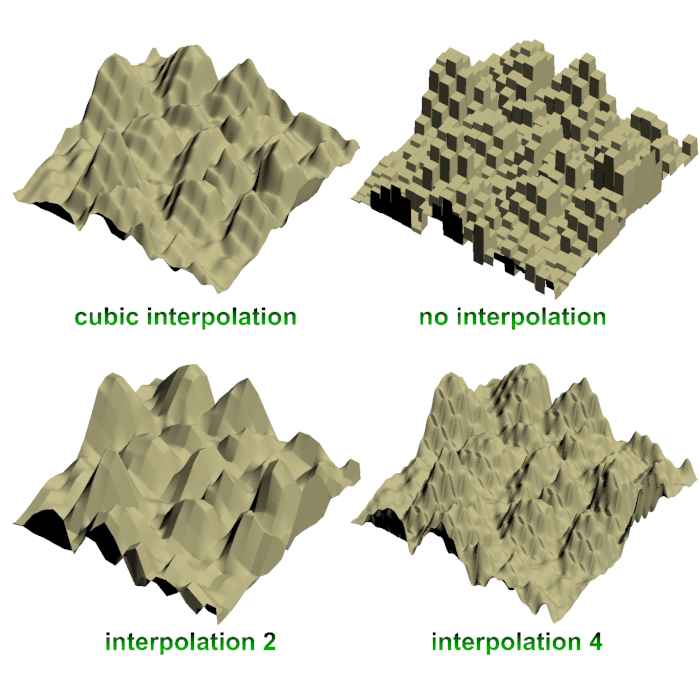
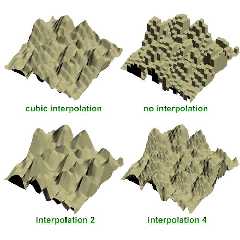
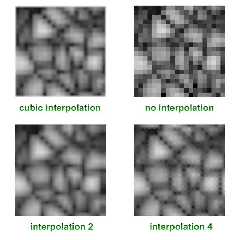
Based on Tek's (very clever) blended cells pattern, I have made a small
macro which provides cubic interpolation between an image_map's pixels.

It's easy to use, as long as you can provide the exact width and height
for the input image. You can specify the amount of blurring to perform.
It could be useful for light probes, height_fields, or anything else you
could think of. The files are available now at p.b.scene-files. A basic
example file is included.

Hope it's useful to someone :)

~Sam
Post a reply to this message
Attachments:
Download 'cubic_image_map2.jpg' (35 KB)
Download 'cubic_image_map1.jpg' (27 KB)
Preview of image 'cubic_image_map2.jpg'
Preview of image 'cubic_image_map1.jpg'
|
|
| |
| |
|
|
From: Samuel Benge
Subject: Re: cubic interpolation for image_maps (2 jpegs - 63kb)
Date: 6 Mar 2007 21:13:01
Message: <45ee1fad@news.povray.org>
|
|
|
| |
| |
|
|
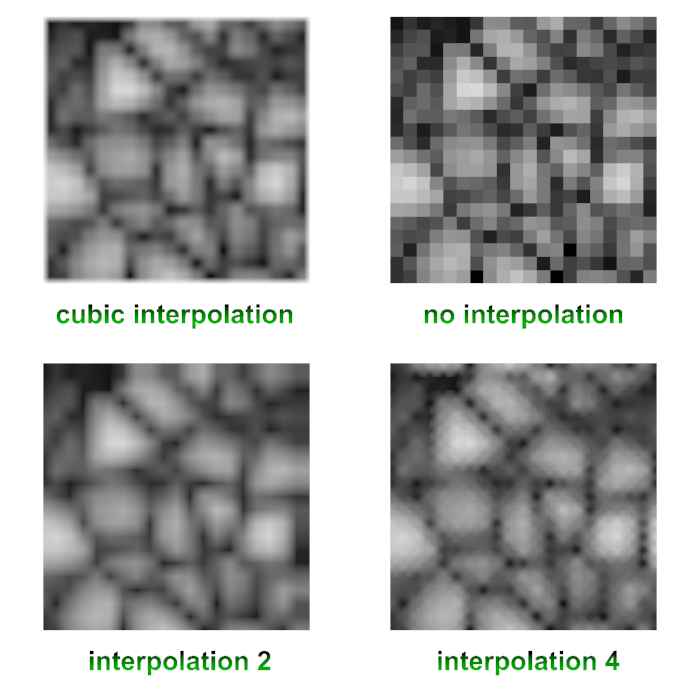
Oh, I should have mentioned that the first example in each of the
attached images uses the macro. The rest are already available in the
current version of POV.

~Sam
Post a reply to this message
|
|
| |
| |
|
|
From: Vincent Le Chevalier
Subject: Re: cubic interpolation for image_maps (2 jpegs - 63kb)
Date: 7 Mar 2007 05:05:28
Message: <45ee8e68@news.povray.org>
|
|
|
| |
| |
|
|
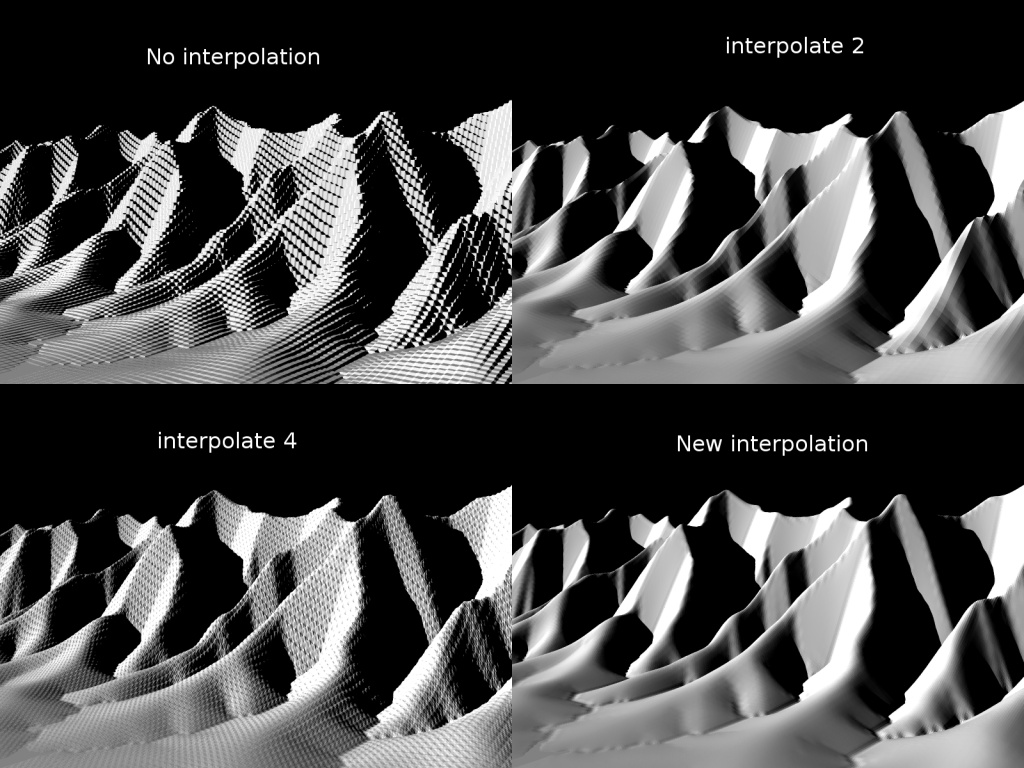
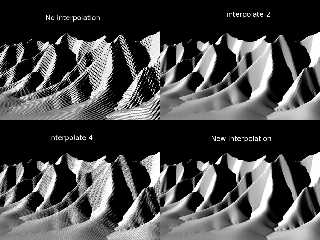
Funny, I did something similar a while ago, when I was trying to mimic
Terragen's rendering of height fields. Although obviously, our methods
differ. I was calling mine cubic interpolation back then but I'm not so
sure now... I'll have to re-check the source file to find out exactly
what it is doing ;-)

Anyway, here are the results I got. I'm not uploading the source because
it is not really readable as is, but if someone is interested I can
clean it up...

Regards

--
Vincent
Post a reply to this message
Attachments:
Download 'interpolations.jpg' (231 KB)
Preview of image 'interpolations.jpg'
|
|
| |
| |
|
|
From: Samuel Benge
Subject: Re: cubic interpolation for image_maps (2 jpegs - 63kb)
Date: 7 Mar 2007 12:38:47
Message: <45eef8a7$1@news.povray.org>
|
|
|
| |
| |
|
|
Vincent Le Chevalier wrote:
> Funny, I did something similar a while ago, when I was trying to mimic
> Terragen's rendering of height fields. Although obviously, our methods
> differ. I was calling mine cubic interpolation back then but I'm not so
> sure now... I'll have to re-check the source file to find out exactly
> what it is doing ;-)
>
> Anyway, here are the results I got. I'm not uploading the source because
> it is not really readable as is, but if someone is interested I can
> clean it up...
>
> Regards

An easy-to-use macro of your technique would be useful, if it
renders/parses quickly. It is an improvement over linear interpolation,
that much is evident.

I was hoping that Tek's blended cells technique would work well for
height_fields, but as it turns out, those extra "Steps" don't look so
good... maybe if other things were done to the pigment it would be good.
Oh well :) I figured I should post it anyway.

~Sam
Post a reply to this message
|
|
| |
| |
|
|
From: Christoph Hormann
Subject: Re: cubic interpolation for image_maps (2 jpegs - 63kb)
Date: 7 Mar 2007 14:35:03
Message: <esn40c$b2d$1@chho.imagico.de>
|
|
|
| |
| |
|
|
Samuel Benge wrote:
> Hello everyone. I think there was a patch for this somewhere once... but
> anyway.
>
> Based on Tek's (very clever) blended cells pattern, I have made a small
> macro which provides cubic interpolation between an image_map's pixels.

Are you sure this actually does bicubic interpolation?  The sample image
looks somewhat strange.  Compare:

http://earth.imagico.de/img/hf_flat.jpg
http://earth.imagico.de/img/iso_cubic.jpg

BTW MegaPOV offers bicubic interpolation for image maps internally.

Christoph

--
Views of the Earth: http://earth.imagico.de/
Images, include files, tutorials: http://www.imagico.de/
MegaPOV with mechanics simulation: http://megapov.inetart.net/
Post a reply to this message
|
|
| |
| |
|
|
|
|
| |
| |
|
|
I don't think that's the effect you were looking for. I have taken a look at
your code, and if I understand correctly, you are making interpolation pixel
per pixel, but with cubic interpolation you need 4 pixels, so if you are
repeating it on the next pixel, you are overlapping the previous
interplation. I've never tried it, but I think you should skip to the next
block of 4*4 pixels (or maybe 3*3, considering continuity/differentiability
of the block's edges).
Post a reply to this message
|
|
| |
| |
|
|
From: Samuel Benge
Subject: Re: cubic interpolation for image_maps (2 jpegs - 63kb)
Date: 7 Mar 2007 16:15:12
Message: <45ef2b60@news.povray.org>
|
|
|
| |
| |
|
|
Christoph Hormann wrote:
>
> Are you sure this actually does bicubic interpolation?

No, as a matter of fact, I am not sure. I figured since the cells are
blended with cubic_map, that meant it was using cubic interpolation. I
am not a great mathematician, by any means. I am more of a "math hacker".

> The sample image
> looks somewhat strange.

Indeed. I was displeased with it.

> Compare:
>
> http://earth.imagico.de/img/hf_flat.jpg
> http://earth.imagico.de/img/iso_cubic.jpg
>
> BTW MegaPOV offers bicubic interpolation for image maps internally.
>
> Christoph

This explains things... I am using MegaPOV v1.1! There was no
interpolate 3 with this version. Thanks for the heads-up, Christoph!

~Sam
Post a reply to this message
|
|
| |
| |
|
|
From: Samuel Benge
Subject: Re: cubic interpolation for image_maps (2 jpegs - 63kb)
Date: 7 Mar 2007 16:21:25
Message: <45ef2cd5@news.povray.org>
|
|
|
| |
| |
|
|
Grassblade wrote:
> I don't think that's the effect you were looking for. I have taken a look at
> your code, and if I understand correctly, you are making interpolation pixel
> per pixel, but with cubic interpolation you need 4 pixels, so if you are
> repeating it on the next pixel, you are overlapping the previous
> interplation. I've never tried it, but I think you should skip to the next
> block of 4*4 pixels (or maybe 3*3, considering continuity/differentiability
> of the block's edges).
>

Hmm, you may be right. Christoph pointed me toward a new version of
MegaPOV which does what I want. If that works, then I won't improve my code.

~Sam
Post a reply to this message
|
|
| |
| |
|
|
From: Tek
Subject: Re: cubic interpolation for image_maps (2 jpegs - 63kb)
Date: 7 Mar 2007 23:41:48
Message: <45ef940c@news.povray.org>
|
|
|
| |
| |
|
|
"Samuel Benge" <stb### [at] hotmail com> wrote in message
news:45eef8a7$1@news.povray.org...
> I was hoping that Tek's blended cells technique would work well for
> height_fields, but as it turns out, those extra "Steps" don't look so
> good... maybe if other things were done to the pigment it would be good.
> Oh well :) I figured I should post it anyway.
IMO the problem is it's only blending to the adjacent cell, and it always
uses pov's cubic curve rather than trying to maintain a smooth gradient. If
I'm understanding correctly Vincent's technique was actually doing cubic
interpolation, rather than just using cubic_wave (which isn't equivalent)...
Of course I'm saying all this without checking anyone's source code, but
since it's based on my blended cells I would expect it to create curved
steps where there should be a smooth gradient, which would cause the problem
you're seeing.
Wow I explained that really badly!
--
Tek
http://evilsuperbrain.com com> wrote in message
news:45eef8a7$1@news.povray.org...
> I was hoping that Tek's blended cells technique would work well for
> height_fields, but as it turns out, those extra "Steps" don't look so
> good... maybe if other things were done to the pigment it would be good.
> Oh well :) I figured I should post it anyway.
IMO the problem is it's only blending to the adjacent cell, and it always
uses pov's cubic curve rather than trying to maintain a smooth gradient. If
I'm understanding correctly Vincent's technique was actually doing cubic
interpolation, rather than just using cubic_wave (which isn't equivalent)...
Of course I'm saying all this without checking anyone's source code, but
since it's based on my blended cells I would expect it to create curved
steps where there should be a smooth gradient, which would cause the problem
you're seeing.
Wow I explained that really badly!
--
Tek
http://evilsuperbrain.com
Post a reply to this message
|
|
| |
| |
|
|
From: Vincent Le Chevalier
Subject: Re: cubic interpolation for image_maps (2 jpegs - 63kb)
Date: 8 Mar 2007 04:34:46
Message: <45efd8b6$1@news.povray.org>
|
|
|
| |
| |
|
|
Tek a écrit :
> If I'm understanding correctly Vincent's technique was actually doing
> cubic interpolation, rather than just using cubic_wave (which isn't
> equivalent)...
>

Well I don't know if it was cubic interpolation proper, but looking at
my code it seems that I was attempting to keep a continuous slope at
each vertex, and likely along the sides of the cells as well. Indeed
there is a cubic polynomial (degree 3 in x and 3 in y, in fact) looming
in there, but no cubic_wave...

For now my code is horribly mangled, because it is doing some other
things such as blending with another pattern, etc. and I never tried to
extract the interpolation from there. I'll try to single out and clean
up this part, then post it.

I'm not too sure about the efficiency of my technique either, I
implemented everything with functions, and thus it spends a lot of time
re-computing things that could have been stored... I don't remember
exactly why I did it like that. It seems I have another non-working
version where I tried to use arrays... There could have been something
about being unable to read an array from inside a function, I believe.

--
Vincent
Post a reply to this message
|
|
| |
| |
|
|
From: Samuel Benge
Subject: Re: cubic interpolation for image_maps (2 jpegs - 63kb)
Date: 8 Mar 2007 12:46:54
Message: <45f04c0e$1@news.povray.org>
|
|
|
| |
| |
|
|
Tek wrote:
> "Samuel Benge" <stb### [at] hotmailcom> wrote in message
> news:45eef8a7$1@news.povray.org...
>I figured I should post it anyway.
>
> IMO the problem is it's only blending to the adjacent cell, and it always
> uses pov's cubic curve rather than trying to maintain a smooth gradient.

Yes, I was hoping to control that with a poly_wave n statement after a
cubic_mapped pigment_pattern, but it didn't work out very well. The
cubic wave is still expressed in the same way, only shifted one way or
another.

> If
> I'm understanding correctly Vincent's technique was actually doing cubic
> interpolation, rather than just using cubic_wave (which isn't equivalent)...
>
> Of course I'm saying all this without checking anyone's source code, but
> since it's based on my blended cells I would expect it to create curved
> steps where there should be a smooth gradient, which would cause the problem
> you're seeing.
>
> Wow I explained that really badly!

Maybe so, but I understand why there are steps. I don't like it, but at
least I have the newest version of MegaPOV now. It supports bi-cubic
interpolation for image maps :)

~Sam
Post a reply to this message
|
|
| |
| |
|
|
|
|
| |
| |
|
|
If you really wanted to do it with my system, which would not be a good
idea, you'd need to overlap 4 copies of the pattern on every axis, so 16 for
an image, with each component being adjusted to behave like a part in a
cubic formula to create a nice curve through the surfaces.

My system just blends between 2 values, but to get a nice smooth slope you
need to blend 4 using a much more complex formula.

--
Tek
http://evilsuperbrain.com


"Samuel Benge" <stb### [at] hotmailcom> wrote in message
news:45f04c0e$1@news.povray.org...
> Tek wrote:
>> "Samuel Benge" <stb### [at] hotmailcom> wrote in message
>> news:45eef8a7$1@news.povray.org...
>>I figured I should post it anyway.
>>
>> IMO the problem is it's only blending to the adjacent cell, and it always
>> uses pov's cubic curve rather than trying to maintain a smooth gradient.
>
> Yes, I was hoping to control that with a poly_wave n statement after a
> cubic_mapped pigment_pattern, but it didn't work out very well. The cubic
> wave is still expressed in the same way, only shifted one way or another.
>
>> If I'm understanding correctly Vincent's technique was actually doing
>> cubic interpolation, rather than just using cubic_wave (which isn't
>> equivalent)...
>>
>> Of course I'm saying all this without checking anyone's source code, but
>> since it's based on my blended cells I would expect it to create curved
>> steps where there should be a smooth gradient, which would cause the
>> problem you're seeing.
>>
>> Wow I explained that really badly!
>
> Maybe so, but I understand why there are steps. I don't like it, but at
> least I have the newest version of MegaPOV now. It supports bi-cubic
> interpolation for image maps :)
>
> ~Sam
>
Post a reply to this message
|
|
| |
| |
|
|
|
|
| |
| |
|
|
There is an interpolation method, based on signal-processing techniques,
known as 'Whittaker interpolation' that can be extended at 2 dimensions,
and therefore applies to 2-D data (diagrams, images or whatsoever that can
be expressed as f(u, v)). This method makes good interpolations and gives
good results.

The formula (seen in a book!) is:

Being given E(ui, vj), with i in [1..N], j in [1..M} the grid value of the
data in question, and with steps du in u and dv in v, the value of E in a
point (u, v) is given by:

        N    M
       ---- ----
                      sin(PI*(u-u1)/du - i*PI) sin(PI*(v-v1)/dv - j*PI)
E(u,v)=/    /   E(ui,vj)------------------------ ------------------------
       ---  ---           PI*(u-u1)/du - i*PI     PI*(v-v1)/dv - j*PI
         i=1  j=1

OK it is quite a complicated formula, and I apologize, but perhaps POV-team
members who have implemented math-related features in POV can understand
and give an opinion.

However, there must be somewhere well-known image-processing techniques to
perform interpolations. If some of you are fresh engineers ...


    Bruno
Post a reply to this message
|
|
| |
| |
|
|
From: Vincent Le Chevalier
Subject: Re: cubic interpolation for image_maps (2 jpegs - 63kb)
Date: 9 Mar 2007 10:15:59
Message: <45f17a2f$1@news.povray.org>
|
|
|
| |
| |
|
|
Bruno Cabasson a écrit :
> Being given E(ui, vj), with i in [1..N], j in [1..M} the grid value of the
> data in question, and with steps du in u and dv in v, the value of E in a
> point (u, v) is given by:
>
>         N    M
>        ---- ----
>                       sin(PI*(u-u1)/du - i*PI) sin(PI*(v-v1)/dv - j*PI)
> E(u,v)=/    /   E(ui,vj)------------------------ ------------------------
>        ---  ---           PI*(u-u1)/du - i*PI     PI*(v-v1)/dv - j*PI
>          i=1  j=1
>

Yes, I heard about this before. In fact, what this formula does is
summing plenty of 2D sinc functions, one for each point of the grid. The
scaling with PI is merely to ensure that each sinc is zero at all grid
points, except the one it is centered on.

This interpolation is indeed good in signal processing, because if I
remember correctly, it does not add frequencies higher than the sampling
you already have from the grid.

But it seems prohibitive to compute, since you must consider every point
of the grid each time you need a value. It can be sped up by considering
a limited set of neighbours, but then it becomes tricky to ensure that
the value and derivative(s) stay continuous.

--
Vincent
Post a reply to this message
|
|
| |
| |
|
|
|
|
| |
| |
|
|
Vincent Le Chevalier <gal### [at] libertyALLsurfSPAMfr> wrote:
> Bruno Cabasson a écrit :
> > Being given E(ui, vj), with i in [1..N], j in [1..M} the grid value of the
> > data in question, and with steps du in u and dv in v, the value of E in a
> > point (u, v) is given by:
> >
> >         N    M
> >        ---- ----
> >                       sin(PI*(u-u1)/du - i*PI) sin(PI*(v-v1)/dv - j*PI)
> > E(u,v)=/    /   E(ui,vj)------------------------ ------------------------
> >        ---  ---           PI*(u-u1)/du - i*PI     PI*(v-v1)/dv - j*PI
> >          i=1  j=1
> >
>
> Yes, I heard about this before. In fact, what this formula does is
> summing plenty of 2D sinc functions, one for each point of the grid. The
> scaling with PI is merely to ensure that each sinc is zero at all grid
> points, except the one it is centered on.
>
> This interpolation is indeed good in signal processing, because if I
> remember correctly, it does not add frequencies higher than the sampling
> you already have from the grid.
>
> But it seems prohibitive to compute, since you must consider every point
> of the grid each time you need a value. It can be sped up by considering
> a limited set of neighbours, but then it becomes tricky to ensure that
> the value and derivative(s) stay continuous.
>
> --
> Vincent

You're right, it is not costless. But I have an application using it and it
works quite fast. You might use this interpolation only if you want quality
and/or if the extra computation time is neglectable wrt the rest of the
image. Many things are a compromise.

In addition, you should not retrict the neighbours otherwise you'll get
ondulations (you obviously studied signal processing :)).

    Bruno

PS: here's an interresting link:
http://www.cambridgeincolour.com/tutorials/image-interpolation.htm
Post a reply to this message
|
|
| |
| |
|
|
From: Vincent Le Chevalier
Subject: Re: cubic interpolation for image_maps (2 jpegs - 63kb)
Date: 10 Mar 2007 18:15:14
Message: <45f33c02@news.povray.org>
|
|
|
| |
| |
|
|
Samuel Benge a écrit :
> An easy-to-use macro of your technique would be useful, if it
> renders/parses quickly. It is an improvement over linear
> interpolation, that much is evident.
>

I posted a macro version of my technique under your thread with the same
subject in povray.binaries.scene-files. I wouldn't say it is quick...
But I don't really know if a quicker implementation can be done.

Of course since it is in Megapov now the incentive to optimize is a bit
diminished :-)

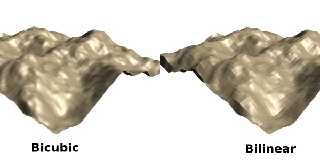
However, as I said in my message over at povray.binaries.scene-files, I
believe you could make interesting things by tweaking the computation a
bit. Since the bicubic method needs the slope at each grid point, you
could specify anything, not necessarily deducing it from the data as
I've done.

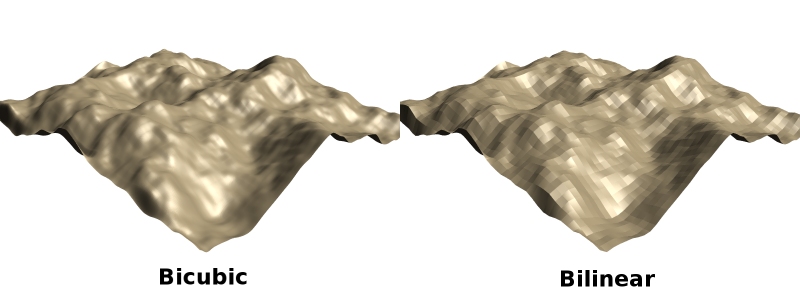
I also made a new comparison of the bilinear and bicubic methods using
this new scene file and a lower-res height field, see the attachment.

Regards,

--
Vincent
Post a reply to this message
Attachments:
Download 'interpolations.jpg' (72 KB)
Preview of image 'interpolations.jpg'
|
|
| |
| |
|
|
From: Samuel Benge
Subject: Re: cubic interpolation for image_maps (2 jpegs - 63kb)
Date: 10 Mar 2007 19:44:04
Message: <45f350d4@news.povray.org>
|
|
|
| |
| |
|
|
Vincent Le Chevalier wrote:
>
> I posted a macro version of my technique under your thread with the same
> subject in povray.binaries.scene-files. I wouldn't say it is quick...
> But I don't really know if a quicker implementation can be done.

Okay, I'll give it a look. There's always something to learn from
techniques like this :)

> Of course since it is in Megapov now the incentive to optimize is a bit
> diminished :-)

Tell me about it!

> However, as I said in my message over at povray.binaries.scene-files, I
> believe you could make interesting things by tweaking the computation a
> bit. Since the bicubic method needs the slope at each grid point, you
> could specify anything, not necessarily deducing it from the data as
> I've done.
>
> I also made a new comparison of the bilinear and bicubic methods using
> this new scene file and a lower-res height field, see the attachment.
>
> Regards,

Looks good. Perfect, even.

~Sam
Post a reply to this message
|
|
| |
| |
|
|
|
|
| |
|
|