|
|
|
|
|
|
| |
| |
|
|
|
|
| |
| |
|
|
Tek's recent beautiful and complex ocean wave images got me to thinking
about adding noise blobs to the tops of isosurface wave crests, to see if
the look of foam and spray could be better simulated there, to some degree.
 Certainly not a new concept. ;-) The essence of the idea involves the noise
being constrained, more or less, to only the tips of the waves, "fading in"
in intensity there. I vaguely remember seeing some POV-Ray images that may
have used this trick, but can't remember where.

An interesting question was raised, about whether the noise blobs--being
smooth by nature--would assume a "sharper" look due to the underlying sharp
wave crests. I made some tests to see what might happen; the isosurface code
is posted below.

My *quick and dirty* water waves are just triangles (from a pigment
function) bent with a cosine wave to curl over, plus noise. Good enough to
test the idea. The wave crests curl in the +z direction.  BTW, the triangle
waves aren't actually "bent"--they're SHEARED in the z direction. Every
point on the isosurface stays at the same height it began at (a limitation
of my own current understanding of function-bending.)

Just to keep things as simple as possible, the noise "appears" at a set
height, rather than being made to follow any vertical undulations (though
it does follow the wave curls, in z, to impart a wind-blown look.)

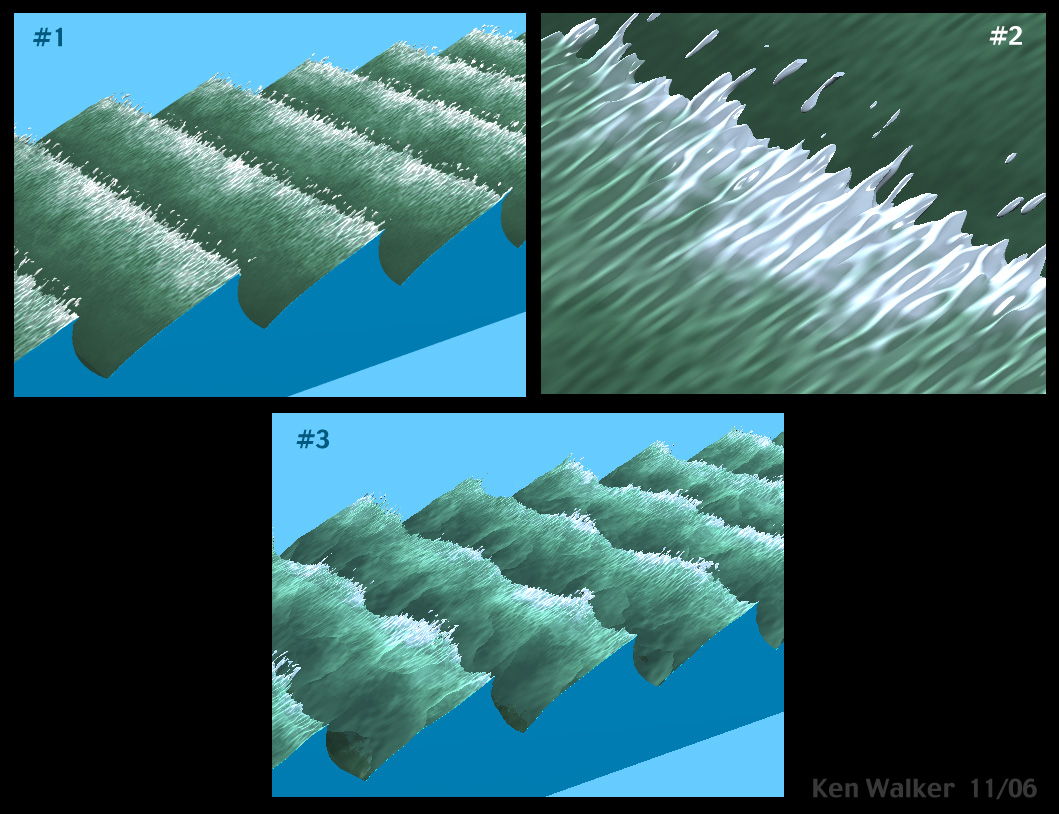
Image #1 is just a "proof of concept."
#2 is a close-up, to see what the noise blobs look like--whether they're
still blobby, or look like sharp, flattened spikes due to the triangle
waves. Looks like a cross between the two. But even seen edge-on, they
still look reasonably rounded. The noise intensity is fading in so quickly
that it seems to overwhelm the sharp triangle edge. Part of the blobbiness
appears to be out beyond the edge anyway.
#3 is with some choppy distortion laid onto the isosurface. Since both the
noise position and the gradient y texture don't move, the white "foamy"
areas happen to correspond to the noise blobs. Interesting!

Unfortuntely, every value in my noise_compressor function is critical, due
to the exponent behavior. The values have to be finessed, to constrain and
position the noise *just so.* I'm still not satisfied with the final look;
needs more tweaking.

The contained_by box's upper y dimension is also critical, to keep the noise
from quickly fading back in above the waves (a result of the way the
noise_compressor function is currently built.) That might(?) be a problem
for more complex water waves. But there are methods of using the underlying
water-wave function(s) to make the noise follow any changes in wave
height...so the contained-by box size may not be a problem. But right now,
there IS an abrupt (and probably apparent) cut-off of the noise right above
the wave tips. I'm still experimenting to find a way around that.

What I see a need for--just from this basic experiment--is to scale the SIZE
of the noise blobs in the +y direction, larger to smaller. The result would
be a two-fold improvement, I believe: to make the noise larger and smoother
as it *approaches* the wave tips; but then tiny and more pronounced AT the
tips. Given a set noise intensity in the noise_compressor function.  But I
don't yet know how to variably scale a function's "size" across space. :-(

Does the blobby effect add realism?  That's...a good question.  I kind of
like it. With some good water waves and textures...?

Here's the isosurface code, for image #1. If anyone is interested, I'd be
glad to "deconstruct" the various functions, as to what they do (though I'm
still learning the finer points of functions myself.) I'm sure they could be
improved.

Comments, critiques, suggestions--all welcome. This is definitely a learning
experience!

Ken Walker

-----------
#include "functions.inc"

#local triangle_waves =
function{
pigment{
gradient z
triangle_wave
color_map{
[0.0 rgb 0]
[1.0 rgb 1]
}
scale .35
}
}

#local wave_bender =
function(y){.13*cos(11*y - 1.9) + .6};

#local noise_compressor =
function(y){775*pow(y + .390,30)};

isosurface{
function{
y - .3
+ triangle_waves(x,y,z + wave_bender(y)).gray*.13
- f_noise3d(150*x,100*y,100*(z + wave_bender(y)))*noise_compressor(y)
}
threshold 0
max_gradient 6.3
accuracy .00001
contained_by{box{<0,0,-.6>,<1.2,.328,3>}}
}
Post a reply to this message
Attachments:
Download 'noisy_waves.jpg' (261 KB)
Preview of image 'noisy_waves.jpg'
|
|
| |
| |
|
|
|
|
| |
| |
|
|
Does it add realism? I dunno 'bout that. It might, in the right scene -- but
it adds style. There is a very chic look to them waves thar. They feel much
wilder, much more violent without being great big towering things. I like
it a lot. Nice work.


--
Sam Bleckley
stm 31415 (@) g mail . com
Post a reply to this message
|
|
| |
| |
|
|
|
|
| |
| |
|
|
"stm31415" <sam### [at] cs com> wrote:
> Does it add realism? I dunno 'bout that. It might, in the right scene -- but
> it adds style. There is a very chic look to them waves thar. They feel much
> wilder, much more violent without being great big towering things. I like
> it a lot. Nice work.
>
Thanks! The comments on style are something I hadn't considered; you're
probably right. I think I was "too close" to the technical workings of the
code to see that. Especially after all the tweaking I had to do, hour after
hour! (Even a supposedly simple experiment has a way of becoming complex.
Ah, but that's the power of POV-Ray...being able to change anything at
will.)
BTW, sorry for the glaring capital letters in the title of this post; a
cut-and-paste error. Didn't mean to announce my little experiment with such
fanfare! ;-)
Ken
Post a reply to this message
|
|
| |
| |
|
|
From: Thomas de Groot
Subject: Re: NOISE BLOBS FOR THE CRESTS OF OCEAN WAVES
Date: 22 Nov 2006 03:13:48
Message: <456406bc$1@news.povray.org>
|
|
|
| |
| |
|
|
"Kenneth" <kdw### [at] earthlinknet> schreef in bericht
news:web.4563ff3fd6d04fcfc9aaf65e0@news.povray.org...
> "stm31415" <sam### [at] cscom> wrote:
>
> BTW, sorry for the glaring capital letters in the title of this post; a
> cut-and-paste error. Didn't mean to announce my little experiment with
> such
> fanfare!  ;-)
>

<grin> Liar!!  :-)

Now, jokes aside, your experiment looks promising, but if done right, it
might dramatically improve the sea views. I wonder what this technique would
do with Tek's rough sea... Worth a trial. I shall certainly take a look at
your code and try to understand it :-)

Thomas
Post a reply to this message
|
|
| |
| |
|
|
|
|
| |
| |
|
|
"Kenneth" <kdw### [at] earthlinknet> wrote:

>
> Thanks!  The comments on style are something I hadn't considered;

It’s more than style, when the wind gets up it starts to blow the tops off
the waves and flattens them. These waves look like a swell coming in from
the Atlantic with the wind building up to force 8 or 9.

Stephen
Post a reply to this message
|
|
| |
| |
|
|
|
|
| |
| |
|
|
"Stephen" <mcavoys_AT_aolDOT.com> wrote:
> "Kenneth" <kdw### [at] earthlinknet> wrote:

>These waves look like a swell coming in from
> the Atlantic with the wind building up to force 8 or 9.
>

Right you are! I live near the coast of Virginia, USA, and we get crazy
"Nor'easter" storms all the time. One is going on right now, in fact. Would
love to be down at the oceanfront to witness it!

Haven't yet thought of a way to make the wind "blow" in the opposite
direction. That would take some *real* finessing of the noise function.
Possibly by quickly fading in a high-frequency sin or cos wave form in y,
right near the top of the waves, to curl the triangles over there. Then
making the noise follow that.  Hmm....

Ken
Post a reply to this message
|
|
| |
| |
|
|
|
|
| |
| |
|
|
"Kenneth" <kdw### [at] earthlinknet> wrote:
> "Stephen" <mcavoys_AT_aolDOT.com> wrote:
> > "Kenneth" <kdw### [at] earthlinknet> wrote:
>
> >These waves look like a swell coming in from
> > the Atlantic with the wind building up to force 8 or 9.
> >
>
> Right you are! I live near the coast of Virginia, USA, and we get crazy
> "Nor'easter" storms all the time. One is going on right now, in fact. Would
> love to be down at the oceanfront to witness it!
>
> Haven't yet thought of a way to make the wind "blow" in the opposite
> direction. That would take some *real* finessing of the noise function.
> Possibly by quickly fading in a high-frequency sin or cos wave form in y,
> right near the top of the waves, to curl the triangles over there. Then
> making the noise follow that.  Hmm....
>
> Ken


It’s Nor’ Westerlies for us in the UK.
I look forward to seeing your results. The sea is fascinating, like work I
could watch it all day :-)

Stephen
Post a reply to this message
|
|
| |
| |
|
|
|
|
| |
| |
|
|
"Thomas de Groot" <t.d### [at] internlDOTnet> wrote:
> I wonder what this technique would
> do with Tek's rough sea... Worth a trial.

Haven't yet attempted that. (I had to work long and hard just to get my
little TEST to behave!!) Looks to be a *daunting* task. But I'm gonna
try....

Ken
Post a reply to this message
|
|
| |
| |
|
|
|
|
| |
| |
|
|
I still think this wouldn't solve my problem, all it does is add noise on
top of the controlling function, so you still get sharp edges.

You should render the close up with a lower camera position, so it has a
more edge-on view of the sharp edge, at the moment the sharpness is mostly
round the edge of the blobs so you can't really tell how sharp/smooth it is.

--
Tek
http://evilsuperbrain.com

"Kenneth" <kdw### [at] earthlinknet> wrote in message
news:web.45632ef1a91bd327dc4a63960@news.povray.org...
> Tek's recent beautiful and complex ocean wave images got me to thinking
> about adding noise blobs to the tops of isosurface wave crests, to see if
> the look of foam and spray could be better simulated there, to some
> degree.
> Certainly not a new concept. ;-) The essence of the idea involves the
> noise
> being constrained, more or less, to only the tips of the waves, "fading
> in"
> in intensity there. I vaguely remember seeing some POV-Ray images that may
> have used this trick, but can't remember where.
>
> An interesting question was raised, about whether the noise blobs--being
> smooth by nature--would assume a "sharper" look due to the underlying
> sharp
> wave crests. I made some tests to see what might happen; the isosurface
> code
> is posted below.
>
> My *quick and dirty* water waves are just triangles (from a pigment
> function) bent with a cosine wave to curl over, plus noise. Good enough to
> test the idea. The wave crests curl in the +z direction.  BTW, the
> triangle
> waves aren't actually "bent"--they're SHEARED in the z direction. Every
> point on the isosurface stays at the same height it began at (a limitation
> of my own current understanding of function-bending.)
>
> Just to keep things as simple as possible, the noise "appears" at a set
> height, rather than being made to follow any vertical undulations (though
> it does follow the wave curls, in z, to impart a wind-blown look.)
>
> Image #1 is just a "proof of concept."
> #2 is a close-up, to see what the noise blobs look like--whether they're
> still blobby, or look like sharp, flattened spikes due to the triangle
> waves. Looks like a cross between the two. But even seen edge-on, they
> still look reasonably rounded. The noise intensity is fading in so quickly
> that it seems to overwhelm the sharp triangle edge. Part of the blobbiness
> appears to be out beyond the edge anyway.
> #3 is with some choppy distortion laid onto the isosurface. Since both the
> noise position and the gradient y texture don't move, the white "foamy"
> areas happen to correspond to the noise blobs. Interesting!
>
> Unfortuntely, every value in my noise_compressor function is critical, due
> to the exponent behavior. The values have to be finessed, to constrain and
> position the noise *just so.* I'm still not satisfied with the final look;
> needs more tweaking.
>
> The contained_by box's upper y dimension is also critical, to keep the
> noise
> from quickly fading back in above the waves (a result of the way the
> noise_compressor function is currently built.) That might(?) be a problem
> for more complex water waves. But there are methods of using the
> underlying
> water-wave function(s) to make the noise follow any changes in wave
> height...so the contained-by box size may not be a problem. But right now,
> there IS an abrupt (and probably apparent) cut-off of the noise right
> above
> the wave tips. I'm still experimenting to find a way around that.
>
> What I see a need for--just from this basic experiment--is to scale the
> SIZE
> of the noise blobs in the +y direction, larger to smaller. The result
> would
> be a two-fold improvement, I believe: to make the noise larger and
> smoother
> as it *approaches* the wave tips; but then tiny and more pronounced AT the
> tips. Given a set noise intensity in the noise_compressor function.  But I
> don't yet know how to variably scale a function's "size" across space. :-(
>
> Does the blobby effect add realism?  That's...a good question.  I kind of
> like it. With some good water waves and textures...?
>
> Here's the isosurface code, for image #1. If anyone is interested, I'd be
> glad to "deconstruct" the various functions, as to what they do (though
> I'm
> still learning the finer points of functions myself.) I'm sure they could
> be
> improved.
>
> Comments, critiques, suggestions--all welcome. This is definitely a
> learning
> experience!
>
> Ken Walker
>
> -----------
> #include "functions.inc"
>
> #local triangle_waves =
> function{
> pigment{
> gradient z
> triangle_wave
> color_map{
> [0.0 rgb 0]
> [1.0 rgb 1]
> }
> scale .35
> }
> }
>
> #local wave_bender =
> function(y){.13*cos(11*y - 1.9) + .6};
>
> #local noise_compressor =
> function(y){775*pow(y + .390,30)};
>
> isosurface{
> function{
> y - .3
> + triangle_waves(x,y,z + wave_bender(y)).gray*.13
> - f_noise3d(150*x,100*y,100*(z + wave_bender(y)))*noise_compressor(y)
> }
> threshold 0
> max_gradient 6.3
> accuracy .00001
> contained_by{box{<0,0,-.6>,<1.2,.328,3>}}
> }
>
>
>
>
Post a reply to this message
|
|
| |
| |
|
|
From: Jim Charter
Subject: Re: NOISE BLOBS FOR THE CRESTS OF OCEAN WAVES
Date: 27 Nov 2006 13:29:08
Message: <456b2e74@news.povray.org>
|
|
|
| |
| |
|
|
Kenneth wrote:
> Tek's recent beautiful and complex ocean wave images got me to thinking
> about adding noise blobs to the tops of isosurface wave crests, to see if
> the look of foam and spray could be better simulated there, to some degree.
>  Certainly not a new concept. ;-) The essence of the idea involves the noise
> being constrained, more or less, to only the tips of the waves, "fading in"
> in intensity there. I vaguely remember seeing some POV-Ray images that may
> have used this trick, but can't remember where.
>
> An interesting question was raised, about whether the noise blobs--being
> smooth by nature--would assume a "sharper" look due to the underlying sharp
> wave crests. I made some tests to see what might happen; the isosurface code
> is posted below.
>
> My *quick and dirty* water waves are just triangles (from a pigment
> function) bent with a cosine wave to curl over, plus noise. Good enough to
> test the idea. The wave crests curl in the +z direction.  BTW, the triangle
> waves aren't actually "bent"--they're SHEARED in the z direction. Every
> point on the isosurface stays at the same height it began at (a limitation
> of my own current understanding of function-bending.)
>
> Just to keep things as simple as possible, the noise "appears" at a set
> height, rather than being made to follow any vertical undulations (though
> it does follow the wave curls, in z, to impart a wind-blown look.)
>
> Image #1 is just a "proof of concept."
> #2 is a close-up, to see what the noise blobs look like--whether they're
> still blobby, or look like sharp, flattened spikes due to the triangle
> waves. Looks like a cross between the two. But even seen edge-on, they
> still look reasonably rounded. The noise intensity is fading in so quickly
> that it seems to overwhelm the sharp triangle edge. Part of the blobbiness
> appears to be out beyond the edge anyway.
> #3 is with some choppy distortion laid onto the isosurface. Since both the
> noise position and the gradient y texture don't move, the white "foamy"
> areas happen to correspond to the noise blobs. Interesting!
>
> Unfortuntely, every value in my noise_compressor function is critical, due
> to the exponent behavior. The values have to be finessed, to constrain and
> position the noise *just so.* I'm still not satisfied with the final look;
> needs more tweaking.
>
> The contained_by box's upper y dimension is also critical, to keep the noise
> from quickly fading back in above the waves (a result of the way the
> noise_compressor function is currently built.) That might(?) be a problem
> for more complex water waves. But there are methods of using the underlying
> water-wave function(s) to make the noise follow any changes in wave
> height...so the contained-by box size may not be a problem. But right now,
> there IS an abrupt (and probably apparent) cut-off of the noise right above
> the wave tips. I'm still experimenting to find a way around that.
>
> What I see a need for--just from this basic experiment--is to scale the SIZE
> of the noise blobs in the +y direction, larger to smaller. The result would
> be a two-fold improvement, I believe: to make the noise larger and smoother
> as it *approaches* the wave tips; but then tiny and more pronounced AT the
> tips. Given a set noise intensity in the noise_compressor function.  But I
> don't yet know how to variably scale a function's "size" across space. :-(
>
> Does the blobby effect add realism?  That's...a good question.  I kind of
> like it. With some good water waves and textures...?
>
> Here's the isosurface code, for image #1. If anyone is interested, I'd be
> glad to "deconstruct" the various functions, as to what they do (though I'm
> still learning the finer points of functions myself.) I'm sure they could be
> improved.
>
> Comments, critiques, suggestions--all welcome. This is definitely a learning
> experience!
>
> Ken Walker
>
> -----------
> #include "functions.inc"
>
> #local triangle_waves =
> function{
> pigment{
> gradient z
> triangle_wave
> color_map{
> [0.0 rgb 0]
> [1.0 rgb 1]
> }
> scale .35
> }
> }
>
> #local wave_bender =
> function(y){.13*cos(11*y - 1.9) + .6};
>
> #local noise_compressor =
> function(y){775*pow(y + .390,30)};
>
> isosurface{
> function{
> y - .3
> + triangle_waves(x,y,z + wave_bender(y)).gray*.13
> - f_noise3d(150*x,100*y,100*(z + wave_bender(y)))*noise_compressor(y)
> }
> threshold 0
> max_gradient 6.3
> accuracy .00001
> contained_by{box{<0,0,-.6>,<1.2,.328,3>}}
> }
>
>
>
>
>
> ------------------------------------------------------------------------
>
Looks like it would have great potential to show waves curling and
crashing against a beach.
Post a reply to this message
|
|
| |
| |
|
|
|
|
| |
| |
|
|
"Tek" <tek### [at] evilsuperbraincom> wrote:
> I still think this wouldn't solve my problem, all it does is add noise on
> top of the controlling function, so you still get sharp edges.
>
> You should render the close up with a lower camera position, so it has a
> more edge-on view of the sharp edge, at the moment the sharpness is mostly
> round the edge of the blobs so you can't really tell how sharp/smooth it is.
>

Yes, I see your...point.  ;-)

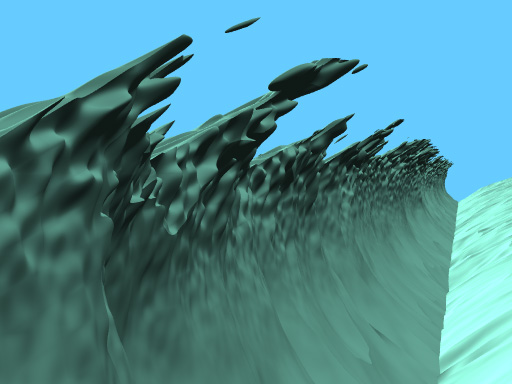
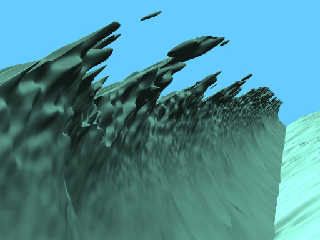
Here's a close-up view of image #3, "in the curl," to try and show the true
nature of what's going on. The noise does indeed come to a sharp point as
it reaches the tips of the triangle waves. You're right. But then it comes
back with a vengeance--in its typical rounded form--right after that.

I could be wrong, but I don't think there is a *particular* controlling
function at work here.  That is, POV-Ray seems to treat each of the three
functions "equally," so that the final result is a blending of all
three...but only where all three functions happen to coincide in space. At
least, that's what I see from the purely visual evidence.

The stretched-out nature of the noise is the result of TWO things, it seems:
 the "curling function" that I added to it; and the curled triangle waves
themselves. I had originally assumed that ONLY the curling
function-added-to-noise was responsible.

Another little thought struck me: Fading in even smaller-scale noise--but
only out at the extreme tips--to further break up the noise that's already
there  Might add a bit more realism.

Ken
Post a reply to this message
Attachments:
Download 'iso_waves_7.jpg' (53 KB)
Preview of image 'iso_waves_7.jpg'
|
|
| |
| |
|
|
|
|
| |
| |
|
|
"Kenneth" <kdw### [at] earthlinknet> wrote in message
news:web.456c6cd0d6d04fcfb5347a330@news.povray.org...
> I could be wrong, but I don't think there is a *particular* controlling
> function at work here.  That is, POV-Ray seems to treat each of the three
> functions "equally," so that the final result is a blending of all
> three...but only where all three functions happen to coincide in space. At
> least, that's what I see from the purely visual evidence.

Well it's not up to pov, it's maths, but yes you're right I used the term
"controlling" to over-emphasize my point :-D

The point is, no functions can eliminate the underlying hard-edged function,
but as you rightly demonstrate they can disguise it. It's certainly less
noticeable in that render than I expected.

Anyway, onto a possible solution I've been toying with in my head, though as
noted before the hard edges in my scene just don't bug me enough to go to
the trouble of fixing them! But anyhow, the solution is to smooth out the
edges in the underlying function itself, which is entirely possible by
simply creating a function that looks like it everywhere else.

For a general purpose solution, if you have a function f(x,y,z) returning
values between 0 and 1 and you want sharp edges to fade out as it approaches
1 you could just do (warning crazy untested maths!):
function { max(min(.9, f(x,y,z)), 1-.1*(pow(f(x,y,z)/(2*.1),2)+.75) ) }
Pretty sure that maths is right... Basically you're substituting a y=x curve
with a y=x*x, matched up so the transition is at the point where x*x has the
same gradient... hmm I should probably test that maths but it's late and
anyway it's no use to me...

You see my problem's more complex, because I have, quite deliberately, made
the foam occur on a pattern that isn't strictly related to the output of my
wave function, so I can't simply use my trickery to round off the edges.
However I could subtract my foam's controlling pattern from my wave pattern,
since they both have sharp edges that coincide, and hope they cancel out!
But more likely it would severely alter the shape of the foamy areas and I
really don't want to do that. I'm very happy with the shape of the foam, so
if I can't isolate the sharp edges and smooth only them, I'll just have to
live with them.

--
Tek
http://evilsuperbrain.com
Post a reply to this message
|
|
| |
| |
|
|
|
|
| |
| |
|
|
"Kenneth" <kdw### [at] earthlinknet> wrote in message
news:web.45642ca9d6d04fcf838ba8a10@news.povray.org...
> "Stephen" <mcavoys_AT_aolDOT.com> wrote:
>> "Kenneth" <kdw### [at] earthlinknet> wrote:
>
>>These waves look like a swell coming in from
>> the Atlantic with the wind building up to force 8 or 9.
>>
>
> Right you are! I live near the coast of Virginia, USA, and we get crazy
> "Nor'easter" storms all the time. One is going on right now, in fact.
> Would
> love to be down at the oceanfront to witness it!


     You should see the waves hitting the side of our coast road in North
Wales - the cops close the 5 mile long road because the waves carry rocks!

      <bad for your car and head!>

      Nice experiment Ken. Looks good to me.

       (Subject sorted)  Heh...  ;)


        ~Steve~


> Ken
Post a reply to this message
|
|
| |
| |
|
|
|
|
| |
|
|