|
|
|
|
|
|
| |
| |
|
|
|
|
| |
| |
|
|
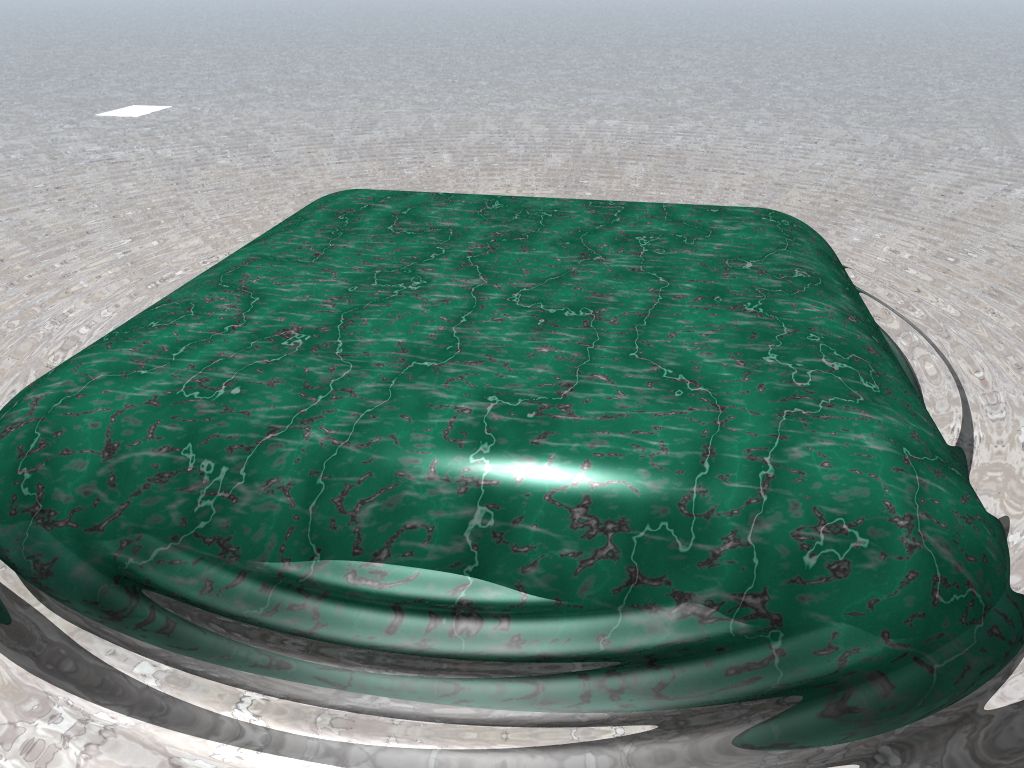
Well, let's somewhat better... (Although there's still no glassware.) It
seems just putting something *under* the water made all the difference.

(It's Stone8 from stones.inc. Unfortunately, it appears to have a
nonzero ambient setting. *sigh* So I will have to use some other texture
for the final render...)
Post a reply to this message
Attachments:
Download 'glassware03-final.jpg' (121 KB)
Preview of image 'glassware03-final.jpg'
|
|
| |
| |
|
|
|
|
| |
| |
|
|
Orchid XP v3 wrote:

> Well, let's somewhat better... (Although there's still no glassware.) It
> seems just putting something *under* the water made all the difference.
>

You're getting there.
The color of water is determined by what's underneath it because water by
itself is colorless. Have a look at a swimmingpool :)

> (It's Stone8 from stones.inc. Unfortunately, it appears to have a
> nonzero ambient setting. *sigh* So I will have to use some other texture
> for the final render...)

I have removed ALL ambient settings from all predefined textures. that way I
can control everything in the main file without having to worry about
textures being too bright.

--
Ger
Post a reply to this message
|
|
| |
| |
|
|
|
|
| |
| |
|
|
"Orchid XP v3" <voi### [at] dev null> a écrit dans le message de news:
452d4f41@news.povray.org...
> Well, let's somewhat better... (Although there's still no glassware.) It
> seems just putting something *under* the water made all the difference.
>
> (It's Stone8 from stones.inc. Unfortunately, it appears to have a
> nonzero ambient setting. *sigh* So I will have to use some other texture
> for the final render...)
>
That's better indeed :)
For the Stone8, why don't you copy and paste it in your pov scen so you can
change the finish settings?
And what is this strange square on the left?
Marc null> a écrit dans le message de news:
452d4f41@news.povray.org...
> Well, let's somewhat better... (Although there's still no glassware.) It
> seems just putting something *under* the water made all the difference.
>
> (It's Stone8 from stones.inc. Unfortunately, it appears to have a
> nonzero ambient setting. *sigh* So I will have to use some other texture
> for the final render...)
>
That's better indeed :)
For the Stone8, why don't you copy and paste it in your pov scen so you can
change the finish settings?
And what is this strange square on the left?
Marc
Post a reply to this message
|
|
| |
| |
|
|
|
|
| |
| |
|
|
>> Well, let's somewhat better... (Although there's still no glassware.) It
>> seems just putting something *under* the water made all the difference.
>>
>> (It's Stone8 from stones.inc. Unfortunately, it appears to have a
>> nonzero ambient setting. *sigh* So I will have to use some other texture
>> for the final render...)
>>
> That's better indeed :)
> For the  Stone8, why don't you copy and paste it in your pov scen so you can
> change the finish settings?

Because, being a predefined texture, the parts that make it up are
actually declared in 12 seperate places and then gradually merged
together... heh.

By the way, forgot to mention... 9 hours + 50 minutes render time.
(Can't wait to do the radiosity version!)

> And what is this strange square on the left?

If anybody can figure out what the hell that actually is, LET ME KNOW! >_<

I theorise it's something to do with the edge of my isosurface. The
water around the stone block is an isosurface, but the infinite stretch
of water in the background is a flat plane. That square is roughly on
the seam between the two...

Weirdly, I changed the ground texture and the square vanished. Go figure!
Post a reply to this message
|
|
| |
| |
|
|
|
|
| |
| |
|
|
"Orchid XP v3" <voi### [at] devnull> a écrit dans le message de news:
452d5c31$1@news.povray.org...
> Because, being a predefined texture, the parts that make it up are
> actually declared in 12 seperate places and then gradually merged
> together... heh.

Oh sorry I forgot that, I didn't use predefined textures for a long time,
and now I remember that is one of the reasons :)

>
> By the way, forgot to mention... 9 hours + 50 minutes render time.
> (Can't wait to do the radiosity version!)

For the moment your scene does not need radiosity does it?

>
> > And what is this strange square on the left?
>
> If anybody can figure out what the hell that actually is, LET ME KNOW! >_<

 Arthur Dent's towel?
>
> I theorise it's something to do with the edge of my isosurface. The
> water around the stone block is an isosurface, but the infinite stretch
> of water in the background is a flat plane. That square is roughly on
> the seam between the two...

Strange

>
> Weirdly, I changed the ground texture and the square vanished. Go figure!

Strange again

Marc
Post a reply to this message
|
|
| |
| |
|
|
|
|
| |
| |
|
|
On Wed, 11 Oct 2006 22:08:32 +0100 Orchid XP v3 wrote:

> Well, let's somewhat better... (Although there's still no glassware.) It
> seems just putting something *under* the water made all the difference.
>
> (It's Stone8 from stones.inc. Unfortunately, it appears to have a
> nonzero ambient setting. *sigh* So I will have to use some other texture
> for the final render...)

looks nice.
in my eyes water is too clean. maybe you try to add wrinkles on surface.
second suggestion: when I let fallen an cube into water I do not see one
concentric circle, I see four running away from every side of my cube.
Post a reply to this message
|
|
| |
| |
|
|
|
|
| |
| |
|
|
"Orchid XP v3" <voi### [at] devnull> wrote in message
news:452d4f41@news.povray.org...

> (It's Stone8 from stones.inc. Unfortunately, it appears to have a
> nonzero ambient setting. *sigh* So I will have to use some other texture
> for the final render...)

texture {
 T_Stone8
 finish {ambient 0.005}
}

I do that every time I use one of the stone textures, or they end up glowing
too much.
Post a reply to this message
|
|
| |
| |
|
|
|
|
| |
| |
|
|
Ger <No.### [at] ThankYou> wrote:
> The color of water is determined by what's underneath it because water by
> itself is colorless. Have a look at a swimmingpool :)

Swimming pools are tricky to judge.  Every one i've ever seen is *painted*
baby boy blue.

Water is colorless at the shallow depth that Orchid is rendering.  However,
water absorbs light differentially by wavelength.  Red is the first to go,
and green fades as you go deeper.  If your body of water is deep enough, it
will show blue all by itself.  (Otherwise, the oceans would be the color of
basalt and diatomaceous earth.)
Post a reply to this message
|
|
| |
| |
|
|
|
|
| |
| |
|
|
It's a bit brute force but you can always do:
global_settings { ambient_light 0 }

Looking much better BTW. I suggest make the ripples smaller but nice work on
the materials :)

--
Tek
http://evilsuperbrain.com

"Orchid XP v3" <voi### [at] devnull> wrote in message
news:452d4f41@news.povray.org...
> Well, let's somewhat better... (Although there's still no glassware.) It
> seems just putting something *under* the water made all the difference.
>
> (It's Stone8 from stones.inc. Unfortunately, it appears to have a
> nonzero ambient setting. *sigh* So I will have to use some other texture
> for the final render...)
>
Post a reply to this message
|
|
| |
| |
|
|
|
|
| |
| |
|
|
"Tek" <tek### [at] evilsuperbraincom> wrote:
> It's a bit brute force but you can always do:
> global_settings { ambient_light 0 }

Before using that, make sure you don't want to see the sun.  If you do, the
global ambient_light of 0 will make the sun (and reflections of it)
disappear.
Post a reply to this message
|
|
| |
| |
|
|
|
|
| |
| |
|
|
Ger <No.### [at] ThankYou> wrote:
> Orchid XP v3 wrote:
>
> > Well, let's somewhat better... (Although there's still no glassware.) It
> > seems just putting something *under* the water made all the difference.
> >
>
> You're getting there.
> The color of water is determined by what's underneath it because water by
> itself is colorless. Have a look at a swimmingpool :)

Are you using media?  Try "absorption" color and put a little blue.  Also
try "extinction".

Let _magnitude represent the strength of absorption as a single floating-pt
number, such as 0.05 or 2.5, etc.

absorption rgb <0.1 0.2 0.7>*_magnitude
extinction 1
Post a reply to this message
|
|
| |
| |
|
|
|
|
| |
| |
|
|
"Orchid XP v3" <voi### [at] devnull> wrote in message
news:452d4f41@news.povray.org...
> Well, let's somewhat better... (Although there's still no glassware.) It
> seems just putting something *under* the water made all the difference.

    And wouldn't that be natural in real life? What you've got to determine
is the depth of your water.

     Is it a shallow lake, or a deep sea? Shallower, clearer. Deeper,
darker.

     Also, if that's 9 hours 'work' time, then you need to reduce that.
That's wasted chat-up lines...  ;)


       ~Steve~
Post a reply to this message
|
|
| |
| |
|
|
|
|
| |
| |
|
|
"Orchid XP v3" <voi### [at] devnull> schreef in bericht
news:452d5c31$1@news.povray.org...
>
> Because, being a predefined texture, the parts that make it up are
> actually declared in 12 seperate places and then gradually merged
> together... heh.
>
You could , like Alain did for metals.inc, change all the stones.inc ambient
statements and save it as a stones2.inc (or whatever).
Solves the problem.

Thomas
Post a reply to this message
|
|
| |
| |
|
|
|
|
| |
| |
|
|
> "Tek" <tek### [at] evilsuperbraincom> wrote:
> > It's a bit brute force but you can always do:
> > global_settings { ambient_light 0 }
>
"EagleSun" <nomail@nomail> wrote:
> Before using that, make sure you don't want to see the sun.  If you do, the
> global ambient_light of 0 will make the sun (and reflections of it)
> disappear.

If you must... :-)

   looks_like
   {  sphere
      {  0, R
         pigment { rgb 1 } //renders as light_source color
         finish { diffuse 1 }
         double_illuminate
      }
   }
Post a reply to this message
|
|
| |
| |
|
|
|
|
| |
| |
|
|
> looks nice.

Thanks.

> in my eyes water is too clean. maybe you try to add wrinkles on surface.

Possibly... OTOH, I'm going for a "clean" look. We'll see.

> second suggestion: when I let fallen an cube into water I do not see one
> concentric circle, I see four running away from every side of my cube.

Agreed. I have just worked out a new way to do this - but it makes the
render time increase to a whopping 10 hours! o__O
Post a reply to this message
|
|
| |
| |
|
|
|
|
| |
| |
|
|
> By the way, forgot to mention... 9 hours + 50 minutes render time.
> (Can't wait to do the radiosity version!)

Actually, that's a lie. The version I posted rendered in under 1 hour.
The *new* version renders in 10 hours...
Post a reply to this message
|
|
| |
| |
|
|
|
|
| |
| |
|
|
>> (It's Stone8 from stones.inc. Unfortunately, it appears to have a
>> nonzero ambient setting. *sigh* So I will have to use some other texture
>> for the final render...)
>
> texture {
>  T_Stone8
>  finish {ambient 0.005}
> }
>
> I do that every time I use one of the stone textures, or they end up glowing
> too much.

I tried that, but it didn't seem to affect the image in any way... (But
then, I tried to set it to 0.)
Post a reply to this message
|
|
| |
| |
|
|
|
|
| |
| |
|
|
>      Also, if that's 9 hours 'work' time, then you need to reduce that.
> That's wasted chat-up lines...  ;)

:-P

No, that's 9 hours of render time. (And, as I just corrected myself, the
image posted here is *not* the version that takes 9 hours...)
Post a reply to this message
|
|
| |
| |
|
|
|
|
| |
| |
|
|
>> The color of water is determined by what's underneath it because water by
>> itself is colorless. Have a look at a swimmingpool :)
>
> Swimming pools are tricky to judge.  Every one i've ever seen is *painted*
> baby boy blue.
>
> Water is colorless at the shallow depth that Orchid is rendering.  However,
> water absorbs light differentially by wavelength.  Red is the first to go,
> and green fades as you go deeper.  If your body of water is deep enough, it
> will show blue all by itself.  (Otherwise, the oceans would be the color of
> basalt and diatomaceous earth.)

I've heard this one before... Does water actually absorb light, or is
this due to scattering like with the sky?
Post a reply to this message
|
|
| |
| |
|
|
|
|
| |
| |
|
|
>> Because, being a predefined texture, the parts that make it up are
>> actually declared in 12 seperate places and then gradually merged
>> together... heh.
>
> Oh sorry I forgot that, I didn't use predefined textures for a long time,
> and now I remember that is one of the reasons :)

Oh yeah. ;-)

>> By the way, forgot to mention... 9 hours + 50 minutes render time.
>> (Can't wait to do the radiosity version!)
>
> For the moment your scene does not need radiosity does it?

It does once you turn off the ambient setting on the sea floor. :-S
(Actually, the radiosity version I'm working on is really quite nice.
But... slow.)

>>> And what is this strange square on the left?
>> If anybody can figure out what the hell that actually is, LET ME KNOW! >_<
>
> Strange

Uh, yes.

>> Weirdly, I changed the ground texture and the square vanished. Go figure!
>
> Strange again

And also yes...

I can only think it's some kind of internal reflection issue, or maybe
something about coincident surfaces...
Post a reply to this message
|
|
| |
| |
|
|
|
|
| |
| |
|
|
>> Because, being a predefined texture, the parts that make it up are
>> actually declared in 12 seperate places and then gradually merged
>> together... heh.
>>
> You could , like Alain did for metals.inc, change all the stones.inc ambient
> statements and save it as a stones2.inc (or whatever).
> Solves the problem.

Actually, stones.inc simply contains this:

   #include "stones1.inc"
   #include "stones2.inc"

So maybe I won't be using your idea. ;-)

Note also that several include files also use colors.inc and friends to
get their effect; changing "just one file" is way harder than it sounds.
Post a reply to this message
|
|
| |
| |
|
|
|
|
| |
| |
|
|
Orchid XP v3 <voi### [at] devnull> wrote:
> >> The color of water is determined by what's underneath it because water by
> >> itself is colorless. Have a look at a swimmingpool :)
> >
> > Swimming pools are tricky to judge.  Every one i've ever seen is *painted*
> > baby boy blue.
> >
> > Water is colorless at the shallow depth that Orchid is rendering.  However,
> > water absorbs light differentially by wavelength.  Red is the first to go,
> > and green fades as you go deeper.  If your body of water is deep enough, it
> > will show blue all by itself.  (Otherwise, the oceans would be the color of
> > basalt and diatomaceous earth.)
>
> I've heard this one before... Does water actually absorb light, or is
> this due to scattering like with the sky?

http://www.seafriends.org.nz/phgraph/water.htm#colour

All you need to know about water and light.  I used this for the basis of my
underwater scene at the CGTalk lighting challenge "Under the Boardwalk".

I found it much more effective to leave the water perfectly clear (rgbt 1)
and use absorption and scattering media (no attenuation either).  Basically
you absorb the inverse of the water colour.  The colour of the scattering
(if you want scattering) should be based on the scattering particle colours
(i.e. dirt, algae, etc.).  In my example below you will need to play with
the numbers in the fade distance function (FD) according to the scale of
your scene.

-tgq

//START

#declare WCol=rgb <0.51373, 0.70588, 0.70588>; //water colour

#declare MWater=
  material{
    texture{
      pigment{rgbt 1}
      finish{conserve_energy  diffuse 0.0  ambient 0  reflection{0 1 fresnel
on metallic 0}}
      normal{P1}
    }

    #local FD=-(1000/(6*25.4))/ln(0.58);
    interior{
      ior 1.33
      media{
        absorption rgb 1-WCol //coastal
        density{rgb 1/FD}
      }
      media{
        method 3
        //intervals 12
        //samples 60,100
        jitter 0.5
        scattering{4,rgb <0.74118, 0.71765, 0.41961>}
        density{
          bozo
            color_map {
              [0.0 rgb 1/100]
              [1.0 rgb 1/200]
            }
            scale 1/2
        }
      }
    }
  }
//END


-tgq
Post a reply to this message
|
|
| |
| |
|
|
|
|
| |
| |
|
|
"Orchid XP v3" <voi### [at] devnull> wrote in message
news:452e7cc8$1@news.povray.org...
>> By the way, forgot to mention... 9 hours + 50 minutes render time. (Can't
>> wait to do the radiosity version!)
>
> Actually, that's a lie.

     Liar.  :op

   ~Steve~
Post a reply to this message
|
|
| |
| |
|
|
|
|
| |
| |
|
|
"Orchid XP v3" <voi### [at] devnull> wrote in message
news:452e7d52$1@news.povray.org...
>>      Also, if that's 9 hours 'work' time, then you need to reduce that.
>> That's wasted chat-up lines...  ;)
>
> :-P

    :o)  (I wasn't kidding either...)


>
> No, that's 9 hours of render time. (And, as I just corrected myself, the
> image posted here is *not* the version that takes 9 hours...)

    Now I'm intrigued. Please post at your earliest convenience - I think
you have an hour to go...


     ~Steve~
Post a reply to this message
|
|
| |
| |
|
|
|
|
| |
| |
|
|
"Orchid XP v3" <voi### [at] devnull> schreef in bericht
news:452e7f8e@news.povray.org...
>
> Actually, stones.inc simply contains this:
>
>   #include "stones1.inc"
>   #include "stones2.inc"
>
> So maybe I won't be using your idea. ;-)
>
<grin> I confess, I didn't check first  :-)

Thomas
Post a reply to this message
|
|
| |
| |
|
|
|
|
| |
| |
|
|
Among other things, Ger saw fit to write:

> You're getting there.
> The color of water is determined by what's underneath it because water by
> itself is colorless. Have a look at a swimmingpool :)

Our swimming-pool is not painted, the walls and floor are just bare concrete
(a bit greenish with time). When it has been just filled with clear water
(from the well) it has a beautiful bluish-greenish tint which becomes bluer
(can I use this word?) after adding some chemicals (especially copper
sulfate). After a couple of months of use, and if we have been unlucky with
the weather (too many storms), the water is completelly dark green, and I
mean *green* you cannot see the floor and sometimes your own feet. With
some effort it comes back to transparency, but still with a blue tint.

Yes, I know about the chemicals, the particles and the algae, it's just that
looking at a swimming-pool is not the best way to know what colour water
has. Nevertheless, I always see a blue tint, in the just-filled
swimming-pool and in the bathtub (but it's chlorinated water), just look at
your own skin underwater, it doesn't have the same colour as outside.

--
light_source{9+9*x,1}camera{orthographic look_at(1-y)/4angle 30location
9/4-z*4}light_source{-9*z,1}union{box{.9-z.1+x clipped_by{plane{2+y-4*x
0}}}box{z-y-.1.1+z}box{-.1.1+x}box{.1z-.1}pigment{rgb<.8.2,1>}}//Jellby
Post a reply to this message
|
|
| |
| |
|
|
|
|
| |