|
|
|
|
|
|
| |
| |
|
|
|
|
| |
| |
|
|
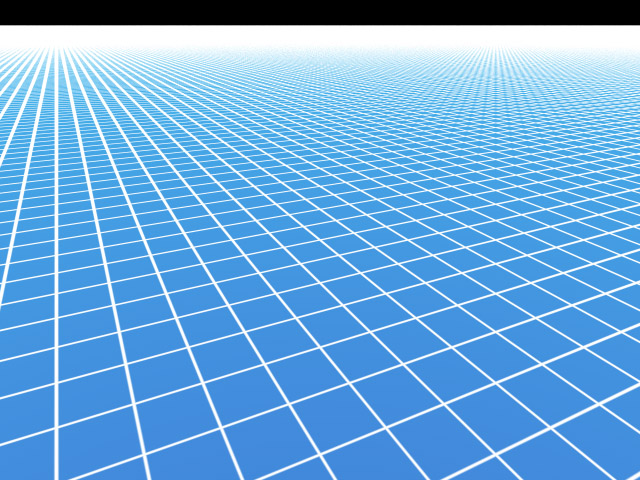
See "Re: TRON Game Grid..." in povray.newusers. The grid lines get bigger as
they get farther away from the camera.

 - Slime
 [ http://www.slimeland.com/ ]
Post a reply to this message
Attachments:
Download 'constantgrid.jpg' (161 KB)
Preview of image 'constantgrid.jpg'
|
|
| |
| |
|
|
|
|
| |
| |
|
|
"Slime" <fak### [at] email address> wrote:
> See "Re: TRON Game Grid..." in povray.newusers. The grid lines get bigger as
> they get farther away from the camera.
>
> - Slime
> [ http://www.slimeland.com/ ]
Nice work, far better then I could do but its still missing something.
http://www.wwwmwww.com/Matt/grid5.png
Refering to the above, things look about correct when the camera is looking
at 45 degrees to the grid lines (the black arrow). However when the camera
is looking down one of the grid lines (as it is with the red arrow) the
effect looks backwards. The grid line should narrow in this direction and
you can see that it doesn't. Also the grid lines perpendicular to this one
shouldn't narrow with distance near as much as they do.
Check out this frame from the film:
http://www.wwwmwww.com/Matt/grid.png
Note when you are looking parallel to the grid lines its the perpendicular
ones that bleed together and not the not the ones that you are looking
along that are merging.
To prove that the grid lines narrow about correctly when the camera looks
along them look at this:
http://www.wwwmwww.com/Matt/grid4.png
The top image is a frame from TRON. The bottom image is a POV-Ray sceen
rendered using the grid I posted in "Re: TRON Game Grid..." in
povray.newusers.
Carl address> wrote:
> See "Re: TRON Game Grid..." in povray.newusers. The grid lines get bigger as
> they get farther away from the camera.
>
> - Slime
> [ http://www.slimeland.com/ ]
Nice work, far better then I could do but its still missing something.
http://www.wwwmwww.com/Matt/grid5.png
Refering to the above, things look about correct when the camera is looking
at 45 degrees to the grid lines (the black arrow). However when the camera
is looking down one of the grid lines (as it is with the red arrow) the
effect looks backwards. The grid line should narrow in this direction and
you can see that it doesn't. Also the grid lines perpendicular to this one
shouldn't narrow with distance near as much as they do.
Check out this frame from the film:
http://www.wwwmwww.com/Matt/grid.png
Note when you are looking parallel to the grid lines its the perpendicular
ones that bleed together and not the not the ones that you are looking
along that are merging.
To prove that the grid lines narrow about correctly when the camera looks
along them look at this:
http://www.wwwmwww.com/Matt/grid4.png
The top image is a frame from TRON. The bottom image is a POV-Ray sceen
rendered using the grid I posted in "Re: TRON Game Grid..." in
povray.newusers.
Carl
Post a reply to this message
|
|
| |
| |
|
|
|
|
| |
| |
|
|
The effect I was trying to create was grid lines that don't get thinner as
they go off into the distance. As you point out, it doesn't appear that TRON
used that sort of effect after all.

Looking at the last image you linked to (grid4.png), I don't believe there
is any sort of effect being applied at all. The reason your image doesn't
fade to white at the horizon like the original does is a lack of
anti-aliasing - rays are not hitting the white lines often enough to know
they're there. Try AA settings +AM2 +A0.0 +R3 and see what sort of results
you get.

 - Slime
 [ http://www.slimeland.com/ ]
Post a reply to this message
|
|
| |
| |
|
|
|
|
| |
| |
|
|
"Slime" <fak### [at] emailaddress> wrote:
> Looking at the last image you linked to (grid4.png), I don't believe there
> is any sort of effect being applied at all. The reason your image doesn't
> fade to white at the horizon like the original does is a lack of
> anti-aliasing - rays are not hitting the white lines often enough to know
> they're there. Try AA settings +AM2 +A0.0 +R3 and see what sort of results
> you get.
>
>  - Slime
>  [ http://www.slimeland.com/ ]

The AA is quite high in that last image already. I think that one was made
with +AM2 +A0.0 +R4. I've played with this enough to know that there is
more going on in the TRON images then just AA.  For example the grid fades
to all white... not all black as it should.  Remember the white grid lines
only cover about 2% of the grid surface.  The perpandicular grid lines are
certainly getting wider with distance from the camera.  So much so that the
surface is all white just a few grid squares away from the camera in that
last shot.

Carl
Post a reply to this message
|
|
| |
| |
|
|
|
|
| |
| |
|
|
"Slime" <fak### [at] emailaddress> wrote:
> See "Re: TRON Game Grid..." in povray.newusers. The grid lines get bigger as
> they get farther away from the camera.
>
>  - Slime
>  [ http://www.slimeland.com/ ]

Looks like there is no width to the lines, which means POV-Ray doesn't know
what to do with it, producing the white-out in the distance.  Suppose you
define a width to the line.. say 1 mm or something small... then the lines
should get thinner near the horizon.
Post a reply to this message
|
|
| |
| |
|
|
|
|
| |
| |
|
|
"Carl" <car### [at] semisouthcom> wrote in message
news:web.44b1a9a2e4538ab647c7ed100@news.povray.org...
> The AA is quite high in that last image already. I think that one was
made
> with +AM2 +A0.0 +R4.

I might be mistaken, but don't you loose the adaptive advantage of +am2
if you have +a0.0 ?

cu!
--
#macro G(b,e)b+(e-b)*C/50#end#macro _(b,e,k,l)#local C=0;#while(C<50)
sphere{G(b,e)+3*z.1pigment{rgb G(k,l)}finish{ambient 1}}#local C=C+1;
#end#end _(y-x,y,x,x+y)_(y,-x-y,x+y,y)_(-x-y,-y,y,y+z)_(-y,y,y+z,x+y)
_(0x+y.5+y/2x)_(0x-y.5+y/2x)            // ZK http://www.povplace.com
Post a reply to this message
|
|
| |
| |
|
|
|
|
| |
| |
|
|
"Zeger Knaepen" <zeg### [at] povplacecom> wrote:
> I might be mistaken, but don't you loose the adaptive advantage of +am2
> if you have +a0.0 ?

Yes you do but if you have a very thin line going through a pixel it could
easily be missed all together if its set to anything else.

Carl
Post a reply to this message
|
|
| |
| |
|
|
|
|
| |
| |
|
|
> The AA is quite high in that last image already. I think that one was made
> with +AM2 +A0.0 +R4. I've played with this enough to know that there is
> more going on in the TRON images then just AA.  For example the grid fades
> to all white... not all black as it should.  Remember the white grid lines
> only cover about 2% of the grid surface.  The perpandicular grid lines are
> certainly getting wider with distance from the camera.  So much so that the
> surface is all white just a few grid squares away from the camera in that
> last shot.

I guess the blurred grid effect in TRON is due to MIP-Mapping
http://en.wikipedia.org/wiki/Mipmap
I remember to have seen blurred textures in the far in
some games. To reproduce this with just the SDL should be
some work, especially when trilinear filtering on the edges
between different LOD images is desired.

Sebastian
Post a reply to this message
|
|
| |
| |
|
|
|
|
| |
| |
|
|
"Sebastian" <van### [at] gmxde> a écrit dans le message de news:
pan### [at] gmxde...
>
> I guess the blurred grid effect in TRON is due to MIP-Mapping
> http://en.wikipedia.org/wiki/Mipmap

I see at the end of the wikipedia page that MIP-Mapping was invented by
Lance William in 1983
TRON was out in 1982
Maybe Lance William invented time travel as well? ;-)

Marc
Post a reply to this message
|
|
| |
| |
|
|
|
|
| |
| |
|
|
>>
>> I guess the blurred grid effect in TRON is due to MIP-Mapping
>> http://en.wikipedia.org/wiki/Mipmap
>
> I see at the end of the wikipedia page that MIP-Mapping was invented by
> Lance William in 1983
> TRON was out in 1982
> Maybe Lance William invented time travel as well? ;-)

Hmm, good point. :-)
Post a reply to this message
|
|
| |
| |
|
|
|
|
| |
| |
|
|
"Slime" <fak### [at] emailaddress> wrote:
> See "Re: TRON Game Grid..." in povray.newusers. The grid lines get bigger as
> they get farther away from the camera.
>
>  - Slime
>  [ http://www.slimeland.com/ ]

How's this look? All constant size, but using 3D "gridlines" seems to mimic
the effect better than any 2D pattern on the floor plane, since the pattern
becomes infinitely thin as it approaches the horizon.

-Mike

// ----------------------------------------

camera {
  location  <-15.0, 2, -15.0>
  direction 1.5*z
  right     x*image_width/image_height
  look_at   <-5.0, -4.0,  10.0>

// ----------------------------------------

#declare gridtex = texture {
 pigment { color White }
 finish { ambient 1 diffuse 0 }
}
#declare R = 0.025;
#declare i = 0;
#while (i<101)

        cylinder { <-50, 0, -50+i>, <50, 0, -50+i>, R texture {gridtex }
no_shadow}
        cylinder { <-50+i, 0, 50>, <-50+i, 0, -50>, R texture {gridtex }
no_shadow}

        #declare i = i+1;
#end

// ----------------------------------------
Post a reply to this message
Attachments:
Download 'gridtest.png' (40 KB)
Preview of image 'gridtest.png'

|
|
| |
| |
|
|
|
|
| |
| |
|
|
"Mike Sobers" <sob### [at] mindspringcom> wrote:

> How's this look? All constant size, but using 3D "gridlines" seems to mimic
> the effect better than any 2D pattern on the floor plane, since the pattern
> becomes infinitely thin as it approaches the horizon.
>
> -Mike
>

Of course, you'd need to add a } to the camera statement. There are some
limitations to this approach, as seen below.  Maybe the y-dimension
thickness of the cylinders could be scaled according to their distance from
the camera using a matrix transformation?  That would fix the fact that
objects look like they're sitting on top of the gridlines (which they are).
 You'd still have the problem of no shadows being cast on the gridlines.

It's sometimes hard to mimic 2D raster graphics with z-buffering using
"real" 3D objects.

Mike
Post a reply to this message
Attachments:
Download 'gridtest2.png' (53 KB)
Preview of image 'gridtest2.png'

|
|
| |
| |
|
|
|
|
| |
| |
|
|
Am Mon, 10 Jul 2006 13:46:07 -0400 schrieb Mike Sobers:

>
> Of course, you'd need to add a } to the camera statement. There are some
> limitations to this approach, as seen below.  Maybe the y-dimension
> thickness of the cylinders could be scaled according to their distance from
> the camera using a matrix transformation?  That would fix the fact that
> objects look like they're sitting on top of the gridlines (which they are).
>  You'd still have the problem of no shadows being cast on the gridlines.

Actually I was trying the same. At the moment I use a cone under the
camera as ground. Looks not too bad. I'll post some images later.

Sebastian
Post a reply to this message
|
|
| |
| |
|
|
|
|
| |
| |
|
|
"Carl" <car### [at] semisouthcom> wrote in message
news:web.44b263b7e4538ab670dc520d0@news.povray.org...
> "Zeger Knaepen" <zeg### [at] povplacecom> wrote:
>> I might be mistaken, but don't you loose the adaptive advantage of +am2
>> if you have +a0.0 ?
>
> Yes you do but if you have a very thin line going through a pixel it could
> easily be missed all together if its set to anything else.

oh, yes, ic, with +r4 or higher you do get an advantage by using +am2

... or am I totally misinterpreting the adaptive aa-method? :)

cu!
--
#macro G(b,e)b+(e-b)*C/50#end#macro _(b,e,k,l)#local C=0;#while(C<50)
sphere{G(b,e)+3*z.1pigment{rgb G(k,l)}finish{ambient 1}}#local C=C+1;
#end#end _(y-x,y,x,x+y)_(y,-x-y,x+y,y)_(-x-y,-y,y,y+z)_(-y,y,y+z,x+y)
_(0x+y.5+y/2x)_(0x-y.5+y/2x)            // ZK http://www.povplace.com
Post a reply to this message
|
|
| |
| |
|
|
|
|
| |
| |
|
|
I see everyone has been busy and things are looking better.  Now to try and
digest all this info.

Carl
Post a reply to this message
|
|
| |
| |
|
|
|
|
| |
| |
|
|
I seem to remember that TRON used vector graphics.
Instead of sweeping the electron beams to paint the
whole screen only the object outlines get painted.
Any background bluring might have been intentionally
added when they merged the layered images together.
Post a reply to this message
|
|
| |
| |
|
|
|
|
| |
| |
|
|
Here is my latest try...

However you can now tell the grid lines have height.  I have another idea
but I'll discuss that over at "Re: TRON Game Grid..." in povray.newusers.
Post a reply to this message
Attachments:
Download 'test1.png' (75 KB)
Preview of image 'test1.png'

|
|
| |
| |
|
|
|
|
| |