|
|
|
|
|
|
| |
| |
|
|
|
|
| |
| |
|
|
playing with media and clouds, I tried to write a macro to create binary
df3 files from within SDL.

Of cause I failed 'cause it seems to be unpossible to write a binary
zero to a file (will allways be interpreted as end of string).

I renembered a macro created by Gilles Tran (makeclouds) which included
to render a series of images corresponding to slices of the density
volume and merging these images with an external program together.

In order to simplify this approach I wrote my own macro, which writes a
density file in ASCII format and convert it with a tiny PERL script into
the binary df3 format.

Eventhough it still needs an external script, I think it's a more
versatile approach adressing the same problem. There is no more need to
render slices anymore; instead of this you get only one file which have
to be converted. As this file is pure ASCII it can be converted easely
without writing a program which have to handle image formats and data.

OUTLINE:
The macro itself takes a pre-declared pigment as input. Together with
the file name to write to and the voxel resolution, the corners of
density extents are specified.
The pigment is turned into a vector function which is evaluated for the
midpoint of every voxel. The resulting color value will then be
interpreted as density by means of the .gray operator and written to the
ascii file.

I post the macro together with the PERL script in p.b.s

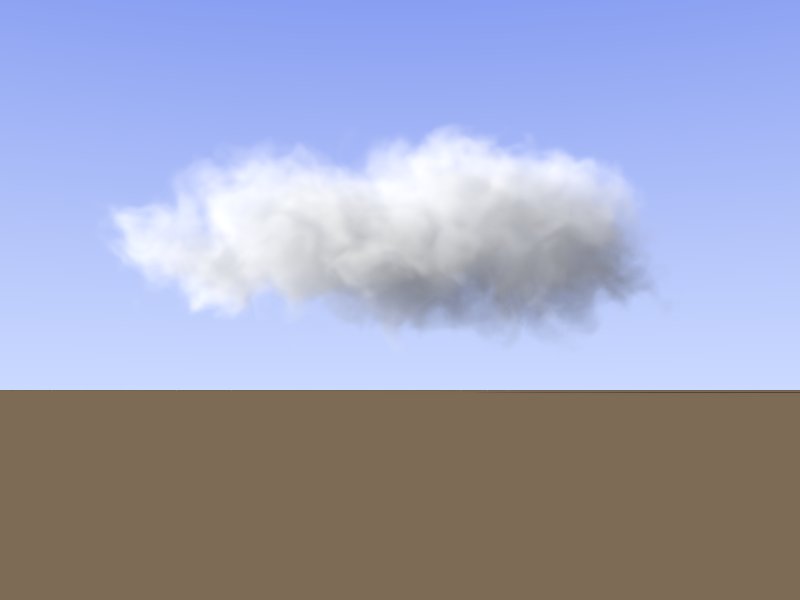
the image shows just a simple test:

generation of the ascii density file (90x30x60 = 162000 voxels) : 10s
conversion to binary df3 : < 1s

comments, critics and suggestions for improvment are welcome (as ever)

... dave
Post a reply to this message
Attachments:
Download 'df3_cloud.jpg' (15 KB)
Preview of image 'df3_cloud.jpg'
|
|
| |
| |
|
|
|
|
| |
| |
|
|
David El Tom wrote...
  > generation of the ascii density file (90x30x60 = 162000 voxels) : 10s
> conversion to binary df3 : < 1s
>
> comments, critics and suggestions for improvment are welcome (as ever)
>
> ... dave

Really nice, but what about rendering time ?
Post a reply to this message
|
|
| |
| |
|
|
|
|
| |
| |
|
|
LightBeam schrieb:
> David El Tom wrote...
>  > generation of the ascii density file (90x30x60 = 162000 voxels) : 10s
>> conversion to binary df3 : < 1s
>>
>> comments, critics and suggestions for improvment are welcome (as ever)
>>
>> ... dave
>
> Really nice, but what about rendering time ?


Gilles Tran gives a very good comparision between diffrent methods when
it comes to render clouds.

http://www.oyonale.com/ressources/english/sources13.htm

for this one it was appr. 10min with AA and high media-sample settings
(30,100)

... dave
Post a reply to this message
|
|
| |
| |
|
|
|
|
| |
| |
|
|
David El Tom <dav### [at] t-online de> wrote:
> Gilles Tran gives a very good comparision between diffrent methods when
> it comes to render clouds.
> http://www.oyonale.com/ressources/english/sources13.htm
yes very good. I even sucessfully used it in animations.
But the real problem with this method is that you reach the 255 raytrace
limit very soon when one cloud is in front of another.
Would it be possible to hack povray to accept trace levels of >255 ? or at
least not make the pixel black when it reaches the maximum trace level? de> wrote:
> Gilles Tran gives a very good comparision between diffrent methods when
> it comes to render clouds.
> http://www.oyonale.com/ressources/english/sources13.htm
yes very good. I even sucessfully used it in animations.
But the real problem with this method is that you reach the 255 raytrace
limit very soon when one cloud is in front of another.
Would it be possible to hack povray to accept trace levels of >255 ? or at
least not make the pixel black when it reaches the maximum trace level?
Post a reply to this message
Attachments:
Download 'sky_red_cloud.png' (374 KB)
Preview of image 'sky_red_cloud.png'

|
|
| |
| |
|
|
|
|
| |
| |
|
|
Jaap schrieb:
>
> yes very good. I even sucessfully used it in animations.
>
> But the real problem with this method is that you reach the 255 raytrace
> limit very soon when one cloud is in front of another.
> Would it be possible to hack povray to accept trace levels of >255 ? or at
> least not make the pixel black when it reaches the maximum trace level?
>
>
> ------------------------------------------------------------------------
>

if you want to use this approach to get a dense cloud cover there are
some drawbacks. You have to make sure that the containers of the cloud
do not overlap -> this will probably give some strange artefacts.

concerning your questions:
it would be quite tedious to modify the source code and tracing all the
dependencies throughout all the files.
Is there an example of a scene showing those black dots?
And which media settings do you use?
Are you aware, that the docs contain an error in the media section?

DEFAULTS

docs		correct
----		-------
intervals 10	intervals 1
samples 1,1	samples 10,10

I'm not really sure but I always thought intervals spwans a new trace
for each interval.

So try keeping the intervals low and instead raise the samples.

....dave
Post a reply to this message
|
|
| |
| |
|
|
|
|
| |
| |
|
|
David El Tom <dav### [at] t-onlinede> wrote:
> concerning your questions:
> it would be quite tedious to modify the source code and tracing all the
> dependencies throughout all the files.
ok.

> Is there an example of a scene showing those black dots?
found one. (attached)

> And which media settings do you use?
> Are you aware, that the docs contain an error in the media section?

I used:
      media{
        scattering{1,GammaColor(C_Sun,0.3)*0.0003*0.75}
        absorption (1-C_SkyBlue_05)*0.001*0.6
        intervals 1 // (or 2)
        density{
          density_file df3 "include/cloud1.df3"
          interpolate 1
        }
      }
I think the problem is with the ~90 layers in the cloud. If you look at the
cloud at an angle it will be 180 layers? I can overlap a small corner of
clouds without running into problems, but it will if two clouds overlap
more than that.

by the way, the clouds look really nice if you fly along them in an
animation!
Post a reply to this message
Attachments:
Download 'water_test_1.png' (403 KB)
Preview of image 'water_test_1.png'

|
|
| |
| |
|
|
|
|
| |
| |
|
|
also, viewing the clouds exactly along the x,y or z axes does not work.
(I renders them like this to manually adjust the bounding box of the media)
Post a reply to this message
Attachments:
Download 'showcloud_1.png' (80 KB)
Preview of image 'showcloud_1.png'

|
|
| |
| |
|
|
|
|
| |
| |
|
|
"Jaap" <jws### [at] yahoocom> wrote:
> David El Tom <dav### [at] t-onlinede> wrote:
> > Is there an example of a scene showing those black dots?
> found one. (attached)

It's the first few frames of this animation:  (8MB on a slow server)
http://jwstolk.xs4all.nl/wisse/f4animation_test10.mpg

For the reaming frames I disabled most of the clouds.

Note that the problem is not caused by overlapping cloud bounding boxes in
3D, that would be easy to avoid. The problem is when two clouds overlap in
the rendered (2D) image.

of course using less layers for each cloud would allow for some clouds to
overlap, but that makes the clouds look less good.
Post a reply to this message
|
|
| |
| |
|
|
|
|
| |
| |
|
|
Jaap schrieb:
> also, viewing the clouds exactly along the x,y or z axes does not work.
> (I renders them like this to manually adjust the bounding box of the media)
>
>
> ------------------------------------------------------------------------
>

the rectangular shapes looks more like an coincident surface problem
then a max_trace_level problem.

I will check the problem concerning the viewing angle.
Have to check if it's a inherent problem of the density file or it is a
problem of the macro or the script.

I wonder what you mean with layers as the density file compared to a
desity function is like an image_map compared to a procedural texture.

b.t.w really nice animation

... dave
Post a reply to this message
|
|
| |
| |
|
|
|
|
| |
| |
|
|
David El Tom <dav### [at] t-onlinede> wrote:
> the rectangular shapes looks more like an coincident surface problem
> then a max_trace_level problem.
I made sure that the clouds do not overlap in 3D, so unless it's within a
cloud it can't be a coincident surface problem. I think rectangular shapes
make sence if you run out of trace levels becouse another "patch" of cloud
is added.

Gilles decribes them as "vertical lines"
Post a reply to this message
|
|
| |
| |
|
|
|
|
| |
| |
|
|
David El Tom <dav### [at] t-onlinede> wrote:
> I will check the problem concerning the viewing angle.
> Have to check if it's a inherent problem of the density file or it is a
> problem of the macro or the script.
Just note that I used Gilles Tran make cloud code, not your code.
I don't think the problem with the perpendicular view is very important, I'm
probably the only one dat rendered a cloud along one of the axes, using a
parallel camera, and I just did it to measure the size of the cloud.

> b.t.w really nice animation
tank you. did you see the final render/edit I just posted in
povray.binary.animations ?
Post a reply to this message
|
|
| |
| |
|
|
|
|
| |
| |
|
|
Jaap schrieb:
> Just note that I used Gilles Tran make cloud code, not your code.
> I don't think the problem with the perpendicular view is very important, I'm
> probably the only one dat rendered a cloud along one of the axes, using a
> parallel camera, and I just did it to measure the size of the cloud.

I'll check nevertherles , since it bothers me, if something don't work
as expected. ;-)

> tank you. did you see the final render/edit I just posted in
> povray.binary.animations ?
>

impressive. at which school he was taken.
It seems to be a kind of coincindence as my brother has just graduated
to become a professional film-photographer.
To my unfortune he is more into traditional "analogue" filming. So all
my offers to spice up his work with some CG FX passed off.
Post a reply to this message
|
|
| |
| |
|
|
|
|
| |
| |
|
|
mmhh, ....

neither the render of mutliple clouds in direction of the viewing vector
showed some visible glitches nor I found rendering artefacts while
letting the cloud rotate around one of the major axis.

which version of povray do you use?

(myself using self compiled versions of povray 3.6.1 and megapov 2.1.1
under linux 2.6 on P4@3GHz/1GB)

...dave
Post a reply to this message
|
|
| |
| |
|
|
|
|
| |
| |
|
|
David El Tom <dav### [at] t-onlinede> wrote:
> mmhh, ....
>
> neither the render of mutliple clouds in direction of the viewing vector
> showed some visible glitches nor I found rendering artefacts while
> letting the cloud rotate around one of the major axis.

maybe I did something wrong. maybe this helps: it's the pov file i used to
render
the perpendicular views. (attached)

>
> which version of povray do you use?
megapov 1.2.1 (testing on Linux, redered on windows render farm)
Post a reply to this message
Attachments:
Download 'showcloud.pov.txt' (5 KB)
|
|
| |
| |
|
|
|
|
| |
| |
|
|
Jaap schrieb:
> David El Tom <dav### [at] t-onlinede> wrote:
>> mmhh, ....
>>
>> neither the render of mutliple clouds in direction of the viewing vector
>> showed some visible glitches nor I found rendering artefacts while
>> letting the cloud rotate around one of the major axis.
>
> maybe I did something wrong. maybe this helps: it's the pov file i used to
> render
> the perpendicular views. (attached)
>
>> which version of povray do you use?
> megapov 1.2.1 (testing on Linux, redered on windows render farm)

yepp, got the same result ...

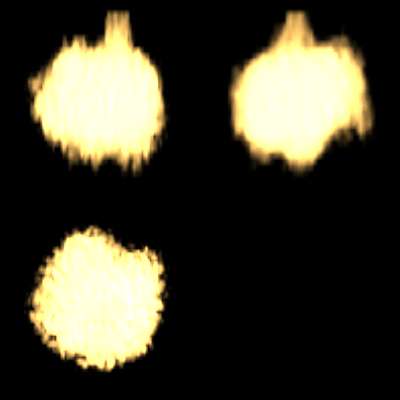
BUT, if you comment out the grid you get the following result (see
attached render)

... dave
Post a reply to this message
Attachments:
Download 'showcloud.jpg' (8 KB)
Preview of image 'showcloud.jpg'
|
|
| |
| |
|
|
|
|
| |
| |
|
|
found the problem with your code ...

what you see (or believe not to see) are the shadows of the grid !

simple add "no_shadow" keyword at the end of the grid union and your
code works as expected.

... dave
Post a reply to this message
|
|
| |
| |
|
|
|
|
| |
| |
|
|
David El Tom <dav### [at] t-onlinede> wrote:
> yepp, got the same result ...
>
> BUT, if you comment out the grid you get the following result (see
> attached render)

strange. I did experiment a bit with slightly rotating the camera and/or the
cloud yesterday, but that did not help.
It's defenately the grid. with just the horizontal grid lines I only get the
horizontal black bar. if I decrease the grid (cylinder) radius, the black
bar is thinner too. It almost looks like the grid is casting a shadow on
the cloud, bot the grid should be behind the cloud. wired. anyway, it's not
in the cloud. :-)

thanks.
Post a reply to this message
|
|
| |
| |
|
|
|
|
| |
| |
|
|
just missed your last post.
yes, it's a shadow. the z in:
light_source { z*100000 C_Sun*5 }
was negative, so everything was lid from the back instead of from the front.
Post a reply to this message
|
|
| |
| |
|
|
|
|
| |
| |
|
|
Jaap nous apporta ses lumieres en ce 27/05/2006 08:11:
> David El Tom <dav### [at] t-onlinede> wrote:
>> Gilles Tran gives a very good comparision between diffrent methods when
>> it comes to render clouds.
>> http://www.oyonale.com/ressources/english/sources13.htm
>
> yes very good. I even sucessfully used it in animations.
>
> But the real problem with this method is that you reach the 255 raytrace
> limit very soon when one cloud is in front of another.
> Would it be possible to hack povray to accept trace levels of >255 ? or at
> least not make the pixel black when it reaches the maximum trace level?
>
>
> ------------------------------------------------------------------------
>
You can prevent reaching the max_trace_level by altering adc_bailout to a larger
value. Default to
1/256.
When you reach max_trace_level, you get black. When you reach adc_bailout, you get the
current value.

--
Alain
-------------------------------------------------
WARNING: The consumption of alcohol may cause you to tell your friends over and over
again that you
love them.
Post a reply to this message
|
|
| |
| |
|
|
|
|
| |
| |
|
|
Alain <ele### [at] netscapenet> wrote:
> You can prevent reaching the max_trace_level by
> altering adc_bailout to a larger value. Default to
> 1/256. When you reach max_trace_level, you get black.
> When you reach adc_bailout, you get the current value.

sounds promising, I'm going to try that.
thanks!
Post a reply to this message
|
|
| |
| |
|
|
|
|
| |
| |
|
|
Jaap nous apporta ses lumieres en ce 31/05/2006 16:52:
> Alain <ele### [at] netscapenet> wrote:
>> You can prevent reaching the max_trace_level by
>> altering adc_bailout to a larger value. Default to
>> 1/256. When you reach max_trace_level, you get black.
>> When you reach adc_bailout, you get the current value.
>
> sounds promising, I'm going to try that.
> thanks!
>
Don't overdo it. You will loose some quality, and may get some artefacts if you push
that to far.

--
Alain
-------------------------------------------------
If one synchronized swimmer drowns, do the rest have to drown too?
Post a reply to this message
|
|
| |
| |
|
|
|
|
| |