|
|
|
|
|
|
| |
| |
|
|
|
|
| |
| |
|
|
Greetings.

1
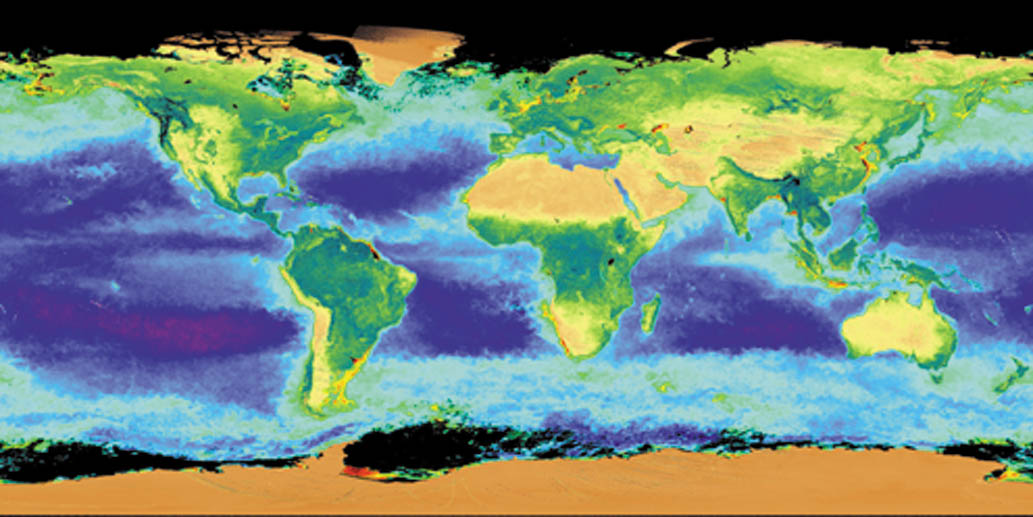
I am looking for images like those about our earth, but with real clouds and
in high resolution. I need them as texture for a rendered earth. Who can
supply links?

2
What is the name of this kind of projection?

Thanks,

Sven
Post a reply to this message
Attachments:
Download '67.jpg' (107 KB)
Preview of image '67.jpg'
|
|
| |
| |
|
|
|
|
| |
| |
|
|
"Sven Littkowski" <sve### [at] jamaica-focus com> wrote:
> Greetings.
>
> 1
> I am looking for images like those about our earth, but with real clouds and
> in high resolution. I need them as texture for a rendered earth. Who can
> supply links?
>
> 2
> What is the name of this kind of projection?
>
> Thanks,
>
> Sven
Try here: http://www.nasa.gov/vision/earth/features/blue_marble.html
I think it's called a spherical projection, but there may be a more
technical term for it.
#declare earth_tex = texture {
pigment {
image_map {
jpeg "nasa_blue_marble.jpg"
map_type 1 // 0=planar, 1=spherical, 2=cylindrical, 5=torus
interpolate 2 // 0=none, 1=linear, 2=bilinear, 4=normalized distance
once // for no repetitive tiling
}
}
normal {
bump_map {
jpeg "earthbump_usgs.jpg"
map_type 1 // 0=planar, 1=spherical, 2=cylindrical, 5=torus
interpolate 2 // 0=none, 1=linear, 2=bilinear, 4=normalized
distance
once // for no repetitive tiling
bump_size 2.5 // 0...3
}
}
NASA has some really high resolution ones, but none that I found had clouds.
I used procedural clouds on mine. You will have to play with the scaling
to get it to look natural.
#declare earthclouds_tex = texture {
pigment {
bozo
turbulence 0.65
octaves 6
omega 0.7
lambda 2
color_map {
[0.0 0.1 color rgb <0.85, 0.85, 0.85>
color rgb <0.75, 0.75, 0.75>]
[0.1 0.5 color rgb <0.75, 0.75, 0.75>
color rgbt <1, 1, 1, 1>]
[0.5 1.0 color rgbt <1, 1, 1, 1>
color rgbt <1, 1, 1, 1>]
}
scale <2, 0.5,2>
}
I've also attached the bump map from US Geological Survey.
Mike com> wrote:
> Greetings.
>
> 1
> I am looking for images like those about our earth, but with real clouds and
> in high resolution. I need them as texture for a rendered earth. Who can
> supply links?
>
> 2
> What is the name of this kind of projection?
>
> Thanks,
>
> Sven
Try here: http://www.nasa.gov/vision/earth/features/blue_marble.html
I think it's called a spherical projection, but there may be a more
technical term for it.
#declare earth_tex = texture {
pigment {
image_map {
jpeg "nasa_blue_marble.jpg"
map_type 1 // 0=planar, 1=spherical, 2=cylindrical, 5=torus
interpolate 2 // 0=none, 1=linear, 2=bilinear, 4=normalized distance
once // for no repetitive tiling
}
}
normal {
bump_map {
jpeg "earthbump_usgs.jpg"
map_type 1 // 0=planar, 1=spherical, 2=cylindrical, 5=torus
interpolate 2 // 0=none, 1=linear, 2=bilinear, 4=normalized
distance
once // for no repetitive tiling
bump_size 2.5 // 0...3
}
}
NASA has some really high resolution ones, but none that I found had clouds.
I used procedural clouds on mine. You will have to play with the scaling
to get it to look natural.
#declare earthclouds_tex = texture {
pigment {
bozo
turbulence 0.65
octaves 6
omega 0.7
lambda 2
color_map {
[0.0 0.1 color rgb <0.85, 0.85, 0.85>
color rgb <0.75, 0.75, 0.75>]
[0.1 0.5 color rgb <0.75, 0.75, 0.75>
color rgbt <1, 1, 1, 1>]
[0.5 1.0 color rgbt <1, 1, 1, 1>
color rgbt <1, 1, 1, 1>]
}
scale <2, 0.5,2>
}
I've also attached the bump map from US Geological Survey.
Mike
Post a reply to this message
Attachments:
Download 'earthbump_usgs.jpg' (90 KB)
Preview of image 'earthbump_usgs.jpg'

|
|
| |
| |
|
|
|
|
| |
| |
|
|
Hello Mike,

thanks for your help and advice, and examples. I already read your own
thread where you placed entire planets on your giant-sized patio (which I
like, actually) and posted there a similar question.

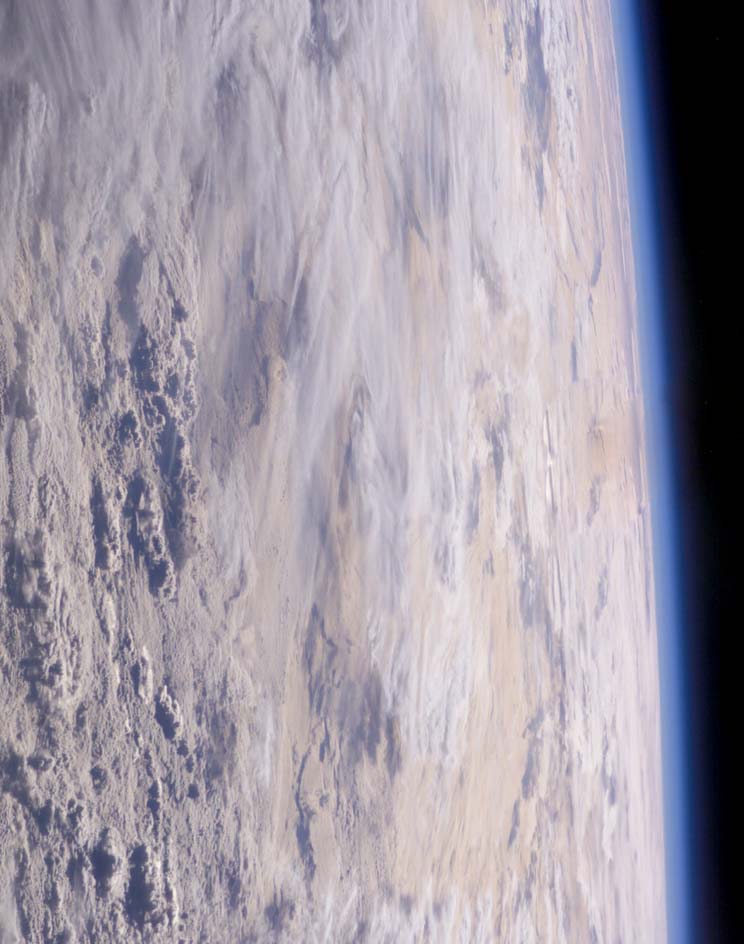
Do you know any way to create clouds like on the photo below with POV-Ray?
And that blueish shine at the horizon?

True thanks for your link, my browser has it open already. I am checking
them today and tomorrow.

Later,

Sven


"Mike Sobers" <sob### [at] mindspringcom> schrieb im Newsbeitrag
news:web.44767236eed6fdf7613e60490@news.povray.org...
> "Sven Littkowski" <sve### [at] jamaica-focuscom> wrote:
>> Greetings.
>>
>> 1
>> I am looking for images like those about our earth, but with real clouds
>> and
>> in high resolution. I need them as texture for a rendered earth. Who can
>> supply links?
>>
>> 2
>> What is the name of this kind of projection?
>>
>> Thanks,
>>
>> Sven
>
> Try here:  http://www.nasa.gov/vision/earth/features/blue_marble.html
>
> I think it's called a spherical projection, but there may be a more
> technical term for it.
>
> #declare earth_tex = texture {
> pigment {
> image_map {
>  jpeg "nasa_blue_marble.jpg"
>  map_type 1        // 0=planar, 1=spherical, 2=cylindrical, 5=torus
>  interpolate 2     // 0=none, 1=linear, 2=bilinear, 4=normalized distance
>  once           // for no repetitive tiling
> }
> }
>  normal {
>    bump_map {
>      jpeg "earthbump_usgs.jpg"
>      map_type 1        // 0=planar, 1=spherical, 2=cylindrical, 5=torus
>      interpolate 2     // 0=none, 1=linear, 2=bilinear, 4=normalized
> distance
>      once           // for no repetitive tiling
>      bump_size 2.5     // 0...3
>    }
>  }
>
> NASA has some really high resolution ones, but none that I found had
> clouds.
> I used procedural clouds on mine.  You will have to play with the scaling
> to get it to look natural.
>
> #declare earthclouds_tex = texture {
> pigment {
>      bozo
>      turbulence 0.65
>      octaves 6
>      omega 0.7
>      lambda 2
>      color_map {
>          [0.0 0.1 color rgb <0.85, 0.85, 0.85>
>                   color rgb <0.75, 0.75, 0.75>]
>          [0.1 0.5 color rgb <0.75, 0.75, 0.75>
>                   color rgbt <1, 1, 1, 1>]
>          [0.5 1.0 color rgbt <1, 1, 1, 1>
>                   color rgbt <1, 1, 1, 1>]
>      }
>      scale <2, 0.5,2>
> }
>
> I've also attached the bump map from US Geological Survey.
>
>
> Mike
>
Post a reply to this message
Attachments:
Download 'Planet.jpg' (100 KB)
Preview of image 'Planet.jpg'
|
|
| |
| |
|
|
|
|
| |
| |
|
|
Hi Mike,

it looks like some bracklets are missing. I try to restore. But in any case,
could you send/post a corrected version?

Lots of thanks,

Sven


> #declare earth_tex = texture {
> pigment {
> image_map {
>  jpeg "nasa_blue_marble.jpg"
>  map_type 1        // 0=planar, 1=spherical, 2=cylindrical, 5=torus
>  interpolate 2     // 0=none, 1=linear, 2=bilinear, 4=normalized distance
>  once           // for no repetitive tiling
> }
> }
>  normal {
>    bump_map {
>      jpeg "earthbump_usgs.jpg"
>      map_type 1        // 0=planar, 1=spherical, 2=cylindrical, 5=torus
>      interpolate 2     // 0=none, 1=linear, 2=bilinear, 4=normalized
> distance
>      once           // for no repetitive tiling
>      bump_size 2.5     // 0...3
>    }
>  }
>
> NASA has some really high resolution ones, but none that I found had
> clouds.
> I used procedural clouds on mine.  You will have to play with the scaling
> to get it to look natural.
>
> #declare earthclouds_tex = texture {
> pigment {
>      bozo
>      turbulence 0.65
>      octaves 6
>      omega 0.7
>      lambda 2
>      color_map {
>          [0.0 0.1 color rgb <0.85, 0.85, 0.85>
>                   color rgb <0.75, 0.75, 0.75>]
>          [0.1 0.5 color rgb <0.75, 0.75, 0.75>
>                   color rgbt <1, 1, 1, 1>]
>          [0.5 1.0 color rgbt <1, 1, 1, 1>
>                   color rgbt <1, 1, 1, 1>]
>      }
>      scale <2, 0.5,2>
> }
>
> I've also attached the bump map from US Geological Survey.
>
>
> Mike
>
Post a reply to this message
|
|
| |
| |
|
|
|
|
| |
| |
|
|
"Sven Littkowski" <sve### [at] jamaica-focuscom> wrote:
> Hello Mike,
>
> thanks for your help and advice, and examples. I already read your own
> thread where you placed entire planets on your giant-sized patio (which I
> like, actually) and posted there a similar question.
>
> Do you know any way to create clouds like on the photo below with POV-Ray?
> And that blueish shine at the horizon?
>
> True thanks for your link, my browser has it open already. I am checking
> them today and tomorrow.
>
> Later,
>
> Sven
>
>

Hi Sven,

As for the blue shine, try this.  Unfortunately, the clouds look nothing
like your picture.  I think it would be difficult to reproduce the 3D
texture seen in the picture.  Although, you could try some layered spheres
with slightly different textures and normal maps.  That might do the trick.

Good luck,
Mike


// Planet
sphere{<0,0,0>,2000
  texture { agate
  texture_map{
      [0 pigment { color rgb <0,0,0.5>}  finish { ambient 0.2 diffuse 0.1 }]
      [0.45  pigment { color rgb <0,0,0.5>}  finish { ambient 0.2 diffuse
0.1 }]
      [0.5 pigment { color rgb <0.52,0.32,0.16>}  finish { ambient 0.2
diffuse 0.1 }]
      [0.56 pigment { color rgb <0.52,0.32,0.16>}  finish { ambient 0.1
diffuse 0.1 }]
      [0.7  pigment {
             granite
             color_map {
               [0 color rgb <0.12,0.32,0.16>]
               [0.5 color rgb <0.12,0.32,0.16>]
               [1 color rgb <0.42,0.22,0.16>]
             } turbulence 0.5 scale 0.5
             }
             finish { ambient 0.1 diffuse 0.1 }
             ]
    }  turbulence 0.3
   scale 200
  }
  rotate 40*x
}

//Clouds

sphere{<0,0,0>,2005
  texture { agate
  texture_map{
      [0 pigment { color rgbt 1}  ]
      [0.2 pigment { color rgbt 1}  ]
      [0.9  pigment { color rgbt <1,1,1,0>} finish { ambient 0.3 diffuse 0.5
}]
    }  turbulence 0.8
   scale 200
  }
  rotate 90*x
}

// Atmosphere

sphere{<0,0,0>,1
  pigment{
    color rgbt <1,1,1,1>
  }
  hollow
  interior {
   media {    // atmospheric media sample
    intervals 10
    emission 0.75
    density{
      spherical
      color_map {
        [0 rgb <0,0,0>]
        [1 rgb <0.1,0.1,0.5>]
      }
    }
    samples 1, 10
    confidence 0.9999
    variance 1/1000
    ratio 0.9
   }
  }
  scale 2035
}
Post a reply to this message
Attachments:
Download 'earth_atmosphere.jpg' (10 KB)
Preview of image 'earth_atmosphere.jpg'

|
|
| |
| |
|
|
|
|
| |
| |
|
|
"Sven Littkowski" <sve### [at] jamaica-focuscom> wrote:
> Hi Mike,
>
> it looks like some bracklets are missing. I try to restore. But in any case,
> could you send/post a corrected version?
>
> Lots of thanks,
>
> Sven
>

Sorry!  I shouldn't try to edit code online!  Put a bracket at the end of
each texture declaration and it should work.  Or, try the attached code.

Mike
Post a reply to this message
Attachments:
Download 'earth.pov.txt' (3 KB)
|
|
| |
| |
|
|
|
|
| |
| |
|
|
"Sven Littkowski" <sve### [at] jamaica-focuscom> wrote:
> Hello Mike,
>
> thanks for your help and advice, and examples. I already read your own
> thread where you placed entire planets on your giant-sized patio (which I
> like, actually) and posted there a similar question.
>
> Do you know any way to create clouds like on the photo below with POV-Ray?
> And that blueish shine at the horizon?
>
> True thanks for your link, my browser has it open already. I am checking
> them today and tomorrow.
>
> Later,
>
> Sven
>

Is this closer?  The texture seems to "procedural" and uniform, but that
could be remedied with a texture map and more layers.

Mike
Post a reply to this message
Attachments:
Download 'cloudy_day.jpg' (58 KB)
Preview of image 'cloudy_day.jpg'

|
|
| |
| |
|
|
|
|
| |
| |
|
|
"Sven Littkowski" <sve### [at] jamaica-focuscom> wrote:
> Hello Mike,
>
> thanks for your help and advice, and examples. I already read your own
> thread where you placed entire planets on your giant-sized patio (which I
> like, actually) and posted there a similar question.
>
> Do you know any way to create clouds like on the photo below with POV-Ray?
> And that blueish shine at the horizon?
>
> True thanks for your link, my browser has it open already. I am checking
> them today and tomorrow.
>
> Later,
>
> Sven
>

Here's the code for the picture I just posted.  Do you know how to add more
than one attachment (I'm using the web browser, not a newsgroup client).

Mike
Post a reply to this message
Attachments:
Download 'cloudy_day.pov.txt' (4 KB)
|
|
| |
| |
|
|
|
|
| |
| |
|
|
Google is your friend:

First hit for "rendering planets povray":

	http://www.imagico.de/pov/planets.html

(Especially the 'earth' section should help you)

The BlueMarble dataset from NASA is within the first 10 hits of a search
for "earth texture" on Google, too :)


HTH,
Florian
Post a reply to this message
|
|
| |
| |
|
|
|
|
| |
| |
|
|
Hi Mike,

I have some ideas for how to create a more realistic cloud surface for
planets, it is only that I am good in theory but not practical.

When looking to the orbital photo I attached previously, I see two kinds of
clouds: the regular, smooth-bumpy surface, and here and there some bumpy
cloud mountains.

Now I wonder, if we could achieve the same by using two cloud layers. One
for the regular surface, and one for the fewer cloud mountains. But in any
way, with my limited knowledge I am not able to follow up my own ideas, here
I depend on you and the others.

Ben Chambers used his great skills to supply a bumby surface. Here is the
code of Ben Chambers:

#declare fn_planet = function
{
 sqrt(pow(x,2)+pow(y,2)+pow(z,2))
 +f_snoise3d(x/64,y/64,z/64)*0.4
 +f_snoise3d(x/32,y/32,z/32)*0.2
 +f_snoise3d(x/16,y/16,z/16)*0.1
 +f_snoise3d(x/8,y/8,z/8)*0.05
 +f_snoise3d(x/4,y/4,z/4)*0.025
 +f_snoise3d(x/2,y/2,z/2)*0.0125
 +f_snoise3d(x,y,z)*0.00625
 -100
}
/*
Note: for effect I increased the bump sizes.  For a realistic range of
heights, IIRC the largest should be *0.4 (not *4), and the scales would
decrease from there.
*/

//And the object itself:
isosurface
{
 function { fn_planet(x,y,z) }
 threshold 0
 evaluate 1,1.2,0.8
 contained_by { sphere { 0.0, 100.00 } }
 pigment { White }
 finish { ambient 0.0 }
}

His code could make, with some changes, the regular cloud surface, I guess.
What is still needed is a texture sphere, which contains here and there
these cloud mountains. And a way to create gray storms (kind of spirals) in
3D would be an additional feature of that atmosphere!

Ideas? Suggestions? Solutions? Go ahead!

Best greetings and united creativity,

Sven
Post a reply to this message
|
|
| |
| |
|
|
|
|
| |
| |
|
|
"Sven Littkowski" <sve### [at] jamaica-focuscom> a écrit dans le message de news:
44774529$1@news.povray.org...For
my common with Jean Francois Dispot IRTC entry
http://www.irtc.org/ftp/pub/stills/2005-02-28/rtfm_jd.jpg
I used an isosurface based on a cloud map from blue marble
I shall post the inc file for the earth in p.b.s-f (the maps are on
bluemarble)

Marc
Post a reply to this message
|
|
| |
| |
|
|
|
|
| |
| |
|
|
I try to find download links there (http://www.imagico.de/pov/planets.html),
but I don't see them. Any hints?

Sven


"Florian Brucker" <tor### [at] torfboldcom> schrieb im Newsbeitrag
news:447729bf$1@news.povray.org...
> http://www.imagico.de/pov/planets.html
Post a reply to this message
|
|
| |
| |
|
|
|
|
| |
| |
|
|
Hi Marc,

not only that your image is quite funny (I like it), but the clouds there
are looking pretty much as I would like to have them!

Great work! I will look immediately at the "povray.binaries.scene-files"
newsgroup.

Later,

Sven


"M_a_r_c" <jac### [at] wanadoofr> schrieb im Newsbeitrag
news:44774a8b$1@news.povray.org...
>
> "Sven Littkowski" <sve### [at] jamaica-focuscom> a écrit dans le message de
> news:
> 44774529$1@news.povray.org...For
> my common with Jean Francois Dispot IRTC entry
> http://www.irtc.org/ftp/pub/stills/2005-02-28/rtfm_jd.jpg
> I used an isosurface based on a cloud map from blue marble
> I shall post the inc file for the earth in p.b.s-f (the maps are on
> bluemarble)
>
> Marc
>
>
Post a reply to this message
|
|
| |
| |
|
|
|
|
| |
| |
|
|
Hi Marc,

I saved your Terre.inc on my computer. Now I still try to get those images
you have there in use, "D:\A_Gegene\Moi\Moray\3.5\earthbump10k.jpg" and
"D:\A_Gegene\Moi\Moray\3.5\ev11643_cloud_combined_8192.tga" (here I use your
entire paths, as well).

I visited (and still do) the "Blue Marble" website. But all I find there are
rendered pictures of the earth. I just cannot find at all bump maps, and the
other special images I should use for a spherical texture. Help!

Marc, it is frustrating for me to see the probably right website which is
supposed to contain all free downloads, but I just don't find them! The
responses to my posting contained several times the Blue Marble website, but
even so, I just don't see there any usable graphics...

Sven
Post a reply to this message
|
|
| |
| |
|
|
|
|
| |
| |
|
|
"Sven Littkowski" <sve### [at] jamaica-focuscom> a écrit dans le message de news:
44776e36@news.povray.org...
> Hi Marc,
>
> I saved your Terre.inc on my computer. Now I still try to get those images
> you have there in use, "D:\A_Gegene\Moi\Moray\3.5\earthbump10k.jpg" and
> "D:\A_Gegene\Moi\Moray\3.5\ev11643_cloud_combined_8192.tga" (here I use
your
> entire paths, as well).
>
> I visited (and still do) the "Blue Marble" website. But all I find there
are
> rendered pictures of the earth. I just cannot find at all bump maps, and
the
> other special images I should use for a spherical texture. Help!
>
> Marc, it is frustrating for me to see the probably right website which is
> supposed to contain all free downloads, but I just don't find them! The
> responses to my posting contained several times the Blue Marble website,
but
> even so, I just don't see there any usable graphics...
>
> Sven
>
>
you should find clouds at different resolutions here
http://visibleearth.nasa.gov/view_rec.php?id=2432
lands
http://visibleearth.nasa.gov/view_rec.php?id=2430

I can't find a link to earthbump but I actually didn't use it in my earth
render because it slowed render ground is a sphere primitive in the irtc
image

Marc
Post a reply to this message
|
|
| |
| |
|
|
|
|
| |
| |
|
|
"Sven Littkowski" <sve### [at] jamaica-focuscom> wrote:

> Marc, it is frustrating for me to see the probably right website which is
> supposed to contain all free downloads, but I just don't find them! The
> responses to my posting contained several times the Blue Marble website, but
> even so, I just don't see there any usable graphics...
>
> Sven

Sorry for all the blue marble madness.  It looks like there are some
problems with that page today anyway.  Try here instead:

http://mcnasobers.home.mindspring.com/nasa_blue_marble.jpg

Check here for lots of maps:

http://www.johnstonsarchive.net/spaceart/planetcylmaps.html

Mike
Post a reply to this message
|
|
| |
| |
|
|
|
|
| |
| |
|
|
Mike,

I like the fluid change of the atmosphere from blue to transparent. The only
problem I have is that, despite of an added "finish { ambient 0.0 }" the
atmosphere remains visible even on the night side of the planet - the
atmosphere seems to be ambiet.

Is there any way to solve that?

Best greetings,

Sven


"Mike Sobers" <sob### [at] mindspringcom> schrieb im Newsbeitrag
news:web.44767ea6eed6fdf7613e60490@news.povray.org...
> "Sven Littkowski" <sve### [at] jamaica-focuscom> wrote:
>> Hello Mike,
>>
>> thanks for your help and advice, and examples. I already read your own
>> thread where you placed entire planets on your giant-sized patio (which I
>> like, actually) and posted there a similar question.
>>
>> Do you know any way to create clouds like on the photo below with
>> POV-Ray?
>> And that blueish shine at the horizon?
>>
>> True thanks for your link, my browser has it open already. I am checking
>> them today and tomorrow.
>>
>> Later,
>>
>> Sven
>>
>>
>
> Hi Sven,
>
> As for the blue shine, try this.  Unfortunately, the clouds look nothing
> like your picture.  I think it would be difficult to reproduce the 3D
> texture seen in the picture.  Although, you could try some layered spheres
> with slightly different textures and normal maps.  That might do the
> trick.
>
> Good luck,
> Mike
>
>
> // Planet
> sphere{<0,0,0>,2000
>  texture { agate
>  texture_map{
>      [0 pigment { color rgb <0,0,0.5>}  finish { ambient 0.2 diffuse
> 0.1 }]
>      [0.45  pigment { color rgb <0,0,0.5>}  finish { ambient 0.2 diffuse
> 0.1 }]
>      [0.5 pigment { color rgb <0.52,0.32,0.16>}  finish { ambient 0.2
> diffuse 0.1 }]
>      [0.56 pigment { color rgb <0.52,0.32,0.16>}  finish { ambient 0.1
> diffuse 0.1 }]
>      [0.7  pigment {
>             granite
>             color_map {
>               [0 color rgb <0.12,0.32,0.16>]
>               [0.5 color rgb <0.12,0.32,0.16>]
>               [1 color rgb <0.42,0.22,0.16>]
>             } turbulence 0.5 scale 0.5
>             }
>             finish { ambient 0.1 diffuse 0.1 }
>             ]
>    }  turbulence 0.3
>   scale 200
>  }
>  rotate 40*x
> }
>
> //Clouds
>
> sphere{<0,0,0>,2005
>  texture { agate
>  texture_map{
>      [0 pigment { color rgbt 1}  ]
>      [0.2 pigment { color rgbt 1}  ]
>      [0.9  pigment { color rgbt <1,1,1,0>} finish { ambient 0.3 diffuse
> 0.5
> }]
>    }  turbulence 0.8
>   scale 200
>  }
>  rotate 90*x
> }
>
> // Atmosphere
>
> sphere{<0,0,0>,1
>  pigment{
>    color rgbt <1,1,1,1>
>  }
>  hollow
>  interior {
>   media {    // atmospheric media sample
>    intervals 10
>    emission 0.75
>    density{
>      spherical
>      color_map {
>        [0 rgb <0,0,0>]
>        [1 rgb <0.1,0.1,0.5>]
>      }
>    }
>    samples 1, 10
>    confidence 0.9999
>    variance 1/1000
>    ratio 0.9
>   }
>  }
>  scale 2035
> }
>
>
Post a reply to this message
|
|
| |
| |
|
|
|
|
| |
| |
|
|
More than one attachment? Hmmm, not sure. To be honest, I use Outlook
Express - there it is very easy to add even 10,000 attachments if so desired
(the same with any other newsreader-capable program). Sorry that I don't
have a better solution.

Hmmm... Unless... Maybe... Well, just an idea, but I am not sure if that can
work: if you add several files (including their paths) and separate them
just by semicolon and MAYBE also a blank ("; ")? Really, not sure. With
newsgroup clients it works just easy.

Greetings,

Sven


"Mike Sobers" <sob### [at] mindspringcom> schrieb im Newsbeitrag
news:web.44768ab8eed6fdf7613e60490@news.povray.org...
> Do you know how to add more than one attachment (I'm using the web
> browser, not a newsgroup client).
Post a reply to this message
|
|
| |
| |
|
|
|
|
| |
| |
|
|
> I try to find download links there (http://www.imagico.de/pov/planets.html),
> but I don't see them. Any hints?

Christoph's site doesn't provide any textures, if that's what you mean.
But it features explanations of the different data sets (and their
sources) and techniques used for rendering. IMO it's the best starting
point when one tries to render planets with POV-Ray. That's why I posted
the link :)


Greetings,
Florian
Post a reply to this message
|
|
| |
| |
|
|
|
|
| |
|
|