|
|
|
|
|
|
| |
| |
|
|
|
|
| |
| |
|
|
I just did a quick google through the newsgroups but couldn't find an answer
to this. Here's a really simple scene, with fog turned off the cylinder
appears solid black, because it's a black & transparent checker containing a
dense black media. But with fog turned on the media parts become lighter
*regardless of how dense the media is*.

fog {
 fog_type 1
 rgb x
 distance 3
}

background { rgb z }

cylinder {
 -y, y, .3
 translate z*2
 hollow on
 pigment {
  checker
  rgb 0,
  rgbt 1
  scale <.3,.3,100>
 }
 interior {
  media { //media so dense that without fog it looks identical to the opaque
bits.
   absorption 1
   density { rgb 100 }
  }
 }
}

Try increasing the media density, you'll see it doesn't get any darker.

Is this a known bug with media & fog? Is there any solution? It's screwing
up the smoke in my volcano image :(

--
Tek
http://evilsuperbrain.com
Post a reply to this message
|
|
| |
| |
|
|
|
|
| |
| |
|
|
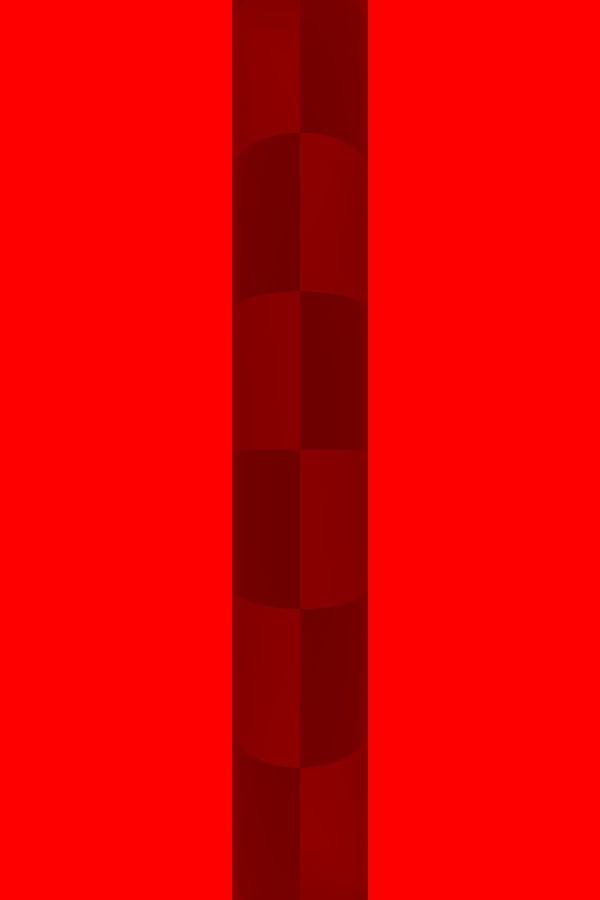
And this time, with a picture (doh!)
You shouldn't be able to see those checks, and increasing the media density
doesn't make them darker.
--
Tek
http://evilsuperbrain.com
"Tek" <tek### [at] evilsuperbrain com> wrote in message
news:43f78692@news.povray.org...
>I just did a quick google through the newsgroups but couldn't find an
>answer
> to this. Here's a really simple scene, with fog turned off the cylinder
> appears solid black, because it's a black & transparent checker containing
> a
> dense black media. But with fog turned on the media parts become lighter
> *regardless of how dense the media is*.
>
> fog {
> fog_type 1
> rgb x
> distance 3
> }
>
> background { rgb z }
>
> cylinder {
> -y, y, .3
> translate z*2
> hollow on
> pigment {
> checker
> rgb 0,
> rgbt 1
> scale <.3,.3,100>
> }
> interior {
> media { //media so dense that without fog it looks identical to the
> opaque
> bits.
> absorption 1
> density { rgb 100 }
> }
> }
> }
>
> Try increasing the media density, you'll see it doesn't get any darker.
>
> Is this a known bug with media & fog? Is there any solution? It's screwing
> up the smoke in my volcano image :(
>
> --
> Tek
> http://evilsuperbrain.com
>
> com> wrote in message
news:43f78692@news.povray.org...
>I just did a quick google through the newsgroups but couldn't find an
>answer
> to this. Here's a really simple scene, with fog turned off the cylinder
> appears solid black, because it's a black & transparent checker containing
> a
> dense black media. But with fog turned on the media parts become lighter
> *regardless of how dense the media is*.
>
> fog {
> fog_type 1
> rgb x
> distance 3
> }
>
> background { rgb z }
>
> cylinder {
> -y, y, .3
> translate z*2
> hollow on
> pigment {
> checker
> rgb 0,
> rgbt 1
> scale <.3,.3,100>
> }
> interior {
> media { //media so dense that without fog it looks identical to the
> opaque
> bits.
> absorption 1
> density { rgb 100 }
> }
> }
> }
>
> Try increasing the media density, you'll see it doesn't get any darker.
>
> Is this a known bug with media & fog? Is there any solution? It's screwing
> up the smoke in my volcano image :(
>
> --
> Tek
> http://evilsuperbrain.com
>
>
Post a reply to this message
Attachments:
Download 'fog-media-bug-test.jpg' (11 KB)
Preview of image 'fog-media-bug-test.jpg'
|
|
| |
| |
|
|
|
|
| |
| |
|
|
No solution, but you have made me aware of a (possible) problem.
In my Alien Cliff scene, I have added a media for simulating the spray at
the base of the waterfall. The image is (still) rendering (off and on), but
I have the feeling that something similar to you is happening... Maybe there
is an incompatibility, indeed?

Thomas
Post a reply to this message
|
|
| |
| |
|
|
|
|
| |
| |
|
|
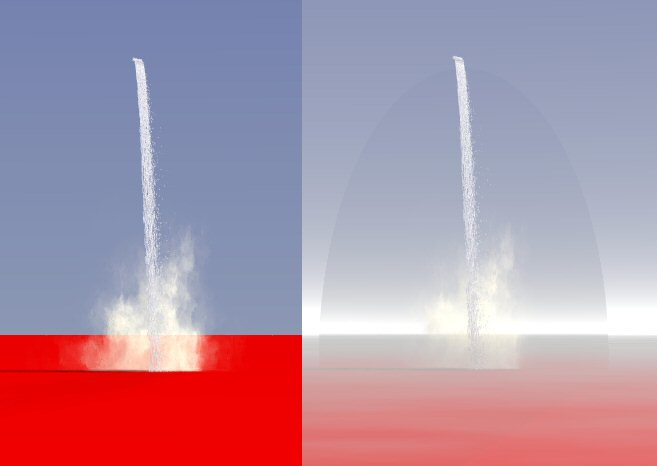
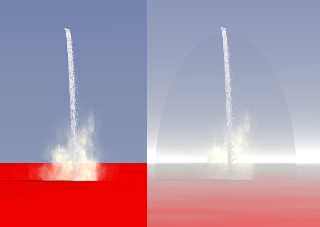
This is an image (like Tek's) showing what is happening when media and fog
interact.

The container is, however, hardly or not visible when in front or
intersecting a textured surface/object. In my Alien Cliff image, I cannot
see it against the cliff.

Thomas
Post a reply to this message
Attachments:
Download 'Media_mist_test.jpg' (20 KB)
Preview of image 'Media_mist_test.jpg'
|
|
| |
| |
|
|
|
|
| |
| |
|
|
"Thomas de Groot" <t.d### [at] internlnet> wrote in message
news:43f970b9@news.povray.org...
> This is an image (like Tek's) showing what is happening when media and fog
> interact.
>
> The container is, however, hardly or not visible when in front or
> intersecting a textured surface/object. In my Alien Cliff image, I cannot
> see it against the cliff.

Transparent objects mixing with fog is an old issue. It could be remedied,
somewhat, by increasing the transmit or filter value a little beyond 1.0.
Unfortunately, now I can't remember if that is really a solution at all. If
anything, an imperfect one probably. Wish I could say more about it with
more assurance as to what or how it was dealt with in the past or in the
current version(s).

The original question here is apparently more an issue of the fog being in
front of the media container object. That 'distance 3' causes the camera to
see that fog color between it and the cylinder, which is at <0,0,0> and
<0,0,2> (less 0.3 radius) respectively.

Hope that is of some help.

Bob H
Post a reply to this message
|
|
| |
| |
|
|
|
|
| |
| |
|
|
"Bob Hughes" <omniverse@charter%net> wrote in message
news:43f9a13a$1@news.povray.org...
> "Thomas de Groot" <t.d### [at] internlnet> wrote in message
> news:43f970b9@news.povray.org...
>> This is an image (like Tek's) showing what is happening when media and
>> fog
>> interact.
>>
>> The container is, however, hardly or not visible when in front or
>> intersecting a textured surface/object. In my Alien Cliff image, I cannot
>> see it against the cliff.
>
> Transparent objects mixing with fog is an old issue.

Hey Thomas, I tried a test render in both 3.6 and the latest beta of 3.7
just to make sure I was on the right track about my reply to you. The media
container is invisible amid fog, also not seen in ground type, so I'm
wondering if you could have rendered that from version 3.5 or something
other than POV for Windows which I am using here. Just wasn't sure with
absolute certainty if that had changed in the later versions.

Anyway... I still think I was right about Tek's (AKA evil super brain) media
container being obscured by the fog between the camera and cylinder. It
could never be completely black with a red fog color there, right? Not
unless the container object surface is next to the camera, or the camera
within it.  ;)

Bob H
Post a reply to this message
|
|
| |
| |
|
|
|
|
| |
| |
|
|
"Bob Hughes" <omniverse@charter%net> schreef in bericht
news:43f9c077$1@news.povray.org...
>
> Hey Thomas, I tried a test render in both 3.6 and the latest beta of 3.7
> just to make sure I was on the right track about my reply to you. The
media
> container is invisible amid fog, also not seen in ground type, so I'm
> wondering if you could have rendered that from version 3.5 or something
> other than POV for Windows which I am using here. Just wasn't sure with
> absolute certainty if that had changed in the later versions.
>
I used MegaPOV 1.21 (which uses 3.6.1) for Windows.
Post a reply to this message
|
|
| |
| |
|
|
|
|
| |
| |
|
|
Perhaps I should include the used code:

The fogs:
fog {
  fog_type   2
  distance   15
  color      rgb 0.6 // gray
  fog_offset 0.05   // below this level the fog is constant
  fog_alt    0.29   // halving distance
  turbulence 1
}

fog {
  fog_type   2
  distance   800
  color      rgb <0.8, 0.8, 0.8>
  fog_offset 0.1   // below this level the fog is constant
  fog_alt    15.00   // halving distance
  turbulence 0.1
}

And the media:
#declare Scattering =
sphere {
  0, 10
  texture {
    pigment { rgbt 1 }
  }
  interior {
    media {
      samples 10, 100
      scattering {1, <0.9, 0.9, 0.9, 0.0, 0.9> extinction 3} // higher
extinction = more transparant media
      intervals 1
      density {
        spherical
        poly_wave 5
        scale 2
        warp { turbulence <T,T/2,T/1> }
        scale 2
        warp { turbulence <T,T/2,T/2> }
        scale 2
        warp { turbulence <T,T/2,T/3> }
        scale 2
        warp { turbulence <T,T/2,T/4> }
      }
      scale 0.3*exp(pow(T,0.5))/(1+T)
    }
  }
  hollow
  scale <1,1,1>
}

object {Scattering
  scale <0.3, 0.6, 0.3>
  translate <1.75, 0, 2.0>
}
Post a reply to this message
|
|
| |
| |
|
|
|
|
| |
| |
|
|
Maybe an important issue:
I have used tone_mapping.inc, and then: Clip_Colors()  in the
global_sttings, for tone mapping for antialiasing like in version 3.5
(smoother transitions)

I shall test without this to see if there is a difference

Thomas
Post a reply to this message
|
|
| |
| |
|
|
|
|
| |
| |
|
|
Actually that's different to my problem, my media container is invisible but
the smoke media from my volcano gets more fogged than the top of the volcano
does at the same distance.

I've managed to work round the problem by an extremely elaborate means:

First, I tried using a global media instead of the fog, but that did exactly
the same thing. So then I replaced it with a huge box of media in front of
the camera, differenced with the smoke-media's container. And I added a copy
of the air-media to the inside of the smoke media's container. All of this
meant that pov finally got the message and gave me the result I was after,
though it's a ludicrously elaborate work-round.

--
Tek
http://evilsuperbrain.com

"Thomas de Groot" <t.d### [at] internlnet> wrote in message
news:43f970b9@news.povray.org...
> This is an image (like Tek's) showing what is happening when media and fog
> interact.
>
> The container is, however, hardly or not visible when in front or
> intersecting a textured surface/object. In my Alien Cliff image, I cannot
> see it against the cliff.
>
> Thomas
>
>
>
Post a reply to this message
|
|
| |
| |
|
|
|
|
| |
| |
|
|
"Thomas de Groot" <t.d### [at] internlnet> schreef in bericht
news:43f9e7f5$1@news.povray.org...
>
> I shall test without this to see if there is a difference
>
....No. No difference   :-(

Thomas
Post a reply to this message
|
|
| |
| |
|
|
|
|
| |
| |
|
|
"Tek" <tek### [at] evilsuperbraincom> schreef in bericht
news:43fa041a$1@news.povray.org...
> Actually that's different to my problem, my media container is invisible
but
> the smoke media from my volcano gets more fogged than the top of the
volcano
> does at the same distance.
>
> I've managed to work round the problem by an extremely elaborate means:
>
> First, I tried using a global media instead of the fog, but that did
exactly
> the same thing. So then I replaced it with a huge box of media in front of
> the camera, differenced with the smoke-media's container. And I added a
copy
> of the air-media to the inside of the smoke media's container. All of this
> meant that pov finally got the message and gave me the result I was after,
> though it's a ludicrously elaborate work-round.
>
> --

Yes it's different, but somehow I cannot convince myself that there is not a
common problem here which concerns media and fog...

Thomas
Post a reply to this message
|
|
| |
| |
|
|
From: Thomas de Groot
Subject: Re: media-fog bug? intersecting with isosurface
Date: 21 Feb 2006 04:40:11
Message: <43fadffb@news.povray.org>
|
|
|
| |
| |
|
|
"Thomas de Groot" <t.d### [at] internlnet> schreef in bericht
news:43f970b9@news.povray.org...
>
> The container is, however, hardly or not visible when in front or
> intersecting a textured surface/object. In my Alien Cliff image, I cannot
> see it against the cliff.
>

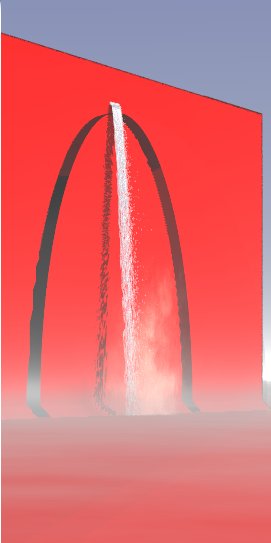
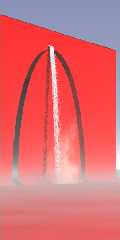
This is not true unfortunately :-(
I looked acrefully at my image and saw strange patches that shouldn't be
there. So I made a new test with the fog, the media, and an isosurface
representing the cliff. This is the result. Note that the horizontal plane
does not show any artifact!!

Thomas
Post a reply to this message
Attachments:
Download 'Media_mist_test2.jpg' (17 KB)
Preview of image 'Media_mist_test2.jpg'
|
|
| |
| |
|
|
|
|
| |
| |
|
|
Thanks for giving the partial script earlier, Thomas. I just now got a look
at a rendering of that here and saw the container bubble this time. I was
going to ask if you had POV 3.6.1a or the 3.6.1b but I guess that's not the
reason anyhow.

I didn't know you were using two fogs together before this point in time,
thinking it was only media and one fog. I have no idea why the two fogs
cause the media container to appear.

Bob H
Post a reply to this message
|
|
| |
| |
|
|
From: Thomas de Groot
Subject: Re: media-fog bug? intersecting with isosurface
Date: 21 Feb 2006 08:52:28
Message: <43fb1b1c@news.povray.org>
|
|
|
| |
| |
|
|
"Bob Hughes" <omniverse@charter%net> schreef in bericht
news:43fae38b$1@news.povray.org...
> Thanks for giving the partial script earlier, Thomas. I just now got a
look
> at a rendering of that here and saw the container bubble this time. I was
> going to ask if you had POV 3.6.1a or the 3.6.1b but I guess that's not
the
> reason anyhow.
>
> I didn't know you were using two fogs together before this point in time,
> thinking it was only media and one fog. I have no idea why the two fogs
> cause the media container to appear.
>

Thank you Bob, for taking time to look into this. Which shows again, by the
way, that it is always important to give complete information. Small details
(like one or two fogs) can easily be overlooked when just asking questions.

In fact, in the latter case, it is not the fog which causes the container to
appear! The container is carved out of the isosurface whether there is a fog
or not! I am puzzled because I cannot find any document treating this
matter. But I may be overlooking the obvious (I wouldn't be surprised).

So I end up with two problems.
1. interaction media and 2 fogs
2. interaction media and isosurface

Thomas
Post a reply to this message
|
|
| |
| |
|
|
|
|
| |
| |
|
|
"Thomas de Groot" <t.d### [at] internlnet> wrote:
> So I end up with two problems.

I've been having a play with this, and I have a couple of conclusions.

> 1. interaction media and 2 fogs
It's not the media. It appears to be a fog problem - if you take out the
interior block, the (now totally invisible) container object still shows up
if you use more than one fog. Unless someone knows a way around this, I
guess you'll have to fake one of the fogs with media (!).

> 2. interaction media and isosurface
Again, it's the container object intersecting the isosurface that seems to
cause the problem. Try raising the accuracy of the isosurface (i.e., use a
lower accuracy value). That worked with my tests.

Hope that's of some use

Bill
Post a reply to this message
|
|
| |
| |
|
|
|
|
| |
| |
|
|
>> 2. interaction media and isosurface
>Again, it's the container object intersecting the isosurface that seems to
> cause the problem. Try raising the accuracy of the isosurface (i.e., use a
> lower accuracy value). That worked with my tests.

Oh, isosurface has a keyword for that, it's all_intersections. Won't help
the fog bubble any but should eliminate those empty places where another
object is in contact with a isosurface. There's also a way to give it a
certain number of possible "intersections", the Help tells something about
it. I wasn't paying any attention to those arches in that last image and
only looked for the media container bubble. ;)

Bob H
Post a reply to this message
|
|
| |
| |
|
|
From: Thomas de Groot
Subject: Re: media-fog bug? intersecting with isosurface
Date: 22 Feb 2006 02:46:53
Message: <43fc16ed@news.povray.org>
|
|
|
| |
| |
|
|
"Bob Hughes" <omniverse@charter%net> schreef in bericht
news:43fb7e31$1@news.povray.org...
> >> 2. interaction media and isosurface
> >Again, it's the container object intersecting the isosurface that seems
to
> > cause the problem. Try raising the accuracy of the isosurface (i.e., use
a
> > lower accuracy value). That worked with my tests.
>
> Oh, isosurface has a keyword for that, it's all_intersections. Won't help
> the fog bubble any but should eliminate those empty places where another
> object is in contact with a isosurface. There's also a way to give it a
> certain number of possible "intersections", the Help tells something about
> it. I wasn't paying any attention to those arches in that last image and
> only looked for the media container bubble. ;)
>

Thanks a lot, Bill and Bob,  for these thought.

Accuracy it is! I had forgotten that I had changed the default value for
faster render. Did not realise that it would also influence other things.
Very stupid... I had tried already increasing max_trace (or
all_intersection) but to no avail, so I was on the wrong track.

Remains the transparant object/fogs problem. Replacing one of the fogs by a
media is tricky to say the least, and will bring down my already very slow
render speed even more. I shall first try to leave it out altogether and see
what the image is like.

Again, thanks both of you for your help!

Thomas
Post a reply to this message
|
|
| |
| |
|
|
From: Bob Hughes
Subject: Re: media-fog bug? intersecting with isosurface
Date: 22 Feb 2006 03:09:14
Message: <43fc1c2a@news.povray.org>
|
|
|
| |
| |
|
|
"Thomas de Groot" <t.d### [at] internlnet> wrote in message
news:43fc16ed@news.povray.org...
>
> Accuracy it is! I had forgotten that I had changed the default value for
> faster render. Did not realise that it would also influence other things.

Good to know there was an explanation. :)  Wish you much luck getting that
cliff scene done.

I tend to change accuracy only for changing effect of how textures appear,
something I noticed early on when isosurfaces were first being implemented
in POV or to see how the it's surface differs at varying values of accuracy.
I leave it alone most of the time now.

Bob H
Post a reply to this message
|
|
| |
| |
|
|
From: Thomas de Groot
Subject: Re: media-fog bug? intersecting with isosurface
Date: 23 Feb 2006 03:59:13
Message: <43fd7961@news.povray.org>
|
|
|
| |
| |
|
|
"Bob Hughes" <omniverse@charter%net> schreef in bericht
news:43fc1c2a@news.povray.org...
> "Thomas de Groot" <t.d### [at] internlnet> wrote in message
> news:43fc16ed@news.povray.org...
> >
> > Accuracy it is! I had forgotten that I had changed the default value for
> > faster render. Did not realise that it would also influence other
things.
>
> Good to know there was an explanation. :)  Wish you much luck getting that
> cliff scene done.
>
> I tend to change accuracy only for changing effect of how textures appear,
> something I noticed early on when isosurfaces were first being implemented
> in POV or to see how the it's surface differs at varying values of
accuracy.
> I leave it alone most of the time now.
>

Thanks Bob. The scene will be finished eventually. :-)   I have noted that,
against the cliff, the media container is invisible (the fog is probably too
thin thin) so I left my two fogs in place. Started rendering again....
I mainly change accuracy for render speed or to test how different
isosurface settings looks, although I admit it doesn't change speed that
much in general. To avoid forgetting to set things back to normal, I should
leave it alone...

Thomas
Post a reply to this message
|
|
| |
| |
|
|
|
|
| |