|
|
|
|
|
|
| |
| |
|
|
|
|
| |
| |
|
|
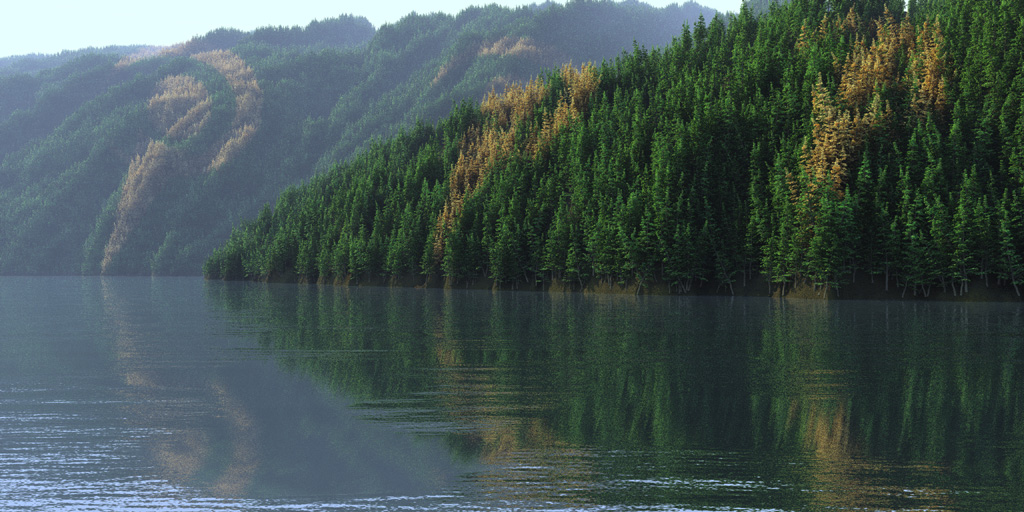
This demo scene shows three effects useful for planting many things like
grass, trees, rocks or stones.

1. If you want to show a dense forest from near to a far distance, you may
need millions of tree copies. Even povray has problems with millions of
mesh2 copies.
But if you show only the visible ones, you need only 75000 trees like in
this demo file.
The trick is to define random vectors from the camera position, which point
only to visible parts and to use them in the trace command.

2. The problem with this method is that parts far away seem less dense
populated as nearer parts.
The solution is to find the maximum distance to be populated. Then you  can
use the inverse quadratic relationship to plant with equal density despite
different distances.

3. I always wanted to draw directly on a test image and to use it for
different planting effects. This would give maximum control over the result.
The second image shows the POV logo's image used in the demo scene.

I'll post an (unoptimized) demo file at binaries.scene-files.


Norbert Kern
Post a reply to this message
Attachments:
Download 'Tree_Logo.jpg' (259 KB)
Download 'pov_logo.jpg' (49 KB)
Preview of image 'Tree_Logo.jpg'
Preview of image 'pov_logo.jpg'

|
|
| |
| |
|
|
|
|
| |
| |
|
|
Quit postiing photog...

*is impressed by the shiny shiny image, then notices that the trees
have...patterns*

heyyyyyyy

o.o

--
Tim Cook
http://home.bellsouth.net/p/PWP-empyrean

-----BEGIN GEEK CODE BLOCK-----
Version: 3.12
GFA dpu- s: a?-- C++(++++) U P? L E--- W++(+++)>$
N++ o? K- w(+) O? M-(--) V? PS+(+++) PE(--) Y(--)
PGP-(--) t* 5++>+++++ X+ R* tv+ b++(+++) DI
D++(---) G(++) e*>++ h+ !r--- !y--
------END GEEK CODE BLOCK------
Post a reply to this message
|
|
| |
| |
|
|
|
|
| |
| |
|
|
Nice image! I was going to comment on the strange regularity of the tree
colors until I read your third point. =)

> 2. The problem with this method is that parts far away seem less dense
> populated as nearer parts.
> The solution is to find the maximum distance to be populated. Then you
can
> use the inverse quadratic relationship to plant with equal density despite
> different distances.

But since you don't know where that maximum distance occurs, you still have
to shoot the same density of rays everywhere. Do you then use 1/distance^2
as a probability for discarding the ray?

 - Slime
 [ http://www.slimeland.com/ ]
Post a reply to this message
|
|
| |
| |
|
|
|
|
| |
| |
|
|
By the way, what's your water texture?

 - Slime
 [ http://www.slimeland.com/ ]
Post a reply to this message
|
|
| |
| |
|
|
|
|
| |
| |
|
|
yes, exactly. In effect I use that code:
#if (pow (vlength (cam_loc-Inter) / max_dist, 2) > rand (r4))
Of course it would be possible to set max_dist to something very big.
But then generating the tree coordinates would take much more time.
Norbert Kern
"Slime" <fak### [at] email address> schrieb im Newsbeitrag
news:43236fc0$1@news.povray.org...
> But since you don't know where that maximum distance occurs, you still
> have
> to shoot the same density of rays everywhere. Do you then use 1/distance^2
> as a probability for discarding the ray?
>
> - Slime
> [ http://www.slimeland.com/ ]
>
> address> schrieb im Newsbeitrag
news:43236fc0$1@news.povray.org...
> But since you don't know where that maximum distance occurs, you still
> have
> to shoot the same density of rays everywhere. Do you then use 1/distance^2
> as a probability for discarding the ray?
>
> - Slime
> [ http://www.slimeland.com/ ]
>
>
Post a reply to this message
|
|
| |
| |
|
|
|
|
| |
| |
|
|
"Slime" <fak### [at] emailaddress> schrieb im Newsbeitrag
news:43236ffc$1@news.povray.org...
> By the way, what's your water texture?

For this demo I used a water material from Gilles Tran.
I included a link in the demo at povray.binaries.scene-files.


Norbert Kern
Post a reply to this message
|
|
| |
| |
|
|
|
|
| |
| |
|
|
"Norbert Kern" <nor### [at] t-onlinede> wrote in message
news:43236855@news.povray.org...
> This demo scene shows three effects useful for planting many things like
> grass, trees, rocks or stones.
>
> 1. If you want to show a dense forest from near to a far distance, you may
> need millions of tree copies. Even povray has problems with millions of
> mesh2 copies.
> But if you show only the visible ones, you need only 75000 trees like in
> this demo file.
> The trick is to define random vectors from the camera position, which
> point
> only to visible parts and to use them in the trace command.
>
> 2. The problem with this method is that parts far away seem less dense
> populated as nearer parts.
> The solution is to find the maximum distance to be populated. Then you
> can
> use the inverse quadratic relationship to plant with equal density despite
> different distances.
>
> 3. I always wanted to draw directly on a test image and to use it for
> different planting effects. This would give maximum control over the
> result.
> The second image shows the POV logo's image used in the demo scene.
>
> I'll post an (unoptimized) demo file at binaries.scene-files.

Really NICE photo!  (tho not sure it's allowed here) hehe.

Still trying to figure out what you're saying here.. cause I'm a novice with
POV-Ray.  Sounds like you're trying to define only those trees that are in
view, and not ALL the trees.... when I ran the veg_many_things_WRITE
script... I gave up waiting for it to finish, and I think it did only 300
trees.  Not sure this shortcut of yours is anything short at all.
Post a reply to this message
|
|
| |
| |
|
|
|
|
| |
| |
|
|
Norbert Kern wrote:
> This demo scene shows three effects useful for planting many things like
> grass, trees, rocks or stones.
>
> 1. If you want to show a dense forest from near to a far distance, you may
> need millions of tree copies. Even povray has problems with millions of
> mesh2 copies.

Could you elaborate?  Lots of mesh instances of course take memory (much
less than copying the mesh though) but this should scale without
problems as long as you have enough memory and the performance should be
O(log n) as long as the trees do not overlap too much.

> But if you show only the visible ones, you need only 75000 trees like in
> this demo file.
> The trick is to define random vectors from the camera position, which point
> only to visible parts and to use them in the trace command.

Interesting idea this 'image space object placement' - it has a few
problems though:

- Esp. with lower tree density you have the problems that trees with
their bottom below visibility (only the top looking above a mountain
ridge for example) don't get placed.

To avoid this but still keep the number of trees placed low you can use
the normal scene space placing and trace a 'visibility ray' to the
camera location to check if to actually place the tree.  If you trace
this ray from the top of the tree this will solve the issue.  The major
disadvantage is of course this is very slow (lots of unsuccessful tests,
two traces per test)

- it only works for camera types you have written a mapping function
for.  For this might be good to have scene language support for image
space/scene space transformation.

Christoph

--
POV-Ray tutorials, include files, Landscape of the week:
http://www.tu-bs.de/~y0013390/ (Last updated 24 Jul. 2005)
MegaPOV with mechanics simulation: http://megapov.inetart.net/
Post a reply to this message
|
|
| |
| |
|
|
|
|
| |
| |
|
|
Nice image and interesting technique. I guess I'll try something similiar a
the near future, though I'd probably go the longer and more complicated way
as Christoph described it. You can't have trees just stop behind a hill...

I'd probably use my Surcoat-Macros, and an idea I just had: if I'd place a
parallel lightsource in place of the camera and view from above, the hills
should throw shadows onto the terrain itself. So I only get bright spots
(where placing of objects will take place) where the camera sees it. If I
then "grow" a rim around that area, I'd have a little more space in all
directions... Hm. Need to think about this more.

Anyways, how did you create the tree? POV-Tree, or did you do it yourself?

Regards,
Tim

--
"Tim Nikias v2.0"
Homepage: <http://www.nolights.de>
Post a reply to this message
|
|
| |
| |
|
|
|
|
| |
| |
|
|
sorrry, I should have mentioned the time needed.
It takes about 10 minutes with a 2.7 GHz P4 system to complete the
coordinate finding for the 75000 trees.
You need an aspect ratio of 2:1 like in +w800 +h400 despite ending with a
black image.
After you generated the tree coordinates once parsing the Tree_Logo.pov file
needs only 20 seconds.

Norbert Kern

"EagleSun" <nomail@nomail> schrieb im Newsbeitrag
news:4323a659@news.povray.org...
>
> "Norbert Kern" <nor### [at] t-onlinede> wrote in message
> news:43236855@news.povray.org...
>> This demo scene shows three effects useful for planting many things like
>> grass, trees, rocks or stones.
>>
>> 1. If you want to show a dense forest from near to a far distance, you
>> may
>> need millions of tree copies. Even povray has problems with millions of
>> mesh2 copies.
>> But if you show only the visible ones, you need only 75000 trees like in
>> this demo file.
>> The trick is to define random vectors from the camera position, which
>> point
>> only to visible parts and to use them in the trace command.
>>
>> 2. The problem with this method is that parts far away seem less dense
>> populated as nearer parts.
>> The solution is to find the maximum distance to be populated. Then you
>> can
>> use the inverse quadratic relationship to plant with equal density
>> despite
>> different distances.
>>
>> 3. I always wanted to draw directly on a test image and to use it for
>> different planting effects. This would give maximum control over the
>> result.
>> The second image shows the POV logo's image used in the demo scene.
>>
>> I'll post an (unoptimized) demo file at binaries.scene-files.
>
> Really NICE photo!  (tho not sure it's allowed here) hehe.
>
> Still trying to figure out what you're saying here.. cause I'm a novice
> with POV-Ray.  Sounds like you're trying to define only those trees that
> are in view, and not ALL the trees.... when I ran the
> veg_many_things_WRITE script... I gave up waiting for it to finish, and I
> think it did only 300 trees.  Not sure this shortcut of yours is anything
> short at all.
>
>
Post a reply to this message
|
|
| |
| |
|
|
|
|
| |
| |
|
|
"Christoph Hormann" <chr### [at] gmxde> schrieb im Newsbeitrag
news:dg0ifb$2oi$1@chho.imagico.de...

> Could you elaborate?  Lots of mesh instances of course take memory (much
> less than copying the mesh though) but this should scale without problems
> as long as you have enough memory and the performance should be O(log n)
> as long as the trees do not overlap too much.


It's only my experience, that with millions of objects my computer gets slow
even with 2 GB memory.
Beside, with about 11 million copies of anything the coordinates file alone
takes 1.5 GB memory.
Problems are much more severe with  normal meshes or CSG objects, but it
depends on the object complexity.
I'll try to make a bit of more exact statements in the next days.


> - Esp. with lower tree density you have the problems that trees with their
> bottom below visibility (only the top looking above a mountain ridge for
> example) don't get placed.


That's true, therefore the method is best in densily populated cases, but I
can think of some workarounds.


> To avoid this but still keep the number of trees placed low you can use
> the normal scene space placing and trace a 'visibility ray' to the camera
> location to check if to actually place the tree.  If you trace this ray
> from the top of the tree this will solve the issue.  The major
> disadvantage is of course this is very slow (lots of unsuccessful tests,
> two traces per test)


This works not always. In some cases you can see only parts of an object,
but not base or top.
Especially at near overhangs you can need perhaps 5 or more traces.
Of course it takes time, therefore I usually decouple coordinates generation
and scene rendering.


> - it only works for camera types you have written a mapping function for.
> For this might be good to have scene language support for image
> space/scene space transformation.


That's the biggest drawback.
Of course its possible to increase the cam_ang value for the camera angle
during the coordinate generation, if you don't use extreme camera types or
settings.
Post a reply to this message
|
|
| |
| |
|
|
|
|
| |
| |
|
|
"Tim Nikias" <JUSTTHELOWERCASE:timISNOTnikias(at)gmx.netWARE> schrieb im
Newsbeitrag news:4323d0cd@news.povray.org...

> I'd probably use my Surcoat-Macros, and an idea I just had: if I'd place a
> parallel lightsource in place of the camera and view from above, the hills
> should throw shadows onto the terrain itself. So I only get bright spots
> (where placing of objects will take place) where the camera sees it. If I
> then "grow" a rim around that area, I'd have a little more space in all
> directions... Hm. Need to think about this more.


This is one possibility and I used such a method in my IRTC entry "Meadow".
If you blur such a black/white image with photoshop, you can use it to shoot
test rays from above.
If you hit a non-black pixel, you can populate the place.
But usually it is complicated to define the orthogonal camera and to align
the results to your scene.
I gave up this technology, because I'm too weak in trigonometry.


> Anyways, how did you create the tree? POV-Tree, or did you do it yourself?


The tree is only a demo tree I always use for tests or far distances like in
my images "Boreal" or "Meadow"
( http://www.povcomp.com/hof/Boreal_big.html and
http://www.irtc.org/ftp/pub/stills/2002-02-28/meadow.jpg ).

You can download the tree from http://www.dartnall.f9.co.uk/ , then go to
galleries and then to arboretum.
It comes as a usual mesh object. With the new version of Poseray you can
import such a mesh and save it as a mesh2 object.
This makes an enormous difference in memory usage and render speed, at least
in this case.


Norebrt Kern
Post a reply to this message
|
|
| |
| |
|
|
|
|
| |
| |
|
|
Norbert Kern wrote:
>
> It's only my experience, that with millions of objects my computer gets slow
> even with 2 GB memory.

What exactly gets slow?  Everything (placing the trees of course,
parsing the generated trees, rendering) should be roughly proportional
to the number of objects (rendering even faster) as long as you don't
exceed memory.

> Beside, with about 11 million copies of anything the coordinates file alone
> takes 1.5 GB memory.

And of course parsing such a file will take some time.  You might be
able to improve this by storing the numbers with different accuracy
(normal vectors usually do not require a lot of decimal places).  And
when you position objects you should not use macros, better calculate a
matrix and write it to the file.

Christoph

--
POV-Ray tutorials, include files, Landscape of the week:
http://www.tu-bs.de/~y0013390/ (Last updated 24 Jul. 2005)
MegaPOV with mechanics simulation: http://megapov.inetart.net/
Post a reply to this message
|
|
| |
| |
|
|
|
|
| |
| |
|
|
Norbert Kern wrote:
> This demo scene shows three effects useful for planting many things like
> grass, trees, rocks or stones.
>
> 1. If you want to show a dense forest from near to a far distance, you may
> need millions of tree copies. Even povray has problems with millions of
> mesh2 copies.
> But if you show only the visible ones, you need only 75000 trees like in
> this demo file.
> The trick is to define random vectors from the camera position, which point
> only to visible parts and to use them in the trace command.
>
> 2. The problem with this method is that parts far away seem less dense
> populated as nearer parts.
> The solution is to find the maximum distance to be populated. Then you  can
> use the inverse quadratic relationship to plant with equal density despite
> different distances.
>
If you know the approximate distance, is it also possible to use
different levels of detail for far away and close objects?
> 3. I always wanted to draw directly on a test image and to use it for
> different planting effects. This would give maximum control over the result.
> The second image shows the POV logo's image used in the demo scene.
>
> I'll post an (unoptimized) demo file at binaries.scene-files.
>
>
> Norbert Kern
>
>
>
>
Post a reply to this message
|
|
| |
| |
|
|
|
|
| |
| |
|
|
> What exactly gets slow?  Everything (placing the trees of course,
> parsing the generated trees, rendering) should be roughly proportional
> to the number of objects (rendering even faster) as long as you don't
> exceed memory.


I think it's a combination of all this. Perhaps I find an easy way to try
out.
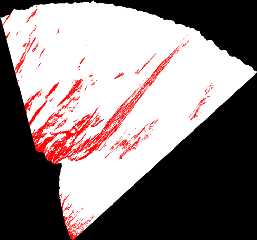
In this case about 10 % of an area is populated which is defined by the
camera field of view and found maximum distance.
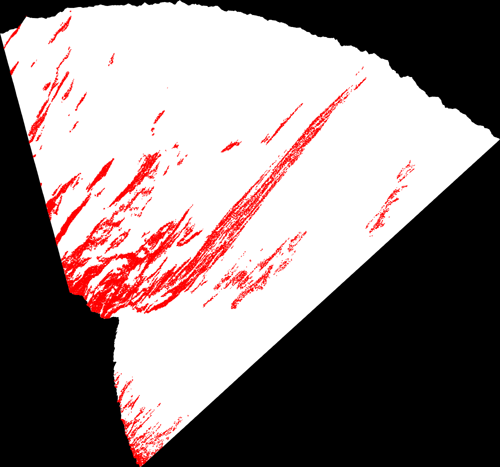
I include an image from above with land is white and trees are red.


> And of course parsing such a file will take some time.  You might be
> able to improve this by storing the numbers with different accuracy
> (normal vectors usually do not require a lot of decimal places).  And
> when you position objects you should not use macros, better calculate a
> matrix and write it to the file.


This is an excellent idea, but how can I make this?
Times I worked with matrices are 17 years ago.
Usually I need a scale operation (should be different in all three axes),
three consecutive rotations around y, x and y again and a translation at the
end.
Post a reply to this message
Attachments:
Download 'Tree_Logo_abovecK.png' (65 KB)
Preview of image 'Tree_Logo_abovecK.png'
|
|
| |
| |
|
|
|
|
| |
| |
|
|
"andrel" <a_l### [at] hotmailcom> schrieb im Newsbeitrag
news:432### [at] hotmailcom...

> If you know the approximate distance, is it also possible to use
> different levels of detail for far away and close objects?

If you use mesh2 objects, you shouldn't save memory, but for other objects
this is the way to go.
Of course you have to generate such different objects with equal appearence.
In this case the nearest tree is 20 times nearer than the ones far away.
If you can see a continous range of tree copies, it can be possible to
detect the boundaries between the different meshes.


Norbert Kern
Post a reply to this message
|
|
| |
| |
|
|
|
|
| |
| |
|
|
There is a small, but critical error in the zip file I posted at
binaries.scene-files.
Sorry for any inconvenience.

I posted a corrected file at the same thread.
Post a reply to this message
|
|
| |
| |
|
|
|
|
| |
| |
|
|
> I gave up waiting for it to finish, and I think it did only 300 trees.
> Not sure this shortcut of yours is anything short at all.


It's my fault, I posted an incorrect zip.
In the meantime, I posted a correct one at the same thread.

Norbert Kern
Post a reply to this message
|
|
| |
| |
|
|
|
|
| |
| |
|
|
I made some trials.
You are right with the rough proportionality, if you don't reach memory
limits.
Surprisingly it takes only 600000 tree copies to reach the limits of my 2 GB
machine. Why?
If I subtract the base scene file memory need, Povray (v3.5) needs 3 KB per
tree.
The tree is a mesh2 object with 57000 faces, 23 MB memory need and two
simple textures.
For a simple pointer 3 KB seems very much.


Norbert Kern

"Christoph Hormann" <chr### [at] gmxde> schrieb im Newsbeitrag
news:dg0shl$4o6$1@chho.imagico.de...

> Norbert Kern wrote:
>> It's only my experience, that with millions of objects my computer gets
>> slow even with 2 GB memory.

> What exactly gets slow?  Everything (placing the trees of course, parsing
> the generated trees, rendering) should be roughly proportional to the
> number of objects (rendering even faster) as long as you don't exceed
> memory.
Post a reply to this message
|
|
| |
| |
|
|
|
|
| |
| |
|
|
Norbert Kern wrote:
> I made some trials.
> You are right with the rough proportionality, if you don't reach memory
> limits.
> Surprisingly it takes only 600000 tree copies to reach the limits of my 2 GB
> machine. Why?
> If I subtract the base scene file memory need, Povray (v3.5) needs 3 KB per
> tree.
> The tree is a mesh2 object with 57000 faces, 23 MB memory need and two
> simple textures.
> For a simple pointer 3 KB seems very much.

Not a simple pointer, you need a lot of other stuff (The transform for
each instance alone is 256 byte (2*4*4*8)).

IIRC you save a lot if your mesh is textured as a whole and not
internally (Mesh textures are copied).

Christoph

--
POV-Ray tutorials, include files, Landscape of the week:
http://www.tu-bs.de/~y0013390/ (Last updated 24 Jul. 2005)
MegaPOV with mechanics simulation: http://megapov.inetart.net/
Post a reply to this message
|
|
| |
| |
|
|
|
|
| |
| |
|
|
simple question:
How can I texture a mesh2 as a whole?

Norbert Kern


"Christoph Hormann" <chr### [at] gmxde> schrieb im Newsbeitrag
news:dg1in5$a72$1@chho.imagico.de...

> IIRC you save a lot if your mesh is textured as a whole and not internally
> (Mesh textures are copied).
Post a reply to this message
|
|
| |
| |
|
|
|
|
| |
| |
|
|
Norbert Kern wrote:
> simple question:
> How can I texture a mesh2 as a whole?
>

If you have a textureless (no texture_list) mesh2 object called 'Mesh2':

#declare Textured_Mesh2=
   object {
     Mesh2
     texture { ... }
   }

;-)

Christoph

--
POV-Ray tutorials, include files, Landscape of the week:
http://www.tu-bs.de/~y0013390/ (Last updated 24 Jul. 2005)
MegaPOV with mechanics simulation: http://megapov.inetart.net/
Post a reply to this message
|
|
| |
| |
|
|
|
|
| |
| |
|
|
Oh my word... how cool is that?! :-D
Post a reply to this message
|
|
| |
| |
|
|
|
|
| |
| |
|
|
"Norbert Kern" <nor### [at] t-onlinede> schreef in bericht
news:43236855@news.povray.org...
> This demo scene shows three effects useful for planting many things like
> grass, trees, rocks or stones.
>

Excellent! I am impressed by your method! ...and image!
have you thought about the implication of your scene?? Dead trees where the
pov-logo appears!!! POV is deadly!  :-)
That could be interpreted as very negative advertisement ;-)

Thomas
Post a reply to this message
|
|
| |
| |
|
|
|
|
| |
| |
|
|
> have you thought about the implication of your scene?? Dead trees where
> the
> pov-logo appears!!! POV is deadly!  :-)

Lol!

I thought more of larches in autumn, when I defined the yellow tree texture.
The green ones should be firs.
By the way, I threw the scene together in 2 h. So don't be impressed.

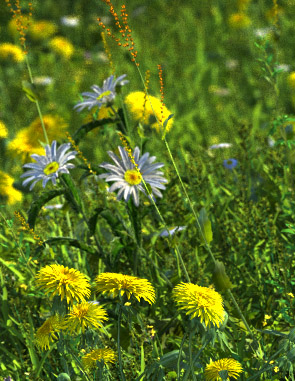
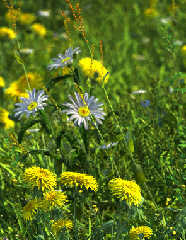
I'm currently working on a meadow scene, where the green colors are much
more vivid and realistic.
A small part shows what I mean.


Norbert Kern
Post a reply to this message
Attachments:
Download 'green.jpg' (91 KB)
Preview of image 'green.jpg'
|
|
| |
| |
|
|
|
|
| |
| |
|
|
Norbert Kern wrote:
> I'm currently working on a meadow scene, where the green colors are much
> more vivid and realistic.
> A small part shows what I mean.

Stop posting photos!  :)

--
Tim Cook
http://home.bellsouth.net/p/PWP-empyrean

-----BEGIN GEEK CODE BLOCK-----
Version: 3.12
GFA dpu- s: a?-- C++(++++) U P? L E--- W++(+++)>$
N++ o? K- w(+) O? M-(--) V? PS+(+++) PE(--) Y(--)
PGP-(--) t* 5++>+++++ X+ R* tv+ b++(+++) DI
D++(---) G(++) e*>++ h+ !r--- !y--
------END GEEK CODE BLOCK------
Post a reply to this message
|
|
| |
| |
|
|
|
|
| |
| |
|
|
"Norbert Kern" <nor### [at] t-onlinede> schreef in bericht
news:4325c254@news.povray.org...
>
> I'm currently working on a meadow scene, where the green colors are much
> more vivid and realistic.
> A small part shows what I mean.
>
>
<sigh>
(I already hear my old PC groaning and creaking under the strain...)
This looks very realistic, Norbert!

Thomas
Post a reply to this message
|
|
| |
| |
|
|
|
|
| |
| |
|
|
"Tim Cook" <z99### [at] bellsouthnet> wrote in message
news:4325c757@news.povray.org...
> Norbert Kern wrote:
> > I'm currently working on a meadow scene, where the green colors are much
> > more vivid and realistic.
> > A small part shows what I mean.
>
> Stop posting photos!  :)
>
> --
> Tim Cook

hmm.

seriously, i almost can't tell. the focal blur might be the only giveaway.
either it's focal blur, or bad compression.

kinda not sure.
Post a reply to this message
|
|
| |
| |
|
|
|
|
| |
| |
|
|
"Norbert Kern" <nor### [at] t-onlinede> wrote:

> I'm currently working on a meadow scene, where the green colors are much
> more vivid and realistic.
> A small part shows what I mean.

If those plants were any more realistic, I'd get hayfever just looking at
them. :)
Post a reply to this message
|
|
| |
| |
|
|
|
|
| |
| |
|
|
"Ross" wrote in message news:4326fc43$1@news.povray.org...
> "Tim Cook" wrote in message
> news:4325c757@news.povray.org...
>> Norbert Kern wrote:
>> > I'm currently working on a meadow scene, where the green colors are
>> > much
>> > more vivid and realistic.
>> > A small part shows what I mean.
>>
>> Stop posting photos!  :)
>>
>> --
>> Tim Cook
>
> hmm.
>
> seriously, i almost can't tell. the focal blur might be the only giveaway.
> either it's focal blur, or bad compression.
>
> kinda not sure.

Has to be compression.  I reproduced the image he did (half way), and
there's no focal blur... don't think there should be.
Post a reply to this message
|
|
| |
| |
|
|
|
|
| |
| |
|
|
> Has to be compression.  I reproduced the image he did (half way), and
> there's no focal blur... don't think there should be.

If you are relating to the small green.jpg, this is done with focal blur
indeed. It is a part of a big test render with 5120*2560 pixels, therefore I
did it with obviously unsufficient focal blur settings.


Norbert Kern
Post a reply to this message
|
|
| |
| |
|
|
|
|
| |
| |
|
|
hehe... no, I was referring to the pine trees with water and burnt pines in
shapes of POV logo... but for your "green"  WOWOWOW! really nice photo!  I
think you're notorious for violating the rules, publishing photos like that!

And how can it be "obviously" insufficient?!?  If this really isn't a
photo... then you're absolutely amazing!  The image is perfect as is.....
well.. come to think of it.. now's your chance to add ants, lady bugs, and
grass hoppers!

"Norbert Kern" <nor### [at] t-onlinede> wrote in message
news:432ad61d@news.povray.org...
>> Has to be compression.  I reproduced the image he did (half way), and
>> there's no focal blur... don't think there should be.
>
> If you are relating to the small green.jpg, this is done with focal blur
> indeed. It is a part of a big test render with 5120*2560 pixels, therefore
> I did it with obviously unsufficient focal blur settings.
>
>
> Norbert Kern
>
Post a reply to this message
|
|
| |
| |
|
|
|
|
| |