|
|
|
|
|
|
| |
| |
|
|
From: Jörg 'Yadgar' Bleimann
Subject: Mesh2 bug? [JPG, 800 x 600, 42881 bytes]
Date: 23 Apr 2005 09:49:49
Message: <426a527d@news.povray.org>
|
|
|
| |
| |
|
|
High!

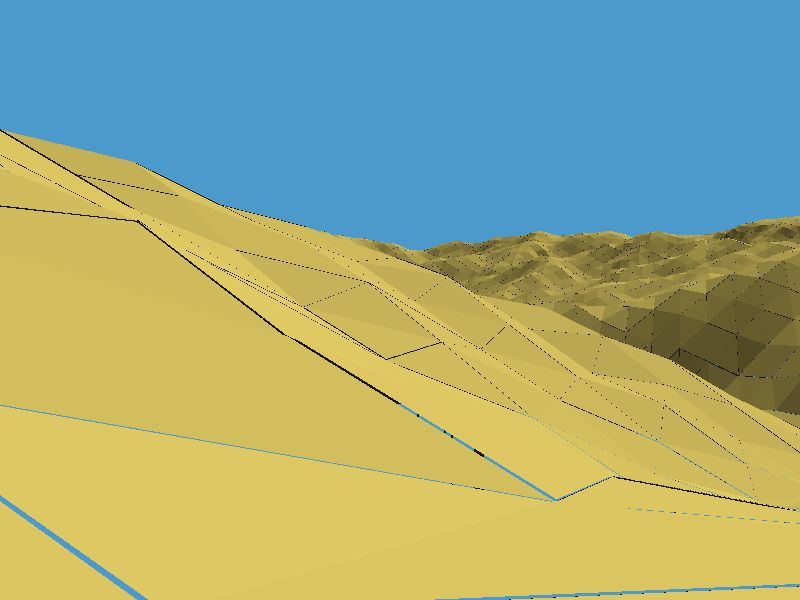
I finally managed to render a spherical mesh2 section from GeoTIFF
elevation data... but then a strange artifact shows up: narrow gaps
between most triangles! How can I get rid of this - do I have to smooth
the triangles? When looking up smooth_triangles, I found that even the
POV manual discourages programming them manually ("prohibitively
difficult")...

See you in Khyberspace!

Yadgar

Now playing: Saving my Heart (Yes)
Post a reply to this message
Attachments:
Download '2005-04-20_sar-e_helmand_take_3_(yadgar).jpg' (42 KB)
Preview of image '2005-04-20_sar-e_helmand_take_3_(yadgar).jpg'
|
|
| |
| |
|
|
|
|
| |
| |
|
|
very interresting this bug to make comics...
there is while that i look for making black lines around the shape...
you, without searching, you find !
that's nice...
"Jörg 'Yadgar' Bleimann" <yaz### [at] gmx de> a écrit dans le message de news:
426a527d@news.povray.org...
> High!
>
> I finally managed to render a spherical mesh2 section from GeoTIFF
> elevation data... but then a strange artifact shows up: narrow gaps
> between most triangles! How can I get rid of this - do I have to smooth
> the triangles? When looking up smooth_triangles, I found that even the
> POV manual discourages programming them manually ("prohibitively
> difficult")...
>
> See you in Khyberspace!
>
> Yadgar
>
> Now playing: Saving my Heart (Yes)
>
-------------------------------------------------------------------------------- de> a écrit dans le message de news:
426a527d@news.povray.org...
> High!
>
> I finally managed to render a spherical mesh2 section from GeoTIFF
> elevation data... but then a strange artifact shows up: narrow gaps
> between most triangles! How can I get rid of this - do I have to smooth
> the triangles? When looking up smooth_triangles, I found that even the
> POV manual discourages programming them manually ("prohibitively
> difficult")...
>
> See you in Khyberspace!
>
> Yadgar
>
> Now playing: Saving my Heart (Yes)
>
--------------------------------------------------------------------------------
Post a reply to this message
|
|
| |
| |
|
|
|
|
| |
| |
|
|
The problem you're seeing has nothing to do with smoothing. I don't know
what's going on; I suspect that your mesh itself is built incorrectly and
actually has gaps between the triangles. If not, maybe you're working at
such a large or tiny scale that you're getting accuracy errors... but I
don't know.

 - Slime
 [ http://www.slimeland.com/ ]
Post a reply to this message
|
|
| |
| |
|
|
From: Jörg 'Yadgar' Bleimann
Subject: Re: Mesh2 bug? [JPG, 800 x 600, 42881 bytes]
Date: 23 Apr 2005 16:03:53
Message: <426aaa29@news.povray.org>
|
|
|
| |
| |
|
|
High!

Slime wrote:

> If not, maybe you're working at
> such a large or tiny scale that you're getting accuracy errors... but I
> don't know.

Hmmm... the mesh2 is a 1-square degree slice of Earth's surface at 1
unit equalling 1 metre... so everything you see in the image is several
million units away from the origin. I'll try scaling it down by a factor
of, let's say 1000 and see what happens...

See you in Khyberspace!

Yadgar

Now playing: Add Space to Time (Software)
Post a reply to this message
|
|
| |
| |
|
|
From: Jörg 'Yadgar' Bleimann
Subject: Re: Mesh2 bug? [JPG, 800 x 600, 42881 bytes]
Date: 23 Apr 2005 18:10:31
Message: <426ac7d7@news.povray.org>
|
|
|
| |
| |
|
|
High!

Jörg 'Yadgar' Bleimann wrote:

> Hmmm... the mesh2 is a 1-square degree slice of Earth's surface at 1
> unit equalling 1 metre... so everything you see in the image is several
> million units away from the origin. I'll try scaling it down by a factor
> of, let's say 1000 and see what happens...

No, obviously it's no matter of dimension... even if I scale the whole
thing down to one billionth (!!!). the gaps remain the same!

Perhaps I should try tweaking max_trace level...

See you in Khyberspace!

Yadgar
Post a reply to this message
|
|
| |
| |
|
|
From: Gilles Tran
Subject: Re: Mesh2 bug? [JPG, 800 x 600, 42881 bytes]
Date: 23 Apr 2005 18:36:02
Message: <426acdd2@news.povray.org>
|
|
|
| |
| |
|
|
"Jörg 'Yadgar' Bleimann" <yaz### [at] gmxde> a écrit dans le message de news:
426ac7d7@news.povray.org...
> No, obviously it's no matter of dimension... even if I scale the whole
> thing down to one billionth (!!!). the gaps remain the same!

If precision errors can be ruled out, then it looks like that the common
vertices of two adjacent triangles are actually slightly different... I've
never seen something like this in a regular mesh2. One possible way to test
this would be to choose one vertex coordinate (for instance x=3.8989901) and
search for the beginning of the string (without the last digits, for
instance 3.898). If you find something like x=3.898123 then it's probable
that the vertices are duplicated and slightly off.

G.


--
**********************
http://www.oyonale.com
**********************
- Graphic experiments
- POV-Ray and Poser computer images
- Posters
Post a reply to this message
|
|
| |
| |
|
|
|
|
| |
| |
|
|
Jörg 'Yadgar' Bleimann wrote:
> High!
>
> Jörg 'Yadgar' Bleimann wrote:
>
>> Hmmm... the mesh2 is a 1-square degree slice of Earth's surface at 1
>> unit equalling 1 metre... so everything you see in the image is
>> several million units away from the origin. I'll try scaling it down
>> by a factor of, let's say 1000 and see what happens...
>
>
> No, obviously it's no matter of dimension... even if I scale the whole
> thing down to one billionth (!!!). the gaps remain the same!
>
> Perhaps I should try tweaking max_trace level...
>
> See you in Khyberspace!
>
> Yadgar

See if PoseRay can help here (user.txcyber.com/~sgalls/). It can read
mesh2{} and mesh{} objects. Load the mesh and join vertices with a
larger tolerance until you don't see any gaps. Then export back to mesh
from PoseRay. If you cannot read the mesh please let me know.

later,

FlyerX
Post a reply to this message
|
|
| |
| |
|
|
From: Jörg 'Yadgar' Bleimann
Subject: Re: Mesh2 bug? [JPG, 800 x 600, 42881 bytes]
Date: 24 Apr 2005 03:48:48
Message: <426b4f60@news.povray.org>
|
|
|
| |
| |
|
|
High!

FlyerX wrote:

> See if PoseRay can help here (user.txcyber.com/~sgalls/). It can read
> mesh2{} and mesh{} objects. Load the mesh and join vertices with a
> larger tolerance until you don't see any gaps. Then export back to mesh
> from PoseRay. If you cannot read the mesh please let me know.

I'm not sure whether this might work... since the POV mesh2 is not
generated from a ready-made mesh object in some other format, but from a
simple ASCII matrix of float values separated by commas, generated by
3DEM from a GeoTIFF!

See you in Khyberspace!

Yadgar
Post a reply to this message
|
|
| |
| |
|
|
From: Jörg 'Yadgar' Bleimann
Subject: Re: Mesh2 bug? [JPG, 800 x 600, 42881 bytes]
Date: 24 Apr 2005 04:07:52
Message: <426b53d8@news.povray.org>
|
|
|
| |
| |
|
|
High!

Gilles Tran wrote:

> If precision errors can be ruled out, then it looks like that the common
> vertices of two adjacent triangles are actually slightly different... I've
> never seen something like this in a regular mesh2. One possible way to test
> this would be to choose one vertex coordinate (for instance x=3.8989901) and
> search for the beginning of the string (without the last digits, for
> instance 3.898). If you find something like x=3.898123 then it's probable
> that the vertices are duplicated and slightly off.

I have no clue how to do this... I even didn't understand until now how
face_indices work - it's all Greek to me! And posting the code would be
useless without also posting the ASCII matrix - but the latter is about
6 megs large!

In the original matrix, the elevation values are in fact integer
numbers, but converted to floats, with an accuracy of 2 digits right of
the point, such as 2894.00,2876.00,2803.00,... etc.

Perhaps I should erase all those useless .00s to get real integers...

See you in Khyberspace!

Yadgar

Now playing: Endless Dream (Yes)
Post a reply to this message
|
|
| |
| |
|
|
|
|
| |
| |
|
|
> No, obviously it's no matter of dimension... even if I scale the whole
> thing down to one billionth (!!!). the gaps remain the same!


I'm not sure actually *scaling* the object down (with the scale keyword)
would make a difference. (This would just cause the ray to be transformed by
the inverse amount, calculate the intersection as usual, and then scale the
result back down, which doesn't avoid the actual potential problem of huge
numbers.) Instead, you might have to actually change the values you're
working with; that is, multiply the actual vertex_vectors by a small number
(or perhaps subtract a large number from them to bring them closer to the
origin in a certain direction without uniformly scaling).

The other thing, as Gilles pointed out, is to check whether your mesh data
actually *is* a series of disconnected triangles! Look at your data
carefully to rule this out.

 - Slime
 [ http://www.slimeland.com/ ]
Post a reply to this message
|
|
| |
| |
|
|
|
|
| |
| |
|
|
> One possible way to test
> this would be to choose one vertex coordinate (for instance x=3.8989901)
and
> search for the beginning of the string (without the last digits, for
> instance 3.898). If you find something like x=3.898123 then it's probable
> that the vertices are duplicated and slightly off.


Another way would be to look at the face indices and check that a certain
vertex number, for instance vertex # 100, appears more than once. If each
vertex number appears only once, then that would indicate triangle corners
aren't matching up.

 - Slime
 [ http://www.slimeland.com/ ]
Post a reply to this message
|
|
| |
| |
|
|
From: Jörg 'Yadgar' Bleimann
Subject: Re: Mesh2 bug? [JPG, 800 x 600, 42881 bytes]
Date: 24 Apr 2005 04:41:46
Message: <426b5bca$1@news.povray.org>
|
|
|
| |
| |
|
|
High!

Slime wrote:

> I'm not sure actually *scaling* the object down (with the scale keyword)
> would make a difference.

No, I instead divided all non-degree numbers through 1000, so also the
elevation values for the vertices!

> The other thing, as Gilles pointed out, is to check whether your mesh data
> actually *is* a series of disconnected triangles! Look at your data
> carefully to rule this out.

Perhaps you didn't understand the situation yet... I didn't import any
ready-made mesh data in a non-POV format, but merely a series of 1.44
million (1200 by 1200) elevation points stored in a simple ASCII file,
such as

2492,2478,2501,2498,... etc. ad nauseam

See you in Khyberspace!

Yadgar

Now playing: The Revealing Science of God, 1996 live version (Yes)
Post a reply to this message
|
|
| |
| |
|
|
From: Jörg 'Yadgar' Bleimann
Subject: Re: Mesh2 bug? [JPG, 800 x 600, 42881 bytes]
Date: 24 Apr 2005 04:44:59
Message: <426b5c8b$1@news.povray.org>
|
|
|
| |
| |
|
|
High!

Jörg 'Yadgar' Bleimann wrote:

> In the original matrix, the elevation values are in fact integer
> numbers, but converted to floats, with an accuracy of 2 digits right of
> the point, such as 2894.00,2876.00,2803.00,... etc.
>
> Perhaps I should erase all those useless .00s to get real integers...

(half an hour later)

Not even this worked... now I'm really not sure anymore whether I should
insist on spherical Khyberspace or instead settle for a flat
Afghanistan... although it would be strange to spot distant Kandahar
from Kabul's Koh-e Safi!

See you there ;-)!

Yadgar

Now playing: The Revealing Science of God, 1996 live version (Yes)
Post a reply to this message
|
|
| |
| |
|
|
|
|
| |
| |
|
|
Jörg 'Yadgar' Bleimann wrote:
> High!
>
> I finally managed to render a spherical mesh2 section from GeoTIFF
> elevation data... but then a strange artifact shows up: narrow gaps
> between most triangles! How can I get rid of this

It is quite obvious - like others have mentioned - that the triangles
you see a gap between do not share the same vertices like they should.
Note i am talking about *the same* here, not calculated from the same
data.  Apart from the errors this could introduce (and the gaps you see)
this is immensely inefficient - the very purpose of the mesh2 syntax is
to avoid specifying the same vertices several times.

Note there is no need to code something new - Ingo's MMMM-macros
(http://members.home.nl/seedseven/) can be used for this.

Christoph

--
POV-Ray tutorials, include files, Sim-POV,
HCR-Edit and more: http://www.tu-bs.de/~y0013390/
Last updated 27 Feb. 2005 _____./\/^>_*_<^\/\.______
Post a reply to this message
|
|
| |
| |
|
|
From: Jörg 'Yadgar' Bleimann
Subject: Re: Mesh2 bug? [JPG, 800 x 600, 42881 bytes]
Date: 24 Apr 2005 06:31:12
Message: <426b7570$1@news.povray.org>
|
|
|
| |
| |
|
|
High!

Christoph Hormann wrote:

> Note there is no need to code something new - Ingo's MMMM-macros
> (http://members.home.nl/seedseven/) can be used for this.

Obviously this is designed for using smooth_triangles... but I did (at
least for the moment) not specify any normal vectors at all!

Can I use the macros nonetheless?

See you in Khyberspace!

Yadgar
Post a reply to this message
|
|
| |
| |
|
|
|
|
| |
| |
|
|
> Obviously this is designed for using smooth_triangles... but I did (at
> least for the moment) not specify any normal vectors at all!
>
> Can I use the macros nonetheless?

You might be able use my MMM (available from the Download-Section of my
website), if you can store the data in a 2d-array.
E.g., if the DEM-data is in a rectangular grid, the first pixel (top left)
would be at array[0][0] and the last pixel (bottom right) would be at
array[100][100], the first dimension being the x-space.

They convert a rectangular grid of vertices into triangles/a mesh, and I've
got macros to generate some normals off of the data for smooth_triangles.
I've lately add Wavefront-OBJ export, so you could also save the mesh to
disk and smoothen/subdivide it with a different programm.

Regards,
Tim

--
"Tim Nikias v2.0"
Homepage: <http://www.nolights.de>
Post a reply to this message
|
|
| |
| |
|
|
|
|
| |
| |
|
|
Jörg 'Yadgar' Bleimann wrote:
>
> Obviously this is designed for using smooth_triangles...

I can't imagine any good reason why you would not want smooth triangles
in this case but you can surely quite easily remove all the normal
vectors related code from those macros.

Note you do not have to specify any normal vectors anyway.  The macros
calculate them automatically.

Christoph

--
POV-Ray tutorials, include files, Sim-POV,
HCR-Edit and more: http://www.tu-bs.de/~y0013390/
Last updated 27 Feb. 2005 _____./\/^>_*_<^\/\.______
Post a reply to this message
|
|
| |
| |
|
|
From: Jörg 'Yadgar' Bleimann
Subject: Re: Mesh2 bug? [JPG, 800 x 600, 42881 bytes]
Date: 24 Apr 2005 12:26:46
Message: <426bc8c6$1@news.povray.org>
|
|
|
| |
| |
|
|
High!

Tim Nikias wrote:
> You might be able use my MMM (available from the Download-Section of my
> website), if you can store the data in a 2d-array.
> E.g., if the DEM-data is in a rectangular grid, the first pixel (top left)
> would be at array[0][0] and the last pixel (bottom right) would be at
> array[100][100], the first dimension being the x-space.

But I'm not even able to store the data retrieved from the ASCII matrix
in a two-dimensional array! My code

#declare SareHelmand=array[l][l]
{
   #declare a=0;
   #while (a<l)
   {
      #declare b=0;
      #while (b<l)
	   <(re+mtrix[a][b]) * sin ((sLong-b/l) * (pi/180)) *
         cos ((sLat + a/l) * (pi/180)),
         (rp+mtrix[a][b])*sin((sLat+a/l)*(pi/180)),
         (re+mtrix[a][b]) * cos ((sLong-b/l) * (pi/180)) *
         cos ((sLat+a/l)*(pi/180))>
         #if (b<l-1)
           ,
       #end
       #declare b=b+1;
   }
   #warning concat("Assigning vectors for line ", str(a, 4, 0))
   #declare a=a+1;
   #end
}

results in the error message

"{ expected after {, # found instead"!

Perhaps I'm in fact just too stupid to program more sophisticated things
than spheres over checkered planes...

See you in my loony bin!

Yadgar
Post a reply to this message
|
|
| |
| |
|
|
|
|
| |
| |
|
|
Jörg 'Yadgar' Bleimann nous apporta ses lumieres en ce 2005-04-24 04:57:
> High!
>
> Slime wrote:
>
>> I'm not sure actually *scaling* the object down (with the scale keyword)
>> would make a difference.
>
>
> No, I instead divided all non-degree numbers through 1000, so also the
> elevation values for the vertices!
>
>> The other thing, as Gilles pointed out, is to check whether your mesh
>> data
>> actually *is* a series of disconnected triangles! Look at your data
>> carefully to rule this out.
>
>
> Perhaps you didn't understand the situation yet... I didn't import any
> ready-made mesh data in a non-POV format, but merely a series of 1.44
> million (1200 by 1200) elevation points stored in a simple ASCII file,
> such as
>
> 2492,2478,2501,2498,... etc. ad nauseam
>
> See you in Khyberspace!
>
> Yadgar
>
> Now playing: The Revealing Science of God, 1996 live version (Yes)
Open your source file in any text editor that can load such a large file. Launch a
search for the
first value, look if you get more than one match. Repeat for several values taken at
random. You
should get several matches for almost all of them. If you get only 1 match for all
your tests, that
mean that all the faces are actualy separate, non-contiguout, triangles.

Alain
Post a reply to this message
|
|
| |
| |
|
|
|
|
| |
| |
|
|
> Perhaps you didn't understand the situation yet... I didn't import any
> ready-made mesh data in a non-POV format, but merely a series of 1.44
> million (1200 by 1200) elevation points stored in a simple ASCII file,

Ah, and then you're taking that and turning it into a mesh with SDL? Maybe
the SDL is the problem.

 - Slime
 [ http://www.slimeland.com/ ]
Post a reply to this message
|
|
| |
| |
|
|
|
|
| |
| |
|
|
I speak with absolutely no knowledge of the inner workings of meshes.
Subjectively though it looks like the result of an XOR (difference)
operation rather than an OR (union).
That would subtract the overlap at the edges.
Are there wise POVers out there to put that to rest?
DLM

"Jörg 'Yadgar' Bleimann" <yaz### [at] gmxde> wrote in message
news:426a527d@news.povray.org...
> High!
>
> I finally managed to render a spherical mesh2 section from GeoTIFF
> elevation data... but then a strange artifact shows up: narrow gaps
> between most triangles! How can I get rid of this - do I have to smooth
> the triangles? When looking up smooth_triangles, I found that even the
> POV manual discourages programming them manually ("prohibitively
> difficult")...
>
> See you in Khyberspace!
>
> Yadgar
>
> Now playing: Saving my Heart (Yes)
>


--------------------------------------------------------------------------------
Post a reply to this message
|
|
| |
| |
|
|
|
|
| |
| |
|
|
Jörg 'Yadgar' Bleimann wrote:
> High!
>
> FlyerX wrote:
>
>> See if PoseRay can help here (user.txcyber.com/~sgalls/). It can read
>> mesh2{} and mesh{} objects. Load the mesh and join vertices with a
>> larger tolerance until you don't see any gaps. Then export back to
>> mesh from PoseRay. If you cannot read the mesh please let me know.
>
>
> I'm not sure whether this might work... since the POV mesh2 is not
> generated from a ready-made mesh object in some other format, but from a
> simple ASCII matrix of float values separated by commas, generated by
> 3DEM from a GeoTIFF!
>
> See you in Khyberspace!
>
> Yadgar

A mesh2{} object is just that. PoseRay does not care where it comes from.

FlyerX
Post a reply to this message
|
|
| |
| |
|
|
From: Tim Nikias
Subject: Re: Mesh2 bug? [JPG, 800 x 600, 42881 bytes]
Date: 24 Apr 2005 21:20:03
Message: <426c45c3@news.povray.org>
|
|
|
| |
| |
|
|
That's a simple syntax problem. Do it like this:

#declare SareHelmand=array[l][l];

#declare a=0; #while (a<l)
#declare b=0; #while (b<l)

#declare SareHelmand[a][b]=blabla;

#declare b=b+1; #end
#declare a=a+1; #end

Then you've got the data in a 2D-Array which you can send over to my MMM.

Regards,
Tim

--
"Tim Nikias v2.0"
Homepage: <http://www.nolights.de>
Post a reply to this message
|
|
| |
| |
|
|
|
|
| |
| |
|
|
Wasn't it Slime who wrote:

>The other thing, as Gilles pointed out, is to check whether your mesh data
>actually *is* a series of disconnected triangles! Look at your data
>carefully to rule this out.

He posted an earlier version of his source code a while ago. Each vertex
is listed once and then used in all the adjoining triangles.

It is floating point precision problems. The points are typically at a
distance of 6378140 POV units from the origin (The Earth's radius in
metres). The short sides of the triangles are somewhere in the region of
33400 POV units, so I guess than an error of a few tens of units would
be visible in this image.

Scaling the whole mesh down doesn't help, because it's the ratio of the
error to the size of the number that's significant.

One way to fix it is to move the whole mesh so that the point being
looked at is placed close to the origin, by subtracting the "look at"
point from the data read from the SRTM file before calculating the mesh.
The calculated mesh can then be translated back to the required
position.

I did some experiments. Not having a copy of the SRTM data, I just set
all heights to sea level. Not having masses of memory on my computer, I
severely reduced the number of triangles, but was still able to
reproduce the problem and work round it by making the following changes:

1. Move the calculation of lNormVect to close to the start of the scene
   and use it to get an approximate look at point. (We can't get the
   exact look at point yet because that requires tracing the mesh.)
   We don't need an exact value.

      #declare ApproxLook = vnormalize(lNormVect) * (rp+re)/2;

2. Move the vertices by minus that vector when creating the mesh

      #while (b<l)
        <(re+mtrix[a][b]) * sin ((sLong-b/l) * (pi/180)) *
        cos ((sLat + a/l) * (pi/180)),
        (rp+mtrix[a][b])*sin((sLat+a/l)*(pi/180)),
        (re+mtrix[a][b]) * cos ((sLong-b/l) * (pi/180)) *
        cos ((sLat+a/l)*(pi/180))> - ApproxLook

3. Translate the whole mesh back to where you want it (at the end of the
   Earthslice declaration, just before its final "}").

        translate ApproxLook


--
Mike Williams
Gentleman of Leisure
Post a reply to this message
|
|
| |
| |
|
|
From: Jörg 'Yadgar' Bleimann
Subject: Re: Mesh2 bug? [JPG, 800 x 600, 42881 bytes]
Date: 25 Apr 2005 16:37:51
Message: <426d551f@news.povray.org>
|
|
|
| |
| |
|
|
High!

Tim Nikias wrote:

> Then you've got the data in a 2D-Array which you can send over to my MMM.

I replaced my faulty array definition with your code... but, you should
have warned me that parsing would take forever, even on an Athlon 64!
O.k., it obviously doesn't slow down exponentially like with standard
meshes, but after adding a #warning output line to mmm.inc, I found out
that parsing the entire mesh would take almost 20 hours, which is really
too slow for my purposes (you know, animated Khyberspace, riding the
Hindu Kush in virtual hippie buses...).

On the other hand, your include file is intriguing as it seems to be
able to automatically smoothen a mesh...

See you in Khyberspace!

Yadgar

Now playing: Shake off the Ghosts (Simple Minds)
Post a reply to this message
|
|
| |
| |
|
|
From: Yadgar
Subject: Re: Mesh2 bug? [JPG, 800 x 600, 42881 bytes]
Date: 26 Apr 2005 03:20:56
Message: <426DEC4C.8020602@gmx.de>
|
|
|
| |
| |
|
|
High!

Mike Williams schrieb:

> [a concise description how to fix my scene ]

Besiâr tashakur (thanks a lot), Mike! It now works perfectly... be
prepared to find one day your name on a street name sign in Virtual
Kabul's New Town... "Sarak-e Williams", sounds cool, eh?

And now... let's smooth it! Watch out for more...

See you in Khyberspace!

Yadgar
Post a reply to this message
|
|
| |
| |
|
|
|
|
| |