|
|
|
|
|
|
| |
| |
|
|
|
|
| |
| |
|
|
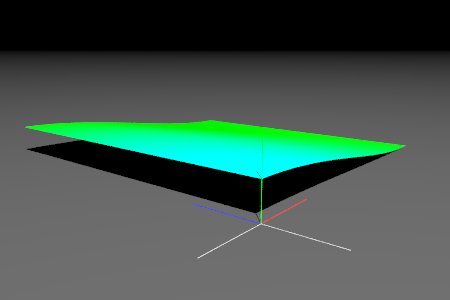
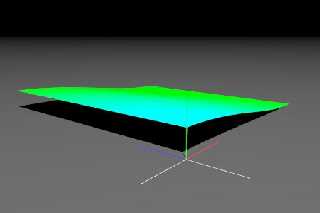
When I run the following the cylindrical pattern seems to be applied in
only the x dimension.  Is it possible to apply it in x and z dimensions?


          #macro MarkOrigin (Radius)  //mark origin
                 cylinder { -100*y 0*y Radius
		pigment { rgb .5 } finish { ambient .8} }
                 cylinder { -100*z 0*z Radius
		pigment { rgb .5 } finish { ambient .8} }
                 cylinder { -100*x 0*x Radius
		pigment { rgb .5 } finish { ambient .8} }
                 cylinder {  0*y 100*y Radius
		pigment { rgb < 0, 1, 0 > } finish { ambient .8} }
                 cylinder {  0*z 100*z Radius
		pigment { rgb < 0, 0, 1 > } finish { ambient .8} }
                 cylinder {  0*x 100*x Radius
		pigment { rgb < 1, 0, 0 > } finish { ambient .8} }

          #end
          MarkOrigin (.4)

          camera {
                 location  <-120,60,-80>*3
                 look_at   <250,0,250>
                 angle  55
                 right  x*image_width/image_height
          }
          light_source {
                 0*x
                 color rgb 2.25
                 translate vrotate ( <0,0,-1200>, <60, 45, 0> )
          }
          plane {
                 y, 0
                 pigment {
                         rgb .1
                 }
                 finish {
                         ambient 0
                         diffuse .8
                 }
          }
          #local F_Terrain =
          function {
                 pattern {
                         cylindrical
                         cubic_wave
                 }
          }
          #local Terrain =
          height_field {
                 function 1000,1000 {
			F_Terrain(x,y,z)
		}
                 pigment {
                        function  {
				F_Terrain(x,y,z)
		       }
                        pigment_map {
                                [0 rgb Green]
                                [1 rgb Cyan]
                        }
                 }
                 scale <500, 50, 500 >
          };

          object { Terrain }
Post a reply to this message
Attachments:
Download 'img.1001.jpg' (9 KB)
Preview of image 'img.1001.jpg'
|
|
| |
| |
|
|
|
|
| |
| |
|
|
> function 1000,1000 {
> F_Terrain(x,y,z)
> }

This evaluates F_Terrain along the X-Y plane from <0,0,0> to <1,1,0>. Since
the cylinder goes along the y-axis (which ends up corresponding to the
z-axis in the height field), the height field only changes along the x-axis.

Two solutions:
 - rotate your cylindrical pattern to face along the z-axis with rotate 90*x
 - use the spherical pattern instead of cylindrical

 - Slime
 [ http://www.slimeland.com/ ]
Post a reply to this message
|
|
| |
| |
|
|
|
|
| |
| |
|
|
"Jim Charter" <jrc### [at] msn com> a écrit dans le message de
news:42371cd4@news.povray.org...
> When I run the following the cylindrical pattern seems to be applied in
> only the x dimension. Is it possible to apply it in x and z dimensions?
Hi
The cylindrical pattern creates a one unit radius cylinder along the Y axis.
and functions are evaluated on the x-y plane
so your pattern is parallel to the evaluation plane
so you could try something like
function {
pattern {
cylindrical
cubic_wave
rotate x*90
}
}
Marc com> a écrit dans le message de
news:42371cd4@news.povray.org...
> When I run the following the cylindrical pattern seems to be applied in
> only the x dimension. Is it possible to apply it in x and z dimensions?
Hi
The cylindrical pattern creates a one unit radius cylinder along the Y axis.
and functions are evaluated on the x-y plane
so your pattern is parallel to the evaluation plane
so you could try something like
function {
pattern {
cylindrical
cubic_wave
rotate x*90
}
}
Marc
Post a reply to this message
|
|
| |
| |
|
|
|
|
| |
| |
|
|
"Slime" <fak### [at] emailaddress> a écrit dans le message de
news:4237206a$1@news.povray.org...
> > function 1000,1000 {
> > F_Terrain(x,y,z)
> > }
>
> This evaluates F_Terrain along the X-Y plane from <0,0,0> to <1,1,0>.
Since
> the cylinder goes along the y-axis (which ends up corresponding to the
> z-axis in the height field), the height field only changes along the
x-axis.
>
> Two solutions:
>  - rotate your cylindrical pattern to face along the z-axis with rotate
90*x
>  - use the spherical pattern instead of cylindrical
>
>  - Slime
>  [ http://www.slimeland.com/ ]

Sorry I was writing my post while you were posting :)

Marc
Post a reply to this message
|
|
| |
| |
|
|
|
|
| |
| |
|
|
Slime wrote:
>>function 1000,1000 {
>>F_Terrain(x,y,z)
>>}
>
>
> This evaluates F_Terrain along the X-Y plane from <0,0,0> to <1,1,0>. Since
> the cylinder goes along the y-axis (which ends up corresponding to the
> z-axis in the height field), the height field only changes along the x-axis.
>
> Two solutions:
>  - rotate your cylindrical pattern to face along the z-axis with rotate 90*x
>  - use the spherical pattern instead of cylindrical
>
>  - Slime
>  [ http://www.slimeland.com/ ]
>
>

 From the docs:
3.5.11.10  Cylindrical
The cylindrical pattern creates a one unit radius cylinder along the Y
axis. It is computed by: value = 1.0-min(1, sqrt(X^2 + Z^2)) It starts
at 1.0 at the origin and decreases to a minimum value of 0.0 as it
approaches a distance of 1 unit from the Y axis.

Also, Why does the pigment behave like I would expect.
Post a reply to this message
|
|
| |
| |
|
|
|
|
| |
| |
|
|
"Jim Charter" <jrc### [at] msncom> a écrit dans le message de
news:423730c7$1@news.povray.org...
> Also, Why does 'not' the pigment behave like I would expect.
the pigment behaves  like you would expect
but the image function evaluation is done on the x-y plane not ont the x-z
plane!
so you have to follow Slime's advice: either rotate your pattern by x*90 or
use spherical pattern

Marc
Post a reply to this message
|
|
| |
| |
|
|
|
|
| |
| |
|
|
Marc Jacquier wrote:
> "Jim Charter" <jrc### [at] msncom> a écrit dans le message de
> news:423730c7$1@news.povray.org...
>
>>Also, Why does 'not' the pigment behave like I would expect.
>
> the pigment behaves  like you would expect
> but the image function evaluation is done on the x-y plane not ont the x-z
> plane!
> so you have to follow Slime's advice: either rotate your pattern by x*90 or
> use spherical pattern
>
> Marc
>
>
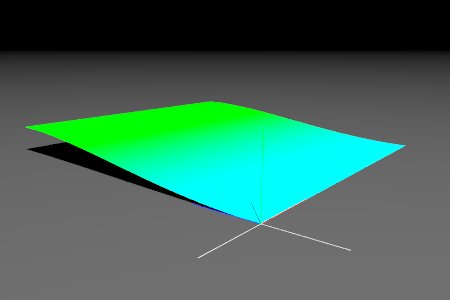
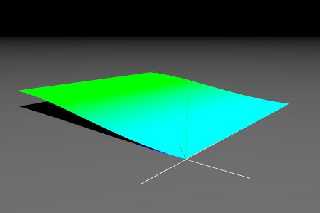
Yes I see that that works except the effect seems to translate by z*1
but I've got to say, for me this is all completely counter intuitive.
Whether I use it for a pigment or for a hf I picture the function, as
described in the docs as a sort of column along the y axis such that any
point on the y xis would return a value of 1, any value at x=1 and z=0
would return 0 for all values of y, etc.  That seems to happen if I use
the function in a pigment whether I rotate or not.  When the pattern is
used in a hf it seems to act like it is a cylinder along the y=-1 axis
that is then rotated?  Forgive me if I am being a pest.  I really am
having trouble picturing this.  But I also had similar misunderstandings
when using the wood pattern.  So I truly believe you guys are all able
to picture something that I am just not getting lol.
Post a reply to this message
Attachments:
Download 'img.1002.jpg' (9 KB)
Preview of image 'img.1002.jpg'
|
|
| |
| |
|
|
|
|
| |
| |
|
|
> Yes I see that that works except the effect seems to translate by z*1
> but I've got to say, for me this is all completely counter intuitive.
> Whether I use it for a pigment or for a hf I picture the function, as
> described in the docs as a sort of column along the y axis such that any
> point on the y xis would return a value of 1, any value at x=1 and z=0
> would return 0 for all values of y, etc.  That seems to happen if I use
> the function in a pigment whether I rotate or not.

That is all correct.

The thing is, when you use the function 1000,1000 {...} syntax, it generates
a 1000x1000 image from the pattern. However, it does not know *how* this
image is going to be used! When images are loaded from files (with the
syntax    tga "myimage.tga"), they are placed vertically, covering the area
from <0,0,0> to <1,1,0> and stretching in the z direction. So it makes sense
that when the function width,height syntax is used to *generate* an image,
it samples from that area also. It doesn't know that you're going to take
that image and use it in a height field, so it doesn't know that it would be
more convenient to sample from <0,0,0> to <1,0,1>.

So, you have to prepare your function to be sampled from the region <0,0,0>
to <1,1,0>, and recognize that after that sampling is done, the data will be
used in a different orientation. Kind of like the sampled area of the
texture were rotate 90 degrees around the x-axis, and then raised along the
y-axis depending on its value at a given point.

What you want is a cross-section of the cylindrical pattern along the x-z
plane. But function width,height samples along the x-y plane, so you have to
take your pattern and rotate it around the x-axis by 90 degrees so that the
cross section you're interested in lies along the x-y plane. That's where it
is then sampled, and that data is turned into a height field.

 - Slime
 [ http://www.slimeland.com/ ]
Post a reply to this message
|
|
| |
| |
|
|
|
|
| |
| |
|
|
In article <4237206a$1@news.povray.org>, "Slime" <fak### [at] emailaddress>
wrote:

> Two solutions:
>  - rotate your cylindrical pattern to face along the z-axis with rotate 90*x
>  - use the spherical pattern instead of cylindrical

Another solution: do the rotation in the call to the function. It's a 90
degree rotation around one axis, so just swap two coordinates and negate
one of them. Since you're generating an image for the height field, it's
even easier to figure out...function images are sampled from the xy
plane, the height field uses the image for the xz plane.

function 1000, 1000 {F_Terrain(x, 0, y)}

--
Christopher James Huff <cja### [at] gmailcom>
POV-Ray TAG: <chr### [at] tagpovrayorg>
http://tag.povray.org/
Post a reply to this message
|
|
| |
| |
|
|
|
|
| |
| |
|
|
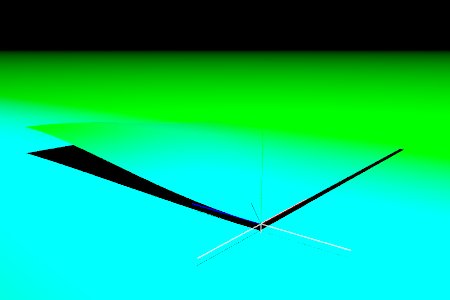
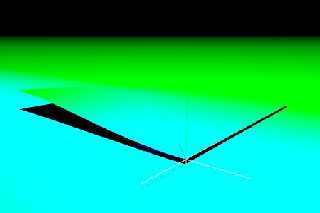
Slime wrote:

Thanks for that Slime.  And now I understand why the apparent difference
between the behavior of the pigment and the hf was faking me out.  The
pigment was being "rotated" too, but its intersection with the surface
just happened to mimic somewhat, what the unrotated pattern might also do.

Now I just have to try and understand why the apparent center of the
cylinder in the cylindrical pattern seems to be at x=0 z=1
Post a reply to this message
Attachments:
Download 'img.1003.jpg' (10 KB)
Preview of image 'img.1003.jpg'
|
|
| |
| |
|
|
|
|
| |
| |
|
|
Christopher James Huff wrote:
> In article <4237206a$1@news.povray.org>, "Slime" <fak### [at] emailaddress>
> wrote:
>
>
>>Two solutions:
>> - rotate your cylindrical pattern to face along the z-axis with rotate 90*x
>> - use the spherical pattern instead of cylindrical
>
>
> Another solution: do the rotation in the call to the function. It's a 90
> degree rotation around one axis, so just swap two coordinates and negate
> one of them. Since you're generating an image for the height field, it's
> even easier to figure out...function images are sampled from the xy
> plane, the height field uses the image for the xz plane.
>
> function 1000, 1000 {F_Terrain(x, 0, y)}
>
That's cool, then I could use the same function for hf and its pigment,
just call each differently.
Post a reply to this message
|
|
| |
| |
|
|
|
|
| |
| |
|
|
In article <42374a9f$1@news.povray.org>,
 Jim Charter <jrc### [at] msncom> wrote:

> > function 1000, 1000 {F_Terrain(x, 0, y)}
> >
> That's cool, then I could use the same function for hf and its pigment,
> just call each differently.

Another thing, it's possible that the function image feature uses the
upper left corner as the origin, with the y coordinate going down. I
hope that's not so, since it'd be confusing and unnecessary, but if so,
just use 1-y instead of y.

--
Christopher James Huff <cja### [at] gmailcom>
POV-Ray TAG: <chr### [at] tagpovrayorg>
http://tag.povray.org/
Post a reply to this message
|
|
| |
| |
|
|
|
|
| |
| |
|
|
Christopher James Huff wrote:
> Another thing, it's possible that the function image feature uses the
> upper left corner as the origin, with the y coordinate going down. I
> hope that's not so, since it'd be confusing and unnecessary

It does IIRC. I had a long discussion with Thorsten on this issue back in
the povray.pre-beta group, but he insisted it was the correct behavior.

Rune
--
3D images and anims, include files, tutorials and more:
rune|vision:  http://runevision.com
POV-Ray Ring: http://webring.povray.co.uk
Post a reply to this message
|
|
| |
| |
|
|
|
|
| |
| |
|
|
Rune wrote:
> Christopher James Huff wrote:
>> Another thing, it's possible that the function image feature uses the
>> upper left corner as the origin, with the y coordinate going down. I
>> hope that's not so, since it'd be confusing and unnecessary
>
> It does IIRC. I had a long discussion with Thorsten on this issue
> back in the povray.pre-beta group, but he insisted it was the correct
> behavior.

Sorry, it was povray.beta-test:

http://news.povray.org/povray.beta-test/thread/%3C3cae24da%40news.povray.org%3E/?mtop=24

And I'm being reminded now that you were in the discussion too.

Rune
--
3D images and anims, include files, tutorials and more:
rune|vision:  http://runevision.com
POV-Ray Ring: http://webring.povray.co.uk
Post a reply to this message
|
|
| |
| |
|
|
|
|
| |
| |
|
|
"Rune" <run### [at] runevisioncom> a écrit dans le message de
news:42376cf2$1@news.povray.org...
> It does IIRC. I had a long discussion with Thorsten on this issue back in
> the povray.pre-beta group, but he insisted it was the correct behavior.
>
> Rune
> --
Oh well so it is the correct behaviour.. ie
counter-intuitive-for-dummy-image-makers....
If it is good for developers, it must be good for us

Marc (We're not worthy, we're not worthy)
Post a reply to this message
|
|
| |
| |
|
|
|
|
| |
| |
|
|
In article <42376edc$1@news.povray.org>,
 "Rune" <run### [at] runevisioncom> wrote:

> And I'm being reminded now that you were in the discussion too.

Yes, I remember that thread now. Looks like I should have followed up on
it...

--
Christopher James Huff <cja### [at] gmailcom>
POV-Ray TAG: <chr### [at] tagpovrayorg>
http://tag.povray.org/
Post a reply to this message
|
|
| |
| |
|
|
|
|
| |
| |
|
|
"Marc Jacquier" <jac### [at] wanadoofr> wrote in message
news:423771d7@news.povray.org...
>
> "Rune" <run### [at] runevisioncom> a écrit dans le message de
> news:42376cf2$1@news.povray.org...
>> It does IIRC. I had a long discussion with Thorsten on this issue back in
>> the povray.pre-beta group, but he insisted it was the correct behavior.
>>
>> Rune
>> --
> Oh well so it is the correct behaviour.. ie
> counter-intuitive-for-dummy-image-makers....
> If it is good for developers, it must be good for us
>
> Marc (We're not worthy, we're not worthy)
>

It's the proper behavior for sticking textures on "walls"... you just need
to rotate it for "floors" and "side walls", it's as good a default behavior
as any.
Post a reply to this message
|
|
| |
| |
|
|
|
|
| |
| |
|
|
Tim Attwood wrote:

>
> ... you just need
> to rotate it for "floors" and "side walls",

No you need to translate if need the origin of the pattern used to
correspond to its native origin in any other context.  I am not
complaining, just pointing out that it is not only the rotate thing that
can fake you out.  The rotation confusion had to do with my own
misunderstanding that the syntax relates to this thing called a
"function image".  I thought it was specifically a variation on height
field syntax and so expected it would work without needing any
manipulation.  That was my mistake.  But the origin being at <0,1,0>
looks truly arbitrary.  Your mind is saying, "Okay, I guess that is just
how it works, so I will compensate."  But at the same time it is also
asking, "But am I misunderstanding something here?  Am I building on a
scaffold of misunderstanding?  Am I doing something wrong which is
causing this behavior?  If I compensate like this will there be even
greater confusion down the line"  Without Rune's post I couldn't answer
that.  Again, once you know what to do it is fine.
Post a reply to this message
|
|
| |
| |
|
|
|
|
| |
| |
|
|
Christopher James Huff wrote:
> In article <42374a9f$1@news.povray.org>,
>  Jim Charter <jrc### [at] msncom> wrote:
>
>
>>>function 1000, 1000 {F_Terrain(x, 0, y)}
>>>
>>
>>That's cool, then I could use the same function for hf and its pigment,
>>just call each differently.
>
>
> Another thing, it's possible that the function image feature uses the
> upper left corner as the origin, with the y coordinate going down. I
> hope that's not so, since it'd be confusing and unnecessary, but if so,
> just use 1-y instead of y.
>
Thanks Chris, that's what I'll do.
Post a reply to this message
|
|
| |
| |
|
|
|
|
| |
| |
|
|
In article <423802ba$1@news.povray.org>,
 "Tim Attwood" <tim### [at] comcastnet> wrote:

> It's the proper behavior for sticking textures on "walls"... you just need
> to rotate it for "floors" and "side walls", it's as good a default behavior
> as any.

The use of the xy plane for image maps is. Putting the origin of the
function image coordinate system at < 0, 1> in the world coordinate
system is a different issue.

--
Christopher James Huff <cja### [at] gmailcom>
POV-Ray TAG: <chr### [at] tagpovrayorg>
http://tag.povray.org/
Post a reply to this message
|
|
| |
| |
|
|
|
|
| |
|
|