|
|
|
|
|
|
| |
| |
|
|
From: Jaime Vives Piqueres
Subject: More landscaping with displace warps [165KB]
Date: 17 Feb 2005 06:21:48
Message: <42147e4c@news.povray.org>
|
|
|
| |
| |
|
|
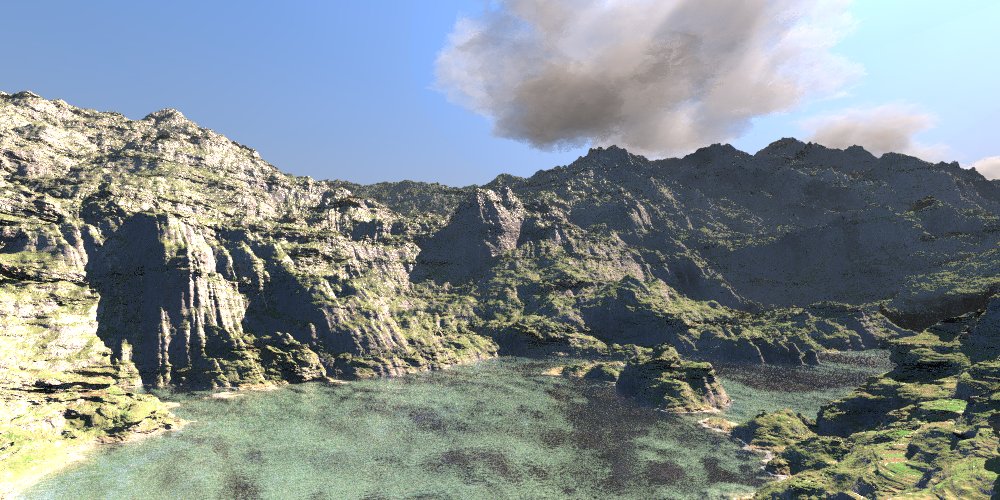
I found a sort of "gold mine" with displacement warps on MegaPOV. Here I
used a wrinkles pattern as base, displaced with a "sandwich" of several
other patterns:

#declare fh=rand(r_terrf)*1000;
#local fn_Form=
    function {
       pattern{
         wrinkles scale 10
         warp {
          displace {
           gradient y
           pigment_map{
            [0.0 granite
                 scale <3*rand(r_terrf),3*rand(r_terrf),3*rand(r_terrf)>
                 rotate 360*rand(r_terrf)]
            [0.2 bumps
                 scale <3*rand(r_terrf),3*rand(r_terrf),3*rand(r_terrf)>
                 rotate 360*rand(r_terrf)]
            [0.4 crackle
                 scale <3*rand(r_terrf),3*rand(r_terrf),3*rand(r_terrf)>
                 rotate 360*rand(r_terrf)]
            [0.6 dents
                 scale <3*rand(r_terrf),3*rand(r_terrf),3*rand(r_terrf)>
                 rotate 360*rand(r_terrf)]
            [0.8 leopard
                 scale <3*rand(r_terrf),3*rand(r_terrf),3*rand(r_terrf)>

                 rotate 360*rand(r_terrf)]
            [1.0 granite
                 scale <3*rand(r_terrf),3*rand(r_terrf),3*rand(r_terrf)>
                 rotate 360*rand(r_terrf)]
           }
           warp{turbulence Terrain_Turb}
           scale <10,2.5,10>
           rotate 360*rand(r_terrf)
          }
         }
       }
    }

#local fn_Terrain=
    function {
      y
      - fn_Form(x, fh, z)*Terrain_Height
      - fn_Form(x*10, y*10, z*10)*Terrain_Height*.05
      - fn_Form(x*100, y*100, z*100)*Terrain_Height*.005
    }

//----------------------------------------------------------

Peak memory used:          18647911 bytes
Total Scene Processing Times
     Parse Time:    0 hours  0 minutes  3 seconds (3 seconds)
     Photon Time:   0 hours  0 minutes  0 seconds (0 seconds)
     Cloth Time:    0 hours  0 minutes  0 seconds (0 seconds)
     Mechsim Time:  0 hours  0 minutes  0 seconds (0 seconds)
     Render Time:   4 hours 37 minutes 50 seconds (16670 seconds)
     Postpr. Time:  0 hours  0 minutes  0 seconds (0 seconds)
     Total Time:    4 hours 37 minutes 53 seconds (16673 seconds)
Post a reply to this message
Attachments:
Download 'lotw-050217-1.jpg' (161 KB)
Preview of image 'lotw-050217-1.jpg'
|
|
| |
| |
|
|
From: Marc Jacquier
Subject: Re: More landscaping with displace warps [165KB]
Date: 17 Feb 2005 08:32:11
Message: <42149cdb$1@news.povray.org>
|
|
|
| |
| |
|
|
"Jaime Vives Piqueres" <jai### [at] ignorancia org> a écrit dans le message
de news:42147e4c@news.povray.org...
> I found a sort of "gold mine" with displacement warps on MegaPOV. Here I
> used a wrinkles pattern as base, displaced with a "sandwich" of several
> other patterns:
>
Wow yes excellent and rich vein!
I'll have a close look to your code ASAP
Congrats for your 2nd POVComp place :)
Marc org> a écrit dans le message
de news:42147e4c@news.povray.org...
> I found a sort of "gold mine" with displacement warps on MegaPOV. Here I
> used a wrinkles pattern as base, displaced with a "sandwich" of several
> other patterns:
>
Wow yes excellent and rich vein!
I'll have a close look to your code ASAP
Congrats for your 2nd POVComp place :)
Marc
Post a reply to this message
|
|
| |
| |
|
|
From: Jim Charter
Subject: Re: More landscaping with displace warps [165KB]
Date: 17 Feb 2005 08:35:19
Message: <42149d97$1@news.povray.org>
|
|
|
| |
| |
|
|
Jaime Vives Piqueres wrote:
> I found a sort of "gold mine" with displacement warps on MegaPOV.

Yes!  Me too, coincidently.  Though I think rugged landscapes are a more
satisfying application than Boli mud. LOL! But I really was trying to
find ways to vary scale within a texture.  Like on crocodile skin,...or
leather ;)
Post a reply to this message
|
|
| |
| |
|
|
|
|
| |
| |
|
|
wow, the formation of the land is great. very believable. the render quality
however... look svery grainy and washed out.

seriously, it's hard to believe that the terrain wasn't meticulously carved
by the old guy in Hitchhikers Guide to the Galaxy who created the coastlines
of earth. amazing work.
Post a reply to this message
|
|
| |
| |
|
|
|
|
| |
| |
|
|
Jaime Vives Piqueres <jai### [at] ignoranciaorg> wrote:
> I found a sort of "gold mine" with displacement warps on MegaPOV. Here I
> used a wrinkles pattern as base, displaced with a "sandwich" of several
> other patterns:
>
> #declare fh=rand(r_terrf)*1000;
> #local fn_Form=
>     function {
>        pattern{
>          wrinkles scale 10
>          warp {
>           displace {
>            gradient y
>            pigment_map{
>             [0.0 granite
>                  scale <3*rand(r_terrf),3*rand(r_terrf),3*rand(r_terrf)>
>                  rotate 360*rand(r_terrf)]
>             [0.2 bumps
>                  scale <3*rand(r_terrf),3*rand(r_terrf),3*rand(r_terrf)>
>                  rotate 360*rand(r_terrf)]
>             [0.4 crackle
>                  scale <3*rand(r_terrf),3*rand(r_terrf),3*rand(r_terrf)>
>                  rotate 360*rand(r_terrf)]
>             [0.6 dents
>                  scale <3*rand(r_terrf),3*rand(r_terrf),3*rand(r_terrf)>
>                  rotate 360*rand(r_terrf)]
>             [0.8 leopard
>                  scale <3*rand(r_terrf),3*rand(r_terrf),3*rand(r_terrf)>
>
>                  rotate 360*rand(r_terrf)]
>             [1.0 granite
>                  scale <3*rand(r_terrf),3*rand(r_terrf),3*rand(r_terrf)>
>                  rotate 360*rand(r_terrf)]
>            }
>            warp{turbulence Terrain_Turb}
>            scale <10,2.5,10>
>            rotate 360*rand(r_terrf)
>           }
>          }
>        }
>     }
>
> #local fn_Terrain=
>     function {
>       y
>       - fn_Form(x, fh, z)*Terrain_Height
>       - fn_Form(x*10, y*10, z*10)*Terrain_Height*.05
>       - fn_Form(x*100, y*100, z*100)*Terrain_Height*.005
>     }
>
> //----------------------------------------------------------
>
> Peak memory used:          18647911 bytes
> Total Scene Processing Times
>      Parse Time:    0 hours  0 minutes  3 seconds (3 seconds)
>      Photon Time:   0 hours  0 minutes  0 seconds (0 seconds)
>      Cloth Time:    0 hours  0 minutes  0 seconds (0 seconds)
>      Mechsim Time:  0 hours  0 minutes  0 seconds (0 seconds)
>      Render Time:   4 hours 37 minutes 50 seconds (16670 seconds)
>      Postpr. Time:  0 hours  0 minutes  0 seconds (0 seconds)
>      Total Time:    4 hours 37 minutes 53 seconds (16673 seconds)

These (displacement warp landscapes) are just phenomenal.  I hope I get some
time in the next few months to
sit down and puzzle out what's going on and why it works so well (I mean,
besides the fact that your stuff is always great and you really know what
you're doing.)

Dave Matthews
Post a reply to this message
|
|
| |
| |
|
|
From: Mick Hazelgrove
Subject: Re: More landscaping with displace warps [165KB]
Date: 17 Feb 2005 15:50:52
Message: <421503ac@news.povray.org>
|
|
|
| |
| |
|
|
Damn it that's a great limestone landscape! thanks for sharing.

Mick
Post a reply to this message
|
|
| |
| |
|
|
From: Stefan Viljoen
Subject: Re: More landscaping with displace warps [165KB]
Date: 17 Feb 2005 16:23:05
Message: <42150b39@news.povray.org>
|
|
|
| |
| |
|
|
The right honourable Jaime Vives Piqueres spake:

> I found a sort of "gold mine" with displacement warps on MegaPOV. Here I
> used a wrinkles pattern as base, displaced with a "sandwich" of several
> other patterns:

Every time I feel I've done something cool in Povray Jaime comes along and I
see just how far I still have to go... :)

FABOULOUSICTY!

Looks almost exactly like a photo I took on my last vacation.

gahhh.... (open mouth, drooling)

--
---
Stefan Viljoen
Software Support Technician
Polar Design Solutions
Post a reply to this message
|
|
| |
| |
|
|
|
|
| |
| |
|
|
Jaime Vives Piqueres wrote:

very convincing.
-Shay
Post a reply to this message
|
|
| |
| |
|
|
From: Larry Hudson
Subject: Re: More landscaping with displace warps [165KB]
Date: 17 Feb 2005 20:32:09
Message: <42154599@news.povray.org>
|
|
|
| |
| |
|
|
Ross wrote:
> by the old guy in Hitchhikers Guide to the Galaxy who created the coastlines
> of earth.

His name was Slartibartfast.  ;-)
Post a reply to this message
|
|
| |
| |
|
|
From: Marc Jacquier
Subject: Re: More landscaping with displace warps [165KB]
Date: 18 Feb 2005 01:45:40
Message: <42158f14@news.povray.org>
|
|
|
| |
| |
|
|
"Larry Hudson" <org### [at] yahoocom> a écrit dans le message de
news:42154599@news.povray.org...
> Ross wrote:
> > by the old guy in Hitchhikers Guide to the Galaxy who created the
coastlines
> > of earth.
>
> His name was Slartibartfast.  ;-)
You can check his name and portrait in a glacier in Norway.

Marc (checking his towel)
Post a reply to this message
|
|
| |
| |
|
|
From: Thomas de Groot
Subject: Re: More landscaping with displace warps [165KB]
Date: 18 Feb 2005 03:23:27
Message: <4215a5ff@news.povray.org>
|
|
|
| |
| |
|
|
"Jaime Vives Piqueres" <jai### [at] ignoranciaorg> schreef in bericht
news:42147e4c@news.povray.org...
> I found a sort of "gold mine" with displacement warps on MegaPOV. Here I
> used a wrinkles pattern as base, displaced with a "sandwich" of several
> other patterns:
>

Gmphhh.... I am part of the drooling and towel biting guys here.....
I just feel I have to plunge into this!!
Great landscape! Where is the geysir?

Thomas
Post a reply to this message
|
|
| |
| |
|
|
|
|
| |
| |
|
|
Jaime Vives Piqueres wrote:
> I found a sort of "gold mine" with displacement warps on MegaPOV. Here I
> used a wrinkles pattern as base, displaced with a "sandwich" of several
> other patterns:

Nice.  Note displace warps, esp. type 1 (gradient based) can be quite
slow and this is a problem when used in isosurfaces of course...

Also note that the displace warp is somewhat a deprecated feature.  It
is in current MegaPOV because it is a useful feature but there have been
plans (since the 3.5 development) for a more universal feature allowing
the same efffects (i.e. function warps). Of course it will be possible
to implement a displace warp effect with such a new feature - it would
just require rewriting the code.

And before anyone asks - this has not been implemented until now because
no one found the time to do so - if someone does it (well coded,
including documentation, sample scenes etc.) it will be added of course.

Christoph

--
POV-Ray tutorials, include files, Sim-POV,
HCR-Edit and more: http://www.tu-bs.de/~y0013390/
Last updated 23 Sep. 2004 _____./\/^>_*_<^\/\.______
Post a reply to this message
|
|
| |
| |
|
|
From: Jaime Vives Piqueres
Subject: Re: More landscaping with displace warps [165KB]
Date: 18 Feb 2005 16:53:44
Message: <421663e8$1@news.povray.org>
|
|
|
| |
| |
|
|
Dave Matthews wrote:
> ...and you really know what you're doing.)

   Me? No, you must be thinking on someone else... ;)

   Seriously, it must be really boring to know exactly what you are
doing... there is no surprise on the result.

--
Jaime
Post a reply to this message
|
|
| |
| |
|
|
From: Jaime Vives Piqueres
Subject: Re: More landscaping with displace warps [165KB]
Date: 18 Feb 2005 16:59:26
Message: <4216653e$1@news.povray.org>
|
|
|
| |
| |
|
|
Christoph Hormann wrote:
> Nice.  Note displace warps, esp. type 1 (gradient based) can be quite
> slow and this is a problem when used in isosurfaces of course...

   I'm using type 0, and it doesn't seems specially slow, at least for
the moment.

> Also note that the displace warp is somewhat a deprecated feature. It
> is in current MegaPOV because it is a useful feature but there have been
> plans (since the 3.5 development) for a more universal feature allowing
> the same efffects (i.e. function warps). Of course it will be possible
> to implement a displace warp effect with such a new feature - it would
> just require rewriting the code.

   Yes, something more generic would be nice. But I use what I've at the
moment, and rewriting is not at all a problem: I do it all the time.

   Thanks for the info!

--
Jaime
Post a reply to this message
|
|
| |
| |
|
|
From: Jim Charter
Subject: Re: More landscaping with displace warps [165KB]
Date: 18 Feb 2005 17:43:44
Message: <42166fa0$1@news.povray.org>
|
|
|
| |
| |
|
|
Christoph Hormann wrote:

> Also note that the displace warp is somewhat a deprecated feature.  It
> is in current MegaPOV because it is a useful feature but there have been
> plans (since the 3.5 development) for a more universal feature allowing
> the same efffects (i.e. function warps).

Sounds powerful.  For those like myself who can't quite picture it,
would such a feature allow one to dynamically change the scale in a
pattern such as crackle?  You can sort of do it now of course but the
result is this goopy averaged effect.  Would a function warp allow you
to do something like make successive rows of cells change scale?
Post a reply to this message
|
|
| |
| |
|
|
|
|
| |
| |
|
|
Jim Charter wrote:
>
> Sounds powerful.  For those like myself who can't quite picture it,
> would such a feature allow one to dynamically change the scale in a
> pattern such as crackle?  You can sort of do it now of course but the
> result is this goopy averaged effect.  Would a function warp allow you
> to do something like make successive rows of cells change scale?

Changing the scale of the cells in the crackle pattern would be
something to do internally in the pattern (and it would no more allow
the current speedup techniques probably).

Changing the scale of any pattern locally is nothing more than a
non-linear transform of the coordinates which is already possible at the
moment.  A function warp would just simplify this a bit.

Christoph

--
POV-Ray tutorials, include files, Sim-POV,
HCR-Edit and more: http://www.tu-bs.de/~y0013390/
Last updated 23 Sep. 2004 _____./\/^>_*_<^\/\.______
Post a reply to this message
|
|
| |
| |
|
|
|
|
| |