|
|
|
|
|
|
| |
| |
|
|
|
|
| |
| |
|
|
Hi,

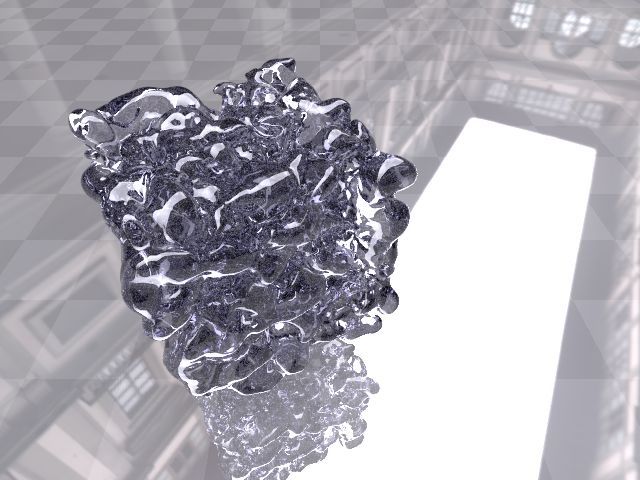
I have this blob made up of 5000 glass spheres inside a spherical HDR.
The result is attached. I turned on photons, but can't get any caustics
to appear.
MegaPOV returns an error: Slab Building warning: Could not save photon
map - no photons!

The blob object hass these propertis:
sturm
texture {
   pigment { color rgbt 1 }
   finish {
     ambient 0
     diffuse 0
     reflection { 0.1, 1.0 fresnel on }
     conserve_energy
   }
}
interior {
   ior 1.5
   fade_distance 1.1
   fade_color <0.11, 0.1, 0.3>
}
photons{
   target Radius1/2
   refraction on
   reflection on
}

I can't find out what is wrong. Any suggestions are welcome.
Post a reply to this message
Attachments:
Download 'newt.jpg' (56 KB)
Preview of image 'newt.jpg'
|
|
| |
| |
|
|
|
|
| |
| |
|
|
Maurice nous apporta ses lumieres ainsi en ce 2005-01-02 04:37... :

> Hi,
>
> I have this blob made up of 5000 glass spheres inside a spherical HDR.
> The result is attached. I turned on photons, but can't get any
> caustics to appear.
> MegaPOV returns an error: Slab Building warning: Could not save photon
> map - no photons!
>
> The blob object hass these propertis:
> sturm
> texture {
>   pigment { color rgbt 1 }
>   finish {
>     ambient 0
>     diffuse 0
>     reflection { 0.1, 1.0 fresnel on }
>     conserve_energy
>   }
> }
> interior {
>   ior 1.5
>   fade_distance 1.1
>   fade_color <0.11, 0.1, 0.3>
> }
> photons{
>   target Radius1/2
>   refraction on
>   reflection on
> }
>
> I can't find out what is wrong. Any suggestions are welcome.
>
> ------------------------------------------------------------------------
>
What are the photons settings for the floor? Does it collect them?
Post a reply to this message
|
|
| |
| |
|
|
|
|
| |
| |
|
|
Alain wrote:
> Maurice nous apporta ses lumieres ainsi en ce 2005-01-02 04:37... :
>
>> Hi,
>>
>> I have this blob made up of 5000 glass spheres inside a spherical HDR.
>> [blabla...]
>> }
>>
>> I can't find out what is wrong. Any suggestions are welcome.
>>
>> ------------------------------------------------------------------------
>>
> What are the photons settings for the floor? Does it collect them?

The floor:

plane{ <0,1,0>, 0
   texture{
     pigment{checker color rgb<1,1,1>*1.2 color rgb<1,1,1>}
     finish{ambient 0.1 diffuse 0.8 metallic reflection{0.9}}
   }
   no_radiosity
}

It has no photons section...

--
Maurice

Welcomes everybody to the fifth year of the century.
Post a reply to this message
|
|
| |
| |
|
|
|
|
| |
| |
|
|
Maurice nous apporta ses lumieres ainsi en ce 2005-01-02 10:30... :

> Alain wrote:
>
>> Maurice nous apporta ses lumieres ainsi en ce 2005-01-02 04:37... :
>>
>>> Hi,
>>>
>>> I have this blob made up of 5000 glass spheres inside a spherical
>>> HDR. [blabla...]
>>> }
>>>
>>> I can't find out what is wrong. Any suggestions are welcome.
>>>
>>> ------------------------------------------------------------------------
>>>
>>>
>> What are the photons settings for the floor? Does it collect them?
>
>
> The floor:
>
> plane{ <0,1,0>, 0
>   texture{
>     pigment{checker color rgb<1,1,1>*1.2 color rgb<1,1,1>}
>     finish{ambient 0.1 diffuse 0.8 metallic reflection{0.9}}
>   }
>   no_radiosity
> }
>
> It has no photons section...
>
No photons section = collect on  target off  OK
Then, it may be that the high reflection value (0.9) make them almost
invisible. The more reflective a surface is, the less it will show
photons effects. That's the main reason why it's recomended to set
collect off for highly reflective surfaces.

Alain
Post a reply to this message
|
|
| |
| |
|
|
|
|
| |
| |
|
|
> Then, it may be that the high reflection value (0.9) make them almost
> invisible. The more reflective a surface is, the less it will show
> photons effects. That's the main reason why it's recomended to set
> collect off for highly reflective surfaces.

Additionally, check if max_trace_level for the photons is high enough to
actually reach the plane. If the glass object has lots of holes in it, a
photon won't pass through, but rather get stuck somewhere along the way.
Note that you can define different max_trace_level for photons and the
actual raytraced rays, but I'm unsure if they use the same keyword... You'd
have to look at the docs for that.

Regards,
Tim

--
"Tim Nikias v2.0"
Homepage: <http://www.nolights.de>
Post a reply to this message
|
|
| |
| |
|
|
|
|
| |
| |
|
|
Does your light_source emit photons?

-S
5TF!
Post a reply to this message
|
|
| |
| |
|
|
|
|
| |
| |
|
|
stm31415 wrote:
> Does your light_source emit photons?
>
> -S
> 5TF!
>
There is no lightsource as such. This is a scene running on radiosity.
The light is caused by a HDR image.

--
Maurice
Post a reply to this message
|
|
| |
| |
|
|
|
|
| |
| |
|
|
That explains everything. Only lightsources cause photons, if you'd want to
have caustics created by radiosity, you'd have to use ridiculously high
settings for the tracing depth.

A workaround would be to do a two-pass render. On the first pass, you only
render with a lightsource and photons, which you save to disk using
save_file in the photons-block. On the second pass, you render using
radiosity, but instead of placing an actual lightsource, you just load the
photons using load_file. You'd get the photons without the lightsource that
way.

--
"Tim Nikias v2.0"
Homepage: <http://www.nolights.de>
Post a reply to this message
|
|
| |
| |
|
|
|
|
| |
| |
|
|
Alain wrote:
> Maurice nous apporta ses lumieres ainsi en ce 2005-01-02 10:30... :
>
>> Alain wrote:
>>
>>> Maurice nous apporta ses lumieres ainsi en ce 2005-01-02 04:37... :
>>>
>>>> Hi,
>>>>
>>>> I have this blob made up of 5000 glass spheres inside a spherical
>>>> HDR. [blabla...]
>>>> }
>>>>
>>>> I can't find out what is wrong. Any suggestions are welcome.
>>>>
>>>> ------------------------------------------------------------------------
>>>>
>>>>
>>> What are the photons settings for the floor? Does it collect them?
>>
>>
>>
>> The floor:
>>
>> plane{ <0,1,0>, 0
>>   texture{
>>     pigment{checker color rgb<1,1,1>*1.2 color rgb<1,1,1>}
>>     finish{ambient 0.1 diffuse 0.8 metallic reflection{0.9}}
>>   }
>>   no_radiosity
>> }
>>
>> It has no photons section...
>>
> No photons section = collect on  target off  OK
> Then, it may be that the high reflection value (0.9) make them almost
> invisible. The more reflective a surface is, the less it will show
> photons effects. That's the main reason why it's recomended to set
> collect off for highly reflective surfaces.

I think you might be right. When I switch off the reflective finish of
the floor I see a hint of caustics on the floor. Is there any way to
increase the strenght of the caustics? Can't seem to find anything in
the manual that promises to do this. I found the caustics keyword for
interior but whatever value I use it doesn't seem to give the right effect.

--
Maurice
Post a reply to this message
|
|
| |
| |
|
|
|
|
| |
| |
|
|
Do what Tim said, using saved data. Radiosity does give very pale caustics,
but if you use the two pass method they will be clear and bright.

-S
5TF!
Post a reply to this message
|
|
| |
| |
|
|
|
|
| |
| |
|
|
stm31415 wrote:
> Do what Tim said, using saved data. Radiosity does give very pale caustics,
> but if you use the two pass method they will be clear and bright.
>
> -S
> 5TF!
>

Thanks Tim and stm31415 for suggesting the two pass method. In the last
few trial renders I've gotten some interesting results. Now, at least
photons are being shot. Obviously more experimenting is needed with the
light placement and stuff like that, but at least I'm back on the road
again.

Thanks to all
--
Maurice
Post a reply to this message
|
|
| |
| |
|
|
|
|
| |
| |
|
|
Hi Maurice,
Just curious how things went and if you have an image to show us :)
Regards,
George
Maurice <cel### [at] nospam hotmailcom> wrote:
> stm31415 wrote:
> > Do what Tim said, using saved data. Radiosity does give very pale caustics,
> > but if you use the two pass method they will be clear and bright.
> >
> > -S
> > 5TF!
> >
>
> Thanks Tim and stm31415 for suggesting the two pass method. In the last
> few trial renders I've gotten some interesting results. Now, at least
> photons are being shot. Obviously more experimenting is needed with the
> light placement and stuff like that, but at least I'm back on the road
> again.
>
> Thanks to all
> --
> Maurice hotmailcom> wrote:
> stm31415 wrote:
> > Do what Tim said, using saved data. Radiosity does give very pale caustics,
> > but if you use the two pass method they will be clear and bright.
> >
> > -S
> > 5TF!
> >
>
> Thanks Tim and stm31415 for suggesting the two pass method. In the last
> few trial renders I've gotten some interesting results. Now, at least
> photons are being shot. Obviously more experimenting is needed with the
> light placement and stuff like that, but at least I'm back on the road
> again.
>
> Thanks to all
> --
> Maurice
Post a reply to this message
|
|
| |
| |
|
|
|
|
| |
| |
|
|
George Pantazopoulos wrote:
> Hi Maurice,
>
>     Just curious how things went and if you have an image to show us :)
>
> Regards,
> George
>
>
> Maurice <cel### [at] nospamhotmailcom> wrote:
>
>>stm31415 wrote:
>>
>>>Do what Tim said, using saved data. Radiosity does give very pale caustics,
>>>but if you use the two pass method they will be clear and bright.
>>>
>>>-S
>>>5TF!
>>>
>>
>>Thanks Tim and stm31415 for suggesting the two pass method. In the last
>>few trial renders I've gotten some interesting results. Now, at least
>>photons are being shot. Obviously more experimenting is needed with the
>>light placement and stuff like that, but at least I'm back on the road
>>again.
>>
>>Thanks to all
>>--
>>Maurice
>
>
>
>

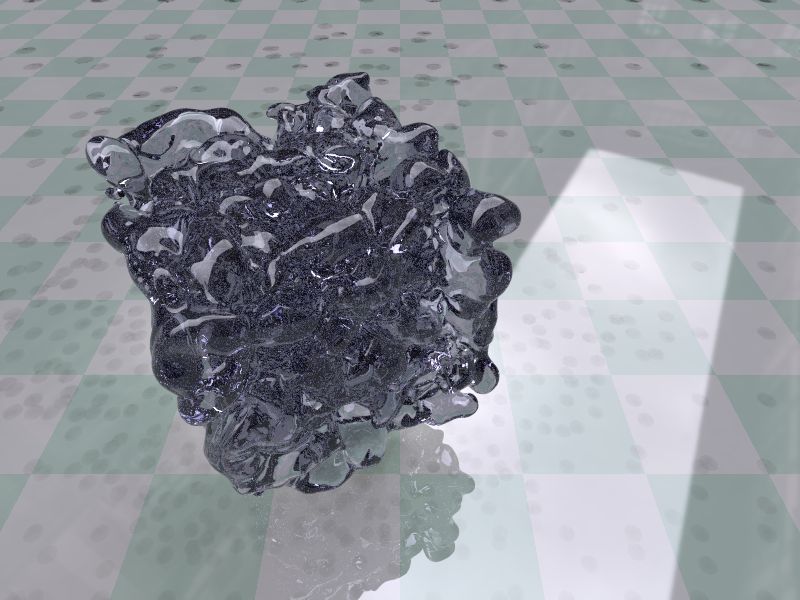
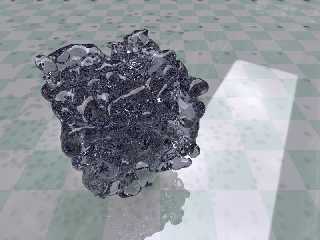
Well, not very proud of the current result really.
I rendered the scene with the HDR image off and a cylinderical
lightsource over the blob. Saving the photon and radiosity data.

The caustics seemed to look okay.

Then I switched off the lightsource put the HDR image back on and upped
the reflection of the floor to 0.5.

The result is attached.

:-(

The caustics are now transfomred to shadows... I'm now renderingwith a
less reflective floor (0.1). But I'm afraid I'll loose the effect I was
going for.

--
Maurice
Post a reply to this message
Attachments:
Download 'newt.jpg' (72 KB)
Preview of image 'newt.jpg'
|
|
| |
| |
|
|
|
|
| |
| |
|
|
>
> Well, not very proud of the current result really.
> I rendered the scene with the HDR image off and a cylinderical
> lightsource over the blob. Saving the photon and radiosity data.
>

Pardon my ignorance, but I don't see a need for radiosity in your image. Why
is it there? I would try disabling radiosity for now and tweak your photons
settings. This would simplify your life by eliminate a big variable from
the equation :)


> The caustics are now transfomred to shadows... I'm now renderingwith a
> less reflective floor (0.1). But I'm afraid I'll loose the effect I was
> going for.
>

What exact effect are you looking for, and what is the diffuse component of
your floor?

-George
Post a reply to this message
|
|
| |
| |
|
|
|
|
| |
| |
|
|
George Pantazopoulos wrote:
>>Well, not very proud of the current result really.
>>I rendered the scene with the HDR image off and a cylinderical
>>lightsource over the blob. Saving the photon and radiosity data.
>>
>
>
> Pardon my ignorance, but I don't see a need for radiosity in your image. Why
> is it there? I would try disabling radiosity for now and tweak your photons
> settings. This would simplify your life by eliminate a big variable from
> the equation :)

Radiosity is used to cause caustics?

>>The caustics are now transfomred to shadows... I'm now renderingwith a
>>less reflective floor (0.1). But I'm afraid I'll loose the effect I was
>>going for.
>>
>
>
> What exact effect are you looking for, and what is the diffuse component of
> your floor?

Okay. It is rather difficult to explain, so I set up a page on my
website to show what is going on and what I'm after. Please visit:

http://members.home.nl/m.e.j.r.hendrix/POV/glass.html

--
Maurice
Post a reply to this message
|
|
| |
| |
|
|
|
|
| |
| |
|
|
On Sunday 09 January 2005 20:58, Maurice wrote :

>
> Okay. It is rather difficult to explain, so I set up a page on my
> website to show what is going on and what I'm after. Please visit:
>
> http://members.home.nl/m.e.j.r.hendrix/POV/glass.html
>

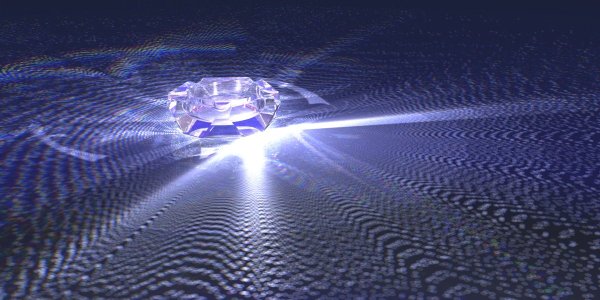
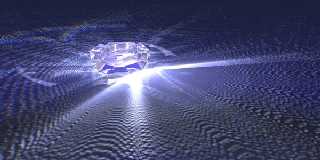
Looking for something like in the attached picture?

--
Ger
Post a reply to this message
Attachments:
Download 'asbak-011-600.jpg' (45 KB)
Preview of image 'asbak-011-600.jpg'
|
|
| |
| |
|
|
|
|
| |
| |
|
|
Ger wrote:
> On Sunday 09 January 2005 20:58, Maurice wrote :
>
>
>>Okay. It is rather difficult to explain, so I set up a page on my
>>website to show what is going on and what I'm after. Please visit:
>>
>>http://members.home.nl/m.e.j.r.hendrix/POV/glass.html
>>
>
>
> Looking for something like in the attached picture?
>
>
>
> ------------------------------------------------------------------------
>
Yes. Although that might be overdoing it a bit ;-)
Post a reply to this message
|
|
| |
| |
|
|
|
|
| |
| |
|
|
On Sunday 09 January 2005 22:22, Maurice wrote :

> Ger wrote:
>> On Sunday 09 January 2005 20:58, Maurice wrote :
>>
>>
>>>Okay. It is rather difficult to explain, so I set up a page on my
>>>website to show what is going on and what I'm after. Please visit:
>>>
>>>http://members.home.nl/m.e.j.r.hendrix/POV/glass.html
>>>
>>
>>
>> Looking for something like in the attached picture?
>>
>>
>>
>> ------------------------------------------------------------------------
>>
> Yes. Although that might be overdoing it a bit ;-)

This is what I used


//...............................................
global_settings {
        max_trace_level 255
        photons {
                count 1000000
                autostop 0
                jitter .1
                }
        }

// light source just inside the ashtray
light_source{ 0 color rgb <1,1,1>*4 translate <-160,0.51,40>
        photons {
                refraction on
                reflection on
        }}

#declare YourBlobbyGlassThing =
        blob.................. etc

        material { M_Glass3 }
        photons {
                target
                refraction on
                reflection on
                collect on
                }

        }

object { YourBlobbyGlassThing }

With the ashtray this used ~1Gb memory and 70~80 hours to render at 1200 x
600 pixels, so you might want to lower the count first :)

--
Ger
Post a reply to this message
|
|
| |
| |
|
|
|
|
| |
| |
|
|
Ger wrote:

Thanks for your input, it is very inspiring. See comments below.
> //...............................................
> global_settings {
>         max_trace_level 255
>         photons {
>                 count 1000000
>                 autostop 0
>                 jitter .1
>                 }
>         }
>
That is a very high count. I'm using default value. I start to
understand why I don't get caustics
My photons settings:
   photons {
   	spacing 1/2
	gather 20,100
   	max_trace_level 300
   	jitter 0.4
   	adc_bailout 0.01
   	save_file "newt.photons"
   }

And radiosity block:
   radiosity {
     samples 1
     pretrace_start 0.08
     pretrace_end   0.01
     count 800
     nearest_count 8
     error_bound 0.07
     recursion_limit 2
     low_error_factor .5
     gray_threshold 0.0
     minimum_reuse 0.015
     brightness 1 //0.7
     adc_bailout 0.01/2
     normal on
     randomize on
     //media on
     max_sample 1.0
     load_file "newt.radiosity"
     always_sample no
   }

> // light source just inside the ashtray
> light_source{ 0 color rgb <1,1,1>*4 translate <-160,0.51,40>
>         photons {
>                 refraction on
>                 reflection on
>         }}

Mmm that's interesting. My lightsource has no photons attached :-\

> #declare YourBlobbyGlassThing =
>         blob.................. etc
>
>         material { M_Glass3 }
>         photons {
>                 target
>                 refraction on
>                 reflection on
>                 collect on
>                 }
>
>         }
>

photons block of the blob:
   photons{
     target 0.05
     refraction on
     reflection on
     collect off // **
   }

Why did you switch on collect? Doesn't that mean that photons are not
exiting the object after they hit it?
> object { YourBlobbyGlassThing }

> With the ashtray this used ~1Gb memory and 70~80 hours to render at 1200 x
> 600 pixels, so you might want to lower the count first :)

I'm hoping that won't be the time for my render... Did you render with
saved photons or calculate the photons dyuring the actual render.

My idea is now to do as follows:
1. Render @ 80x40 with photons, radiosity and lightsource on; save_file
for photons and radiosity
2. Render @ 800x400 with lightsource off and HDR image on, load_file for
photons and radiosity.

I think I'll also try out what happens if I switch on/off radiosity as
George Patazopoulos suggested the scene does not need it. I'm not
convinced but the render results will show.

Bedankt for your help,
--
Maurice
Post a reply to this message
|
|
| |
| |
|
|
|
|
| |
| |
|
|
On Monday 10 January 2005 18:17, Maurice wrote :

> That is a very high count. I'm using default value. I start to
> understand why I don't get caustics

You might want to start way lower to get a basic idea of what is the outcome
is gonna be

> My photons settings:
>    photons {
>    spacing 1/2
> gather 20,100
>    max_trace_level 300
>    jitter 0.4
>    adc_bailout 0.01
>    save_file "newt.photons"
>    }
>
> And radiosity block:
>    radiosity {
>    }

I didn't have radiosity because it tends to wash out a lot of sharp effects

> Mmm that's interesting. My lightsource has no photons attached :-\
>

As far as I know (but don't hit me over the head if I'm wrong) you need that
to get any caustics effects.

>
> photons block of the blob:
>    photons{
>      target 0.05
>      refraction on
>      reflection on
>      collect off // **
>    }
>
> Why did you switch on collect? Doesn't that mean that photons are not
> exiting the object after they hit it?

Hmm, don't remember now.

>
> I'm hoping that won't be the time for my render... Did you render with
> saved photons or calculate the photons dyuring the actual render.
>

All in 1 go, so no in between saves.

> My idea is now to do as follows:
> 1. Render @ 80x40 with photons, radiosity and lightsource on; save_file
> for photons and radiosity
> 2. Render @ 800x400 with lightsource off and HDR image on, load_file for
> photons and radiosity.
>
> I think I'll also try out what happens if I switch on/off radiosity as
> George Patazopoulos suggested the scene does not need it. I'm not
> convinced but the render results will show.
>
I sure would switch it off to make the caustics effect more clear

> Bedankt for your help,

Graag gedaan :)
--
Ger
Post a reply to this message
|
|
| |
| |
|
|
|
|
| |
| |
|
|
Maurice nous apporta ses lumieres en ce 2005-01-10 12:17:
> Ger wrote:
>
> Thanks for your input, it is very inspiring. See comments below.
>
>> //...............................................
>> global_settings {
>>         max_trace_level 255
>>         photons {
>>                 count 1000000
>>                 autostop 0
>>                 jitter .1
>>                 }
>>         }
>>
> That is a very high count. I'm using default value. I start to
> understand why I don't get caustics
That's NOT a very high count. Look at all the dots...
Using spacing, I can easily get over 10 000 000
> My photons settings:
>   photons {
>       spacing 1/2
>     gather 20,100
>       max_trace_level 300// I think that it can't go over 255
>       jitter 0.4
>       adc_bailout 0.01
>       save_file "newt.photons"
>   }
You usualy need smaler spacing. That's about 1 photon per half unit... I
rarely start with a spacing over 1/10


>
> Mmm that's interesting. My lightsource has no photons attached :-\
A light_source without a photons block don't shoot any, and don't
contribute to the photons caustics.
>
>> #declare YourBlobbyGlassThing =
>>         blob.................. etc
>>                 material { M_Glass3 }
>>         photons {
>>                 target
>>                 refraction on
>>                 reflection on
>>                 collect on
>>                 }
>>
>>         }
>>
>
>
> photons block of the blob:
>   photons{
>     target 0.05
>     refraction on
>     reflection on
>     collect off // **
>   }
>
> Why did you switch on collect? Doesn't that mean that photons are not
> exiting the object after they hit it?
Collect on make the object show photons effects ON it. It don't stop the
photons. As, normaly, photons don't show on mostly reflective and/or
transparent object, collect on just waiste time for usualy negligeagle
effect.
Post a reply to this message
|
|
| |
| |
|
|
|
|
| |
| |
|
|
Ger wrote:

> Looking for something like in the attached picture?

Ger,
Did you use differently coloured lightsources to get those rainbow-like
effects in the top of the picture?

--
Maurice
Post a reply to this message
|
|
| |
| |
|
|
|
|
| |
| |
|
|
On Wednesday 12 January 2005 19:54, Maurice wrote :

> Ger wrote:
>
>> Looking for something like in the attached picture?
>
> Ger,
> Did you use differently coloured lightsources to get those rainbow-like
> effects in the top of the picture?
>
Nope, just the one light that I gave you in the code bit.
The whole scene is just 3 things, the plane, the ashtray and 1 light

--
Ger
Post a reply to this message
|
|
| |
| |
|
|
|
|
| |
| |
|
|
Maurice nous apporta ses lumieres en ce 2005-01-12 13:54:
> Ger wrote:
>
>> Looking for something like in the attached picture?
>
>
> Ger,
> Did you use differently coloured lightsources to get those rainbow-like
> effects in the top of the picture?
>
Try adding dispersion <some value> in your interior block. Realistic values from 1.001
to 1.03,
artistic values from 0.7 to 0.99 (reverced effect) and 1.05 to 1.5 (stronger to WAY
stronger
than real effect)
Zero and negative value make the object reflective with no transparency left.

Alain
Post a reply to this message
|
|
| |
| |
|
|
|
|
| |