|
|
|
|
|
|
| |
| |
|
|
|
|
| |
| |
|
|
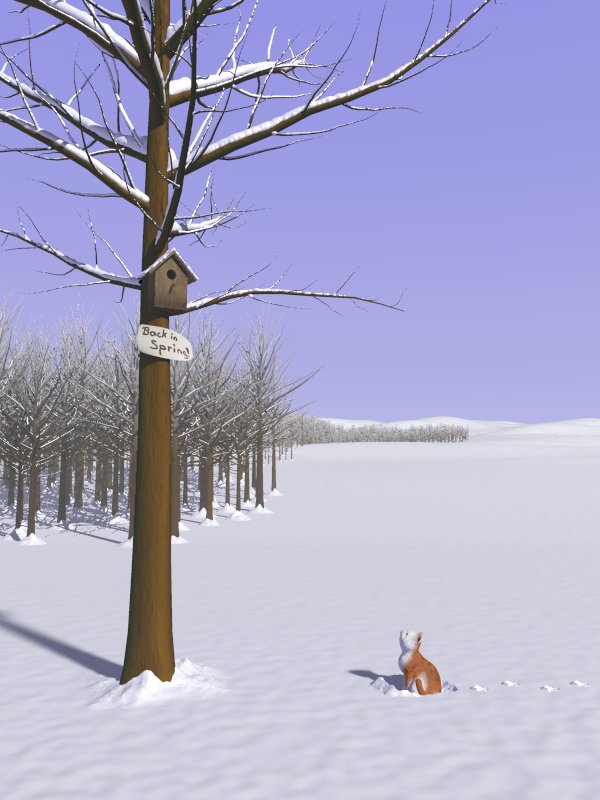
So, latest installment. After the macros for dropping snow onto objects were
working, I tweaked a few hours (parsing times can get high at times, and
small tweaks can have great impact, and thus, you quickly add up to long
hours...) and went on with the image. A selection of four more trees were
generated with Arbaro and are used with a randomization process to create
the forest, which actually consists of roughly 3200 trees.

Some cleaning up of the sources is in order soon, as I've had to move quite
some things around for several lightgroups. The main tree's trunk casts an
arealight-shadow, but doesn't receive arealights itself, the foreground
casts and receives arealights, the background only point-lights... I'm
pondering what to place above (image-wise speaking, not in 3D) the cat. I've
been experimenting with a small macro to create some random houses and
create a little town, then again, I'd also find it fitting to somehow
encircle the cat with a space of white, to further point out that it is
alone and waiting for it's friend, the bird, to return (which is "back in
spring", hence the small note on the tree).

The sky will of course get some clouds in due time.

Suggestions, comments and questions welcome,

regards,
Tim

--
"Tim Nikias v2.0"
Homepage: <http://www.nolights.de>
Post a reply to this message
Attachments:
Download 'wip.jpg' (74 KB)
Preview of image 'wip.jpg'
|
|
| |
| |
|
|
|
|
| |
| |
|
|
Tim Nikias wrote:
> So, latest installment. After the macros for dropping snow onto objects were
> working, I tweaked a few hours (parsing times can get high at times, and
> small tweaks can have great impact, and thus, you quickly add up to long
> hours...) and went on with the image. A selection of four more trees were
> generated with Arbaro and are used with a randomization process to create
> the forest, which actually consists of roughly 3200 trees.
>
> Some cleaning up of the sources is in order soon, as I've had to move quite
> some things around for several lightgroups. The main tree's trunk casts an
> arealight-shadow, but doesn't receive arealights itself, the foreground
> casts and receives arealights, the background only point-lights... I'm
> pondering what to place above (image-wise speaking, not in 3D) the cat. I've
> been experimenting with a small macro to create some random houses and
> create a little town, then again, I'd also find it fitting to somehow
> encircle the cat with a space of white, to further point out that it is
> alone and waiting for it's friend, the bird, to return (which is "back in
> spring", hence the small note on the tree).
>
> The sky will of course get some clouds in due time.
>
> Suggestions, comments and questions welcome,
>
> regards,
> Tim
>
>

i dont think you need anything in the gap, seems to emphasize the
emptiness already


couple of nit picks

do you really get snow that deep on branches ( two stand out )?
sorry, i'm in the uk, odds for xmas snow are rumoured to to be
significantly lower this year !

maybe snow on 'Back in Spring' board ??

snow at base of tree, applicable to all trees in forest or just say 2/3
in from edge ?
trees on the leeward side of forest would logically get less

slightly more bark effect on main tree ?

did you repeat the same tree throughout ? maybe some variation in height
is needed at random

but as usual for you - WOW

stephen
Post a reply to this message
|
|
| |
| |
|
|
|
|
| |
| |
|
|
> i dont think you need anything in the gap, seems to emphasize the
> emptiness already

That's what I thought. The gap is a little too large, so I think I'll pull
the forest closer unless I find something suitable for the expanse.

> do you really get snow that deep on branches ( two stand out )?
> sorry, i'm in the uk, odds for xmas snow are rumoured to to be
> significantly lower this year !

It is a little overdone, true. I want to tone it down somewhat, problem is,
reference pics I found so far have that much snow on them, the branches are
all drooping under the weight... Additionally, the amount of snow makes it
easier to see how much there really is, and to get a sense of when it's too
much.

> maybe snow on 'Back in Spring' board ??

That should actually be paper, nailed to the tree, but I'm not yet sure if
that's final.

> snow at base of tree, applicable to all trees in forest or just say 2/3
> in from edge ?
> trees on the leeward side of forest would logically get less

Yup, that's on my to-do list. The forest was just a rough first
implementation to spread it, the snow was added as an afterthought to every
tree within a 250 unit range.

> slightly more bark effect on main tree ?

I'll try, though I like this one. Too much makes it obvious that it's just a
normal map, so it has to be carefully checked.

> did you repeat the same tree throughout ? maybe some variation in height
> is needed at random

Nope, four new different trees for the forest, with random height/size and
position. Maybe I need to enlargen the randomness in height a little.

> but as usual for you - WOW

Eh, thanks for the praise... :-)

--
"Tim Nikias v2.0"
Homepage: <http://www.nolights.de>
Post a reply to this message
|
|
| |
| |
|
|
|
|
| |
| |
|
|
"Tim Nikias" <JUSTTHELOWERCASE:timISNOTnikias(at)gmx.netWARE> wrote:

> I'm
> pondering what to place above (image-wise speaking, not in 3D) the cat.

How about the moon?

And nice cat/snow/tree, etc!
Post a reply to this message
|
|
| |
| |
|
|
|
|
| |
| |
|
|
Tim Nikias wrote:
>
>>but as usual for you - WOW
>
>
> Eh, thanks for the praise... :-)
>

i'm english, expect understatement

most i usually give is 'Not bad' :-)

stephen
Post a reply to this message
|
|
| |
| |
|
|
|
|
| |
| |
|
|
Tim

Great idea, excellent execution but ....

Please look at the colour of tree trunks!

Sorry to bug you with this but it's one of the few things that really annoy
me.

Mick
Post a reply to this message
|
|
| |
| |
|
|
|
|
| |
| |
|
|
> Great idea, excellent execution but ....

Thanks!

> Please look at the colour of tree trunks!

> Sorry to bug you with this but it's one of the few things that really
annoy
> me.

Is it because tree trunks tend to be generally more gray/green than my
wooden brown? I'll test it, but sometimes, a little artistic license is
required...

Regards,
Tim

--
"Tim Nikias v2.0"
Homepage: <http://www.nolights.de>
Post a reply to this message
|
|
| |
| |
|
|
|
|
| |
| |
|
|
> > I'm
> > pondering what to place above (image-wise speaking, not in 3D) the cat.
>
> How about the moon?

I didn't mean the sky, but the landscape, but thanks for the suggestions
anyway. The sky will get some media clouds, I'll have to see if a moon fits.

> And nice cat/snow/tree, etc!

Thank you!

--
"Tim Nikias v2.0"
Homepage: <http://www.nolights.de>
Post a reply to this message
|
|
| |
| |
|
|
|
|
| |
| |
|
|
"Tim Nikias" <JUSTTHELOWERCASE:timISNOTnikias(at)gmx.netWARE> a écrit dans
le message de news:41c5c477@news.povray.org...
This is becoming very nice!!
Just a suggestion: usually, along the border of a wood, trees tend to be
smaller and have branches starting lower than inside the wood  because they
don't have to seek light.
Well another suggestion: two or three fences across that wide field
range....

regards

Marc
Post a reply to this message
|
|
| |
| |
|
|
|
|
| |
| |
|
|
Tim Nikias wrote:
> So, latest installment. After the macros for dropping snow onto objects were
> working, I tweaked a few hours (parsing times can get high at times, and
> small tweaks can have great impact, and thus, you quickly add up to long
> hours...) and went on with the image. A selection of four more trees were
> generated with Arbaro and are used with a randomization process to create
> the forest, which actually consists of roughly 3200 trees.
>
> Some cleaning up of the sources is in order soon, as I've had to move quite
> some things around for several lightgroups. The main tree's trunk casts an
> arealight-shadow, but doesn't receive arealights itself, the foreground
> casts and receives arealights, the background only point-lights... I'm
> pondering what to place above (image-wise speaking, not in 3D) the cat. I've
> been experimenting with a small macro to create some random houses and
> create a little town, then again, I'd also find it fitting to somehow
> encircle the cat with a space of white, to further point out that it is
> alone and waiting for it's friend, the bird, to return (which is "back in
> spring", hence the small note on the tree).
>
> The sky will of course get some clouds in due time.
>
> Suggestions, comments and questions welcome,
>
> regards,
> Tim

I'm floored every time you come out with a new image, time. Very
impressed...and inspired too.

One comment, one suggestion and two questions. First the comment, the
face on the cat looks a little strange. Maybe it doesn't at a higher
resolution, I don't know. It's just a little difficult to tell where the
facial features are. It almost looks like the cat's head is tilted to
its left about 45 degrees, but then it also looks like it's pointing its
nose at the sign and smiling. Is this just an illusion at the smaller
size or am I right somehow? :)

Now for the questions. I was taking the garbage out this morning and had
POV and snow on my mind (I promised myself I wasn't going to open up
POV-Ray for about a month, but so far I've broken my promise twice and
it's only half past nine.). I was trying to figure out what made the
difference between real snow and raytraced snow - somehow the fake stuff
always looked, well, fake...yours has excellent distribution, the right
"blobbiness" - yes, it looks that way in real life, I checked - but it's
missing that granulated powdery look. The snow at the base of the tree
has it somewhat, but that's all.

I suppose this could be accomplished with a bump map or some averaged
normals or something, but I was trying to think of a better way to do
it. There seems to be a general sentiment running that bump-mapping is
cheating somehow, and I don't like using normals to simulate actual
shapes (personal preference, probably completely unfounded). So I
wondered...would it be possible to use Surcoat to do the general snow
layer with a good blob factor, then to do it again on top of that and
shrink the blobs to a really tiny size so that they don't join at all,
but rather look like little crystals sitting on top of the snow layer?
Kind of like powdered sugar, in a way.

Second question: how does Surcoat handle the snow layers? Does it call
them all blobs as a union or a merge or is it handled after the scene is
created? I'm wondering whether it's possible to do extra
texturing/finishing/interiors/normals on the snow particles without
having to internally modify Surcoat.

Lastly, the suggestion...it seems likt there's a high "blue factor" in
your snow. With such strong shadows I think it would be a tad more
realistic if it were more blindingly white. Maybe it's that "artistic
license" again...just a thought.

Overall incredible work. You're in my HOF book now. :)

~Mike
Post a reply to this message
|
|
| |
| |
|
|
|
|
| |
| |
|
|
Great ideas can take you farther than technical precision. You have both
there, so don't worry; it already is a great image and from now on it can
only get better.

I'm too much of a newbie to give you any advice. I think the image is great
as it is. Cheers.
Post a reply to this message
|
|
| |
| |
|
|
|
|
| |
| |
|
|
Tim Nikias wrote:
> Suggestions, comments and questions welcome,

   This looks fantastic! These macros should be of good use for a lot of
things... About the image itself, I don't have enough experience with
snow and cold places to comment on it (for example, is really the sky so
violet there?).

--
Jaime
Post a reply to this message
|
|
| |
| |
|
|
|
|
| |
| |
|
|
> This is becoming very nice!!

Thanks!

> Just a suggestion: usually, along the border of a wood, trees tend to be
> smaller and have branches starting lower than inside the wood  because
they
> don't have to seek light.

I'm thinking about adding some smaller vegetation, like bushes, because
adding branches could be a little more difficult.

> Well another suggestion: two or three fences across that wide field
> range....

Yeah, I've been thinking about that possibility...

Regards,
Tim

--
"Tim Nikias v2.0"
Homepage: <http://www.nolights.de>
Post a reply to this message
|
|
| |
| |
|
|
|
|
| |
| |
|
|
> Great ideas can take you farther than technical precision. You have both
> there, so don't worry; it already is a great image and from now on it can
> only get better.

Thank you very much for the kind words!

> I'm too much of a newbie to give you any advice. I think the image is
great
> as it is. Cheers.

Nah, don't underestimate your own taste! You're possibly right that you're a
newbie on the technical side of things, but you can still make suggestions
on what you think is missing or needs adjustment. :-)

--
"Tim Nikias v2.0"
Homepage: <http://www.nolights.de>
Post a reply to this message
|
|
| |
| |
|
|
|
|
| |
| |
|
|
> One comment, one suggestion and two questions. First the comment, the
> face on the cat looks a little strange.

It is looking up at the sign. Modelling a face using blobs isn't that easy,
but on a higher res the viewing direction of the cat can be discerned more
easily. Since the cat *does* look like a cat, I wanted to improve on the
overall image before getting stuck with it...

> I suppose this could be accomplished with a bump map or some averaged
> normals or something, but I was trying to think of a better way to do
> it. There seems to be a general sentiment running that bump-mapping is
> cheating somehow, and I don't like using normals to simulate actual
> shapes (personal preference, probably completely unfounded). So I
> wondered...would it be possible to use Surcoat to do the general snow
> layer with a good blob factor, then to do it again on top of that and
> shrink the blobs to a really tiny size so that they don't join at all,
> but rather look like little crystals sitting on top of the snow layer?

Yes, that is possible. You'd just have to do a two-pass with Surcoat: one to
collect the initial, rough data, and then a second pass onto the blob. You'd
have to either render an orthographic view of the blob (to speed up the
sampling of the second pass) or just shoot samples at the entire boundary
box, but that shouldn't be a too big problem, right? ;-)

> Second question: how does Surcoat handle the snow layers?

Actually, all samples, along with their respective surface normal, are
simply saved into a file. A simple loop can then parse through the file and
while the File is defined, like this:

#fopen File Surcoat_Data read
#while (defined(File))
#read (File, Sample_Position, Sample_Normal)
//do some stuff
#end
#fclose File

I've prepared a simple set of macros for visualization, e.g. placing objects
at the samples' positions, or create a simple, spherical blob, or just place
spheres with a given radius. It should be easy to write your own
visualization macro, as the read-in (as seen above) is quite simple.

For the snow, I've written another set of macros which actually trace() the
surroundings of a sample to add some data like possible height, closest wall
and such, to generate heights for the snow. Instead of spheres, I use
cylinders in a blob to visualize the samples (along with the added data).
The processing of the original data into an extended set is of course more
scripting-biased, but that's the way it always is, right?

> Lastly, the suggestion...it seems likt there's a high "blue factor" in
> your snow. With such strong shadows I think it would be a tad more
> realistic if it were more blindingly white. Maybe it's that "artistic
> license" again...just a thought.

Hm, I'll think about that. Need to inspect some more winter photographs. :-)

> Overall incredible work. You're in my HOF book now. :)

Thanks for the praise. :-)

--
"Tim Nikias v2.0"
Homepage: <http://www.nolights.de>
Post a reply to this message
|
|
| |
| |
|
|
|
|
| |
| |
|
|
>    This looks fantastic! These macros should be of good use for a lot of
> things...

Thank you! As for the macros: I hope so! Would rather have them see being
used than collecting dust on my website! :-) Release of them is still a
little off though, as I don't have the time to clean the code and write a
help at the moment.

> About the image itself, I don't have enough experience with
> snow and cold places to comment on it (for example, is really the sky so
> violet there?).

The sky is just a temporary placement, the colors will get adjusted to a
more realistic palette once I get to creating the clouds and such.

--
"Tim Nikias v2.0"
Homepage: <http://www.nolights.de>
Post a reply to this message
|
|
| |
| |
|
|
|
|
| |
| |
|
|
"Tim Nikias" <JUSTTHELOWERCASE:timISNOTnikias(at)gmx.netWARE> wrote:
> The sky is just a temporary placement, the colors will get adjusted to a
> more realistic palette once I get to creating the clouds and such.

My suggestion would be to leave out the clouds and seriously consider
not altering the sky color either.  To me (a finn) it looks perfect,
although on one condition:  the date is, roughly, from March/April.

But it really is a very good looking image, and I congratulate you
on your execution of the snow dropping macros -- very convincing results.

--
jussi
Post a reply to this message
|
|
| |
| |
|
|
|
|
| |
| |
|
|
> My suggestion would be to leave out the clouds and seriously consider
> not altering the sky color either.  To me (a finn) it looks perfect,
> although on one condition:  the date is, roughly, from March/April.

March/April?! There's snow in the image, for god's sake! :-) Seriously
though, I want to take some pictures of the sky here (when it's cold and
clear with little haze, but some clouds) and use that as reference for
colors. As for the clouds, I don't want to overload the sky, just a few
details, as we here (not in Finnland ;-) don't have too many days with no
clouds. Thanks for the feedback though!

> But it really is a very good looking image, and I congratulate you
> on your execution of the snow dropping macros -- very convincing results.

Thank you! :-)

--
"Tim Nikias v2.0"
Homepage: <http://www.nolights.de>
Post a reply to this message
|
|
| |
| |
|
|
|
|
| |
|
|