|
|
|
|
|
|
| |
| |
|
|
From: Tim Nikias
Subject: Dropsnow Macro Examples (48kb, 52kb & 14kb)
Date: 14 Dec 2004 18:08:46
Message: <41bf727e@news.povray.org>
|
|
|
| |
| |
|
|
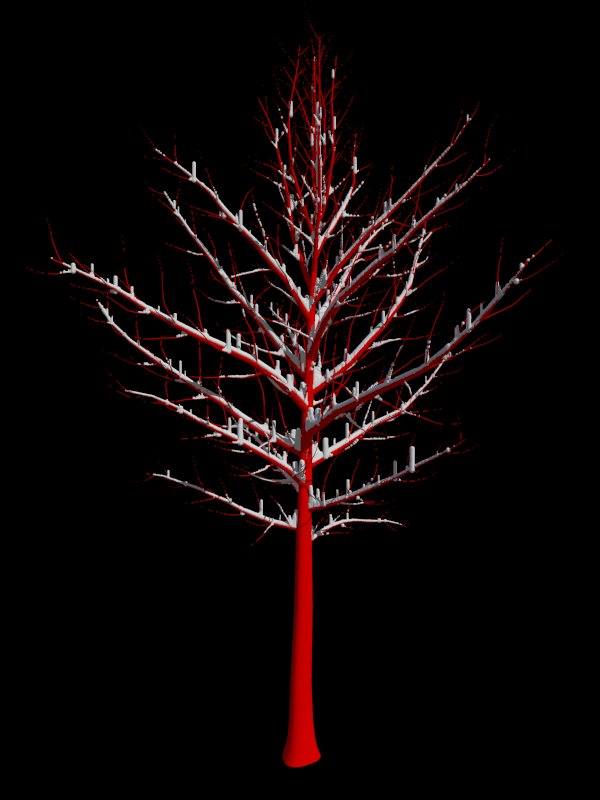
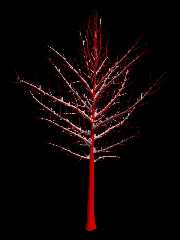
So, in the following, three images. The image ending on 1 is the Dropsnow
Macro released upon a mesh2-tree from Arbaro *without* the smallest
branches. The result is then placed onto the tree with all branches. It
looks nice, clean and crisp.

The image ending on 2 was Dropsnow released upon the *entire* tree, with all
the small parts. The small "noise" introduced by various very small
components (the smallest branches) would require much higher sampling
settings and, along with higher sampling settings already used to place
enough particles on the tree, the resulting parsing time would increase
exponentially. Of course, for a High-Res Final image, this might be what you
need, and I'm already thinking about how to refine the parsing process and
the resulting data so that small tweaks wouldn't result in an entire
reparsing of the particles, rather than just picking a few different
parameters for the display.

I've got no timings on these, but the simpler one required roughly 5 minutes
or so total, whereas the more complicated one would have required somewhere
around 12 minutes or so, both with roughly 8000 final particles out of a
20.000 initial bunch of which some were discarded due to steepness of
surface, surface too thin, inside mesh, etc.

Overall, I'm very pleased and will have to conduct some more tests on
various objects to see if I need to include a few more parameters for more
control on the User-Side.

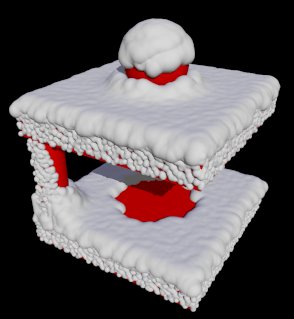
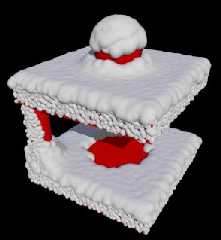
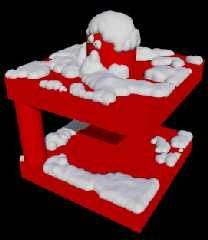
And the third and final image is just the macro on a CSG object to show off
the main effects I wanted to achieve: stacking along walls and removing
particles underneath roofs, two of the important issues about snow.

Regards,
Tim

--
"Tim Nikias v2.0"
Homepage: <http://www.nolights.de>
Post a reply to this message
Attachments:
Download 'tree_snow_1.jpg' (49 KB)
Download 'tree_snow_2.jpg' (53 KB)
Download 'csg_snow.jpg' (15 KB)
Preview of image 'tree_snow_1.jpg'
Preview of image 'tree_snow_2.jpg'
Preview of image 'csg_snow.jpg'
|
|
| |
| |
|
|
|
|
| |
| |
|
|
The word to describe this: sweetastic. Have you tried a more massive render,
with a rediculous number of tiny particles? Does your method allow for
stacking, or will this just leave you with a tiny dusting?

Still, a very impressive result, especially for only a few minutes parse
time.


-S
5TF!
Post a reply to this message
|
|
| |
| |
|
|
From: Tim Nikias
Subject: Re: Dropsnow Macro Examples (48kb, 52kb & 14kb)
Date: 15 Dec 2004 01:57:57
Message: <41bfe075@news.povray.org>
|
|
|
| |
| |
|
|
> The word to describe this: sweetastic. Have you tried a more massive
render,
> with a rediculous number of tiny particles?

Doing one right now, as I'm off to courses now.

> Does your method allow for
> stacking, or will this just leave you with a tiny dusting?

If you look closely at where the big branches meet the trunk, the snow is
stacked there. Stacking in general is allowed, you'd just have to make
several passes, that's all.

> Still, a very impressive result, especially for only a few minutes parse
> time.

Agreed. I'm very fond of how well this turned out after such short scripting
time. Now I'm tweaking the algorithms to near-perfection. :-)

--
"Tim Nikias v2.0"
Homepage: <http://www.nolights.de>
Post a reply to this message
|
|
| |
| |
|
|
|
|
| |
| |
|
|
Tim Nikias wrote:
> So, in the following, three images. The image ending on 1 is the
> Dropsnow Macro released upon a mesh2-tree from Arbaro *without* the
> smallest branches. The result is then placed onto the tree with all
> branches. It looks nice, clean and crisp.

This looks great Tim, along with the animation too.  It looks like a few
more particles are needed for the 3rd image (the sides look a bit "blobby")
but apart from that looks really great.

Would look good in my sunset scene :-)
Post a reply to this message
|
|
| |
| |
|
|
|
|
| |
| |
|
|
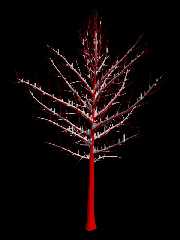
So, here's a version which required half an hour parsing, 46.000 cylinders
and 1000 spheres in a blob. Note that of the half hour, some times was
needed to first generate the particles and remove some due to steepness of
surface etc. The results of those presteps can (and were) saved to disk and
can be easily accessed for tweaking just the final step.

The result wasn't as good as I expected, there are still stalagmites
found... I'll reprocess the particles and tweak the parameters to see if I
can get a better version of this. But generally, such things are to be
expected with miniscule detail and discrete sampling. I imagine combining
image 1 (where the smallest branches have been left out) with a sampling of
positions without the stacking-algorithm might give much better results.

Regards,
Tim

--
"Tim Nikias v2.0"
Homepage: <http://www.nolights.de>
Post a reply to this message
Attachments:
Download 'tree_snow_3.jpg' (56 KB)
Preview of image 'tree_snow_3.jpg'
|
|
| |
| |
|
|
From: Tim Nikias
Subject: Re: Dropsnow Macro Examples (48kb, 52kb & 14kb)
Date: 15 Dec 2004 05:03:20
Message: <41c00be8@news.povray.org>
|
|
|
| |
| |
|
|
> This looks great Tim, along with the animation too.  It looks like a few
> more particles are needed for the 3rd image (the sides look a bit
"blobby")
> but apart from that looks really great.

Thanks. Yeah, the 3rd image is in rough-shape to show proof-of-concept. Some
more particles in some areas might be useful, I'm thinking about how to
implement a manual-particle-addition-macro or something alike for such
cases.

> Would look good in my sunset scene :-)

Unfortunately, the macros will only be released once the image I'm scripting
them for is finished. But then again, it might be fortunate, because I've
got a longer testing period. :-)

--
"Tim Nikias v2.0"
Homepage: <http://www.nolights.de>
Post a reply to this message
|
|
| |
| |
|
|
|
|
| |
| |
|
|
Tim,

This macro is excellent. I can see it being used for more than just snow. I
think an interesting use for it would be moss growing on the side of a
tree.

Tim
Post a reply to this message
|
|
| |
| |
|
|
|
|
| |
| |
|
|
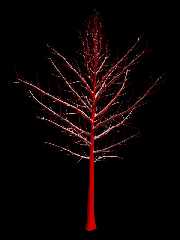
So, the final version, of which I won't do another excessive test. Here we
have 1700 spheres and 49600 cylinders in a blob, and there are still a few
places where a cylinder pops up when it should be a sphere. This one already
required 50 minutes. The point is that even though I could do long and
excruciating parses with ridiculously high settings, the same effect can be
achieved by combining a simpler, pure sphere-version with a cylinder-version
on a less detailed structure.

OTOH, if you have an admirable piece of hardware as a CPU, the parsing times
could drop to a level where it might be feasible doing them. But these "ifs"
pop up everywhere: *if* the PC where much faster, I'd do some Navier Stokes
Equations in Realtime... ;-)

Regards,
Tim

--
"Tim Nikias v2.0"
Homepage: <http://www.nolights.de>
Post a reply to this message
Attachments:
Download 'tree_snow_4.jpg' (53 KB)
Preview of image 'tree_snow_4.jpg'
|
|
| |
| |
|
|
From: Tim Nikias
Subject: Re: Dropsnow Macro Examples (48kb, 52kb & 14kb)
Date: 15 Dec 2004 12:02:16
Message: <41c06e18@news.povray.org>
|
|
|
| |
| |
|
|
> This macro is excellent.

Thank you! High praise... :-)

> I can see it being used for more than just snow. I
> think an interesting use for it would be moss growing on the side of a
> tree.

Yeah, great idea. I guess this surface covering can be used for lots of
different effects (e.g. dust). IIRC someone created a subsurface-scattering
simulation using blobs and image_patterns. The speed-up due to the
pretesting and dividing the area into active and inactive cells should be
worthwhile for lots of these kind of effects.

Regards,
Tim

--
"Tim Nikias v2.0"
Homepage: <http://www.nolights.de>
Post a reply to this message
|
|
| |
| |
|
|
|
|
| |
| |
|
|
Tim Nikias wrote:
> So, the final version, of which I won't do another excessive test. Here we
> have 1700 spheres and 49600 cylinders in a blob, and there are still a few
> places where a cylinder pops up when it should be a sphere. This one already
> required 50 minutes. The point is that even though I could do long and
> excruciating parses with ridiculously high settings, the same effect can be
> achieved by combining a simpler, pure sphere-version with a cylinder-version
> on a less detailed structure.

That one looks quite good.  How do you sample the surfaces - do you just
trace the whole bounding box area or is it some adaptive process?  How
well does it work with some wind (i.e. with the snow coming a bit from
the side and sticking to the vertical parts)?

> OTOH, if you have an admirable piece of hardware as a CPU, the parsing times
> could drop to a level where it might be feasible doing them. But these "ifs"
> pop up everywhere: *if* the PC where much faster, I'd do some Navier Stokes
> Equations in Realtime... ;-)

Note parsing speed is not so much a question of the CPU but of general
system performance.

Christoph

--
POV-Ray tutorials, include files, Sim-POV,
HCR-Edit and more: http://www.tu-bs.de/~y0013390/
Last updated 23 Sep. 2004 _____./\/^>_*_<^\/\.______
Post a reply to this message
|
|
| |
| |
|
|
|
|
| |
| |
|
|
Tim, this all looks fabulous. Incredible work. You have something really
great going on here.

There's just one thing I thought of this morning while looking out over
the yard, which just acquired its first good snow yesterday. Snow
doesn't fall evenly or perfectly vertically, and even once it falls
there's still significant scattering once on the ground due to wind. I
think a good addition to your macro, if you're still in a programming
mood, would be a randomization step. It would come after you run the
particles through the filters but before you calculate drifts. Something
that would randomize the location of each particle for a small amount.
You would probably have to run the filters again to make sure you don't
end up with particles hanging out in space.

I think this would help eliminate that "blobby" look there sometimes is
and would give it a more natural look. It would also add the very
natural occurence of uneven coverage and even bare spots on a tree (a
pine tree in the backyard has small spots of snow (six inches or so)
every so often and the rest of the tree is bare).

I would also add in a filter that would take snow off of objects that
are really small (third level branches, for example). Snow just doesn't
often stick to objects that small anyway, unless there's a huge amount
of snow, in which case it covers everything.


But even without that you have some great work here, and some incredible
results. I'm first in line to download the macros when you release them
(I have a project all scoped out - actually one I've wanted to try for
some time). :)

Keep it up!

~Mike

Tim Nikias wrote:
> So, the final version, of which I won't do another excessive test. Here we
> have 1700 spheres and 49600 cylinders in a blob, and there are still a few
> places where a cylinder pops up when it should be a sphere. This one already
> required 50 minutes. The point is that even though I could do long and
> excruciating parses with ridiculously high settings, the same effect can be
> achieved by combining a simpler, pure sphere-version with a cylinder-version
> on a less detailed structure.
>
> OTOH, if you have an admirable piece of hardware as a CPU, the parsing times
> could drop to a level where it might be feasible doing them. But these "ifs"
> pop up everywhere: *if* the PC where much faster, I'd do some Navier Stokes
> Equations in Realtime... ;-)
>
> Regards,
> Tim
Post a reply to this message
|
|
| |
| |
|
|
|
|
| |
| |
|
|
> That one looks quite good.  How do you sample the surfaces - do you just
> trace the whole bounding box area or is it some adaptive process?  How
> well does it work with some wind (i.e. with the snow coming a bit from
> the side and sticking to the vertical parts)?

Haven't followed the progress of this project, eh? ;-)

First, a macro generates a camera which creates an orthographic view onto
the object with the direction intended to be used for the surface sampling.
This view is plain black/white where the object is white.
Then, I do a pretest. Given the orthographic view, I divide the area into
cells and check each if they have cross from white to black at their edges.
If that fails, I check the center of the cell in case the entire cell is
enclosed within the object. This step is done by using the image as the
basis for a heightfield and applying trace() along the edges of the cells. I
know that I could probably save a little parsing time on this if I'd reuse
the edge-tests for neighbouring cells, but then again, this step is really
the smallest step in the entire chain and not really worth the work.
Once I've figured which cells to be active, I trace() the object with a type
of fibonacci distribution which spreads the samples a lot nicer than plain
u-v-discrete samples would have: this doesn't create such obvious patterns.
The trace() just passes through the entire object, collecting every surface
along the way. These are all saved into one giant file, along with the
discovered normal of those samples.

Then, I apply some selecting macros, which remove samples on surfaces that
are too steep (just a simple angle test between sample-normal and a given
direction), or are within/outside of a given boundary-box or object. A more
tricky macro will check for each sample how much of the sky can be seen when
viewing towards a given direction. A certain percentage is required to keep
the samples, otherwise, the macro assumes that the particle couldn't have
got there and removes it. Hence I get snow-free areas on the CSG object (not
on the trees, obviously there's lots of sky to be seen).

And finally, to calculate how high the cylindrical part of a sample may be,
I trace the upper hemispherical view and check how close the object is. If
enough of the samples are close enough, the particle grows in y-direction to
simulate wall-stacking behaviour.

Note that I use *many* trace() calls for all this, mainly because with
meshes functions are not really an option (and because I'm no pro on
functions, this fits me well). :-)

And as you can see, dependant on how many samples the hemispherical test
uses and with which distance the hemisphere still affects the particle, some
of the particles just grow because lots of hemisphere-samples just hit a
very tiny branch. Like I said, increasing sampling and decreasing distance
would help, but raise parsing even further. And since the stacking effect is
really just needed and visible near the trunk, I can use a simpler tree to
do all those tests, and get away with it. :-)

> Note parsing speed is not so much a question of the CPU but of general
> system performance.

I've always thought that POV-Ray relies heavily on the CPU, it's *the*
driving force. Of course, if the entire system is slow and has low resources
to offer, a CPU can only do *that* much. I guess that *I* would probably
notice the most difference when switching to a faster CPU. Of course, the
data bus and I/O transfer between CPU, Harddrive, RAM etc can slow down
things a lot if picked improperly, but would that really affect the render
*that* much? Honest question, not rhetorical.

--
"Tim Nikias v2.0"
Homepage: <http://www.nolights.de>
Post a reply to this message
|
|
| |
| |
|
|
|
|
| |
| |
|
|
> Tim, this all looks fabulous. Incredible work. You have something really
> great going on here.

Thank you. Motivating feedback is always good. :-)

> There's just one thing I thought of this morning while looking out over
> the yard, which just acquired its first good snow yesterday. Snow
> doesn't fall evenly or perfectly vertically, and even once it falls
> there's still significant scattering once on the ground due to wind.
SNIP

Yeah, drifts and the like... What actually *is* implemented is a check if
the surface below the particle is thick enough, if it isn't, the particle
gets removed. Of course, if you shoot vertically down a thin cylinder, the
bottom would be far enough to pass the test... Generally, I think this set
of macros is best used with some manual tweaking, like using a slightly
different object for the particle sampling than for the filters. As for
drifts: You'd still need some order within the randomization process, or
you'd just end up with chaotic displacements of particles. Still, this is
something I plan on integrating somehow, probably for the visualization
phase. One could use the turbulence field or a function to modify the
heights of particles or remove them altogether (e.g. interpolating from
unchanged particles to smaller particles and finally removing them). It's
something I've got in mind. Actually, like with my I/O Particle System, I
want to create a macros which make it easy for advanced Users to build their
own filters and modifiers.

> But even without that you have some great work here, and some incredible
> results. I'm first in line to download the macros when you release them
> (I have a project all scoped out - actually one I've wanted to try for
> some time). :)

Oooh, pressure! Someone needs my macros! Ups! Deleted everything, can't work
under pressure. ;-)

I'll post a note when the macros are released, but that might still be a few
weeks off.

Regards,
Tim

--
"Tim Nikias v2.0"
Homepage: <http://www.nolights.de>
Post a reply to this message
|
|
| |
| |
|
|
|
|
| |
| |
|
|
Tim Nikias wrote:
>
> Haven't followed the progress of this project, eh? ;-)

No, not really.

> First, a macro generates a camera which creates an orthographic view onto
> the object with the direction intended to be used for the surface sampling.
> This view is plain black/white where the object is white.
> Then, I do a pretest. Given the orthographic view, I divide the area into
> cells and check each if they have cross from white to black at their edges.
> If that fails, [...]

That will have problems with geometric features that are smaller than
the cells i assume.  Still a clever idea of course - it will improve
performance for thing like trees but if the orthographic view is nearly
totally white a conventional sampling of the whole area would be more
efficient.

>
> I've always thought that POV-Ray relies heavily on the CPU, it's *the*
> driving force.

That's the case for *rendering* but not for *parsing*.

Christoph

--
POV-Ray tutorials, include files, Sim-POV,
HCR-Edit and more: http://www.tu-bs.de/~y0013390/
Last updated 23 Sep. 2004 _____./\/^>_*_<^\/\.______
Post a reply to this message
|
|
| |
| |
|
|
|
|
| |
| |
|
|
> That will have problems with geometric features that are smaller than
> the cells i assume.

The typical problem with sampling: inbetween samples you can of course miss
things which fit between two samples. Still, the main idea is to supply a
single, connected object, not pairs to groups of objects. In such a case,
when the boundary box isn't way too big, the boundary box should give a
reasonable scaling as to at least fill a few cells.

> Still a clever idea of course - it will improve
> performance for thing like trees but if the orthographic view is nearly
> totally white a conventional sampling of the whole area would be more
> efficient.

True. But I assume that in most cases, this won't happen. Also, if the
topview-image isn't supplied, there won't be any pretesting and sorting of
active and inactive cells, it'll just be a subdivided sampling. Not too much
loss.

> > I've always thought that POV-Ray relies heavily on the CPU, it's *the*
> > driving force.
>
> That's the case for *rendering* but not for *parsing*.

Oh, yeah, right. Duh... Should have thought a little harder. :-)

--
"Tim Nikias v2.0"
Homepage: <http://www.nolights.de>
Post a reply to this message
|
|
| |
| |
|
|
|
|
| |
| |
|
|
Tim Nikias wrote:

The tree looks great, but there is a problem with the accumulation near
vertical surfaces on the simple CSG object. There is no reason for
accumulation on the bottom of the cylinder, because no snow could have
fallen into that area.

  -Shay
Post a reply to this message
|
|
| |
| |
|
|
|
|
| |
| |
|
|
Shay wrote:
> Tim Nikias wrote:
>
> The tree looks great, but there is a problem with the accumulation near
> vertical surfaces on the simple CSG object. There is no reason for
> accumulation on the bottom of the cylinder, because no snow could have
> fallen into that area.

...assuming that snow falls perfectly vertically and doesn't blow around
once it gets to the ground. Which it doesn't and does, respectively.

~Mike
Post a reply to this message
|
|
| |
| |
|
|
|
|
| |
| |
|
|
Mike Thorn wrote:

> ...assuming that snow falls perfectly vertically and doesn't blow around
> once it gets to the ground. Which it doesn't and does, respectively.
>
> ~Mike

The entire algorithm is built around the assumption that snow doesn't
blow around *that* much. Otherwise, the entire horizontal surface of the
lower platform would be covered. It's an excellent fake still. Just
pointing out one little area that might be improved.

  -Shay
Post a reply to this message
|
|
| |
| |
|
|
|
|
| |
| |
|
|
> The entire algorithm is built around the assumption that snow doesn't
> blow around *that* much. Otherwise, the entire horizontal surface of the
> lower platform would be covered. It's an excellent fake still. Just
> pointing out one little area that might be improved.

The algorithm is very straightforward and simple: place samples and remove
undesired ones (e.g. a macro removes the samples underneath the "roof" of
the CSG object, but not on the edges, as some snow could have fallen there)
and as a last step: check for every particle if there's a wall and how close
it is to the particle.

I intend to make a modifying macro, which will modify the heights of such
particles. With the proper setup, such spots can be corrected manually, as
well as introducing some more "natural" randomness into the distribution.
Overall, the system is designed to just provide the basic building blocks,
and then some work is required to model it to perfection. It's less a "real"
simulation than more a hybrid system of various sampling methods to select
and modify particles.

But thanks for the feedback. :-)

--
"Tim Nikias v2.0"
Homepage: <http://www.nolights.de>
Post a reply to this message
|
|
| |
| |
|
|
|
|
| |
| |
|
|
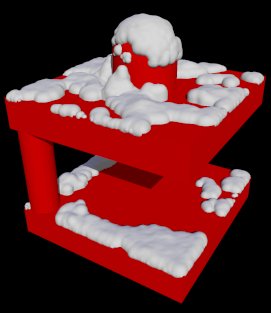
I've written a macro which will read the particles' data and let the User
define two macros to modify the snow: one will just modify the height (by
multiplying with the return-value of the Macro), the other will add/subtract
from the height. Once the multiplier and/or the height gets negative, the
particle will be removed.

This is the result when pairing the existing snow with the turbulence-field
to adjust the height of particles. Just a rough proof-of-concept.

As a final note: I've now figured the official name for the macros: I'll
name them the "Surcoat-Macros". The Surcoat-System is just used to sample a
surface and collect/remove samples with various macros to take care of steep
surfaces or the like. The files returned by the Surcoat-System are pretty
simple: a succession of a sample's positions and it's surface normal. Other
Macros build on this data and are called Plug-Ins. The snowfall-macros is
one such plug-in, as it adds a little more data (e.g. the height of a
particle) to simulate snow-related effects.

Other effects, like moss or paint, may follow and/or can be written by the
User himself.

Regards,
Tim

--
"Tim Nikias v2.0"
Homepage: <http://www.nolights.de>
Post a reply to this message
Attachments:
Download 'csg_snow.jpg' (15 KB)
Preview of image 'csg_snow.jpg'
|
|
| |
| |
|
|
|
|
| |
| |
|
|
Tim Nikias wrote:
> I've written a macro which will read the particles' data and let the User
> define two macros to modify the snow: one will just modify the height (by
> multiplying with the return-value of the Macro), the other will add/subtract
> from the height. Once the multiplier and/or the height gets negative, the
> particle will be removed.
>
> This is the result when pairing the existing snow with the turbulence-field
> to adjust the height of particles. Just a rough proof-of-concept.

I'm floored. This macro of yours is turning out to be so much more than
I thought it would end up as. I was just wondering the other day how
your macro would handle scattered lumps of snow on a pine tree, for
example (as I stared out the window at just that). This shows me that it
very well can do just that. Bravo!! :)

> Other effects, like moss or paint, may follow and/or can be written by the
> User himself.

I have two projects now for these macros: my original (a "fake or
foto"-style thing to try and replicate a cool winter photo I took last
year around this time), and something like this:
http://ricoholmes.com/Gallery/Images/Ga_Tower.htm . I was amazed when I
found it, love it still (it's stayed as my desktop wallpaper longer than
any image I can remember) and now I says to meself, great scott, I can
do my own version with Tim Nikias' super nifty macros.

I think this should get included with v4.0. :)

~Mike
Post a reply to this message
|
|
| |
| |
|
|
|
|
| |
|
|