|
|
|
|
|
|
| |
| |
|
|
|
|
| |
| |
|
|
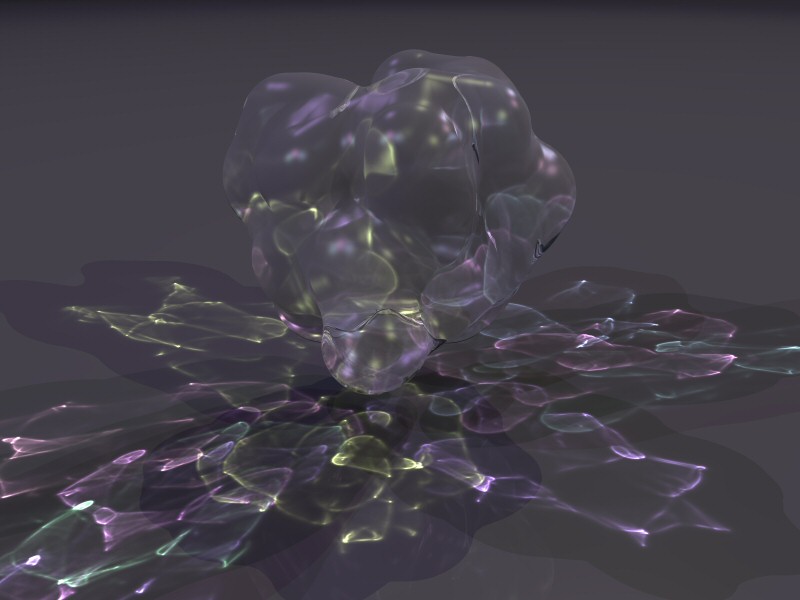
Here is a transparent blob over a plane plane.

I have one question, can anyone explain why when I set the colour of the
plane to black the photons don't show up?  What I really want is just a
black background with the caustics from the lights.  I can't seem to get
this, I have to make the plane grey (0.1) to make them show up.
Post a reply to this message
Attachments:
Download 'blobs.jpg' (58 KB)
Preview of image 'blobs.jpg'
|
|
| |
| |
|
|
|
|
| |
| |
|
|
scott wrote:
> Here is a transparent blob over a plane plane.
>
> I have one question, can anyone explain why when I set the colour of
> the plane to black the photons don't show up?  What I really want is
> just a black background with the caustics from the lights.  I can't
> seem to get this, I have to make the plane grey (0.1) to make them
> show up.

Sorry, that's a dumb question isn't it!! No, I don't feel stupid now :-)
Post a reply to this message
|
|
| |
| |
|
|
|
|
| |
| |
|
|
"scott" <sco### [at] spam com> a écrit dans le message de news:
417508d8$1@news.povray.org...
> scott wrote:
>
> Sorry, that's a dumb question isn't it!! No, I don't feel stupid now :-)
>
Who never does? ;-)
You could achieve a better contrast by settin plane ambient to 0 if not yet
Marc com> a écrit dans le message de news:
417508d8$1@news.povray.org...
> scott wrote:
>
> Sorry, that's a dumb question isn't it!! No, I don't feel stupid now :-)
>
Who never does? ;-)
You could achieve a better contrast by settin plane ambient to 0 if not yet
Marc
Post a reply to this message
|
|
| |
| |
|
|
|
|
| |
| |
|
|
sco### [at] spamcom news:417507e1@news.povray.org

> I have one question, can anyone explain why when I set the colour of the
> plane to black the photons don't show up?

Because the light is not deffused, even the one from photons.

Btw, I think that adding  diffuse_photons (with by default equals to
deffuse) would be a good idea. Such oimages would not be corect from
phisics point of view, but this can be used to make nice artistic images.

As for now, perhaps You could use something like

plane { ...
  pigment { rgb 1 }
  finish { diffuse .5 ambient -.5 }
}

or simmilar?
AFAIK that way direct right would have intensity of:

  light-source * material-color * material-diffuse + material-ambient
= 1 * 1 * 0.5 - 0.5 = 0

and concentrated photons caustic would be in example

10 * 1 * 0.5 - 0.5 = 9.5 = 1 (after clipping)


--
http://www.raf256.com/3d/
Rafal Maj 'Raf256', home page - http://www.raf256.com/me/
Computer Graphics
Post a reply to this message
|
|
| |
| |
|
|
|
|
| |
| |
|
|
Rafal 'Raf256' Maj wrote:
> sco### [at] spamcom news:417507e1@news.povray.org
>
>> I have one question, can anyone explain why when I set the colour of
>> the plane to black the photons don't show up?
>
> Because the light is not deffused, even the one from photons.

I know, I realised this just after I'd posted!

> As for now, perhaps You could use something like
>
> plane { ...
>   pigment { rgb 1 }
>   finish { diffuse .5 ambient -.5 }
> }
>

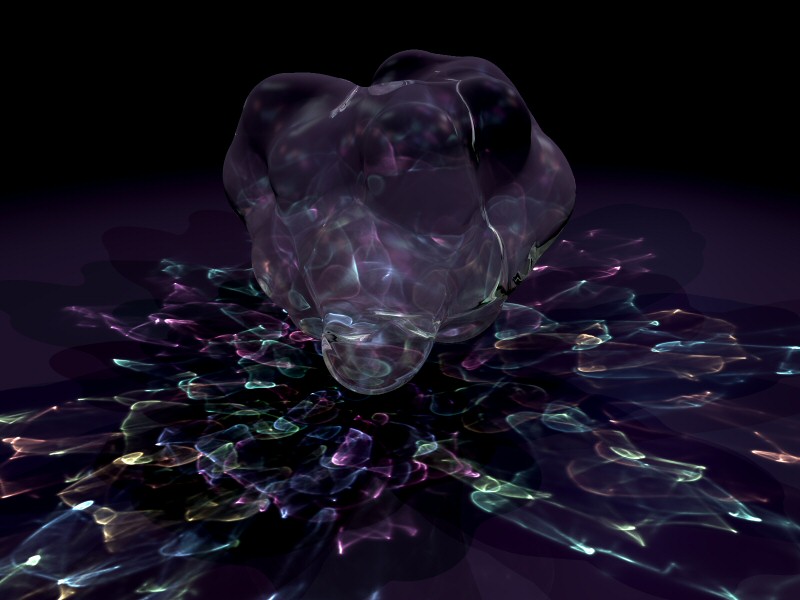
Thanks for that idea, it worked pretty well.  Except that some of the
"colour" of the blob was actually due to the colour of the plane.  Anyway,
after a bit of tweaking I came up with this, which is far closer to what I
wanted.

pigment{ color rgb <1,1,1> }
   finish {
         diffuse 0.5
         ambient -1.1
      }

Cheers!

Scott
Post a reply to this message
Attachments:
Download 'blobs.jpg' (78 KB)
Preview of image 'blobs.jpg'
|
|
| |
| |
|
|
|
|
| |
| |
|
|
Would you be willing to post the source for this image?  I think I could learn a lot
from your work.
Post a reply to this message
|
|
| |
| |
|
|
|
|
| |
| |
|
|
"Spock" <Spo### [at] nospamcom> wrote in message
news:41753a82$1@news.povray.org
> Would you be willing to post the source for this image?  I think I
> could learn a lot from your work.

No probs, its in p.b.s-f now under the same subject.

Hope you can understand it, it's a bit messy!
Post a reply to this message
|
|
| |
| |
|
|
|
|
| |
| |
|
|
Scott,

This is great and really shows off photos.
Kudos to you!

Mike

scott wrote:
> Rafal 'Raf256' Maj wrote:
>> sco### [at] spamcom news:417507e1@news.povray.org
>>
>>> I have one question, can anyone explain why when I set the colour of
>>> the plane to black the photons don't show up?
>>
>> Because the light is not deffused, even the one from photons.
>
> I know, I realised this just after I'd posted!
>
>> As for now, perhaps You could use something like
>>
>> plane { ...
>>   pigment { rgb 1 }
>>   finish { diffuse .5 ambient -.5 }
>> }
>>
>
> Thanks for that idea, it worked pretty well.  Except that some of the
> "colour" of the blob was actually due to the colour of the plane.  Anyway,
> after a bit of tweaking I came up with this, which is far closer to what I
> wanted.
>
> pigment{ color rgb <1,1,1> }
>    finish {
>          diffuse 0.5
>          ambient -1.1
>       }
>
> Cheers!
>
> Scott
Post a reply to this message
|
|
| |
| |
|
|
|
|
| |
| |
|
|
Hey, that's really great. :-D
Post a reply to this message
|
|
| |
| |
|
|
|
|
| |
| |
|
|
Mike Kost wrote:
> Scott,
>
> This is great and really shows off photos.
> Kudos to you!
>

Umm... that's photoNs...

Mike
Post a reply to this message
|
|
| |
| |
|
|
|
|
| |
| |
|
|
Where would one find or how could one generate the Myphotons.ph file that is
called in your scene?
thanks.
.d

"scott" <spa### [at] spamcom> wrote in message news:4175441d@news.povray.org...
> "Spock" <Spo### [at] nospamcom> wrote in message
> news:41753a82$1@news.povray.org
> > Would you be willing to post the source for this image?  I think I
> > could learn a lot from your work.
>
> No probs, its in p.b.s-f now under the same subject.
>
> Hope you can understand it, it's a bit messy!
>
>
Post a reply to this message
|
|
| |
| |
|
|
|
|
| |
| |
|
|
"Dennis Miller" <dhm### [at] comcastnet> wrote in message
news:41759b02@news.povray.org...
> Where would one find or how could one generate the Myphotons.ph file that
is
> called in your scene?
> thanks.
> .d
>
> "scott" <spa### [at] spamcom> wrote in message news:4175441d@news.povray.org...
> > "Spock" <Spo### [at] nospamcom> wrote in message
> > news:41753a82$1@news.povray.org
> > > Would you be willing to post the source for this image?  I think I
> > > could learn a lot from your work.
> >
> > No probs, its in p.b.s-f now under the same subject.
> >
> > Hope you can understand it, it's a bit messy!
> >
> >
>
>

Hi, if you remark that line out, Pov will generate the photons...

HTH

Cheers Dre
Post a reply to this message
|
|
| |
| |
|
|
|
|
| |
| |
|
|
Very nice and impressive!
;-)
Paolo
Post a reply to this message
|
|
| |
| |
|
|
|
|
| |
| |
|
|
Dre wrote:
> "Dennis Miller" <dhm### [at] comcastnet> wrote in message
> news:41759b02@news.povray.org...
>> Where would one find or how could one generate the Myphotons.ph file
>> that is called in your scene?
>> thanks.
>> .d
>>
>> "scott" <spa### [at] spamcom> wrote in message
>> news:4175441d@news.povray.org...
>>> "Spock" <Spo### [at] nospamcom> wrote in message
>>> news:41753a82$1@news.povray.org
>>>> Would you be willing to post the source for this image?  I think I
>>>> could learn a lot from your work.
>>>
>>> No probs, its in p.b.s-f now under the same subject.
>>>
>>> Hope you can understand it, it's a bit messy!
>>>
>>>
>>
>>
>
> Hi, if you remark that line out, Pov will generate the photons...

Yeah, sorry about that.  If you change it to "save_file" it will generate
the photons and save them to a file (this will take a while before it
actually starts the rendering).  Once you've done this you can change it to
"load_file" and it won't have to calculate them again.  You are then free to
fiddle about with the textures and things without have to recalculate all
the photons every time.
Post a reply to this message
|
|
| |
| |
|
|
|
|
| |