|
|
|
|
|
|
| |
| |
|
|
|
|
| |
| |
|
|
Hi,

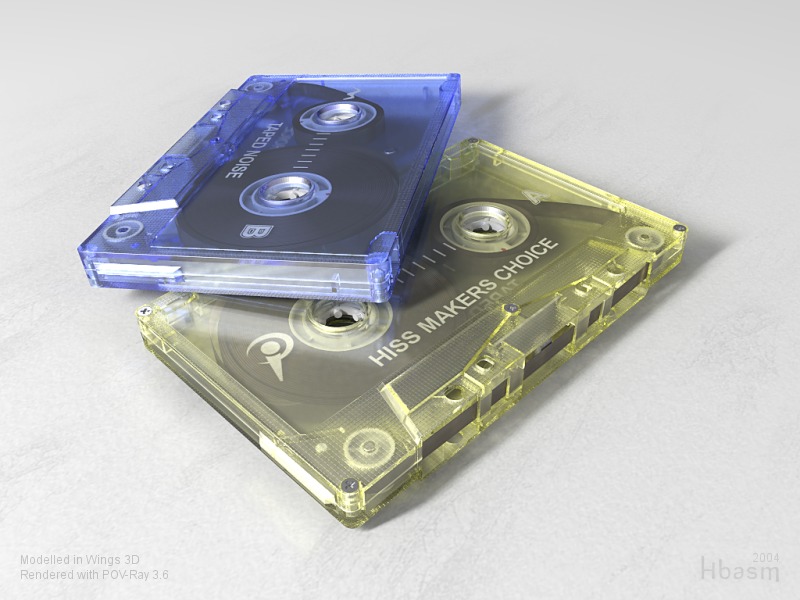
I began this project 12 days ago and it turned out fairly well I think, so I
would like to share it with you all. Suggestions and comments are welcome.

It seems that I have a fondness for small, shiny, plastic things. But there
is not much concept behind my images, except I strive for beauty and
photo-realism (usually). I'm trying to come up with some bigger ideas and
personal designs, but they certainly take more time.

Regards,
Hugo
Post a reply to this message
Attachments:
Download 'CasetteTapes.jpg' (99 KB)
Preview of image 'CasetteTapes.jpg'
|
|
| |
| |
|
|
|
|
| |
| |
|
|
Photorealism?

CHECK!

Andrew @ home.

No, really... it's cool.
Post a reply to this message
|
|
| |
| |
|
|
|
|
| |
| |
|
|
Now that is realy great!
Did you use a modeller like Moray, or is it hand-coded?
Greetings,
JWV
"Hugo Asm" <hua### [at] post3 teledk> wrote in message
news:4155ae7f@news.povray.org...
> Hi,
>
> I began this project 12 days ago and it turned out fairly well I think, so
I
> would like to share it with you all. Suggestions and comments are welcome.
>
> It seems that I have a fondness for small, shiny, plastic things. But
there
> is not much concept behind my images, except I strive for beauty and
> photo-realism (usually). I'm trying to come up with some bigger ideas and
> personal designs, but they certainly take more time.
>
> Regards,
> Hugo
>
>
> teledk> wrote in message
news:4155ae7f@news.povray.org...
> Hi,
>
> I began this project 12 days ago and it turned out fairly well I think, so
I
> would like to share it with you all. Suggestions and comments are welcome.
>
> It seems that I have a fondness for small, shiny, plastic things. But
there
> is not much concept behind my images, except I strive for beauty and
> photo-realism (usually). I'm trying to come up with some bigger ideas and
> personal designs, but they certainly take more time.
>
> Regards,
> Hugo
>
>
>
Post a reply to this message
|
|
| |
| |
|
|
|
|
| |
| |
|
|
> Now that is realy great!

Thank you! There is no doubt that POV-Ray is the best renderer in the world.
:-)

> Did you use a modeller like Moray, or is it hand-coded?

I used Wings3D, which is a freeware polygon modeller, very easy to use with
a user-friendly interface. It's a powerful yet simple application, suited
for modelling all kinds of shapes; organic or not.

Actually, I wrote this in the lower left side of the image, but the text is
so light grey, that apparently you didn't notice. That's fine as it was
intended to be discrete.

Regards,
Hugo
Post a reply to this message
|
|
| |
| |
|
|
|
|
| |
| |
|
|
Hugo Asm wrote:
>  I strive for beauty and
> photo-realism (usually).
>
>

Thanks for that, but please don't post photographs in this forum.

;-)


That's an incredible render.  Great job.

-->Jeff

--
jgentry46 [at] yahoo --dot-- com
Post a reply to this message
|
|
| |
| |
|
|
|
|
| |
| |
|
|
That's really impressive.

I have to wonder how you got all the little cut-out areas on the *inside* of
the casing to look right in Wings3D. Wasn't it hard to shape the inside of
the casing when the outside was in your way?

 - Slime
 [ http://www.slimeland.com/ ]
Post a reply to this message
|
|
| |
| |
|
|
|
|
| |
| |
|
|
Hugo Asm wrote:

> Hi,
>
> I began this project 12 days ago and it turned out fairly well I think, so I
> would like to share it with you all. Suggestions and comments are welcome.
>
> It seems that I have a fondness for small, shiny, plastic things. But there
> is not much concept behind my images, except I strive for beauty and
> photo-realism (usually). I'm trying to come up with some bigger ideas and
> personal designs, but they certainly take more time.
>
> Regards,
> Hugo
>
>
>
I can't find a single thing wrong.  Beautify.

Maybe a tutorial showing how you handled some of the trickier things in
Wings?
Post a reply to this message
|
|
| |
| |
|
|
|
|
| |
| |
|
|
"Slime" <fak### [at] emailaddress> wrote:
> That's really impressive.
>
> I have to wonder how you got all the little cut-out areas on the *inside* of
> the casing to look right in Wings3D. Wasn't it hard to shape the inside of
> the casing when the outside was in your way?
>
>  - Slime
>  [ http://www.slimeland.com/ ]

Probably only half of the tape was modelled, and then mirrored... I guess
Post a reply to this message
|
|
| |
| |
|
|
|
|
| |
| |
|
|
Hi Slime,

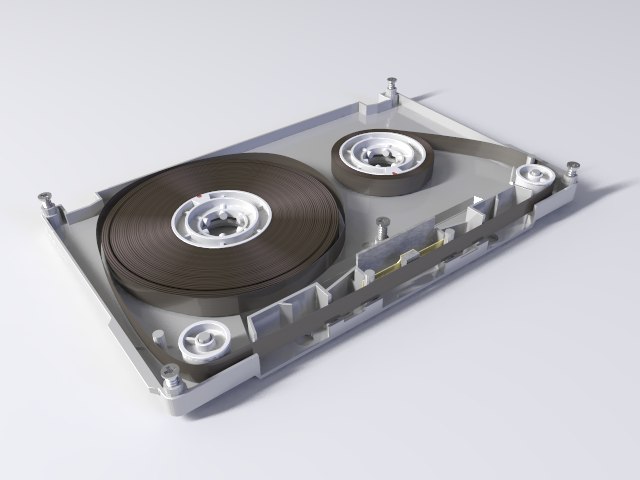
Well, the outside was not in my way. As Wagner says, I modelled half the
casing and copied it. Then I flipped the copy and moved it into position,
and began tweaking it to look like the other part (as the two halfs are not
fully similar).

I find it's generally a good idea to split an object into smaller objects.
It makes everything much clearer when you can turn off parts that you are
currently not working on. It also maintains fast response from OpenGL and
Wings3D... And finally it's quite realistic, because most man-made objects
are made from smaller parts.

Regards,
Hugo
Post a reply to this message
Attachments:
Download 'CasetteTape_half.jpg' (31 KB)
Preview of image 'CasetteTape_half.jpg'
|
|
| |
| |
|
|
|
|
| |
| |
|
|
Beautiful job, congrats!!!
______
Wagner
Post a reply to this message
|
|
| |
| |
|
|
|
|
| |
| |
|
|
> Maybe a tutorial showing how you handled some
> of the trickier things in Wings?

The trickest thing was that I had to do "manual" boolean operations, but at
least that gives me total control over the edges, unlike an automatic
routine like the one I've seen in 3dsMAX that easily produces a bit of a
mess, that one has to clean up afterwards.

It was important for the rendering of the transparant casing, that all the
cut-outs and thingys were modelled as "one piece" of plastic, similar to a
physical casette casing. Otherwise the filtering of light, as it passes
through the plastic, will not look right... Hence, boolean operations would
come in handy to stitch together cylinders and boxes, for example.

But instead I placed cylinders where I wanted them to be (various places on
the box casing) and with an orthographic view, I could accurately place
vertices/edges on the box accordingly. So the cylinder objects never became
part of the box, I just used them to see where I needed to place vertices on
the box.. That is what I call "manual" boolean operation. A few times I also
used the "bridge" command - what ever was faster.

I don't know if I can make a tutorial, but if you have further questions,
I'll try to explain.

> I can't find a single thing wrong.  Beautify

Thanks!  :-)

Hugo
Post a reply to this message
|
|
| |
| |
|
|
|
|
| |
| |
|
|
Still i find it very difficult to rotate the view and select what I like.
I haven't figured out yet how to zoom in and out and rotate in an acceptable
way while modelling.

This model you've got there is truly stunning and photorealistic!
Post a reply to this message
|
|
| |
| |
|
|
|
|
| |
| |
|
|
So smart, really beautiful modelling/rendering.

Rene.
Post a reply to this message
|
|
| |
| |
|
|
|
|
| |
| |
|
|
"Hugo Asm" <hua### [at] post3teledk> a écrit dans le message de news:
4155cfac@news.povray.org...

ATCHAAAAAA!

Oh errr  sorry I messed the tape!
opened cassette tapes (and very expensive white powder opened boxes as
well! )  always make me sneeze!


That's incredible!
And how did you the tape?

Marc
Post a reply to this message
|
|
| |
| |
|
|
|
|
| |
| |
|
|
> This model you've got there is truly stunning and photorealistic!

Thank you!  :-)


> I haven't figured out yet how to zoom in and out and rotate
> in an acceptable way while modelling.

I don't know exactly what you mean by "acceptable" but there are a few
settings you can adjust regarding zooming, rotating and panning. If you have
a 2-button mouse like me (pretty much a standard PC mouse, eventually it has
a scroll wheel, but that does not qualify as a 3-button mouse) you need to
select a 2-button mouse in the preferences, and I suggest using the "Blender
camera mode". Then you can pan, zoom, or rotate with just 2 fingers on the
keyboard using Alt / Shift / Ctrl so it's pretty quick...

Rotate the view with ALT + Left mouse.
Zoom with ALT + CTRL + Left mouse (or just use the scroll wheel).
Pan with ALT + Shift + Left mouse (eventually you think it pans too slowly
but you can adjust the speed in preferences).

You aim the camera to a specific target (a selection) by pressing A ... that
way you can zoom into every detail of your objects.


Regards,
Hugo
Post a reply to this message
|
|
| |
| |
|
|
|
|
| |
| |
|
|
This is amazing !
Wonderful to see what can be done with two open source free softwares.

Noé
--
"From the age of Big Brother, from the age of the thought police, from a
dead man... greetings" -- George Orwell -- 1984

Veuiller retirer NO SPAM HERE de mon adresse.
Please remove NO SPAM HERE from my address.
Post a reply to this message
|
|
| |
| |
|
|
|
|
| |
| |
|
|
> ATCHAAAAAA!
> Oh errr  sorry I messed the tape!

Argh, now see what you've done!  ;-)

> And how did you the tape?

Well seriously, it's made from 3 objects: 2 of them are basic cylinders with
a texture applied, so it looks like tape has been spinned around the wheels.
The texture is basically the onion pattern, and creates the anisotropic
scattering. But to ease the rendering, I faked the scattering with radial
patterns... And 1 object is the tape between the wheels: That was done by
subdividing a rough / course mesh in Wings3D, much like having a spline with
control points.

Hope that is the answer you were looking for.

Thanks,
Hugo
Post a reply to this message
|
|
| |
| |
|
|
|
|
| |
| |
|
|
Well, *I* am fooled! Yowza!
Post a reply to this message
|
|
| |
| |
|
|
|
|
| |
| |
|
|
Damn!  That's real!

--
KC6ETE  Dave's Engineering Page, www.dvanhorn.org
Microcontroller Consultant, specializing in Atmel AVR
Post a reply to this message
|
|
| |
| |
|
|
|
|
| |
| |
|
|
Gorgeous! Very realistic...
=Bob=
Post a reply to this message
|
|
| |
| |
|
|
|
|
| |
| |
|
|
"Hugo Asm" <hua### [at] post3teledk> a écrit dans le message de news:
4155f65a$1@news.povray.org...
> Well seriously, it's made from 3 objects: 2 of them are basic cylinders
with
> a texture applied, so it looks like tape has been spinned around the
wheels.
> The texture is basically the onion pattern, and creates the anisotropic
> scattering. But to ease the rendering, I faked the scattering with radial
> patterns... And 1 object is the tape between the wheels: That was done by
> subdividing a rough / course mesh in Wings3D, much like having a spline
with
> control points.
>
> Hope that is the answer you were looking for.
>
Exactly! thanks

Marc
Post a reply to this message
|
|
| |
| |
|
|
|
|
| |
| |
|
|
That is amazing! Wow and well done!

  ~Steve~
Post a reply to this message
|
|
| |
| |
|
|
|
|
| |
| |
|
|
On Sat, 25 Sep 2004 22:06:06 +0200, "Hugo Asm" <hua### [at] post3teledk>
wrote:

>Hi Slime,
>
>Well, the outside was not in my way. As Wagner says, I modelled half the
>casing and copied it. Then I flipped the copy and moved it into position,
>and began tweaking it to look like the other part (as the two halfs are not
>fully similar).
>
wow!  that looks real.

It makes me flash back to repairing & splicing
damaged/tangled tape in cassettes.  Yikes!
Post a reply to this message
|
|
| |
| |
|
|
|
|
| |
| |
|
|
On Sat, 25 Sep 2004 19:44:13 +0200, "Hugo Asm" <hua### [at] post3teledk>
wrote:

>Hi,
>
>I began this project 12 days ago and it turned out fairly well I think, so I
>would like to share it with you all. Suggestions and comments are welcome.
>

sweet!
Post a reply to this message
|
|
| |
| |
|
|
|
|
| |
| |
|
|
Hugo Asm wrote:

> Suggestions and
_____
> comments are welcome.
whoa!

  -Shay
Post a reply to this message
|
|
| |
| |
|
|
|
|
| |
| |
|
|
Outstanding!!!
Post a reply to this message
|
|
| |
| |
|
|
|
|
| |
| |
|
|
Yes, it's incredible!!! Congratulations for your picture.

Best regards,
Oleguer


"Roberto Amorim" <wol### [at] hotmailcom> escribió en el mensaje
news:415841f2$1@news.povray.org...
> Outstanding!!!
>
>
Post a reply to this message
|
|
| |
| |
|
|
|
|
| |
| |
|
|
Hugo Asm wrote:
> Hi,
>
> I began this project 12 days ago and it turned out fairly well I think, so I
> would like to share it with you all. Suggestions and comments are welcome.
>
> It seems that I have a fondness for small, shiny, plastic things. But there
> is not much concept behind my images, except I strive for beauty and
> photo-realism (usually). I'm trying to come up with some bigger ideas and
> personal designs, but they certainly take more time.
>
> Regards,
> Hugo
>
>
>
Really "realistic" I'm your fan ;-)
I really love this kind of renders.
Post a reply to this message
|
|
| |
| |
|
|
|
|
| |
| |
|
|
Egad! Awesome Rolex!

Hugo Asm wrote:

> Hi,
>
> I began this project 12 days ago and it turned out fairly well I think, so I
> would like to share it with you all. Suggestions and comments are welcome.
>
> It seems that I have a fondness for small, shiny, plastic things. But there
> is not much concept behind my images, except I strive for beauty and
> photo-realism (usually). I'm trying to come up with some bigger ideas and
> personal designs, but they certainly take more time.
>
> Regards,
> Hugo
>
>
>
Post a reply to this message
|
|
| |
| |
|
|
|
|
| |
| |
|
|
"Eli" <eli### [at] jehoelnet> wrote in message news:4155dd1f$1@news.povray.org...
> Still i find it very difficult to rotate the view and select what I like.
> I haven't figured out yet how to zoom in and out and rotate in an
acceptable
> way while modelling.
>
> This model you've got there is truly stunning and photorealistic!
>
>

i've been using the "Blender" camera system in Wings3d and it seems pretty
natural to zoom in, rotate, and pan... even with a two button mouse. I like
it actually, much more than Blender :)
Post a reply to this message
|
|
| |
| |
|
|
|
|
| |
| |
|
|
I know this post is old, but I had to say: OMG!

Very realistic!

I think the tape in the bottom part of the casette looks too straight.
Post a reply to this message
|
|
| |
| |
|
|
|
|
| |