|
|
|
|
|
|
| |
| |
|
|
|
|
| |
| |
|
|
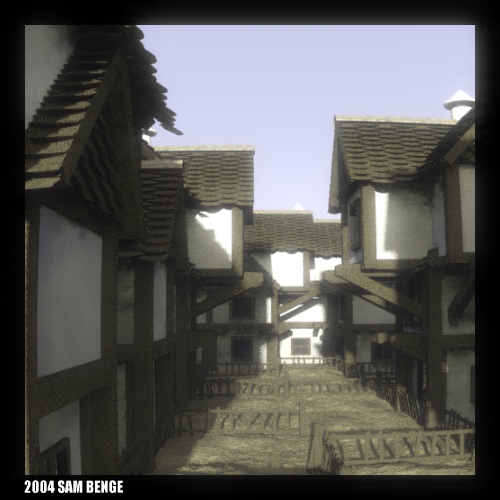
Hello everyone. Today I made a scene file which takes an image and
applies a 'bloom' effect to the bright parts. The example attached is a
bit overdone to show the results. I can control which values in the
image are active.

I think that this technique is probably okay to use in the IRTC, but I
wonder if it would be considered a post-processing step or not....

Happy raytracing~

-Sam Benge
Post a reply to this message
Attachments:
Download 'luminous_bloom3.jpg' (80 KB)
Preview of image 'luminous_bloom3.jpg'
|
|
| |
| |
|
|
From: Nicolas Alvarez
Subject: Re: Raytraced luminous color bleeding (80kb jpeg)
Date: 24 Jun 2004 20:20:42
Message: <40db6fda@news.povray.org>
|
|
|
| |
| |
|
|
Incredible! As with other IRTC images it doesn't look raytraced, it looks as a
photograph!
--
- Nicolas Alvarez
nicoalvar0 [at] hotmail [dot] com
"Samuel Benge" <stb### [at] hotmail com> escribió en el mensaje
news:40D### [at] hotmailcom...
> Hello everyone. Today I made a scene file which takes an image and
> applies a 'bloom' effect to the bright parts. The example attached is a
> bit overdone to show the results. I can control which values in the
> image are active.
>
> I think that this technique is probably okay to use in the IRTC, but I
> wonder if it would be considered a post-processing step or not....
>
> Happy raytracing~
>
> -Sam Benge
>
-------------------------------------------------------------------------------- com> escribió en el mensaje
news:40D### [at] hotmailcom...
> Hello everyone. Today I made a scene file which takes an image and
> applies a 'bloom' effect to the bright parts. The example attached is a
> bit overdone to show the results. I can control which values in the
> image are active.
>
> I think that this technique is probably okay to use in the IRTC, but I
> wonder if it would be considered a post-processing step or not....
>
> Happy raytracing~
>
> -Sam Benge
>
--------------------------------------------------------------------------------
Post a reply to this message
|
|
| |
| |
|
|
From: Slime
Subject: Re: Raytraced luminous color bleeding (80kb jpeg)
Date: 24 Jun 2004 22:37:15
Message: <40db8fdb@news.povray.org>
|
|
|
| |
| |
|
|
> I think that this technique is probably okay to use in the IRTC, but I
> wonder if it would be considered a post-processing step or not....


I think if it's all done in the renderer, it's OK.

Nice effect. It makes the image look like a photo.

 - Slime
 [ http://www.slimeland.com/ ]
Post a reply to this message
|
|
| |
| |
|
|
From: Thomas Lake
Subject: Re: Raytraced luminous color bleeding (80kb jpeg)
Date: 24 Jun 2004 22:43:46
Message: <40db9162@news.povray.org>
|
|
|
| |
| |
|
|
Samuel Benge wrote:

> Hello everyone. Today I made a scene file which takes an image and
> applies a 'bloom' effect to the bright parts. The example attached is a
> bit overdone to show the results. I can control which values in the
> image are active.
>
> I think that this technique is probably okay to use in the IRTC, but I
> wonder if it would be considered a post-processing step or not....
>
> Happy raytracing~

Very nice effect! I don't think anyone would complain about it
technically as long as it is 100% POV. However for an IRTC entry you
might find some of the more purist arguing that the effect looks too
much like the effects that are used by 3D MAX artists. I personally
don't feel this way but I can see others might.
Post a reply to this message
|
|
| |
| |
|
|
From: Jeremy M Praay
Subject: Re: Raytraced luminous color bleeding (80kb jpeg)
Date: 24 Jun 2004 22:58:06
Message: <40db94be$1@news.povray.org>
|
|
|
| |
| |
|
|
"Samuel Benge" <stb### [at] hotmailcom> wrote in message
news:40D### [at] hotmailcom...
> Hello everyone. Today I made a scene file which takes an image and
> applies a 'bloom' effect to the bright parts. The example attached is a
> bit overdone to show the results. I can control which values in the
> image are active.

It really is a nice effect, Samuel.  In fact, most of the things you show
here amaze me.   You're certainly working at a level of understanding which
far surpasses my own.

Incredible work!  :-)

>
> I think that this technique is probably okay to use in the IRTC, but I
> wonder if it would be considered a post-processing step or not....
>

Only if it can be done in one step.  It sounds like it's a 2 part process
(render scene then take image and add bloom effect), which could disqualify
it, since it's done through the renderer.

However, somewhere deep in the rules documentation, it says that post
processing is essentially ok if it applies to the whole image (i.e. it's ok
to blur, gamma correct, etc.), in which case it would be ok.  But...  From
having had this discussion once before, not everyone is aware of that in the
rules FAQ, and so to some voters, any post-processing may get you into
trouble.  The last time I remember being involved in a rules discussion, I
think someone said (maybe it was me) to state the rule in your accompanying
text file with a referencing URL as to why your post processing technique is
valid.

It bothers me when people use the rules too literally, though.  I think the
general idea is simply not to add new elements to your image, nor to use
post-processing to touch-up a bad rendering job, but others may disagree.  I
have thought that unless you're a panel judge, you should just vote on the
image "as is" and let the panel judges decide if it's a violation or not,
but that opens up a whole new can-o-worms.

Now having said all of that, I'll say that I actually hate IRTC
post-processing rule discussions...  bleh

--
Jeremy
www.beantoad.com
Post a reply to this message
|
|
| |
| |
|
|
|
|
| |
| |
|
|
"Jeremy M. Praay" <sla### [at] hotmailcom> wrote:
> "Samuel Benge" <stb### [at] hotmailcom> wrote in message
> news:40D### [at] hotmailcom...
<snip>
> > I think that this technique is probably okay to use in the IRTC, but I
> > wonder if it would be considered a post-processing step or not....
> >
>
> Only if it can be done in one step.  It sounds like it's a 2 part process
> (render scene then take image and add bloom effect), which could disqualify
> it, since it's done through the renderer.
>

That's pretty much my take on it also.  That 2nd step is getting into pretty
gray territory rulewise.  There have been in-renderer effects used in the
IRTC in the past and they have sometimes not been well received. On the
other hand, sometimes they are... it probably all depends on which crowd
shows up for the voting ;-)


> However, somewhere deep in the rules documentation, it says that post
> processing is essentially ok if it applies to the whole image (i.e. it's ok
> to blur, gamma correct, etc.), in which case it would be ok.

I think it says that while gamma correcting is ok, blur is not. At least it
specifically says post processed motion blur is not.  My reading of that
part of the rules is that it's ok to use the three basic processes that are
commonly applied to any image (brightness, contrast & gamma), but that
effect filters such as blur or halo are not.

And even that's iffey, since I could conceivably take a mediocre render and
turn it into a completely different and dynamic abstract by applying 175%
contrast...

RG
Post a reply to this message
|
|
| |
| |
|
|
From: Stefan Viljoen
Subject: Re: Raytraced luminous color bleeding (80kb jpeg)
Date: 25 Jun 2004 02:02:19
Message: <40dbbfea@news.povray.org>
|
|
|
| |
| |
|
|
Samuel Benge wrote:

> Hello everyone. Today I made a scene file which takes an image and
> applies a 'bloom' effect to the bright parts. The example attached is a
> bit overdone to show the results. I can control which values in the
> image are active.
>
> I think that this technique is probably okay to use in the IRTC, but I
> wonder if it would be considered a post-processing step or not....
>
> Happy raytracing~
>
> -Sam Benge

WOW Sam! Looks just like in the mornings when I wake up after a long night
of tracing - everything too bright and hurting.

VERY nice
--
Stefan Viljoen
Software Support Technician
Polar Design Solutions
Post a reply to this message
|
|
| |
| |
|
|
|
|
| |
| |
|
|
Samuel Benge <stb### [at] hotmailcom> wrote:

> I think that this technique is probably okay to use in the IRTC, but I
> wonder if it would be considered a post-processing step or not....


Its not an postprocessing step, because it is done within Povray. Its a
Povray render generated in two steps and as such you can use it in the
IRTC.
I by myself used "postprocessing" within Povray several times in my entries.

By the way, nice effect!


Norbert Kern
Post a reply to this message
|
|
| |
| |
|
|
From: Marc Jacquier
Subject: Re: Raytraced luminous color bleeding (80kb jpeg)
Date: 25 Jun 2004 04:59:07
Message: <40dbe95b@news.povray.org>
|
|
|
| |
| |
|
|
"Norbert Kern" <nor### [at] t-onlinede> a écrit dans le message de
news: web.40dbdfb25ac3ed2ae08477ec0@news.povray.org...
> Samuel Benge <stb### [at] hotmailcom> wrote:
>
> > I think that this technique is probably okay to use in the IRTC, but I
> > wonder if it would be considered a post-processing step or not....
>
>
>
> Its not an postprocessing step, because it is done within Povray. Its a
> Povray render generated in two steps and as such you can use it in the
> IRTC.
> I by myself used "postprocessing" within Povray several times in my
entries.
>
> By the way, nice effect!
>
Yes nice effect
I am not against some ligth postprocessing (as in this case).
I think anyway that this is posprocessing because it is applied on a 2d
image and not in a 3d scene


Marc
Post a reply to this message
|
|
| |
| |
|
|
|
|
| |
| |
|
|
"Marc Jacquier" <nos### [at] wanadoofr> wrote:

> I think anyway that this is posprocessing because it is applied on a 2d
> image and not in a 3d scene

What, if you make an animation with two images - first the actual render,
then afterwards the "postprocessing" using the first frame?
This would be similar to the postprocessing steps in the old Megapov until
MP 0.7 (of course there was no such effect). There are several IRTC entries
with this kind of postprocessing and it was certainly allowed.

Norbert Kern
Post a reply to this message
|
|
| |
| |
|
|
|
|
| |
| |
|
|
Norbert Kern wrote:
>
>>I think anyway that this is posprocessing because it is applied on a 2d
>>image and not in a 3d scene
>
>
> What, if you make an animation with two images - first the actual render,
> then afterwards the "postprocessing" using the first frame?

The problem is quite simple. What you do this way is circumventing the
rules of the IRTC.  This is fine IMO but it should lead to the rules
being modified to be more precise and allow less 'tricks' to circumvent
them.  Since the IRTC rules have not been changed at all recently post
processing with external tools is now in fact allowed.  This is not bad
per se but the rule is a joke then and should be removed.

Christoph

--
POV-Ray tutorials, include files, Sim-POV,
HCR-Edit and more: http://www.tu-bs.de/~y0013390/
Last updated 01 May. 2004 _____./\/^>_*_<^\/\.______
Post a reply to this message
|
|
| |
| |
|
|
From: Gilles Tran
Subject: Re: Raytraced luminous color bleeding (80kb jpeg)
Date: 25 Jun 2004 13:30:04
Message: <40dc611c@news.povray.org>
|
|
|
| |
| |
|
|
"Christoph Hormann" <chr### [at] gmxde> a écrit dans le message de
news:cbh7i2$50e$1@chho.imagico.de...

> The problem is quite simple. What you do this way is circumventing the
> rules of the IRTC.  This is fine IMO but it should lead to the rules
> being modified to be more precise and allow less 'tricks' to circumvent
> them.  Since the IRTC rules have not been changed at all recently post
> processing with external tools is now in fact allowed.  This is not bad
> per se but the rule is a joke then and should be removed.

I think that the spirit of the original rule is to prevent photoshopping,
because otherwise it would be impossible to prevent obviously unacceptable
(*) modifications of a rendered image, like painting new elements by hand.

Perhaps the rule could just be altered by stating that the image generation
(rendering + ant not-rendered effect) should be done with the same program.
This would prevent the use of paint programs while officially authorising
post-processing when done with built-in features of the renderer, including
SDL-based post-processing.

The phrase:
"Images must not be enhanced or altered ('post-processed') by use of paint
programs such as PhotoShop(tm) etc."

could then be replaced by:

"Images must not be modified by use of a program other than the original
renderer".


G.

(*) in the context of a rendering competition of course


--

**********************
http://www.oyonale.com
**********************
- Graphic experiments
- POV-Ray and Poser computer images
- Posters
Post a reply to this message
|
|
| |
| |
|
|
|
|
| |
| |
|
|
Gilles Tran wrote:
>
> I think that the spirit of the original rule is to prevent photoshopping,
> because otherwise it would be impossible to prevent obviously unacceptable
> (*) modifications of a rendered image, like painting new elements by hand.
>
> Perhaps the rule could just be altered by stating that the image generation
> (rendering + ant not-rendered effect) should be done with the same program.
> This would prevent the use of paint programs while officially authorising
> post-processing when done with built-in features of the renderer, including
> SDL-based post-processing.

This would surely be much clearer than the current rule.  The difference
between post processing the image in photoshop and doing the same post
processing in an awfully slow and memory intensive SDL based system is
quite academic though.  But unless you want to completely remove the
post processing rule this probably is the clearest line that can be drawn.

Christoph

--
POV-Ray tutorials, include files, Sim-POV,
HCR-Edit and more: http://www.tu-bs.de/~y0013390/
Last updated 01 May. 2004 _____./\/^>_*_<^\/\.______
Post a reply to this message
|
|
| |
| |
|
|
From: Shay
Subject: Re: Raytraced luminous color bleeding (80kb jpeg)
Date: 25 Jun 2004 15:27:59
Message: <40dc7cbf@news.povray.org>
|
|
|
| |
| |
|
|
Samuel Benge wrote:

> Hello everyone. Today I made a scene file which
 > takes an image and applies a 'bloom' effect to
 > the bright parts.

Did you do this by rendering a grayscale map with something like [.5 rgb
0][.5 rgb 1] blurring the map, and then combining the blur, the original
map, and the original image? (hope that made sense)

...or, is this a one-step process? For the record, I don't see anything
procedural/repeatable as unacceptable post-processing.

  -Shay
Post a reply to this message
|
|
| |
| |
|
|
From: Jim Charter
Subject: Re: Raytraced luminous color bleeding (80kb jpeg)
Date: 25 Jun 2004 18:04:32
Message: <40dca170$1@news.povray.org>
|
|
|
| |
| |
|
|
Samuel Benge wrote:
> Hello everyone. Today I made a scene file which takes an image and
> applies a 'bloom' effect to the bright parts. The example attached is a
> bit overdone to show the results. I can control which values in the
> image are active.
>
> I think that this technique is probably okay to use in the IRTC, but I
> wonder if it would be considered a post-processing step or not....
>
> Happy raytracing~
>
> -Sam Benge
>
> ------------------------------------------------------------------------
>
Congratulations, clever technically and pleasing visually.  Is it my
imagination or is diffused atmosphere in photos becoming so popular
lately as to practically define current visual style.  Like in ads, TV,
movies, photo-art, etc., etc.
Post a reply to this message
|
|
| |
| |
|
|
From: Shay
Subject: Re: Raytraced luminous color bleeding (80kb jpeg)
Date: 25 Jun 2004 21:34:20
Message: <40dcd29c@news.povray.org>
|
|
|
| |
| |
|
|
Jim Charter wrote:

> Congratulations, clever technically and pleasing visually.  Is
> it my imagination or is diffused atmosphere in photos becoming
> so popular lately as to practically define current visual style.
> Like in ads, TV, movies, photo-art, etc., etc.

The Bruckheimer effect.

 -Shay
Post a reply to this message
|
|
| |
| |
|
|
From: Samuel Benge
Subject: Re: Raytraced luminous color bleeding (80kb jpeg)
Date: 25 Jun 2004 22:10:38
Message: <40DCDAB9.80306@hotmail.com>
|
|
|
| |
| |
|
|
Jeremy M. Praay wrote:
<snip>

>
> Incredible work!  :-)
>


Thanks!

>>I think that this technique is probably okay to use in the IRTC, but I
>>wonder if it would be considered a post-processing step or not....
>
> Only if it can be done in one step.  It sounds like it's a 2 part process
> (render scene then take image and add bloom effect), which could disqualify
> it, since it's done through the renderer.


Since POV-Ray has so many options (as a programming language), it might
be possible to link the post-processing file to execute right after a
render is complete. I'll have to look into that....


> Now having said all of that, I'll say that I actually hate IRTC
> post-processing rule discussions...  bleh

Me too.


-Sam
Post a reply to this message
|
|
| |
| |
|
|
|
|
| |
| |
|
|
Shay wrote:

> Did you do this by rendering a grayscale map with something like [.5 rgb
> 0][.5 rgb 1] blurring the map, and then combining the blur, the original
> map, and the original image?

 >

>(hope that made sense)


It does, and it's almost completely correct. There are two planes. One
has the original image, and it remains unharmed. The second plane is
above the first one. It contains the blurred highlights using parts from
the original image. All darker portions are transparent. The upper and
lower values are controlled in a pigment_map, and allow for a smooth
transition from transparent color to image-based color. (if that made
any sense :)

-Sam
Post a reply to this message
|
|
| |
| |
|
|
|
|
| |
| |
|
|
Jim Charter wrote:

>>
> Congratulations, clever technically and pleasing visually.


Thanks

> Is it my
> imagination or is diffused atmosphere in photos becoming so popular
> lately as to practically define current visual style.  Like in ads, TV,
> movies, photo-art, etc., etc.

It adds an extra dimension of realism to an image at low overhead. Cheap
to render; worth the extra time for some renders. I'll end up using it
in too many of my renders for a while, eventually learning when *not* to
use it :)

-Sam
Post a reply to this message
|
|
| |
| |
|
|
From: Tim Nikias
Subject: Re: Raytraced luminous color bleeding (80kb jpeg)
Date: 26 Jun 2004 06:23:31
Message: <40dd4ea3@news.povray.org>
|
|
|
| |
| |
|
|
> Hello everyone. Today I made a scene file which takes an image and
> applies a 'bloom' effect to the bright parts. The example attached is a
> bit overdone to show the results. I can control which values in the
> image are active.

This reminds me of my Glare-Include I've written a while ago. What I did was
to render the scene with Black-Textures and Specular-Highlights only, then
calculate the position for the Glare-Image in-scene. Using average-pattern,
I blurred the image a little and thus got me the glaring effect.
Do you use the colored output of your image as input for the blooming
effect?

Regards,
Tim

--
"Tim Nikias v2.0"
Homepage: <http://www.nolights.de>
Post a reply to this message
|
|
| |
| |
|
|
|
|
| |
| |
|
|
Tim Nikias wrote:

>
> This reminds me of my Glare-Include I've written a while ago. What I did was
> to render the scene with Black-Textures and Specular-Highlights only, then
> calculate the position for the Glare-Image in-scene. Using average-pattern,
> I blurred the image a little and thus got me the glaring effect.


That would be perfect for ocean scenes and rolex scenes :) I can't
imagine lining the image up 'in scene' though... sounds very difficult.
Can you post a link to an example of your technique?


> Do you use the colored output of your image as input for the blooming
> effect?


Yes. I have to first place the #declared image_map inside a
pigment_pattern block, which makes it grayscale. With that map I am able
to make the darks parts transparent and the light parts colored with my
original image_map. I blur the result over a plane with the original
image_map, untouched. I am thinking of releasing the code, but it has to
be cleaned up quite a bit.

-Sam
Post a reply to this message
|
|
| |
| |
|
|
From: Tim Nikias
Subject: Re: Raytraced luminous color bleeding (80kb jpeg)
Date: 26 Jun 2004 19:50:52
Message: <40de0bdc$1@news.povray.org>
|
|
|
| |
| |
|
|
> > This reminds me of my Glare-Include I've written a while ago. What I did
was
> > to render the scene with Black-Textures and Specular-Highlights only,
then
> > calculate the position for the Glare-Image in-scene. Using
average-pattern,
> > I blurred the image a little and thus got me the glaring effect.
>
>
> That would be perfect for ocean scenes and rolex scenes :) I can't
> imagine lining the image up 'in scene' though... sounds very difficult.
> Can you post a link to an example of your technique?
>

It's in my Download-Section:
http://www.nolights.de/download.html#Glare Macros

What I do is just a little arithmetic: take the camera's location and
look_at (along with right, up, and sky) and calculate the viewing frustrum
from that. Place a quad (two triangles) in the line of sight with the
described image_map-function, and there you go! You can have a look at the
source if you like. But linking to my Download-Section should imply that.
;-)


--
"Tim Nikias v2.0"
Homepage: <http://www.nolights.de>
Post a reply to this message
|
|
| |
| |
|
|
From: Jaime Vives Piqueres
Subject: Re: Raytraced luminous color bleeding (80kb jpeg)
Date: 28 Jun 2004 05:53:05
Message: <40dfea81$1@news.povray.org>
|
|
|
| |
| |
|
|
Samuel Benge wrote:
> Hello everyone. Today I made a scene file which takes an image and
> applies a 'bloom' effect to the bright parts. The example attached is a
> bit overdone to show the results. I can control which values in the
> image are active.

   It's a very nice effect, and the scene you used for the test is also
beautiful and very apropiated.

> I think that this technique is probably okay to use in the IRTC, but I
> wonder if it would be considered a post-processing step or not....

   I think it is clearly a postprocessing filter, but it is allowed as
it is done by the same renderer. If you do it automatically using a two
pass technique it's perfectly "legal". Other thing is if the judges will
detract point for it not being a "true" 3D effect... I will not, as I
see it as a very creative use of the renderer, wich is what the spirit
of the competition is all about, IMHO.

   Indeed, congrats: I see your inspiration is coming back!

--
Jaime
Post a reply to this message
|
|
| |
| |
|
|
|
|
| |