|
|
|
|
|
|
| |
| |
|
|
|
|
| |
| |
|
|
Hi folks.

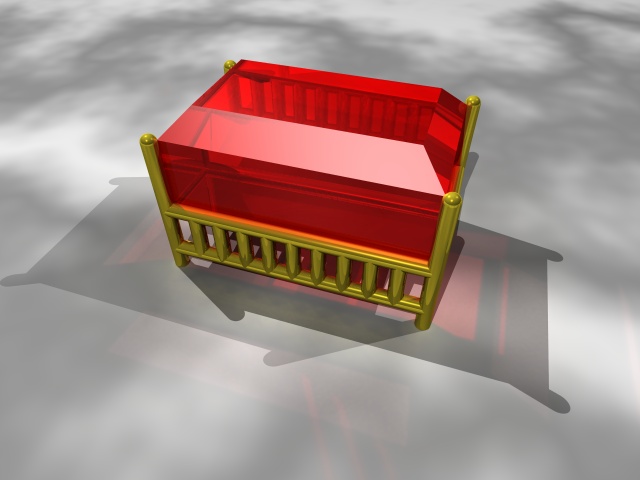
This is supposed to be a an extreme closeup of a small gemstone (a few
mm across), set in a gold setting. But it looks nothing like that - and
I can't figure out why.

The stone doesn't look remotely gem-like. Can't figure that out. It's
transparent, reflective, and reflective. What am I missing?

The setting doesn't look like gold. I've fiddled with brilliance,
specular, roughness, reflection, and turned on metallic (as well as
conserve_energy). Still doesn't look remotely like metal. Why?

Also can't figure out why the metal setting apparently isn't resulting
in any photons. (It makes the photon process hundreds of times slower -
that is, I had to multiply the photon spacing a few hundred times to get
it to render this year.)

This was supposed to end up being a single link in a bracelet - but it
looks so rubbish I hadn't get that far yet.

Any ideas?
Andrew @ home.
Post a reply to this message
Attachments:
Download 'bracelet2.jpg' (53 KB)
Preview of image 'bracelet2.jpg'
|
|
| |
| |
|
|
|
|
| |
| |
|
|
"Andrew C on Mozilla" <voi### [at] dev null> wrote in message
news:409e0084@news.povray.org...
> Hi folks.
>
> This is supposed to be a an extreme closeup of a small gemstone (a
few
> mm across), set in a gold setting. But it looks nothing like that -
and
> I can't figure out why.
> The stone doesn't look remotely gem-like. Can't figure that out.
It's
> transparent, reflective, and reflective. What am I missing?
Your gemstone needs facets on the back of the stone. Do a Google
search for 'Baguette Cut', 'Emerald Cut', and 'Princess Cut'. You'll
see that your gemstone also needs to be shallower.
> The setting doesn't look like gold. I've fiddled with brilliance,
> specular, roughness, reflection, and turned on metallic (as well as
> conserve_energy). Still doesn't look remotely like metal. Why?
It looks like gold to me - it's not that bad, try turning the
ambient and reflection up a touch. The tips of your 'prongs' need to
be bent over the stone too.
>
> Also can't figure out why the metal setting apparently isn't
resulting
> in any photons. (It makes the photon process hundreds of times
slower -
> that is, I had to multiply the photon spacing a few hundred times to
get
> it to render this year.)
No idea.
>
> This was supposed to end up being a single link in a bracelet - but
it
> looks so rubbish I hadn't get that far yet.
Perseverance! ;)
~Steve~
>
> Any ideas?
> Andrew @ home.
>
>
----------------------------------------------------------------------
---------- null> wrote in message
news:409e0084@news.povray.org...
> Hi folks.
>
> This is supposed to be a an extreme closeup of a small gemstone (a
few
> mm across), set in a gold setting. But it looks nothing like that -
and
> I can't figure out why.
> The stone doesn't look remotely gem-like. Can't figure that out.
It's
> transparent, reflective, and reflective. What am I missing?
Your gemstone needs facets on the back of the stone. Do a Google
search for 'Baguette Cut', 'Emerald Cut', and 'Princess Cut'. You'll
see that your gemstone also needs to be shallower.
> The setting doesn't look like gold. I've fiddled with brilliance,
> specular, roughness, reflection, and turned on metallic (as well as
> conserve_energy). Still doesn't look remotely like metal. Why?
It looks like gold to me - it's not that bad, try turning the
ambient and reflection up a touch. The tips of your 'prongs' need to
be bent over the stone too.
>
> Also can't figure out why the metal setting apparently isn't
resulting
> in any photons. (It makes the photon process hundreds of times
slower -
> that is, I had to multiply the photon spacing a few hundred times to
get
> it to render this year.)
No idea.
>
> This was supposed to end up being a single link in a bracelet - but
it
> looks so rubbish I hadn't get that far yet.
Perseverance! ;)
~Steve~
>
> Any ideas?
> Andrew @ home.
>
>
----------------------------------------------------------------------
----------
Post a reply to this message
|
|
| |
| |
|
|
|
|
| |
| |
|
|
>>This is supposed to be a an extreme closeup of a small gemstone (a
>>few mm across), set in a gold setting. But it looks nothing like
 >>that - and I can't figure out why.
 >>
>>The stone doesn't look remotely gem-like. Can't figure that out.
>>It's transparent, reflective, and reflective. What am I missing?
>
> Your gemstone needs facets on the back of the stone. Do a Google
> search for 'Baguette Cut', 'Emerald Cut', and 'Princess Cut'. You'll
> see that your gemstone also needs to be shallower.

...so what you're saying is that it's all in the cut?

OK... well just Googling for (e.g.) Emerald Cut gives me a huge list of
shops that will *sell* me an emerald cut gemstone of one sort or
another... I've found a few little black and white 2D outline drawings
and a few photos, but I can't find anything clear enough to make a
POV-Ray model from.

Anyone know where I can find technical drawings with measurements?

>>The setting doesn't look like gold. I've fiddled with brilliance,
>>specular, roughness, reflection, and turned on metallic (as well as
>>conserve_energy). Still doesn't look remotely like metal. Why?
>
>
>     It looks like gold to me - it's not that bad, try turning the
> ambient and reflection up a touch. The tips of your 'prongs' need to
> be bent over the stone too.

I don't know... maybe the lighting is wrong... I already have 3 light
sources, and still can't get it to look right. Oh yes, and I know about
the prongs - but I have no idea how to explain that to POV-Ray.

>    Perseverance!  ;)

Well, this *is* the POV-Ray NG isn't it? ;-) LOL!

Andrew @ home.
Post a reply to this message
|
|
| |
| |
|
|
|
|
| |
| |
|
|
Hi!

> Anyone know where I can find technical drawings with measurements?

Try his link http://www.3dlapidary.com/Home.htm it could of help. They got a
lot of free *.dxf models of gemsone cuts.


Matt
Post a reply to this message
|
|
| |
| |
|
|
|
|
| |
| |
|
|
Matt Burns wrote:
> Hi!
>
>
>>Anyone know where I can find technical drawings with measurements?
>
>
> Try his link http://www.3dlapidary.com/Home.htm it could of help. They got a
> lot of free *.dxf models of gemsone cuts.
>
>
> Matt
>
>
Thanks for the link. My 25'th is comming up soon and there is just no
way I can afford a real gemstone, so--- POV to the rescue!
(it is a lot better than the silver dime-in-ring joke. I took a 1958
silver US dime and placed it inside my wedding band. She laughed, a little.)
Post a reply to this message
|
|
| |
| |
|
|
|
|
| |
| |
|
|
I think it needs a bit of dispersion (1.1, 50 samples)
and maybe a normal ( something like bump 0.1 scale 100 )
so that it warps very gently the surface of the stone.

This should produce interesing highlights.

Best,

    S.

--
Steven Pigeon, Ph. D.
ste### [at] stevenpigeoncom
ste### [at] videotronca
"Andrew C on Mozilla" <voi### [at] devnull> wrote in message
news:409e0084@news.povray.org...
> Hi folks.
>
> This is supposed to be a an extreme closeup of a small gemstone (a few
> mm across), set in a gold setting. But it looks nothing like that - and
> I can't figure out why.
>
> The stone doesn't look remotely gem-like. Can't figure that out. It's
> transparent, reflective, and reflective. What am I missing?
>
> The setting doesn't look like gold. I've fiddled with brilliance,
> specular, roughness, reflection, and turned on metallic (as well as
> conserve_energy). Still doesn't look remotely like metal. Why?
>
> Also can't figure out why the metal setting apparently isn't resulting
> in any photons. (It makes the photon process hundreds of times slower -
> that is, I had to multiply the photon spacing a few hundred times to get
> it to render this year.)
>
> This was supposed to end up being a single link in a bracelet - but it
> looks so rubbish I hadn't get that far yet.
>
> Any ideas?
> Andrew @ home.
>
>


----------------------------------------------------------------------------
----
Post a reply to this message
|
|
| |
| |
|
|
|
|
| |
| |
|
|
>>Anyone know where I can find technical drawings with measurements?
>
> Try his link http://www.3dlapidary.com/Home.htm it could of help. They got a
> lot of free *.dxf models of gemsone cuts.

Yes - I already found this by Googling.

Trouble is... what the hell is a DXF file??

Andrew @ home.
Post a reply to this message
|
|
| |
| |
|
|
|
|
| |
| |
|
|
> Thanks for the link. My 25'th is comming up soon and there is just no
> way I can afford a real gemstone, so--- POV to the rescue!
> (it is a lot better than the silver dime-in-ring joke. I took a 1958
> silver US dime and placed it inside my wedding band. She laughed, a
> little.)

...and why do you think *I* was trying to make a ruby bracelet? ;-)
Post a reply to this message
|
|
| |
| |
|
|
|
|
| |
| |
|
|
"Andrew C on Mozilla" <voi### [at] devnull> wrote in message
news:409e26b3$1@news.povray.org...
> >>This is supposed to be a an extreme closeup of a small gemstone (a
> >>few mm across), set in a gold setting. But it looks nothing like
>  >>that - and I can't figure out why.
>  >>
> >>The stone doesn't look remotely gem-like. Can't figure that out.
> >>It's transparent, reflective, and reflective. What am I missing?
> >
> > Your gemstone needs facets on the back of the stone. Do a Google
> > search for 'Baguette Cut', 'Emerald Cut', and 'Princess Cut'.
You'll
> > see that your gemstone also needs to be shallower.
>
> ...so what you're saying is that it's all in the cut?

   Yes, normally. A diamond is the perfect example of refraction. I
forgot to say that you need more facets on the crown, (top, table), of
your gemstone too - depending on what cut you want.


>
> OK... well just Googling for (e.g.) Emerald Cut gives me a huge list
of
> shops that will *sell* me an emerald cut gemstone of one sort or
> another... I've found a few little black and white 2D outline
drawings
> and a few photos, but I can't find anything clear enough to make a
> POV-Ray model from.

     Hit 'Images' in Google for all of those terms...


>
> Anyone know where I can find technical drawings with measurements?
>
> >>The setting doesn't look like gold. I've fiddled with brilliance,
> >>specular, roughness, reflection, and turned on metallic (as well
as
> >>conserve_energy). Still doesn't look remotely like metal. Why?
> >
> >
> >     It looks like gold to me - it's not that bad, try turning the
> > ambient and reflection up a touch. The tips of your 'prongs' need
to
> > be bent over the stone too.
>
> I don't know... maybe the lighting is wrong... I already have 3
light
> sources, and still can't get it to look right.

   Well, with this reflective surface, you need the gold to reflect
*something*, so, put something behind the camera, put something above
the setting.

  Also, try this for a gold texture:

   texture {T_Gold_1A }

    finish {
        ambient 0.035
        diffuse .3
        brilliance 5
        phong 0.41
        phong_size 2}}


 Oh yes, and I know about
> the prongs - but I have no idea how to explain that to POV-Ray.

   I'm sure someone can tell you, but I don't know either!  :o/

>
> >    Perseverance!  ;)
>
> Well, this *is* the POV-Ray NG isn't it? ;-) LOL!

   It is??!  Sheesh! I've been coming to the wrong place all these
years!  :-O


   ~Steve~  ;)


>
> Andrew @ home.
Post a reply to this message
|
|
| |
| |
|
|
|
|
| |
| |
|
|
Andrew C on Mozilla nous apporta ses lumieres ainsi en ce 2004/05/09
05:54... :

> Hi folks.
>
> This is supposed to be a an extreme closeup of a small gemstone (a few
> mm across), set in a gold setting. But it looks nothing like that -
> and I can't figure out why.
>
> The stone doesn't look remotely gem-like. Can't figure that out. It's
> transparent, reflective, and reflective. What am I missing?
>
> The setting doesn't look like gold. I've fiddled with brilliance,
> specular, roughness, reflection, and turned on metallic (as well as
> conserve_energy). Still doesn't look remotely like metal. Why?
>
> Also can't figure out why the metal setting apparently isn't resulting
> in any photons. (It makes the photon process hundreds of times slower
> - that is, I had to multiply the photon spacing a few hundred times to
> get it to render this year.)
>
> This was supposed to end up being a single link in a bracelet - but it
> looks so rubbish I hadn't get that far yet.
>
> Any ideas?
> Andrew @ home.
>
>
> ------------------------------------------------------------------------
>
The IOR for your gem may be to low, ruby's ior is higher than glass,
close to 2 I think. Did you set the fade_distance and fade_power? Do you
use media_atenuation? Sould be on. Now, it look like only the surfaces
have any colour.
This look like a midle-ages kind of cut, no faceting on the under side,
very box like (the had still to develop the needed skils and tools).
Did you set the metal as a target for the photons?
It may be "good enough" as is if it's going to be small in the final
scene. How many links in your bracelet? How large will be the complete
bracelet in your scene? You may do a trial render of the complete
bracelet at the planed scale (no protons, no radiosity, no aa, only 1 or
2 light).

Alain
Post a reply to this message
|
|
| |
| |
|
|
|
|
| |
| |
|
|
> The IOR for your gem may be to low, ruby's ior is higher than glass,
> close to 2 I think.

Ruby = 1.7 according to the reference I saw - which happens to be what
I'm using, by total fluke ;-)

> Did you set the fade_distance and fade_power?

Don't even know what those do without checking the manual... LOL!

> Do you use media_atenuation? Sould be on.

Ditto.

> Now, it look like only the surfaces have any colour.

True.

> This look like a midle-ages kind of cut, no faceting on the under side,
> very box like (the had still to develop the needed skils and tools).

...guess whic POV-Ray primitive I used to make it? ;-)

But yes, it seems I need more cuts. Pitty - they are really hard to do. :-S

> Did you set the metal as a target for the photons?

Yup. Target on, collect off, reflection on, refraction off.

> It may be "good enough" as is if it's going to be small in the final
> scene.

No - it's going to BE the entire scene. Or that's the plan...

Anyway, thanks for the tips...

Andrew @ home.
Post a reply to this message
|
|
| |
| |
|
|
|
|
| |
| |
|
|
Andrew C on Mozilla wrote:
>
>>> Anyone know where I can find technical drawings with measurements?
>>
>>
>> Try his link http://www.3dlapidary.com/Home.htm it could of help. They
>> got a
>> lot of free *.dxf models of gemsone cuts.
>
>
> Yes - I already found this by Googling.
>
> Trouble is... what the hell is a DXF file??
>
> Andrew @ home.

Autocad

fairly well detailed structure is around (google time), not sure if its
version specific though

stephen
Post a reply to this message
|
|
| |
| |
|
|
|
|
| |
| |
|
|
> Trouble is... what the hell is a DXF file??
>

I think Crossroads may convert DXF to POVRay, but I downloaded the "RAW"
format from 3dLapidary.  This just lists the vertices, and by playing
with the file -- IIRC inserting commas, "<" ">" and "triangle" you can
create a MESH1 object out of it.

I'm trying to recall off the top of my head, since my files like this
are at home, but it must have been pretty simple, or else I never could
have managed it.

Dave Matthews
Post a reply to this message
|
|
| |
| |
|
|
|
|
| |
| |
|
|
Andrew C on Mozilla nous apporta ses lumieres ainsi en ce 2004/05/09
11:41... :

>> The IOR for your gem may be to low, ruby's ior is higher than glass,
>> close to 2 I think.
>
>
> Ruby = 1.7 according to the reference I saw - which happens to be what
> I'm using, by total fluke ;-)
>
>> Did you set the fade_distance and fade_power?
>
>
> Don't even know what those do without checking the manual... LOL!

They set the rate at witch the light is absorbed.
Start with fade_distance 1 and fade_power 2 (real world value) can also
use 1001, then change fade_distance until you are satisfied.

>
>> Do you use media_atenuation? Sould be on.
>
>
> Ditto.

The ticker the object, stronger the colouring get. Boolean, on or off. I
think that it's ON by default.

>
>> Now, it look like only the surfaces have any colour.
>
>
> True.

fade_distance and fade_power are usefull for that. It simulate the
inside's colouring.

>
>> This look like a midle-ages kind of cut, no faceting on the under
>> side, very box like (the had still to develop the needed skils and
>> tools).
>
>
> ...guess whic POV-Ray primitive I used to make it? ;-)

difference of boxes

>
> But yes, it seems I need more cuts. Pitty - they are really hard to
> do. :-S
>
>> Did you set the metal as a target for the photons?
>
>
> Yup. Target on, collect off, reflection on, refraction off.
>
>> It may be "good enough" as is if it's going to be small in the final
>> scene.
>
>
> No - it's going to BE the entire scene. Or that's the plan...
>
> Anyway, thanks for the tips...
>
> Andrew @ home.

Alain
Post a reply to this message
|
|
| |
| |
|
|
|
|
| |
| |
|
|
I downloaded a zip file of loads of gem meshes, pretty much all the cuts you
might want. I got the link from a post here sometime last year but I can't
remember now who or when, sorry.
Post a reply to this message
|
|
| |
| |
|
|
|
|
| |
| |
|
|
Dave Matthews wrote:

> I'm trying to recall off the top of my head, since my files like this
> are at home, but it must have been pretty simple, or else I never could
> have managed it.
>

Well, for the record, here's what I did:

First, I opened the raw (txt) file in Microsoft Word (sorry, but I did.)
  By using "find" and "replace all" I added commas after each vertex.
(Is there some way of doing this in POV SDL?  I couldn't think of any.)
  Then, once it was comma-delimited, I could use the following POV
script to create a mesh1 object:

//------------------------------------------------------------------------

//This creates a Mesh1 object include file
#fopen Converted_File  "MESHFILE.inc" write

//This should be the comma-delimited RAW format file
#fopen Raw_File  "RAWFILE.txt" read


//Here's where you name your mesh object

#write(Converted_File, "#declare MESH_OBJECT = object { \n")

//This stuff creates the mesh

#write(Converted_File, "mesh {  \n" )
#read (Raw_File,X_1,Y_1,Z_1)
#while (defined(Raw_File))
     #write(Converted_File, "triangle { ")
     #write(Converted_File, "<" , X_1, ", "Y_1, ", " Z_1, ">, ")
     #read (Raw_File,X_2,Y_2,Z_2)
     #write(Converted_File, "<" , X_2, ", "Y_2, ", " Z_2, ">, ")
     #read (Raw_File,X_3,Y_3,Z_3)
     #write(Converted_File, "<" , X_3, ", "Y_3, ", " Z_3, "> } \n ")
     #read (Raw_File,X_1,Y_1,Z_1)
   #end
#write(Converted_File, " } \n ")
#write(Converted_File, "}; \n" )
#fclose Converted_File

//Then if you want to use it, you do something like this:

#include "MESHFILE.inc"
#declare NEW_OBJECT = MESH_OBJECT;
object { NEW_OBJECT texture { pigment { color rgb <1, 0, 0> } } }

//
Post a reply to this message
|
|
| |
| |
|
|
|
|
| |
| |
|
|
On Sun, 09 May 2004 10:54:43 +0100, Andrew C on Mozilla <voi### [at] devnull>
wrote:

> Hi folks.
>
> This is supposed to be a an extreme closeup of a small gemstone (a few
> mm across), set in a gold setting. But it looks nothing like that - and
> I can't figure out why.
>
> The stone doesn't look remotely gem-like. Can't figure that out. It's
> transparent, reflective, and reflective. What am I missing?
>
> The setting doesn't look like gold. I've fiddled with brilliance,
> specular, roughness, reflection, and turned on metallic (as well as
> conserve_energy). Still doesn't look remotely like metal. Why?
>
> Also can't figure out why the metal setting apparently isn't resulting
> in any photons. (It makes the photon process hundreds of times slower -
> that is, I had to multiply the photon spacing a few hundred times to get
> it to render this year.)
>
> This was supposed to end up being a single link in a bracelet - but it
> looks so rubbish I hadn't get that far yet.
>

I was playing with isosurfaces some while back and produced this if it
helps:
//start code
#include "glass.inc"
#include "textures.inc"

global_settings{
photons{count 10000}
}

camera{
location <-2,5,-5>
look_at 0}
plane{y,-2 pigment{
agate scale 20 color_map{[0 rgb 0.5][1 rgb 1]} }}
light_source{<0,10,10> rgb 1
photons{reflection on refraction on}
}

#declare RubyFace=
isosurface {
function {max(abs(x)+abs(y)-3
,abs(z)+abs(y)-3
,abs(x)+abs(y)+abs(z)-4
)}
contained_by {box{-2, 2}}
max_gradient 2
scale y*0.5
}

#declare RubyHalf=
difference{
object{RubyFace}
box{-3,<3,0.2,3>}
translate y*-0.201
}

merge{
object{RubyHalf}
object{RubyHalf scale <1,-1,1>}
pigment{Col_Glass_Ruby}
finish{specular 0.5 reflection 0.2}
interior{ior 1.7}
photons{target refraction on reflection on}
}

#declare i=-13;
#declare Beads=
union{
#while(i<14)
sphere{0,0.1 texture{Gold_Metal} translate <-2.1,0.2,i*0.1>}
#declare i=i+1;
#end
}

#declare BeadBand=
union{
object{Beads}
object{Beads scale y*-1}
box{0,<0.2,0.2,2.8> texture{Gold_Metal} translate <2,-0.1,-1.4>}
}

object{BeadBand}
object{BeadBand scale x*-1}
//end code

The underside facets make a big difference

--
Phil Cook

--
All thoughts and comments are my own unless otherwise stated and I am
happy to be proven wrong.
Post a reply to this message
|
|
| |
| |
|
|
|
|
| |
| |
|
|
Alain <aze### [at] qwertygov> wrote:
> The IOR for your gem may be to low, ruby's ior is higher than glass,
> close to 2 I think. Did you set the fade_distance and fade_power?

The IOR for Ruby is 1.76 and 1.768.

// CORUNDUM
// Variety: Ruby
// Variety: Sapphire
#declare Corundum_IOR_e_1 = 1.76;
#declare Corundum_IOR_w_1 = 1.768;
#declare Corundum_Birefringence_1 = 0.0080;

If you need more IOR values, take a look at my old NewIOR.inc file available
at http://seasoft.tecbox.com/Pov/NewIOR.html with IOR values for almost
3000 minerals. It also includes severals gemstone cuts in POV-Ray format.
Post a reply to this message
|
|
| |
| |
|
|
|
|
| |
| |
|
|
Sven-Erik Andersen nous apporta ses lumieres ainsi en ce 2004/05/16
15:25... :

>Alain <aze### [at] qwertygov> wrote:
>
>
>>The IOR for your gem may be to low, ruby's ior is higher than glass,
>>close to 2 I think. Did you set the fade_distance and fade_power?
>>
>>
>
>The IOR for Ruby is 1.76 and 1.768.
>
>// CORUNDUM
>// Variety: Ruby
>// Variety: Sapphire
>#declare Corundum_IOR_e_1 = 1.76;
>#declare Corundum_IOR_w_1 = 1.768;
>#declare Corundum_Birefringence_1 = 0.0080;
>
>If you need more IOR values, take a look at my old NewIOR.inc file available
>at http://seasoft.tecbox.com/Pov/NewIOR.html with IOR values for almost
>3000 minerals. It also includes severals gemstone cuts in POV-Ray format.
>
>
>
>
Thanks, it will help everybody to make better POV Ray gems.
I know, I over-estimated ruby's ior, but I don't have the adequate
refferences on hand.

Alain
Post a reply to this message
|
|
| |
| |
|
|
|
|
| |
|
|