|
|
|
|
|
|
| |
| |
|
|
|
|
| |
| |
|
|
Hi all!

Now that I've finally finished my particle system and got some more spare
time at hand, I've made a new pic. It isn't final yet, as I'm still tweaking
some stuff to get the look right.

First, the mental side: I wanted to depict something like "absence". The
person, on which the raindrops are falling, is missing in the image, yet she
has some impact and effect on the environment. I'm not too sure if it's
easily visible, and that's one of the things I'm working on, she's smiling
and embracing the rain. So, what it boils down to is the memory of a person,
like she is being missed or such. Though comments on this part of the image
(interpretation) are appreciated and surely of interest, that's what I'm
trying to do with it for myself. :-)

The technical side: I'm using my particle system for this (is it obvious?
;-) with well over 10.000 particles. There are 1800 particles being dropped
on her just to get that splashed-rain-effect. Each of these particles
explodes into 5 smaller particles which either just stay in midair (to make
sure that some effect is still on the invisible person) or trickle down the
body or drop off of it. Then there are 6500 particles for the actual
raindrops floating in midair, and another 3500 drops placed onto her face to
make it visible. That's the part where I need to experiment a little more,
as her smile isn't really obvious enough for my taste. It's exagherated on
the model, but still doesn't come through on the final pic. Any ideas on
that? I guess I'll raise the particle-count on the face and place the light
(or add some more) so that the specular highlights show it better...

Anyways, render time is 3.5 minutes on my 2.4GHz Athlon XP at 1280x960 with
AA-Method 2, parsing 4 minutes (for 19.000 particles total, minus 5 seconds
to load the model of the woman).

Comments and suggestions appreciated and welcome!

Regards,
Tim

--
"Tim Nikias v2.0"
Homepage: <http://www.nolights.de>
Post a reply to this message
Attachments:
Download 'memory.jpg' (22 KB)
Preview of image 'memory.jpg'

|
|
| |
| |
|
|
|
|
| |
| |
|
|
I love it!

Could you make me a larger version (1152*864, or even larger :)), with a little
more contrast (a darker shade of blue)?  I would love to replace my Tubular
Bells background with this :)

tnx :p

cu!
--
camera{location-z*3}#macro G(b,e)b+(e-b)*(C/50)#end#macro L(b,e,k,l)#local C=0
;#while(C<50)sphere{G(b,e),.1pigment{rgb G(k,l)}finish{ambient 1}}#local C=C+1
;#end#end L(y-x,y,x,x+y)L(y,-x-y,x+y,y)L(-x-y,-y,y,y+z)L(-y,y,y+z,x+y)L(0,x+y,
<.5,1,.5>,x)L(0,x-y,<.5,1,.5>,x)               // ZK http://www.povplace.be.tf
Post a reply to this message
|
|
| |
| |
|
|
|
|
| |
| |
|
|
Tim Nikias v2.0 wrote:

> Hi all!
>
> Now that I've finally finished my particle system and got some more spare
> time at hand, I've made a new pic. It isn't final yet, as I'm still tweaking
> some stuff to get the look right.

<snip:mental />

<snip:technical />

WOW!
--
Respectfully,
Dan P
http://<broken link>
Post a reply to this message
|
|
| |
| |
|
|
|
|
| |
| |
|
|
> I love it!

Thanks for the praise!

> Could you make me a larger version (1152*864, or even larger :)), with a
little
> more contrast (a darker shade of blue)?  I would love to replace my
Tubular
> Bells background with this :)

I'm always rendering at 1280x960, so that shouldn't be a problem. I'll
figure out how to get her smiling today, and then I'll see what I can do for
you, k?

Regards,
Tim

--
"Tim Nikias v2.0"
Homepage: <http://www.nolights.de>
Post a reply to this message
|
|
| |
| |
|
|
|
|
| |
| |
|
|
> WOW!

Heh, thanks! :-)

--
"Tim Nikias v2.0"
Homepage: <http://www.nolights.de>
Post a reply to this message
|
|
| |
| |
|
|
|
|
| |
| |
|
|
Its a neat trick, I've done similar in the past by accident, in my case I
defined an isosurface ground object and dropeed trees and bushes onto it,
but forgot to actually render the ground.

v. Nice BTW
Post a reply to this message
|
|
| |
| |
|
|
|
|
| |
| |
|
|
> Its a neat trick, I've done similar in the past by accident, in my case I
> defined an isosurface ground object and dropeed trees and bushes onto it,
> but forgot to actually render the ground.

But I didn't forget the model! ;-) Seriously though, it is quiet difficult
to show certain details on a model when it is invisible. Showing that
*something* is there isn't the problem. But when I used darker colors and
the face wasn't very visible, it seemed more like a threatening image, e.g.
"Hollow Man" on the loose.

> v. Nice BTW

Thanks!

Regards,
Tim

--
"Tim Nikias v2.0"
Homepage: <http://www.nolights.de>
Post a reply to this message
|
|
| |
| |
|
|
|
|
| |
| |
|
|
Final version is now available on my website. I've put a link to a 1280x960
PNG version as well (411kb), as the JPEG does show some colorbanding. If
you're interested, have a look:

<http://www.nolights.de/v2gallery/images/memory.html>

Regards,
Tim

--
"Tim Nikias v2.0"
Homepage: <http://www.nolights.de>
Post a reply to this message
|
|
| |
| |
|
|
|
|
| |
| |
|
|
Tim Nikias v2.0 wrote:

> Final version is now available on my website. I've put a link to a
> 1280x960 PNG version as well (411kb), as the JPEG does show some
> colorbanding. If you're interested, have a look:
>
> <http://www.nolights.de/v2gallery/images/memory.html>
>
> Regards,
> Tim
>
I like the idea but I think this image is very unbalanced.
There's a very dense cloud of particles around the head and a lot less
particles at the rest of the body. I understand your argument of using a
large number of particles to bring out the features in the head but you
have to, imo, do the same for the arms and chest.
--
Ger
Post a reply to this message
|
|
| |
| |
|
|
|
|
| |
| |
|
|
> I like the idea but I think this image is very unbalanced.
> There's a very dense cloud of particles around the head and a lot less
> particles at the rest of the body. I understand your argument of using a
> large number of particles to bring out the features in the head but you
> have to, imo, do the same for the arms and chest.

Okay, I'll give it at try and raise the particle amount a couple thousands.
My brother also suggested placing more raindrops surrounding her, so I'll
try that as well.

--
"Tim Nikias v2.0"
Homepage: <http://www.nolights.de>
Post a reply to this message
|
|
| |
| |
|
|
|
|
| |
| |
|
|
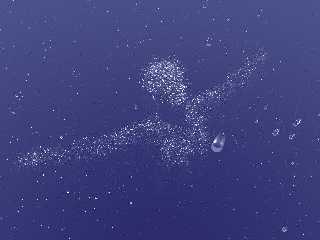
Is this better? I know, the face still has a few more particles than the
remaining scene (well, just like about 4000 or so..), but some emphasis
should still be put on her face and expression, rather than her entire body.
Your comment was very helpful, I've got to admit that! I've always been
watching her face and how it makes the smile visible, but sure, the
remaining body should be almost as visible.

--
"Tim Nikias v2.0"
Homepage: <http://www.nolights.de>
Post a reply to this message
Attachments:
Download 'memory2.jpg' (40 KB)
Preview of image 'memory2.jpg'
|
|
| |
| |
|
|
|
|
| |
| |
|
|
I like it a lot better, I think it actually communicates your original
idea better.  And the lack of the signature graphic is better.
Post a reply to this message
|
|
| |
| |
|
|
|
|
| |
| |
|
|
> I like it a lot better, I think it actually communicates your original
> idea better.

Thanks, I agree, this version is better.

>And the lack of the signature graphic is better.

Well, on my website there still is one, but smaller, as the final image is
larger... Don't know why I put a sig on the image when it's still WIP, that
aside, no need to put sigs on images here in the newsgroups... Probably the
fun of having created another image after a long pause (of scripting the
particle system) made me think that I'd better properly mark my image. :-)

--
"Tim Nikias v2.0"
Homepage: <http://www.nolights.de>
Post a reply to this message
|
|
| |
| |
|
|
|
|
| |
| |
|
|
Tim Nikias v2.0 wrote:

> Is this better? I know, the face still has a few more particles than the
> remaining scene (well, just like about 4000 or so..), but some emphasis

Yes, it's a lot better. Now there is a balance to the body without being too
obvious.

> should still be put on her face and expression, rather than her entire
> body. Your comment was very helpful, I've got to admit that! I've always

Glad I could be of some help :)

> been watching her face and how it makes the smile visible, but sure, the
> remaining body should be almost as visible.
>
I make the same mistake every now and then. Focussing too much on one part
and losing the balance in the overall picture.
--
Ger
Post a reply to this message
|
|
| |
| |
|
|
|
|
| |
| |
|
|
Tim Nikias v2.0 wrote:

> Final version is now available on my website. I've put a link to a 1280x960
> PNG version as well (411kb), as the JPEG does show some colorbanding. If
> you're interested, have a look:
>
> <http://www.nolights.de/v2gallery/images/memory.html>
>
> Regards,
> Tim

Sweet! I see more detail on the face now.
--
Respectfully,
Dan P
http://<broken link>
Post a reply to this message
|
|
| |
| |
|
|
|
|
| |
| |
|
|
Tim Nikias v2.0 wrote:

> Is this better? I know, the face still has a few more particles than the
> remaining scene (well, just like about 4000 or so..), but some emphasis
> should still be put on her face and expression, rather than her entire body.
> Your comment was very helpful, I've got to admit that! I've always been
> watching her face and how it makes the smile visible, but sure, the
> remaining body should be almost as visible.

Better, except that big blob in the middle is destracting :-)
--
Respectfully,
Dan P
http://<broken link>
Post a reply to this message
|
|
| |
| |
|
|
|
|
| |
| |
|
|
> Better, except that big blob in the middle is destracting :-)

Yup, that one annoyed me too. In the version I've put on my website, I check
the raindrops for vicinity of the camera, if they're closer than .5 units,
they get removed. That gets rid of the too large drops near the camera.

--
"Tim Nikias v2.0"
Homepage: <http://www.nolights.de>
Post a reply to this message
|
|
| |
| |
|
|
|
|
| |
| |
|
|
"Tim Nikias v2.0" <#macro timnikias (@) #local = "gmx.net" #end> wrote
in message news:4087ab82@news.povray.org...
> Final version is now available on my website. I've put a link to a
1280x960
> PNG version as well (411kb), as the JPEG does show some
colorbanding. If
> you're interested, have a look:
>
> <http://www.nolights.de/v2gallery/images/memory.html>

      I'm liking this a lot Tim, excellent work!

      ~Steve~


>
> Regards,
> Tim
>
> --
> "Tim Nikias v2.0"
> Homepage: <http://www.nolights.de>
>
>
Post a reply to this message
|
|
| |
| |
|
|
|
|
| |
| |
|
|
>       I'm liking this a lot Tim, excellent work!

Thanks for the praise, Steve! :-)

--
"Tim Nikias v2.0"
Homepage: <http://www.nolights.de>
Post a reply to this message
|
|
| |
| |
|
|
|
|
| |
| |
|
|
Tim Nikias v2.0 wrote:
> Is this better? I know, the face still has a few more particles than the
> remaining scene (well, just like about 4000 or so..), but some emphasis
> should still be put on her face and expression, rather than her entire body.
> Your comment was very helpful, I've got to admit that! I've always been
> watching her face and how it makes the smile visible, but sure, the
> remaining body should be almost as visible.
>
>

any chance of a code snippet for the 'blob' in the middle ?

i know of a paperweight i'd like to try modelling

glass sphere with about 30 of those inside, flattened bottom

stephen
Post a reply to this message
|
|
| |
| |
|
|
|
|
| |
| |
|
|
Stephen wrote:
> any chance of a code snippet for the 'blob' in the middle ?
> i know of a paperweight i'd like to try modelling
> glass sphere with about 30 of those inside, flattened bottom

Hm, you're talking of the raindrops I assume. The image posted here actually
just makes use of two half-spheres, differently scaled, no blob. One for the
upper part, one for the lower, flattened bottom. Both parts have to overlap
slightly and get merged so that no inside surface shows up.

Still, a problem is the sudden change of the surface from one half to the
next, which resulted in that refractive jump which is clearly visible on the
foremost and largest raindrop. Hence I created a new, blobbed version in a
more "standard imagination (wrong) type" of raindrop (raindrops don't
actually look tear-shaped). You can see that version on my homepage.

What I did there was just place several spherical components in a blob, but
scale them smaller as I raise their center. Doing so with enough detail got
rid of the "humps" that easily occur when putting spherical blobs in a row,
but there is some tweaking required to get the shape properly done.

If you want the actual code, say so, but I think the above should clarify
the process enough for you to have a try at it. :-)

Regards,
Tim

--
"Tim Nikias v2.0"
Homepage: <http://www.nolights.de>
Post a reply to this message
|
|
| |
| |
|
|
|
|
| |
| |
|
|
Tim Nikias v2.0 wrote:
> Stephen wrote:
>
>>any chance of a code snippet for the 'blob' in the middle ?
>>i know of a paperweight i'd like to try modelling
>>glass sphere with about 30 of those inside, flattened bottom
>
>
> Hm, you're talking of the raindrops I assume. The image posted here actually
> just makes use of two half-spheres, differently scaled, no blob. One for the
> upper part, one for the lower, flattened bottom. Both parts have to overlap
> slightly and get merged so that no inside surface shows up.
>
> Still, a problem is the sudden change of the surface from one half to the
> next, which resulted in that refractive jump which is clearly visible on the
> foremost and largest raindrop. Hence I created a new, blobbed version in a
> more "standard imagination (wrong) type" of raindrop (raindrops don't
> actually look tear-shaped). You can see that version on my homepage.
>
> What I did there was just place several spherical components in a blob, but
> scale them smaller as I raise their center. Doing so with enough detail got
> rid of the "humps" that easily occur when putting spherical blobs in a row,
> but there is some tweaking required to get the shape properly done.
>
> If you want the actual code, say so, but I think the above should clarify
> the process enough for you to have a try at it. :-)
>
> Regards,
> Tim
>
thanks for the explanation, will try it

curious - how many spheres roughly?

stephen
Post a reply to this message
|
|
| |
| |
|
|
|
|
| |
| |
|
|
SNIP
> thanks for the explanation, will try it
>
> curious - how many spheres roughly?

Well, the blobbed version on my homepage uses 20 per raindrop. The former
merged CSG just used two, of course. ;-)

--
"Tim Nikias v2.0"
Homepage: <http://www.nolights.de>
Post a reply to this message
|
|
| |
| |
|
|
|
|
| |
| |
|
|
In article <4087c886@news.povray.org>,
"Tim Nikias v2.0" <#macro timnikias (@) #local = "gmx.net" #end>
wrote:
> Is this better? I know, the face still has a few more particles than the
> remaining scene (well, just like about 4000 or so..), but some emphasis
> should still be put on her face and expression, rather than her entire body.
> Your comment was very helpful, I've got to admit that! I've always been
> watching her face and how it makes the smile visible, but sure, the
> remaining body should be almost as visible.
I prefer the original. It had a sense of an invisible person being
revealed by a gentle rain...this is more like someone getting sprayed in
the face with a hose. The original just hinted at what was there, this
one buries it in noise.
--
Christopher James Huff <cja### [at] earthlink net>
http://home.earthlink.net/~cjameshuff/
POV-Ray TAG: <chr### [at] tagpovrayorg>
http://tag.povray.org/ net>
http://home.earthlink.net/~cjameshuff/
POV-Ray TAG: <chr### [at] tagpovrayorg>
http://tag.povray.org/
Post a reply to this message
|
|
| |
| |
|
|
|
|
| |
| |
|
|
> I prefer the original. It had a sense of an invisible person being
> revealed by a gentle rain...this is more like someone getting sprayed in
> the face with a hose. The original just hinted at what was there, this
> one buries it in noise.

It's difficult to get the amount right when coming to terms with
randomness... Though I can understand your viewpoint, I think this one
describes better how definitive the effect of the missing person is on the
environment. It's like she's solid and present, even though she's not.
Additionally, to make her face visible, I have to trace quiet a few
particles onto it, or it would just pop up as some distorted face-like
thingy. In some earlier attempts that looked more scary and aggressive,
which is completely the other side of what I wanted.

Regards,
Tim

--
"Tim Nikias v2.0"
Homepage: <http://www.nolights.de>
Post a reply to this message
|
|
| |
| |
|
|
|
|
| |
| |
|
|
Why not instead of having the raindrops falling on the face, have the rain
being driven into the face by a stiff wind.

> , and another 3500 drops placed onto her face to
> make it visible. That's the part where I need to experiment a little more,
> as her smile isn't really obvious enough for my taste. It's exagherated on
> the model, but still doesn't come through on the final pic. Any ideas on
> that? I guess I'll raise the particle-count on the face and place the
light
> (or add some more) so that the specular highlights show it better...
Post a reply to this message
|
|
| |
| |
|
|
|
|
| |
| |
|
|
> Why not instead of having the raindrops falling on the face, have the rain
> being driven into the face by a stiff wind.

The end-result wouldn't be different by the looks, as the woman would still
need to be visible due to raindrops. But if I'd used a stiff wind, those
raindrops sure would have hurt more, and then she'd never be smiling. And
that would spoil the effect I wanted. This way, its a smooth rainfall
(though with lots of water coming down) and she enjoys the rain. Enjoying
stormy weather isn't that convincing. :-)

--
"Tim Nikias v2.0"
Homepage: <http://www.nolights.de>
Post a reply to this message
|
|
| |
| |
|
|
|
|
| |
|
|