|
|
|
|
|
|
| |
| |
|
|
|
|
| |
| |
|
|
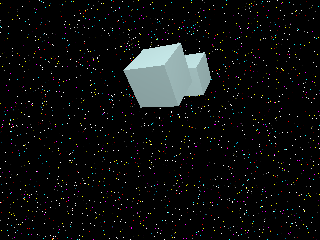
Here are examples of the problems I am encountering when
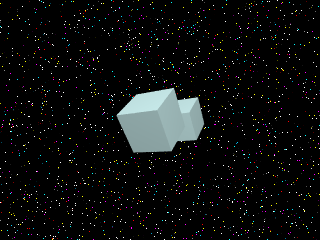
using antialiasing with detailed backgrounds. After antialiasing,
the starfield is gone. Images:

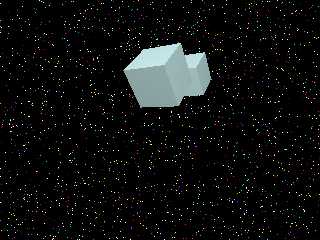
1) Box_no_aa.png is a box on starfield without antialiasing.

2) Box_aa3.png is a box on starfield, AA 3.0

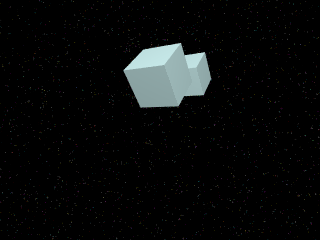
3) Box_aa3_nobk.png is close to what I would like to accomplish
and is two images ORed together.

I'd like to be able to antialias the foreground objects into the
background without losing any of the background. But Pov
antialiases the whole finished image, not individual objects. In
the past, I have done a post-process to merge two images, one
being the background without antialiasing, the other, an anti-
aliased foreground, which gets ORed in. Is there a way to avoid
the post-process? I know the stars are small... I know I can
set a higher number for AA... I would rather not make bigger
stars and I'd like to use the low AA settings.

Hope I made sense! Thanks for your help...
=Bob=
Post a reply to this message
Attachments:
Download 'Box_no_aa.png' (12 KB)
Download 'Box_aa3.png' (16 KB)
Download 'Box_aa3_nobk.png' (13 KB)
Preview of image 'Box_no_aa.png'
Preview of image 'Box_aa3.png'
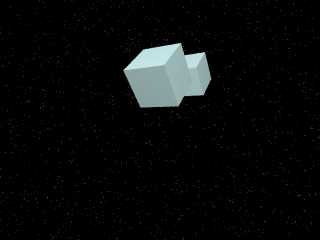
Preview of image 'Box_aa3_nobk.png'
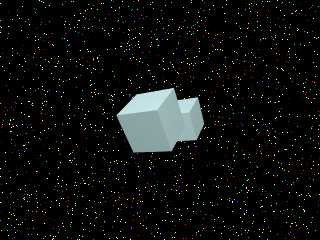
|
|
| |
| |
|
|
|
|
| |
| |
|
|
Hi,

Thanks for posting the pictures so we can see what you mean, and for further
describing the problem. Based on this, I somehow think the best method for
doing what you want, is the method you're already using. In other words,
merging the pictures with post-processing. Because this isn't so much
"raytracing" as it is "image composition" that you're trying to do.

If you were trying to get photorealistic results, it would be another story,
and this is probably what POV-Ray is meant for. Having so small stars with
low AA is not going to work. Either you need bigger stars (a few pixels in
size) or else you need high AA.. Personally I would try a combination, for
the sake of realism and beauty. But I can imagine that your goal is
something else.

If it's simply a matter of rendering time, then I ask: Why not use better AA
and save the time you spend on post-processing?  Not that the starfield will
remain exactly like this, but sure they don't have to vanish. To keep the
stars small, make sure they are very strong / intense, and then try this AA:

+AM2 +A0.0 +R2 -J

Regards,
Hugo
Post a reply to this message
|
|
| |
| |
|
|
|
|
| |
| |
|
|
Your starfield depends on the size of a pixel. To see the problem try rendering
the image at different resolution and you'll see that suddenly more stars appear
and they're in different places.

The problem is as follows: At present certain pixels turn white because they
happen to sample your star pattern on a white point. But when you anti-alias it
the other samples for that pixel will probably sample black, so you'll end up
with all your stars vanishing.

There's 2 possible ways to solve this: Either use bigger stars (which is what I
tend to do), or alternatively use *brighter* stars. So the other anti-aliasing
samples don't reduce the colour so much. If you use stars with a colour like rgb
20 you should still be able to see some after anti-aliasing. But they will look
terrible if you try to animate them.

I use this pattern for larger stars:
sky_sphere {
 pigment {
  //create impression of multiple stars of different sizes.
  pigment_pattern {
   crackle form <1,0,0>
   pigment_map {
    [0 crackle solid pigment_map { [0 rgb 1][1 rgb 0] } ]
    [.4 rgb 0]
   }
  }

  colour_map {
   [.4 rgb 0]
   [.6 rgb 1]
  }
  scale 0.02
 }
}

Hope that helps,
--
Tek
www.evilsuperbrain.com
Post a reply to this message
|
|
| |
| |
|
|
|
|
| |
| |
|
|
"Hugo Asm" <hua### [at] post3 teledk> wrote in message news:40032f66$1@news.povray.org...
: Hi,
:
: Thanks for posting the pictures so we can see what you mean, and for further
: describing the problem. Based on this, I somehow think the best method for
: doing what you want, is the method you're already using. In other words,
: merging the pictures with post-processing. Because this isn't so much
: "raytracing" as it is "image composition" that you're trying to do.
Well, I'd like to AA into the starfield instead of black.
: If you were trying to get photorealistic results, it would be another story,
: and this is probably what POV-Ray is meant for. Having so small stars with
: low AA is not going to work. Either you need bigger stars (a few pixels in
: size) or else you need high AA.. Personally I would try a combination, for
: the sake of realism and beauty. But I can imagine that your goal is
: something else.
:
: If it's simply a matter of rendering time, then I ask: Why not use better AA
: and save the time you spend on post-processing?
I did try better AA.
: Not that the starfield will
: remain exactly like this, but sure they don't have to vanish. To keep the
: stars small, make sure they are very strong / intense, and then try this AA:
:
: +AM2 +A0.0 +R2 -J
This didn't help, still kills the starfield. But thanks!
: Regards,
: Hugo
Have a great day! Thanks again...
=Bob= teledk> wrote in message news:40032f66$1@news.povray.org...
: Hi,
:
: Thanks for posting the pictures so we can see what you mean, and for further
: describing the problem. Based on this, I somehow think the best method for
: doing what you want, is the method you're already using. In other words,
: merging the pictures with post-processing. Because this isn't so much
: "raytracing" as it is "image composition" that you're trying to do.
Well, I'd like to AA into the starfield instead of black.
: If you were trying to get photorealistic results, it would be another story,
: and this is probably what POV-Ray is meant for. Having so small stars with
: low AA is not going to work. Either you need bigger stars (a few pixels in
: size) or else you need high AA.. Personally I would try a combination, for
: the sake of realism and beauty. But I can imagine that your goal is
: something else.
:
: If it's simply a matter of rendering time, then I ask: Why not use better AA
: and save the time you spend on post-processing?
I did try better AA.
: Not that the starfield will
: remain exactly like this, but sure they don't have to vanish. To keep the
: stars small, make sure they are very strong / intense, and then try this AA:
:
: +AM2 +A0.0 +R2 -J
This didn't help, still kills the starfield. But thanks!
: Regards,
: Hugo
Have a great day! Thanks again...
=Bob=
Post a reply to this message
|
|
| |
| |
|
|
From: Thorsten Froehlich
Subject: Re: Antialiasing problems (3 images, 11k,15k,12k)
Date: 12 Jan 2004 19:07:25
Message: <400336bd$1@news.povray.org>
|
|
|
| |
| |
|
|
In article <4003354a$1@news.povray.org> , "=Bob="
<was### [at] threestrandscom> wrote:

> : Not that the starfield will
> : remain exactly like this, but sure they don't have to vanish. To keep the
> : stars small, make sure they are very strong / intense, and then try this AA:
> :
> : +AM2 +A0.0 +R2 -J
>
> This didn't help, still kills the starfield. But thanks!

If it does, it implies your stars are simply too small.  Without
antialiasing you only see something because some stars are hit by accident.
Antialiasing will take more samples, so a star will not be hit for every
sample taken inside the area of a pixel.  Consequently, averaging the
samples colors results in the star appearing like it is fainting away.  In
Reality, the image does get more realistic as the stars in the picture
without antialiasing contribute too much information as they really
represent in the scene.  By telling POV-Ray to produce a more accurate
result, you create an effect you do not desire...

I would also suggest to follow the other poster's suggestions and increase
the size of the stars.  You can i.e. do this by simply scaling the
background up.

    Thorsten

____________________________________________________
Thorsten Froehlich, Duisburg, Germany
e-mail: tho### [at] trfde

Visit POV-Ray on the web: http://mac.povray.org
Post a reply to this message
|
|
| |
| |
|
|
From: Aaron Gillies
Subject: Re: Antialiasing problems (3 images, 11k,15k,12k)
Date: 12 Jan 2004 19:49:31
Message: <4003409b$1@news.povray.org>
|
|
|
| |
| |
|
|
Yep.

I had this problem occasionally when I had a very low-powered
machine.  I was able to solve it by scaling up the details that were
getting lost with AA.

Aaron
Post a reply to this message
|
|
| |
| |
|
|
|
|
| |
| |
|
|
In article <40033289$1@news.povray.org>, "Tek" <tek### [at] evilsuperbraincom>
wrote:

> There's 2 possible ways to solve this: Either use bigger stars (which
> is what I tend to do), or alternatively use *brighter* stars. So the
> other anti-aliasing samples don't reduce the colour so much. If you
> use stars with a colour like rgb 20 you should still be able to see
> some after anti-aliasing. But they will look terrible if you try to
> animate them.

Unfortunately, POV clips the colors before it combines them, rather than
afterward...to antialiasing, rgb 20 is the same as rgb 1.

--
Christopher James Huff <cja### [at] earthlinknet>
http://home.earthlink.net/~cjameshuff/
POV-Ray TAG: <chr### [at] tagpovrayorg>
http://tag.povray.org/
Post a reply to this message
|
|
| |
| |
|
|
|
|
| |
| |
|
|
"Thorsten Froehlich" <tho### [at] trfde> wrote in message
news:400336bd$1@news.povray.org...
: In article <4003354a$1@news.povray.org> , "=Bob="
: <was### [at] threestrandscom> wrote:
:
: > : Not that the starfield will
: > : remain exactly like this, but sure they don't have to vanish. To keep the
: > : stars small, make sure they are very strong / intense, and then try this AA:
: > :
: > : +AM2 +A0.0 +R2 -J
: >
: > This didn't help, still kills the starfield. But thanks!
:
: If it does, it implies your stars are simply too small.  Without
: antialiasing you only see something because some stars are hit by accident.
: Antialiasing will take more samples, so a star will not be hit for every
: sample taken inside the area of a pixel.  Consequently, averaging the
: samples colors results in the star appearing like it is fainting away.  In
: Reality, the image does get more realistic as the stars in the picture
: without antialiasing contribute too much information as they really
: represent in the scene.  By telling POV-Ray to produce a more accurate
: result, you create an effect you do not desire...
:
: I would also suggest to follow the other poster's suggestions and increase
: the size of the stars.  You can i.e. do this by simply scaling the
: background up.
:     Thorsten

Thanks everyone. I will try to find the balance...
=Bob=
Post a reply to this message
|
|
| |
| |
|
|
|
|
| |
| |
|
|
> Unfortunately, POV clips the colors before it combines them, rather than
> afterward...to antialiasing, rgb 20 is the same as rgb 1.

You mean fortunately. POV-Ray does this in the mathematically correct way.
Antialiasing is a method of making an image with finite resolution appear as
though it has infinite resolution. If POV-Ray did not do it this way, then
extremly bright objects which are *large* (such as a sphere with color rgb
20) would look very aliased.

Clipping after anti-aliasing would cause anti-aliasing to be useful only in
situations where colors were not oversaturated. Just because the alternative
would produce a specific effect in a specific situation doesn't mean that
it's desirable.

 - Slime
 [ http://www.slimeland.com/ ]
Post a reply to this message
|
|
| |
| |
|
|
From: Zeger Knaepen
Subject: Re: Antialiasing problems (3 images, 11k,15k,12k)
Date: 12 Jan 2004 22:39:41
Message: <4003687d$1@news.povray.org>
|
|
|
| |
| |
|
|
> > : Not that the starfield will
> > : remain exactly like this, but sure they don't have to vanish. To keep the
> > : stars small, make sure they are very strong / intense, and then try this
AA:
> > :
> > : +AM2 +A0.0 +R2 -J
> >
> > This didn't help, still kills the starfield. But thanks!
>
> If it does, it implies your stars are simply too small.

not necessarily too small, but certainly to dark.  Brighten your stars, and I
believe you will get more realistic results than if you make them bigger.

maybe...
dunno
:)

coulnd't hurt trying :)

cu!
--
camera{location-z*3}#macro G(b,e)b+(e-b)*(C/50)#end#macro L(b,e,k,l)#local C=0
;#while(C<50)sphere{G(b,e),.1pigment{rgb G(k,l)}finish{ambient 1}}#local C=C+1
;#end#end L(y-x,y,x,x+y)L(y,-x-y,x+y,y)L(-x-y,-y,y,y+z)L(-y,y,y+z,x+y)L(0,x+y,
<.5,1,.5>,x)L(0,x-y,<.5,1,.5>,x)               // ZK http://www.povplace.be.tf
Post a reply to this message
|
|
| |
| |
|
|
From: Tek
Subject: Re: Antialiasing problems (3 images, 11k,15k,12k)
Date: 12 Jan 2004 22:57:36
Message: <40036cb0@news.povray.org>
|
|
|
| |
| |
|
|
It depends on what you're trying to emulate. If you want anti-aliasing simply to
make it look like you started with a higher res image and reduced it, then the
way pov does it is fine. But if you want it to simulate photography then it
should combine all it's samples before clipping them. You could avoid
over-bright objects getting jagged edges by using more samples (the
anti-aliasing threshold would mean these extra samples only got used on those
high-contrast areas).

--
Tek
www.evilsuperbrain.com

"Slime" <fak### [at] emailaddress> wrote in message news:40034b23$1@news.povray.org...
> > Unfortunately, POV clips the colors before it combines them, rather than
> > afterward...to antialiasing, rgb 20 is the same as rgb 1.
>
> You mean fortunately. POV-Ray does this in the mathematically correct way.
> Antialiasing is a method of making an image with finite resolution appear as
> though it has infinite resolution. If POV-Ray did not do it this way, then
> extremly bright objects which are *large* (such as a sphere with color rgb
> 20) would look very aliased.
>
> Clipping after anti-aliasing would cause anti-aliasing to be useful only in
> situations where colors were not oversaturated. Just because the alternative
> would produce a specific effect in a specific situation doesn't mean that
> it's desirable.
>
>  - Slime
>  [ http://www.slimeland.com/ ]
>
>
Post a reply to this message
|
|
| |
| |
|
|
From: Slime
Subject: Re: Antialiasing problems (3 images, 11k,15k,12k)
Date: 12 Jan 2004 23:27:59
Message: <400373cf@news.povray.org>
|
|
|
| |
| |
|
|
> You could avoid
> over-bright objects getting jagged edges by using more samples (the
> anti-aliasing threshold would mean these extra samples only got used on
those
> high-contrast areas).

If 1/9 of a pixel has the color rgb 10000, and the rest of the pixel has
other colors between 0 and 1, and clipping happens after anti-aliasing, then
the pixel is going to be 1/9 * 10000 + 8/9 * (something between 0 and 1),
which works out to be well over 1, causing the entire pixel to be
oversaturated. More samples just causes this calculation to be more
accurate, but still well over 1. If this happens at every pixel along the
edge of an object, it will look pixellated.

 - Slime
 [ http://www.slimeland.com/ ]
Post a reply to this message
|
|
| |
| |
|
|
|
|
| |
| |
|
|
In article <40034b23$1@news.povray.org>, "Slime" <fak### [at] emailaddress>
wrote:

> > Unfortunately, POV clips the colors before it combines them, rather than
> > afterward...to antialiasing, rgb 20 is the same as rgb 1.
>
> You mean fortunately. POV-Ray does this in the mathematically correct way.
> Antialiasing is a method of making an image with finite resolution appear as
> though it has infinite resolution. If POV-Ray did not do it this way, then
> extremly bright objects which are *large* (such as a sphere with color rgb
> 20) would look very aliased.

No, do I mean unfortunately. Clipping before antialiasing is the wrong
way to fix this problem. Small, intense sources get completely wiped
out. Antialiasing supersamples the scene, not some virtual model of an
image file in a format that's limited to a tiny dynamic range.

--
Christopher James Huff <cja### [at] earthlinknet>
http://home.earthlink.net/~cjameshuff/
POV-Ray TAG: <chr### [at] tagpovrayorg>
http://tag.povray.org/
Post a reply to this message
|
|
| |
| |
|
|
|
|
| |
| |
|
|
> No, do I mean unfortunately. Clipping before antialiasing is the wrong
> way to fix this problem. Small, intense sources get completely wiped
> out.

Because they're too small to be accurately represented in the final image
resolution. Just because they're intense doesn't mean they should become a
full pixel in size. This could end up producing different results depending
on what the final resolution is.

> Antialiasing supersamples the scene, not some virtual model of an
> image file in a format that's limited to a tiny dynamic range.

Antialiasing supersamples the scene, but it must take into account that the
final output will have limitations such as a finite dynamic range. The
mysterious "format" you refer to is the same as the actual format of the
final image, which is important. By clipping before averaging, anti-aliasing
produces the effect of rendering at an infinite resolution and then resizing
smaller, which is exactly what it's supposed to do.

I admit that I do see some logic in your argument - clipping before
averaging does feel artificial to some extent. However, the fact that
clipping after averaging would produce jagged edges on bright objects causes
me to believe that it would be much more useless than clipping before
averaging.

In any case, I'd appreciate if someone who's done a significant amount of
research on the topic could step in and tell us *why* POV-Ray does it the
way it does, and maybe what other popular 3D apps do, and why it is or is
not correct.

 - Slime
 [ http://www.slimeland.com/ ]
Post a reply to this message
|
|
| |
| |
|
|
|
|
| |
| |
|
|
Oh yes, I see what you mean.
Still my digital camera tends to pick up jagged edges on bright things... :)

--
Tek
www.evilsuperbrain.com

"Slime" <fak### [at] emailaddress> wrote in message news:400373cf@news.povray.org...
> > You could avoid
> > over-bright objects getting jagged edges by using more samples (the
> > anti-aliasing threshold would mean these extra samples only got used on
> those
> > high-contrast areas).
>
> If 1/9 of a pixel has the color rgb 10000, and the rest of the pixel has
> other colors between 0 and 1, and clipping happens after anti-aliasing, then
> the pixel is going to be 1/9 * 10000 + 8/9 * (something between 0 and 1),
> which works out to be well over 1, causing the entire pixel to be
> oversaturated. More samples just causes this calculation to be more
> accurate, but still well over 1. If this happens at every pixel along the
> edge of an object, it will look pixellated.
>
>  - Slime
>  [ http://www.slimeland.com/ ]
>
>
Post a reply to this message
|
|
| |
| |
|
|
|
|
| |
| |
|
|
Slime wrote:
> Just because they're intense doesn't mean they should become a
> full pixel in size.

Sure it does.  If a sun-sized star is a million times farther from
Earth than the sun, but a hundred million times brighter, it would
be visible during the day, even though it is otherwise too small to
be seen.
Post a reply to this message
|
|
| |
| |
|
|
|
|
| |
| |
|
|
> Because they're too small to be accurately represented in the final image
> resolution. Just because they're intense doesn't mean they should become a
> full pixel in size. This could end up producing different results depending
> on what the final resolution is.

But what about if you take a photo of the night sky? The stars are much smaller
than 1 pixel, however they show up because of their intensity.

The colour of a pixel should be the average colour across the area of that
pixel, so if you have a star that's 1/2000th the area of the pixel and has
intensity 1000, then the pixel should have a colour of rgb 0.5. This happens in
a camera because it takes theoretically infinite samples (i.e. all the photons
hitting that pixel contribute to the brightness).

I believe that's the effect Bob was trying to simulate.

--
Tek
www.evilsuperbrain.com

"Slime" <fak### [at] emailaddress> wrote in message news:400409cc$1@news.povray.org...
> > No, do I mean unfortunately. Clipping before antialiasing is the wrong
> > way to fix this problem. Small, intense sources get completely wiped
> > out.
>
> Because they're too small to be accurately represented in the final image
> resolution. Just because they're intense doesn't mean they should become a
> full pixel in size. This could end up producing different results depending
> on what the final resolution is.
>
> > Antialiasing supersamples the scene, not some virtual model of an
> > image file in a format that's limited to a tiny dynamic range.
>
> Antialiasing supersamples the scene, but it must take into account that the
> final output will have limitations such as a finite dynamic range. The
> mysterious "format" you refer to is the same as the actual format of the
> final image, which is important. By clipping before averaging, anti-aliasing
> produces the effect of rendering at an infinite resolution and then resizing
> smaller, which is exactly what it's supposed to do.
>
> I admit that I do see some logic in your argument - clipping before
> averaging does feel artificial to some extent. However, the fact that
> clipping after averaging would produce jagged edges on bright objects causes
> me to believe that it would be much more useless than clipping before
> averaging.
>
> In any case, I'd appreciate if someone who's done a significant amount of
> research on the topic could step in and tell us *why* POV-Ray does it the
> way it does, and maybe what other popular 3D apps do, and why it is or is
> not correct.
>
>  - Slime
>  [ http://www.slimeland.com/ ]
>
>
Post a reply to this message
|
|
| |
| |
|
|
|
|
| |
| |
|
|
Christopher James Huff wrote:
>
>>You mean fortunately. POV-Ray does this in the mathematically correct way.
>>Antialiasing is a method of making an image with finite resolution appear as
>>though it has infinite resolution. If POV-Ray did not do it this way, then
>>extremly bright objects which are *large* (such as a sphere with color rgb
>>20) would look very aliased.
>
>
> No, do I mean unfortunately. Clipping before antialiasing is the wrong
> way to fix this problem. Small, intense sources get completely wiped
> out. Antialiasing supersamples the scene, not some virtual model of an
> image file in a format that's limited to a tiny dynamic range.
>

I tend to agree with you but the whole thing is not that easy.  What
antialiasing does is to try to approximate the integration over the
pixel area by taking several samples.

But the problem is if it is correct to do the averaging of the samples
(which is the approximation of the integral with a sum) with or without
the non-linearities of the tone-mapping used (in case of standard POV
this is gamma correction and clipping).

You can't really answer this from looking how it works in real life -
when you take a photograph of a star the ideal camera outside the earth
atmosphere in ideal empty space will only show an infinitely small
point.  Of course nothing is ideal so the result will be a spot of
finite size (with the intensity diminishing from the center to the rim).
but how exactly the non-linearities of the film exposure work here is
hard to tell (meaning it would be difficult to predict how bright two
stars very close to each other will look from the appearance of them a
distance apart).

Coming back to the actual antialiasing problem - in cases like this it
would be quite nice to antialias before clipping, in relation with the
high dynamic range output in next megapov this will be possible as well.
  But there are also situations where this causes problems, see for
example the wall edge on the right in:

http://www-public.tu-bs.de:8080/%7Ey0013390/pov/pool/chpool.jpg

where despite antialiasing the stairstep effects are quite strong which
is to some extent caused by the tone mappping being applied after
antialiasing.

An idea i had thought of to solve this problem (without the necessity to
accept clipped output) was to make the tone mapping function (or an
approximation of it) available to POV (for example as a user defined
function) and to apply this function before the averaging of samples.
To get back to the linear result afterwards you would need the inverse
of this function of course (it needs to be invertible so you should not
use hard clipping).

I don't know how useful such a feature would be but it would allow to
adjust continuously between the two extemes.

Christoph

--
POV-Ray tutorials, include files, Sim-POV,
HCR-Edit and more: http://www.tu-bs.de/~y0013390/
Last updated 11 Jan. 2004 _____./\/^>_*_<^\/\.______
Post a reply to this message
|
|
| |
| |
|
|
From: Tek
Subject: Re: Antialiasing problems (3 images, 11k,15k,12k)
Date: 13 Jan 2004 13:43:28
Message: <40043c50@news.povray.org>
|
|
|
| |
| |
|
|
> You can't really answer this from looking how it works in real life -
> when you take a photograph of a star the ideal camera outside the earth
> atmosphere in ideal empty space will only show an infinitely small
> point.

Well I was thinking of a digital camera, which works by having a grid of colour
sensors that effectively just add together the brightness due to all photons
falling upon that pixel. Surely with that a very small point would always be 1
pixel in size and have a brightness proportional to it's brightness multiplied
by how much of the area of the pixel it covers.

I'm not sure how all that corresponds to gamma ramps and such, but digital
cameras tend to get sharp images without aliasing, so surely that can be used as
a model for an anti-aliasing technique?

--
Tek
www.evilsuperbrain.com

"Christoph Hormann" <chr### [at] gmxde> wrote in message
news:mgp### [at] tritonimagicode...
> Christopher James Huff wrote:
> >
> >>You mean fortunately. POV-Ray does this in the mathematically correct way.
> >>Antialiasing is a method of making an image with finite resolution appear as
> >>though it has infinite resolution. If POV-Ray did not do it this way, then
> >>extremly bright objects which are *large* (such as a sphere with color rgb
> >>20) would look very aliased.
> >
> >
> > No, do I mean unfortunately. Clipping before antialiasing is the wrong
> > way to fix this problem. Small, intense sources get completely wiped
> > out. Antialiasing supersamples the scene, not some virtual model of an
> > image file in a format that's limited to a tiny dynamic range.
> >
>
> I tend to agree with you but the whole thing is not that easy.  What
> antialiasing does is to try to approximate the integration over the
> pixel area by taking several samples.
>
> But the problem is if it is correct to do the averaging of the samples
> (which is the approximation of the integral with a sum) with or without
> the non-linearities of the tone-mapping used (in case of standard POV
> this is gamma correction and clipping).
>
> You can't really answer this from looking how it works in real life -
> when you take a photograph of a star the ideal camera outside the earth
> atmosphere in ideal empty space will only show an infinitely small
> point.  Of course nothing is ideal so the result will be a spot of
> finite size (with the intensity diminishing from the center to the rim).
> but how exactly the non-linearities of the film exposure work here is
> hard to tell (meaning it would be difficult to predict how bright two
> stars very close to each other will look from the appearance of them a
> distance apart).
>
> Coming back to the actual antialiasing problem - in cases like this it
> would be quite nice to antialias before clipping, in relation with the
> high dynamic range output in next megapov this will be possible as well.
>   But there are also situations where this causes problems, see for
> example the wall edge on the right in:
>
> http://www-public.tu-bs.de:8080/%7Ey0013390/pov/pool/chpool.jpg
>
> where despite antialiasing the stairstep effects are quite strong which
> is to some extent caused by the tone mappping being applied after
> antialiasing.
>
> An idea i had thought of to solve this problem (without the necessity to
> accept clipped output) was to make the tone mapping function (or an
> approximation of it) available to POV (for example as a user defined
> function) and to apply this function before the averaging of samples.
> To get back to the linear result afterwards you would need the inverse
> of this function of course (it needs to be invertible so you should not
> use hard clipping).
>
> I don't know how useful such a feature would be but it would allow to
> adjust continuously between the two extemes.
>
> Christoph
>
> --
> POV-Ray tutorials, include files, Sim-POV,
> HCR-Edit and more: http://www.tu-bs.de/~y0013390/
> Last updated 11 Jan. 2004 _____./\/^>_*_<^\/\.______
>
Post a reply to this message
|
|
| |
| |
|
|
|
|
| |
| |
|
|
In article <400409cc$1@news.povray.org>, "Slime" <fak### [at] emailaddress>
wrote:

> Because they're too small to be accurately represented in the final image
> resolution. Just because they're intense doesn't mean they should become a
> full pixel in size.

That is exactly what it means.


> This could end up producing different results depending
> on what the final resolution is.

Correct. For instance, a star, which is essentially a point light, will
be a bright point...not a ball or empty space.


> Antialiasing supersamples the scene, but it must take into account that the
> final output will have limitations such as a finite dynamic range. The
> mysterious "format" you refer to is the same as the actual format of the
> final image, which is important. By clipping before averaging, anti-aliasing
> produces the effect of rendering at an infinite resolution and then resizing
> smaller, which is exactly what it's supposed to do.

No it is not. The purpose of antialiasing is to prevent aliasing
artifacts by supersampling the scene, *not* to emulate reduction from a
larger sized image.


> I admit that I do see some logic in your argument - clipping before
> averaging does feel artificial to some extent.

Because it *is* artificial.


> However, the fact that
> clipping after averaging would produce jagged edges on bright objects causes
> me to believe that it would be much more useless than clipping before
> averaging.

Which wipes out small details which *should* be visible.

--
Christopher James Huff <cja### [at] earthlinknet>
http://home.earthlink.net/~cjameshuff/
POV-Ray TAG: <chr### [at] tagpovrayorg>
http://tag.povray.org/
Post a reply to this message
|
|
| |
| |
|
|
|
|
| |
| |
|
|
> > Just because they're intense doesn't mean they should become a
> > full pixel in size.
>
> Sure it does.  If a sun-sized star is a million times farther from
> Earth than the sun, but a hundred million times brighter, it would
> be visible during the day, even though it is otherwise too small to
> be seen.


Yes, but I think this is caused by different reasons, isn't it? Like, the
atmosphere, the workings of the human eye, stuff like that causing the light
to seem as though it's coming to you from a larger area than it really is.
Again, just because it creates a nice effect in some situations doesn't mean
that it's correct.

 - Slime
 [ http://www.slimeland.com/ ]
Post a reply to this message
|
|
| |
| |
|
|
|
|
| |
| |
|
|
Tek wrote:
>>You can't really answer this from looking how it works in real life -
>>when you take a photograph of a star the ideal camera outside the earth
>>atmosphere in ideal empty space will only show an infinitely small
>>point.
>
>
> Well I was thinking of a digital camera, which works by having a grid of colour
> sensors that effectively just add together the brightness due to all photons
> falling upon that pixel. Surely with that a very small point would always be 1
> pixel in size and have a brightness proportional to it's brightness multiplied
> by how much of the area of the pixel it covers.
>
> I'm not sure how all that corresponds to gamma ramps and such, but digital
> cameras tend to get sharp images without aliasing, so surely that can be used as
> a model for an anti-aliasing technique?

That's something completely different and does not help to determine the
best way to antialias a raytracing scene.  Note the only reasons why i
brought up the photography comparison was to illustrate the interaction
of averaging processes and nonlinearities (both occurs both in digital
and conventional photography).

Christoph

--
POV-Ray tutorials, include files, Sim-POV,
HCR-Edit and more: http://www.tu-bs.de/~y0013390/
Last updated 11 Jan. 2004 _____./\/^>_*_<^\/\.______
Post a reply to this message
|
|
| |
| |
|
|
|
|
| |
| |
|
|
Slime wrote:
>> Unfortunately, POV clips the colors before it combines them, rather than
>> afterward...to antialiasing, rgb 20 is the same as rgb 1.
>
>You mean fortunately. POV-Ray does this in the mathematically correct way.
>Antialiasing is a method of making an image with finite resolution appear as
>though it has infinite resolution. If POV-Ray did not do it this way, then
>extremly bright objects which are *large* (such as a sphere with color rgb
>20) would look very aliased.

No, they would not in general: Especially if you use adapitive antialiasing,
it will just take more samples until the difference is small enough. Due to
the number of samples taken, there usually will not be a visible aliasing.

    Thorsten
Post a reply to this message
|
|
| |
| |
|
|
From: Daniel Nilsson
Subject: Re: Antialiasing problems (3 images, 11k,15k,12k)
Date: 14 Jan 2004 11:09:23
Message: <400569b3@news.povray.org>
|
|
|
| |
| |
|
|
Tek <tek### [at] evilsuperbraincom> wrote in message 40043c50@news.povray.org:
>> You can't really answer this from looking how it works in real life -
>> when you take a photograph of a star the ideal camera outside the
>> earth atmosphere in ideal empty space will only show an infinitely
>> small point.
>
> Well I was thinking of a digital camera, which works by having a grid
> of colour sensors that effectively just add together the brightness
> due to all photons falling upon that pixel. Surely with that a very
> small point would always be 1 pixel in size and have a brightness
> proportional to it's brightness multiplied by how much of the area of
> the pixel it covers.
>
> I'm not sure how all that corresponds to gamma ramps and such, but
> digital cameras tend to get sharp images without aliasing, so surely
> that can be used as a model for an anti-aliasing technique?
>

There seems to be many arguments on what's right in this thread but I (who
normaly just reads this group) want to give you all my view on the topic.
I'm not saying that this is more "right" or something like that, all is
IMHO.
I have for several years planned making my own raytracer and have though
long about the antialias problem (having had the clipping before/after aa
problem with pov). I have come to the conclusion that the super sampling
should be done on unclipped values on the argument that it is really an
approximisation to an intergral over the pixel. This gives the expected
result for small bright objects such as stars. The problem is that edges of
very bright object get alias problems, and that's not the expected result.
With a digital camera such an edge will look soft (at least partly) because
imperfections in the lenses and the air will make the bright light "bleed".
My plan is to simulate this bleeding in a post process step before the
clipping/gamma/whatever (the plan is to output the image with raw floating
point color values and do any transforms when saving to ex. png). That
should solve that problem too.

My planned raytracer is probably never going to be implemented, so don't ask
for it. I just enjoy thinking about features for it :)

--
Daniel Nilsson
Post a reply to this message
|
|
| |
| |
|
|
|
|
| |
| |
|
|
Daniel Nilsson wrote:
>
> There seems to be many arguments on what's right in this thread but I (who
> normaly just reads this group) want to give you all my view on the topic.
> I'm not saying that this is more "right" or something like that, all is
> IMHO.
> I have for several years planned making my own raytracer and have though
> long about the antialias problem (having had the clipping before/after aa
> problem with pov). I have come to the conclusion that the super sampling
> should be done on unclipped values on the argument that it is really an
> approximisation to an intergral over the pixel. This gives the expected
> result for small bright objects such as stars. The problem is that edges of
> very bright object get alias problems, and that's not the expected result.
> With a digital camera such an edge will look soft (at least partly) because
> imperfections in the lenses and the air will make the bright light "bleed".
> My plan is to simulate this bleeding in a post process step before the
> [...]

No. While you are perfectly right that a digital camera image contains
blur because of the imperfections in the optical system and elsewhere
that is not the reason why there are no aliasing effects.  These won't
occur even with a perfect optical system because - as Tek correctly
describes - a digital camera sensor collects the incoming energy and
therefore does a true integration over the pixel area.

Using post processing to make a render look more like a photograph is
certainly useful but you should not make the mistake to think this has
anything to do with antialiasing.

Christoph

--
POV-Ray tutorials, include files, Sim-POV,
HCR-Edit and more: http://www.tu-bs.de/~y0013390/
Last updated 11 Jan. 2004 _____./\/^>_*_<^\/\.______
Post a reply to this message
|
|
| |
| |
|
|
|
|
| |
| |
|
|
"Christoph Hormann" <chr### [at] gmxde> wrote in message
news:ff9### [at] tritonimagicode...

[deletions]

: Using post processing to make a render look more like a photograph is
: certainly useful but you should not make the mistake to think this has
: anything to do with antialiasing.
: Christoph

Are there programs that can antialias specific objects rather than just the
entire frame? Please keep in mind that reality is not my pursuit...
=Bob=
Post a reply to this message
|
|
| |
| |
|
|
|
|
| |
| |
|
|
In article <web.400469f9570536d75800b48e0@news.povray.org>,
 "Thorsten" <nomail@nomail> wrote:

> No, they would not in general: Especially if you use adapitive antialiasing,
> it will just take more samples until the difference is small enough. Due to
> the number of samples taken, there usually will not be a visible aliasing.

Well, if the antialiasing algorithm simply computes the integral of the
unclipped values, it is possible for a pixel only partially covering a
bright area of the scene to be pushed over 100%. If the area of the
scene has an intensity of 10, it need only cover 10% of the pixel to
reach maximum intensity. Digital cameras have imperfect optics, blooming
effects, a different detector element geometry...each pixel is usually 4
squares: a red, two green, and a blue...and various software filters. I
think this is something that should be taken care of with a post-process
filter...it wouldn't be a problem if display devices could reproduce the
true intensities.

--
Christopher James Huff <cja### [at] earthlinknet>
http://home.earthlink.net/~cjameshuff/
POV-Ray TAG: <chr### [at] tagpovrayorg>
http://tag.povray.org/
Post a reply to this message
|
|
| |
| |
|
|
From: Ryan Bennitt
Subject: Re: Antialiasing problems (3 images, 11k,15k,12k)
Date: 15 Jan 2004 14:04:17
Message: <4006e431@news.povray.org>
|
|
|
| |
| |
|
|
> But what about if you take a photo of the night sky? The stars are much
smaller
> than 1 pixel, however they show up because of their intensity.

Heh, when I take a picture of the night sky with my digital camera, even with
all night settings on and sensitivity/exposure settings maxed out, I get a black
picture with only a couple of the brighter stars shown. Most stars simply ain't
bright enough. They really are quite faint, but the human eye is sensitive
enough to pick them up. You've gotta love the human eye...

Personally, I've been through the phase of simulating stars with thousands of
small spheres. I gave up and started using a textured sky sphere instead. It's
faster to parse/render and you can achieve greater star 'densities'.

Ryan
Post a reply to this message
|
|
| |
| |
|
|
From: JFMILLER28
Subject: Re: Antialiasing problems (3 images, 11k,15k,12k)
Date: 24 Jan 2004 15:44:56
Message: <4012d948$1@news.povray.org>
|
|
|
| |
| |
|
|
What this really means is that PovRay would benefit from having more
Intelligent  handeling of >rgb 1 samples.  I've seen several people
working on just such issues and I hope to see the results in... [Author
was shot before he could mention a future version of POV in the news groups]

Slime wrote:

>>You could avoid
>>over-bright objects getting jagged edges by using more samples (the
>>anti-aliasing threshold would mean these extra samples only got used on
>
> those
>
>>high-contrast areas).
>
>
> If 1/9 of a pixel has the color rgb 10000, and the rest of the pixel has
> other colors between 0 and 1, and clipping happens after anti-aliasing, then
> the pixel is going to be 1/9 * 10000 + 8/9 * (something between 0 and 1),
> which works out to be well over 1, causing the entire pixel to be
> oversaturated. More samples just causes this calculation to be more
> accurate, but still well over 1. If this happens at every pixel along the
> edge of an object, it will look pixellated.
>
>  - Slime
>  [ http://www.slimeland.com/ ]
>
>
Post a reply to this message
|
|
| |
| |
|
|
|
|
| |
|
|