|
|
|
|
|
|
| |
| |
|
|
From: David Burnett
Subject: warp function test images (76k and 28k)
Date: 12 Oct 2003 09:51:30
Message: <3f895c62@news.povray.org>
|
|
|
| |
| |
|
|
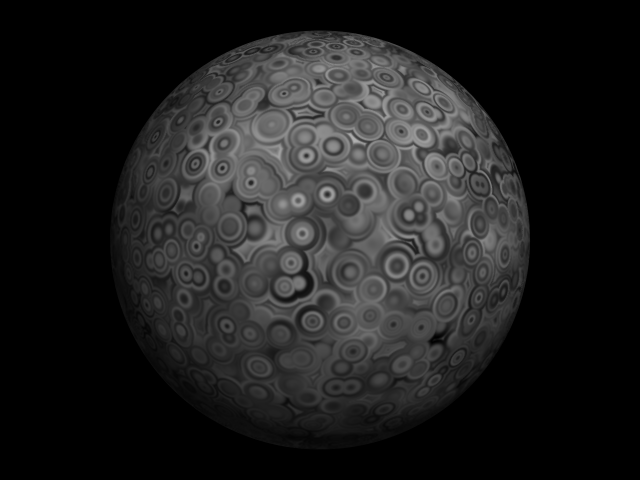
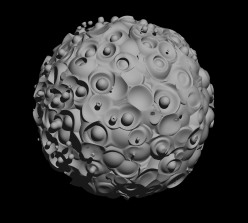
Here's some test images from a quick patch I've created.

I've let warp take a function so

     warp {
         function{f_bozo(x,y,z)}
     }

is now legal, working syntax.

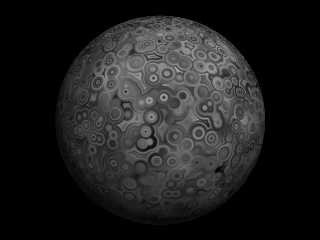
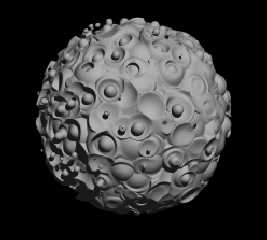
The attached images use the following function as a
pigment and isofunction.

#declare f_worley = function {
    pattern {
         crackle
         form <1,0,0>
	}
}

#declare worley_warped_bozo = function {
	pattern {
		bozo
		warp {
			function{f_worley(x,y,z)}
		}
		scale 0.2
	}
}

Dave
Post a reply to this message
Attachments:
Download 'warpg.png' (74 KB)
Download 'warp_isog.png' (25 KB)
Preview of image 'warpg.png'
Preview of image 'warp_isog.png'
|
|
| |
| |
|
|
From: Light Beam
Subject: Re: warp function test images (76k and 28k)
Date: 12 Oct 2003 10:34:02
Message: <3f89665a@news.povray.org>
|
|
|
| |
| |
|
|
Really excellent pattern.
Post a reply to this message
|
|
| |
| |
|
|
|
|
| |
| |
|
|
David Burnett wrote:
> Here's some test images from a quick patch I've created.
>
> I've let warp take a function so
>
>     warp {
>         function{f_bozo(x,y,z)}
>     }
>
> is now legal, working syntax.

Such a feature was already planned for MegaPOV but not yet implemented.
  I don't really understand how you define a warp with a single float
function though.  The planned feature was supposed to use a vector function.

Christoph

--
POV-Ray tutorials, include files, Sim-POV,
HCR-Edit and more: http://www.tu-bs.de/~y0013390/
Last updated 2 Sep. 2003 _____./\/^>_*_<^\/\.______
Post a reply to this message
|
|
| |
| |
|
|
|
|
| |
| |
|
|
Christoph Hormann wrote:
> David Burnett wrote:
>
>> Here's some test images from a quick patch I've created.
>>
>> I've let warp take a function so
>>
>>     warp {
>>         function{f_bozo(x,y,z)}
>>     }
>>
>> is now legal, working syntax.
>
>
> Such a feature was already planned for MegaPOV but not yet implemented.
>  I don't really understand how you define a warp with a single float
> function though.  The planned feature was supposed to use a vector
> function.
>
> Christoph
>

It's just a straight forward multiplication
of each part of the original point by the results
of the function, so for the example images its
equivalent to...

f_crackle(x*f_bozo(x,y,z), y*f_bozo(x,y,z), z*f_bozo(x,y,z))

if f_crackle used form <1,0,0>,  with the advantage of only
having to work out the function result once (and nicer syntax :0)).


In code term, the important bit is

     POVFPU_SetLocal(X, EPoint[X]);
     POVFPU_SetLocal(Y, EPoint[Y]);
     POVFPU_SetLocal(Z, EPoint[Z]);

     value = POVFPU_Run(*((FUNCTION_PTR)(Warp->Function.Fn)));

     EPoint[X] *= value;
     EPoint[Y] *= value;
     EPoint[Z] *= value;


Any one is welcome to the code, I just want to tidy it up first
in proper pov patch style.

Dave.
Post a reply to this message
|
|
| |
| |
|
|
|
|
| |
| |
|
|
The patch is now available at

http://www.vargolsoft.net/function_warp.zip

at about 43k
Post a reply to this message
|
|
| |
| |
|
|
|
|
| |
| |
|
|
David Burnett wrote:
>
> It's just a straight forward multiplication
> of each part of the original point by the results
> of the function, so for the example images its
> equivalent to...
>
> f_crackle(x*f_bozo(x,y,z), y*f_bozo(x,y,z), z*f_bozo(x,y,z))
>
> [...]

I don't think this is a very useful interpretation of a function as a
warp, even if it leads to interesting results in this case.  The pattern
gets scaled by the value of the function - to imagine how this
influences a pattern seems quite difficult to me.

I think the most intuitive interpretation of a float function as a warp
would be the gradient - like it is used in the type 1 displace warp.

Christoph

--
POV-Ray tutorials, include files, Sim-POV,
HCR-Edit and more: http://www.tu-bs.de/~y0013390/
Last updated 2 Sep. 2003 _____./\/^>_*_<^\/\.______
Post a reply to this message
|
|
| |
| |
|
|
From: David Burnett
Subject: Re: warp function test images (76k and 28k)
Date: 12 Oct 2003 18:55:35
Message: <3f89dbe7@news.povray.org>
|
|
|
| |
| |
|
|
Christoph Hormann wrote:
> David Burnett wrote:
>> of the function, so for the example images its
>> equivalent to...
>>
>> f_crackle(x*f_bozo(x,y,z), y*f_bozo(x,y,z), z*f_bozo(x,y,z))
>>
>> [...]
>
>
> I don't think this is a very useful interpretation of a function as a
> warp, even if it leads to interesting results in this case.  The pattern
> gets scaled by the value of the function - to imagine how this
> influences a pattern seems quite difficult to me.
 > I think the most intuitive interpretation of a float function as a
 > warp  would be the gradient - like it is used in the type 1 displace
 >warp.
 >

Well I'd said is about as obvious as a 1 octave turbulence warp :-)
which I guess it is when it comes down to it. The direction of
movement isn't random, it's the same direction as the current
point is from <0,0,0> but the distance traveled past the current
point is the result of the function.

I choose multiplication as I'd already used it in
planetGenesis a little Java 'heightfield' generator
I occasionally attempt to program and got some nice
results, and I wanted to see how they would look as
isosurfaces.

Anyway, now I've put the source out there, give it
a try, you'll get some fun results, and maybe grow
to like it.

Dave


I haven't looked at that


> Christoph
>
Post a reply to this message
|
|
| |
| |
|
|
From: Roberto A
Subject: Re: warp function test images (76k and 28k)
Date: 13 Oct 2003 09:16:18
Message: <3f8aa5a2@news.povray.org>
|
|
|
| |
| |
|
|
Is that true displacement? Because that's the one thing I miss in POV.
Post a reply to this message
|
|
| |
| |
|
|
|
|
| |
| |
|
|
Roberto A. wrote:
> Is that true displacement? Because that's the one thing I miss in POV.
>

Not really.
It's an isosurface using the noise subtracted, from f_r(),
which is as close to displacement that POV gets.

I supposed you could argue its a limited version of
displacement, you need a function to derive the original
shape, rather than being able to displace anything.

Dave
Post a reply to this message
|
|
| |
| |
|
|
|
|
| |
| |
|
|
In article <3f8af3ec$1@news.povray.org>,
David Burnett <var### [at] ntlworld com> wrote:
> It's an isosurface using the noise subtracted, from f_r(),
> which is as close to displacement that POV gets.
I'd say true displacement is as close to true displacement as POV gets...
Combining functions in this way isn't really displacement, but you can
do real displacement by modifying the coordinates given to the function.
Common examples of this are scaling by dividing the coordinates or
translation by subtraction. Just use something like:
originalFn(x - xDispFn(x, y, z),
y - yDispFn(x, y, z),
z - zDispFn(x, y, z)
)
Warping a function also qualifies as true displacement...
http://news.povray.org/povray.binaries.images/11612/
--
Christopher James Huff <cja### [at] earthlinknet>
http://home.earthlink.net/~cjameshuff/
POV-Ray TAG: chr### [at] tagpovrayorg
http://tag.povray.org/ com> wrote:
> It's an isosurface using the noise subtracted, from f_r(),
> which is as close to displacement that POV gets.
I'd say true displacement is as close to true displacement as POV gets...
Combining functions in this way isn't really displacement, but you can
do real displacement by modifying the coordinates given to the function.
Common examples of this are scaling by dividing the coordinates or
translation by subtraction. Just use something like:
originalFn(x - xDispFn(x, y, z),
y - yDispFn(x, y, z),
z - zDispFn(x, y, z)
)
Warping a function also qualifies as true displacement...
http://news.povray.org/povray.binaries.images/11612/
--
Christopher James Huff <cja### [at] earthlinknet>
http://home.earthlink.net/~cjameshuff/
POV-Ray TAG: chr### [at] tagpovrayorg
http://tag.povray.org/
Post a reply to this message
|
|
| |
| |
|
|
From: David Burnett
Subject: Re: warp function test images (76k and 28k)
Date: 14 Oct 2003 13:58:25
Message: <3f8c3941@news.povray.org>
|
|
|
| |
| |
|
|
Christopher James Huff wrote:
> In article <3f8af3ec$1@news.povray.org>,
>  David Burnett <var### [at] ntlworldcom> wrote:
>
>
>>It's an isosurface using the noise subtracted, from f_r(),
>>which is as close to displacement that POV gets.
>
>
> I'd say true displacement is as close to true displacement as POV gets...
> Warping a function also qualifies as true displacement...


Hmmmm, I'm personally not sure *I'd* count anything done in a
isofunction true displacement (you're just changing the function
or the function input so for me its still the 'original' shape)
but do I see what you're getting at.

Dave
Post a reply to this message
|
|
| |
| |
|
|
|
|
| |
| |
|
|
David Burnett wrote:
> [...]
>
> Hmmmm, I'm personally not sure *I'd* count anything done in a
> isofunction true displacement

And i am not sure whether you can clearly define what you understand as
'true displacement'.  As Chris Huff said you can't really get much
closer to true displacement than with isosurfaces.

Christoph

--
POV-Ray tutorials, include files, Sim-POV,
HCR-Edit and more: http://www.tu-bs.de/~y0013390/
Last updated 2 Sep. 2003 _____./\/^>_*_<^\/\.______
Post a reply to this message
|
|
| |
| |
|
|
From: David Burnett
Subject: Re: warp function test images (76k and 28k)
Date: 15 Oct 2003 13:59:08
Message: <3f8d8aec@news.povray.org>
|
|
|
| |
| |
|
|
Christoph Hormann wrote:
> David Burnett wrote:
>
>> [...]
>>
>> Hmmmm, I'm personally not sure *I'd* count anything done in a
>> isofunction true displacement
>
>
> And i am not sure whether you can clearly define what you understand as
> 'true displacement'.

I mean displacement in the renderman displacement shader sense which
is what Roberto was asking about, hence in this case 'true
displacement'. A function (in this case a shader)
applied to an object, sphere, mesh, plane etc which change its
geometry.

As I stated IMHO isosurfaces are not displacement as there is no
original object expect the one created by the function. It doesn't
matter what you do within that function what you get is still the
'original' object not a displaced one.

Picky, oh yes.

Dave.
Post a reply to this message
|
|
| |
| |
|
|
|
|
| |
| |
|
|
On Wed, 15 Oct 2003 18:56:23 +0100, David Burnett <var### [at] ntlworldcom> wrote:
> I mean displacement in the renderman displacement shader sense which
> is what Roberto was asking about, hence in this case 'true
> displacement'. A function (in this case a shader)
> applied to an object, sphere, mesh, plane etc which change its
> geometry.

Is that displacement on object/sphere/plane/mesh or is is only on meshes (if
you know what I mean in my question)?

> As I stated IMHO isosurfaces are not displacement as there is no
> original object expect the one created by the function. It doesn't
> matter what you do within that function what you get is still the
> 'original' object not a displaced one.

Thinking that way displacement of mesh surface is only new mesh (even if it is
calculated on the fly). You can work with displacement on
functions/isosurfaces were efficient way if you have tools like:
http://www-public.tu-bs.de/~y0013390/pov/ic/docu02.html#Displace

ABX
Post a reply to this message
|
|
| |
| |
|
|
|
|
| |
| |
|
|
David Burnett wrote:
>
> I mean displacement in the renderman displacement shader sense which
> is what Roberto was asking about, hence in this case 'true
> displacement'.

Renderman (at least the PRMan implementation) is not a raytracer.

> A function (in this case a shader)
> applied to an object, sphere, mesh, plane etc which change its
> geometry.
>
> As I stated IMHO isosurfaces are not displacement as there is no
> original object expect the one created by the function. It doesn't
> matter what you do within that function what you get is still the
> 'original' object not a displaced one.
>
> Picky, oh yes.

No, it's simply wrong.  Isosurfaces are just a more general feature than
a displacement shader.  Displacement there is limited to mesh
geomentries since - as mentioned above - it has to work for a scanline
renderer.  You can model a shape as an isosurface function and then
displace it - just like with a shader.  The only difference is that with
isosurfaces you can also do much more.

Christoph

--
POV-Ray tutorials, include files, Sim-POV,
HCR-Edit and more: http://www.tu-bs.de/~y0013390/
Last updated 2 Sep. 2003 _____./\/^>_*_<^\/\.______
Post a reply to this message
|
|
| |
| |
|
|
From: Roberto A
Subject: Re: warp function test images (76k and 28k)
Date: 16 Oct 2003 10:05:38
Message: <3f8ea5b2@news.povray.org>
|
|
|
| |
| |
|
|
> > I mean displacement in the renderman displacement shader sense which
> > is what Roberto was asking about, hence in this case 'true
> > displacement'. A function (in this case a shader)
> > applied to an object, sphere, mesh, plane etc which change its
> > geometry.
>
> Is that displacement on object/sphere/plane/mesh or is is only on meshes
(if
> you know what I mean in my question)?

Displacement on Renderman can be applied to any primitive that takes
shaders, with the exception of points and curves. That means meshes,
subsurface subdivision meshes, spheres, cones, etc.

Regards,

Roberto
Post a reply to this message
|
|
| |
| |
|
|
From: Roberto A
Subject: Re: warp function test images (76k and 28k)
Date: 16 Oct 2003 10:12:43
Message: <3f8ea75b@news.povray.org>
|
|
|
| |
| |
|
|
> > I mean displacement in the renderman displacement shader sense which
> > is what Roberto was asking about, hence in this case 'true
> > displacement'.
>
> Renderman (at least the PRMan implementation) is not a raytracer.

There are Renderman compliant renderers with raytracing support that do true
displacement without problems (BMRT being one of them, and Pixie a more
current example). Of course, true displacement is best used with Reyes
renderers, since you have almost infinite precision with that particular
algorythm.

> No, it's simply wrong.  Isosurfaces are just a more general feature than
> a displacement shader.  Displacement there is limited to mesh
> geomentries since - as mentioned above - it has to work for a scanline
> renderer.  You can model a shape as an isosurface function and then
> displace it - just like with a shader.  The only difference is that with
> isosurfaces you can also do much more.

Displacement can be applied to any primitive that takes shaders on a
Renderman compliant renderer. The original object retains the same
geometry - it's only displaced by the shader when rendering. However, with
isosurfaces, you have to modify the original function, thus the original
object is modified before parsing or rendering. As David said, picky, but
true.

Both approaches have their weak and strong points. However, that doesn't
change the fact that I'd like to apply displacement on pure primitives on
POV, or even meshes without any workarounds. And I can't do that.

At least not for now (hint, hint). ;-)

Best regards,

Roberto
Post a reply to this message
|
|
| |
| |
|
|
|
|
| |
| |
|
|
On Thu, 16 Oct 2003 11:05:35 -0300, "Roberto A." <wol### [at] hot-mailcom>
wrote:
> > Is that displacement on object/sphere/plane/mesh or is is only on meshes (if
> > you know what I mean in my question)?
>
> Displacement on Renderman can be applied to any primitive that takes
> shaders, with the exception of points and curves. That means meshes,
> subsurface subdivision meshes, spheres, cones, etc.

From what I understand from
https://renderman.pixar.com/products/rispec/rispec_3_1/section12.html#Displacement.shaders
https://renderman.pixar.com/products/rispec/rispec_3_1/section4.html#RiDisplacement
https://renderman.pixar.com/products/rispec/rispec_3_1/section5.html#Quadrics
it doesn't mean that 'applied' = realized without conversion to mesh

ABX
Post a reply to this message
|
|
| |
| |
|
|
|
|
| |
| |
|
|
Roberto A. wrote:
>
> There are Renderman compliant renderers with raytracing support that do true
> displacement without problems (BMRT being one of them, and Pixie a more
> current example). Of course, true displacement is best used with Reyes
> renderers, since you have almost infinite precision with that particular
> algorythm.

There is no raytracer that can apply displacement to an analytically
solved shape.  That's not too bad of course because all non-raytracers
can't even render those shapes.  At the risk of repeating myself -
isosurfaces are as close to 'true displacement' as you can get.

> Displacement can be applied to any primitive that takes shaders on a
> Renderman compliant renderer. The original object retains the same
> geometry - it's only displaced by the shader when rendering.

This is simply wrong (see above).  What the renderer you have in mind
probably does is to approximate the shape with a mesh and displace that
- this is of course much less a 'true displacement' than an isosurface.

> However, with
> isosurfaces, you have to modify the original function, thus the original
> object is modified before parsing or rendering. As David said, picky, but
> true.

No, you don't have to modify the function as ABX already pointed out:

#declare fn_Shape = function { ... }

#declare fn_Iso = IC_Displace (fn_Shape)

isosurface {
   function { fn_Iso(x,y,z) }
   ...
}

> Both approaches have their weak and strong points. However, that doesn't
> change the fact that I'd like to apply displacement on pure primitives on
> POV,

Sorry, this will never happen, simply because it is not possible (at
least not without an approximative root solver like in the isosurface
shape).

Christoph

--
POV-Ray tutorials, include files, Sim-POV,
HCR-Edit and more: http://www.tu-bs.de/~y0013390/
Last updated 2 Sep. 2003 _____./\/^>_*_<^\/\.______
Post a reply to this message
|
|
| |
| |
|
|
|
|
| |
| |
|
|
> There is no raytracer that can apply displacement to an analytically
> solved shape.  That's not too bad of course because all non-raytracers
> can't even render those shapes.  At the risk of repeating myself -
> isosurfaces are as close to 'true displacement' as you can get.

Got it.

> This is simply wrong (see above).  What the renderer you have in mind
> probably does is to approximate the shape with a mesh and displace that
> - this is of course much less a 'true displacement' than an isosurface.

That's what it does internally, yes, but the effect has a 1-pixel
resolution, and thus is as close as defining a perfect displaced geometry as
possible. That's what I meant. I may be wrong, though.

> No, you don't have to modify the function as ABX already pointed out:
>
> #declare fn_Shape = function { ... }
>
> #declare fn_Iso = IC_Displace (fn_Shape)
>
> isosurface {
>    function { fn_Iso(x,y,z) }
>    ...
> }

I was not aware of this possibility. My bad.

> Sorry, this will never happen, simply because it is not possible (at
> least not without an approximative root solver like in the isosurface
> shape).

That's sad. I stand corrected then.

Regards,

Roberto
Post a reply to this message
|
|
| |
| |
|
|
|
|
| |
| |
|
|
On Thu, 16 Oct 2003 13:58:04 -0300, "Roberto A." <wol### [at] hot-mailcom>
wrote:
> > Sorry, this will never happen, simply because it is not possible (at
> > least not without an approximative root solver like in the isosurface
> > shape).
>
> That's sad. I stand corrected then.

No. You were wrong. POV _can_ do exactly the same what other packages - see
family of HF macros in shapes.inc where You can displace grid of triangles
using delivered function (kind of shader). You can do it on-the fly (like in
other packages) or write it to precalculated file. You have sources of it so
you can adjust it to your needs. You can even write macros to perform kind of
CSG with it.

And yes, POV can't do displacement on every primitive but afaik none other
package can do it as it was said in this thread.

ABX
Post a reply to this message
|
|
| |
| |
|
|
From: David Burnett
Subject: Re: warp function test images (76k and 28k)
Date: 16 Oct 2003 14:48:13
Message: <3f8ee7ed@news.povray.org>
|
|
|
| |
| |
|
|
ABX wrote:
> On Wed, 15 Oct 2003 18:56:23 +0100, David Burnett <var### [at] ntlworldcom> wrote:
>
>>I mean displacement in the renderman displacement shader sense which
>>is what Roberto was asking about, hence in this case 'true
>>displacement'. A function (in this case a shader)
>>applied to an object, sphere, mesh, plane etc which change its
>>geometry.
>
>
> Is that displacement on object/sphere/plane/mesh or is is only on meshes (if
> you know what I mean in my question)?
>

Displacement shaders can be applied to any sphere, however as RMAN,
BMRT etc always convert objects to micropolygons
(effectively sub 1 pixel in size depending on settings ) for shading
you could and probably should say its done on meshes.

Dave
Post a reply to this message
|
|
| |
| |
|
|
|
|
| |
| |
|
|
Christoph Hormann wrote:

  No, you don't have to modify the function as ABX already pointed out:
>
> #declare fn_Shape = function { ... }
>
> #declare fn_Iso = IC_Displace (fn_Shape)
>
> isosurface {
>   function { fn_Iso(x,y,z) }
>   ...
> }
>


And this our point of contention. I say
the isosurface here is the result of fn_Iso,
and not a displacement of fn_Shape and you
disagree.

Dave
Post a reply to this message
|
|
| |
| |
|
|
|
|
| |
| |
|
|
Among other things, David Burnett wrote:

>   No, you don't have to modify the function as ABX already pointed out:
>>
>> #declare fn_Shape = function { ... }
>>
>> #declare fn_Iso = IC_Displace (fn_Shape)
>>
>> isosurface {
>>   function { fn_Iso(x,y,z) }
>>   ...
>> }
>
> And this our point of contention. I say
> the isosurface here is the result of fn_Iso,
> and not a displacement of fn_Shape and you
> disagree.

What if POV syntax were:

isosurface {
  function { fn_Shape(x,y,z) }
  displaced_by { IC_Displace }
  ...
}

... and it were internally translated to IC_Displace(fn_Shape) ?

Would it be different?

--
light_source{9+9*x,1}camera{orthographic look_at(1-y)/4angle 30location
9/4-z*4}light_source{-9*z,1}union{box{.9-z.1+x clipped_by{plane{2+y-4*x
0}}}box{z-y-.1.1+z}box{-.1.1+x}box{.1z-.1}pigment{rgb<.8.2,1>}}//Jellby
Post a reply to this message
|
|
| |
| |
|
|
|
|
| |
| |
|
|
Jellby wrote:
> Among other things, David Burnett wrote:
>
>
>>  No, you don't have to modify the function as ABX already pointed out:
>>
>>>#declare fn_Shape = function { ... }
>>>
>>>#declare fn_Iso = IC_Displace (fn_Shape)
>>>
>>>isosurface {
>>>  function { fn_Iso(x,y,z) }
>>>  ...
>>>}
>>
>>And this our point of contention. I say
>>the isosurface here is the result of fn_Iso,
>>and not a displacement of fn_Shape and you
>>disagree.
>
>
> What if POV syntax were:
>
> isosurface {
>   function { fn_Shape(x,y,z) }
>   displaced_by { IC_Displace }
>   ...
> }
>
> .... and it were internally translated to IC_Displace(fn_Shape) ?
>
> Would it be different?
>

Not really, syntactically it looks good but internally it would have to
work something like...


if shape(<x,y,z>) = threshold then
    <a,b,c> = ic_displace(<x,y,z>)
    value_for_point(<a,b,c>) = threshold
end if


Dave
Post a reply to this message
|
|
| |
| |
|
|
|
|
| |
| |
|
|
In article <3f903478$1@news.povray.org>,
 David Burnett <var### [at] ntlworldcom> wrote:

> > .... and it were internally translated to IC_Displace(fn_Shape) ?
> >
> > Would it be different?
>
> Not really, syntactically it looks good but internally it would have to
> work something like...

I do not see how the internal implementation can matter. The only thing
of importance is the results.

I especially don't see how a mesh approximation of an object with the
vertices shifted around with the displacement function can be any more
"real" of a displacement than solving for a displaced version of the
actual shape.

--
Christopher James Huff <cja### [at] earthlinknet>
http://home.earthlink.net/~cjameshuff/
POV-Ray TAG: chr### [at] tagpovrayorg
http://tag.povray.org/
Post a reply to this message
|
|
| |
| |
|
|
|
|
| |
|
|