|
|
|
|
|
|
| |
| |
|
|
|
|
| |
| |
|
|
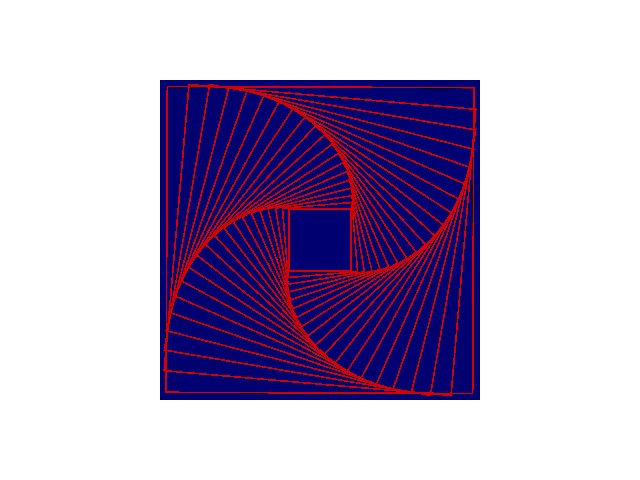
I would like any help someone can give regarding a math problem in Povray.

I have included an image of what I'm trying to accomplish, however it's
never quite perfect.  I'm trying to start with a small square in the center
(1x1 size) and increase its size to 5x5 and rotate the square as I go.  I
want the squares to match up so each square corner perfectly matches up with
a line on the next larger square.  Basically end up with a curving line made
of many squares. I'm doing it all by trail and error and never getting it
clean enough.  The square image here is small and doesn't show the
discrepancies as much, but once it is increased in size it never lines up
cleanly. Is there a math formulae to create this?  Is there a name for this
type of thing?

Thanks for any help!

Patrick Dugan


Here is the code I created for what it is worth:

#include "colors.inc"
#include "textures.inc"
#include "metals.inc"


#version 3.5;
global_settings {
   assumed_gamma 2.2
   max_trace_level 25
}

light_source {< 500, 500, -500> White * 1.0}

background {White}

camera {
   location <0,0,-15>
   look_at  <0,0,3>
}

#declare WallTex =  texture {pigment {Red} finish {ambient 0.5}}

#declare X = 1;
#declare Z = 0;
#declare Reduce = 0.11;
#declare WallFan =
union {
   #while (X <= 5)
      difference {
         box {<-X,-X,-0.01>,<X,X,0.01> texture {WallTex}}
         box {<-X+0.05,-X+0.05,-0.02>,<X-0.05,X-0.05,0.02> texture
{WallTex}}
         rotate <0,0,Z>
      }
      #declare X = X + Reduce;
      #declare Reduce = Reduce + 0.01;
      #declare Z = Z + 4.725;
   #end
}

object {WallFan}

// Size reference box behind wall fan
box {<-5,-5,-0.005>,<5,5,0.005> pigment {Blue}}
Post a reply to this message
Attachments:
Download 'RotatingSquares.jpg' (58 KB)
Preview of image 'RotatingSquares.jpg'
|
|
| |
| |
|
|
|
|
| |
| |
|
|
One major problem I see here is that your camera is using the standard
settings. Point of view, along with perspective's distortive effects
might be hindering you from achieving your desired effect. Try making
the camera orthographic and go from there.
Patrick Dugan wrote:
> I have included an image of what I'm trying to accomplish, however it's
> never quite perfect. I'm trying to start with a small square in the center
> (1x1 size) and increase its size to 5x5 and rotate the square as I go. I
> want the squares to match up so each square corner perfectly matches up with
> a line on the next larger square.
>
> camera {
> location <0,0,-15>
> look_at <0,0,3>
> }
--
Samuel Benge
stb### [at] hotmail com com
Post a reply to this message
|
|
| |
| |
|
|
|
|
| |
| |
|
|
Well I used the orthographic view and it really makes the discrepancies
stand out.  While it helps in seeing the drawing "head on"
it still doesn't help in the math of things.  I rather not keep using trial
and error math if a formulae is around that would
make it cleanly.


"Samuel Benge" <sbe### [at] hotmailcom> wrote in message
news:3F8### [at] hotmailcom...
> One major problem I see here is that your camera is using the standard
> settings. Point of view, along with perspective's distortive effects
> might be hindering you from achieving your desired effect. Try making
> the camera orthographic and go from there.
>
> Patrick Dugan wrote:
>
> > I have included an image of what I'm trying to accomplish, however it's
> > never quite perfect.  I'm trying to start with a small square in the
center
> > (1x1 size) and increase its size to 5x5 and rotate the square as I go.
I
> > want the squares to match up so each square corner perfectly matches up
with
> > a line on the next larger square.
>
>  >
>
> > camera {
> >    location <0,0,-15>
> >    look_at  <0,0,3>
> > }
>
>
> --
> Samuel Benge
>
> stb### [at] hotmailcom
>
Post a reply to this message
|
|
| |
| |
|
|
|
|
| |
| |
|
|
My initial attempts to solve the problem have failed. I'm getting the
same corner-clipping artifacts you are. Maybe the folks over at
povray.avanced-users could help.


--
Samuel Benge

stb### [at] hotmailcom
Post a reply to this message
|
|
| |
| |
|
|
|
|
| |
| |
|
|
3 years ago i had to solve the same problem for mathclass (VWO, type of
education in the Netherlands, comparable with High school), so i should be
able to solve this. But it's to late, and i'm not realy sober, so i'm not
going to solve it now i'm afraid. I'll try to work something out on friday
(it shouldn't be to hard).

If you want the solution before friday/saturday, try the advanced newsgroup.

JWV
"Samuel Benge" <sbe### [at] hotmailcom> wrote in message
news:3F8### [at] hotmailcom...
> My initial attempts to solve the problem have failed. I'm getting the
> same corner-clipping artifacts you are. Maybe the folks over at
> povray.avanced-users could help.
>
>
>
> --
> Samuel Benge
>
> stb### [at] hotmailcom
>
Post a reply to this message
|
|
| |
| |
|
|
|
|
| |
| |
|
|
Wasn't it Patrick Dugan who wrote:
>I would like any help someone can give regarding a math problem in Povray.
>
>I have included an image of what I'm trying to accomplish, however it's
>never quite perfect.  I'm trying to start with a small square in the center
>(1x1 size) and increase its size to 5x5 and rotate the square as I go.  I
>want the squares to match up so each square corner perfectly matches up with
>a line on the next larger square.  Basically end up with a curving line made
>of many squares. I'm doing it all by trail and error and never getting it
>clean enough.  The square image here is small and doesn't show the
>discrepancies as much, but once it is increased in size it never lines up
>cleanly. Is there a math formulae to create this?  Is there a name for this
>type of thing?

I can work out the math for calculating what the correct amount of
rotation (Z) should be, given the values for your "Reduction" variable,
like this (using the unincremented value of X):

// Length of new hypotenuse
   #declare H = X + Reduce;

// solve simultaneous equations A+B=H, A^2 + B^2 = X^2
// (By substituting "H-A" for "B", moving everything
// over the left hand side and using the standard
// quadratic equation solver for A.
   #declare A = (2*H + sqrt(4*H*H  - 8*(H*H - X*X)))/4;

// use trig to find the angle
   #declare Z = Z + degrees(acos(A/X));

// then increment X
   #declare X = X + Reduce;


The problem then is that when you create the fan, the 5x5 square is
significantly past vertical.

I did some experiments with different initial values of "Reduction" and
its increment, (changing the while clause to "#while (Z <= 90)" helps)
but it seems that the squares want to become vertical again at a size
between 3.9 and 4.4 rather than 5. To get the size close to 5x5 I had to
use very low values for "Reduction" and its increment, which causes
hundreds of squares to be generated.

--
Mike Williams
Gentleman of Leisure
Post a reply to this message
|
|
| |
| |
|
|
|
|
| |
| |
|
|
"Patrick Dugan" <pat### [at] netinsnet> wrote in
news:3f844537@news.povray.org:

> I would like any help someone can give regarding a math problem in
> Povray.

Sounds like a trig. problem...

I think Reduce should simply be set to something like:

#declare Reduce = X * tan(radians(4.725));
Post a reply to this message
|
|
| |
| |
|
|
|
|
| |
| |
|
|
Among other things, Patrick Dugan wrote:

> I would like any help someone can give regarding a math problem in Povray.
>
> I have included an image of what I'm trying to accomplish, however it's
> never quite perfect.  I'm trying to start with a small square in the
> center
> (1x1 size) and increase its size to 5x5 and rotate the square as I go.  I
> want the squares to match up so each square corner perfectly matches up
> with
> a line on the next larger square.  Basically end up with a curving line
> made of many squares. I'm doing it all by trail and error and never
> getting it
> clean enough.  The square image here is small and doesn't show the
> discrepancies as much, but once it is increased in size it never lines up
> cleanly. Is there a math formulae to create this?  Is there a name for
> this type of thing?

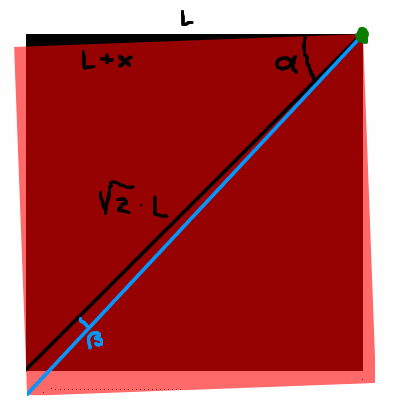
If I have understood it correctly, this is what you want (see picture
attached).

The green corner (top-right) is the center of the squares, so that what you
see are just the lower-left quadrants. The black square is the "old" (and
smaller) one, with side L, the red square is a larger one (side L+x) laid
over the black one and rotated.

As it is drawn, the cosine of the angle alpha is (L+x)/(sqrt(2)*L), but
you're interested in angle beta, which is:

beta = 45 - degrees(acos( (L+x)/(sqrt(2)*L) ))
beta = 45 - degrees(acos( (1+x/L)/sqrt(2) ))

If, as it seems, you want to make the squares smaller and smaller, just
substitute L+x -> L and L -> L-x:

beta = 45 - degrees(acos( L/(sqrt(2)*(L-x)) ))

... unless I've made a mistake...

--
light_source{9+9*x,1}camera{orthographic look_at(1-y)/4angle 30location
9/4-z*4}light_source{-9*z,1}union{box{.9-z.1+x clipped_by{plane{2+y-4*x
0}}}box{z-y-.1.1+z}box{-.1.1+x}box{.1z-.1}pigment{rgb<.8.2,1>}}//Jellby
Post a reply to this message
Attachments:
Download 'sample.gif' (11 KB)
Preview of image 'sample.gif'
|
|
| |
| |
|
|
|
|
| |
| |
|
|
Thanks!    Replacing that line in the code seems to have worked well.


"None" <Non### [at] onca> wrote in message
news:Xns### [at] 204213191226...
> "Patrick Dugan" <pat### [at] netinsnet> wrote in
> news:3f844537@news.povray.org:
>
> > I would like any help someone can give regarding a math problem in
> > Povray.
>
> Sounds like a trig. problem...
>
> I think Reduce should simply be set to something like:
>
> #declare Reduce = X * tan(radians(4.725));
Post a reply to this message
|
|
| |
| |
|
|
|
|
| |
| |
|
|
"Patrick Dugan" <pat### [at] netinsnet> wrote in news:3f847253$1
@news.povray.org:

> Thanks!    Replacing that line in the code seems to have worked well.

Great, I'm glad I could help.
Post a reply to this message
|
|
| |
| |
|
|
|
|
| |
| |
|
|
Patrick Dugan wrote:
>
> I would like any help someone can give regarding a math problem in Povray.
>

I didn't quite follow the source posted here and saw that your problem
is already solved but since I've been struggling with the exact same
things some time ago and only barely worked it out, by trial and error,
it struck me now that there might be a fairly simple solutions: drop the
rotation part!
Start with the bottom square (or box), move from the corner along the
side for a fixed percentage of the side length, do that for every side
(in the same direction). The four resulting points will form a new
square.
Put this in a recursive macro and there you go.

Toch? Jan?

Remco
Post a reply to this message
|
|
| |
| |
|
|
|
|
| |
| |
|
|
I'm unschooled in the field of traditional trigonomentry usage.... where
did you get the number 4.725?

None wrote:

> I think Reduce should simply be set to something like:
>
> #declare Reduce = X * tan(radians(4.725));
>


--
Samuel Benge

stb### [at] hotmailcom
Post a reply to this message
|
|
| |
| |
|
|
|
|
| |
| |
|
|
The number wasn't significant.  I simply testing various Z axis rotation
sizes and by trial and error (mostly error) ended up on that number.

"Samuel Benge" <sbe### [at] hotmailcom> wrote in message
news:3F8### [at] hotmailcom...
> I'm unschooled in the field of traditional trigonomentry usage.... where
> did you get the number 4.725?
>
> None wrote:
>
> > I think Reduce should simply be set to something like:
> >
> > #declare Reduce = X * tan(radians(4.725));
> >
>
>
> --
> Samuel Benge
>
> stb### [at] hotmailcom
>
Post a reply to this message
|
|
| |
| |
|
|
|
|
| |
| |
|
|
Samuel Benge <sbe### [at] hotmailcom> wrote in news:3F8588D8.6080308
@hotmail.com:

> I'm unschooled in the field of traditional trigonomentry usage.... where
> did you get the number 4.725?

That was simply the angle Patrick was rotating by, I pluged in the angle he
was using in his code into a standard trig. equation:

tan(angle) = Opposite/Adjacent.

Trigonometry is the measurement of triangles.  A square can be broken down
into eight right angle triangles.  In the eighth of a square, the Opposite
(O) and Adjacent (A) are the same.  So if you change the angle while
keeping O or A the same, it will tell you how much the new A or O should
be.

Search the net for "trigonometry sin cos tan" for explanations of
trigonometry.
Post a reply to this message
|
|
| |
| |
|
|
|
|
| |
| |
|
|
None wrote:
> Trigonometry is the measurement of triangles.  A square can be broken down
> into eight right angle triangles.  In the eighth of a square, the Opposite
> (O) and Adjacent (A) are the same.  So if you change the angle while
> keeping O or A the same, it will tell you how much the new A or O should
> be.

For efficiency, it's easier to just break a square into two triangles.
^_^  Also in a square you can't change the angles, or it ceases to be
a square.  They will always be 45 and 90 degrees.
Post a reply to this message
|
|
| |
| |
|
|
|
|
| |
| |
|
|
Tim Cook <z99### [at] bellsouthnet> wrote in
news:3f86c37d$1@news.povray.org:

> For efficiency, it's easier to just break a square into two triangles.
> ^_^  Also in a square you can't change the angles, or it ceases to be
> a square.  They will always be 45 and 90 degrees.

Efficiency?  In this case the square is centered at the origin, that's
where it's rotated from, so that's where the angle is, so we are dealing
with the eigtht, but we only care about _one_ triangle.  If you want to
just use two triangles to solve this case, you're going to have to do
more math, which would be innefficient.

Of course a square's triangle angle can't change, that is exactly what we
are taking advantage of in this case.  I said: the opposite and adjacent
sides are the same, so the angle is obviously fixed.  In this case, if
the angle changes, we are determining by how much we need to adjust the
sides to keep the angle constant.

It sounds like you took my message completely out of context.  I was
reffering to the problem at hand, the original question.
Post a reply to this message
|
|
| |
| |
|
|
|
|
| |