|
|
|
|
|
|
| |
| |
|
|
|
|
| |
| |
|
|
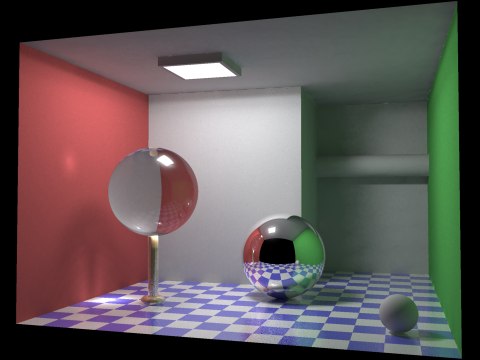
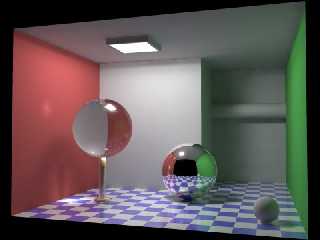
The battle takes place in a Cornell type of box. These reveal how good a
renderer simulates reality. There is nothing fancy about textures here, but
you get to see soft shadows, caustics, specular reflection and refraction,
diffuse indirect illumination with color bleeding, and anti-aliasing.

The attached picture is a 3-pass rendering in MegaPOV1.0. The 3 passes
combined takes roughly 24 minutes on AMD 1.4 GHz.. My motivation is to
demonstrate modern POV-Ray. I found this page yesterday that I think is
quite interesting: http://www.winosi.onlinehome.de/

If you browse to the gallery, you'll see the same scene as mine, rendered
with different softwares. The homepage also demonstrates "WinOSi" that is an
interesting renderer. Very slow, but very realistic.

My scene is not pure global illumination such as WinOSi, but an attempt to
balance all the available variables. Anyway, we're not throwing the exact
same variables into all renderers and expect the optimal output. But I
haven't changed the scene in any major way.

Please let me know what you think.

Regards,
Hugo
Post a reply to this message
Attachments:
Download 'illum2-final.jpg' (24 KB)
Preview of image 'illum2-final.jpg'
|
|
| |
| |
|
|
|
|
| |
| |
|
|
"Hugo Asm" <hua### [at] post3 teledk> wrote in news:3f509b18@news.povray.org:
> The battle takes place in a Cornell type of box. These reveal how good
> [...]
Nice Job! Very nice indeed. I think one of Povray and derivitives'
strongest assets is also it's most challenging aspects: the incredible
amount of parameters and options. To get the best renders, you need to
know what you are doing and experience goes a long way.
Strange thing I found about the site you linked was how sometimes the same
scene was nicely rendered, but the light on the ceiling was heavily
aliased? What's up with that? teledk> wrote in news:3f509b18@news.povray.org:
> The battle takes place in a Cornell type of box. These reveal how good
> [...]
Nice Job! Very nice indeed. I think one of Povray and derivitives'
strongest assets is also it's most challenging aspects: the incredible
amount of parameters and options. To get the best renders, you need to
know what you are doing and experience goes a long way.
Strange thing I found about the site you linked was how sometimes the same
scene was nicely rendered, but the light on the ceiling was heavily
aliased? What's up with that?
Post a reply to this message
|
|
| |
| |
|
|
|
|
| |
| |
|
|
> how sometimes the same scene was nicely rendered,
> but the light on the ceiling was heavily aliased?
> What's up with that?

Yes, it's bad anti aliasing. It's because, when the lit plate is acting as a
true light source, that illuminates the entire room, it has to be very
bright. Much brighter than what you can see on a computer monitor / TV. So
the brightness is clipped on screen, but not in the calculation. Their
anti-aliasing doesn't take this into account. In POV-Ray, this IS taken into
account... Unless you use focal blur (that, when activated it replaces AA).

Actually, in this case I didn't use the lit plate as true source of
illumination. It's too small for that, and would require much higher
radiosity settings. I remove this plate
completely during radiosity calculation (the second pass) to avoid signs of
splotcy patches.

..More info available upon request.

Regards,
Hugo
Post a reply to this message
|
|
| |
| |
|
|
|
|
| |
| |
|
|
Nice image, I think you reached your goal, it is really comparable to
the WinOSi one. What do you mean by 'demonstrate the modern POVRay' ?

The approach of the WinOSi renderer seems interesting, but I understand
why it is so slow, and I must remark that all the scenes are very basic
scenes with few simple objects only. I look forward more powerfull
computers to be able to use this kind of things, but I'd rather see them
included in POVRay some day because one needs fast rendering methods as
well when setting up a scene.

JC

Hugo Asm wrote:
> The battle takes place in a Cornell type of box. These reveal how good a
> renderer simulates reality. There is nothing fancy about textures here, but
> you get to see soft shadows, caustics, specular reflection and refraction,
> diffuse indirect illumination with color bleeding, and anti-aliasing.
>
> The attached picture is a 3-pass rendering in MegaPOV1.0. The 3 passes
> combined takes roughly 24 minutes on AMD 1.4 GHz.. My motivation is to
> demonstrate modern POV-Ray. I found this page yesterday that I think is
> quite interesting: http://www.winosi.onlinehome.de/
>
> If you browse to the gallery, you'll see the same scene as mine, rendered
> with different softwares. The homepage also demonstrates "WinOSi" that is an
> interesting renderer. Very slow, but very realistic.
>
> My scene is not pure global illumination such as WinOSi, but an attempt to
> balance all the available variables. Anyway, we're not throwing the exact
> same variables into all renderers and expect the optimal output. But I
> haven't changed the scene in any major way.
>
> Please let me know what you think.
>
> Regards,
> Hugo
>
>
>
Post a reply to this message
|
|
| |
| |
|
|
|
|
| |
| |
|
|
> What do you mean by 'demonstrate the modern POVRay' ?

Oh, I just think the examples of POV-Ray renderings on the WinOSi homepage,
needs to be updated, because POV can do better today.. I've tried to proove
it.. If there's nothing else I can improve in this image (?) I'm going to
send it to the author of WinOSi.. Just in case he wants to update his
homepage.

> I'd rather see them included in POVRay some day
> because one needs fast rendering methods as
> well when setting up a scene.

I agree, and cooperation is more important than competition.

Greetings,
Hugo
Post a reply to this message
|
|
| |
| |
|
|
|
|
| |
| |
|
|
Hugo Asm wrote:
> Please let me know what you think.
Sweet, but try to put in the front wall with no_image, so it can be seen
  in the reflections. You can use the same trick for the green wall as
well, if you want to use the original camera position. Just do a normal
save radiosity pass and then a load with no_image also for the green
one. That's how I did a no-lights version of this scene last winter.
Too bad no_image means no_radiosity. It would be great to be able to
hide stuff like walls in this case and they would still affect the lighting.

Trace on,
Ari-Matti
Post a reply to this message
|
|
| |
| |
|
|
|
|
| |
| |
|
|
> Just do a normal save radiosity pass and then a load
> with no_image

aaah! The solution to my problem! Of course. I'll do this!

> That's how I did a no-lights version of this scene last winter.

I can't find it...?

-Hugo-
Post a reply to this message
|
|
| |
| |
|
|
|
|
| |
| |
|
|
> aaah! The solution to my problem! Of course. I'll do this!

Actually, that doesn't work. Having these walls in the scene during
radiosity will hide everything behind them. When I use no_image in the final
pass, these areas becomes visible again but no radiosity was calculated for
them. The result looks bad. So I can only get the backwall into the
reflections, as you suggested, but it will not be included in radiosity. So
it's going to make things unreal.

Regards,
Hugo
Post a reply to this message
|
|
| |
| |
|
|
From: Ari-Matti Leppaenen
Subject: Re: Cornell's box; MegaPOV vs. WinOSi
Date: 30 Aug 2003 17:15:07
Message: <3f5113db@news.povray.org>
|
|
|
| |
| |
|
|
Hugo Asm wrote:

>>That's how I did a no-lights version of this scene last winter.
>
>
> I can't find it...?
Didn't post it. :) Actually haven't been here or poved that much since..
dunno.. at least year and I've totally lost the little touch I had. :(

How many photons are you using? I tried to add photons, but can't find a
good spacing to get rid of the splotches.

A-M
Post a reply to this message
|
|
| |
| |
|
|
|
|
| |
| |
|
|
> How many photons are you using?

Very few. They are shot during render pass 1. All lights but one has been
removed from this pass, to speed up photon calculation there is only one,
strong light at the lit plate on the ceiling.

During pass 2 (radiosity calculation) there are a grid of 4*4 area_lights at
the ceiling, to fill the room with something that resembles the physical
dimension of the lit plate. All of these lights are weak but together they
generate as much light as pass 1. However this grid of weak lights would
generate splotchy photons (no matter what I do) not to mention slow down the
process. So photons are turned off here.

Pass 3 combines the precalculated photons and radiosity, with high quality
AA, and turns on most reflections including blurred reflections on the
floor.


> I tried to add photons, but can't find a
> good spacing to get rid of the splotches.

To be precise, it's:

photons {
   spacing 0.01
   autostop 0
}

And the scene geometry is small. The overall bounding box is circa 4*4
units.

Regards,
Hugo
Post a reply to this message
|
|
| |
| |
|
|
From: Ari-Matti Leppaenen
Subject: Re: Cornell's box; MegaPOV vs. WinOSi
Date: 31 Aug 2003 10:58:05
Message: <3f520cfd@news.povray.org>
|
|
|
| |
| |
|
|
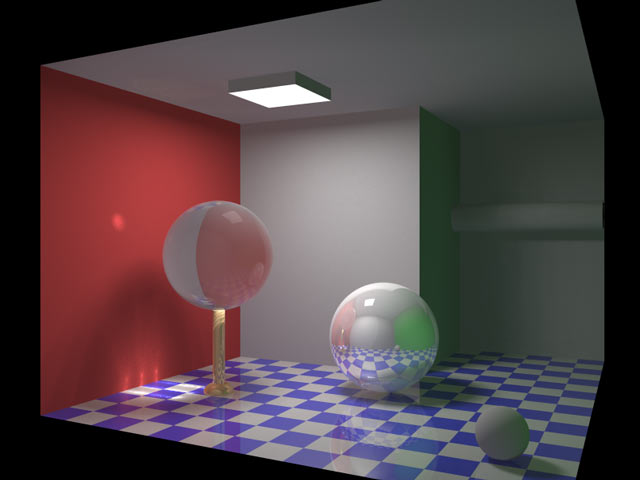
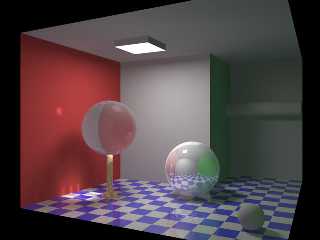
This is my try with POV3.5. Radiosity values are saved first from a
diffrent camera position and a super wide FOV to get most of the room
visible and then the final with photons, loadedradiosity values and
no_image for the front and right walls. The lighting is still a bit
darker and material don't look quite the same, but at least now I'm
starting to remember how to use POV.

A-M
Post a reply to this message
Attachments:
Download 'winosi.jpg' (29 KB)
Preview of image 'winosi.jpg'
|
|
| |
| |
|
|
|
|
| |
| |
|
|
Nice, but it still lacks something.  :o)  Anyway, how did you convert the
scene to POV? The WinOSi homepage offers the file in vmd, dxf and rib
format, and I tried at least 6 different converters but none of them worked,
so I had to rewrite the scene in POV myself  (based on the vmd file). The
camera orientation and up-vector was about to drive me crazy.

> Radiosity values are saved first from a diffrent camera
> position and a super wide FOV to get most of the room visible

Could you elaborate on that?

You also said, you had a "no light" scenario, but I suppose you did use
light_sources to calc photons, right?

Regards,
Hugo
Post a reply to this message
|
|
| |
| |
|
|
|
|
| |
| |
|
|
Hugo Asm wrote:
> Anyway, how did you convert the scene to POV?
I also wrote the scene based on the vmd. The catch is that it's a right
handed system and z-axis points up and not into the screen. Also the
angle has to be a bit larger than 42 degrees.


>>Radiosity values are saved first from a diffrent camera
>>position and a super wide FOV to get most of the room visible
>
> Could you elaborate on that?
The cameras look like this:

#if( save_rad )
camera {
   location <0.0,  -0.01, 1.25>
   look_at <0.13, -1.14, 1.25>
   sky      <0.00,  0.00, 1.00>
   right   -(4/3)*x
   angle  175.0
}
#else
camera {
   location <-1.27,  3.00, 1.25>
   look_at <0.33, -0.14, 1.25>
   sky      <0.00,  0.00, 1.00>
   right   -(4/3)*x
   angle  55.0
}
#end


> You also said, you had a "no light" scenario, but I suppose you did use
> light_sources to calc photons, right?
Yes, this one has a light_source. Earlier this year I tried an ambient
box for the lighting.

A-M
Post a reply to this message
|
|
| |
| |
|
|
|
|
| |
| |
|
|
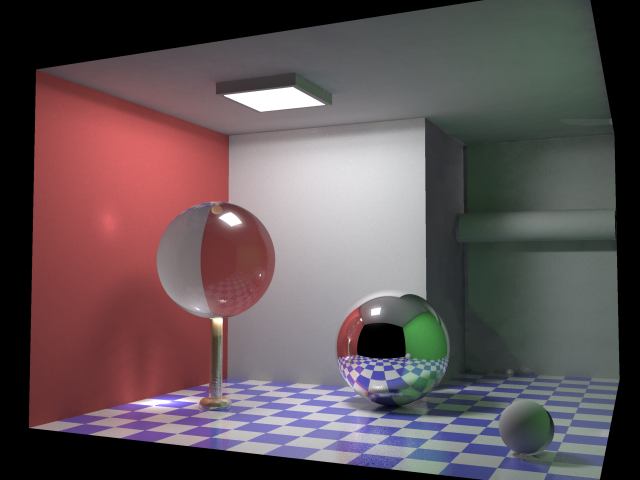
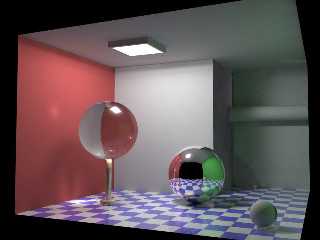
> >Radiosity values are saved first from a diffrent camera
> >position and a super wide FOV to get most of the room visible

That's a clever trick, and I didn't expect it to work!  Well, it has some
problems. The attached picture was rendered with a 90 degrees angle for
radiosity (it was too hard to adjust the camera at 175 degrees). I also
rendered radiosity at double resolution but there are definitely some
artifacts left.

> this one has a light_source. Earlier this year I tried an ambient
> box for the lighting.

And you're trying to get rid of the splotches? Well, in the image you just
posted, I think the problem is possibly the same I had: You use several
light sources at the ceiling. The easiest solution is to use only 1 light
source during photon calculation.

Regards,
Hugo
Post a reply to this message
Attachments:
Download 'illum2-d.jpg' (26 KB)
Preview of image 'illum2-d.jpg'
|
|
| |
| |
|
|
|
|
| |
| |
|
|
> Too bad no_image means no_radiosity. It would be great to be able to
> hide stuff like walls in this case and they would still affect the
> lighting.

That should be possible with
   interior_texture {pigment {transmit 1}}
shouldn't it?

   Mark


--
merge{#local i=-11;#while(i<11)#local
i=i+.1;sphere{<i*(i*i*(.05-i*i*(4e-7*i*i+3e-4))-3)10*sin(i)30>.5}#end
pigment{rgbt 1}interior{media{emission x}}hollow}//  Mark Weyer
Post a reply to this message
|
|
| |
| |
|
|
|
|
| |
| |
|
|
> That should be possible with
>    interior_texture {pigment {transmit 1}}
> shouldn't it?

I thought about it, but a quick try didn't work.
Now I might have got it to work!

It slows down rendering I'm afraid, but it works!

Thanks,
Hugo
Post a reply to this message
|
|
| |
| |
|
|
|
|
| |
| |
|
|
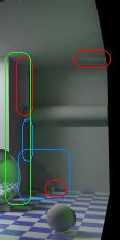
Hi Hugo,

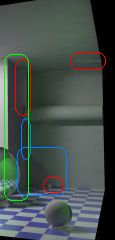
There are many strange artifacts in your image -- see attached image
(only intended as a 'pointer' to your original post; red: too bright;
blue: too dark; green: gray instead of green). I don't think they are
caused by multiple light sources at the ceiling (or do they vanish
when only one light source is used?)

   Sputnik
Post a reply to this message
Attachments:
Download 'illum2-d_detail.jpg' (5 KB)
Preview of image 'illum2-d_detail.jpg'
|
|
| |
| |
|
|
|
|
| |
| |
|
|
Sputnik wrote:
> There are many strange artifacts in your image -- see attached image

Thanks. Yes, you're right. These are caused by calculating radiosity in a 90
degrees camera angle, and rendering the final image with a 45 degrees angle.
Higher settings for radiosity would look nicer, but I found another solution
as Mark Weyer pointed me to: interior_texture.

Sputnik wrote:
> I don't think they are caused by multiple light sources at the
> ceiling (or do they vanish when only one light source is used?)

No, multiple light sources at the ceiling makes the photons look bad. Each
of these lights will make a bright photon-spot below the glass sphere, but
at slightly different positions. The result looks splotchy. Using only 1
light gives smooth caustics.

With all these parameters carefully adjusted, the 3 passes takes about 35
minutes to render. That's a lot quicker than joining everything in 1 pass.
WinOSi, on the other hand, need about 8 hours to make a similar, smooth
image (nearly free from noise). I checked it tonight. But there are some
advantages of WinOSi.. In short, it's more accurate.

Regards,
Hugo
Post a reply to this message
|
|
| |
| |
|
|
|
|
| |