|
|
|
|
|
|
| |
| |
|
|
|
|
| |
| |
|
|
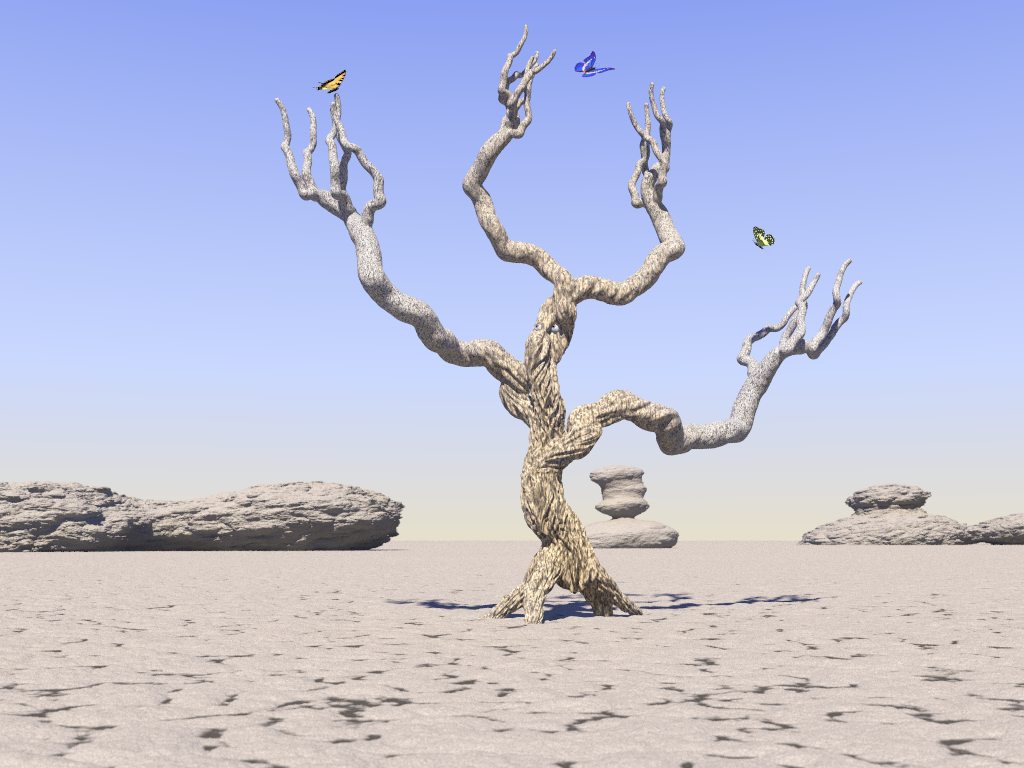
My first real work since Radio Graves...

I simply started out with POVTree/TomTree and went from there.  I wanted to
make something more fun, and less realistic.

I'm not planning on adding too much to this at this point, other than simply
adding more detail, or modifying some textures, but maybe I'll change my
mind.

I'm open for comments/suggestions!

Tree was created with POVTree.  The ground is an isosurface with a texture
map applied to make the cracks more visible.  The rocks are isosurface blobs
(using isocsg) with horizontally stretched granite on top of the blobs (I
love isosurfaces!).

The butterflies use the butterly macro available in the POV-Ray Objects
Collection, but I found my own wings.  In fact, the wings of the yellow
butterfly on the left are the result of a scan of real butterfly wings that
I found outside my house a few days ago.  Apparently, something ate the
butterfly and left the wings.  They seem to look better than the other
wings.  Hopefully, I'll find more dead butterflies lying around.

--
Slash
Post a reply to this message
Attachments:
Download 'juggling9.jpg' (97 KB)
Preview of image 'juggling9.jpg'
|
|
| |
| |
|
|
|
|
| |
| |
|
|
Nice picture...

Just add one nice sun using Abe macro
http://news.povray.org/povray.binaries.scene-files/26067/
and your scene will be almost completed.

Try to add a slight media or fog to show the heat and to smooth the pic (and
smooth the contrast between the ground and the tree).

May be a glow from Colefax glow and lens will give you a nice camera glow
effect.

Then, add one or two red flowers at the end of the upper branches of your
tree.  Just like succulent or desertic trees which look like dead but are
alive and keep having one or two colourful flowers (most of the time red)
to attract insects (and butterflies) and to survive !!

Tommy
Post a reply to this message
|
|
| |
| |
|
|
|
|
| |
| |
|
|
"lieven_ke" <lie### [at] yahoo fr> wrote in message
news:web.3eeeb4cf7a5a20d8a472d3920@news.povray.org...
> Nice picture...
>
> Just add one nice sun using Abe macro
> http://news.povray.org/povray.binaries.scene-files/26067/
> and your scene will be almost completed.
I looked for some "sun" source code awhile back. I'll have to take a look
at that.
> Try to add a slight media or fog to show the heat and to smooth the pic
(and
> smooth the contrast between the ground and the tree).
Media... Hmmm... I've successfully avoided learning it all this time...
;-) Is there a way to make the distant background appear as if there are
"heat waves"?
> May be a glow from Colefax glow and lens will give you a nice camera glow
> effect.
What/where is that? I'm not familiar with that.
> Then, add one or two red flowers at the end of the upper branches of your
> tree. Just like succulent or desertic trees which look like dead but are
> alive and keep having one or two colourful flowers (most of the time red)
> to attract insects (and butterflies) and to survive !!
I thought about the flowers as well. I think perhaps I'll do that. I'll
have to come up with a nifty little flower macro.
Thanks for the comments! This is the first time I've openly submitted a
WIP, so all comments are greatly appreciated.
--
Slash fr> wrote in message
news:web.3eeeb4cf7a5a20d8a472d3920@news.povray.org...
> Nice picture...
>
> Just add one nice sun using Abe macro
> http://news.povray.org/povray.binaries.scene-files/26067/
> and your scene will be almost completed.
I looked for some "sun" source code awhile back. I'll have to take a look
at that.
> Try to add a slight media or fog to show the heat and to smooth the pic
(and
> smooth the contrast between the ground and the tree).
Media... Hmmm... I've successfully avoided learning it all this time...
;-) Is there a way to make the distant background appear as if there are
"heat waves"?
> May be a glow from Colefax glow and lens will give you a nice camera glow
> effect.
What/where is that? I'm not familiar with that.
> Then, add one or two red flowers at the end of the upper branches of your
> tree. Just like succulent or desertic trees which look like dead but are
> alive and keep having one or two colourful flowers (most of the time red)
> to attract insects (and butterflies) and to survive !!
I thought about the flowers as well. I think perhaps I'll do that. I'll
have to come up with a nifty little flower macro.
Thanks for the comments! This is the first time I've openly submitted a
WIP, so all comments are greatly appreciated.
--
Slash
Post a reply to this message
|
|
| |
| |
|
|
|
|
| |
| |
|
|
Slashdolt wrote:
>My first real work since Radio Graves...
<snip>
>I'm open for comments/suggestions!
<snip>
>Slash
>

Neat idea!

The monochrome background with just splashes of color in the butterflies is
great, but the color seems understated now. Adding the flowers would be
good, and maybe move a butterfly out in front or something to emphasize the
color a little more (although that may not even be necessary in a larger
render...)

Also, the rocks in the background seem too in line with each other, maybe
moving them around in relation to each other would give it more depth.

Look forward to the final!

RG
Post a reply to this message
|
|
| |
| |
|
|
|
|
| |
| |
|
|
"Slashdolt" <jer### [at] questsoftwarecom> wrote in message
news:3eee0fa2@news.povray.org...
| I'm open for comments/suggestions!
|

This is a nice idea for a picture, but the tree macro you are using just
isn't cutting it. I would suggest writing another tree macro which will
make a better looking dormant or dead tree.

 -Shay
Post a reply to this message
|
|
| |
| |
|
|
|
|
| |
| |
|
|
Slashdolt wrote:
> . . . . The ground is an isosurface with a texture
map applied to make the cracks more visible.

I really like the effect this achieved.  Could you be a little more specific
about how you did this?
Post a reply to this message
|
|
| |
| |
|
|
|
|
| |
| |
|
|
> This is a nice idea for a picture, but the tree macro you are using just
> isn't cutting it. I would suggest writing another tree macro which will
> make a better looking dormant or dead tree.
>

Unfortunately, since the tree was largely "just something neat that
happened" with POVTree/TomTree, there isn't much I can do with the macro,
other than perhaps to change the textures.

Other than the texture, I'm quite pleased with it.  It's not a completely
reaslistic tree, but real trees don't have eye-balls either.  The branches
look very much like fingers to me.  Additionally, when I stare at it long
enough, it seems like I can make out an expression on the tree's "face".
It's very subtle and leaves quite a bit to the imagination of the viewer,
and I think I'd like to keep it that way.

Even so, there are some things that prevent the tree from blending into the
scene.  I plan to work on that more.

--
Slash
Post a reply to this message
|
|
| |
| |
|
|
|
|
| |
| |
|
|
"gonzo" <rgo### [at] lansetcom> wrote in message
news:web.3eef5f127a5a20d8a0c272b50@news.povray.org...
> Neat idea!

Thanks!

> The monochrome background with just splashes of color in the butterflies
is
> great, but the color seems understated now. Adding the flowers would be
> good, and maybe move a butterfly out in front or something to emphasize
the
> color a little more (although that may not even be necessary in a larger
> render...)

I was thinking of having something in the forefront, but because the focus
of the image is the the tree itself, I haven't really come up with anything
at this point that would not distract from the subject.

> Also, the rocks in the background seem too in line with each other, maybe
> moving them around in relation to each other would give it more depth.

I've moved the rocks several times so far, but since they take FOREVER-42 to
render, they're still not exactly as I want them.  For one thing, I can't
figure out why the rock in the middle is smoother than the others.  I'm sure
it has something to do with isosurfaces and how they use functions, but so
far, I can't figure it out.  *sigh*

I wanted the image to convey the notion that the rocks feel as if they are
"closing in" on the tree.  Not in a literal sense, but more in a feng-shui
kind of sense.  The rocks and the desert itself are "exerting pressure" on
the tree, and the tree is desparate to hold on to "life", which is best
conveyed (IMHO) by the use of the color in the butterflies.

--
Slash
Post a reply to this message
|
|
| |
| |
|
|
|
|
| |
| |
|
|
"Dave Matthews" <mat### [at] dinecollegeedu> wrote in message
news:web.3eef6a1c7a5a20d87196f5900@news.povray.org...
>
> I really like the effect this achieved.  Could you be a little more
specific
> about how you did this?
>

I used Cristoph Hormann's IsoCSG library.  The ground is basically an
iso_plane minus a granite texture functure.  I don't have the source in
front of my now, but it's basically like this (my syntax may is likely all
wrong, but hopefully you'll get the idea):

#fuction F_Ground = iso_plane(y,0)
isosurface {
  function(F_Ground(x,y,z) - f_granite(x,y,z)*0.02)
  contained_by box { whatever size }
  texture { T_Ground }
}

T_Ground is a gradient texture_map, so that the lower "cracks" are darker
than the higher areas.

If that doesn't explain enough, let me know, and I'll try to post a working
source code snippet later on.  :-)

--
Slash
Post a reply to this message
|
|
| |
| |
|
|
|
|
| |
| |
|
|
"Slashdolt" <jer### [at] questsoftwarecom> wrote in message
news:3eef7576$1@news.povray.org...
|
| Unfortunately, since the tree was largely "just something
| neat that happened" with POVTree/TomTree, there isn't much
| I can do with the macro, other than perhaps to change the
| textures.
|

There should be a way to add some #write statements to the data in order
to output the positions of the branches. You could then build a better
(for close inspection) tree with a near identical shape. My idea would
be to build a mesh tree and then create some code to crease and divide
the mesh into something resembling bark. I'm the worst to give advice in
that respect, however, as I don't mess with organic.

 -Shay
Post a reply to this message
|
|
| |
| |
|
|
|
|
| |
| |
|
|
"Slashdolt" <jer### [at] questsoftwarecom> wrote in message
news:3eef7576$1@news.povray.org...

> Other than the texture, I'm quite pleased with it.  It's not a
completely
> reaslistic tree, but real trees don't have eye-balls either.  The
branches
> look very much like fingers to me.

  I love this, and my good lady ~lurves~ it. The way I see it, those
branches (arms and hands), would smooth out towards the ends anyway
due to stretching. Why not? It's apparently a living thing...

Additionally, when I stare at it long
> enough, it seems like I can make out an expression on the tree's
"face".
> It's very subtle and leaves quite a bit to the imagination of the
viewer,
> and I think I'd like to keep it that way.

   I think I see a smiling sort of face, perhaps with a 'beaky' kind
of nose, but that's about it. Close?


>
> Even so, there are some things that prevent the tree from blending
into the
> scene.  I plan to work on that more.

    You could try changing the scene to a yellow/orange/sandy colour?

    It might work.


     ~Steve~


> Slash
Post a reply to this message
|
|
| |
| |
|
|
|
|
| |
| |
|
|
The rock in the middle, the texture for the trunk, the butterflies and
the shadow of the tree looks awesome!

<snip>
> I'm open for comments/suggestions!
<snip>

Here's a few:
The rocks on the left and right looks a bit strecthed.
The texture for the branches of the tree doesn't look as good as the
trunk.
The ground looks a bit low-res.?
I'd have moved the camera a bit closer to the ground, so that the sky
fills more of the image.
You might also want to move the butterflies up to make it look more like
they're being juggled.
And as mentioned, a sun would look good!

>;-)  Is there a way to make the distant background appear as if there
are
>"heat waves"?

I remember someone made a animation simulation heat waves a while back,
look it up in p.b.a.
Perhaps you could stack a couple of transparent boxes with a wavy
normal?

> This is the first time I've openly submitted a WIP, so all comments
are greatly appreciated.
Keep us posted!

-Peter
Post a reply to this message
|
|
| |
| |
|
|
|
|
| |
| |
|
|
"St." <dot### [at] dotcom> wrote in message news:3eef87f3@news.povray.org...
>
> "Slashdolt" <jer### [at] questsoftwarecom> wrote in message
> news:3eef7576$1@news.povray.org...


> > and I think I'd like to keep it that way.
>

> Close?

      ;)    <-----(forgot the smiley)-----<<<
Post a reply to this message
|
|
| |
| |
|
|
|
|
| |
| |
|
|
>> May be a glow from Colefax glow and lens will give you a nice camera glow
>> effect.
>
>What/where is that?  I'm not familiar with that.

If Colefax are unknown to you, then, you better have a look :
http://www.geocities.com/SiliconValley/Lakes/1434/

See the lens Effects 9 Aug 98 [download]: Create thousands of different lens
effects, with complete animation support


Tommy
The 1st African citizen POV member !
==================
http://www.webkenya.com/
Promote Web Development in Africa
WWW = Western or World Wide Web ??
Post a reply to this message
|
|
| |
| |
|
|
|
|
| |
| |
|
|
I love this one. No complaints from me altho' I was looking for some
dirt/sand against one side of the rocks.

> reaslistic tree, but real trees don't have eye-balls either.

Must get my eyes tested - I didn't notice them ( yours ;) 1st time.
Nice touch.

Alf
Post a reply to this message
|
|
| |
| |
|
|
|
|
| |
| |
|
|
"Alf Peake" <alf### [at] peake42freeservecouk> wrote in message
news:3ef0b494@news.povray.org...

> Must get my eyes tested - I didn't notice them ( yours ;) 1st time.
> Nice touch.
>
> Alf
>

A lot of people I've showed it to didn't notice the eyes.  I actually
thought of making them even less noticeable.  I don't want to make the tree
look too much like something from the "Wizard of Oz," but at the same time,
I do want it to look somewhat like that.  My 4-year-old daughter said it
looked like a Wizard of Oz tree the first time I showed it to her, even
without the eyes.  I considered giving it eye-brows, beard, nose, mouth,
etc., but decided that it might be better to let the viewer's imagination
fill in most of the gaps.

--
Slash
Post a reply to this message
|
|
| |
| |
|
|
|
|
| |
| |
|
|
Sounds like an interesting idea, but I will probably keep it largely as is,
even though the bark could be quite a bit better.  I guess it all just
depends on how much time I really want to spend on this project.  For now,
I'm just playing it by ear, but eventually I'll want to move on to something
else.

--
Slash
Post a reply to this message
|
|
| |
| |
|
|
|
|
| |
| |
|
|
To me, it's a worried face.  I think it's neat that different people see
different things, or nothing at all...  My wife doesn't see what I see
either, but that's fine, too.  It pleases me to look at my own art.  ;-)

--
Slash
Post a reply to this message
|
|
| |
| |
|
|
|
|
| |
| |
|
|
Thanks for the suggestions!

As for the sun, making it visible would change the shadowing of the tree.
I'm not sure how that would look, but I'll definitely play around with it.

I'm not sure what's making the ground look "low res".  I'm using a small
amount of focal blur, and it's possible that's what's causing it, but I
suspect that I need to play around with the textures and isosurface
functions a little more.

Yes, the tree textures could use some improvement, too.  I'm using the ones
straight out of TomTree and  they are not real easy to change, other than
the colors, which is unfortunate.  I'll have to see what I can do about
that.

--
Slash
"Peter Hertel" <peter@hertel**NOSPAM**.no> wrote in message
news:3eef8baf@news.povray.org...
> The rock in the middle, the texture for the trunk, the butterflies and
> the shadow of the tree looks awesome!
>
> <snip>
> > I'm open for comments/suggestions!
> <snip>
>
> Here's a few:
> The rocks on the left and right looks a bit strecthed.
> The texture for the branches of the tree doesn't look as good as the
> trunk.
> The ground looks a bit low-res.?
> I'd have moved the camera a bit closer to the ground, so that the sky
> fills more of the image.
> You might also want to move the butterflies up to make it look more like
> they're being juggled.
> And as mentioned, a sun would look good!
>
> >;-)  Is there a way to make the distant background appear as if there
> are
> >"heat waves"?
>
> I remember someone made a animation simulation heat waves a while back,
> look it up in p.b.a.
> Perhaps you could stack a couple of transparent boxes with a wavy
> normal?
>
> > This is the first time I've openly submitted a WIP, so all comments
> are greatly appreciated.
> Keep us posted!
>
> -Peter
>
>
Post a reply to this message
|
|
| |
| |
|
|
|
|
| |
| |
|
|
"Slashdolt" <jer### [at] questsoftwarecom> wrote in message
news:3ef0c613$1@news.povray.org...

> To me, it's a worried face.

   Yes, I can see that now, it's in the eyes.


I think it's neat that different people see
> different things, or nothing at all...  My wife doesn't see what I
see
> either, but that's fine, too.  It pleases me to look at my own art.
;-)

    And good art it is too Slash. Exhaust it.  ;)

     ~Steve~


>
> --
> Slash
>
>
Post a reply to this message
|
|
| |
| |
|
|
|
|
| |