|
|
|
|
|
|
| |
| |
|
|
|
|
| |
| |
|
|
(I had to resend the file, because I received some error. I hope it won't
come as a duplicate)

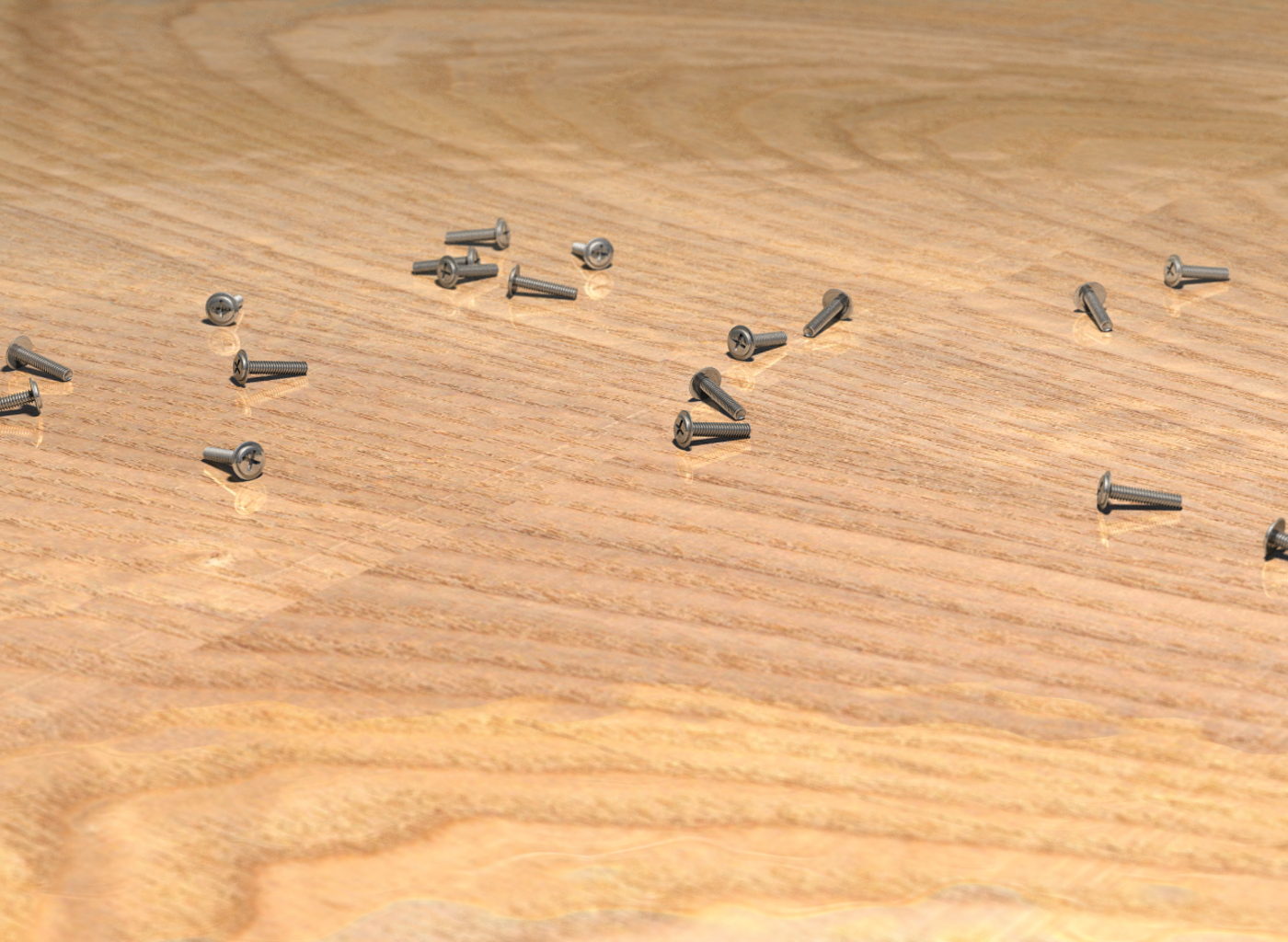
This is my latest creation, some screws tossed on a wooden table.

The wooden texture was taken from some place on the web.

It took about 3 hours in my P4-1.8Ghz

I attempted to make it as photorealistic as possible, I hope you like it.
Any comments and/or suggestions will be appreciated.

Fernando.
Post a reply to this message
Attachments:
Download 'Screws.jpg' (200 KB)
Preview of image 'Screws.jpg'
|
|
| |
| |
|
|
|
|
| |
| |
|
|
Could you please stop posting photos here? ;)
Good work!
/Stefan
"Fernando Gonzalez del Cueto" <fgd### [at] hotmail com> wrote in message
news:3ee89f12@news.povray.org...
> (I had to resend the file, because I received some error. I hope it won't
> come as a duplicate)
>
> This is my latest creation, some screws tossed on a wooden table.
>
> The wooden texture was taken from some place on the web.
>
> It took about 3 hours in my P4-1.8Ghz
>
> I attempted to make it as photorealistic as possible, I hope you like it.
> Any comments and/or suggestions will be appreciated.
>
> Fernando.
>
>
> com> wrote in message
news:3ee89f12@news.povray.org...
> (I had to resend the file, because I received some error. I hope it won't
> come as a duplicate)
>
> This is my latest creation, some screws tossed on a wooden table.
>
> The wooden texture was taken from some place on the web.
>
> It took about 3 hours in my P4-1.8Ghz
>
> I attempted to make it as photorealistic as possible, I hope you like it.
> Any comments and/or suggestions will be appreciated.
>
> Fernando.
>
>
>
Post a reply to this message
|
|
| |
| |
|
|
|
|
| |
| |
|
|
It's very nice! Depth of field, finish of screws. I have 3 small
suggestions:

1)  Blur the reflections on the wood.
2)  Translate seam of texture away from origin (or make it seamless)
3)  Concentrate the screws in a smaller area and crop resolution.
     (For those of us, who doesn't have so big screens.)

But I got to say, it's very, very nice!  I also wonder:  If the shadows are
so intense, why don't I sense an intense lightsource above the scene .. the
screws are very reflective so I would expect a strong highlight. But maybe
you have referenced a photo so I shouldn't complain?  :o)  (not that I try
to complain at all)

Regards,
Hugo
Post a reply to this message
|
|
| |
| |
|
|
|
|
| |
| |
|
|
I swear, if you put a slight scratch on the table somewhere, I'll
accuse you of posting a photo.

Very nice...
Post a reply to this message
|
|
| |
| |
|
|
|
|
| |
| |
|
|
AWESOME...
Post a reply to this message
|
|
| |
| |
|
|
|
|
| |
| |
|
|
"Stefan Persson" <azy### [at] teliacom> escribió en el mensaje
news:3ee8a01e$1@news.povray.org...
> Could you please stop posting photos here? ;)
> Good work!
>
> /Stefan

He he he... Thanks ;)
Post a reply to this message
|
|
| |
| |
|
|
|
|
| |
| |
|
|
"Hugo Asm" <hua### [at] post3teledk> escribió en el mensaje
news:3ee8a73f@news.povray.org...
> It's very nice! Depth of field, finish of screws. I have 3 small
> suggestions:
>
> 1)  Blur the reflections on the wood.
> 2)  Translate seam of texture away from origin (or make it seamless)
> 3)  Concentrate the screws in a smaller area and crop resolution.
>      (For those of us, who doesn't have so big screens.)

About the blurry reflection, I tried adding a layer of transparent and
reflective "varnish"... however, the results were not that impressive, and
the render time was awfully increased. Do you know of a better way of doing
it?

About the seam, I was going to do it, but I forgot :P

About the placement, I totally agree, but as the screws are located
randomly, some intersections may occur, and I had to disperse them more to
avoid that, without having to place them individually... Yes, I admit I'm a
bit lazy, he he he


> But I got to say, it's very, very nice!  I also wonder:  If the shadows
are
> so intense, why don't I sense an intense lightsource above the scene ..
the
> screws are very reflective so I would expect a strong highlight. But maybe
> you have referenced a photo so I shouldn't complain?  :o)  (not that I try
> to complain at all)

Thanks! :)
Post a reply to this message
|
|
| |
| |
|
|
|
|
| |
| |
|
|
"Richard Dault" <a20### [at] NOSPAMrogerscom> escribió en el mensaje
news:3ee8ae33@news.povray.org...
> I swear, if you put a slight scratch on the table somewhere, I'll
> accuse you of posting a photo.
>
> Very nice...

Thanks for your comments!

Fernando
Post a reply to this message
|
|
| |
| |
|
|
|
|
| |
| |
|
|
"Greg M. Johnson" <gregj:-)565### [at] aolcom> escribió en el mensaje
news:3ee8db69$1@news.povray.org...
> AWESOME...

I'm glad you liked it Greg, thanks.

Fernando.
Post a reply to this message
|
|
| |
| |
|
|
|
|
| |
| |
|
|
"Fernando Gonzalez del Cueto" <fgd### [at] hotmailcom> wrote in message
news:3ee89f12@news.povray.org...

Excellent. This was well worth downloading twice! Would you mind sharing
your AA settings?

 -Shay
Post a reply to this message
|
|
| |
| |
|
|
|
|
| |
| |
|
|
Fernando Gonzalez del Cueto wrote:
>(I had to resend the file, because I received some error. I hope it won't
>come as a duplicate)
>
>This is my latest creation, some screws tossed on a wooden table.
>
>The wooden texture was taken from some place on the web.
>
>It took about 3 hours in my P4-1.8Ghz
>
>I attempted to make it as photorealistic as possible, I hope you like it.
>Any comments and/or suggestions will be appreciated.
>
>Fernando.
>

Fernando,

How do you position the screw objects on the table? In particular, I'd like
to know how you rotate the screws so that they lie so nicely without
clipping through the table's surface, or leaving small gaps where contact
should be made.

Do you manually estimate the transformations until it looks right, or do you
have an algorithm that uses trace() to figure it out?

I'm trying to work on an algorithm that lets me place objects onto a surface
in a natural way.
Post a reply to this message
|
|
| |
| |
|
|
|
|
| |
| |
|
|
"Shay" <sah### [at] simcopartscom> escribió en el mensaje
news:3ee9f500@news.povray.org...
>
> "Fernando Gonzalez del Cueto" <fgd### [at] hotmailcom> wrote in message
> news:3ee89f12@news.povray.org...
>
> Excellent. This was well worth downloading twice! Would you mind sharing
> your AA settings?
>
>  -Shay

Thanks Shay!

Of course, my antialias settings are none :) I used focal blur instead:

  aperture 0.5
  blur_samples 64
  confidence 0.9

Fernando
Post a reply to this message
|
|
| |
| |
|
|
|
|
| |
| |
|
|
I rotated the screw by trial and error, until I believed it looked OK :)

Then I copied them and distributed them randomly, and had to use trial and
error to avoid intersections between screws...

Not very elegant, but it was faster than coding something more complicated.

Fernando.
Post a reply to this message
|
|
| |
| |
|
|
|
|
| |