|
|
|
|
|
|
| |
| |
|
|
From: Rene Schwietzke
Subject: Anti-Aliasing Problem including sample image (58k)
Date: 26 Nov 2002 17:53:40
Message: <3de3fb74@news.povray.org>
|
|
|
| |
| |
|
|
Hi,

It might not be the right group to post a question about an possible render
issue but I wanna post
an example picture.
I have not found any previous discussions about a similar topic, if there is
any, please let me know.

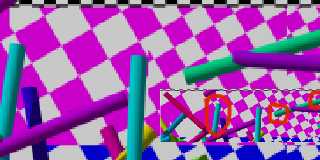
Currently I am writing a short tutorial about anti-aliasing and during the
rendering of several test images, I discovered the effect of bleeding colors
(rough translation from German, sorry). In English, certain color
combinations do not show an quality improvement during rendering with
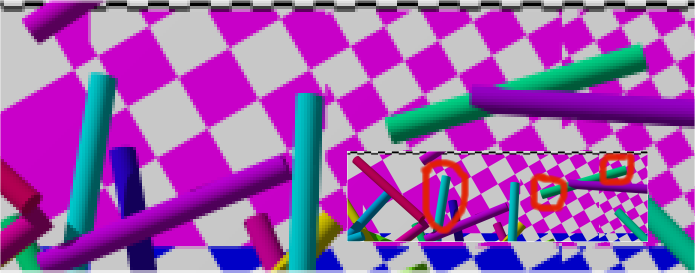
anti-aliasing. Instead an unwanted color appears. In my example, a dark blue
appears between a light blue and magenta. See the marked area in the
attached image.

After thinking about the algorithms of anti-aliasing I seems pretty clear to
me, that such effect can occur. Anti-aliasing averages colors to find a more
suitable color at edges and so tries to improve the image quality. But the
average between a light blue and magenta is dark blue, even when this means
stressing the edge instead of smoothing it.

I tried both anti-aliasing methods and different settings (deepness,
threshold). A similar effect occurs in all graphics applications during
resizing of images with smart interpolation algorithms. These resizing
algorihms also average colors to deliver better results and therefore get
cought in the same problem.

Does anyone know a way to suppress this strange but quite logical behavior?
Would it make sense to use an averaging algorithm based on HSL instead of
RGB to improve the results? Of course, it could also be a problem without
any solution. Comments are welcome.

Thanks,
Rene

P.S. Sorry for posting a PNG file, but this is the only compressed and well
supported file format that can demonstrate these pixel color problems.
--
Rene Schwietzke
http://www.rene-schwietzke.de/
Post a reply to this message
Attachments:
Download 'aa-sample.png' (58 KB)
Preview of image 'aa-sample.png'
|
|
| |
| |
|
|
From: hughes, b
Subject: Re: Anti-Aliasing Problem including sample image (58k)
Date: 26 Nov 2002 18:30:16
Message: <3de40408@news.povray.org>
|
|
|
| |
| |
|
|
"Rene Schwietzke" <r.s### [at] reneschwietzke de> wrote in message
news:3de3fb74@news.povray.org...
---snip---
> After thinking about the algorithms of anti-aliasing I seems pretty clear
to
> me, that such effect can occur. Anti-aliasing averages colors to find a
more
> suitable color at edges and so tries to improve the image quality. But the
> average between a light blue and magenta is dark blue, even when this
means
> stressing the edge instead of smoothing it.
---snip---
> Does anyone know a way to suppress this strange but quite logical
behavior?
> Would it make sense to use an averaging algorithm based on HSL instead of
> RGB to improve the results? Of course, it could also be a problem without
> any solution. Comments are welcome.
Good example. Yellow against magenta also looks a little strange to me. And
where the blue checkers are the yellow and light green cylinders darken. If
other programs also do this like you say then it sounds like a holy grail
idea, but maybe a good one anyway.If I only knew how HSL would effect it... de> wrote in message
news:3de3fb74@news.povray.org...
---snip---
> After thinking about the algorithms of anti-aliasing I seems pretty clear
to
> me, that such effect can occur. Anti-aliasing averages colors to find a
more
> suitable color at edges and so tries to improve the image quality. But the
> average between a light blue and magenta is dark blue, even when this
means
> stressing the edge instead of smoothing it.
---snip---
> Does anyone know a way to suppress this strange but quite logical
behavior?
> Would it make sense to use an averaging algorithm based on HSL instead of
> RGB to improve the results? Of course, it could also be a problem without
> any solution. Comments are welcome.
Good example. Yellow against magenta also looks a little strange to me. And
where the blue checkers are the yellow and light green cylinders darken. If
other programs also do this like you say then it sounds like a holy grail
idea, but maybe a good one anyway.If I only knew how HSL would effect it...
Post a reply to this message
|
|
| |
| |
|
|
From: Ive
Subject: Re: Anti-Aliasing Problem including sample image (58k)
Date: 26 Nov 2002 20:16:56
Message: <3de41d08@news.povray.org>
|
|
|
| |
| |
|
|
> I tried both anti-aliasing methods and different settings (deepness,
> threshold). A similar effect occurs in all graphics applications during
> resizing of images with smart interpolation algorithms. These resizing
> algorihms also average colors to deliver better results and therefore get
> cought in the same problem.
>

Thats not completely true. Photoshop uses internal the CIE L*a*b color
format for all image processing and does avoid that unwanted color blending.
L*a*b is also a possible color format for TIFF images but most image
viewers (like IrfanView) do not display this format correctly, maybe thats the
reason that not so many people know about it.
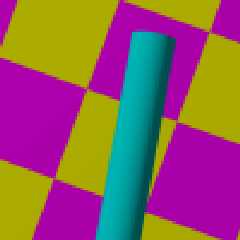
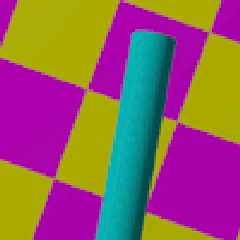
For high quality images, it's the best to render them without AA but twice the
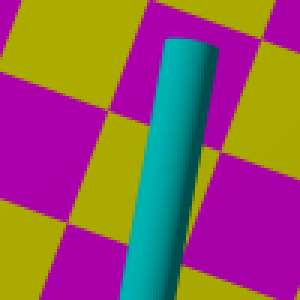
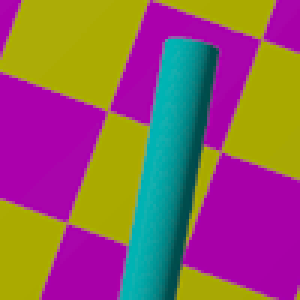
size and then use P'shop to downsample them. See the attached (3x magnified)
examples. One is just POV with +AA0.0 +AM2, the other one is resampled
with Photoshop. If I remember right, ImageMagic works fine with CIE L*a*b,
so maybe it could also be used, but I have not checked this out.

so long
-Ive
Post a reply to this message
Attachments:
Download 'aaTest-POV.png' (7 KB)
Download 'aaTest-PS.png' (12 KB)
Preview of image 'aaTest-POV.png'
Preview of image 'aaTest-PS.png'
|
|
| |
| |
|
|
From: Anders K
Subject: Re: Anti-Aliasing Problem including sample image (58k)
Date: 26 Nov 2002 20:36:16
Message: <3de42190$1@news.povray.org>
|
|
|
| |
| |
|
|
The problem completely goes away when I gamma-correct your image by 2.2.
Don't tell me that old anti-aliasing gamma bug snuck back in there...

Anders

--
light_source{6#local D=#macro B(E)#macro A(D)#declare E=(E-#declare
C=mod(E D);C)/D;C#end#while(E)#if(A(8)=7)#declare D=D+2.8;#else#if(
C>2)}torus{1..2clipped_by{box{-2y}}rotate<1 0C>*90translate<D+1A(2)
*2+1#else}cylinder{0(C-v=1).2translate<D+C*A(2)A(4)#end-2 13>finish
{specular 1}pigment{rgb x}#end#end#end-8;1B(445000298)B(519053970)B
(483402386)B(1445571258)B(77778740)B(541684549)B(42677491)B(70)}
Post a reply to this message
|
|
| |
| |
|
|
From: Anders K
Subject: Re: Anti-Aliasing Problem including sample image (58k)
Date: 26 Nov 2002 21:17:28
Message: <3de42b38$1@news.povray.org>
|
|
|
| |
| |
|
|
I wrote:
> The problem completely goes away when I gamma-correct your image by 2.2.
> Don't tell me that old anti-aliasing gamma bug snuck back in there...

I just checked, and indeed, POV-Ray seems to be antialiasing after gamma
correction. Bad!! This should really be fixed, but as a workaround, you can
render with Display_Gamma=1.0 and then manually gamma-correct the image by
2.2.

Anders

--
light_source{6#local D=#macro B(E)#macro A(D)#declare E=(E-#declare
C=mod(E D);C)/D;C#end#while(E)#if(A(8)=7)#declare D=D+2.8;#else#if(
C>2)}torus{1..2clipped_by{box{-2y}}rotate<1 0C>*90translate<D+1A(2)
*2+1#else}cylinder{0(C-v=1).2translate<D+C*A(2)A(4)#end-2 13>finish
{specular 1}pigment{rgb x}#end#end#end-8;1B(445000298)B(519053970)B
(483402386)B(1445571258)B(77778740)B(541684549)B(42677491)B(70)}
Post a reply to this message
|
|
| |
| |
|
|
From: hughes, b
Subject: Re: Anti-Aliasing Problem including sample image (58k)
Date: 27 Nov 2002 03:31:52
Message: <3de482f8@news.povray.org>
|
|
|
| |
| |
|
|
"Anders K." <and### [at] kaseorgcom> wrote in message
news:3de42b38$1@news.povray.org...
> I wrote:
> > The problem completely goes away when I gamma-correct your image by 2.2.
> > Don't tell me that old anti-aliasing gamma bug snuck back in there...
>
> I just checked, and indeed, POV-Ray seems to be antialiasing after gamma
> correction. Bad!! This should really be fixed, but as a workaround, you
can
> render with Display_Gamma=1.0 and then manually gamma-correct the image by
> 2.2.

Oh no. Glad someone knew about it, I sure don't remember that. Also seems to
agree with Ive's observation that AA can be done okay in another program
after rendering. Just by looking though I can't imagine why such a bug, if
is so, would be so detrimental. I'd expect a less pronounced change to
occur, from my laymans viewpoint.

--
Farewell,
Bob
Post a reply to this message
|
|
| |
| |
|
|
From: Rene Schwietzke
Subject: Re: Anti-Aliasing Problem including sample image (58k)
Date: 27 Nov 2002 03:57:19
Message: <3de488ef@news.povray.org>
|
|
|
| |
| |
|
|
Hi,

Your are right. I just checked Irfanview and PSP. I know ImageMagick but I
use it very seldom. I will check it.

Thanks
Rene

--
Rene Schwietzke
r.schwietzke<at>reneschwietzke.de
http://www.rene-schwietzke.de/

> Thats not completely true. Photoshop uses internal the CIE L*a*b color
> format for all image processing and does avoid that unwanted color
blending.
> L*a*b is also a possible color format for TIFF images but most image
> viewers (like IrfanView) do not display this format correctly, maybe thats
the
> reason that not so many people know about it.
> For high quality images, it's the best to render them without AA but twice
the
> size and then use P'shop to downsample them. See the attached (3x
magnified)
> examples. One is just POV with +AA0.0 +AM2, the other one is resampled
> with Photoshop. If I remember right, ImageMagic works fine with CIE L*a*b,
> so maybe it could also be used, but I have not checked this out.
Post a reply to this message
|
|
| |
| |
|
|
From: Rene Schwietzke
Subject: Re: Anti-Aliasing Problem including sample image (58k)
Date: 27 Nov 2002 03:58:50
Message: <3de4894a@news.povray.org>
|
|
|
| |
| |
|
|
Thanks. I will give it a try today.

Rene
--
Rene Schwietzke
r.schwietzke<at>reneschwietzke.de
http://www.rene-schwietzke.de/

"Anders K." <and### [at] kaseorgcom> wrote in message
news:3de42b38$1@news.povray.org...
> I wrote:
> > The problem completely goes away when I gamma-correct your image by 2.2.
> > Don't tell me that old anti-aliasing gamma bug snuck back in there...
>
> I just checked, and indeed, POV-Ray seems to be antialiasing after gamma
> correction. Bad!! This should really be fixed, but as a workaround, you
can
> render with Display_Gamma=1.0 and then manually gamma-correct the image by
> 2.2.
Post a reply to this message
|
|
| |
| |
|
|
From: Christoph Hormann
Subject: Re: Anti-Aliasing Problem including sample image (58k)
Date: 27 Nov 2002 04:19:56
Message: <3DE48E3B.A056E319@gmx.de>
|
|
|
| |
| |
|
|
Rene Schwietzke wrote:
>
> [...]
>
> Does anyone know a way to suppress this strange but quite logical behavior?
> Would it make sense to use an averaging algorithm based on HSL instead of
> RGB to improve the results? Of course, it could also be a problem without
> any solution. Comments are welcome.

The reason is that color blending in POV is based on linear interpolation
between the different color values in RGB space.  Although HSL color space
is somewhat different i don't think it would solve the problem.

I think it would be an interesting feature to add an optional different
(and more realistic) color interpolation method to POV-Ray, not only for
antialiasing but also for color maps for example.

Christoph

--
POV-Ray tutorials, include files, Sim-POV,
HCR-Edit and more: http://www.tu-bs.de/~y0013390/
Last updated 15 Nov. 2002 _____./\/^>_*_<^\/\.______
Post a reply to this message
|
|
| |
| |
|
|
From: Rene Schwietzke
Subject: Re: Anti-Aliasing Problem including sample image (58k)
Date: 27 Nov 2002 04:33:01
Message: <3de4914d$1@news.povray.org>
|
|
|
| |
| |
|
|
Hi Christoph,

I checked the code and saw the linear interpolation algorithm. Therefore I
expected an unsolvable problem but the discussion above shows, that it might
be a defect. Could LAB solve the problem as discussed before? It seems to be
fine for Photoshop but it could be protected by copyrights...

Rene
--
Rene Schwietzke
r.schwietzke<at>reneschwietzke.de
http://www.rene-schwietzke.de/

"Christoph Hormann" <chr### [at] gmxde> wrote in message
news:3DE48E3B.A056E319@gmx.de...

> The reason is that color blending in POV is based on linear interpolation
> between the different color values in RGB space.  Although HSL color space
> is somewhat different i don't think it would solve the problem.
>
> I think it would be an interesting feature to add an optional different
> (and more realistic) color interpolation method to POV-Ray, not only for
> antialiasing but also for color maps for example.
>
> Christoph
Post a reply to this message
|
|
| |
| |
|
|
From: Christoph Hormann
Subject: Re: Anti-Aliasing Problem including sample image (58k)
Date: 27 Nov 2002 05:00:53
Message: <3DE497D5.5B052B6B@gmx.de>
|
|
|
| |
| |
|
|
Rene Schwietzke wrote:
>
> Hi Christoph,
>
> I checked the code and saw the linear interpolation algorithm. Therefore I
> expected an unsolvable problem but the discussion above shows, that it might
> be a defect. Could LAB solve the problem as discussed before? It seems to be
> fine for Photoshop but it could be protected by copyrights...

Doing color interpolation in CIE color space could indeed help but
conversion isn't easy.  A google search for 'CIE color interpolation' or
something similar will spit out a lot of material.  It might be easier
though to simply implement some nonlinear interpolation in RGB space
instead, this could be easily adjusted too.

Christoph

--
POV-Ray tutorials, include files, Sim-POV,
HCR-Edit and more: http://www.tu-bs.de/~y0013390/
Last updated 15 Nov. 2002 _____./\/^>_*_<^\/\.______
Post a reply to this message
|
|
| |
| |
|
|
From: Rene Schwietzke
Subject: Re: Anti-Aliasing Problem including sample image (58k)
Date: 27 Nov 2002 05:25:47
Message: <3de49dab$1@news.povray.org>
|
|
|
| |
| |
|
|
Hi,

the ImageMagick (http://www.imagemagick.org) source can be accessed...a way
to borrow a few ideas?

Rene

--
Rene Schwietzke
r.schwietzke<at>reneschwietzke.de
http://www.rene-schwietzke.de/
"Christoph Hormann" <chr### [at] gmxde> wrote in message
news:3DE497D5.5B052B6B@gmx.de...
>
> Doing color interpolation in CIE color space could indeed help but
> conversion isn't easy.  A google search for 'CIE color interpolation' or
> something similar will spit out a lot of material.  It might be easier
> though to simply implement some nonlinear interpolation in RGB space
> instead, this could be easily adjusted too.
>
Post a reply to this message
|
|
| |
| |
|
|
|
|
| |
| |
|
|
> I just checked, and indeed, POV-Ray seems to be antialiasing after gamma
> correction. Bad!! This should really be fixed, but as a workaround, you can
> render with Display_Gamma=1.0 and then manually gamma-correct the image by
> 2.2.
>

Strange. I've checked it and it seems to work, but I do not understand why.
From my knowledge, simple color blending within the RGB color space
should always give that unwanted result, and I do not see what gamma
correction has to do with it. Can somebody please enlighten me.

-Ive
Post a reply to this message
|
|
| |
| |
|
|
From: Anders K
Subject: Re: Anti-Aliasing Problem including sample image (58k)
Date: 27 Nov 2002 11:22:13
Message: <3de4f135@news.povray.org>
|
|
|
| |
| |
|
|
Ive wrote:
> Strange. I've checked it and it seems to work, but I do not understand
why.
> From my knowledge, simple color blending within the RGB color space
> should always give that unwanted result, and I do not see what gamma
> correction has to do with it. Can somebody please enlighten me.

Suppose we're just "antialiasing" two pixels together, purple and cyan --
that is, rgb <1, 0, 1> and rgb <0, 1, 1>. If we antialias and then
gamma-correct, we get <0.730, 0.730, 1> which the monitor turns into <0.500,
0.500, 1>, the color halfway between purple and cyan. However, if we
gamma-correct and then antialias (as POV-Ray does), we get <0.500, 0.500, 1>
which the monitor turns into about <0.218, 0.218, 1> -- resulting in the
blue line.

Anders

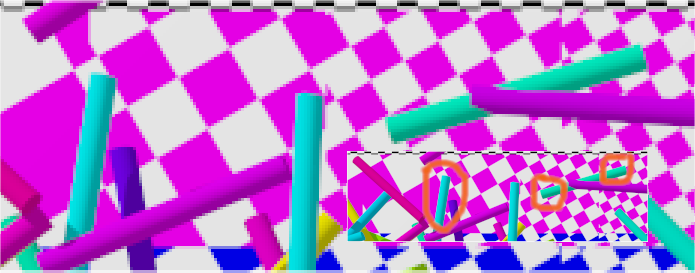
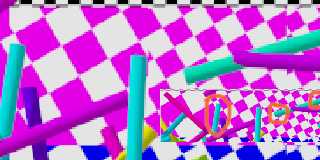
P.S. Here's the original image gamma-corrected by 2.2. As you can see, the
unwanted colors are gone.

--
light_source{6#local D=#macro B(E)#macro A(D)#declare E=(E-#declare
C=mod(E D);C)/D;C#end#while(E)#if(A(8)=7)#declare D=D+2.8;#else#if(
C>2)}torus{1..2clipped_by{box{-2y}}rotate<1 0C>*90translate<D+1A(2)
*2+1#else}cylinder{0(C-v=1).2translate<D+C*A(2)A(4)#end-2 13>finish
{specular 1}pigment{rgb x}#end#end#end-8;1B(445000298)B(519053970)B
(483402386)B(1445571258)B(77778740)B(541684549)B(42677491)B(70)}
Post a reply to this message
Attachments:
Download 'aa-sample.png' (56 KB)
Preview of image 'aa-sample.png'
|
|
| |
| |
|
|
From: Ive
Subject: Re: Anti-Aliasing Problem including sample image (58k)
Date: 27 Nov 2002 13:05:30
Message: <3de5096a@news.povray.org>
|
|
|
| |
| |
|
|
> Suppose we're just "antialiasing" two pixels together, purple and cyan --
> that is, rgb <1, 0, 1> and rgb <0, 1, 1>. If we antialias and then
> gamma-correct, we get <0.730, 0.730, 1> which the monitor turns into <0.500,
> 0.500, 1>, the color halfway between purple and cyan. However, if we
> gamma-correct and then antialias (as POV-Ray does), we get <0.500, 0.500, 1>
> which the monitor turns into about <0.218, 0.218, 1> -- resulting in the
> blue line.
>

Well, I already got it by thinking a little more about the problem (as always
first thinking then posting) but anyway thanks a lot.

-Ive
Post a reply to this message
|
|
| |
| |
|
|
From: Anders K
Subject: Re: Anti-Aliasing Problem including sample image (58k)
Date: 27 Nov 2002 13:48:19
Message: <3de51373$1@news.povray.org>
|
|
|
| |
| |
|
|
I posted a patch for this problem in povray.programming.

Subject: Apply gamma correction after antialiasing
<http://news.povray.org/3de5126d$1@news.povray.org>

For this patch to work, make sure you set global_settings { assumed_gamma
1.0 } in your scene.

Anders

--
light_source{6#local D=#macro B(E)#macro A(D)#declare E=(E-#declare
C=mod(E D);C)/D;C#end#while(E)#if(A(8)=7)#declare D=D+2.8;#else#if(
C>2)}torus{1..2clipped_by{box{-2y}}rotate<1 0C>*90translate<D+1A(2)
*2+1#else}cylinder{0(C-v=1).2translate<D+C*A(2)A(4)#end-2 13>finish
{specular 1}pigment{rgb x}#end#end#end-8;1B(445000298)B(519053970)B
(483402386)B(1445571258)B(77778740)B(541684549)B(42677491)B(70)}
Post a reply to this message
|
|
| |
| |
|
|
|
|
| |