|
|
|
|
|
|
| |
| |
|
|
|
|
| |
| |
|
|
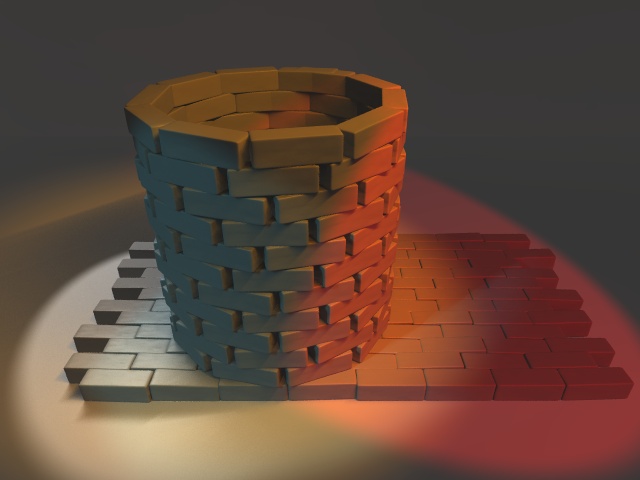
on disk i found a piece of a scene i made long time ago. it is a macro
which makes a floor, a wall and a well. the well part of macro is buggy as
everyone can see. that is because i have no solution for the question: on a
defined stone and a nearly given radius how many complete stones can be
positioned to fill a circle and how great is radius then? is there a
formular i can use? for help i would be appreciated. for comments on the
pic, too.
Post a reply to this message
Attachments:
Download 'well.jpg' (50 KB)
Preview of image 'well.jpg'
|
|
| |
| |
|
|
|
|
| |
| |
|
|
Wasn't it marabou who wrote:
>
>on disk i found a piece of a scene i made long time ago. it is a macro
>which makes a floor, a wall and a well. the well part of macro is buggy as
>everyone can see. that is because i have no solution for the question: on a
>defined stone and a nearly given radius how many complete stones can be
>positioned to fill a circle and how great is radius then? is there a
>formular i can use? for help i would be appreciated.

I'd attack it like this:

The interior faces of the bricks form a regular N-gon with the side
equal to the length of the brick. Determine the sizes of regular N-gons
with unit size and pick the one that most nearly matches the given
radius.

Let's call the distance from the centre of the circle to the midpoint of
an edge "R". (It's not a true radius, particularly in cases where N is
odd).

We know that the sum of the angles at the centre is 2*Pi, and that the
N-gon is regular, so each edge subtends an angle of 2*Pi/N at the
centre.

Lets draw a right angled triangle connecting the centre of the circle,
the centre of an edge and an adjacent vertex. We can see that the angle
at the centre is Pi/N, and it's tangent is 0.5/R (opposite over
adjacent), so

        tan(pi/N) = 0.5/R

i.e.

        R = 1/(2*tan(pi/N))


So

#declare N=3;
#while (1/(2*tan(pi/N)) < given_radius)
  #declare N=N+1;
#end
#declare R = 1/(2*tan(pi/N));

--
Mike Williams
Gentleman of Leisure
Post a reply to this message
|
|
| |
| |
|
|
|
|
| |
| |
|
|
marabou wrote:
> on a
> defined stone and a nearly given radius how many complete stones can be
> positioned to fill a circle and how great is radius then? is there a
> formular i can use?
Hello Marabou. Here is some code for you. I tested and re-tested this
code and it works great. Note, Radius must be a multiple of Scale. For
example if Scale is 4, then Radius must be 4, 8, 12, 16, etc. Here is
the code (I added a camera and light_source for convenience):
camera{location<0,40,-40>
look_at 0
angle 35
}
light_source{
<2,1,-.5>*100000
,<1.5 1.45 1.25>*1.7
}
#declare Scale=1;
#declare Radius=10;
#declare RotateV=0;
#while(RotateV<360)
superellipsoid{<.2,.2>
pigment{rgb 1}
scale< Scale, Scale/2, Scale/2 >
translate z*Radius
rotate y*RotateV
}
#local RotateV = RotateV+360/Radius/3*Scale;
#end
--
Samuel Benge
sbe### [at] caltel com com
Post a reply to this message
|
|
| |
| |
|
|
|
|
| |
| |
|
|
marabou schrieb:
> that is because i have no solution for the question: on a
> defined stone and a nearly given radius how many complete stones can be
> positioned to fill a circle and how great is radius then? is there a
> formular i can use?

I used some formulas in my arch macro. It can do circles too. Just have
a look at:

http://www.b0n541.net/povray/povmacro.html

I hope the comments in the code are not to confusing...

So long,

Bonsai


--
<--------------------------->
    ___ __ __  _ ___ ___  _
   | _ )  \  \( )  _) _ )( )
   | _ \() |\ \ |\ \/ _ \| |
   |___/__/_)\__)___)/ \_)_)

        www.b0n541.net
<--------------------------->
Post a reply to this message
|
|
| |
| |
|
|
|
|
| |
| |
|
|
On Thu, 25 Jul 2002 20:40:53 +0200, marabou <not### [at] availablenet> wrote:

>
>on disk i found a piece of a scene i made long time ago. it is a macro
>which makes a floor, a wall and a well. the well part of macro is buggy as
>everyone can see. that is because i have no solution for the question: on a
>defined stone and a nearly given radius how many complete stones can be
>positioned to fill a circle and how great is radius then? is there a
>formular i can use? for help i would be appreciated. for comments on the
>pic, too.

Hi,
I found an interesting article in the SIGGRAPH'90 proceedings which
might interest you ("A Method of Generating Stone Wall Patterns" by
Kazunori Miyata), which coupled to this ("Feature-Based Cellular
Texturing for Architectural Models" by Justin Legakis, Julie Dorsey
and Steven Gortler, SIGGRAPH'01) should let build the most complex
stone designs.

I hope it helps,
Alex

P.S.: If you want i'll e-mail you the articles in PDF form.
Post a reply to this message
|
|
| |
| |
|
|
|
|
| |
| |
|
|
> P.S.: If you want i'll e-mail you the articles in PDF form.

I'm also interested. Is it possible to send them to me too.

Thanks in advance...

Bonsai


--
<--------------------------->
    ___ __ __  _ ___ ___  _
   | _ )  \  \( )  _) _ )( )
   | _ \() |\ \ |\ \/ _ \| |
   |___/__/_)\__)___)/ \_)_)

        www.b0n541.net
<--------------------------->
Post a reply to this message
|
|
| |
| |
|
|
|
|
| |
| |
|
|
They're up for grabbers on http://www.alphac.it/pov
Or, more accurately, they'll be in a minute or so...they're around 9
megs in size.

Peace and POV,
Alex
Post a reply to this message
|
|
| |
| |
|
|
|
|
| |
| |
|
|
"Samuel Benge" <sbe### [at] caltelcom> wrote:
> marabou wrote:
>
> > on a
> > defined stone and a nearly given radius how many complete stones can be
> > positioned to fill a circle and how great is radius then? is there a
> > formular i can use?
>
>
> Hello Marabou. Here is some code for you. I tested and re-tested this
> code and it works great. Note, Radius must be a multiple of Scale. For
> example if Scale is 4, then Radius must be 4, 8, 12, 16, etc. Here is
> the code (I added a camera and light_source for convenience):
>
> camera{location<0,40,-40>
>   look_at 0
>   angle 35
> }
>
> light_source{
>   <2,1,-.5>*100000
>   ,<1.5 1.45 1.25>*1.7
> }
>
> #declare Scale=1;
> #declare Radius=10;
> #declare RotateV=0;
> #while(RotateV<360)
>   superellipsoid{<.2,.2>
>    pigment{rgb 1}
>    scale< Scale, Scale/2, Scale/2 >
>    translate z*Radius
>    rotate y*RotateV
>   }
>   #local RotateV = RotateV+360/Radius/3*Scale;
> #end

#declare Scale=3.2;

Same problem :-(

Regards.

-- #=--=#=--=#=--=#=--=#=--=#=--=#=--=#=--=# --
Philippe Lhoste (Paris -- France)
Professional programmer and amateur artist
http://jove.prohosting.com/~philho/
Post a reply to this message
|
|
| |
| |
|
|
|
|
| |
| |
|
|
Hmm, radius can be 3.2, 6.4, 12.8, 25.6, etc....

I guess you don't want to use a decimal radius?

Philippe Lhoste wrote:

>
> #declare Scale=3.2;
>
> Same problem :-(
>
> Regards.


--
Samuel Benge

sbe### [at] caltelcom
Post a reply to this message
|
|
| |
| |
|
|
|
|
| |
| |
|
|
"Samuel Benge" <sbe### [at] caltelcom> wrote:
> Hmm, radius can be 3.2, 6.4, 12.8, 25.6, etc....
>
> I guess you don't want to use a decimal radius?
>
> Philippe Lhoste wrote:
>
> >
> > #declare Scale=3.2;
> >
> > Same problem :-(
> >
> > Regards.

Oh well, as usual, problem between keyboard and chair...
I didn't read your note about the relationship between radius and scale.
I added it as a comment in your code snippet.

Thank you for this useful piece of code.

-- #=--=#=--=#=--=#=--=#=--=#=--=#=--=#=--=# --
Philippe Lhoste (Paris -- France)
Professional programmer and amateur artist
http://jove.prohosting.com/~philho/
Post a reply to this message
|
|
| |
| |
|
|
|
|
| |
| |
|
|
Philippe Lhoste wrote:

>
> Oh well, as usual, problem between keyboard and chair...


That's usually my problem too ;P

> I didn't read your note about the relationship between radius and scale.
> I added it as a comment in your code snippet.
>
> Thank you for this useful piece of code.
>

You're welcome. I hope it comes in handy :)

--
Samuel Benge

sbe### [at] caltelcom
Post a reply to this message
|
|
| |
| |
|
|
|
|
| |
| |
|
|
"Alessandro Morelli" <ale### [at] alphacit> schrieb im Newsbeitrag
news:b6k2ku4mdjjnjf4gtd0b16085tidkaqc3d@4ax.com...
> They're up for grabbers on http://www.alphac.it/pov


This is interesting stuff. I would love to see that stone wall generation
method implemented on an isosurface basis, but I don't know if my
programming skills are up to it. If I get it right, it would be only
necessary to implement point 1 to 3 of their method, i.e. the generation and
deformation of the joint pattern and the pathfinding for the stone. Those
paths could probably be used to define some functions which would define an
isosurface (how do I do this? Splines perhaps?). The third dimension could
be implemented with some additional function (like some pattern-function).
The time consuming subdivision-process is not necessary then. Neither their
clipping (which could be done by scaling or some threshold value).

The disadvantage is clear - rendertimes will be quite high. They might be
bearable for smaller walls. Memory usage should be reasonable.

Comments?

Marc-Hendrik
Post a reply to this message
|
|
| |
| |
|
|
|
|
| |
| |
|
|
How did you stagger the bricks from row to row?  I'm trying to do my own well,
and so far I've the rows repeating, but I can't seem to figure out how to get
each row to be rotated a little more than the last, i.e. staggered.

-Law

marabou wrote:

> on disk i found a piece of a scene i made long time ago. it is a macro
> which makes a floor, a wall and a well. the well part of macro is buggy as
> everyone can see. that is because i have no solution for the question: on a
> defined stone and a nearly given radius how many complete stones can be
> positioned to fill a circle and how great is radius then? is there a
> formular i can use? for help i would be appreciated. for comments on the
> pic, too.
>
>   ------------------------------------------------------------------------
>                Name: well.jpg
>    well.jpg    Type: JPEG Image (image/jpeg)
>            Encoding: base64
Post a reply to this message
|
|
| |
| |
|
|
|
|
| |
| |
|
|
Lawrence Winstead wrote:

> How did you stagger the bricks from row to row?  I'm trying to do my own
> well, and so far I've the rows repeating, but I can't seem to figure out
> how to get each row to be rotated a little more than the last, i.e.
> staggered.
>

you set one row of your well. then you rotate it with a randomly generated
angle. then you do the same with next row. simple, isn't it?
Post a reply to this message
|
|
| |
| |
|
|
|
|
| |
| |
|
|
Alessandro Morelli schrieb:
> They're up for grabbers on http://www.alphac.it/pov

Thanks.


--
<--------------------------->
    ___ __ __  _ ___ ___  _
   | _ )  \  \( )  _) _ )( )
   | _ \() |\ \ |\ \/ _ \| |
   |___/__/_)\__)___)/ \_)_)

        www.b0n541.net
<--------------------------->
Post a reply to this message
|
|
| |
| |
|
|
|
|
| |