|
|
|
|
|
|
| |
| |
|
|
|
|
| |
| |
|
|
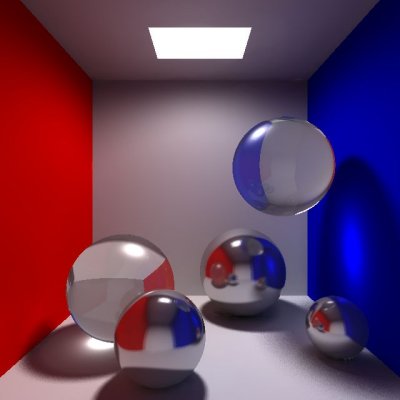
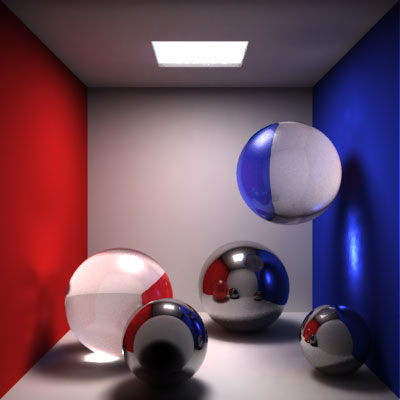
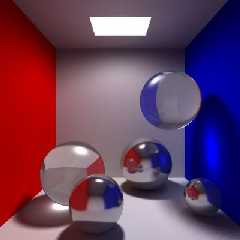
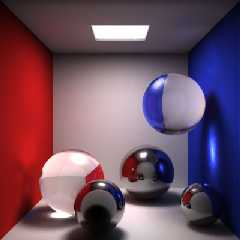
I came across a Lightwave 7 review and it featured a picture to show
Lightwave's caustic capabilities.  The picture is fairly simple so I decided
to try and duplicate it in POV-Ray 3.5 rc6.  The first picture is from
Lightwave (in case it posts in reverse order, the one with the brighter
glass spheres) and the second picture is what I rendered.  The most notable
differences are caustics that appear on the blue wall (I don't know how they
achieved the caustics to appear white) and the subtle highlights and shadows
on the red wall in Lightwave's render (I'm not sure how to get that effect
either).  Oh yeah, and the light on the ceiling in my render does not appear
to be "in the ceiling" (although it is...it shows if I don't render with
radiosity) and the shadows aren't as soft.

-Paragon
Post a reply to this message
Attachments:
Download 'draft.jpg' (17 KB)
Download 'caustics_f_02_lightwave.jpg' (21 KB)
Preview of image 'draft.jpg'
Preview of image 'caustics_f_02_lightwave.jpg'
|
|
| |
| |
|
|
|
|
| |
| |
|
|
In article <3d28a6a1@news.povray.org>, "Paragon" <use### [at] host com> wrote:
> I came across a Lightwave 7 review and it featured a picture to show
> Lightwave's caustic capabilities. The picture is fairly simple so I decided
> to try and duplicate it in POV-Ray 3.5 rc6. The first picture is from
> Lightwave (in case it posts in reverse order, the one with the brighter
> glass spheres) and the second picture is what I rendered. The most notable
> differences are caustics that appear on the blue wall (I don't know how they
> achieved the caustics to appear white) and the subtle highlights and shadows
> on the red wall in Lightwave's render (I'm not sure how to get that effect
> either). Oh yeah, and the light on the ceiling in my render does not appear
> to be "in the ceiling" (although it is...it shows if I don't render with
> radiosity) and the shadows aren't as soft.
The metal balls in your image have a fairly blurry texture, the
Lightwave ones have barely any blur at all. The camera is slightly
off...look how the room corners meet the image corners in the Lightwave
room. Also, the POV room looks like it is about twice the size of the
Lightwave room, judging from the reflections...it looks like there is a
wall just behind the camera in the Lightwave room, and one twice as far
away in the POV one. And I think the POV glass objects look washed out
in comparison because the texture isn't entirely transparent...I like to
use a 100% transparent pigment and some attenuation or media in glass
materials.
As for the shadows...your area light might be half as big as it should
be. And it looks like you might have left the default ambient values in.
Source code?
--
Christopher James Huff <chr### [at] maccom>
POV-Ray TAG e-mail: chr### [at] tagpovrayorg
TAG web site: http://tag.povray.org/ com> wrote:
> I came across a Lightwave 7 review and it featured a picture to show
> Lightwave's caustic capabilities. The picture is fairly simple so I decided
> to try and duplicate it in POV-Ray 3.5 rc6. The first picture is from
> Lightwave (in case it posts in reverse order, the one with the brighter
> glass spheres) and the second picture is what I rendered. The most notable
> differences are caustics that appear on the blue wall (I don't know how they
> achieved the caustics to appear white) and the subtle highlights and shadows
> on the red wall in Lightwave's render (I'm not sure how to get that effect
> either). Oh yeah, and the light on the ceiling in my render does not appear
> to be "in the ceiling" (although it is...it shows if I don't render with
> radiosity) and the shadows aren't as soft.
The metal balls in your image have a fairly blurry texture, the
Lightwave ones have barely any blur at all. The camera is slightly
off...look how the room corners meet the image corners in the Lightwave
room. Also, the POV room looks like it is about twice the size of the
Lightwave room, judging from the reflections...it looks like there is a
wall just behind the camera in the Lightwave room, and one twice as far
away in the POV one. And I think the POV glass objects look washed out
in comparison because the texture isn't entirely transparent...I like to
use a 100% transparent pigment and some attenuation or media in glass
materials.
As for the shadows...your area light might be half as big as it should
be. And it looks like you might have left the default ambient values in.
Source code?
--
Christopher James Huff <chr### [at] maccom>
POV-Ray TAG e-mail: chr### [at] tagpovrayorg
TAG web site: http://tag.povray.org/
Post a reply to this message
|
|
| |
| |
|
|
|
|
| |
| |
|
|
"Paragon" <use### [at] hostcom> wrote in message news:3d28a6a1@news.povray.org...
> I came across a Lightwave 7 review and it featured a picture to show
> Lightwave's caustic capabilities.  The picture is fairly simple so I
decided
> to try and duplicate it in POV-Ray 3.5 rc6.  The first picture is from
> Lightwave (in case it posts in reverse order, the one with the brighter
> glass spheres) and the second picture is what I rendered.  The most
notable
> differences are caustics that appear on the blue wall (I don't know how
they
> achieved the caustics to appear white) and the subtle highlights and
shadows
> on the red wall in Lightwave's render (I'm not sure how to get that effect
> either).  Oh yeah, and the light on the ceiling in my render does not
appear
> to be "in the ceiling" (although it is...it shows if I don't render with
> radiosity) and the shadows aren't as soft.

Don't know about Lightwave, but it could be that the light has a
"brightness" value over the "maximum". That way it makes the spot on the
wall white. Just a thought.
Post a reply to this message
|
|
| |
| |
|
|
|
|
| |
| |
|
|
> Lightwave ones have barely any blur at all. The camera is slightly
> off...look how the room corners meet the image corners in the Lightwave
> room. Also, the POV room looks like it is about twice the size of the
> Lightwave room, judging from the reflections...it looks like there is a
> wall just behind the camera in the Lightwave room, and one twice as far
> away in the POV one. And I think the POV glass objects look washed out
> in comparison because the texture isn't entirely transparent...I like to
> use a 100% transparent pigment and some attenuation or media in glass
> materials.

Yeah, I blurred the reflection a little too much,  I'll have to fix that.
And the POV room is longer than the Lightwave room.  Actually, I don't know
how to adjust the camera properly so that I can get a good perspective in
such a small room.

> Source code?
I'll post in povray.text.scene-files.  If you can adjust and get better
results,
please post results (and adjusted settings).

-Paragon
Post a reply to this message
|
|
| |
| |
|
|
|
|
| |
| |
|
|
> from Lightwave (in case it posts in reverse order ..

It does come up reversed, but why?

Anyway I thought your picture was the lower one and I preferred the upper
one.. Now I see the upper one is yours, congratulations!  ;o)

Regards,
Hugo
Post a reply to this message
|
|
| |
| |
|
|
|
|
| |
| |
|
|
What you can do for the back wall is use a plane with an interior texture
using the wall texture and for the exterior texture make it transparent so
you can see through it like a window and place the camera farther back.

"Paragon" <use### [at] hostcom> wrote in message news:3d28cd36@news.povray.org...
>
>Actually, I don't know
> how to adjust the camera properly so that I can get a good perspective in
> such a small room.
Post a reply to this message
|
|
| |
| |
|
|
From: Nathan Kopp
Subject: Re: POV-Ray vs. Lightwave image (16k + 20k)
Date: 8 Jul 2002 19:27:04
Message: <3d2a1fc8@news.povray.org>
|
|
|
| |
| |
|
|
"Paragon" <use### [at] hostcom> wrote...
> I came across a Lightwave 7 review and it featured a picture to show
> Lightwave's caustic capabilities.  The picture is fairly simple so I
decided
> to try and duplicate it in POV-Ray 3.5 rc6.  The first picture is from
> Lightwave (in case it posts in reverse order, the one with the brighter
> glass spheres) and the second picture is what I rendered.  The most
notable
> differences are caustics that appear on the blue wall (I don't know how
they
> achieved the caustics to appear white)

Instead of using rgb<0,0,1> for your wall, use something not quite so
perfect, like rgb<0.01, 0.01, 1.0>.  The non-zero components for red and
green will allow the wall to show colors other than blue.

> and the subtle highlights and shadows
> on the red wall in Lightwave's render (I'm not sure how to get that effect
> either).

Did you enable reflection photons for the glass spheres and metal spheres?
Also, their spheres might have a bit more reflection.  You might also want
to consider the possibility that those "subtle highlights" might be
aretefacts (though the more likely scenario is internal reflection in the
glass spheres).

Your image is very nice, though!

-Nathan
Post a reply to this message
|
|
| |
| |
|
|
|
|
| |
| |
|
|
> It does come up reversed, but why?
I use Outlook Express for browsing the newsgroups and when I attach files,
it orders them alphabetically them posts them in the reverse order.  I
always get this confused though.

> Anyway I thought your picture was the lower one and I preferred the upper
> one.. Now I see the upper one is yours, congratulations!  ;o)
Thanks!

-Paragon
Post a reply to this message
|
|
| |
| |
|
|
|
|
| |
| |
|
|
> Did you enable reflection photons for the glass spheres and metal spheres?
> Also, their spheres might have a bit more reflection.  You might also want
> to consider the possibility that those "subtle highlights" might be
> aretefacts (though the more likely scenario is internal reflection in the
> glass spheres).

> Your image is very nice, though!

Thanks for the comments and suggestions, learning POV-Ray is an ever growing
process for me.

-Paragon
Post a reply to this message
|
|
| |
| |
|
|
|
|
| |
| |
|
|
> I came across a Lightwave 7 review and it featured a picture to show
> Lightwave's caustic capabilities.  The picture is fairly simple so I
decided
> to try and duplicate it in POV-Ray 3.5 rc6.  The first picture is from
> Lightwave (in case it posts in reverse order, the one with the brighter
> glass spheres) and the second picture is what I rendered.  The most
notable
> differences are caustics that appear on the blue wall (I don't know how
they
> achieved the caustics to appear white) and the subtle highlights and
shadows
> on the red wall in Lightwave's render (I'm not sure how to get that effect
> either).  Oh yeah, and the light on the ceiling in my render does not
appear
> to be "in the ceiling" (although it is...it shows if I don't render with
> radiosity) and the shadows aren't as soft.

Personally I disagree that the "most notable differences are caustics"... I
think the most notable difference is the price of the software!!!!

LW = $1,595
POVRay = $0

I know which is best value for money!

Rarius
Post a reply to this message
|
|
| |
| |
|
|
From: TinCanMan
Subject: Re: POV-Ray vs. Lightwave image (16k + 20k)
Date: 9 Jul 2002 09:07:29
Message: <3d2ae011@news.povray.org>
|
|
|
| |
| |
|
|
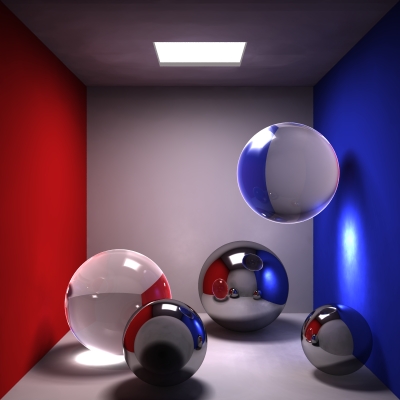
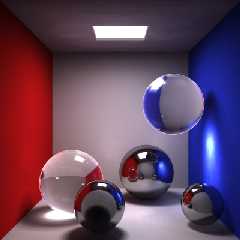
I had a try at rendering the image based on your source (with numerous
changes, including converting to the left handed sytem from moray's
right-handed one). For the lightsource I used an array of point lights
(12x12) rather than an area light, as I couldn't get smooth photons with an
area light.  I also changed the materials to use fresnel reflection.  One of
the most important changes here is the change in the colour definitions for
the walls.  As you can see, the caustics appear white now where they are
oversaturated.  As Nathan pointed out, you need to have non-zero components
(even if minimal) in all three colours:
Red = rgb <0.88039, 0.10196, 0.10980>
Blue = rgb <0.18039, 0.23922, 0.87843>

I found an article relating to light and colour a while ago that had stated
something to the fact that in real-life, pure R G or B colours don't exist,
they are only theoretical (or something like that, I don't have the link
anymore at present, but I'm sure it would be easy to find this information
somewhere again)

Render time 15h 43m 16s
Oddly enough, with the method I used the photons took virtually no time to
parse (<1s) yet they look very resonable.

-tgq
Post a reply to this message
Attachments:
Download 'test room.JPG' (72 KB)
Preview of image 'test room.JPG'
|
|
| |
| |
|
|
|
|
| |
| |
|
|
> I had a try at rendering the image based on your source (with numerous
> changes, including converting to the left handed sytem from moray's
> right-handed one). For the lightsource I used an array of point lights
> (12x12) rather than an area light, as I couldn't get smooth photons with
an
> area light.  I also changed the materials to use fresnel reflection.  One
of
> the most important changes here is the change in the colour definitions
for
> the walls.  As you can see, the caustics appear white now where they are
> oversaturated.  As Nathan pointed out, you need to have non-zero
components
> (even if minimal) in all three colours:
> Red = rgb <0.88039, 0.10196, 0.10980>
> Blue = rgb <0.18039, 0.23922, 0.87843>
>
> I found an article relating to light and colour a while ago that had
stated
> something to the fact that in real-life, pure R G or B colours don't
exist,
> they are only theoretical (or something like that, I don't have the link
> anymore at present, but I'm sure it would be easy to find this information
> somewhere again)
>
> Render time 15h 43m 16s
> Oddly enough, with the method I used the photons took virtually no time to
> parse (<1s) yet they look very resonable.
>
> -tgq

Wow, there's an improvement!  It looks very good, can you share your source?

-Paragon
Post a reply to this message
|
|
| |
| |
|
|
From: TinCanMan
Subject: Re: POV-Ray vs. Lightwave image (16k + 20k)
Date: 9 Jul 2002 15:02:48
Message: <3d2b3358@news.povray.org>
|
|
|
| |
| |
|
|
> Wow, there's an improvement!  It looks very good, can you share your
source?
>
> -Paragon

Certainly, I'll post the files in p.b.s-f.  My apologies to you, the scene
files look nothing like the originals anymore after I fixed them up to match
my style of coding (especially moray's hideous right-handed method).
I virtually re-positioned each ball by trial and error to try to match the
original.  Same with the camera parameters, the camera is now behind the
wall.  (Inside rather, I used the method suggested by Captain Tylor with a
transparent inside texture and regulat outside texture. I originally tried
using no_image, but radiosity didn't seem to be affected by that wall with
this method).

-tgq
Post a reply to this message
|
|
| |
| |
|
|
From: Erik Noble
Subject: Re: POV-Ray vs. Lightwave image (16k + 20k)
Date: 9 Jul 2002 15:20:25
Message: <3d2b3779@news.povray.org>
|
|
|
| |
| |
|
|
In article <3d2ae011@news.povray.org>, "TinCanMan" <Tin### [at] hotmailcom> wrote:
>I had a try at rendering the image based on your source (with numerous
>changes, including converting to the left handed sytem from moray's
>right-handed one). For the lightsource I used an array of point lights
>(12x12) rather than an area light, as I couldn't get smooth photons with an
>area light.  I also changed the materials to use fresnel reflection.  One of
>the most important changes here is the change in the colour definitions for
>the walls.  As you can see, the caustics appear white now where they are
>oversaturated.  As Nathan pointed out, you need to have non-zero components
>(even if minimal) in all three colours:
>Red = rgb <0.88039, 0.10196, 0.10980>
>Blue = rgb <0.18039, 0.23922, 0.87843>
>
>I found an article relating to light and colour a while ago that had stated
>something to the fact that in real-life, pure R G or B colours don't exist,
>they are only theoretical (or something like that, I don't have the link
>anymore at present, but I'm sure it would be easy to find this information
>somewhere again)
>
>Render time 15h 43m 16s
>Oddly enough, with the method I used the photons took virtually no time to
>parse (<1s) yet they look very resonable.
>
>-tgq
>

As somebody that uses both PovRay and Lightwave, I have to say something.
First of all, to both Paragon and TinCanMan, those are fantastic renders, and
very close to the original.  I've made attempts in the past to duplicat PovRay
images using Lightwave, with varying levels of success.  It's refreshing to
see the challenge in the other direction.

I actually prefer Paragon's original image overall, but the caustics are
closer to the LW version in TinCanMan's version.  The finish on the floating
glass sphere makes it look almost cartoony to me.

*Rarius-
 There's another comparison to keep in mind besides price, namely render time.
I rendered up a passable image in LW in about 10 minutes.  15 hours in
Lightwave is more like an animation instead of a single frame. ;-)
Post a reply to this message
|
|
| |
| |
|
|
|
|
| |
| |
|
|
> I actually prefer Paragon's original image overall, but the caustics are
> closer to the LW version in TinCanMan's version.  The finish on the
floating
> glass sphere makes it look almost cartoony to me.
Yes, there is a sort of 'halo' around the edge of the glass balls, this is a
result of the fresnel type variable reflection.  I don't know if this is
realistic or if it is a pitfall of using fresnel with transparent objects.
I'll have to find myself a glass ball to look at.

-tgq
Post a reply to this message
|
|
| |
| |
|
|
|
|
| |
| |
|
|
"TinCanMan" <Tin### [at] hotmailcom> wrote in message
news:3d2b4552$1@news.povray.org...
> > I actually prefer Paragon's original image overall, but the caustics are
> > closer to the LW version in TinCanMan's version.  The finish on the
> floating
> > glass sphere makes it look almost cartoony to me.
> Yes, there is a sort of 'halo' around the edge of the glass balls, this is
a
> result of the fresnel type variable reflection.  I don't know if this is
> realistic or if it is a pitfall of using fresnel with transparent objects.
> I'll have to find myself a glass ball to look at.

Did you try conserve_energy?
Post a reply to this message
|
|
| |
| |
|
|
|
|
| |
| |
|
|
> Did you try conserve_energy?

Yes

-tga
Post a reply to this message
|
|
| |
| |
|
|
|
|
| |
| |
|
|
"TinCanMan" <Tin### [at] hotmailcom> wrote...
> > Did you try conserve_energy?
>
> Yes

Make sure to use "photons{ collect off }" for glass and metal objects.

-Nathan
Post a reply to this message
|
|
| |
| |
|
|
From: TinCanMan
Subject: Re: POV-Ray vs. Lightwave image (16k + 20k)
Date: 10 Jul 2002 07:52:01
Message: <3d2c1fe1@news.povray.org>
|
|
|
| |
| |
|
|
> > Did you try conserve_energy?
>
> Yes
>
> -tga

Ooops! I must apologize, I didn't have it on. Usually I have it in there all
the time by default, but this time it must've slipped out and I didn't
notice.  The effect disappears now, perhaps I'll run the long render over
night again for tomorrow.

-tgq
Post a reply to this message
|
|
| |
| |
|
|
From: TinCanMan
Subject: Re: POV-Ray vs. Lightwave image (16k + 20k)
Date: 10 Jul 2002 13:13:30
Message: <3d2c6b3a@news.povray.org>
|
|
|
| |
| |
|
|
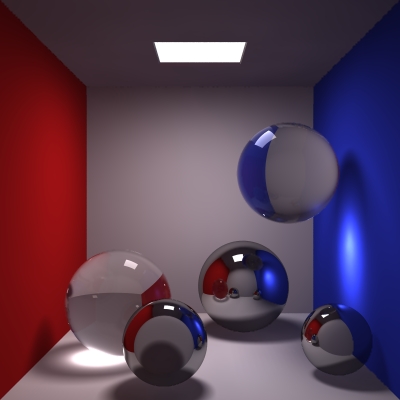
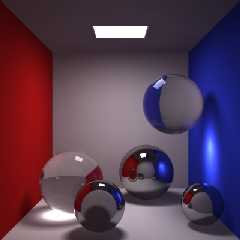
Here is a new render with the 'conserve_energy' put into the glass material,
much better (I hadn't noticed it missing earlier).  Some of the other
quality settings have been changed.

Render Time: 1h 35m 26s  (P4 1GHz 256RAM WIN2000)
Parse Time: 1s
# photons shot: 28400
# surface photons stored: 26816

global_settings {
  adc_bailout 0.00001
  ambient_light 1
  assumed_gamma 1.8
  max_trace_level 25
    radiosity{
      pretrace_start 0.08
      pretrace_end 0.04
      count 100
      recursion_limit 5
      nearest_count 10
      error_bound 1.8
      low_error_factor .5
      minimum_reuse 0.0001
      brightness 1
    }
    photons{
     spacing 0.0033
     radius 10
      autostop 0
      gather 200,1000
      max_trace_level 5
    }
}


20x20 array of spotlights used

glass and metal objects have a target value of  400 (20*20)

I am surprised to get such smooth photon results with such a large target
spacing factor and such a low parse time.  Any clue as to why this is so?

-tgq
Post a reply to this message
Attachments:
Download 'test room2.JPG' (59 KB)
Preview of image 'test room2.JPG'
|
|
| |
| |
|
|
|
|
| |