|
 |
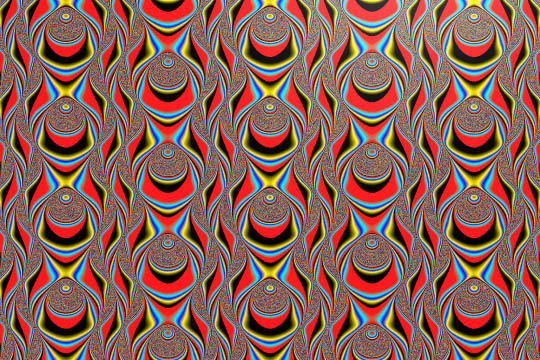
Here's a shot of the 2D function I have been discussing in povray.general. I
would like to find a way to have the image "extrude" out towards the viewer
on the -z axis, using the function as a sort of "3D contour.". Anyone have
any suggestions using the function below, an approximate of the actual?
Thanks very much,
Dennis.
#declare A =1;
#declare B =1;
#declare C =1;
#declare D =1;
#declare E =1; //1
#declare F =1;

#declare I =1;
#declare J =1;
#declare K =1;
#declare L =1;


function
    {E*sin(A*sin(I*x*.01) + B*cos(J*y))
              + F*cos(C*cos(K*x) + D*sin(L*y)) }
Post a reply to this message
Attachments:
Download '2dfunction.jpg' (180 KB)
Preview of image '2dfunction.jpg'
|
|
|
|
you might try this

camera {
 location <20, 16, 12>
 look_at <0, 0, 0>
}

light_source {
 <500, 1500, 750>
 rgb 1
}

#declare fn_llama = function (x,y,z,A,B,C,D,E,F,I,J,K,L) {
 E*sin(A*sin(I*x*.01) + B*cos(J*z)) + F*cos(C*cos(K*x) + D*sin(L*z)) - y
}

isosurface {
 function {
  -fn_llama(x,y,z,1,1,1,1,1,1,1,1,1,1)
 }
 contained_by {
  box {
   <-16, -2, -16>, <16, 2, 16>
  }
 }
 accuracy .001
 max_gradient 4
 pigment {
  rgb 1
 }
}


--
Kevin
http://www.geocities.com/qsquared_1999/
#macro _(r)#if(r<12)#local i=asc(substr("oqshilacefg",r,1))-97;
disc{<mod(i,7)-3,div(i,7)-1,6>,z,.4pigment{rgb 10}}_(r+1)
#end#end _(1)//KL
Post a reply to this message
|
|